
How to Collect CryptoPanic News and Review Community Votes
CryptoPanic combines headlines from different publishers with coin labels and community reactions. That makes it useful for deciding what to read, provided you keep the headline, source, and votes separate.
The CryptoPanic News Scraper runs on Apify and returns those fields for a chosen category and filter. I maintain the Actor. This guide builds a news-review sheet; it does not turn a handful of votes into a reliable trading signal.

Choose a feed that matches your question
If you want a general reading list, start with all-news and show-all. If you specifically want regulation coverage, choose the regulation category. Each run takes one category and one filter, so keep the selection with the resulting dataset.
Filters such as bullish, bearish, hot, and important change which stories enter the sample. A feed prefiltered to bullish stories cannot tell you the balance of bullish and bearish reactions across all news. Use the unfiltered selection when your task requires seeing different reaction types.
The current input has no coin selector, date range, or item-count limit. Filter returned coin mentions in your spreadsheet afterward. The category name all-news is a feed selection, not a guarantee of complete historical coverage.
Check the start charge before your first run
Pricing as of September 6, 2026: the configured result event costs $0.002, and the Actor-start event costs $0.50 per GB of allocated memory, with a minimum of one event.
For example, a run charged one start event and returning 50 results has $0.50 in start charges plus $0.10 in result charges. That is $0.60 for those events. Fifty results is an illustrative output count, not a quantity this input lets you request. Higher allocated memory can increase the start charge.
Review the current pricing, allocated memory, and run charge limit before starting. The start charge matters particularly for short or frequent runs, including ones that return few useful records.
Run one category and inspect the records
In the Actor's Input editor, choose JSON and paste:
{
  "category": "all-news",
  "filter": "show-all",
  "proxyConfiguration": {
    "useApifyProxy": true,
    "apifyProxyGroups": ["RESIDENTIAL"]
  }
}
The current schema recommends residential proxies to reduce 403 blocks and enables them by default. Keep that setting for the initial check. There is no maxItems field; adding an invented limit will not establish that the Actor respects it.
Click Start, then inspect the dataset and run log. Check that titles, sources, and coin arrays are present before building a recurring workflow around them.
This is one record from the historical sample used in the earlier guide:
{
  "title": "Bitcoin retreats below $100,000, causing $850 million in crypto liquidations over past day",
  "date": "4w",
  "coins": [
    "BTC"
  ],
  "votes": [
    "5 positive votes",
    "2 important votes",
    "1 comments votes",
    "2 like votes",
    "1 lol votes"
  ],
  "source": "theblock.co"
}
The headline is an old output example, not a current report about Bitcoin. The date value is the relative text 4w, not an exact publication timestamp. Likewise, source is a publisher domain, not an article URL.
The documented sample contains no article body or stable article ID. Do not design an importer around fields that have not been established in the output.
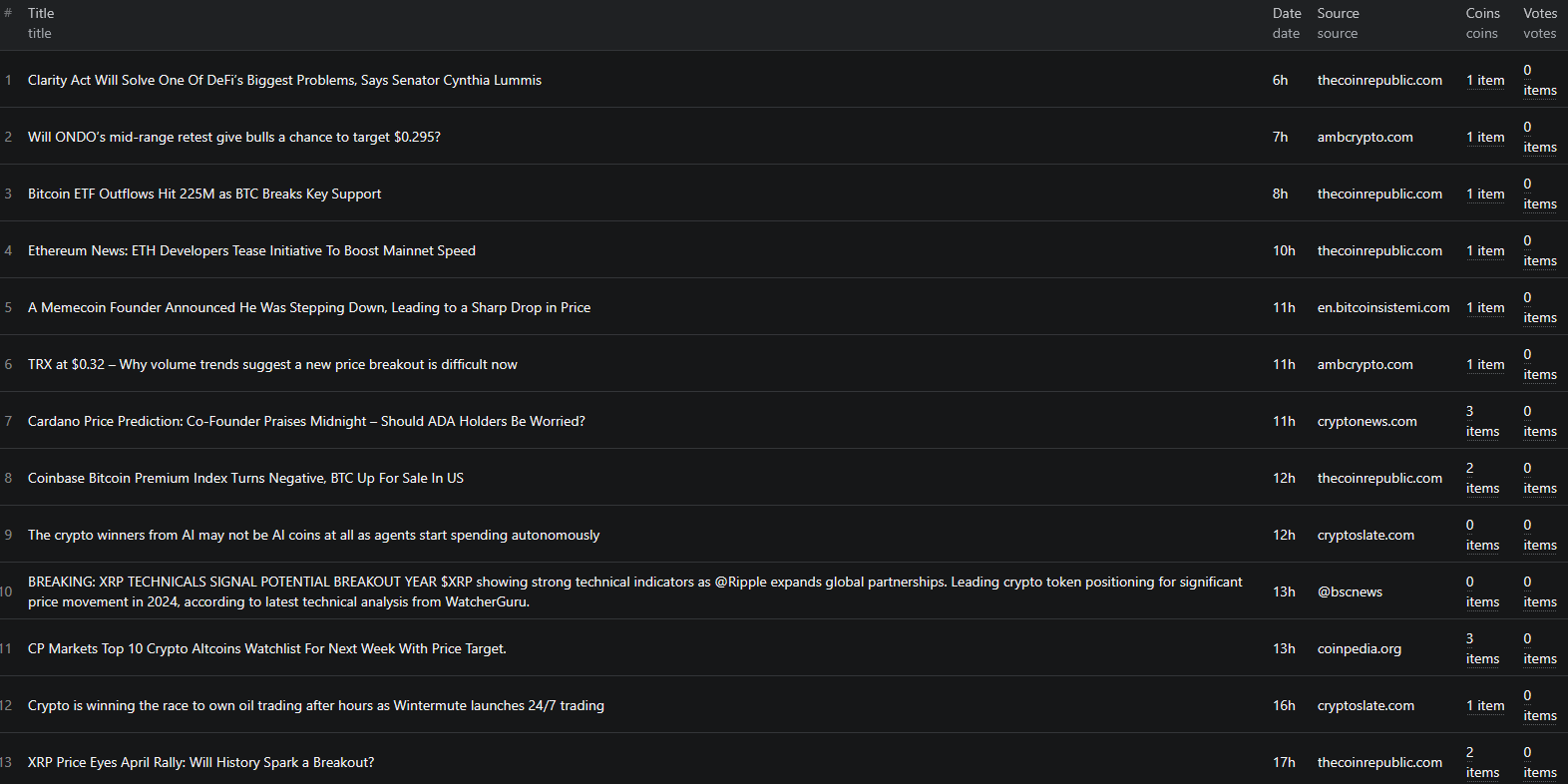
Build a review sheet that preserves the raw data
Export JSON to keep coins and votes as arrays, or use CSV for manual review. Start with columns for title, source, raw date, coins, and raw votes. Add your own collection time, category, and filter.
If your reading list is about BTC, select records whose coin array contains the exact BTC label. Keep untagged stories available for review because a missing coin label is not proof that a story is irrelevant.
Add a review-status column and a short note describing why each story matters to your task. Use the title and publisher to locate the original reporting before drawing conclusions from the headline. Since the documented output lacks an article link, that lookup is an extra step rather than an automatic link-out feature.
Retain the original language of each vote string. If you create numeric columns, parse each named category separately and keep the raw strings beside the parsed values. Do not combine “important,” “like,” “lol,” and “positive” into one score; those labels express different reactions.
What the votes can and cannot tell you
A count of positive votes describes reactions to a particular story in the collected sample. It does not measure all readers, all market participants, or the direction of an asset's price.
Even a descriptive ratio needs context. In an illustrative record with five positive and three negative votes, the positive share among those two vote types is 5 / (5 + 3), or 62.5%. Keep the denominator of eight beside that figure. It excludes other reaction categories and is not a probability of a price increase.
If a vote category is absent, preserve it as missing until you have verified whether absence means zero for the page format you are collecting. A parser should flag unfamiliar labels instead of silently assigning them to the closest category.
Deduplicate repeat runs cautiously
Save the input as an Apify task only after the first export is useful. Choose a schedule based on how often you will review the output, taking the per-run start charge into account.
Because the documented output has no stable article ID, you can use normalized title plus source as a candidate duplicate key. Keep the original title too. A headline edit can look like a new story, and two separate stories can share similar wording, so review uncertain matches.
For matched records, store vote snapshots with collection time. Do not sum the same cumulative votes across runs. That would count recurring observations as new reactions.
Keep the raw relative date instead of converting 4w into an exact timestamp. If you estimate a date range for internal review, mark it as approximate. The data shown here is not suitable for precise event timing without a separate verified publication timestamp.
If the run returns a 403 or empty dataset, check the proxy configuration and log before retrying. Repeated failed starts can still incur the start event. If the export contains older stories than expected, inspect the category and source feed rather than assuming every returned record is newly published.
For code integration, see the CryptoPanic Node.js example. Keep raw fields and collection metadata when moving the review sheet into a pipeline.
Frequently asked questions
Can I filter by a particular coin in the Actor input?
The current input exposes category, filter, and proxyConfiguration. Filter the returned coins array afterward for a coin-specific review sheet.
Does the date field contain an exact publication time?
The documented sample uses relative strings such as 4w and 3mon. Store collection time separately and do not treat those strings as exact publication timestamps.
Are community votes a market sentiment score?
No. They describe reactions to stories in the collected feed. Feed selection, small counts, missing labels, and repeated observations all affect their interpretation.
