How to Scrape Wildberries Product Listings (Step-by-Step Guide)

If you want to scrape Wildberries product listings — for price monitoring, market research, or competitor analysis across Russia and the CIS — this guide walks you through the entire process. You will learn what data you can extract from Wildberries category and search pages, how to automate the collection at scale, and how to turn raw listings into actionable e-commerce intelligence.
Why Scrape Wildberries Data?
Wildberries is the largest e-commerce marketplace in Russia and the CIS — the regional equivalent of Amazon. With hundreds of millions of products spanning fashion, electronics, home goods, beauty, groceries, and more, and a vast third-party seller platform layered on top, Wildberries effectively sets the reference price for consumer goods across the Russian-speaking market.
What makes Wildberries uniquely valuable as a data source is the depth of structured information behind every page. Listing cards carry prices, discounts, stock levels, ratings, review counts, brand, supplier, sizes, and colors. And because the scraper reads Wildberries' own public JSON catalog API directly — no headless browser required — extraction is fast and reliable, returning hundreds of products per request. For anyone tracking the Russian and CIS retail market — sellers, brands, market researchers, and price-comparison products — Wildberries is one of the highest-signal public datasets in the region.
Businesses and researchers scrape Wildberries data for a range of purposes:
- Price monitoring — track pricing and discount changes across a competitor's catalog or an entire category in RUB
- Stock & availability tracking — Wildberries exposes per-size stock and total quantity, so you can monitor when products go in and out of stock
- Supplier & seller analysis — Wildberries' marketplace means many suppliers compete on the same category; the
supplierandsupplierRatingfields let you track who's winning - Cross-marketplace comparison — pair Wildberries with other regional marketplaces to spot pricing gaps and arbitrage opportunities
- Catalog analysis — explore which brands, price points, and suppliers dominate a given category on Wildberries
- Demand & sentiment signals — use review counts, ratings, and customer review text to identify trending products and emerging brands
Manually copying product details from Wildberries is impractical. A single category or keyword search can return thousands of products across many pages, prices and stock change continuously, and the data lives behind paginated JSON endpoints. Automation is the only realistic approach.
What Data You Can Extract from Wildberries
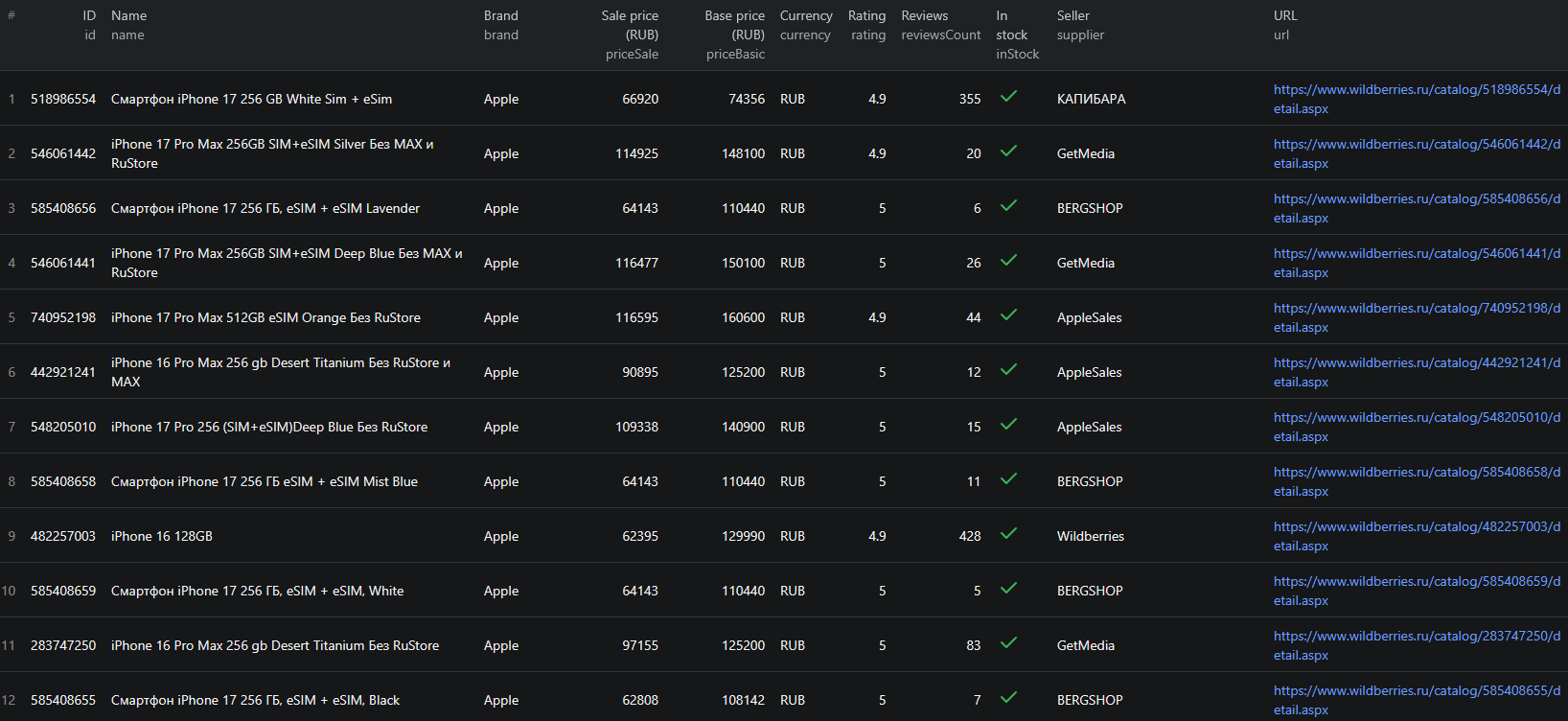
The Wildberries Listings Scraper has three depth levels. By default it returns one listing card per product straight from category and search pages. With enrichDetails=true, each product also gets its full product card — description, characteristics, and category taxonomy. With scrapeReviews=true, each product additionally gets a reviews array.
Listing card fields (default mode)
| Field | Description | Example |
|---|---|---|
| id | Wildberries' unique product identifier | 546061442 |
| url | Direct link to the product detail page | wildberries.ru/catalog/546061442/detail.aspx |
| name | Full product title | iPhone 17 Pro Max 256GB SIM+eSIM Silver |
| brand | Brand name | Apple |
| supplier | Marketplace seller / supplier name | ООО Технопарк |
| supplierRating | Average rating of the supplier | 4.8 |
| rating | Average product rating | 4.9 |
| reviewsCount | Total review count | 1588 |
| priceBasic | List price before discount | 148100 |
| priceSale | Current selling price after discount | 114925 |
| currency | ISO currency code | RUB |
| inStock | Whether the product is currently available | true |
| totalQuantity | Total units in stock across sizes | 54 |
| colors | Available colors | ["серебристый"] |
| sizes | Available sizes with per-size stock | |
| picsCount | Number of product images | 5 |
| source | The category or search query the card came from | search:iphone |
| scrapedAt | UTC timestamp of the extraction | 2026-06-03T12:00:00.000Z |
Enriched detail fields (enrichment mode)
When you enable enrichDetails, each record adds the full product card: description, a characteristics array of { name, value } spec pairs, category and categoryRoot taxonomy, vendorCode, and the full-resolution imageUrls.
This is exactly the kind of structured retail data category managers, pricing analysts, and brand teams need — full specs, the taxonomy path, and image URLs — all in a single export.
Reviews (reviews mode)
When you enable scrapeReviews, each product gets a reviews array, capped by maxReviewsPerProduct. Each review carries rating, text, author, and date. Reviews are only charged when a product actually has them.
Common Use Cases for Wildberries Data
Price & Discount Monitoring
Wildberries is discount-driven — the gap between priceBasic and priceSale is a core signal. Scraping listing cards on a schedule lets you build a real-time view of how prices and discounts move across a category, and spot when a competitor launches a promotion.
Stock & Availability Tracking
Wildberries exposes per-size stock under sizes and aggregate totalQuantity. Tracking these over time tells you when popular products sell out, how fast inventory turns, and which suppliers consistently keep stock — all early indicators of demand.
Supplier & Brand Analysis
Group listing cards by supplier or brand to see which sellers and brands dominate a category, and at what price and rating. The supplierRating field adds a quality dimension that's useful for distribution and sourcing decisions.
Catalog & Assortment Research
Scrape every result for a category or keyword and analyze the distribution of brands, price points, suppliers, and ratings. The category and categoryRoot fields (with enrichment on) make it easy to slice the data along the dimensions a category manager actually cares about.
Review & Sentiment Mining
With scrapeReviews on, you get structured customer reviews — rating, text, author, and date. Mining this text surfaces recurring complaints, feature requests, and the language real buyers use, which is gold for product and marketing teams.
Region-Specific Price Comparison
Run the same category with different dest regions to compare pricing and availability across the country. Cross-region price and stock gaps are a recurring source of arbitrage and merchandising insight on Wildberries.
Challenges of Scraping Wildberries Manually
Before jumping into the tutorial, it is worth understanding why building your own Wildberries scraper is harder than it looks:
- Region-dependent data — prices, discounts, and stock vary by delivery region (
dest). Scraping without pinning a region gives you inconsistent, misleading numbers - Multiple JSON endpoints — listings, product cards, characteristics, and reviews each live behind different internal API endpoints that have to be stitched together per product
- Pagination — category and search results paginate, and a robust walker has to stop cleanly at the end of results (Wildberries serves roughly 100 pages / ~10,000 items per list)
- Image URL construction — Wildberries image URLs are sharded across
basket-*hosts computed from the product ID, so building correct image links is non-trivial - Proxy requirements — reliable access from outside the region benefits from residential proxies in country RU to match real shopper traffic
- Frontend & API churn — Wildberries updates its internal endpoints periodically, breaking custom scrapers that are not actively maintained
For most use cases, a pre-built and maintained scraper that already handles region targeting, all the JSON endpoints, pagination, and image URL construction is dramatically more practical than building one in-house.
Step-by-Step: How to Scrape Wildberries Product Listings
Here is how to scrape Wildberries product data using the Wildberries Listings Scraper on Apify.
Step 1 — Choose Your Input Mode
The scraper figures out what to do from what you give it:
- Category — paste Wildberries category page URLs into
categoryUrls(e.g.https://www.wildberries.ru/catalog/obuv/muzhskaya/kedy-i-krossovki) - Search — add free-text keywords like
iphoneundersearchQueries
You can mix and match both in a single run. At least one of categoryUrls or searchQueries must be provided.
Step 2 — Choose Your Depth
Decide how rich you need the data:
- Leave both toggles off for fast, cheap listing cards — price, discount, stock, rating, supplier, sizes, colors
- Turn on
enrichDetailsfor descriptions, characteristics, taxonomy, and image URLs - Turn on
scrapeReviews(and setmaxReviewsPerProduct) to collect customer reviews
Step 3 — Set Your Region
Set dest to the delivery region you care about — prices and stock vary by region. By default the scraper targets the Moscow region. Pinning the region ensures your data matches what a real local shopper sees.
Step 4 — Configure the Scraper Input
Head to the Wildberries Listings Scraper on Apify and configure your run:
- Add
categoryUrls,searchQueries, or both - Set
maxItemsto cap the run (default50,0= unlimited up to the ~10,000-per-list cap) - Optionally enable
enrichDetailsand/orscrapeReviews - Choose a
sortorder —popularity,rating,price,newest, orbest deal - Set the
destregion and configureproxyConfiguration— Apify RESIDENTIAL proxies in countryRUare recommended
Example input:
{
"categoryUrls": [
"https://www.wildberries.ru/catalog/obuv/muzhskaya/kedy-i-krossovki"
],
"searchQueries": ["iphone"],
"maxItems": 500,
"enrichDetails": true,
"scrapeReviews": false,
"maxReviewsPerProduct": 20,
"sort": "popularity",
"dest": "-1257786",
"proxyConfiguration": {
"useApifyProxy": true,
"apifyProxyGroups": ["RESIDENTIAL"],
"apifyProxyCountry": "RU"
}
}
Step 5 — Run the Scraper
Once started, the scraper will:
- Convert each
searchQueryinto a search request and resolve eachcategoryUrlto its catalog endpoint - Walk each listing source through pagination until
maxItemsor the ~10,000-per-list cap is reached - Read Wildberries' public JSON catalog API directly — hundreds of products per request, no headless browser
- In enrichment mode, fetch each product card for description, characteristics, taxonomy, and images
- In reviews mode, fetch reviews per product up to
maxReviewsPerProduct - Construct correct sharded image URLs from each product ID
- Stream every item into a typed dataset
Step 6 — Export Your Results
When the scraper finishes, export your data in the format you need:
- JSON — ideal for developers building integrations or price-monitoring pipelines
- CSV / Excel — perfect for spreadsheet analysis or importing into BI tools
- HTML — useful for quick reporting and sharing
- API — access results programmatically via the Apify API for automated runs
Ready to try it? Run the Wildberries Listings Scraper on Apify and get your first dataset in minutes.
Example Output (Real Data Preview)

Here is what the actual output looks like. With enrichment and reviews enabled, each product is returned as a structured record:
{
"id": 546061442,
"url": "https://www.wildberries.ru/catalog/546061442/detail.aspx",
"name": "iPhone 17 Pro Max 256GB SIM+eSIM Silver",
"brand": "Apple",
"supplier": "ООО Технопарк",
"supplierRating": 4.8,
"rating": 4.9,
"reviewsCount": 1588,
"priceBasic": 148100,
"priceSale": 114925,
"currency": "RUB",
"inStock": true,
"totalQuantity": 54,
"colors": ["серебристый"],
"sizes": [{ "name": "256 ГБ", "inStock": true }],
"picsCount": 5,
"category": "Смартфоны",
"categoryRoot": "Смартфоны и гаджеты",
"vendorCode": "iPhone 17 Pro Max 256GB Silver",
"description": "...",
"characteristics": [{ "name": "Объём встроенной памяти", "value": "256 ГБ" }],
"imageUrls": ["https://basket-28.wbbasket.ru/vol5460/part546061/546061442/images/big/1.webp"],
"reviews": [{ "rating": 5, "text": "Оригинал", "author": "Евгений", "date": "2026-05-31T18:25:56Z" }],
"source": "search:iphone",
"scrapedAt": "2026-06-03T12:00:00.000Z"
}
Key things to notice:
- List vs sale price —
priceBasicandpriceSaleexpose the full discount, the single most important signal on a discount-driven marketplace - Per-size stock — every entry in
sizescarries its owninStockflag, andtotalQuantityaggregates availability for fast in/out-of-stock tracking - Supplier signal —
supplierandsupplierRatinglet you analyze the marketplace by seller, not just by brand - Full specs and taxonomy —
characteristics,category, andcategoryRootgive you machine-readable specs and the breadcrumb path without re-scraping - Ready-to-use image URLs —
imageUrlsare correctly constructed sharded links you can fetch directly - Provenance fields —
id,source, andscrapedAtmake it easy to deduplicate, audit, and join records over time
Try the Wildberries Listings Scraper now — no coding required.
Automating Wildberries Data Collection
For ongoing price intelligence, you do not want to run the scraper manually every time. The Apify platform supports full automation:
Scheduled Runs
Set up recurring scrapes on any schedule — hourly, daily, or weekly. Hourly runs work well during peak retail events like big seasonal sales; daily runs are sufficient for general catalog tracking; weekly runs make sense for slower-moving categories.
API Integration
Use the Apify API to trigger scraper runs programmatically and retrieve results. This lets you integrate Wildberries data into your existing systems:
- Feed listings into your price-monitoring dashboard
- Trigger alerts when a tracked product drops below a target price or goes out of stock
- Sync Wildberries catalog data into your BI warehouse, partitioned by category
- Connect to tools like Zapier, Make, or custom data pipelines
Node.js Example
For a complete working example showing how to call this scraper from Node.js, see the GitHub repository.
Webhooks
Configure webhooks to get notified when a scraper run completes. This is useful for event-driven workflows where you want to process new product data as soon as it lands — for example, recomputing discount depth by supplier right after a fresh sweep finishes.
Using Wildberries Data for Business Intelligence
The structured data from Wildberries unlocks a range of analytical use cases specific to the Russian and CIS markets.
Discount Depth by Supplier
Group records by supplier and compare the spread between priceBasic and priceSale. This reveals which sellers compete hardest on price and how aggressive promotions are across a category.
Brand Share by Category
Scrape every result in a category and group by brand or the categoryRoot taxonomy. The result is a clean map of which brands dominate which categories on Wildberries — useful for distribution decisions and identifying entry opportunities.
Stock-Out & Replenishment Patterns
Track inStock and totalQuantity over time on the same products to spot which items sell out fastest and how quickly suppliers replenish. Stock velocity is one of the strongest demand signals a marketplace exposes.
Review-Velocity Trend Spotting
Track rating and reviewsCount over time on the same products to spot which items are gaining momentum. Review velocity on Wildberries is an early indicator for what will trend across the broader market.
Does Wildberries Provide an API?
Wildberries does not offer a general-purpose public catalog API:
What's Available
- The Wildberries seller APIs let approved sellers manage their own products, orders, stock, and prices — scoped to your account, not the broader catalog
- The on-site catalog, search, and review endpoints are private internal APIs that are not documented or supported for third-party use
What an Official API Would Miss
Even where seller APIs exist, they only show your data. The most useful fields for retail intelligence — competitors' live prices and discounts, supplier ratings, stock levels, ratings and review counts across the catalog, and customer review text — are visible to every shopper on the public site but are not exposed through any official API. A scraper that reads the public catalog endpoints is the only practical way to capture them at scale.
The Wildberries Listings Scraper gives you a practical alternative — structured catalog data from any category or search, without seller approval or rate-limit gating.
Why Use a Wildberries Scraper Instead of Building One
Building a custom Wildberries scraper sounds straightforward until you actually start:
- Region-dependent data — you have to pin
destto a region, or your prices and stock are inconsistent and wrong - Multiple JSON endpoints — listings, product cards, characteristics, and reviews each live behind different internal APIs that must be stitched together per product
- Pagination to the ~10,000-item cap — a robust walker has to stop cleanly at the end of results
- Image URL construction — image links are sharded across
basket-*hosts computed from the product ID, which is easy to get subtly wrong - Proxy management — reliable access benefits from residential proxies in country RU, plus session handling
- API churn — Wildberries updates its internal endpoints periodically, breaking unmaintained scrapers
- Opportunity cost — every hour spent fixing your scraper is an hour not spent on the analysis the scraper exists to support
Unless you have very specific requirements that no existing tool can meet, a maintained scraper that already handles region targeting, every endpoint, pagination, and image construction lets you focus on insights instead of plumbing.
Pricing — Pay Only for Results
The Wildberries Listings Scraper uses Apify's Pay-Per-Event pricing model, so you only pay for the depth of data you actually collect — there is no per-run start fee.
| Event | When it's charged | Price per event |
|---|---|---|
product-listing | Once per product found in a category/search listing | $0.001 |
item-detail | Once per product when enrichDetails is on | $0.004 |
product-reviews | Once per product when scrapeReviews is on and reviews exist | $0.003 |
Example run costs (50 products):
- Default — prices only (
enrichDetails: false) → $0.05 - Prices + specs + images (
enrichDetails: true) → $0.25 - Full — including reviews → $0.40
A base run only charges the cheap product-listing event, keeping large-scale price monitoring inexpensive. Enrichment and reviews are billed strictly for the work performed — reviews aren't charged when a product has none. Set maxItems to put a hard cap on the run and your bill before kicking off a large sweep.
Try the Wildberries Listings Scraper
The Wildberries Listings Scraper extracts structured data from Wildberries across category and search pages — product IDs, titles, brands, suppliers, supplier ratings, prices, discounts, stock and total quantity, ratings, review counts, sizes, colors, images, and — with enrichment enabled — full descriptions, characteristics, and taxonomy, plus optional customer reviews.
What you get:
- Wildberries category page URLs or free-text search queries — mix and match in a single run
- Three depth levels: fast listing cards, rich product detail, and customer reviews
- Region-aware pricing and stock via the
destparameter - Pure JSON API access — hundreds of products per request, no headless browser
- Correctly constructed sharded image URLs ready to fetch
- Structured JSON, CSV, Excel, or HTML output ready for any downstream tool
- Pay-Per-Event pricing —
$0.001per listing card,$0.004per detail record,$0.003per reviews record — compute and residential proxy bandwidth included - Scheduled runs and API access for ongoing price intelligence
- No coding, no proxy management, no scraper maintenance
Start scraping Wildberries now — your first run takes less than 5 minutes to set up.
Legal and Ethical Considerations
Web scraping occupies a well-established legal space, but responsible practice matters:
- Public data only — the Wildberries scraper extracts publicly visible product information that anyone can see by visiting Wildberries. No login or authentication is required
- Respect rate limits — the scraper makes requests at a reasonable pace to avoid overloading Wildberries' infrastructure
- No misuse — use collected data for legitimate business purposes like price monitoring, catalog research, and competitive analysis. Do not use the data to create counterfeit listings or mislead buyers
- Compliance — ensure your data handling complies with applicable privacy regulations. This primarily applies to how you store and process the data, not the collection of public product listings
Wildberries product listings are public marketplace data — they are designed to be found by buyers. Scraping this data for catalog research and price intelligence is aligned with the platform's intended purpose.
Frequently Asked Questions
Is scraping Wildberries legal?
Scraping publicly available data from Wildberries is generally legal. Product listings, prices, stock, ratings, sellers, characteristics, and reviews are visible to anyone who visits the site without logging in. You should always use the data responsibly, comply with applicable privacy regulations, and avoid overloading Wildberries' servers with excessive requests.
Does Wildberries provide a public API?
Wildberries offers seller-facing APIs scoped to your own account — your own products, orders, and stock — not the broader public catalog. There is no general-purpose public API for browsing prices, ratings, and competitor listings across the marketplace. The Wildberries Listings Scraper reads the site's own public JSON catalog endpoints directly, which is the practical alternative for price monitoring and competitor research.
What data can be extracted from Wildberries?
From listing pages you can extract product IDs, titles, brands, suppliers, supplier ratings, prices, discounts, stock and total quantity, ratings, review counts, sizes, colors, and image counts. With detail enrichment enabled you also get full descriptions, characteristics (specs), and category taxonomy. With reviews enabled you get customer reviews including rating, text, author, and date.
How do I use the Wildberries Listings Scraper?
Provide Wildberries category page URLs under categoryUrls, free-text keywords under searchQueries, or both. Optionally turn on enrichDetails for descriptions, characteristics, and images, and scrapeReviews for customer reviews. Set a delivery region with dest, choose a sort order, set maxItems to cap your spend, and run. The scraper reads Wildberries' public JSON API directly and assembles a typed dataset. Results export as JSON, CSV, Excel, or HTML.
Why does region matter when scraping Wildberries?
Wildberries prices, discounts, and stock availability vary by delivery region. The scraper exposes a dest parameter so you can target a specific region — by default it targets the Moscow region. Pinning the region ensures the prices and availability you collect match what a real shopper in that location actually sees.
How much does the Wildberries Listings Scraper cost?
The actor uses Apify's Pay-Per-Event pricing. Each listing card costs $0.001, each enriched product detail record costs $0.004 when enrichDetails is on, and each reviews record costs $0.003 when scrapeReviews is on and the product has reviews. A base run only charges the cheap listing event, keeping large-scale price monitoring inexpensive. Set maxItems to put a hard cap on the run and your bill.
About the Author
This guide was written by Piotr, a software engineer with hands-on experience building and maintaining web scrapers at scale. He develops and maintains a suite of data extraction tools on the Apify platform, helping businesses automate their data collection workflows.
Need help with your scraping project?
Book a free discovery call and let's scope your project together.
Book a Call