How to Find Local Business Leads on Google Maps (Step-by-Step Guide)

If you sell to small and medium-sized businesses — local SEO services, web design, reputation management, ad agencies, B2B SaaS for SMBs — Google Maps is the largest, most up-to-date directory of your prospects on the planet. Every dentist, plumber, roofer, restaurant, gym, and law firm with a Google Business Profile is sitting there, waiting to be turned into a structured outreach list.
This guide walks you through how to extract outreach-ready local business leads from Google Maps — names, phones, emails, websites, social links, and even AI-generated pitch angles — without writing a single line of code.
Why Scrape Google Maps for Leads?
Cold outbound starts with a list. The quality of that list determines how many meetings you book.
Most B2B data providers fall short for local outreach. They focus on enterprise companies with rich firmographic data, but they barely cover the corner pizzeria, the local roofer, or the family dental clinic. And the data they do have is often stale — addresses outdated, phone numbers disconnected, websites long since taken down.
Google Maps does not have this problem. It is constantly updated by:
- Business owners who claim their Google Business Profile and keep it accurate to attract customers
- Customers who leave reviews, photos, and corrections in real time
- Google itself through automated checks against websites, phone numbers, and street imagery
The result is the cleanest, freshest, most complete database of local businesses in the world. The challenge is getting it out of Google Maps and into your CRM in a structured, deduplicated, outreach-ready format.
That is exactly what the Local Google Maps Lead Miner does:
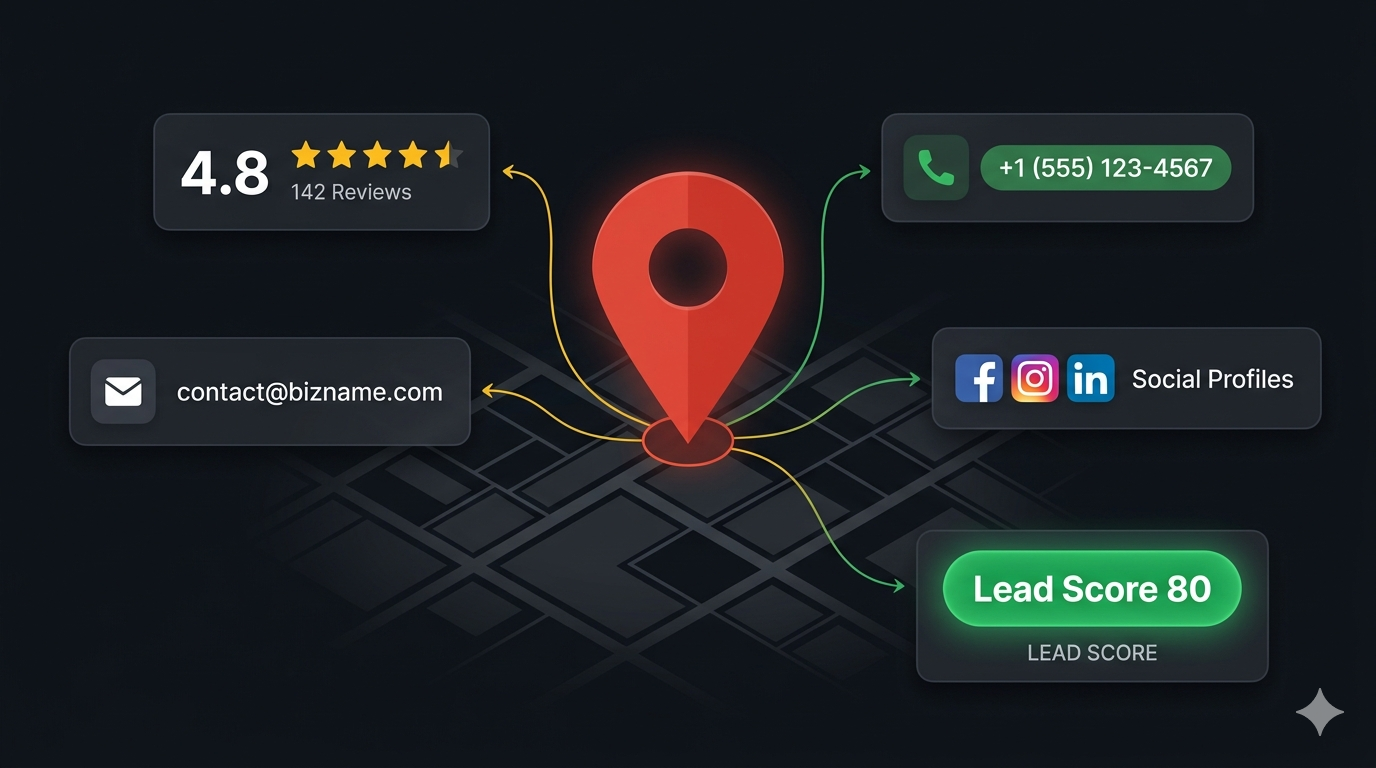
- Extracts every business matching your search query — name, category, rating, reviews, address, phone, website, GPS, place ID
- Enriches each lead by visiting the business website to pull emails, social links, contact pages, and the tech stack the site is built on
- Optionally calls AI to generate a business summary, ICP fit assessment, pitch angle, pain points, and a recommended offer for every prospect
- Scores and filters leads so you only pay for prospects that match your criteria
In short — it turns a Google Maps search into a CRM-ready list with personalized angles for outreach.
What Data You Can Extract from Google Maps
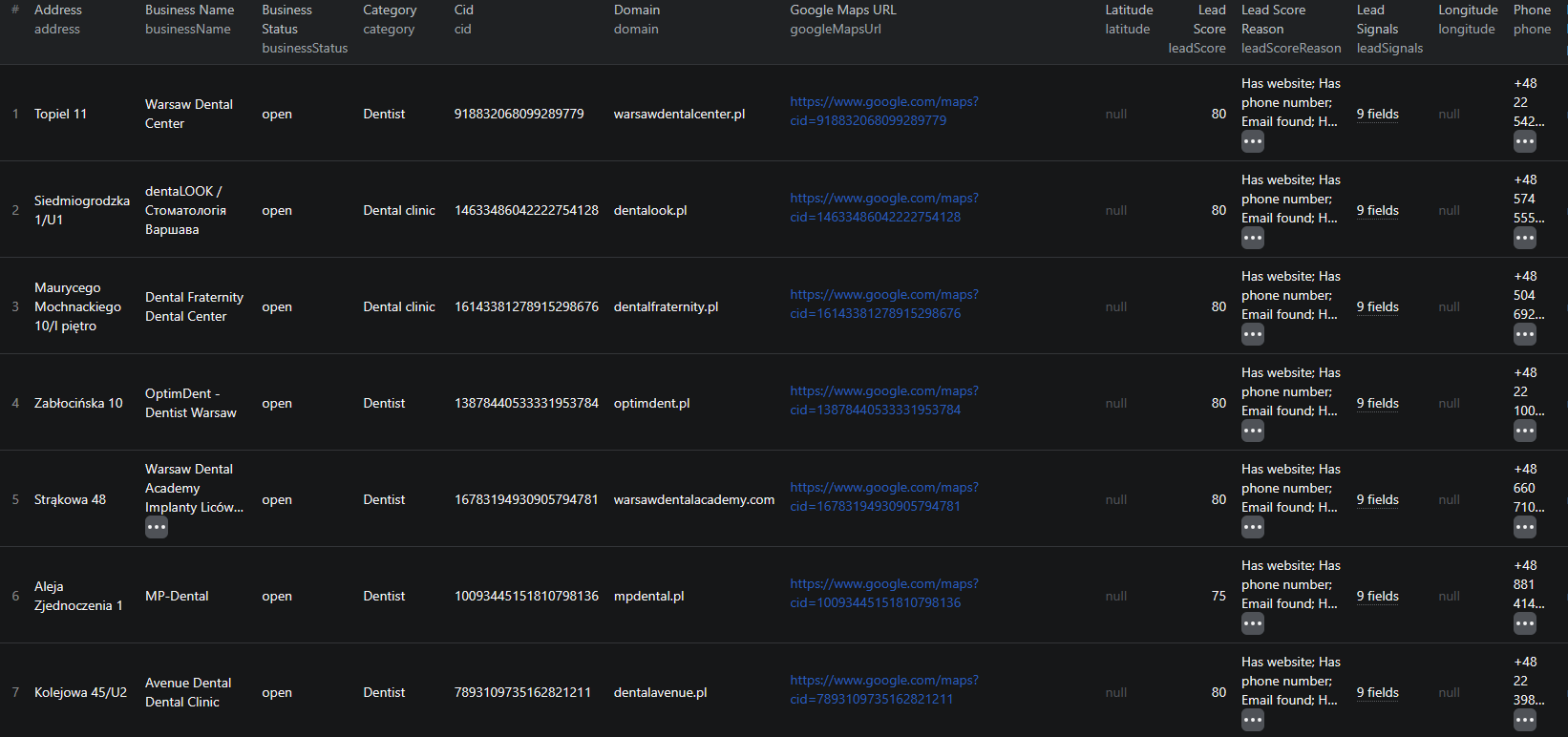
The Local Google Maps Lead Miner returns a deeply structured object for every lead. Here are the key fields:
| Field | Description | Example |
|---|---|---|
| businessName | Business name as listed on Google Maps | Warsaw Dental Center |
| category | Primary business category | Dental clinic |
| rating | Average Google rating | 4.8 |
| reviewCount | Total number of reviews | 541 |
| address | Street address of the business | Aleje Jerozolimskie, Warsaw, Poland |
| phone | Public phone number | +48 22 542 18 04 |
| website | Business website URL | https://warsawdentalcenter.pl/ |
| domain | Bare website domain | warsawdentalcenter.pl |
| googleMapsUrl | Direct Google Maps place URL | google.com/maps/place/... |
| placeId / cid | Google's unique identifiers for the place | ChIJ… / 1234567890 |
| latitude / longitude | Precise GPS coordinates | 52.2387485, 21.0246285 |
| businessStatus | Open, temporarily closed, or permanently closed | open |
| websiteEnrichment.emails | Emails extracted from the business website | info@warsawdentalcenter.pl |
| websiteEnrichment.socialLinks | Facebook, Instagram, X, LinkedIn, YouTube, TikTok | facebook.com/warsawdentalcenter |
| websiteEnrichment.hasContactForm | Whether the website has a contact form | true |
| websiteEnrichment.detectedTechnologies | Technology stack detected on the site | wordpress, google-tag-manager |
| leadScore | 0–100 score combining all available signals | 80 |
| leadScoreReason | Human-readable explanation of the score | Has website; Has phone; Email found; ... |
| ai.businessSummary | AI-generated short summary of the business | Highly-rated dental clinic in central Warsaw |
| ai.idealCustomerFit | ICP fit grade (low / medium / high) | medium |
| ai.pitchAngle | Personalized angle for cold outreach | Boost your already excellent reputation with stronger local SEO. |
| ai.painPoints | Likely problems the business is facing | No contact form on homepage; Limited social engagement |
| ai.recommendedOffer | Most relevant offer for this prospect | Google Business Profile optimization |
This is enough data to write a personalized cold email or LinkedIn message for every lead — without ever opening Google Maps yourself.
Common Use Cases
Local SEO Agencies
If you sell local SEO, your ideal prospects are SMBs that already rank in Google Maps but have visible weaknesses — low review counts, missing or outdated websites, no social presence, or a half-finished Google Business Profile. Pull every chiropractor, plumber, or law firm in your target city, filter for businesses with a website but few reviews, and you have a hyper-qualified outreach list in minutes.
Web Design and Development Studios
Filter leads by their detected technology stack to find businesses on outdated platforms or with no proper website at all. A business with a 4.8-star rating, hundreds of reviews, and a barely functional WordPress site from 2014 is a perfect prospect for a redesign pitch.
Reputation Management Services
The combination of rating and reviewCount is a goldmine for reputation management providers. Find businesses with rating ≤ 3.8 (problem to fix) or rating ≥ 4.5 with low review counts (room to grow). Either segment is a clear fit for review acquisition, response management, and reputation monitoring services.
Ad Agencies and PPC Specialists
Use the AI enrichment to grade each business by ICP fit and pitch angle. A roofer with no contact form, no Instagram, and a 4.6-star rating across 80 reviews is a prime candidate for a Google Local Services Ads or Meta Ads campaign — and the AI will tell you exactly why and how to pitch it.
B2B SaaS for SMBs
If you sell scheduling software for salons, POS systems for restaurants, or job-tracking software for tradespeople, Google Maps is the most accurate source of your TAM. Pull the entire universe of relevant businesses in a city, filter by review volume to focus on active operators, and feed the list straight into your outbound sequencer.
Local Market Research and Site Selection
Each lead includes precise GPS coordinates, business category, rating, and review count. This is enough to map service density, identify underserved neighborhoods, and benchmark business quality across an entire city — useful for franchisors, commercial real estate, and competitive intelligence.
Why Manual Lead Mining Doesn't Scale
Anyone who has tried to build a local lead list by hand knows the pain:
- Volume — a single search like "dentists in London" can return hundreds of businesses across multiple result pages
- Pagination — Google Maps uses scroll-based loading that requires careful automation to avoid missing results
- Website enrichment — each business website has its own structure. Pulling emails, socials, and contact forms consistently across thousands of sites by hand is impossible
- Deduplication — chains, multiple branches, and slightly different name variants cause duplicate leads that pollute outreach lists and damage sender reputation
- Filtering — qualifying leads by rating, review count, and "must have a website" requires reading every listing manually
- Personalization — writing a tailored opener for every prospect is the most valuable outbound activity, and the most expensive in human time
The Local Google Maps Lead Miner handles every step automatically — extraction, enrichment, dedupe, scoring, and AI personalization — so you spend your time on conversations, not data entry.
Step-by-Step: How to Mine Local Leads from Google Maps
Here is how to use the Local Google Maps Lead Miner on Apify.
Step 1 — Define Your Target Searches
Start with a clear definition of who you want to reach. The actor accepts either:
- Search queries like
dentists in Warsaw,roofers in Chicago, orlaw firms in London - Pre-built Google Maps search URLs if you have already filtered or geo-positioned the search yourself
Tip: be specific. coffee shops in Brooklyn will give you more focused, relevant leads than coffee shops in New York. You can pass multiple queries in a single run to cover several niches or cities at once.
Step 2 — Configure Filters
Tighten the result set with filters before you spend a cent on AI enrichment:
minRating— drop businesses below a quality threshold (e.g., 4.0)minReviews— focus on actively operating businesses (e.g., reviewCount ≥ 10)onlyWithWebsite— keep only leads that have a website (essential for web design or SEO outreach)onlyWithPhone— keep only leads with a phone number (essential for cold call campaigns)includeClosedBusinesses— exclude permanently closed listings to keep your list cleanlanguageandcountry— set the locale to match your target market
These filters apply before the lead is pushed to the dataset, so you never pay for prospects that do not match your criteria.
Step 3 — Choose Your Enrichment Tier
The actor has three usage modes you can mix and match:
- Phones-only outreach —
enrichWebsite=false,aiEnrichment=false. Fastest and cheapest; useful for cold-calling campaigns where the phone number is all you need. - Standard (emails + socials) —
enrichWebsite=true,aiEnrichment=false. The actor visits each business website and pulls emails, social links, contact forms, and detected tech. This is the default for most cold email and LinkedIn campaigns. - Sales-ready with AI pitch —
enrichWebsite=true,aiEnrichment=true. Adds AI-generated business summaries, ICP fit grades, pitch angles, pain points, and recommended offers to every lead. Use it for high-stakes outreach where personalization is critical.
Step 4 — Run the Actor
Click Start. The scraper will:
- Run each Google Maps search and scroll through the results
- Open every place page and extract structured business data
- Visit each business website (if enrichment is enabled) and parse emails, socials, and tech
- Optionally call OpenAI to generate the AI fields for every qualifying lead
- Deduplicate against placeId, cid, normalized URL, phone+domain, and name+address
- Apply filters and push the final, scored leads to the dataset
Default settings — residential proxy, low concurrency, cookie-consent handling — keep the scrape stable and respectful of Google Maps and the websites it visits.
Step 5 — Export Your Leads
When the run finishes, export the dataset in your preferred format:
- CSV — drag-and-drop into Instantly, Smartlead, Lemlist, Apollo, HubSpot, or any modern outreach tool
- JSON — for developers building custom enrichment pipelines or CRM integrations
- Excel — for sales teams that prefer to qualify leads in a spreadsheet
- HTML — for quick visual review
Ready to try it? Run the Local Google Maps Lead Miner on Apify and get your first lead list in minutes.
Example Output (Real Lead Preview)

Here is what a single lead looks like in the actor's output:
{
"searchQuery": "dentists in Warsaw",
"businessName": "Warsaw Dental Center",
"category": "Dental clinic",
"rating": 4.8,
"reviewCount": 541,
"address": "Aleje Jerozolimskie, Warsaw, Poland",
"phone": "+48 22 542 18 04",
"website": "https://warsawdentalcenter.pl/",
"domain": "warsawdentalcenter.pl",
"googleMapsUrl": "https://www.google.com/maps/place/Warsaw+Dental+Center/...",
"placeId": "ChIJ…",
"cid": "1234567890",
"latitude": 52.2387485,
"longitude": 21.0246285,
"businessStatus": "open",
"websiteEnrichment": {
"title": "Warsaw Dental Center — Premium Dental Clinic",
"metaDescription": "Comprehensive dental services in central Warsaw…",
"emails": ["info@warsawdentalcenter.pl"],
"phones": ["+48 22 542 18 04"],
"socialLinks": {
"facebook": ["https://facebook.com/warsawdentalcenter"],
"instagram": ["https://instagram.com/warsawdentalcenter"],
"twitter": [],
"linkedin": [],
"youtube": [],
"tiktok": [],
"other": []
},
"contactPageUrl": "https://warsawdentalcenter.pl/contact",
"aboutPageUrl": "https://warsawdentalcenter.pl/about",
"hasContactForm": true,
"detectedTechnologies": ["wordpress", "google-tag-manager"]
},
"leadSignals": {
"hasWebsite": true,
"hasPhone": true,
"hasEmail": true,
"hasSocialLinks": true,
"hasManyReviews": true
},
"leadScore": 80,
"leadScoreReason": "Has website; Has phone number; Email found; Has social links; Has meaningful review volume",
"ai": {
"businessSummary": "Highly-rated dental clinic in central Warsaw with strong online reputation.",
"idealCustomerFit": "medium",
"pitchAngle": "Boost your already excellent reputation with stronger local SEO.",
"painPoints": ["No contact form on homepage", "Limited social engagement"],
"recommendedOffer": "Google Business Profile optimization"
}
}
Things to notice:
- Outreach-ready by default — you have business name, phone, address, website, email, social links, and a personalized pitch angle in a single object
- Lead score with reasoning — the
leadScoreandleadScoreReasonmake it trivial to sort, prioritize, and split your list into A/B/C tiers - AI grounded in evidence — the
ai.pitchAngleandai.painPointsreference real, scraped signals about the business, not generic flattery - Tech stack detection — knowing the business is on WordPress with Google Tag Manager is gold for web design and PPC pitches
- Multi-channel ready — phone for cold calls, email for cold email, socials for LinkedIn / Instagram outreach, and a contact form fallback if all else fails
This format drops directly into any modern sales stack with no transformation required.
Try the Local Google Maps Lead Miner now — no coding required.
Pricing — Pay Only for Real Leads
The actor uses pay-per-event pricing. You only pay for what you actually receive. Failed page loads, dropped leads (filters/dedupe), failed website fetches, and failed AI calls are never charged.
| Event | When it fires | Price |
|---|---|---|
| lead-extracted | Every unique business pushed to the dataset (after filtering and dedupe) | $0.008 |
| website-enriched | When the website fetch yields useful data — emails, socials, contact pages, tech stack, or page title | $0.004 |
| ai-enrichment | When the AI fields are successfully populated | $0.012 |
Effective costs by tier:
- Phones-only outreach — ~$8 per 1,000 leads
- Standard (emails + socials) — ~$12 per 1,000 leads
- Sales-ready with AI pitch — ~$24 per 1,000 leads
For comparison, most B2B data providers charge $0.50–$2.00 per contact for stale, enterprise-only data. The Local Google Maps Lead Miner gives you fresher, hyper-local SMB data at a fraction of the cost — with personalized AI pitch angles built in.
Automating Lead Generation
Once you find a niche that converts, the next move is to automate. The Apify platform supports full automation:
Scheduled Runs
Set up recurring scrapes — daily, weekly, or monthly. New businesses appear on Google Maps constantly, and a weekly run keeps your outreach pipeline fed with fresh leads. Scheduled runs are ideal for agencies that need a steady flow of new prospects in a target city or vertical.
API Integration
Use the Apify API to trigger runs programmatically and retrieve results. This lets you:
- Push new leads directly into your CRM (HubSpot, Pipedrive, Close, Salesforce)
- Drop leads into Instantly, Smartlead, or Lemlist for automated email sending
- Hand-off to AI assistants that further qualify or research each lead
- Build custom dashboards for lead pipeline visibility
Multi-City Pipelines
If you operate across multiple metros, run parallel scraper instances per city and combine results into a unified, deduplicated lead database. The actor's deduplication logic ensures the same business never lands in your CRM twice — even if it shows up under slightly different name variants across cities.
Node.js Example
For a complete working example showing how to call this scraper from Node.js, see the GitHub repository.
Webhooks
Configure webhooks to fire when a run completes. This is perfect for event-driven outreach pipelines — as soon as fresh leads land, your sequencer can pick them up and start sending automatically.
Tips for Getting the Most Out of Google Maps Leads
Start Narrow, Then Expand
Pick one tight niche in one city for your first run — say, roofers in Phoenix or dental clinics in Warsaw. Validate that the leads convert. Then expand to adjacent cities or related verticals. This is much more efficient than scraping a giant generic list and discovering the offer doesn't resonate.
Use Filters Aggressively
Every lead that passes your filters costs money, so be ruthless:
minReviews=10filters out brand-new or inactive listingsminRating=4.0focuses on quality businesses with happy customersonlyWithWebsite=trueis essential for web design, SEO, and ad pitchesonlyWithPhone=trueis essential for cold call campaigns
A tight filter set can cut your costs by 50%+ and dramatically raise reply rates.
Combine Lead Score with AI Pitch
Sort the dataset by leadScore descending, then look at the ai.pitchAngle and ai.painPoints for the top decile. These are your highest-fit prospects with personalized outreach copy already attached — perfect candidates for a manual or semi-manual outreach push before scaling.
Use the Tech Stack as a Qualifier
websiteEnrichment.detectedTechnologies is a free segmentation axis. Filter for businesses on platforms your offer plugs into — WordPress for SEO and CRO services, Shopify for ecommerce optimization, Wix or Squarespace as redesign opportunities.
Layer in Other Signals
Combine Google Maps leads with LinkedIn decision-maker data to find the actual person to email at each business — owner, marketing manager, GM. This turns a list of businesses into a list of named contacts with a personalized angle.
Does Google Offer an API for This?
Google does provide the Places API, but it has serious limitations for lead generation:
- Strict per-call billing that quickly becomes expensive at lead-generation volumes
- Limited fields per query type — getting all the fields the actor returns would require multiple paid API calls per place
- No website enrichment — emails, social profiles, contact forms, and tech stack detection are not part of the API
- No AI enrichment — pitch angles, ICP fit, and pain points are entirely on you to build
- No deduplication or lead scoring — you receive raw data and have to write your own pipeline
The Local Google Maps Lead Miner is purpose-built for outbound lead generation, with all the enrichment, scoring, and pricing model designed around that workflow.
Why Use a Pre-Built Lead Miner Instead of Building One
Building a Google Maps scraper that produces outreach-ready leads is much harder than it looks:
- Anti-bot defenses — Google Maps is one of the most aggressively protected web properties. Scrolling, clicking, and place page extraction need careful automation and high-quality residential proxies
- Multi-region behavior — Google Maps localizes results, layouts, and cookie banners by country. Supporting multiple geos in one scraper is non-trivial
- Website enrichment at scale — every business website is built differently. Pulling emails, socials, and tech stack consistently across thousands of heterogeneous sites is its own engineering project
- Deduplication logic — combining placeId, cid, URL normalization, phone+domain, and name+address heuristics is the difference between a clean list and a list full of duplicates
- AI cost control — naive AI enrichment burns money on poor-fit prospects. Smart filtering before the AI step is essential to keep unit economics sane
- Maintenance — Google Maps and the long tail of business websites change constantly. A custom scraper requires ongoing fixes to stay reliable
Using a maintained, pre-built tool means you spend your time talking to leads, not babysitting scrapers.
Try the Local Google Maps Lead Miner
The Local Google Maps Lead Miner turns Google Maps searches into outreach-ready local business leads — names, phones, emails, social links, websites, tech stacks, and AI-generated pitch angles, all in a single run.
What you get:
- Structured JSON, CSV, Excel, or HTML output ready to drop into your sales stack
- Every key field — name, category, rating, reviews, address, phone, website, place ID, GPS
- Website enrichment with emails, social profiles, contact pages, contact forms, and tech detection
- Optional AI enrichment with business summary, ICP fit, pitch angle, pain points, and recommended offer
- 0–100 lead score with a human-readable reason for every prospect
- Smart filters (
minRating,minReviews,onlyWithWebsite,onlyWithPhone, closed-business toggles) - Bulletproof dedupe across placeId, cid, normalized URL, phone+domain, and name+address
- Conservative crawling with residential proxy, low default concurrency, and graceful cookie-consent handling
- Pay-per-event pricing — you only pay for leads that pass your filters
- Scheduled runs, API access, and webhook support for full automation
Start mining local leads now — your first list takes less than 5 minutes to set up.
Legal and Ethical Considerations
Web scraping for lead generation occupies an established legal space, but responsible practice is non-negotiable:
- Public data only — the actor extracts publicly visible business information that anyone can view on Google Maps. No login required
- Business data, not personal data — the actor focuses on business contact details (info@ emails, business phones, business addresses), not personal data of individuals
- GDPR and privacy compliance — if you target EU businesses, ensure your outreach complies with GDPR, ePrivacy, and any local opt-out requirements
- CAN-SPAM and analogous laws — every cold email you send must comply with applicable anti-spam regulations: real sender identity, valid physical address, working unsubscribe link
- Respect rate limits — the actor uses conservative crawling defaults to avoid putting load on Google or business websites
- No harassment — use the data for legitimate B2B outreach. Do not abuse phone numbers or emails for spam, scams, or harassment
Treat lead data as if it were yours — clean, segmented, and respected. Your sender reputation and your brand depend on it.
Frequently Asked Questions
Is scraping Google Maps business listings legal?
Scraping publicly visible business listings from Google Maps is generally legal. Business names, addresses, phone numbers, websites, ratings, and reviews are public information shown to any visitor. Use the data responsibly, comply with applicable data privacy laws like GDPR for any personal data, and avoid sending spam.
What input does the Local Google Maps Lead Miner accept?
You can provide either a list of search queries (for example, dentists in Warsaw or roofers in Chicago) or pre-built Google Maps search URLs. The actor scrolls Google Maps, opens each place page, and returns structured leads.
Can I get email addresses from Google Maps?
Google Maps itself rarely lists emails directly, but the actor enriches each lead by visiting the business website and extracting emails, social profiles, contact pages, and contact form availability. This produces email-ready leads in a single run.
What is the lead score and how is it calculated?
Every lead ships with a 0–100 leadScore and a leadScoreReason explaining how the score was derived. Signals include having a website, phone, email, social links, and meaningful review volume. Higher scores indicate more outreach-ready prospects.
Does the actor deduplicate leads?
Yes. Leads are deduplicated by placeId, cid, normalized Google Maps URL, phone+domain, and name+address. Running the same query twice or across overlapping queries will not pollute your dataset with duplicates.
How much does it cost to scrape leads?
The actor uses pay-per-event pricing. Phones-only outreach (no website fetch, no AI) costs roughly $8 per 1,000 leads. Standard with emails and socials costs ~$12 per 1,000 leads. AI sales-ready pitches cost ~$24 per 1,000 leads. You only pay for leads that pass filters and dedupe.
About the Author
This guide was written by Piotr, a software engineer with hands-on experience building and maintaining web scrapers at scale. He develops and maintains a suite of data extraction tools on the Apify platform, helping businesses automate their data collection and lead generation workflows.
Need help with your scraping project?
Book a free discovery call and let's scope your project together.
Book a Call