How to Find Decision Makers on LinkedIn (Step-by-Step Guide)

If you want to find decision makers on LinkedIn at scale for B2B sales, lead generation, or account-based marketing, this guide walks you through the entire process. You will learn how to automatically discover CEOs, CTOs, VPs, and directors at target companies — without needing a LinkedIn account or premium subscription.
Why Find Decision Makers on LinkedIn?
LinkedIn is the world's largest professional network, with over one billion members. For B2B sales and marketing teams, it is the single most reliable source of decision maker contact intelligence — job titles, company affiliations, locations, and career histories are all publicly visible.
The challenge is scale. Manually searching LinkedIn for the right person at each target company, clicking through profiles, and copying data into a spreadsheet takes hours per day. For any team working a meaningful prospect list, manual research is a bottleneck that limits pipeline growth.
Automating decision maker discovery unlocks several high-value workflows:
- B2B sales prospecting — build targeted contact lists at companies in your ICP without manual research
- Account-based marketing — identify the right stakeholders at target accounts to personalize outreach
- Lead enrichment — append decision maker data to your CRM records to improve segmentation and prioritization
- Recruitment — find hiring managers and executives at companies you want to approach
- Competitive intelligence — track leadership changes at competitor or partner companies
- Investor research — identify founders, CEOs, and C-suite contacts at portfolio or target companies
Without automation, this research is slow, expensive, and hard to scale.
What Data You Can Extract
The LinkedIn Decision Maker Finder returns both company intelligence and individual profile data for each result. Here are the key fields:
Company Data
| Field | Description | Example |
|---|---|---|
| Company name | The resolved company name | Apify |
| LinkedIn URL | Direct link to the company LinkedIn page | linkedin.com/company/apify |
| Industry | The company's industry category | Software Development |
| Company size | Employee headcount range | 51–200 |
| Headquarters | Company location | Prague, Czech Republic |
| Specialties | Company focus areas | web scraping, automation |
Decision Maker Profile Data
| Field | Description | Example |
|---|---|---|
| Name | Full name of the decision maker | Jan Curn |
| Title | Current job title | CEO & Co-Founder |
| Profile URL | Direct link to their LinkedIn profile | linkedin.com/in/jancurn |
| Location | Current city and country | Prague, Czech Republic |
| Education | Most recent educational institution | Czech Technical University |
| Connections | LinkedIn connection count | 500+ |
| Current company | Their current employer | Apify |
| About snippet | Excerpt from their LinkedIn About section | Building the web scraping and automation platform... |
| Confidence score | Match quality rating | high |
Each result combines company context with individual profile data in a single structured record — exactly what you need to build targeted outreach lists without further enrichment steps.
Common Use Cases
B2B Sales Prospecting
Decision maker data is the foundation of any outbound sales process. Rather than spending hours manually identifying the right contact at each target account, you can generate a structured list of CEOs, CTOs, or VPs at your entire prospect list in a single run.
Combine this with hiring signals from job postings to prioritize accounts that are actively growing and spending — the strongest indicator of buying intent in B2B sales.
Account-Based Marketing
ABM requires knowing exactly who to target at each account. The scraper lets you identify all relevant stakeholders at a company — from the economic buyer to the technical decision maker to the end user — and surface their profile data for personalized campaign targeting.
Lead Enrichment
If you already have a list of target companies in your CRM, decision maker data adds the human layer. Append contact names, titles, LinkedIn URLs, and location data to each account record to improve segmentation, prioritization, and outreach personalization.
Recruitment and Executive Search
Identify specific leadership roles — hiring managers, department heads, or C-suite contacts — at companies you want to approach. The configurable titles input lets you precisely target the roles relevant to your search without wading through irrelevant results.
Competitive and Market Intelligence
Track leadership changes at competitors, key partners, or industry players. Knowing when a company brings in a new CTO or VP of Sales can signal strategic shifts worth acting on.
Challenges of Finding Decision Makers Manually
Before jumping into the tutorial, it is worth understanding why manual LinkedIn research does not scale:
- Volume — even a list of 100 target companies requires hundreds of individual searches, profile views, and copy-paste operations
- Accuracy — people change roles frequently, and manually maintained lists go stale quickly
- LinkedIn limits — free LinkedIn accounts have strict profile view and search limits that throttle manual research
- No structure — manual research produces unstructured notes, not clean data ready for CRM import or outreach tools
- Opportunity cost — hours spent on research are hours not spent on selling, building relationships, or closing deals
Automating the research step eliminates the bottleneck and produces clean, structured data ready to use immediately.
Step-by-Step: How to Find Decision Makers on LinkedIn
Here is how to find decision makers using the LinkedIn Decision Maker Finder on Apify.
Step 1 — Prepare Your Company List
Start by listing the companies you want to research. You can provide either:
- Company names — plain text like
Apify,Stripe,HubSpot - LinkedIn company URLs — direct links like
https://www.linkedin.com/company/qdrant
LinkedIn URLs give faster, more accurate results because they skip the company name resolution step. If you have them, use them.
Step 2 — Configure the Scraper Input
Head to the LinkedIn Decision Maker Finder on Apify and configure your run:
{
"companies": [
"Apify",
"https://www.linkedin.com/company/qdrant"
],
"titles": ["CEO", "CTO", "Founder"],
"maxPersonsPerCompany": 5,
"country": "com"
}
Key parameters:
- companies — your list of target company names or LinkedIn URLs
- titles — the job titles to search for. Leave blank to use the built-in default list of 18 common C-level and VP titles
- maxPersonsPerCompany — how many decision makers to find per company (1–50, default: 5)
- country — the country domain for search locality (e.g.,
com,co.uk,de)
Step 3 — Run the Scraper
The actor runs a four-step pipeline automatically:
- Resolve companies — converts company names to LinkedIn company pages
- Fetch company info — extracts industry, size, headquarters, and specialties
- Search decision makers — finds LinkedIn profiles matching your target titles at each company
- Enrich profiles — extracts detailed data from each public profile page
Processing time scales with the number of companies and the maxPersonsPerCompany setting.
Step 4 — Export Your Results
Once the run finishes, export your dataset in the format that fits your workflow:
- JSON — ideal for CRM imports, data pipelines, or API integrations
- CSV — ready to open in Excel or Google Sheets for manual review and outreach
- Excel — formatted spreadsheet for teams working outside of a CRM
- API — programmatic access via the Apify API for automated enrichment workflows
Ready to try it? Run the LinkedIn Decision Maker Finder on Apify and get your first contact list in minutes.
Example Output (Real Data Preview)

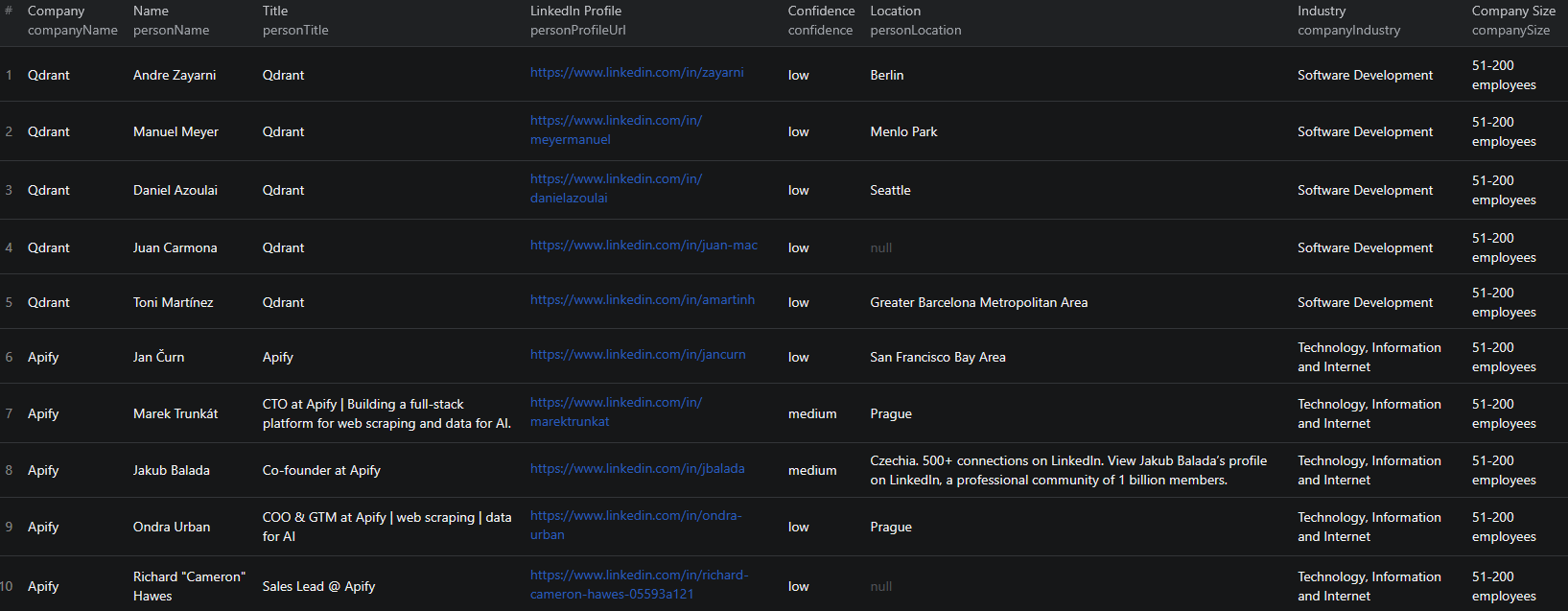
Here is what the actual output looks like. Each record combines company and person data in a single structured object:
{
"companyName": "Apify",
"companyLinkedInUrl": "https://www.linkedin.com/company/apify",
"companyIndustry": "Software Development",
"companySize": "51-200",
"companyHeadquarters": "Prague, Czech Republic",
"companySpecialties": "web scraping, automation",
"personName": "Jan Curn",
"personTitle": "CEO & Co-Founder",
"personProfileUrl": "https://www.linkedin.com/in/jancurn",
"personLocation": "Prague, Czech Republic",
"personEducation": "Czech Technical University",
"personConnections": "500+",
"personCurrentCompany": "Apify",
"personAboutSnippet": "Building the web scraping and automation platform...",
"confidence": "high",
"scrapedAt": "2025-01-15T12:00:00.000Z"
}
Key things to notice:
- Confidence score — each result is rated
high,medium, orlowbased on how well the person's current company and title match your target criteria. Start with high-confidence results for outreach - Company context alongside profile data — industry, size, and headquarters are included in every row, so you can filter and segment without needing a separate company enrichment step
- Direct profile URL — the LinkedIn profile link lets you review the contact or pass it directly to outreach tools
- About snippet — a preview of their LinkedIn bio adds context for personalizing your first message
Try the LinkedIn Decision Maker Finder now — no coding required.
Understanding the Confidence Score
The confidence score is one of the most useful features for outreach prioritization:
- High confidence — the person's current company matches your target company AND their title matches one of your target titles. These are your best leads.
- Medium confidence — one of the two conditions is met but not both
- Low confidence — the match is weaker, either due to ambiguous company resolution or a title that partially matches
For outbound sales, filter to high-confidence results first. Medium-confidence results are worth a manual review before sending outreach. Low-confidence results can be deprioritized or discarded.
Automating Decision Maker Research
For teams prospecting at scale, running the scraper manually is not efficient. The Apify platform supports full automation:
Scheduled Runs
Set up recurring enrichment runs on a schedule — weekly or monthly. As your target account list grows, new companies are automatically researched and added to your dataset.
API Integration
Use the Apify API to trigger the scraper programmatically from your CRM, sales engagement tool, or data pipeline. This enables:
- Automatic enrichment of new accounts added to your CRM
- Triggering outreach sequences as soon as decision maker data is available
- Building account intelligence dashboards that update with fresh data
Node.js Example
For a complete working example showing how to call this scraper from Node.js, see the GitHub repository.
Webhooks
Configure webhooks to get notified when a run completes. This is useful for event-driven pipelines where you want to process new contact data as soon as it is ready.
Does LinkedIn Provide an API for This?
LinkedIn's official API is restricted to approved partners and does not provide open access to profile or company data for most use cases. The Marketing API and Sales Navigator API are expensive, require formal approval, and still do not surface the level of profile detail available on public pages.
Your practical options for bulk decision maker research are:
- Manual LinkedIn search — works for a handful of companies but completely unscalable
- LinkedIn Sales Navigator — powerful but expensive, and still requires manual research for each company
- Custom scraper — significant development and maintenance overhead
- Pre-built scraper — a maintained solution like the LinkedIn Decision Maker Finder that handles all the technical complexity
For most teams, the pre-built scraper delivers the best return on investment.
Why Use a Decision Maker Finder Instead of Building One
Building a custom LinkedIn scraper is deceptively complex:
- Dynamic content — LinkedIn profiles are rendered with JavaScript and require browser-level rendering
- Anti-bot defenses — LinkedIn actively blocks scrapers, requiring sophisticated request handling, proxy rotation, and session management
- Maintenance burden — LinkedIn updates its frontend frequently, breaking custom scrapers and requiring immediate fixes
- No login required, but complex to implement — building a scraper that reliably accesses public data without triggering blocks is a non-trivial engineering challenge
- Opportunity cost — every hour spent on scraper infrastructure is an hour not spent building pipeline
The LinkedIn Decision Maker Finder handles all of this out of the box.
Try the LinkedIn Decision Maker Finder
The LinkedIn Decision Maker Finder identifies C-level executives, VPs, directors, and founders at any list of target companies — using only public LinkedIn data, with no login or cookies required.
What you get:
- Company intelligence and decision maker profiles in a single structured export
- Configurable target titles — use defaults or specify exactly the roles you need
- Confidence scoring to prioritize your best leads
- Up to 50 decision makers per company
- JSON, CSV, and Excel export
- API access for automated enrichment workflows
- No coding or scraper maintenance required
Start finding decision makers now — your first run takes less than 5 minutes to set up.
If you are building a broader B2B prospecting workflow, combine this with LinkedIn job listings data to identify companies that are actively hiring — one of the strongest buying signals in B2B sales. You can also pair it with Clutch data to enrich agency and vendor prospect lists.
Legal and Ethical Considerations
Web scraping of public data occupies a well-established legal space, but responsible practice matters:
- Public data only — the scraper only accesses data that is publicly visible on LinkedIn without any login. It does not bypass authentication or access private profile information
- hiQ v. LinkedIn — the US Supreme Court's ruling established that scraping publicly available data from LinkedIn does not violate the Computer Fraud and Abuse Act
- GDPR and CCPA — if you operate in the EU or California, ensure your handling of personal data complies with applicable regulations. This primarily governs how you store, process, and use the data — not the collection of publicly visible information
- Responsible outreach — use collected contact data for legitimate business purposes. Avoid spamming or unsolicited mass messaging that violates platform terms of service
Frequently Asked Questions
Is scraping LinkedIn decision maker data legal?
Scraping publicly available LinkedIn profile data is generally legal. The US Supreme Court's hiQ v. LinkedIn decision established that accessing public data does not violate the Computer Fraud and Abuse Act. The LinkedIn Decision Maker Finder only accesses data visible to anyone without logging in. Always use collected data responsibly and in compliance with GDPR, CCPA, or other applicable privacy regulations.
Do I need a LinkedIn account or cookies to use this scraper?
No. The LinkedIn Decision Maker Finder operates without any LinkedIn login, cookies, or authentication. It accesses only publicly visible profile and company data.
What job titles does the scraper search for by default?
By default, the scraper searches for CEO, CTO, COO, CFO, CMO, CIO, CISO, VP, Vice President, Director, Head of, Founder, Co-Founder, Managing Director, General Manager, Partner, President, and Owner. You can override this list with any custom titles you need.
Can I target specific roles at specific companies?
Yes. You provide the list of companies (by name or LinkedIn URL) and optionally specify which job titles to search for. This lets you precisely target, for example, only CTOs at mid-size SaaS companies.
What is the confidence score in the output?
Each result is scored high, medium, or low based on whether the person's current company matches your target company and whether their title matches one of your target titles. High-confidence results are the strongest matches.
How many decision makers can I find per company?
You can configure up to 50 decision makers per company using the maxPersonsPerCompany parameter. The default is 5. For most outreach workflows, 3 to 5 contacts per company is the right balance.
About the Author
This guide was written by Piotr, a software engineer with hands-on experience building and maintaining web scrapers at scale. He develops and maintains a suite of data extraction tools on the Apify platform, helping businesses automate their data collection workflows.
Need help with your scraping project?
Book a free discovery call and let's scope your project together.
Book a Call