Piotr VassevPiotr Vassev

How to Scrape Clutch Companies and Agencies (Step-by-Step Guide)

How to Scrape Clutch Companies and Agencies

If you want to scrape Clutch companies and agencies for B2B lead generation, sales prospecting, or competitive research, this guide covers everything you need. You will learn what data you can extract from Clutch.co, how to automate the process, and how to turn raw agency listings into actionable business leads.

Why Scrape Clutch Data?

Clutch.co is one of the most comprehensive B2B directories on the web. It lists thousands of agencies and service providers across categories like software development, marketing, design, IT services, and more — each with detailed profiles including ratings, reviews, pricing, and project history.

That makes Clutch a high-value data source for anyone doing B2B outreach. Unlike general business directories, Clutch profiles include verified reviews, hourly rates, minimum project sizes, and employee counts. This level of detail lets you qualify leads before you ever reach out.

Businesses scrape Clutch data for several reasons:

  • Sales prospecting — build targeted outreach lists of agencies and service providers in specific categories and locations
  • Lead generation — identify companies that match your ideal customer profile based on size, services, and budget range
  • Competitive analysis — benchmark your agency against competitors on pricing, reviews, and service offerings
  • Market research — analyze industry trends, pricing patterns, and service demand across different regions
  • Partnership discovery — find potential partners or subcontractors with complementary service offerings

Manually browsing Clutch and copying company data into a spreadsheet is impractical at scale. A single category page can list hundreds of agencies, and Clutch has thousands of categories across dozens of locations. Automation is the only realistic approach.

What Data You Can Extract from Clutch

The Clutch Listings Scraper extracts structured data from company listing pages. Here are the key fields you can collect:

FieldDescriptionExample
Company nameThe agency or company titleSigma Software Group
RatingAverage review rating on Clutch4.8
Review countTotal number of verified reviews37
Hourly rateAgency's listed hourly rate range$50 - $99 / hr
Min. project sizeMinimum engagement budget$50,000+
Employee countCompany size range1,000 - 9,999
LocationPrimary office locationWest Hollywood, CA
ServicesBreakdown of services with percentages25% Mobile App Development, 25% Custom Software Dev
DescriptionAI-generated company summary from reviewsLeading company specializing in mobile app development...
Profile URLDirect link to the Clutch profileclutch.co/profile/sigma-software-group
Website URLCompany's external websitesigma.software
Verified statusWhether the profile is Clutch-verifiedtrue
TagsSpecialization tags and badgesReceptive, Completed projects in 8 countries

This is exactly the kind of data sales teams need to qualify B2B leads — company size, budget range, service focus, and reputation signals — all in one structured export.

Common Use Cases for Clutch Data

Lead Generation and Sales Outreach

Clutch data is a goldmine for B2B sales teams. If you sell tools, services, or partnerships to digital agencies, Clutch gives you a pre-qualified list of prospects complete with budget indicators and service focus areas.

Filter by hourly rate and employee count to find agencies in your target segment. A company listing $50 - $99 / hr with 10 - 49 employees tells you a lot about their budget and decision-making speed before you even visit their website.

Agency Prospecting

Looking for a development partner, marketing agency, or design firm? Scraping Clutch lets you compare hundreds of agencies side by side — filtering by location, specialization, rating, and price range. This is far more efficient than browsing profiles one at a time.

Market Research and Pricing Benchmarks

Want to know what agencies charge for SEO services in New York versus London? Or how many mobile development firms have ratings above 4.5? Clutch data lets you answer these questions with real numbers instead of guesswork.

Track pricing trends over time by running regular scrapes and comparing datasets. Identify underserved markets or oversaturated categories before making business decisions.

Competitor Analysis

If you run an agency, Clutch data shows you exactly where you stand relative to competitors. Compare your hourly rate, review count, rating, and service mix against others in your category. Identify what top-rated agencies do differently and where you have opportunities to differentiate.

Vendor Selection Automation

Enterprise teams evaluating vendors can use Clutch data to build a shortlist automatically. Define your criteria — minimum rating, review count, location, services — and filter the dataset to produce a qualified vendor list in seconds instead of hours.

Challenges of Extracting Clutch Data Manually

Before diving into the tutorial, here is why manual collection is impractical:

  • Scale — Clutch lists thousands of agencies per category. Even a single search like "web development agencies" can return hundreds of pages of results
  • Pagination — results are spread across many pages, each requiring a separate page load and manual scrolling
  • Structured data complexity — each company profile contains nested data like service breakdowns, tags, and review summaries that are tedious to copy accurately
  • Time cost — manually extracting 100 companies with all their data points would take hours. At 1,000+ companies, it is not feasible
  • Freshness — Clutch profiles change as agencies get new reviews and update their information. Manual snapshots go stale quickly
  • Maintenance — if Clutch changes its page layout, any manual process or custom script you built needs to be redone

A pre-built, maintained scraper eliminates all of these problems.

Step-by-Step: How to Scrape Clutch Companies

Here is how to scrape Clutch listings using the Clutch Listings Scraper on Apify.

Step 1 — Choose a Category or Location

Start by deciding what kind of companies you want to extract. Go to Clutch.co and browse to a listing page. For example:

  • Mobile app developers in Los Angeleshttps://clutch.co/app-developers/los-angeles
  • SEO agencieshttps://clutch.co/seo-firms
  • Web development companies in the UKhttps://clutch.co/web-developers/united-kingdom
  • Marketing agencies in New Yorkhttps://clutch.co/agencies/digital-marketing/new-york

You can use any Clutch listing page URL. The scraper will extract all companies from the pages you provide.

Step 2 — Configure the Scraper Input

Head to the Clutch Listings Scraper on Apify and configure your run:

  1. Paste your Clutch listing URL(s) into the input field
  2. You can add multiple URLs to scrape different categories, locations, or filters in a single run
  3. Review the settings and click Start to begin the extraction

The scraper handles pagination automatically — it will extract all companies across all pages of your listing URL.

Step 3 — Run the Scraper

Once started, the scraper will:

  • Load each listing page and extract company data
  • Navigate through all pages of results automatically
  • Parse structured data including services, ratings, and tags
  • Store results in a clean, structured dataset

Processing time depends on the number of listing pages. Most runs complete within a few minutes.

Step 4 — Export Your Results

When the scraper finishes, export your data in the format you need:

  • JSON — ideal for developers building integrations or data pipelines
  • CSV — perfect for spreadsheet analysis in Excel or Google Sheets, or importing into a CRM
  • API — access results programmatically via the Apify API for automated workflows

Each record includes the full set of structured fields — company name, rating, reviews, pricing, location, services, and direct URLs.

Ready to try it? Run the Clutch Listings Scraper on Apify and get your first dataset in minutes.

Example Output (Real Data Preview)

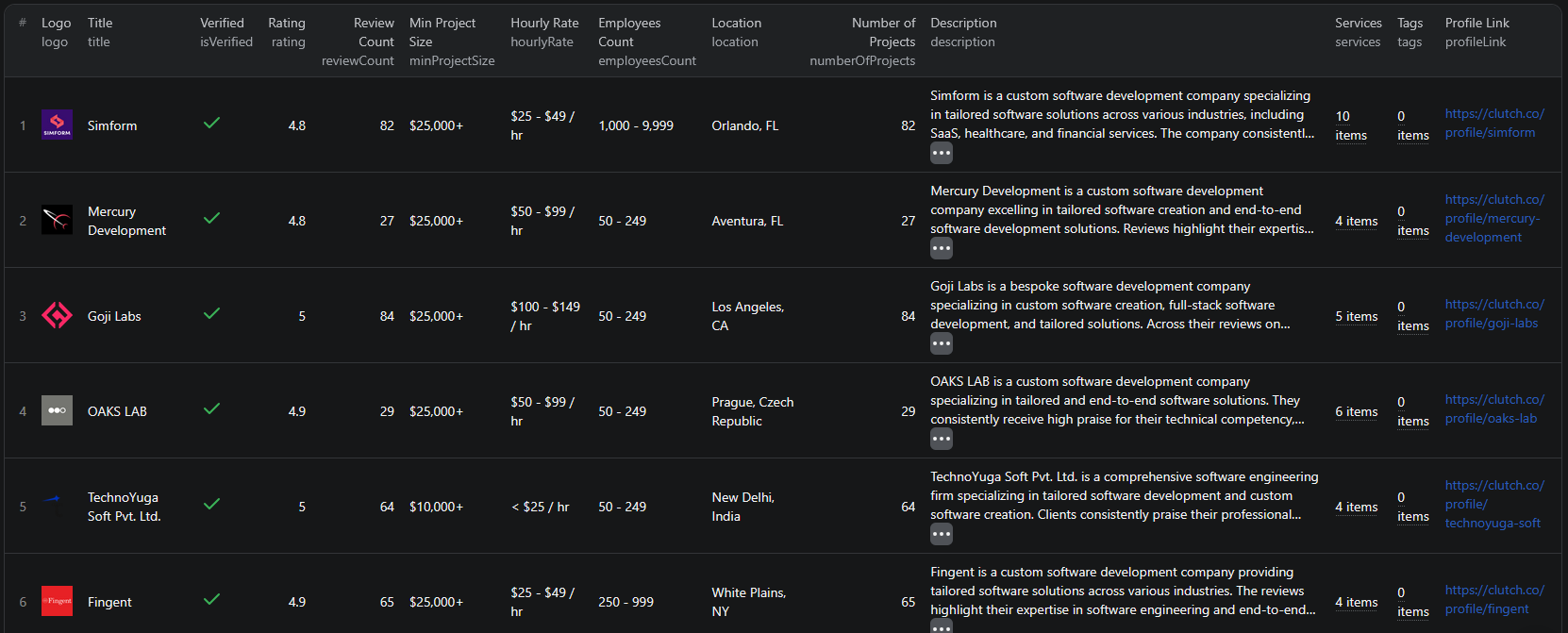
Clutch scraper results

Here is what the actual output looks like from the Clutch Listings Scraper. Each company listing returns a structured JSON object:

{
  "title": "Sigma Software Group",
  "isVerified": true,
  "profileLink": "https://clutch.co/profile/sigma-software-group",
  "rating": 4.8,
  "reviewCount": 37,
  "minProjectSize": "$50,000+",
  "hourlyRate": "$50 - $99 / hr",
  "employeesCount": "1,000 - 9,999",
  "location": "West Hollywood, CA",
  "services": [
    "25% Mobile App Development",
    "25% Custom Software Development",
    "20% Web Development",
    "10% BI & Big Data Consulting & SI",
    "10% Enterprise App Modernization",
    "10% IoT Development"
  ],
  "description": "Sigma Software Group is a leading company specializing in mobile app development...",
  "numberOfProjects": 37,
  "tags": [
    "Receptive",
    "12 reviews mention Mobile App Development",
    "4.3 out of 5.0 rating for cost",
    "Completed projects in 8 countries"
  ],
  "websiteUrl": "https://sigma.software/"
}

Key things to notice:

  • Budget signals — hourly rate and minimum project size let you qualify leads by budget before outreach
  • Service breakdown — percentage-based service mix shows what each agency actually focuses on
  • Reputation data — ratings, review counts, and verification status provide trust signals
  • Rich tags — specialization badges, cost ratings, and international experience give additional qualification data
  • Direct URLs — profile links and website URLs for immediate follow-up

This structured format makes it straightforward to import into any CRM, database, or analytics tool for sales outreach and market analysis.

Try the Clutch Listings Scraper now — no coding required.

Automating Agency Lead Generation

For ongoing B2B prospecting, you do not want to run the scraper manually every time a new agency appears on Clutch. The Apify platform supports full automation:

Scheduled Runs

Set up recurring scrapes on any schedule — daily, weekly, or monthly. The scraper runs automatically and stores results in a dataset you can access anytime. Weekly runs work well for most B2B lead generation use cases, since Clutch profiles do not change as rapidly as marketplace listings.

API Integration

Use the Apify API to trigger scraper runs programmatically and retrieve results. This lets you integrate Clutch data into your existing sales workflows:

  • Feed new agency listings directly into your CRM
  • Trigger alerts when companies matching your criteria appear
  • Build dashboards that update with fresh competitive data
  • Connect to tools like Zapier, Make, or custom data pipelines

CRM Enrichment

Combine Clutch data with data from other sources like Fiverr or BBB to build richer company profiles. Cross-referencing multiple directories gives you a more complete picture of potential leads and reduces the chance of outdated information.

Node.js Example

For a complete working example showing how to call this scraper from Node.js, see the GitHub repository.

Webhooks

Configure webhooks to get notified when a scraper run completes. This is useful for event-driven architectures where you want to process new leads as soon as data is available.

Legal and Ethical Considerations

Web scraping occupies a well-established legal space, but responsible practice matters:

  • Public data only — the Clutch scraper extracts publicly visible information that anyone can see by visiting Clutch.co. No login or authentication is required.
  • Respect rate limits — the scraper is designed to make requests at a reasonable pace to avoid overloading Clutch's servers
  • No personal data abuse — use collected data for legitimate business purposes like market research and B2B outreach. Do not spam or harass companies.
  • Compliance — if you operate in the EU or California, ensure your data handling complies with GDPR or CCPA. This primarily applies to how you store and process the data, not the collection itself.

Clutch profiles are public business listings — they are designed to be found and contacted. Scraping this data for business development is aligned with the platform's intended purpose.

Does Clutch Provide an API?

No. Unlike some platforms, Clutch does not offer a public API for accessing its directory data. There is no official way to programmatically query company listings, ratings, or reviews through an API endpoint.

This means your options for bulk data extraction are:

  • Manual browsing — works for a handful of companies but is not scalable
  • Custom scraper — requires development time, ongoing maintenance, and infrastructure to handle pagination and data parsing
  • Pre-built scraper — a maintained solution like the Clutch Listings Scraper that handles all the technical complexity

For most teams, the pre-built scraper is the most practical choice. It eliminates the development and maintenance burden while giving you reliable, structured data output.

Why Use a Pre-Built Clutch Scraper Instead of Building One

Building a custom Clutch scraper sounds straightforward until you start dealing with the details:

  • Development cost — a production-quality scraper that handles pagination, data parsing, and error recovery takes days or weeks to build
  • Maintenance — Clutch updates its frontend periodically. Every layout change can break your scraper, requiring immediate fixes to keep your data pipeline running
  • Infrastructure — you need proxy management, request throttling, and error handling. Running this reliably takes time and money.
  • Edge cases — different listing pages may render differently, sponsored listings have different structures, and pagination behavior varies. A maintained scraper already handles these edge cases.
  • Opportunity cost — every hour spent building and maintaining a scraper is an hour not spent on closing deals or analyzing the data

Unless you have very specific requirements that no existing tool can meet, using a maintained scraper lets you focus on what to do with the data instead of how to collect it.

Try the Clutch Listings Scraper

The Clutch Listings Scraper extracts structured data from Clutch.co company listings — agency names, ratings, reviews, hourly rates, project sizes, employee counts, services, locations, and direct URLs.

What you get:

  • Structured JSON or CSV output ready for CRM import or analysis
  • All key company data fields in a single export
  • Automatic pagination — extracts all companies across all pages
  • Scheduled runs for ongoing lead generation
  • API access for integration into your sales workflows
  • No coding or scraper maintenance required

Start scraping Clutch now — your first run takes less than 5 minutes to set up.

If you are building a B2B lead generation pipeline, combine Clutch data with other directory scrapers like the Fiverr Listings Scraper to build comprehensive prospect lists across multiple platforms.

Frequently Asked Questions

Is scraping Clutch legal?

Scraping publicly available data from Clutch.co is generally legal. The listings are visible to anyone who visits the site without logging in. However, you should always use the data responsibly, comply with local privacy regulations like GDPR and CCPA, and avoid overloading Clutch's servers with excessive requests.

Does Clutch have an API?

Clutch does not offer a public API for accessing its directory data. The only way to extract company listings at scale is through web scraping or manual collection. A pre-built scraper is the most practical solution for bulk data extraction.

What data can I extract from Clutch?

You can extract company names, ratings, review counts, hourly rates, minimum project sizes, employee counts, locations, services offered, company descriptions, profile URLs, website URLs, verification status, and tags like specialization areas and project history.

Can I export Clutch data to CSV?

Yes. The Clutch Listings Scraper supports exporting results as JSON, CSV, or via API. CSV exports can be opened directly in Excel or Google Sheets for analysis and outreach workflows.

How often can I scrape Clutch?

You can schedule scraper runs as often as you need — daily, weekly, or on a custom schedule. The scraper uses responsible request rates to avoid issues. For most B2B lead generation use cases, weekly or bi-weekly runs provide a good balance of freshness and efficiency.

How many Clutch listings can I scrape at once?

The scraper can process multiple Clutch listing page URLs in a single run, each containing dozens of pages of results. There is no hard limit on the number of listings — the run time scales with the volume of data you request.

About the Author

This guide was written by Piotr, a software engineer with hands-on experience building and maintaining web scrapers at scale. He develops and maintains a suite of data extraction tools on the Apify platform, helping businesses automate their data collection workflows.

Need help with your scraping project?

Book a free discovery call and let's scope your project together.

Book a Call
Piotr Vassev

Piotr Vassev

Founder of FalconScrape. Building production-grade web scraping systems and data automation pipelines for businesses worldwide.

Connect on LinkedIn