
How to scrape Fiverr gigs and build a freelancer shortlist
A Fiverr search can return several gigs from the same seller, each with a different price and service description. Copying those cards into a spreadsheet gets tedious quickly. The Fiverr Listings Scraper collects them for you, including gig titles, prices, seller ratings, countries, and profile links.
I maintain this Actor on Apify. You can run it in your browser, export a CSV, and filter the results without writing code. Below, we'll collect a small front-end development search and turn it into a list of sellers to review.

Know what you're getting
Each result is a gig listing, not a unique freelancer. A seller with three matching gigs may appear in three rows. The output includes seller rating scores and counts, but not the text of individual reviews or private contact details.
The price and duration fields describe the recommended package exposed by the listing. They aren't a complete comparison of Basic, Standard, and Premium packages. Before comparing prices, check that the service scope is similar and confirm the currency on the source page; the current output schema has no currency field.
You need an Apify account and a Fiverr search or category URL. The Actor's input consists of Search URLs and Max items per URL. It does not ask for a Fiverr login.
The listed price is $1.50 per 1,000 result rows, as of September 6, 2026. If the example returns 20 rows, the result fee is $0.03. Check current pricing before a larger run.
Export a small Fiverr search
1. Choose a search you would actually use
Open Fiverr and search for the service you need. For this example, use:
https://www.fiverr.com/search/gigs?query=front%20end%20web%20developer
Open a few results before scraping. A broad development search can mix landing pages, small fixes, and larger projects. If you're looking for a specific service, refine the search now so the export has less irrelevant material to remove later.
2. Paste the URL and cap the run
Open the Fiverr scraper, choose Try for free, and sign in to Apify if prompted. In the Input form, paste the URL into Search URLs and set Max items per URL to 20.
If you prefer the JSON editor, paste this input:
{
  "searchUrls": [
    "https://www.fiverr.com/search/gigs?query=front%20end%20web%20developer"
  ],
  "maxItemsPerUrl": 20
}
The limit applies to each input URL. Three URLs with a limit of 20 can return up to 60 rows. Start with one URL so you can check the result before broadening the search.
3. Run it and check the dataset
Click Start. When the run finishes, open the output dataset. Look at a few title and gigUrl values to confirm that the results match your search. A successful run can return fewer rows than your limit.
Example output is shown below. Listings, availability, and prices will differ on a new run.
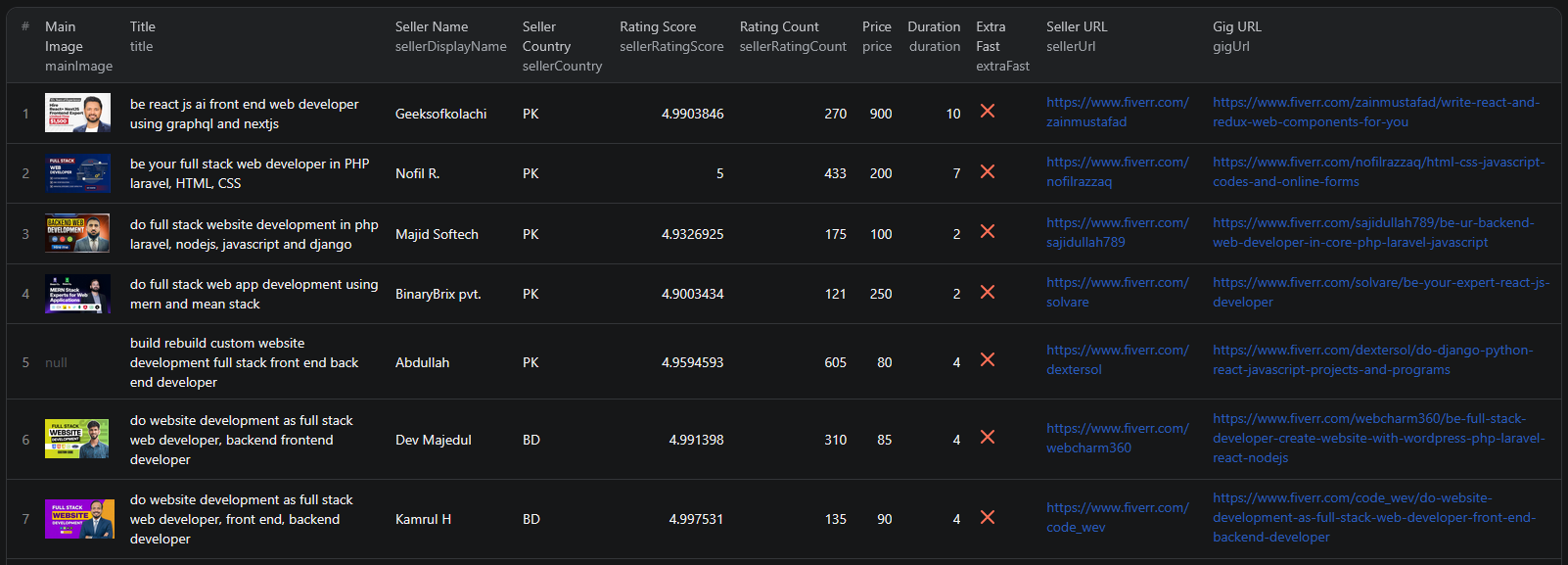
Here's an abbreviated record from the sample used in the original guide. It's an example of the fields, not a current quote from this seller:
{
  "gigId": 301650643,
  "title": "be your front end web developer using HTML,CSS, bootstrap,react js and jquery",
  "sellerName": "musttechusa",
  "sellerCountry": "US",
  "sellerLevel": "level_two_seller",
  "sellerRatingScore": 4.8131313,
  "sellerRatingCount": 233,
  "price": 100,
  "duration": 2,
  "sellerUrl": "https://www.fiverr.com/musttechusa",
  "gigUrl": "https://www.fiverr.com/musttechusa/be-your-front-end-web-developer-using-html-css-bootstrap-react-js-and-jquery"
}
4. Download the CSV
Choose Export → CSV from the dataset. Keep these columns for the shortlist: sellerName, title, price, duration, sellerRatingScore, sellerRatingCount, sellerCountry, gigUrl, and sellerUrl.
Open the CSV in Google Sheets or Excel. Use JSON instead if you need the nested metadata fields, which vary by gig category. The current output also includes scrapedAt; retain it for repeated comparisons so you can distinguish old observations from new ones.
Turn gig rows into a list of people to review
Suppose you need a front-end developer for a landing page. Before filtering, decide which requirements are firm and which you want to inspect yourself. As an illustrative first pass, you might use a rating of at least 4.5, at least 50 ratings, and a quoted package price within your budget.
- Keep relevant gigs. Review the titles and remove services outside the work you need. Don't compare a small CSS fix with a complete landing-page build.
- Filter ratings and rating counts together. A high average from a handful of ratings tells you something different from the same average across hundreds. These fields describe the seller; they aren't a substitute for checking the gig's reviews and portfolio.
- Check price and scope. Confirm the package, currency, and included work on the source page before applying a budget cutoff. Leave rows with missing values for manual review.
- Keep one row per seller. Make a copy of the filtered sheet, then use Remove duplicates on
sellerName. In Google Sheets, that's under Data → Data cleanup; in Excel, use Data → Remove Duplicates. Put the gig you want to retain first for each seller before deduplicating. - Review the remaining profiles. Follow
sellerUrlto check relevant work, availability, and communication fit. UsegigUrlto return to the specific offer.
The sample record above would pass the illustrative rating thresholds. It would still need a scope and price check. That's the purpose of the export: reduce the browsing work and give you a manageable set of profiles to investigate.
If your aim is pricing research instead, keep each distinct gigId. Deduplicating by seller would discard service-level observations that matter to that analysis. Group comparable services before calculating a median price, and describe it as a median for your collected sample.
A few things that can trip you up
The same seller appears repeatedly. That's expected when a seller has multiple gigs or your searches overlap. Use gigId to deduplicate listings and sellerName to deduplicate people, depending on your task.
Some agency or metadata fields are empty. Those fields depend on the seller and category. Empty agency fields don't make an individual seller's row unusable.
The file has fewer than 20 rows. The setting is a maximum. Check the input URL and the run log before assuming the search is exhausted. A changed page, blocked request, or limited source results can affect the output.
You expected review text or email addresses. This Actor's documented output provides rating summaries and public profile links. Use the original gig page for reviews, and Fiverr's own contact options if you want to discuss a project.
Today's export differs from yesterday's. Listings and search results change. Keep dated exports and compare by gigId; a gig missing from one search snapshot is not proof that it has been deleted.
Use the data for your research, respect applicable platform terms, and avoid bulk unsolicited messages to the people in your export.
Repeat the process when you need fresh data
After checking a manual run, save the input as an Apify task and schedule it at an interval that suits your research. Save the returned rows with their gigId and scrapedAt values. A schedule reruns the search; calculating price changes or identifying new sellers is a separate step in your spreadsheet or code.
For API access, the existing Fiverr Node.js example shows how to call the Actor. Check its inputs against the current schema before increasing the limits. If you're researching agencies rather than individual gigs, the Clutch guide covers a different source that may fit better.
Watch the original Fiverr walkthrough
This earlier video gives a visual overview. Use the input fields and limits above if the current interface differs.
Questions before you run
Can I export Fiverr results to Excel or Google Sheets?
Yes. Export the dataset as CSV, then open or import it in your spreadsheet. Use JSON when you need nested metadata rather than just the flat gig and seller columns.
How many gigs will a run return?
maxItemsPerUrl limits rows for each search URL. One URL with a limit of 20 can return up to 20 rows; three URLs can return up to 60. Source availability and request failures can reduce the actual count.
Can I get all of a seller’s gigs from their profile URL?
The documented inputs are search and category URLs. Do not assume a seller profile URL will enumerate their entire catalog; this guide collects gigs returned by the supplied search pages.
