
How to Monitor Local Services Ads and Local Search Results
A local search can show paid ads, a map pack, and ordinary website results on the same page. Counting all three as Local Services Ads gives you a misleading competitor report.
The Local Services Ads & Google Verified Scraper separates those business records and captures the badges, ratings, contact details, and positions Google exposes. I maintain the Actor. This guide creates a repeatable visibility check for plumbers in Austin.
Fix the search conditions first
An Actor is a tool you run on Apify. You need an Apify account, a service query, and a chosen market; you do not need access to a competitor's advertising account.
Use the same query, country, language, and device each time. location biases the search when the query does not already specify a place. These settings establish a repeatable collection setup, but they do not guarantee the exact results every resident sees. A search from a different location or device can expose different cards.
businessType distinguishes lsa, local_pack, sponsored, and organic_local. Keep these separate from the start. An ordinary sponsored result is not automatically an LSA placement, and a business name appearing organically does not establish that it advertises.
Capture one page for one service
Open the Actor, select the JSON view of Input, and enter:
{
  "searchQueries": ["plumbers in Austin"],
  "language": "en",
  "countryCode": "us",
  "device": "desktop",
  "maxResultsPerQuery": 20,
  "maxPages": 1,
  "proxyConfiguration": {
    "useApifyProxy": true,
    "apifyProxyGroups": ["RESIDENTIAL"]
  }
}
The first page is the useful starting point for ads and the local pack. Later pages primarily extend the organic results. maxPages can be 1 to 10, while maxResultsPerQuery caps business records across those pages, from 1 to 200. Adding five queries creates five separate result allowances, not one shared allowance of twenty.
Residential proxies are the documented default because Google frequently blocks datacenter requests. Click Start, then open the dataset when the run finishes. Check that query, countryCode, and device match your intended setup before interpreting the businesses.
Pricing as of September 6, 2026: each result costs $0.004. Twenty returned records cost $0.08, plus an Actor-start event of $0.00005 per GB of allocated memory, with at least one event. Check live pricing before expanding your query list.
Read the type before the rank
An abbreviated historical README sample shows:
{
  "query": "plumbers in Austin",
  "businessType": "local_pack",
  "pageIndex": 0,
  "position": 1,
  "name": "Reliant Plumbing",
  "isSponsored": false,
  "isVerified": false,
  "verifiedLabel": null,
  "rating": 4.7,
  "reviewCount": 2900
}
This is a local-pack observation with a rating, not a verified advertiser. isVerified: false means the parser did not identify that badge on this result. It is not a finding about the business's licensing or qualifications. Preserve verifiedLabel when present so your report can show the actual observed label.
position is numbered continuously across the query's pages. Do not silently rename it “LSA rank” or “map rank” after filtering the dataset. Keep the original position and business type together, and define any new within-type ranking separately.
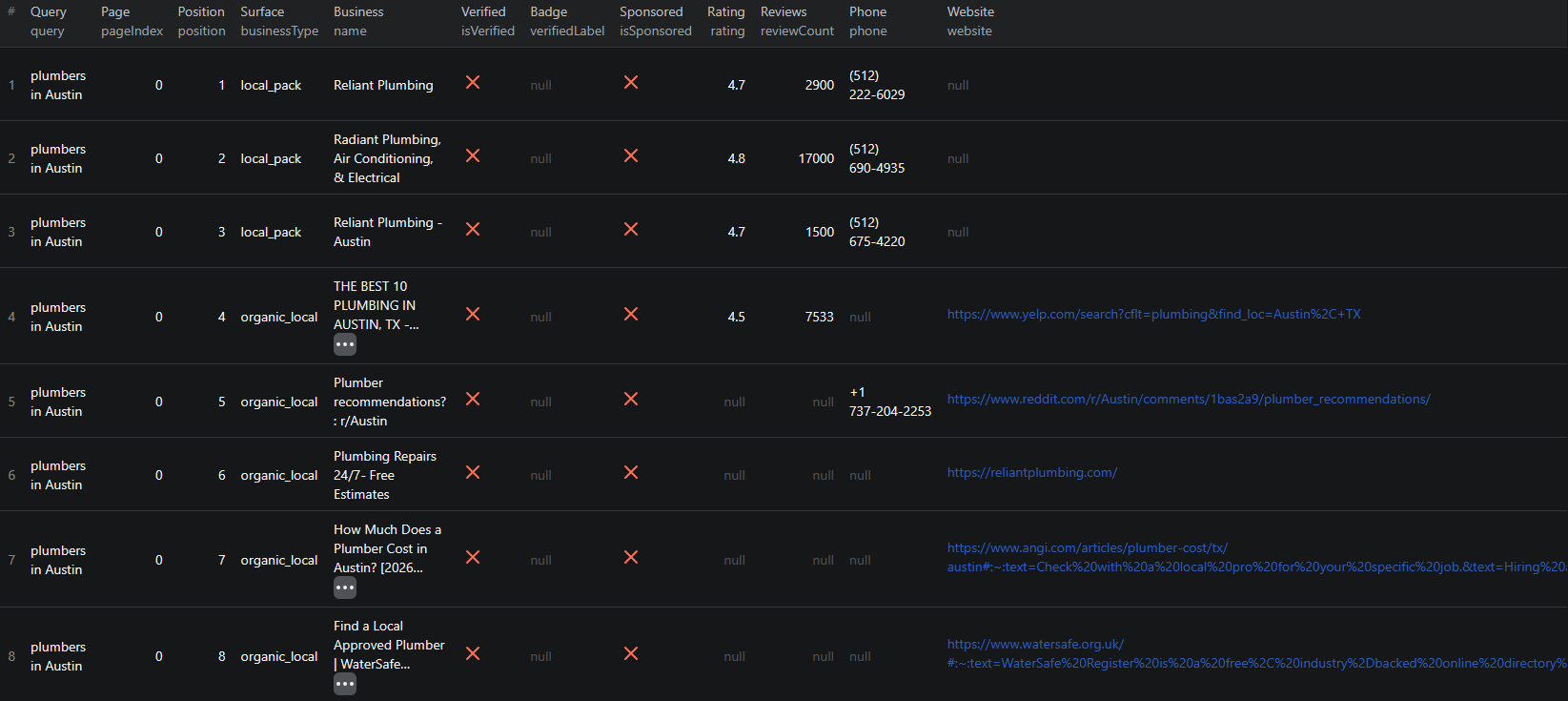
Historical Google results show why business type and badge fields belong beside position.
Turn the export into a visibility log
Export CSV with query, businessType, name, website, profileUrl, pageIndex, position, isSponsored, isVerified, verifiedLabel, rating, reviewCount, and scrapedAt. Preserve country, device, and language as comparison dimensions.
In your spreadsheet, filter to businessType = lsa for the advertising view and create a separate local-pack view. Match the same business using its profile URL or normalized website plus name. Names alone can merge unrelated companies or different branches; manually review ambiguous matches.
For a later observation, compare only the same query and collection conditions. A move from position 4 to 2 is a change of two positions within that collected sequence. A missing business should be marked “not observed in this sample,” since a result cap or changed page layout can also explain its absence.
Track badge text independently from position. This lets a client see whether a badge was observed, without converting it into a claim about approval status. Missing ratings, phone numbers, or websites should remain blank: those details are not exposed on every surface.
When Google returns only part of the picture
An empty LSA filter can be a valid outcome even when the run returned businesses. Inspect businessType before assuming failure. If the whole dataset is empty, check the log for blocked pages and verify the query in the target market. Increasing maxPages will not manufacture an LSA block that Google did not show.
Save the checked input as an Apify task for repeated collection. If you instead need a broader directory of local businesses, the Google Maps lead guide covers that different starting point.
The Node.js example shows how to run this Actor from code and retrieve its dataset.
Frequently asked questions
Does a sponsored result count as a Local Services Ad?
No. Filter businessType to lsa for Local Services Ads. The sponsored, local_pack, and organic_local types describe different result surfaces.
Does an absent badge mean a business is unqualified?
No. The fields describe badges observed on the collected Google result. They do not verify a business’s qualifications, licensing, or advertising-account status.
