How to Scrape Brand Store Locator Data (Step-by-Step Guide)

If you want to scrape brand store locator data for retail intelligence, sales prospecting, location data enrichment, or supply chain analysis, this guide walks you through the entire process. You will learn what data you can extract from brand store locators, how to automate collection across dozens of brands simultaneously, and how to turn raw location data into actionable retail intelligence.
Why Scrape Store Locator Data?
Every brand that sells through physical retail has a store locator — a page on their website listing every retail location where you can find their products. These pages are goldmines of structured location data: addresses, GPS coordinates, phone numbers, and the names of every retail partner carrying that brand.
The challenge is that store locator data is fragmented across hundreds of different brand websites, each using a different platform or implementation. Some brands use Storemapper, others use Locally.com or Stockist.co, and many use custom JavaScript-rendered locators that require a full browser to extract. Gathering this data manually — across even a handful of brands — is a painful, repetitive process.
A store locator scraper that works on any brand homepage, automatically discovers the locator page, and handles all major platforms and rendering approaches changes the economics completely.
Businesses and researchers scrape store locator data for several reasons:
- Retail intelligence — map a brand's physical retail footprint across regions and retail channels
- Competitive analysis — understand where competing brands are stocked and identify distribution gaps
- Sales prospecting — find new distribution opportunities by seeing which retailers carry similar brands
- Location data enrichment — build or refresh a database of authorized retailers and stockists
- Market research — analyze which retail chains carry which brands and in which geographies
- Supply chain analysis — track how a brand's retail presence evolves over time
Manually visiting store locator pages, clicking through each result, and copying location details is completely unscalable beyond a handful of records. Automation is the only realistic approach for building comprehensive retail location datasets.
What Data You Can Extract from Store Locators
The Brand Store Locator Scraper extracts a normalized, consistent record for every retail location — regardless of which underlying platform the brand's locator uses. Here are the key fields available:
| Field | Description | Example |
|---|---|---|
| brandName | Brand domain extracted from the input URL | darntough.com |
| brandUrl | Brand homepage URL provided as input | https://www.darntough.com |
| storeName | Retail store or location name | REI - Soho Flagship |
| address | Street address | 109 East Houston St |
| city | City | New York |
| state | State or province | NY |
| country | Country code | US |
| postalCode | ZIP or postal code | 10002 |
| latitude | GPS latitude coordinate | 40.7237 |
| longitude | GPS longitude coordinate | -73.9957 |
| phone | Store phone number | (212) 505-3860 |
| Store email address (when available) | soho@rei.com | |
| website | Store-specific website or URL | https://www.rei.com/stores/new-york-soho.html |
| locatorService | Underlying platform detected | locally, storemapper, stockist, html_list, xhr_intercept |
| sourceUrl | URL of the store locator page | https://darntough.com/pages/find-a-store |
| extractedAt | ISO 8601 extraction timestamp | 2026-03-17T09:00:00.000Z |
Every record follows this consistent schema regardless of which platform the brand's store locator uses — so you can combine data from dozens of brands into a single, clean dataset without any post-processing normalization.
Common Use Cases for Store Locator Data
Retail Intelligence and Competitive Footprint Mapping
Understanding where a brand's products are physically available is fundamental retail intelligence. Which retail chains carry this brand? In which states or countries is it available? How has the retail footprint grown or contracted over the past year?
With the Brand Store Locator Scraper, you can map any brand's complete retail distribution in a single run — from a handful of boutique stockists to thousands of locations across a national retail chain. Run it against multiple competing brands to compare distribution footprints and identify where one brand has penetrated markets that others have not.
Sales Prospecting and Distribution Gap Analysis
If you are a brand looking to expand retail distribution, understanding where similar brands are stocked tells you exactly which retail partners to pursue. If Darn Tough socks are in REI stores across the US but your competing product is not, that is a clear distribution gap and a prioritized prospect list — without any manual research.
Scrape store locators for five to ten brands in your category, extract all their retail partners, and you have a comprehensive list of every relevant retailer already buying products like yours.
Location Data Enrichment
Many businesses maintain databases of retail partners, authorized dealers, or distribution points that quickly become stale. Phone numbers change, stores close, new locations open. Running the Brand Store Locator Scraper against a list of brand URLs gives you a regularly refreshed, authoritative source of current location data directly from the brand.
This is particularly valuable for data providers, market research firms, and anyone who needs accurate physical store location data at scale.
Market Research and Retail Channel Analysis
Which retail chains carry which brands? Where do specialty outdoor brands sell versus mass-market brands? Is a brand's distribution concentrated in the northeast US or spread nationally? Store locator data answers all of these questions with precision.
Combine location data across multiple brands to build a picture of retail channel preferences by category — which chains are the dominant stockists for specific product types, and where the retail landscape is fragmented versus consolidated.
Supply Chain and Distribution Tracking
Brands with physical retail distribution can use this tool to audit their own store locator accuracy — does every authorized retailer appear correctly? Are there missing locations or outdated records?
For supply chain analysts, tracking a brand's retail presence over time provides leading indicators of distribution changes — new retail partnerships, dropped channels, geographic expansion or contraction — before they appear in official press releases.
Challenges of Collecting Store Locator Data Manually
Before jumping into the tutorial, it is worth understanding why store locator scraping is harder than it looks:
- Locator discovery — brands rarely link their store locator prominently. Finding the right URL requires scanning navigation links, parsing sitemaps, and probing common paths like
/store-locator,/find-a-store,/stockists, and dozens more - Platform fragmentation — Storemapper, Locally.com, Stockist.co, custom HTML lists, map embeds, and proprietary JavaScript apps all expose location data differently. There is no single extraction approach that works across all of them
- JavaScript-rendered content — many store locators are entirely JavaScript-rendered. Simple HTTP requests return an empty shell; you need a full browser to load the page and intercept the underlying API calls
- Search form locators — some locators require entering a postal code to retrieve nearby stores. Systematic coverage requires simulating searches across many locations worldwide
- Scale — a single brand might have thousands of retail locations across dozens of countries. Collecting all of them requires pagination handling, deduplication, and robust error handling
- Maintenance — brand websites update their store locator implementations regularly. A custom scraper that works today may break next month
Building a reliable cross-brand store locator scraper that handles all of these cases is a significant engineering project. For most use cases, a pre-built, maintained solution is the more practical approach.
Step-by-Step: How to Scrape Store Locator Data
Here is how to scrape brand store locator data using the Brand Store Locator Scraper on Apify.
Step 1 — Prepare Your Brand URLs
The only input you need is a list of brand homepage URLs. The scraper handles everything from there — finding the locator page, detecting the platform, and extracting every retail location.
Use the brand's main homepage URL, not the store locator page itself. For example:
https://www.untuckit.comhttps://www.darntough.comhttps://www.hydroflask.com
You can provide as many brand URLs as you want in a single run.
Step 2 — Configure the Scraper Input
Head to the Brand Store Locator Scraper on Apify and configure your run:
- Add your brand homepage URLs to the
startUrlsfield - Optionally set
maxStoresPerBrandto cap how many store records are extracted per brand (default is 500; set to 0 for unlimited) - Configure proxy settings if needed (recommended for large-scale runs)
- Click Start to begin the extraction
The scraper will automatically:
- Scan each brand's navigation links, sitemap, and common URL paths to find the store locator page
- Detect which platform the locator uses (Storemapper, Locally.com, Stockist.co, HTML list, or JavaScript-rendered)
- Call the service API directly for supported platforms, or fall back to Playwright with XHR interception for custom implementations
- Normalize all extracted records into the consistent output schema
Step 3 — Run the Scraper
Once started, the scraper processes each brand URL in sequence:
- Discovery — scans nav links, parses
sitemap.xml, and probes candidate paths to find the store locator page - Platform detection — identifies whether the locator uses Storemapper, Locally.com, Stockist.co, an HTML list, or a custom JavaScript implementation
- Extraction — calls the detected platform's API directly (fast, efficient) or launches a Playwright browser with XHR interception for JavaScript-rendered locators
- Normalization — maps all extracted fields to the consistent output schema regardless of source
- Storage — pushes all normalized records to your dataset
Processing time depends on the number of brands and the complexity of their locators. HTTP-first extraction for supported platforms is very fast; Playwright-based fallback for custom JavaScript locators takes longer but ensures complete coverage.
Step 4 — Export Your Results
Once the scraper finishes, export your results in the format that works best for your workflow:
- JSON — ideal for developers building data pipelines or feeding results into downstream tools
- CSV — perfect for spreadsheet analysis in Excel or Google Sheets
- Excel — ready-to-use workbook format for business reporting
- API — access results programmatically via the Apify API for automated workflows
Every record includes the full normalized schema: brand name, brand URL, store name, address, city, state, country, postal code, coordinates, phone, email, website, locator service, source URL, and extraction timestamp.
Ready to try it? Run the Brand Store Locator Scraper on Apify and get your first dataset in minutes.
Example Output (Real Data Preview)

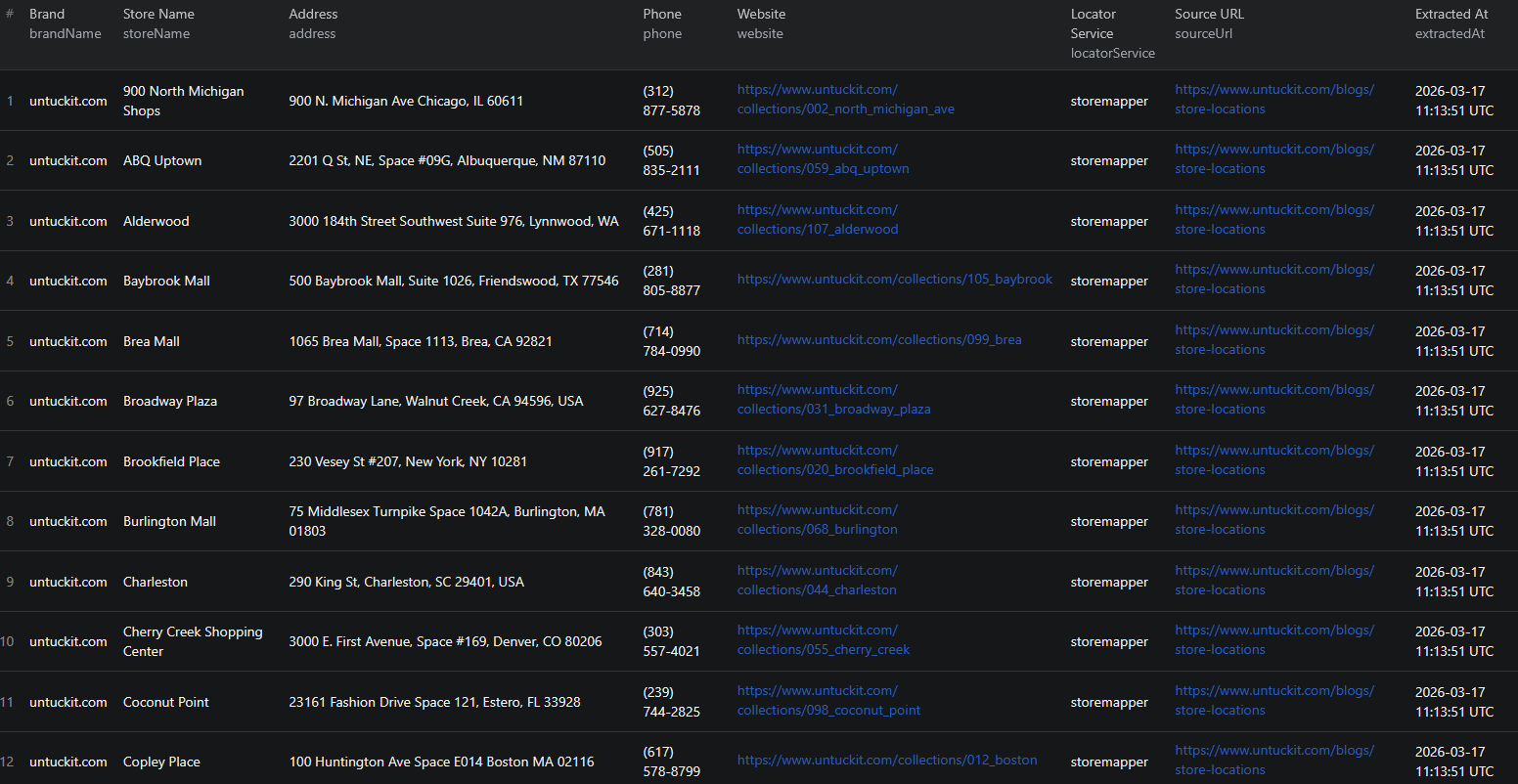
Here is what the actual output looks like from the Brand Store Locator Scraper. Each retail location returns a normalized JSON record:
{
"brandName": "darntough.com",
"brandUrl": "https://www.darntough.com",
"storeName": "REI - Soho Flagship",
"address": "109 East Houston St",
"city": "New York",
"state": "NY",
"country": "US",
"postalCode": "10002",
"latitude": 40.7237,
"longitude": -73.9957,
"phone": "(212) 505-3860",
"website": "https://www.rei.com/stores/new-york-soho.html",
"locatorService": "locally",
"sourceUrl": "https://darntough.com/pages/find-a-store",
"extractedAt": "2026-03-17T09:00:00.000Z"
}
Key things to notice:
- Normalized schema — every record follows the same structure regardless of which platform the brand uses. Mix records from Storemapper brands, Locally brands, and custom JS locators in the same dataset without any post-processing
- GPS coordinates — latitude and longitude are included wherever the source provides them, enabling direct use in mapping tools, GIS analysis, and distance-based queries
- Platform transparency — the
locatorServicefield tells you exactly which platform or extraction method was used for each record, so you can filter or audit by source - Source tracking —
sourceUrlrecords the exact locator page URL, giving you an audit trail and a link to verify any record - Timestamp —
extractedAtlets you track data freshness and identify records that need refreshing in ongoing monitoring workflows
This structured output imports cleanly into any spreadsheet, database, mapping tool, or analytics platform.
Try the Brand Store Locator Scraper now — no coding required.
Supported Locator Platforms
The scraper has built-in adapters for the most widely used store locator platforms, and a universal fallback for everything else:
| Platform | Method | Notes |
|---|---|---|
| Storemapper | JSONP API | Detected via data-storemapper-id attribute or script src |
| Locally.com | Geo sweep API | Supports both company_key and subdomain/company_id API modes |
| Stockist.co | REST API | Extracts API key from widget script URL |
| HTML list | Cheerio parsing | Static <address> tags and store item containers |
| JS-rendered (any) | Playwright + XHR intercept | Scores JSON responses by field presence to identify store arrays |
| Search form | Playwright form simulation | Fills 14 global postal codes, collects XHR deltas per submission |
For supported platforms (Storemapper, Locally.com, Stockist.co), the scraper calls the underlying API directly — fast, efficient, and complete. The Playwright fallback activates automatically when the locator is custom JavaScript-rendered, ensuring nothing falls through the cracks.
Automating Retail Location Monitoring
For ongoing competitive intelligence or location data maintenance, you do not want to run the scraper manually every time. The Apify platform supports full automation:
Scheduled Runs
Set up recurring scrapes on any schedule — weekly, monthly, or quarterly. The scraper runs automatically and stores results in a dataset you can access anytime. Monthly runs work well for competitive footprint tracking. Quarterly runs are sufficient for distribution channel analysis and stockist database refreshes.
API Integration
Use the Apify API to trigger scraper runs programmatically and retrieve results. This lets you integrate store location data into your existing workflows:
- Feed updated retailer location data into your CRM or partner database automatically
- Trigger alerts when a competitor adds new retail locations in a specific region
- Build distribution coverage dashboards that refresh on a regular schedule
- Connect to tools like Zapier, Make, or custom data pipelines
Multi-Brand Competitive Monitoring
Run the scraper against a list of competitor brand URLs in a single batch. Compare retail footprints side by side — which chains carry Brand A but not Brand B? Where is your distribution underrepresented relative to category leaders? This kind of competitive mapping would take weeks to assemble manually; automated scraping makes it a routine operation.
Node.js Example
For a complete working example showing how to call this scraper from Node.js, see the GitHub repository.
Webhooks
Configure webhooks to get notified when a scraper run completes. This is useful for event-driven workflows where you want to process fresh location data as soon as it is available — for example, triggering a CRM update when a new stockist audit completes.
Pricing
The Brand Store Locator Scraper uses Pay Per Result pricing — you only pay for the store records extracted.
| Event | Price | |---|---| | Store location record | $1.00 / 1,000 results |
Example costs:
- 500 locations across 5 brands: approximately $0.50
- 5,000 locations across 20 brands: approximately $5.00
- 50,000 locations across 100 brands: approximately $50.00
The default maxStoresPerBrand: 500 caps extraction per brand to keep test runs affordable.
Do Brands Provide APIs for Store Location Data?
Generally, no. Brands do not offer public APIs for their retail location data. The store locator pages on brand websites are intended for consumers looking for local stores — not for programmatic data extraction.
Your practical options for bulk store location data collection are:
- Manual extraction — feasible for a handful of locations, but completely unscalable across dozens of brands or thousands of locations
- Custom scraper — requires per-brand development effort, ongoing maintenance as locator implementations change, and separate handling for every platform variant
- Pre-built scraper — a maintained solution like the Brand Store Locator Scraper that handles automatic discovery, multi-platform support, and JS fallback out of the box
For most teams, the pre-built scraper is the clear choice. It eliminates per-brand engineering effort and delivers consistent, normalized output across any brand homepage you provide.
Why Use a Pre-Built Store Locator Scraper
Building a custom store locator scraper that works across arbitrary brand websites is a significantly harder problem than it looks:
- Locator discovery — there is no standard location for store locator pages. You need to scan navigation links, parse sitemaps, and probe dozens of common path patterns to reliably find locator pages across diverse brand websites
- Platform fragmentation — Storemapper, Locally.com, Stockist.co, and dozens of custom implementations each require different extraction logic. Building and maintaining adapters for each adds ongoing development cost
- JavaScript rendering — a large proportion of modern store locators are fully JavaScript-rendered. You need a headless browser (Playwright or Puppeteer), request interception, and heuristics for identifying which XHR responses contain store data
- Search form coverage — some locators only show stores near a specific search location. Systematic extraction requires simulating searches across many postal codes globally and deduplicating results
- Normalization — every platform returns data in a different shape. Building a normalization layer that maps diverse source formats to a consistent schema is unglamorous but essential for usable output
- Ongoing maintenance — brand websites and locator platform APIs change. What works today may break next month. Someone has to keep the adapters up to date
- Opportunity cost — every hour spent building store locator parsers is an hour not spent on the retail intelligence work the data is meant to enable
Unless you have highly specific requirements no existing tool can meet, a pre-built, maintained scraper is the more practical path.
Try the Brand Store Locator Scraper
The Brand Store Locator Scraper extracts complete retail location data from any brand homepage — automatic locator discovery, multi-platform support, and JS fallback included.
What you get:
- Automatic store locator discovery from any brand homepage — no manual URL hunting
- Native support for Storemapper, Locally.com, and Stockist.co via their APIs
- Playwright fallback with XHR interception for JavaScript-rendered locators
- Consistent normalized output schema across all source platforms
- Up to 15 fields per store: name, address, city, state, country, postal code, coordinates, phone, email, website, and more
- JSON, CSV, or Excel export ready for immediate use
- Scheduled runs for ongoing competitive monitoring
- API access for integration into your data workflows
- No coding or per-brand configuration required
Start scraping store locator data now — your first run takes less than 5 minutes to set up.
If you are building a broader retail intelligence dataset, combine store locator data with other sources to enrich your picture of the retail landscape. For local business discovery beyond brand-owned retail, see our guide on scraping 2GIS business listings.
Legal and Ethical Considerations
Web scraping occupies a well-established legal space, but responsible practice matters:
- Public data only — the scraper extracts publicly visible store location information that any website visitor can see. Store locators are explicitly published for public consumption
- Respect rate limits — the scraper is designed to make requests at a reasonable pace to avoid overloading brand websites. The HTTP-first architecture minimizes unnecessary requests
- Responsible use — use collected data for legitimate business purposes like market research, competitive analysis, and retail intelligence
- Check terms of service — while store location data is generally freely available, review the terms of service for any brand website you plan to scrape at scale
Frequently Asked Questions
Is scraping store locator data legal?
Scraping publicly available store locator data is generally legal. Store locations are visible to any visitor on a brand's website without logging in. You should use the data responsibly, comply with applicable data privacy laws, and avoid overloading brand websites with excessive requests.
Does this scraper work on any brand website?
The Brand Store Locator Scraper works on any brand homepage. It automatically discovers the store locator page through nav link scanning, sitemap parsing, and common path probing — no manual configuration required. It supports Storemapper, Locally.com, Stockist.co, static HTML lists, and JavaScript-rendered locators via Playwright fallback.
What data can be extracted from store locators?
You can extract store name, street address, city, state, country, postal code, GPS coordinates (latitude and longitude), phone number, email, and store-specific website URL. Every record also includes the brand name, brand URL, the locator service platform used, the source URL, and an extraction timestamp.
Which store locator platforms are supported natively?
The scraper has native API support for Storemapper, Locally.com (both company_key and subdomain/company_id modes), and Stockist.co. For all other locator types — static HTML lists, map embeds, and custom JavaScript-rendered locators — it uses Playwright with XHR interception or search form simulation.
How do I provide input to the Brand Store Locator Scraper?
Provide one or more brand homepage URLs as input. The scraper automatically finds the store locator page and extracts every retail location — no need to manually hunt for locator URLs or configure anything per brand.
Can I control how many stores are extracted per brand?
Yes. Use the maxStoresPerBrand parameter to set a cap on how many store records are extracted per brand. Set it to 0 for unlimited extraction.
About the Author
This guide was written by Piotr, a software engineer with hands-on experience building and maintaining web scrapers at scale. He develops and maintains a suite of data extraction tools on the Apify platform, helping businesses automate their data collection workflows.
Need help with your scraping project?
Book a free discovery call and let's scope your project together.
Book a Call