Piotr VassevPiotr Vassev

How to Scrape 2GIS Business Listings (Step-by-Step Guide)

How to Scrape 2GIS Business Listings

If you want to scrape 2GIS business listings for market research, competitor analysis, lead generation, or local business intelligence, this guide walks you through the entire process. You will learn what data you can extract from 2GIS, how to automate the collection across any city and category, and how to turn raw business listing data into actionable intelligence.

Why Scrape 2GIS Data?

2GIS is one of the most detailed city mapping and business directory platforms in the world, operating across major cities in Russia, Kazakhstan, Ukraine, Belarus, the UAE, and other CIS and Middle East markets. Unlike Google Maps, 2GIS is purpose-built as an offline-capable city guide, which means it tends to have particularly deep coverage of businesses, points of interest, and local services in its supported regions.

For any business, researcher, or analyst who needs structured data about local businesses in these markets, 2GIS is an invaluable source. It contains millions of business listings with rich structured metadata — hours, categories, attributes, ratings, and geographic data — that would take weeks to compile manually.

Businesses and researchers scrape 2GIS data for several reasons:

  • Lead generation — build targeted lists of businesses in specific categories, cities, or districts for sales outreach
  • Competitor analysis — identify competing businesses in your market, their locations, ratings, and attributes
  • Market research — understand the density, distribution, and quality of businesses across a city or region
  • Location intelligence — map business concentrations, identify underserved areas, and analyze geographic patterns
  • Real estate and site selection — evaluate neighborhood commercial activity when assessing a location for a new business
  • Directory enrichment — augment your own business database with verified addresses, coordinates, and contact hours
  • Academic research — study urban commercial activity, service density, and local business ecosystems across CIS and MENA markets

Manually copying 2GIS listings is impractical for any serious dataset. A search for restaurants in Dubai returns hundreds of results across dozens of pages. Automation is the only realistic path to collecting meaningful data at scale.

What Data You Can Extract from 2GIS

The 2GIS Places Scraper extracts richly structured data from 2GIS business listings. Here are the key fields you can collect:

FieldDescriptionExample
Business IDUnique 2GIS identifier for the listing70000001041258673
NameFull business name as listed on 2GISCe La Vi Dubai, restaurant
Name extensionShort or alternate business nameCe La Vi Dubai
AddressStreet address of the businessAddress Sky View Hotel, 133a, Sheikh Zayed road
Building nameName of the building (if available)Sky View Hotel
CityCity where the business is locatedDubai
DistrictNeighborhood or sub-city districtBurj Khalifa/Downtown Dubai
LatitudeGPS latitude coordinate25.201722
LongitudeGPS longitude coordinate55.270756
CategoriesBusiness category tagsCafe / Restaurants
RatingAverage user rating on 2GIS4.6
Review countTotal number of user reviews33
ScheduleWorking hours by day of weekMon–Sun 12:00–03:00
AttributesStructured business features and amenitiesCuisine type, payment methods, accessibility
Photo countNumber of photos on the listing12
Branch countNumber of branches for this business1
Listing URLDirect link to the 2GIS business page2gis.ae/dubai/firm/70000001041258673
Search URLThe search URL that produced this result2gis.ae/dubai/search/restaurants
Scraped atTimestamp when the record was collected2026-02-07T15:21:19.853Z

The structured attributes field is especially valuable — it captures business-specific features like average bill amount, cuisine type, payment methods, accessibility features, seating capacity, and service languages. This level of detail is not easily available from any other mapping platform.

Common Use Cases for 2GIS Data

Lead Generation for B2B Sales

2GIS is one of the most reliable sources of business contact data in Russia, Kazakhstan, and the UAE. A sales team targeting restaurants, hotels, medical clinics, or retail shops in a specific city can use scraped 2GIS data to build a targeted prospect list in minutes — complete with business name, address, category, and location.

Filter by category and district to narrow leads to exactly the segment you are targeting. The rating and review count fields help you qualify leads by activity level — businesses with many reviews are actively operating and more likely to be reachable.

Competitor Mapping and Market Analysis

If you operate a business in any of 2GIS's covered markets, scraping your competitive landscape is a powerful way to understand what you are up against. Extract all businesses in your category within a city, map them geographically, and compare ratings to benchmark your own performance.

Identify which districts have high competitor density versus underserved areas where there is room to expand. Use the attributes data to understand how competitors position themselves — which features and amenities they advertise.

Location Intelligence and Site Selection

Before opening a new location, understanding the commercial landscape in a neighborhood is essential. 2GIS data lets you analyze the density and mix of businesses in any area, identify anchor businesses nearby, and assess foot traffic potential based on surrounding commercial activity.

GPS coordinates for every listing make it straightforward to build geographic visualizations and run spatial analyses — cluster maps, proximity analyses, and neighborhood profiles.

Directory Enrichment and Data Cleansing

If you maintain a database of businesses in CIS or MENA markets, 2GIS is an excellent enrichment source. Validate and update addresses, add GPS coordinates, enrich category tagging, and append working hours and rating data to existing records.

2GIS's editorial standards for its business data make it particularly reliable compared to user-contributed sources.

Research on Urban Commercial Activity

2GIS's depth of coverage in Russian and Central Asian cities makes it a compelling dataset for researchers studying urban economics, service industry density, and local business ecosystems. The structured attributes and working hours data enable analyses that go beyond what latitude and longitude alone can provide.

Challenges of Extracting 2GIS Data Manually

Before jumping into the tutorial, it is worth understanding why automation is necessary:

  • Volume — a single search category in a major city like Moscow, Almaty, or Dubai can return thousands of business listings across dozens of pages
  • Pagination — 2GIS search results paginate, and navigating them manually to collect complete data for a category is extremely time-consuming
  • Structured attributes — the rich attribute data on each listing is buried inside the detail page. Extracting it consistently at scale requires programmatic parsing
  • Multi-city coverage — running parallel data collection across multiple cities multiplies the manual effort significantly
  • Data freshness — business listings on 2GIS are updated frequently. Any manual collection is stale within days for fast-changing categories like restaurants and retail

A maintained scraper handles all of this automatically, letting you focus on analyzing the data instead of collecting it.

Step-by-Step: How to Scrape 2GIS Business Listings

Here is how to scrape 2GIS data using the 2GIS Places Scraper on Apify.

Step 1 — Find Your Target Search URLs

Start by navigating to 2GIS in your target city and running a search for the business category you want to extract. Copy the resulting search page URL — this is what you will provide as input to the scraper.

For example:

  • Restaurants in Dubaihttps://2gis.ae/dubai/search/restaurants
  • Hotels in Almatyhttps://2gis.kz/almaty/search/hotel
  • Pharmacies in Moscowhttps://2gis.ru/moscow/search/аптека
  • Car dealers in Novosibirskhttps://2gis.ru/novosibirsk/search/автосалон

You can provide multiple URLs in a single run to collect data across several categories or cities simultaneously.

Step 2 — Configure the Scraper Input

Head to the 2GIS Places Scraper on Apify and configure your run:

  1. Enter one or more 2GIS search URLs as your input
  2. Set maxItems to limit the total number of business listings to collect
  3. Set maxPages to limit how many pages of search results to paginate through
  4. Click Start to begin the extraction

The scraper handles pagination automatically — you do not need to manually navigate through result pages.

Step 3 — Run the Scraper

Once started, the scraper will:

  • Load each search URL you provided
  • Extract all business listings visible on the page
  • Automatically paginate through additional result pages up to your configured limit
  • Parse structured data for each listing including name, address, GPS coordinates, categories, ratings, hours, and attributes
  • Store all results in a clean, structured dataset

The scraper is built on Crawlee's CheerioCrawler — a lightweight, high-speed engine that does not require a full browser, making it fast and efficient even for large extraction runs.

Step 4 — Export Your Results

Once the scraper finishes, export your results in your preferred format:

  • JSON — ideal for developers building data pipelines, CRMs, or analytics integrations
  • CSV — perfect for analysis in Excel or Google Sheets, or importing into a database
  • API — access results programmatically via the Apify API for automated downstream workflows

Ready to try it? Run the 2GIS Places Scraper on Apify and get your first dataset in minutes.

Example Output (Real Data Preview)

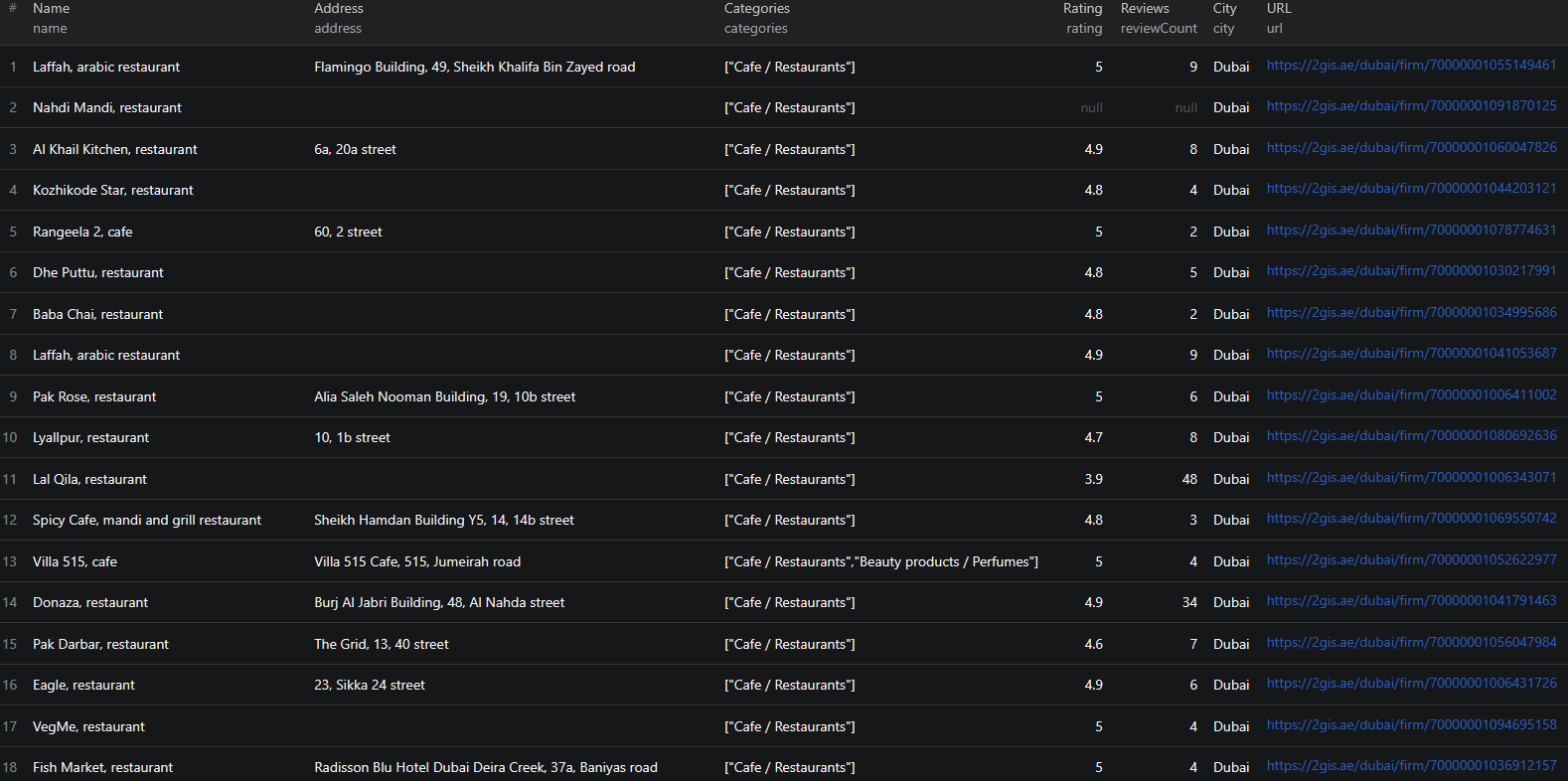
2GIS scraper results

Here is what the actual output looks like from the 2GIS Places Scraper. Each business listing returns a structured JSON object:

{
  "id": "70000001041258673",
  "name": "Ce La Vi Dubai, restaurant",
  "nameExtension": "Ce La Vi Dubai",
  "address": "Address Sky View Hotel, 133a, Sheikh Zayed road",
  "buildingName": null,
  "city": "Dubai",
  "district": "Burj Khalifa/Downtown Dubai",
  "latitude": 25.201722,
  "longitude": 55.270756,
  "categories": ["Cafe / Restaurants"],
  "rating": 4.6,
  "reviewCount": 33,
  "schedule": {
    "Fri": [{ "from": "12:00", "to": "03:00" }],
    "Mon": [{ "from": "12:00", "to": "03:00" }],
    "Sat": [{ "from": "12:00", "to": "03:00" }],
    "Sun": [{ "from": "12:00", "to": "03:00" }],
    "Thu": [{ "from": "12:00", "to": "03:00" }],
    "Tue": [{ "from": "12:00", "to": "03:00" }],
    "Wed": [{ "from": "12:00", "to": "03:00" }]
  },
  "attributes": {
    "Restaurants / Café": [
      "Average bill 180 AED",
      "Asian cuisine",
      "Vegeterian menu",
      "Desserts",
      "Alcohol menu",
      "Live music",
      "Restaurants with a View",
      "Valet Parking",
      "Outdoor sitting area",
      "Brunch",
      "Brunch hours 13:00-16:00",
      "Brunch price 290–690 AED",
      "Seating capacity 150 people"
    ],
    "Assortment": ["Fresh juice"],
    "Payment by credit cards": ["Wi-Fi"],
    "Payment methods": ["Payment by credit cards", "Cash payment"],
    "Service Language": ["English", "Tagalog", "French", "Russian"],
    "Wheelchair Accessible": ["Entrance for handicapped people"]
  },
  "photoCount": null,
  "orgName": "Ce La Vi Dubai, restaurant",
  "branchCount": 1,
  "url": "https://2gis.ae/dubai/firm/70000001041258673",
  "searchUrl": "https://2gis.ae/dubai/search/restaurants",
  "scrapedAt": "2026-02-07T15:21:19.853Z"
}

Key things to notice:

  • Rich attributes — the attributes object captures structured business features organized by category. For this restaurant you get cuisine type, average bill, brunch details, accessibility info, service languages, and payment methods — not just a text description
  • GPS coordinates — precise latitude and longitude for every listing, enabling geographic mapping and spatial analysis
  • Working hours by day — the schedule field breaks down hours by day of the week, so you can identify businesses open late, on weekends, or around the clock
  • Rating and review count — combined, these give you a signal of both quality and activity level. A business with 4.6 stars across 33 reviews is very different from one with 4.6 across 3 reviews
  • District information — sub-city district data lets you analyze listing density and characteristics by neighborhood, not just by city
  • Branch count — identifies whether a listing is a standalone business or part of a chain, useful for distinguishing independent operators from franchises

This structured format is ready to import into any database, analytics tool, or CRM without additional parsing.

Try the 2GIS Places Scraper now — no coding required.

Automating 2GIS Data Collection

For ongoing lead generation, competitor monitoring, or market research, you do not want to run the scraper manually each time. The Apify platform supports full automation:

Scheduled Runs

Set up recurring scrapes on any schedule — daily, weekly, or monthly. The scraper runs automatically and stores results in a persistent dataset you can access at any time. Weekly runs work well for most lead generation and competitive monitoring use cases, while daily runs are appropriate for tracking fast-changing categories like restaurant openings and closures.

API Integration

Use the Apify API to trigger scraper runs programmatically and retrieve results. This lets you integrate 2GIS data into your existing workflows:

  • Feed new business listings into your CRM automatically
  • Trigger alerts when businesses matching your criteria appear in a target district
  • Build dashboards that update with fresh business data across multiple cities
  • Connect to tools like Zapier, Make, or custom data pipelines

Multi-City Pipelines

Run parallel scraper instances across multiple cities and search categories to build a unified view of business activity across your target markets. Combine results with geographic normalization to compare business density and quality across cities on a common basis.

Node.js Example

For a complete working example showing how to call this scraper from Node.js, see the GitHub repository.

Webhooks

Configure webhooks to get notified when a scraper run completes. This is useful for event-driven architectures where you want to process new business data immediately rather than polling on a schedule.

Tips for Getting the Most Out of 2GIS Data

Constructing Effective Search URLs

The quality of your 2GIS data starts with the search URLs you provide. To build effective inputs:

  1. Go to 2gis.ru (Russia), 2gis.kz (Kazakhstan), 2gis.ae (UAE), or the appropriate regional domain
  2. Navigate to your target city and search for your target category or keyword
  3. Copy the URL from the address bar — it will look like https://2gis.ru/moscow/search/кафе
  4. Pass this URL as input to the scraper

For more precise targeting, use 2GIS's built-in search filters (category, district, rating) and copy the filtered URL — the scraper will respect those filters.

Combining Multiple Search URLs

You can provide multiple search URLs in a single run. This is useful when you want to collect data across:

  • Multiple categories in the same city (e.g., restaurants, bars, cafes in Dubai)
  • The same category across multiple cities (e.g., pharmacies in Moscow, Almaty, and Novosibirsk)
  • Different regional domains (e.g., .ru and .kz and .ae in one run)

Results from all provided URLs are collected into a single unified dataset.

Using GPS Coordinates for Spatial Analysis

Every 2GIS listing includes precise GPS coordinates. Use these to:

  • Build map-based visualizations of business density by district
  • Run proximity analyses to identify clusters of businesses near a target location
  • Calculate catchment areas for site selection or delivery planning
  • Correlate business quality (ratings) with geographic position in a city

The latitude/longitude data is included in every result by default — no additional configuration needed.

Filtering by Rating and Review Count

The raw scraped data includes rating and reviewCount for every listing. After export, you can filter in your analytics tool to focus on:

  • High-quality businesses (rating ≥ 4.0) for premium outreach
  • Active businesses (reviewCount ≥ 10) to focus on established operations
  • Newly opened businesses with few reviews but a specific category tag

These filters help you build lead lists that match your exact qualification criteria.

Does 2GIS Offer an API?

2GIS does have a developer API, but it comes with significant limitations for bulk data extraction:

Limited Data Access

The 2GIS API is primarily designed for map embedding, geocoding, and route planning — not for bulk extraction of business listing data with full attributes. The richness of structured attributes, working hours breakdowns, and business categories available on the public website is not fully exposed through the API.

Usage Restrictions

The free API tier has strict rate limits and query caps. Bulk extraction at scale requires paid API tiers with commercial agreements, which are not readily accessible to most teams.

The Practical Alternative

For most teams that need structured 2GIS business data at scale, a web scraper is the practical solution. The 2GIS Places Scraper extracts the same information visible to anyone visiting the 2GIS website — without requiring API access, commercial agreements, or custom infrastructure.

Why Use a Pre-Built 2GIS Scraper Instead of Building One

Building a custom 2GIS scraper is more involved than it looks:

  • Dynamic content — portions of 2GIS listing data require JavaScript execution or structured API calls to extract, not simple HTML parsing
  • Pagination complexity — 2GIS search results use infinite scroll or page-based pagination that requires careful handling to avoid missing results
  • Multi-region URL structures — 2GIS operates on different regional domains with varying URL patterns and content structures. Supporting multiple regions in one scraper requires substantial engineering
  • Attribute parsing — the structured attributes field contains nested, category-specific data in a semi-structured format. Parsing this consistently across thousands of listings requires careful schema handling
  • Maintenance overhead — 2GIS updates its frontend regularly. Every update can break a custom scraper, requiring immediate fixes to keep your data pipeline running
  • Infrastructure costs — scaling to thousands of listings per run requires proxy management, distributed request handling, and retry logic that adds up fast to build and maintain

Using a maintained, pre-built solution means you spend time analyzing 2GIS data instead of maintaining the infrastructure to collect it.

Try the 2GIS Places Scraper

The 2GIS Places Scraper extracts structured business data from 2GIS across any city and category — names, addresses, GPS coordinates, ratings, reviews, working hours, and rich structured attributes.

What you get:

  • Structured JSON or CSV output ready for analysis
  • All key business fields including name, address, coordinates, categories, ratings, and hours
  • Rich structured attributes including cuisine type, payment methods, accessibility features, and more
  • Multi-city support — scrape any city where 2GIS has coverage
  • Simple URL-based input — no category IDs or complex configuration required
  • Configurable limits with maxItems and maxPages
  • Fast, lightweight extraction without a full browser
  • Scheduled runs for ongoing monitoring and lead generation
  • API access for integration into your workflows
  • No coding or scraper maintenance required

Start scraping 2GIS now — your first run takes less than 5 minutes to set up.

If you are building a broader local business intelligence pipeline, combine 2GIS data with LinkedIn company data to enrich leads with contact details, or use it alongside career page scraping to identify fast-growing businesses actively hiring.

Legal and Ethical Considerations

Web scraping occupies a well-established legal space, but responsible practice matters:

  • Public data only — the 2GIS Places Scraper extracts publicly visible business listings that anyone can view by visiting 2GIS. No login or authentication is required
  • Respect rate limits — the scraper is designed to make requests at a reasonable pace to avoid overloading 2GIS's servers
  • Privacy compliance — business listing data is commercial and public in nature, but if your use case involves processing personal data of individual business owners, ensure compliance with applicable regulations including GDPR for EU-connected operations
  • Responsible use — use collected data for legitimate business purposes such as lead generation, market research, and competitive analysis

Frequently Asked Questions

Is scraping 2GIS business listings legal?

Scraping publicly available business listings from 2GIS is generally legal. All listing data is visible to any visitor without logging in. You should use the data responsibly, comply with applicable data privacy laws, and avoid overloading 2GIS servers with excessive requests.

Does 2GIS offer an official API?

2GIS does offer a limited API, but it requires registration, has usage restrictions, and does not expose the full richness of business listing data available on the public site. For bulk extraction with complete structured data, a scraper is the practical alternative.

What regions does 2GIS cover?

2GIS covers cities across Russia, Kazakhstan, Ukraine, Belarus, the UAE, and other CIS and Middle East markets. You can scrape any city where 2GIS has a presence by providing the corresponding search URL.

What data can be extracted from 2GIS?

You can extract business names, addresses, GPS coordinates, city, district, categories, ratings, review counts, working hours, business attributes (cuisine type, payment methods, accessibility features, etc.), branch counts, and direct listing URLs.

How do I provide input to the 2GIS scraper?

You provide one or more 2GIS search result URLs — for example, https://2gis.ae/dubai/search/restaurants. The scraper extracts all business listings from those search results and paginates automatically.

Can I control how many results the scraper collects?

Yes. Use the maxItems parameter to limit the total number of business listings extracted, and maxPages to limit how many pages of search results the scraper navigates. Both can be configured independently.

About the Author

This guide was written by Piotr, a software engineer with hands-on experience building and maintaining web scrapers at scale. He develops and maintains a suite of data extraction tools on the Apify platform, helping businesses automate their data collection workflows.

Need help with your scraping project?

Book a free discovery call and let's scope your project together.

Book a Call
Piotr Vassev

Piotr Vassev

Founder of FalconScrape. Building production-grade web scraping systems and data automation pipelines for businesses worldwide.

Connect on LinkedIn