How to Scrape OLX Listings Across Europe (Step-by-Step Guide)

If you want to scrape OLX listings for market research, price monitoring, lead generation, or competitive intelligence, this guide walks you through the entire process. You will learn what data you can extract from OLX, how to automate collection across multiple European markets, and how to turn OLX listing data into structured, actionable intelligence.
Why Scrape OLX Listing Data?
OLX is one of Europe's largest classifieds marketplace networks, operating dominant platforms in Poland, Bulgaria, Romania, Portugal, and Ukraine. Millions of listings are posted across categories including electronics, vehicles, real estate, fashion, home goods, and services. It is the go-to platform for buying and selling second-hand goods across Central and Eastern Europe.
Businesses and researchers scrape OLX listing data for several reasons:
- Price intelligence — monitor market prices for used goods, electronics, vehicles, and real estate across five European markets
- Competitive research — track competitor inventory, pricing strategies, and product availability on classifieds marketplaces
- Market demand analysis — identify which product categories and specific items have high supply or demand in different regions
- Lead generation — find sellers in specific categories who may be interested in your services, platform, or marketplace
- Inventory sourcing — identify bulk sellers, resellers, or suppliers active on OLX for procurement or arbitrage purposes
- Real estate research — analyze rental and sale listing volumes, prices, and geographic distribution across cities and regions
- Academic and policy research — study second-hand markets, regional price differences, and consumer goods dynamics in European economies
Manually copying listings from OLX is impractical. A single search returns hundreds of results across dozens of pages, and listings appear and expire daily. Automation is the only realistic approach for collecting data at scale.
What Data You Can Extract from OLX
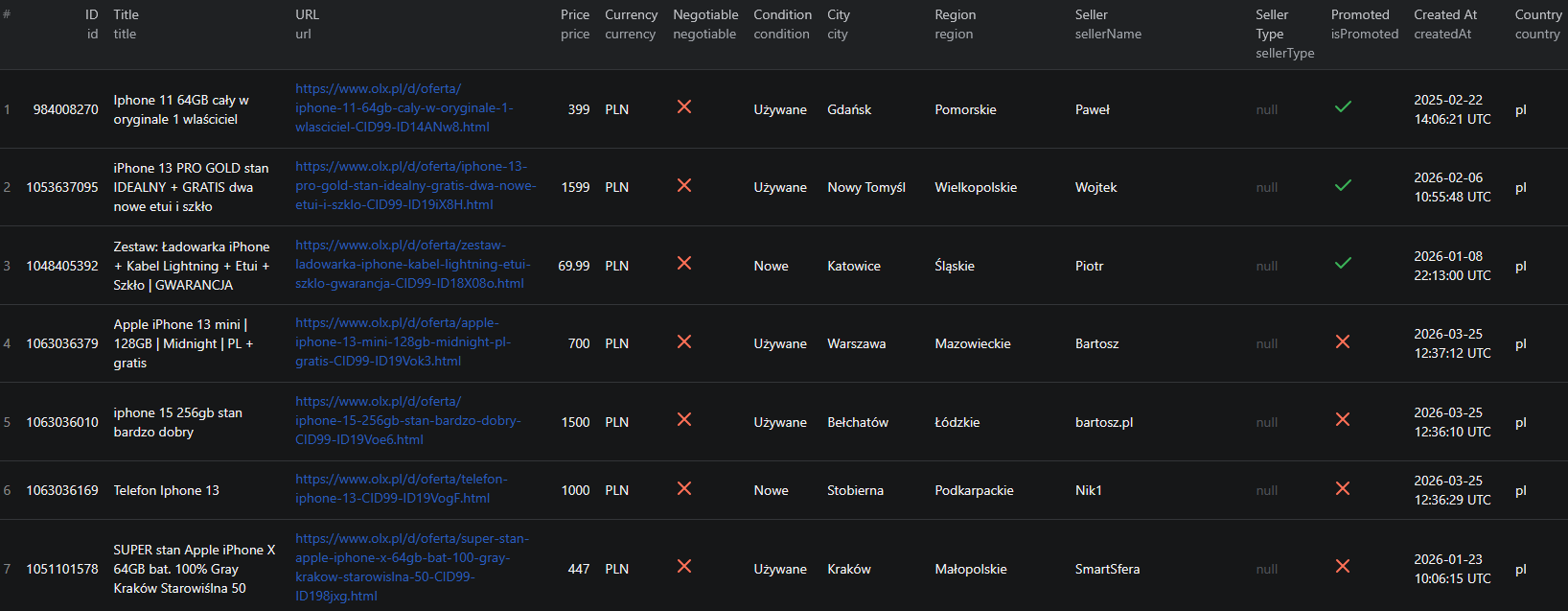
The OLX Listings Scraper extracts structured data from listing pages and search results. Here are the key fields you can collect:
| Field | Description | Example |
|---|---|---|
| Listing title | The title of the classified listing | Iphone 16! 93% kondycja baterii |
| Description | Full text description of the listing | Witam. Mam na sprzedaż telefon... |
| Price | Listed price in local currency | 1950 |
| Currency | Currency of the listed price | PLN, RON, EUR, UAH |
| Negotiable flag | Whether the price is negotiable | true / false |
| Condition | Item condition (new, used, etc.) | Używane (Used) |
| City | City where the listing is located | Katowice |
| District | Sub-city district of the listing | Osiedle Tysiąclecia |
| Region | Province or voivodeship | Śląskie |
| GPS coordinates | Latitude and longitude (optional) | 50.27778, 18.98144 |
| Category ID | OLX category of the listing | 2298 |
| Seller name | Display name of the seller | Maciej Szczygieł |
| Seller ID | OLX internal seller identifier | 776288518 |
| Seller joined | Date the seller registered on OLX | 2021-02-22 |
| Promoted flag | Whether the listing is a paid promotion | true / false |
| Photos | Array of listing photo URLs | ireland.apollo.olxcdn.com/... |
| Category params | Category-specific attributes | phonemodel, storage, color, SIM |
| Created at | Timestamp when the listing was posted | 2026-03-20T10:45:06+01:00 |
| Refreshed at | Timestamp of last listing refresh | 2026-03-20T10:47:30+01:00 |
| Listing URL | Direct link to the listing page | olx.pl/d/oferta/... |
| Country | OLX regional market of the listing | pl, bg, ro, pt, ua |
This level of structured detail would take hours to compile manually. With a scraper, you can extract thousands of OLX listings in under a minute.
Common Use Cases for OLX Listing Data
Price Monitoring and Market Intelligence
OLX is one of the most reliable sources for real-world second-hand prices in its markets. Unlike retail prices, OLX listings reflect what real buyers and sellers are willing to transact at. Scraping OLX data gives you a live view of market prices for electronics, vehicles, appliances, and consumer goods across five European markets.
Track price distributions for specific products, monitor how quickly listings refresh or disappear (a signal of demand), and identify regional price differences across cities and provinces.
Competitive Research for Resellers and Marketplaces
If you operate an ecommerce business, resell goods, or run a competing classifieds platform, OLX data tells you what your market looks like. Track how many listings exist for specific product categories, what prices competitors are listing at, and which cities have the densest supply of goods in your niche.
This intelligence is particularly valuable for resellers who source inventory from OLX, for marketplaces looking to benchmark their own listings, and for brands wanting to understand how their products are priced in the grey market.
Real Estate Market Research
OLX hosts significant volumes of real estate listings in Poland, Romania, and Bulgaria. Researchers and investors use OLX real estate data to track rental prices, monitor property availability, and identify geographic trends in housing markets. The GPS coordinate enrichment feature is especially useful for mapping listings and analyzing supply by neighborhood.
Lead Generation for Service Businesses
Sellers listing specific categories on OLX can be valuable leads for related services. A seller listing a used car may need insurance, financing, or detailing. A seller listing electronics may need repairs. A landlord listing apartments may need property management services. OLX data gives you a direct channel to identify and reach these prospects at the moment they are most relevant.
Sourcing and Procurement
Businesses and arbitrage operators use OLX data to identify bulk sellers, liquidators, and consistent resellers in their target categories. By filtering by seller ID and tracking listing volume, you can identify power sellers who may be open to wholesale arrangements.
Academic Research
OLX's scale and geographic diversity make it a compelling dataset for researchers studying second-hand markets, regional economic differences, consumer goods dynamics, and the informal economy in Central and Eastern Europe. The platform provides a real-time view of transaction-level market data that complements traditional economic surveys.
Challenges of Extracting OLX Data Manually
Before jumping into the tutorial, it is worth understanding why scraping OLX requires automation:
- Volume — major OLX categories like electronics or vehicles contain tens of thousands of listings across hundreds of pages. Manual browsing captures only a tiny fraction
- Pagination — OLX paginates results, and most categories require following dozens of pages to collect complete data
- Multi-market complexity — running parallel data collection across five regional domains with different category structures and currencies multiplies the manual effort
- Category-specific fields — each OLX category has its own set of structured attributes (phone specs, vehicle details, property features). Parsing these consistently from raw HTML is complex
- Listing volatility — OLX listings are posted and expired constantly. Any manual collection is stale within hours for fast-moving categories
- GPS enrichment — latitude and longitude require additional requests beyond the search page, making manual collection even more tedious
Building and maintaining a custom OLX scraper that handles all of this correctly is a significant engineering investment. A pre-built, maintained solution is far more practical for most use cases.
Step-by-Step: How to Scrape OLX Listings
Here is how to scrape OLX listing data using the OLX Listings Scraper on Apify.
Step 1 — Choose a Country and Mode
Start by deciding which OLX regional market you want to target:
- Poland —
pl(olx.pl) — the largest OLX market, covering a wide range of consumer goods, vehicles, and real estate - Bulgaria —
bg(olx.bg) — strong in electronics, appliances, and vehicles - Romania —
ro(olx.ro) — a major marketplace for real estate, vehicles, and general goods - Portugal —
pt(olx.pt) — active in fashion, electronics, and home goods - Ukraine —
ua(olx.ua) — large classifieds market for electronics, vehicles, and consumer goods
Then choose your input mode:
- Search mode — enter a keyword to search across all categories in the selected market
- Category mode — provide one or more OLX category IDs to scrape all listings in a specific category
- URL mode — provide direct OLX listing URLs to scrape specific pages
Step 2 — Configure the Scraper Input
Head to the OLX Listings Scraper on Apify and configure your run:
- Select the country —
pl,bg,ro,pt, orua - Set the mode —
search,category, orurls - Enter your search query (if using search mode) or category IDs (if using category mode)
- Set a maxItems limit — up to 1,000 results per query
- Optionally set price filters —
priceFromandpriceToin local currency - Choose a sort order — newest, cheapest, or most expensive
- Enable includeDetails if you want GPS coordinates enriched on each listing
- Click Start to begin the extraction
The scraper handles pagination automatically and collects all matching results up to your specified limit.
Step 3 — Run the Scraper
Once started, the scraper will:
- Query OLX in the selected market with your search or category parameters
- Follow all result pages automatically (up to 1,000 results per query)
- Parse structured listing data including price, seller info, category attributes, and photos
- Optionally enrich each listing with GPS coordinates if
includeDetailsis enabled - Store all results in a clean, structured dataset
Speed is not a constraint. The OLX Listings Scraper can process 1,000 listings in approximately 30 seconds.
Step 4 — Export Structured Results
Once the scraper finishes, export your results in your preferred format:
- JSON — ideal for developers building data pipelines, analytics, or integrations
- CSV — perfect for analysis in Excel or Google Sheets, or importing into a CRM or database
- API — access results programmatically via the Apify API for automated downstream workflows
Each record includes the full set of structured fields: title, description, price, currency, condition, seller info, location, GPS, photos, category attributes, and timestamps.
Ready to try it? Run the OLX Listings Scraper on Apify and get your first dataset in minutes.
Example Output (Real Data Preview)

Here is what the actual output looks like from the OLX Listings Scraper. Each listing returns a structured JSON object:
{
"id": 1061972724,
"url": "https://www.olx.pl/d/oferta/iphone-16-93-kondycja-baterii-CID99-ID19RWCk.html",
"title": "Iphone 16! 93% kondycja baterii",
"description": "Witam. Mam na sprzedaż telefon IPhone 16 w kolorze czarnym...",
"price": 1950,
"currency": "PLN",
"negotiable": true,
"previousPrice": null,
"condition": "Używane",
"city": "Katowice",
"district": "Osiedle Tysiąclecia",
"region": "Śląskie",
"lat": 50.27778,
"lon": 18.98144,
"categoryId": 2298,
"sellerId": 776288518,
"sellerName": "Maciej Szczygieł",
"sellerType": null,
"sellerJoined": "2021-02-22",
"isPromoted": true,
"photos": [
"https://ireland.apollo.olxcdn.com:443/v1/files/haxawzyemzul1-PL/image;s=800x600"
],
"params": {
"state": "Używane",
"phonemodel": "iPhone 16",
"builtinmemory_phones": "128GB",
"coloriphone": "Czarny",
"sim_options": "Dual SIM (SIM + eSIM)"
},
"createdAt": "2026-03-20T10:45:06+01:00",
"refreshedAt": "2026-03-20T10:47:30+01:00",
"country": "pl",
"scrapedAt": "2026-03-25T12:32:37.195Z"
}
Key things to notice:
- Category params — structured attributes specific to the listing's category. For this phone listing, you get the exact model, storage capacity, color, and SIM type — not just a text description
- GPS coordinates — latitude and longitude available when
includeDetailsis enabled, allowing geographic mapping of listings - Seller history — seller join date and ID let you identify power sellers and build seller-level aggregations
- Promoted flag —
isPromoted: truemarks paid promoted listings, useful for distinguishing organic from boosted inventory - Negotiable price — the
negotiablefield tells you which sellers are open to offers versus fixed-price - Previous price —
previousPricecaptures price drops, useful for identifying listings where sellers are motivated to move inventory - Refresh timestamp —
refreshedAtshows when a listing was last bumped, a signal of active sellers
This structured format is ready to import into any database, analytics tool, or CRM without additional parsing.
Try the OLX Listings Scraper now — no coding required.
Automating OLX Data Collection
For ongoing price monitoring, inventory tracking, or market research, you do not want to run the scraper manually each time. The Apify platform supports full automation:
Scheduled Runs
Set up recurring scrapes on any schedule — daily, weekly, or monthly. The scraper runs automatically and stores results in a persistent dataset you can access at any time. Daily runs are ideal for price monitoring and lead generation, while weekly runs work well for broader market research.
API Integration
Use the Apify API to trigger scraper runs programmatically and retrieve results. This lets you integrate OLX data into your existing workflows:
- Feed new listings into your pricing database automatically
- Trigger alerts when items matching your criteria appear on OLX
- Build dashboards that update with fresh listing data across multiple markets
- Connect to tools like Zapier, Make, or custom data pipelines
Multi-Market Pipelines
Run parallel scraper instances across all five supported OLX markets to build a unified view of classifieds activity across Central and Eastern Europe. Combine results with currency normalization to compare prices across markets on a common basis.
Node.js Example
For a complete working example showing how to call this scraper from Node.js, see the GitHub repository.
Webhooks
Configure webhooks to get notified when a scraper run completes. This is useful for event-driven architectures where you want to process new listing data immediately rather than polling on a schedule.
Tips for Getting the Most Out of OLX Data
Working with Category IDs
Category IDs are region-specific on OLX. A category ID that is valid on olx.pl will not work on olx.bg. To find the correct category ID for your target market:
- Browse the target OLX site and navigate to your category
- Look at the URL — the category ID is embedded in the path (e.g.
/elektronika/maps to category ID 99 on olx.pl) - Use that ID in the
categoryIdsinput
You can pass multiple category IDs in a single run to aggregate listings across related categories.
Overcoming the 1,000-Result Cap
OLX limits any single query to 1,000 results. For categories with more listings than this limit, use these strategies to collect comprehensive data:
- Split by price range — use
priceFromandpriceTofilters to subdivide the result set into price bands, each under 1,000 results - Multiple category IDs — run separate queries for sub-categories rather than parent categories
- Geographic segmentation — use keyword searches with city names to scope results to specific markets
GPS Coordinate Enrichment
Enabling includeDetails adds GPS coordinates to each listing but doubles the cost per listing ($0.002 vs $0.001). Use this option when:
- You are building a map-based visualization of listings
- You need to analyze listing density by neighborhood
- You are correlating listing prices with geographic data
For bulk price analysis where location is less important, leave includeDetails disabled to keep costs lower.
Does OLX Offer an API?
OLX does not provide a broadly available public API for extracting listing data at scale:
Limited Partner Access
OLX has some API integrations available to select enterprise partners and ATS integrations, but these are not accessible to most businesses or developers. Even where partner APIs exist, they are scoped to specific use cases and do not expose the full range of listing data available on the public site.
Manual Export Limitations
You can manually browse OLX and copy listing details, but this only works for a handful of listings at a time. For any meaningful analysis — even 100 listings — manual collection is impractical and error-prone.
The Practical Alternative
For most teams that need structured OLX listing data at scale, a web scraper is the practical solution. The OLX Listings Scraper extracts the same information that anyone can see by visiting OLX — without requiring API access, authentication, or custom infrastructure.
Why Use a Pre-Built OLX Scraper Instead of Building One
Building a custom OLX scraper is more involved than it looks:
- Multi-market complexity — handling five regional domains with different category structures, currencies, and URL patterns requires substantial engineering to get right
- Category-specific parsing — each OLX category has its own structured attribute fields. A generic scraper misses this data; a category-aware scraper requires ongoing updates as OLX adds or changes categories
- Pagination logic — OLX search results span multiple pages. Reliable pagination handling requires careful implementation to avoid missing results or hitting rate limits
- GPS enrichment — fetching location data requires additional requests per listing on top of the standard scraping workflow. Building this correctly requires queue management and cost control logic
- Maintenance overhead — OLX updates its frontend regularly. Every update can break custom scrapers, requiring immediate fixes to keep your data pipeline running
- Infrastructure costs — scaling to thousands of listings per run requires proxy management, distributed request handling, and retry logic that adds up fast to build and maintain
Using a maintained, pre-built solution means you spend time analyzing OLX data instead of maintaining the infrastructure to collect it.
Try the OLX Listings Scraper
The OLX Listings Scraper extracts structured data from OLX listings across Poland, Bulgaria, Romania, Portugal, and Ukraine — prices, seller info, photos, GPS coordinates, and category-specific attributes.
What you get:
- Structured JSON or CSV output ready for analysis
- All key listing fields including price, condition, seller info, and category attributes
- Multi-country support across five OLX regional markets
- Keyword search, category browsing, or direct URL input
- Price and sort filters to target specific market segments
- Optional GPS coordinate enrichment for geographic analysis
- Fast collection — 1,000 listings in ~30 seconds
- Scheduled runs for ongoing market monitoring
- API access for integration into your workflows
- No coding or scraper maintenance required
Start scraping OLX now — your first run takes less than 5 minutes to set up.
If you are building a broader marketplace intelligence pipeline, combine OLX data with Alibaba listings for wholesale pricing context, or AliExpress listings for retail price benchmarks.
Legal and Ethical Considerations
Web scraping occupies a well-established legal space, but responsible practice matters:
- Public data only — the OLX Listings Scraper extracts publicly visible listings that anyone can view by visiting OLX. No login or authentication is required
- GDPR compliance — OLX operates across the EU, so be mindful of GDPR when storing and processing data. Listing data includes seller names and locations — handle these with appropriate care
- Respect rate limits — the scraper is designed to make requests at a reasonable pace to avoid overloading OLX's servers
- Responsible use — use the data for legitimate business purposes such as price research, market analysis, and lead generation
Frequently Asked Questions
Is scraping OLX listings legal?
Scraping publicly available listings from OLX is generally legal. All listing data is visible to any visitor without logging in. However, you should use the data responsibly, comply with local privacy laws including GDPR, and avoid overloading OLX's servers with excessive requests.
Does OLX offer an official API?
OLX does not provide a broadly available public API for extracting listing data at scale. Some seller and partner integrations exist, but they are not accessible to most businesses or developers. A scraper is the practical way to access OLX listing data programmatically.
Which OLX regional markets are supported?
The OLX Listings Scraper supports five regional markets: Poland (olx.pl), Bulgaria (olx.bg), Romania (olx.ro), Portugal (olx.pt), and Ukraine (olx.ua).
What data can be extracted from OLX listings?
You can extract listing titles, descriptions, prices, currencies, negotiability flags, condition, seller names, seller IDs, listing creation and refresh dates, city, district, region, GPS coordinates (optional), category IDs, photos, and category-specific attributes such as phone model, storage, and color.
How fast is the OLX scraper?
The OLX Listings Scraper can collect 1,000 listings in approximately 30 seconds. It handles pagination automatically and supports up to 1,000 results per search query or category.
Can I filter OLX listings by price or sort order?
Yes. The scraper supports filtering by minimum and maximum price in local currency, and sorting results by newest, cheapest, or most expensive. You can combine price filters with keyword or category inputs to precisely target the listings you want.
About the Author
This guide was written by Piotr, a software engineer with hands-on experience building and maintaining web scrapers at scale. He develops and maintains a suite of data extraction tools on the Apify platform, helping businesses automate their data collection workflows.
Need help with your scraping project?
Book a free discovery call and let's scope your project together.
Book a Call