
How to Scrape Alibaba Products and Build a Supplier Shortlist
A low Alibaba price is not enough to choose a supplier. The offer may require a larger order than you can place, refer to a different specification, or exclude costs you still need to confirm.
The Alibaba Listings Scraper turns a search query into product records with prices, minimum order quantities, and supplier information. I maintain the Actor. This guide shows how to collect a small search and turn it into a shortlist of suppliers worth contacting.
Search for a product you can specify
Use a product description that includes the characteristic you actually need. “Bluetooth speaker” is a valid starting search, but a sourcing decision will also need requirements such as battery capacity, dimensions, materials, or customization.
Write those requirements down before comparing offers. They will become your screening columns after export. Search results can help identify candidates; the scraper does not verify manufacturing capacity, certification authenticity, or the terms a supplier will agree to.
This Actor accepts one search string per run. It does not take an array of keywords, a product URL, or a supplier page as input. For distinct searches, use separate runs so you can keep the query attached to each result set.
Collect twenty offers
Open the Actor on Apify and choose the JSON view of Input:
{
  "search": "bluetooth speaker",
  "limit": 20
}
search is required. limit is an integer with a default of 60. Set it explicitly instead of relying on older instructions suggesting an unlimited run. The current input has no MOQ, price, or certification filters; those decisions happen after collection.
Click Start, then open the dataset. Check that the returned products match the intended product category and that the price and MOQ fields are usable. A relevant twenty-row sample is more useful than a large export of loosely related products.
Pricing as of September 6, 2026: the configured product event is $0.003 per saved product. Twenty results correspond to $0.06 in product event fees. The current pricing configuration has no Actor-start event. Check live pricing before increasing the limit.
Know which columns to keep
The current Actor documents more sourcing fields than the original version of this article:
| Fields | Question they help answer |
|---|---|
productId, productUrl, title | Which exact offer am I reviewing? |
price, priceMin, priceMax, currency | What price or range is displayed? |
moq, moqValue, moqUnit | Can I meet the advertised minimum order? |
companyId, companyName, supplierProfileUrl | Which supplier is behind several similar offers? |
supplierServiceScore, shippingScore, certifications | What supplier information should I inspect further? |
isSponsored, scrapedAt | Was this a paid placement, and when was it collected? |
The current documentation says the storefront is pinned to USD. Older samples use US$ and have different types for some numeric fields, so inspect the export from your own run before writing a strict importer. Keep raw price and MOQ text alongside normalized numbers.
The screenshot below is from an earlier run and may not show every field now available:
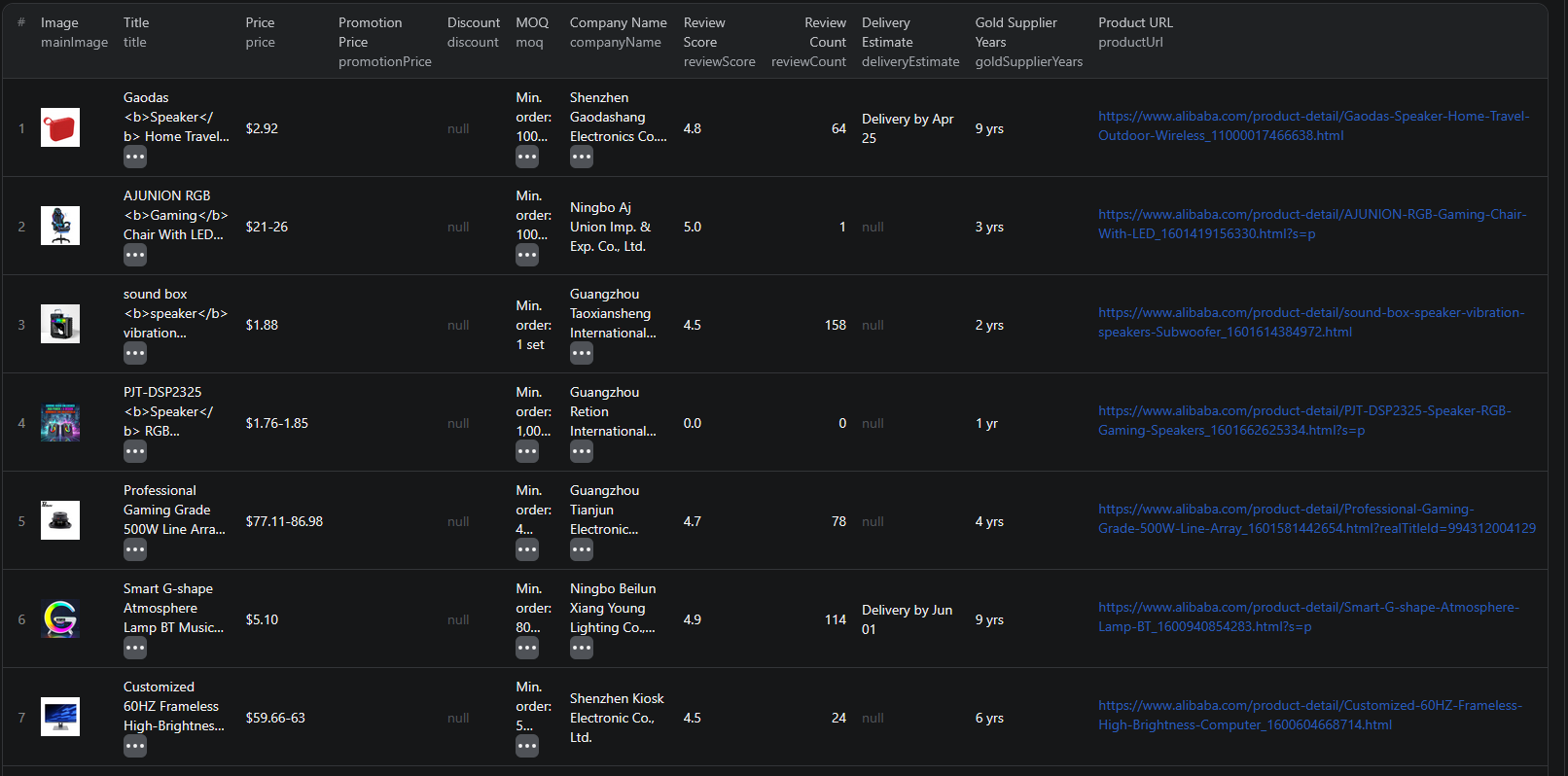
For a compact example, this older record shows the original price and MOQ strings:
{
  "title": "Hot Selling Galaxy S24 Ultra 5G Smartphone 6.8inch 16G+512GB With S-Pen Original Android 13 Telephone 4G 5G+WIFI Mobile Phones",
  "price": "$119.60",
  "promotionPrice": "$59.80",
  "moq": "Min. order: 1 unit",
  "companyName": "Hefei Iceching Technology Co., Ltd.",
  "countryCode": "CN"
}
This is a historical listing claim, not a verified branded product or a supplier recommendation. In particular, a familiar brand in a title does not establish authenticity. The example also shows why a promotion price should not become your purchase-cost assumption without checking the offer.
Filter by order size before sorting by price
Export CSV, retaining the raw and numeric price/MOQ fields plus supplier identifiers. Add your planned quantity, required specification, and a review-status column.
Suppose you want an initial order of 50 pieces. That is an illustrative sourcing requirement, not a recommendation for this search. Filter out offers whose moqValue exceeds 50 only after checking moqUnit. Fifty sets may contain a very different quantity from fifty pieces.
Rows with a missing numeric MOQ need manual review. Do not convert a blank into zero and let it pass the filter. Open the product link and read the raw moq text before deciding whether the offer fits.
Next, examine the price range. The lowest advertised price can depend on volume or configuration. Do not multiply your planned quantity by priceMin and call that a quote. Keep a separate column for the price the supplier confirms at your specification and order size.
You now have two useful groups: offers that appear to fit your order and offers that need clarification. That is a better starting point for outreach than a ranking by headline price alone.
Reduce the list to suppliers worth reviewing
Group the remaining rows by companyId where available, using the company profile link as a fallback. One supplier may have many similar listings. Keep representative offers rather than treating every row as a different sourcing option.
Review each shortlisted supplier's profile and the actual product page. Record the questions still open: exact specification, sample availability, production lead time, packaging, freight, and documentation relevant to your product. A certification field or supplier badge is a lead to inspect, not verification that the product meets your requirements.
Keep sponsored status visible if you are interpreting search placement. An advertised position is not evidence that an offer is the cheapest or the best match. Missing certifications, discounts, or delivery estimates should remain missing until checked.
If your comparison also includes China's domestic wholesale market, the 1688 sourcing guide follows a separate workflow. Keep currencies, order units, and supplier terms explicit when comparing the two sources.
Repeat the search without losing context
Save the input as an Apify task once the first shortlist is useful. Retain the search term and collection time with each export. Match repeat observations by product ID and keep old values if you want price history.
Search ranking can change. A product absent from your next limited sample is not necessarily discontinued. Recheck its page before removing a supplier from consideration.
The Alibaba Node.js example is a separate reference for integrating the workflow into code. Verify older sample fields against the current Actor before building a database importer.
Questions before you run
Can I provide several search keywords as an array?
The current input requires a single search string. Run distinct searches separately and retain the query with each export.
Can I filter by MOQ before the run?
The current Actor input has search and limit fields. Use the returned MOQ fields to filter after collection, checking the unit as well as the number.
Is the scraped price a supplier quote?
No. It is the price or range displayed in a listing. Confirm the specification, quantity, shipping, and commercial terms with the supplier before treating it as a purchasing cost.
