How to Scrape Poshmark Listings and Seller Data (Step-by-Step Guide)

If you want to scrape Poshmark listings and seller data for resale market research, price monitoring, or competitor analysis, this guide walks you through the entire process. You will learn what data you can extract, how to automate the collection, and how to turn raw Poshmark listings into actionable marketplace intelligence.
Why Scrape Poshmark Data?
Poshmark is one of the largest resale marketplaces in the United States, with millions of active listings across fashion, apparel, shoes, accessories, and lifestyle products. It is a go-to platform for resellers, thrift entrepreneurs, and anyone buying or selling secondhand goods.
That makes Poshmark a rich data source for understanding the resale economy — what products are in demand, how sellers price their items, which brands hold value, and where market opportunities exist.
Businesses and resellers scrape Poshmark data for several reasons:
- Product trend analysis — identify which brands, styles, and categories are trending in the resale market
- Price monitoring — track how products are priced across sellers to find competitive pricing and margin opportunities
- Competitor monitoring — analyze what other sellers are listing, how they price items, and how quickly they sell
- Marketplace analytics — study seller behavior, listing patterns, and demand signals at scale
- E-commerce research — understand resale market dynamics to inform sourcing, pricing, and inventory decisions
Manually browsing Poshmark and copying listing details is impractical. A single search query can return thousands of results, and new listings appear constantly. Automation is the only realistic approach at scale.
What Data You Can Extract from Poshmark
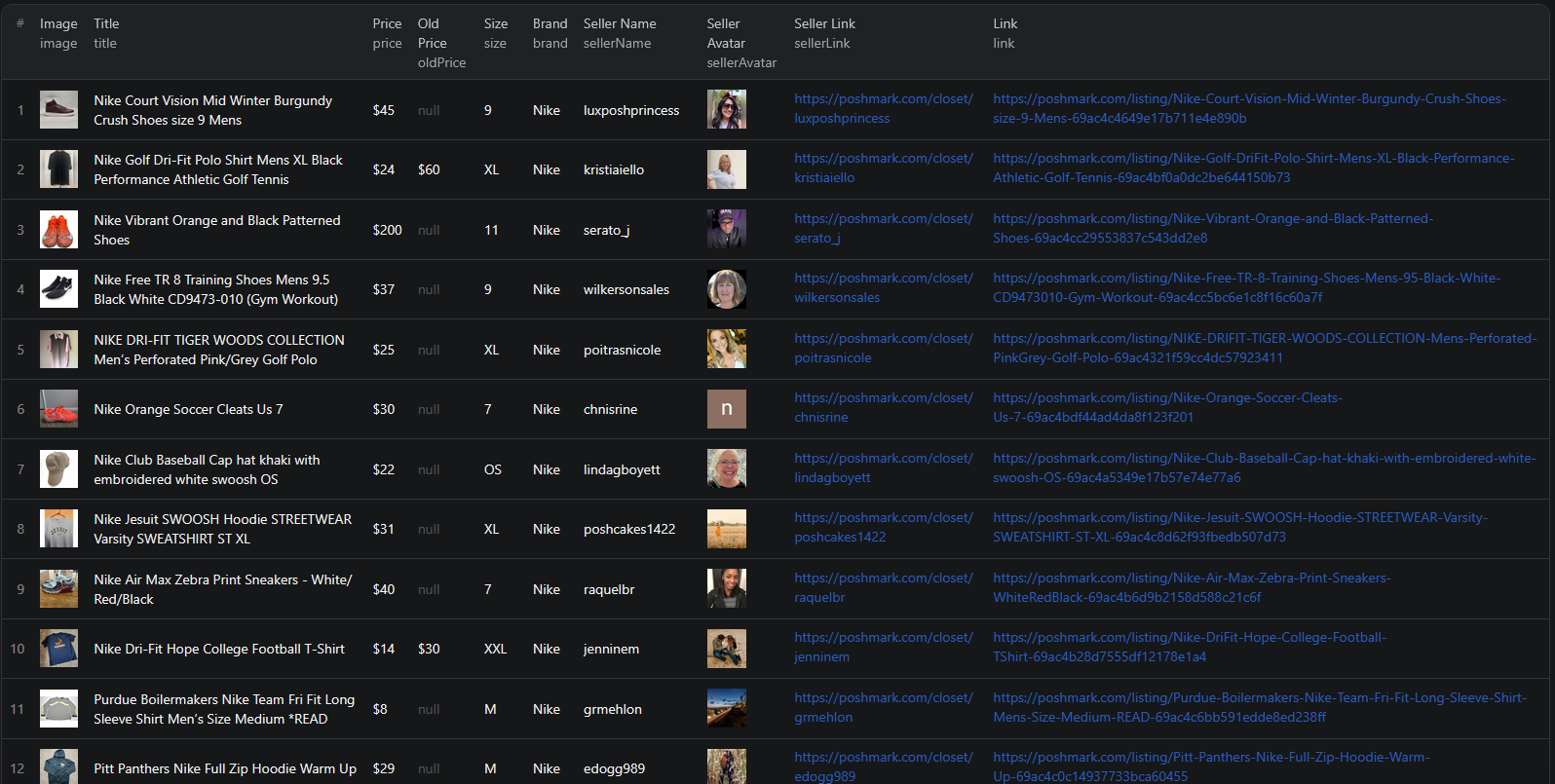
The Poshmark Listings Scraper extracts structured data from search result pages. Here are the key fields you can collect:
| Field | Description | Example |
|---|---|---|
| Product title | The full name of the listing | Nike Air Max Penny I Ds Men Size 9 |
| Price | Current listing price | $110 |
| Original price | Original or retail price before markdown | $190 |
| Brand | The product brand | Nike |
| Size | Product size | 9 |
| Product image | URL of the listing image | di2ponv0v5otw.cloudfront.net/posts/... |
| Listing URL | Direct link to the product page | poshmark.com/listing/Nike-Air-Max-Penny... |
| Seller name | The seller's username | shoeman302 |
| Seller avatar | URL of the seller's profile image | di2ponv0v5otw.cloudfront.net/users/... |
| Seller profile | Direct link to the seller's closet | poshmark.com/closet/shoeman302 |
This is the kind of data that would take hours to compile manually for even a single search query. With a scraper, you can extract thousands of listings across multiple categories in minutes.
Common Use Cases for Poshmark Data
Product Trend Analysis
The resale market moves fast. What sells well today may not sell next month. Scraping Poshmark lets you track which brands, product types, and styles are generating the most activity — helping you spot trends before they peak and adjust your inventory accordingly.
Monitor how often specific items appear in search results, compare pricing across similar products, and identify which categories are growing.
Competitor Monitoring
If you sell on Poshmark, knowing what your competitors are doing is essential. Track their listings, pricing strategies, and how quickly they mark down items. Identify which sellers dominate specific categories and learn from their approach.
Scraping competitor data regularly reveals patterns — like when they drop prices, which brands they focus on, and how they title their listings for visibility.
Price Monitoring and Resale Valuation
Understanding the going rate for specific items is critical for resale profitability. Scrape Poshmark to build a pricing database for specific brands and product categories. Compare current prices against original retail prices to calculate typical resale margins.
This data is especially valuable for resellers sourcing inventory from thrift stores, estate sales, or wholesale lots — knowing the Poshmark market price before you buy determines whether a deal is worth it.
Marketplace Analytics
Analytics platforms and data companies use Poshmark data to build market reports, trend dashboards, and pricing tools for the resale industry. The structured data format makes it straightforward to feed into any analytics pipeline.
E-commerce Research
Brands and retailers use resale marketplace data to understand how their products perform on the secondary market. Track brand value retention, identify which product lines hold their price, and understand customer preferences through marketplace demand signals.
Challenges of Extracting Poshmark Data Manually
Before jumping into the tutorial, it is worth understanding why scraping Poshmark is harder than it looks:
- Large listing volume — Poshmark has millions of active listings. Even a narrow search returns hundreds of pages of results
- Dynamic content loading — listings are rendered with JavaScript, so simple HTTP requests will not capture the data
- Pagination and infinite scroll — results load dynamically as you scroll, making traditional scraping approaches ineffective
- Rate limiting — too many requests from the same IP can trigger blocks or throttling
- Maintenance overhead — Poshmark updates its frontend regularly, which means custom scrapers break and need constant fixing
Building and maintaining your own Poshmark scraper is a significant time investment. For most use cases, using a pre-built, maintained solution is far more practical.
Step-by-Step: How to Scrape Poshmark Listings
Here is how to scrape Poshmark data using the Poshmark Listings Scraper on Apify.
Step 1 — Define Your Search Query
Start by deciding what kind of products you want to extract. Go to Poshmark and perform a search to get the search URL. For example:
- Nike sneakers —
https://poshmark.com/search?query=nike+sneakers - Vintage jackets —
https://poshmark.com/search?query=vintage+jackets - Designer handbags —
https://poshmark.com/search?query=designer+handbags
You can also browse Poshmark's category pages or apply filters (brand, size, price range) to narrow down results before scraping.
Step 2 — Configure the Scraper Input
Head to the Poshmark Listings Scraper on Apify and configure your run:
- Paste your Poshmark search URL(s) into the input field
- You can add multiple URLs to scrape different categories or search queries in a single run
- Review the settings and click Start to begin the extraction
The scraper handles all the heavy lifting — browser rendering, pagination, and data parsing.
Step 3 — Run the Scraper
Once started, the scraper will:
- Load each search results page and extract listing data
- Navigate through all pages of results automatically
- Parse structured data including prices, brands, sizes, and seller details
- Store results in a clean, structured dataset
Processing time depends on the number of search pages. Most runs complete within a few minutes.
Step 4 — Export Your Results
Once the scraper finishes, you can export the results in multiple formats:
- JSON — ideal for developers building data pipelines or integrations
- CSV — perfect for spreadsheet analysis in Excel or Google Sheets
- API — access results programmatically via the Apify API for automated workflows
Each record includes the full set of structured fields: product title, pricing, brand, size, images, seller details, and direct URLs.
Ready to try it? Run the Poshmark Listings Scraper on Apify and get your first dataset in minutes.
Example Output (Real Data Preview)

Here is what the actual output looks like from the Poshmark Listings Scraper. Each listing returns a structured JSON object:
{
"link": "https://poshmark.com/listing/Nike-Air-Max-Penny-I-Ds-Men-Size-9-67d1ceb3580123e2aa7d8b09",
"image": "https://di2ponv0v5otw.cloudfront.net/posts/2025/03/12/67d1ceb3580123e2aa7d8b09/s_67d1ced29ceaf72b7cc2d130.jpg",
"title": "Nike Air Max Penny I Ds Men Size 9",
"price": "$110",
"oldPrice": "$190",
"size": "9",
"brand": "Nike",
"sellerName": "shoeman302",
"sellerAvatar": "https://di2ponv0v5otw.cloudfront.net/users/2023/11/07/17/t_654ae88478b9e8950ceed73a.jpg",
"sellerLink": "https://poshmark.com/closet/shoeman302"
}
Key things to notice:
- Pricing data — current price and original price let you instantly calculate markdowns and resale margins
- Brand and size — key product attributes for filtering, comparison, and trend analysis
- Product image — listing photo URL for visual review without visiting Poshmark
- Seller details — username, avatar, and closet link for evaluating sellers and analyzing competitor listings
- Direct URLs — links to both the listing and the seller's closet for quick reference
This structured format makes it straightforward to import into any spreadsheet, database, or analytics tool.
Try the Poshmark Listings Scraper now — no coding required.
Automating Marketplace Analytics
For ongoing price monitoring or trend tracking, you do not want to run the scraper manually every time. The Apify platform supports full automation:
Scheduled Runs
Set up recurring scrapes on any schedule — daily, weekly, or monthly. The scraper runs automatically and stores results in a dataset you can access anytime. Daily runs work well for price monitoring and competitive tracking, while weekly runs are sufficient for general market research.
API Integration
Use the Apify API to trigger scraper runs programmatically and retrieve results. This lets you integrate Poshmark data into your existing workflows:
- Feed listing data into pricing dashboards automatically
- Trigger alerts when specific brands or products drop below a price threshold
- Build trend reports that update with fresh marketplace data
- Connect to tools like Zapier, Make, or custom data pipelines
Price Tracking Pipelines
Combine scheduled scraping with historical data storage to build price tracking systems. Monitor how resale prices change over time for specific brands, categories, or product types. Identify seasonal pricing patterns and optimal buy/sell windows.
Node.js Example
For a complete working example showing how to call this scraper from Node.js, see the GitHub repository.
Webhooks
Configure webhooks to get notified when a scraper run completes. This is useful for event-driven architectures where you want to process new listing data as soon as it is available.
Using Poshmark Data for E-commerce Intelligence
Poshmark data is valuable for building intelligent resale tools and market analytics.
Demand Forecasting
Track listing volumes and pricing trends across categories to predict which product types will see increased demand. Correlate seasonal patterns with pricing changes to forecast optimal times for buying and selling specific items.
Resale Price Analysis
Build pricing models based on historical Poshmark data. Understand the typical markdown from retail to resale for different brands, how pricing varies by size and condition, and what factors drive higher resale value.
Product Classification
Train machine learning models to classify products by brand, category, condition tier, or price segment. The structured data from Poshmark — including titles, brands, sizes, and pricing — provides rich features for classification tasks that power recommendation engines and search tools.
Recommendation Systems
Use Poshmark listing data to build product recommendation engines. Match buyers with relevant listings based on brand preferences, size, price range, and style patterns derived from marketplace data.
Does Poshmark Provide an API?
No. Poshmark does not offer a public API for accessing its marketplace data. There is no official way to programmatically query product listings, pricing, or seller information through an API endpoint.
This means your options for bulk data extraction are:
- Manual browsing — works for a handful of listings but is not scalable
- Custom scraper — requires development time, ongoing maintenance, and infrastructure to handle dynamic content and pagination
- Pre-built scraper — a maintained solution like the Poshmark Listings Scraper that handles all the technical complexity
For most teams, the pre-built scraper is the most practical choice. It eliminates the development and maintenance burden while giving you reliable, structured data output.
Why Use a Poshmark Scraper Instead of Building One
Building a custom Poshmark scraper sounds straightforward until you start dealing with the reality:
- Infrastructure complexity — Poshmark requires browser-level rendering and sophisticated request handling. Setting this up from scratch is a significant engineering project.
- Maintenance cost — Poshmark updates its frontend regularly. Every update can break your scraper, requiring immediate fixes to keep your data pipeline running.
- Anti-bot handling — reliable scraping at scale requires proxy rotation, request throttling, and detection avoidance. Managing this infrastructure takes time and money.
- Scaling challenges — scraping thousands of listing pages requires distributed infrastructure, queue management, and monitoring. The operational overhead adds up fast.
- Opportunity cost — every hour spent building and maintaining a scraper is an hour not spent on analyzing trends, pricing inventory, or growing your resale business
Unless you have very specific requirements that no existing tool can meet, using a maintained scraper lets you focus on what to do with the data instead of how to collect it.
Try the Poshmark Listings Scraper
The Poshmark Listings Scraper extracts structured data from Poshmark search results — product titles, prices, original prices, brands, sizes, images, seller details, and direct URLs.
What you get:
- Structured JSON or CSV output ready for analysis
- All key product and seller data fields in a single export
- Multiple search query support in a single run
- Scheduled runs for ongoing price monitoring
- API access for integration into your workflows
- No coding or scraper maintenance required
Start scraping Poshmark now — your first run takes less than 5 minutes to set up.
If you are building a marketplace data pipeline, combine Poshmark data with other e-commerce sources like AliExpress for sourcing intelligence or Fiverr for finding e-commerce service providers.
Legal and Ethical Considerations
Web scraping occupies a well-established legal space, but responsible practice matters:
- Public data only — the Poshmark scraper extracts publicly visible listing information that anyone can see by visiting Poshmark. No login or authentication is required.
- Respect rate limits — the scraper is designed to make requests at a reasonable pace to avoid overloading Poshmark's servers
- No seller harassment — use collected data for legitimate business purposes like market research and pricing analysis. Do not use seller data to spam or harass individual resellers.
- Compliance — if you operate in the EU or California, ensure your data handling complies with GDPR or CCPA. This primarily applies to how you store and process the data, not the collection itself.
Frequently Asked Questions
Is scraping Poshmark legal?
Scraping publicly available data from Poshmark is generally legal. The listings are visible to anyone who visits the site without logging in. However, you should always use the data responsibly, comply with local privacy regulations, and avoid overloading Poshmark's servers with excessive requests.
Does Poshmark have an API?
Poshmark does not offer a public API for accessing its marketplace data. There is no official way to programmatically query product listings, pricing, or seller information. A web scraper is the practical alternative for extracting structured resale data at scale.
What data can be extracted from Poshmark?
You can extract product titles, current prices, original prices, sizes, brand names, product images, listing URLs, seller usernames, seller avatars, and seller profile URLs. Each listing is returned as a structured JSON object.
How often can listings be updated?
You can schedule scraper runs as often as you need — daily, weekly, or on a custom schedule. For price monitoring and resale trend tracking, daily runs ensure you catch pricing changes and new listings quickly. For general market research, weekly runs provide a good balance.
Can I export Poshmark seller data?
Yes. The Poshmark Listings Scraper exports seller information alongside product data — including seller usernames, avatar images, and direct links to their closets. Results can be exported as JSON, CSV, or accessed via API.
How many Poshmark listings can I scrape at once?
The scraper can process multiple search URLs in a single run, each containing dozens of pages of results. There is no hard limit on the number of listings — the run time scales with the volume of data you request.
About the Author
This guide was written by Piotr, a software engineer with hands-on experience building and maintaining web scrapers at scale. He develops and maintains a suite of data extraction tools on the Apify platform, helping businesses automate their data collection workflows.
Need help with your scraping project?
Book a free discovery call and let's scope your project together.
Book a Call