How to Scrape Rakuten Japan (Ichiba) Product Listings (Step-by-Step Guide)

If you want to scrape Rakuten Japan product listings for market research, price monitoring, or competitive analysis, this guide covers everything you need. You will learn what data you can extract from Rakuten Ichiba (楽天市場), how to handle its mixed UTF-8 / EUC-JP encodings, and how to turn raw listings into actionable Japan e-commerce intelligence — including Rakuten Points, shop information, and structured attribute tags.
Why Scrape Rakuten Japan Product Data?
Rakuten Ichiba (楽天市場) is the largest online marketplace in Japan and the flagship property of the Rakuten Group. Unlike Amazon Japan, which is dominated by a single storefront, Ichiba is a multi-shop platform — tens of thousands of independent Japanese retailers list their products under the Rakuten umbrella, each with their own shop page, pricing, and shipping rules.
That makes Rakuten one of the most important e-commerce datasets in Japan. Anyone serious about the Japanese market — whether you sell into Japan, source from Japan, or compete with Japanese sellers — eventually needs structured Rakuten data. The catch: Rakuten serves search results in UTF-8 but product detail pages in legacy EUC-JP, the data spans search, genre browsing, and per-shop catalogs, and the headline price is only half the story once you factor in Rakuten Points.
Businesses scrape Rakuten data for several reasons:
- Price intelligence in Japan — track JPY prices across thousands of shops for the same SKU and identify pricing trends
- Loyalty-adjusted pricing — compute the effective price (
price - rakutenPoints) that Japanese shoppers actually see - Shop discovery and competitor research — find which shops sell a given category and how they price relative to each other
- Genre-level market mapping — walk a Rakuten genre (e.g. smartphones, cosmetics) to see the full supply landscape
- Cross-platform comparison — pair Rakuten prices with Mercari or Amazon Japan to spot arbitrage and resale gaps
- Review and rating analytics — aggregate review scores and counts to identify trending products before they peak
Manually browsing Rakuten and copy-pasting product data is impractical at any meaningful scale — and the encoding quirks make naïve scraping painful. Automation is the only realistic approach.
What Data You Can Extract from Rakuten Ichiba
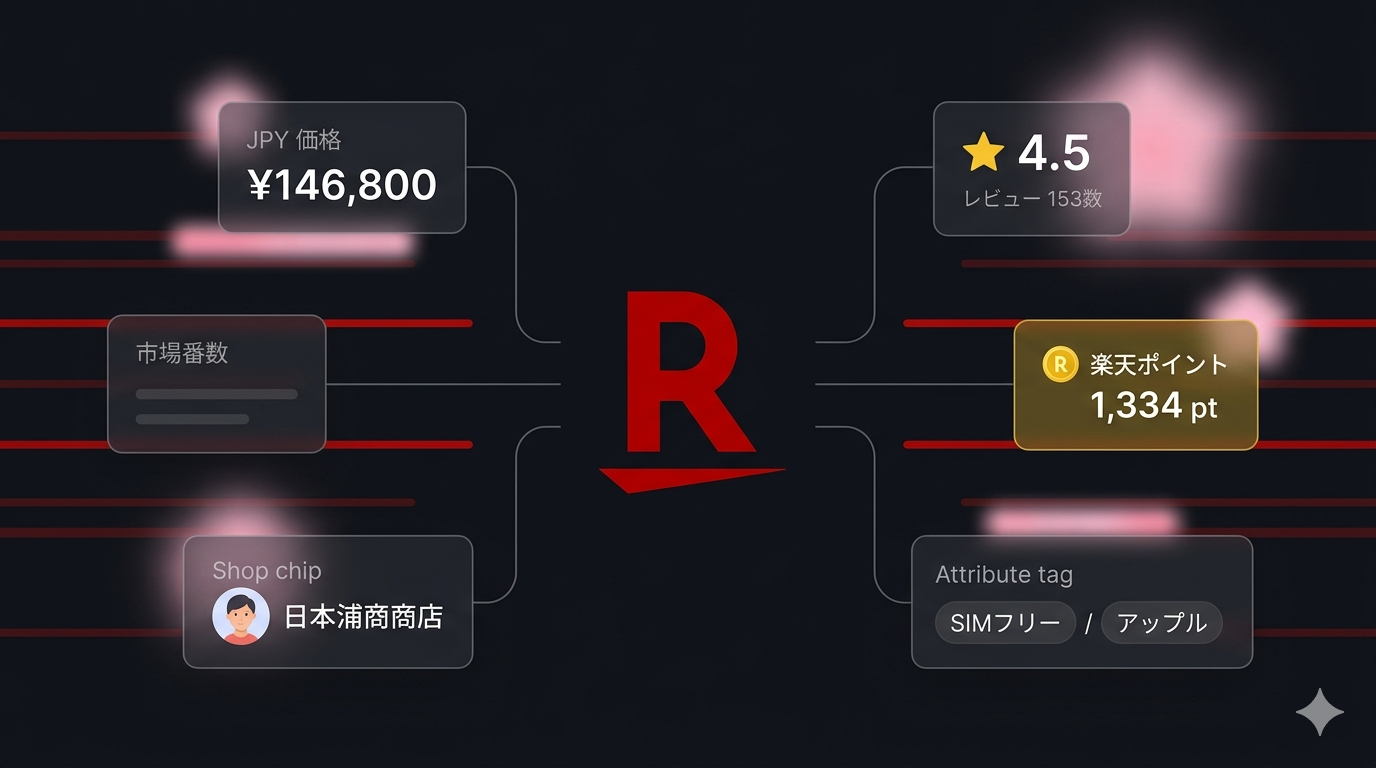
The Rakuten Japan Listings Scraper extracts structured data from both search results and full product detail pages. Here are the key fields you can collect:
| Field | Description | Example |
|---|---|---|
| Item code | Rakuten's unique item identifier within a shop | 10001785 |
| Item unique key | Globally unique key combining shop + item | rakutenmobile-store:10001785 |
| Title | Full Japanese product title | Apple iPhone 17 SIMフリー 端末本体のみ |
| Price | Sticker price in JPY | 146800 |
| Rakuten Points | Loyalty points awarded per purchase | 1334 |
| Review score | Average review rating (0–5) | 4.5 |
| Review count | Number of reviews | 16 |
| Shop | Shop ID, URL slug, and full Japanese shop name | rakutenmobile-store |
| Shipping | Shipping price, estimated delivery day, RSL flag | ¥0, 3日程度で商品を発送 |
| Tags | Structured attribute tags with group names | SIMフリー (機能), アップル (メーカー) |
| Genre ID path | Full Rakuten genre breadcrumb path | [0, 564500, 560202] |
| Images | Product images via Rakuten's thumbnail CDN | thumbnail.image.rakuten.co.jp/... |
| Sold-out flag | Whether the listing is currently out of stock | false |
| Product URL | Direct link to the product detail page | item.rakuten.co.jp/... |
With includeDetails: true, each record is enriched further with the product description, full breadcrumbs, og:image, and microdata-derived availability (InStock / OutOfStock / PreOrder).
Common Use Cases for Rakuten Data
Japan Price Monitoring
Rakuten is where most Japanese online price comparisons happen. Scraping product data lets you build accurate JPY price-monitoring pipelines across thousands of shops — and because Rakuten is multi-shop, you often see the same SKU listed by ten different sellers at ten different price points.
Loyalty-Adjusted Pricing
Japanese shoppers do not just look at the sticker price — they look at the effective price after Rakuten Points. A ¥10,000 product with 1,000 points is meaningfully cheaper than a ¥9,500 product with zero points for a regular Rakuten user. Extracting rakutenPoints as structured data lets you model the real price shoppers compare against.
Shop & Competitor Research
Use the shopUrlCodes input to crawl an entire shop's catalog. This is invaluable for competitor monitoring — pick the shops you compete with and pull their full assortment, pricing, and review signals on a schedule.
Genre-Level Market Mapping
Pass a genreIds array (e.g. 560202 for smartphones) and the scraper will walk that genre without needing a keyword. This gives you a clean, complete view of an entire Rakuten category — perfect for market sizing, share-of-shelf analysis, or category trend research.
Cross-Platform Comparison
Combine Rakuten data with data from Mercari on the same SKUs to compare new-product retail prices against secondhand resale prices. The two together give you a full picture of Japan's product economics — primary market vs. secondary market.
Review and Rating Analytics
Aggregate reviewScore and reviewCount across thousands of products to identify trending items, evaluate seller reliability, or build a product-quality index for your category.
Challenges of Scraping Rakuten Manually
Before jumping into the tutorial, it is worth understanding why scraping Rakuten is harder than scraping most other marketplaces:
- Mixed character encodings — search.rakuten.co.jp serves UTF-8, but item.rakuten.co.jp serves legacy EUC-JP. Naïve scrapers mangle Japanese titles, attributes, and shop names
- Multiple input modes — Rakuten data lives across search, genre pages, shop catalogs, and direct PDPs. A useful scraper has to handle all four
- Rich tag and genre structures — products carry structured attribute tags grouped by category (e.g. メーカー: アップル, 機能: SIMフリー) and a multi-level genre breadcrumb. Parsing these correctly is essential for downstream filtering
- Rakuten Points — extracting points correctly requires picking the right markup, since they appear in several places on the page with different meanings (base points, campaign points, SPU bonuses)
- Pagination quirks — Rakuten search results paginate differently depending on whether you arrive via a keyword, a genre, or a shop URL
- Two data paths — you can scrape from the HTML or from the official Rakuten Webservice API. Each has different trade-offs in stability vs. field coverage
- Maintenance burden — Rakuten updates its frontend periodically, breaking custom scrapers that are not actively maintained
Building and maintaining your own Rakuten scraper is a real engineering project. For most use cases, a pre-built, maintained solution is far more practical.
Step-by-Step: How to Scrape Rakuten Japan Product Listings
Here is how to scrape Rakuten Ichiba product data using the Rakuten Japan Listings Scraper on Apify.
Step 1 — Choose Your Input Mode
The scraper supports four input modes that you can mix and match in a single run:
- Keyword search — pass a list of
searchQueries(e.g.iphone,ニンテンドースイッチ) with optional sort and pagination - Genre browsing — pass
genreIds(e.g.560202for smartphones) to walk a Rakuten genre without a keyword - Shop catalog — pass
shopUrlCodes(e.g.rakutenmobile-store) to crawl an entire shop - Direct PDP URLs — pass
pdpUrlsto scrape specific product detail pages you already know
Japanese keywords return significantly richer results than English ones because Ichiba is built for Japanese buyers. For example, ニンテンドースイッチ returns far more relevant listings than nintendo switch.
Step 2 — Configure the Scraper Input
Head to the Rakuten Japan Listings Scraper on Apify and configure your run:
- Choose your input mode(s):
searchQueries,genreIds,shopUrlCodes, orpdpUrls - Set
maxItemsto cap the total rows returned across all inputs - For keyword searches, optionally set
sort(default, price-asc, price-desc, review) andpagesper query - Toggle
includeDetails:- Off (shallow mode) — fast, cheap, returns 30+ core listing fields per product
- On (detail mode) — slower, follows each result to its product detail page for description, breadcrumbs, og:image, and microdata price/availability
- (Optional) Provide a free Rakuten Webservice
appKeyto switch to the official REST API path for a more stable data contract - Leave the proxy configuration empty — Rakuten edges are permissive and most runs work without any proxy
Example input:
{
"searchQueries": [
{ "keyword": "iphone", "pages": 5 },
{ "keyword": "ニンテンドースイッチ", "sort": "review" }
],
"includeDetails": false,
"maxItems": 500
}
Step 3 — Run the Scraper
Once started, the scraper will:
- Issue search, genre, shop, or PDP requests in parallel (validated to 20 concurrent requests)
- Decode search results as UTF-8 and product detail pages as EUC-JP automatically
- Extract 30+ structured fields per product including JPY price, Rakuten Points, review score, shop info, shipping, and tags
- Follow each listing to its detail page if
includeDetails: true - If you provided an
appKey, route requests through the official Rakuten Webservice API for an extra-stable data contract - Stream results to the dataset as they are scraped
Processing time depends on the volume of data requested. Most runs complete in a few minutes.
Step 4 — Export Your Results
When the scraper finishes, export your data in the format you need:
- JSON — ideal for developers building integrations or analytics pipelines
- CSV — perfect for spreadsheet analysis or importing into BI tools
- Excel / HTML — for sharing with non-technical stakeholders
- API — access results programmatically via the Apify API for automated workflows
Ready to try it? Run the Rakuten Japan Listings Scraper on Apify and get your first dataset in minutes.
Example Output (Real Data Preview)

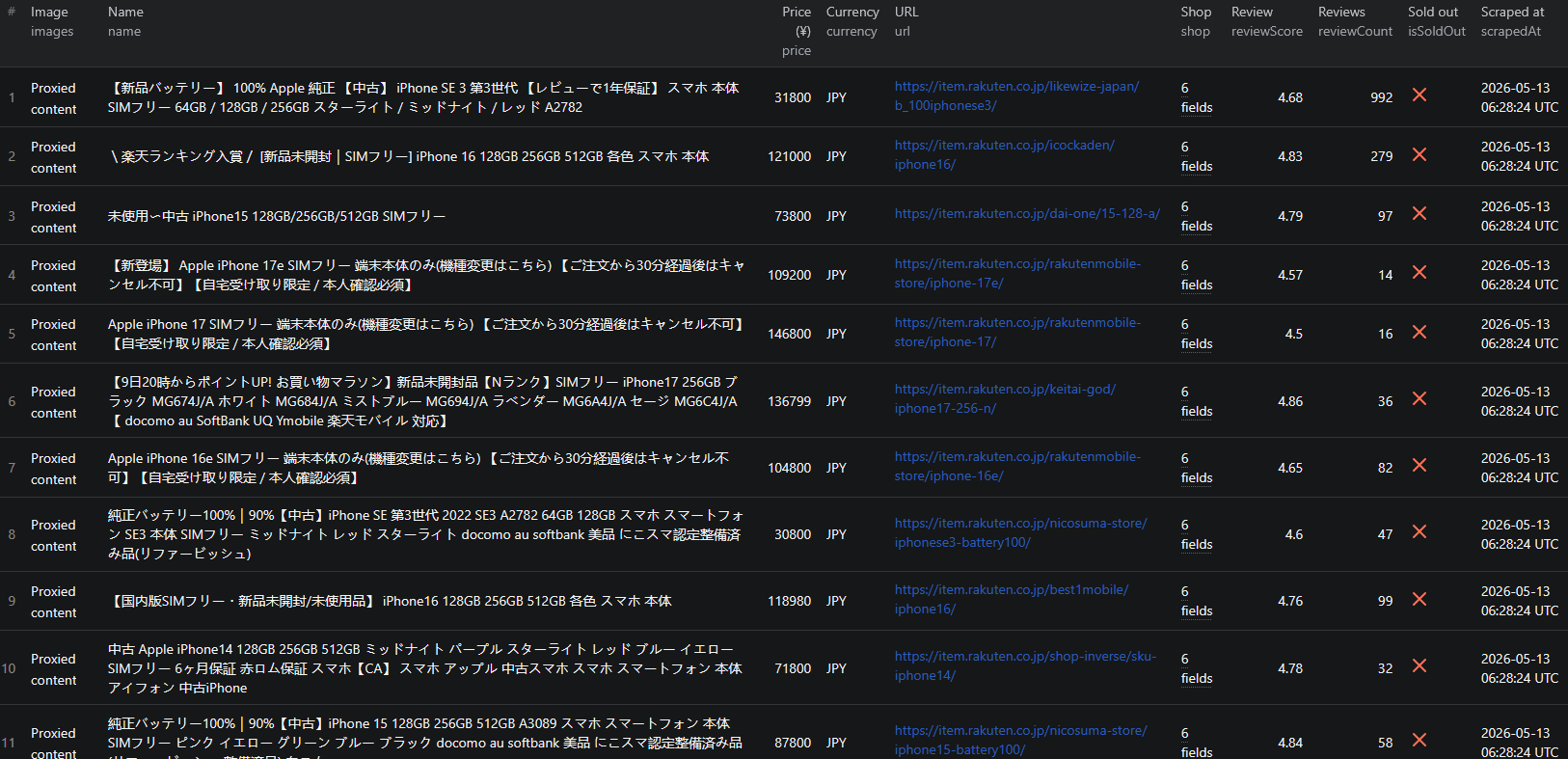
Here is what the actual output looks like. Each product returns a structured JSON object:
{
"itemCode": "10001785",
"shopUrlCode": "rakutenmobile-store",
"shopId": 384677,
"itemUniqueKey": "rakutenmobile-store:10001785",
"url": "https://item.rakuten.co.jp/rakutenmobile-store/iphone-17/",
"name": "Apple iPhone 17 SIMフリー 端末本体のみ",
"subtitle": "楽天モバイル公式 スマホ",
"brand": "Apple",
"genreIdPath": ["0", "564500", "560202"],
"price": 146800,
"currency": "JPY",
"rakutenPoints": 1334,
"isSoldOut": false,
"reviewScore": 4.5,
"reviewCount": 16,
"images": [
"https://thumbnail.image.rakuten.co.jp/.../iphone-17.jpg?_ex=600x600"
],
"shop": {
"id": 384677,
"urlCode": "rakutenmobile-store",
"name": "楽天モバイル公式 楽天市場店"
},
"shipping": {
"price": 0,
"estimateDeliveryDay": "3日程度で商品を発送",
"rsl": false
},
"tags": [
{ "id": 1002851, "name": "アップル", "groupName": "メーカー" },
{ "id": 1021164, "name": "SIMフリー", "groupName": "機能(SIMカード)" }
],
"flags": { "shop39": true },
"source": "search",
"sourcePage": 1,
"scrapedAt": "2026-05-10T12:34:56.000Z"
}
Key things to notice:
- JPY price + Rakuten Points as separate fields — compute the effective price (
price - rakutenPoints) for accurate Japanese shopper comparisons - Structured tags with group names — every attribute is a typed key-value pair, not a free-text blob
- Multi-level genre path — the full breadcrumb from Ichiba root down to the leaf category, perfect for category analytics
- Shop identification — shop ID, URL slug, and full Japanese name for shop-level competitor research
- Shipping specifics — shipping price, delivery SLA, and the RSL (Rakuten Super Logistics) flag
- Source tracking —
sourceandsourcePagetell you whether a record came from a search, genre, shop, or PDP request and from which page
When includeDetails: true, records also include description, breadcrumbs, og:image, and microdata-derived availability (InStock / OutOfStock / PreOrder) — useful for full PDP-level analysis.
Try the Rakuten Japan Listings Scraper now — no coding required.
Pricing
The Rakuten Japan Listings Scraper uses Apify's Pay-Per-Event pricing — you pay only for products you successfully scrape. No upfront platform-usage fees.
| Event | Price | When it fires |
|---|---|---|
| product-listing | $1.50 per 1,000 results ($0.0015 each) | Charged once per product extracted from a search, genre, or shop page (or via the official Rakuten API). |
| item-detail | $4.00 per 1,000 results ($0.004 each) | Charged once per product detail page parsed — when includeDetails: true, or when you supply direct pdpUrls. |
How it adds up in practice:
- 1,000 products, listings only → 1,000 × $0.0015 = $1.50
- 1,000 products, with details → 1,000 × $0.0015 + 1,000 × $0.004 = $5.50
- 100 direct PDP URLs → 100 × $0.004 = $0.40
Use maxItems to cap your spend per run, or set a Max charge per run in the Apify Console — the actor stops issuing charges as soon as the limit is reached.
Automating Rakuten Research
For ongoing Japanese e-commerce intelligence, you do not want to run the scraper manually every time you need fresh data. The Apify platform supports full automation:
Scheduled Runs
Set up recurring scrapes on any schedule — daily, weekly, or monthly. The scraper runs automatically and stores results in a dataset you can access anytime. Daily runs work well for tracking volatile categories or flash-sale price moves; weekly runs are sufficient for general market research.
API Integration
Use the Apify API to trigger scraper runs programmatically and retrieve results. This lets you integrate Rakuten data into your existing analytics workflows:
- Feed new listings into your product research pipeline
- Trigger alerts when a tracked product's price drops below a threshold
- Build dashboards that update with fresh Rakuten data
- Connect to tools like Zapier, Make, or custom data pipelines
Cross-Platform Comparison Pipelines
Pair Rakuten data with Mercari data on the same SKUs to compare primary-market retail prices against secondary-market resale prices. This is one of the highest-signal datasets you can build for the Japanese market — it tells you not just what a product costs new, but what it is actually worth in the wild.
Node.js Example
For a complete working example showing how to call this scraper from Node.js, see the GitHub repository.
Webhooks
Configure webhooks to get notified when a scraper run completes. This is useful for event-driven architectures where you want to process new product data as soon as it is available.
Using Rakuten Data for Japan Market Intelligence
Rakuten data goes far beyond simple product discovery. It is one of the richest datasets in Japanese e-commerce.
Effective-Price Analytics
Use the price - rakutenPoints formula to model what Japanese shoppers actually compare. A product with aggressive points can outcompete a nominally cheaper rival because the effective price is lower.
Shop-Level Competitor Tracking
Crawl your competitors' shops with shopUrlCodes on a weekly schedule and diff the catalogs. You will see every new SKU launch, every price change, and every shipping-rule update — without ever logging into a single competitor's site.
Genre Trend Analysis
Walk a Rakuten genre and analyze the distribution of reviewCount and reviewScore over time. Rising review counts on new SKUs are an early signal that a product is gaining traction — useful for predicting which items will trend before they peak.
Tag-Based Filtering
The structured tags array makes Rakuten data uniquely powerful for filtering. You can slice an entire genre by manufacturer, by feature, by material, or by any other tag group without ever parsing free-text product titles.
Does Rakuten Provide an Official API?
Yes — and uniquely among large Japanese marketplaces, the API is free and developer-friendly:
What's Available
- The Rakuten Webservice offers an IchibaItem/Search REST API with free access after registration
- You receive a free
applicationId(no business verification required) and can immediately query product data - The API returns most of the fields available on the public site, in a stable JSON contract
- Rate limits apply but are reasonable for moderate volumes
How the Scraper Uses the API
The Rakuten Japan Listings Scraper supports both modes: pure HTTP scraping out of the box (no key needed) and the official API path if you provide your free applicationId via the appKey input. The API path is more stable long-term, while the HTML path gives you access to a few extra fields that are surfaced in the public UI but not in the API response.
For most users, the default HTML mode is the right choice — it works immediately with no setup. If you are building a long-running production pipeline, supplying an appKey adds an extra layer of stability.
Why Use a Rakuten Scraper Instead of Building One
Building a custom Rakuten scraper sounds straightforward until you start dealing with the reality:
- Mixed UTF-8 / EUC-JP encoding — search results and product detail pages use different encodings, requiring per-request encoding detection and conversion
- Four input modes — search, genre, shop, and PDP each have different URL patterns, pagination logic, and response shapes
- Rakuten Points parsing — points appear in several places on the page (base, campaign, SPU). Picking the right one without false positives takes careful HTML analysis
- Tag and genre extraction — structured tags and multi-level genre paths require parsing nested data structures correctly
- Frontend churn — Rakuten updates its layout periodically. Every update breaks selectors, requiring immediate fixes
- Opportunity cost — every hour spent fixing your scraper is an hour not spent on the analysis you actually care about
Unless you have very specific requirements that no existing tool can meet, using a maintained scraper lets you focus on what to do with the data instead of how to collect it.
Try the Rakuten Japan Listings Scraper
The Rakuten Japan Listings Scraper extracts structured data from Rakuten Ichiba product listings — item codes, Japanese titles, JPY prices, Rakuten Points, review scores, shop info, shipping, structured tags, and full genre paths.
What you get:
- Structured JSON, CSV, Excel, or HTML output ready for analytics tools
- 30+ fields per listing including JPY price, Rakuten Points, review score, shop identification, and structured attribute tags
- Four input modes — keyword search, genre browsing, shop catalogs, and direct PDP URLs
- Automatic handling of mixed UTF-8 / EUC-JP encodings
- Optional official Rakuten Webservice API mode via a free
applicationId - Pay-Per-Event pricing:
$1.50 / 1,000listing rows,$4.00 / 1,000detail rows — you only pay for results - Scheduled runs and API access for ongoing market intelligence
- No coding, no proxy management, no scraper maintenance
Start scraping Rakuten Japan now — your first run takes less than 5 minutes to set up.
If you are building a Japan market data pipeline, combine Rakuten data with other Japanese e-commerce sources like Mercari for secondary-market pricing — together they give you a full view of the Japanese product economy.
Legal and Ethical Considerations
Web scraping occupies a well-established legal space, but responsible practice matters:
- Public data only — the Rakuten scraper extracts publicly visible product information that anyone can see by visiting Rakuten Ichiba. No login or authentication is required
- Respect rate limits — the scraper is designed to make requests at a reasonable pace and Rakuten edges are permissive on datacenter IPs
- No misuse — use collected data for legitimate business purposes like market research, price monitoring, and competitive analysis. Do not use the data to harass sellers or create misleading listings
- Compliance — if you handle personal data from Japan, ensure your processing complies with the Act on the Protection of Personal Information (APPI). The scraper extracts product and shop data, not personal data, but downstream use is your responsibility
Rakuten product listings are public marketplace data — they are designed to be found by buyers. Scraping this data for market research and competitive analysis is aligned with the platform's intended purpose.
Frequently Asked Questions
What is Rakuten Ichiba (楽天市場)?
Rakuten Ichiba (楽天市場) is Japan's largest online marketplace, operated by Rakuten Group. Unlike Amazon Japan, Ichiba is a multi-shop platform — tens of thousands of independent Japanese shops list their products under the Rakuten umbrella, with prices in JPY, Rakuten Points as a loyalty currency, and shop-by-shop shipping rules. It is one of the most important e-commerce datasets in Japan.
Is scraping Rakuten Japan legal?
Scraping publicly available product data from Rakuten Ichiba is generally legal. The product listings are visible to anyone who visits search.rakuten.co.jp or item.rakuten.co.jp without logging in. You should always use the data responsibly, comply with Japan's Act on the Protection of Personal Information (APPI), and avoid overloading Rakuten's servers with excessive requests.
Does Rakuten provide an official API?
Yes. Rakuten offers a free Webservice (IchibaItem/Search) REST API that returns product data in a stable contract — but it requires you to register an applicationId, comes with rate limits, and exposes a narrower set of fields than the public site. The Rakuten Japan Listings Scraper supports both modes: pure HTTP scraping out of the box, or you can pass your free applicationId via the appKey input to switch to the official API path.
Do I need a Japanese proxy to scrape Rakuten?
Usually no. Rakuten edges are permissive on datacenter IPs and most runs work without any proxy at all — the scraper has been validated at 20 parallel requests with no rate limits. If you do hit a regional restriction, you can configure Apify Proxy with a Japan-based session in the input.
Why does Rakuten use two different character encodings?
Search results on search.rakuten.co.jp are served as UTF-8, but the individual product detail pages on item.rakuten.co.jp are still served as EUC-JP — a legacy Japanese encoding from the 1990s. Most off-the-shelf scrapers mangle Japanese product titles and descriptions because they assume UTF-8 everywhere. The Rakuten Japan Listings Scraper handles both encodings automatically so titles, attributes, and shop names come out cleanly.
What are Rakuten Points and why are they in the data?
Rakuten Points (楽天ポイント) are Rakuten's loyalty currency — every purchase earns points that can be spent across the Rakuten ecosystem (Ichiba, Travel, Mobile, Securities, etc.). The points awarded per product are part of the headline offer for Japanese shoppers, so the scraper extracts them as a first-class field (rakutenPoints) alongside the JPY price. For price-intelligence work, the effective price is price - rakutenPoints, not the sticker price.
About the Author
This guide was written by Piotr, a software engineer with hands-on experience building and maintaining web scrapers at scale. He develops and maintains a suite of data extraction tools on the Apify platform, helping businesses automate their data collection workflows.
Need help with your scraping project?
Book a free discovery call and let's scope your project together.
Book a Call