How to Scrape Mercari Listings and Product Data (Step-by-Step Guide)

If you want to scrape Mercari listings and product data for market research, price monitoring, or competitive analysis, this guide walks you through the entire process. You will learn what data you can extract from Japan's largest secondhand marketplace, how to automate the collection, and how to turn raw Mercari listings into actionable market intelligence.
Why Scrape Mercari Data?
Mercari is the largest online marketplace in Japan, with tens of millions of active listings across electronics, fashion, collectibles, toys, sports equipment, and everyday goods. Originally launched in Japan, it has grown into a dominant platform for secondhand commerce across all product categories.
That makes Mercari a uniquely valuable data source — especially for anyone tracking the Japanese consumer market, monitoring resale prices for specific brands, or sourcing inventory from Japan. The breadth of categories and the volume of listings create a rich dataset for a wide range of research and business applications.
Businesses and researchers scrape Mercari data for several reasons:
- Price monitoring — track how specific products, brands, or categories are priced in the Japanese resale market
- Market research — understand demand patterns, popular categories, and pricing dynamics unique to the Japanese marketplace
- Competitor monitoring — analyze what other sellers are listing, how they price items, and how quickly inventory moves
- Sourcing intelligence — identify undervalued items to source for resale in other markets
- Product trend analysis — spot which brands and product types are gaining traction in Japanese e-commerce
- Collector and hobbyist research — track valuations for collectibles, gaming, and limited-edition items
Manually browsing Mercari and copying listing details is impractical at any meaningful scale. A single search query can return thousands of results, and listings are added and removed constantly. Automation is the only realistic approach.
What Data You Can Extract from Mercari
The Mercari Listings Scraper operates in two modes: search mode (default) and detail mode. Here are the key fields available in each:
Search Mode (Default)
| Field | Description | Example |
|---|---|---|
| Item ID | Unique Mercari item identifier | m17108645847 |
| Name | Full product listing title | Nintendo Switch2 ソフト 2本セット |
| Price | Listed price in JPY | 15080 |
| Status | Current sale status | ITEM_STATUS_ON_SALE |
| Thumbnails | Listing thumbnail image URLs | static.mercdn.net/thumb/item/... |
| Item condition | Condition rating (1=New to 6=Bad) | 1 |
| Shipping payer | Who pays shipping (1=Seller, 2=Buyer) | 2 |
| Seller ID | The seller's Mercari user ID | 614470169 |
| Listing URL | Direct link to the product page | jp.mercari.com/item/m17108645847 |
Detail Mode (fetchItemDetails: true)
Enabling detail mode enriches each listing with additional fields fetched from the individual item page:
| Field | Description | Example |
|---|---|---|
| Description | Full item description text | 商品をご覧いただき誠にありがとうございます... |
| Photos | High-resolution product image URLs | static.mercdn.net/item/detail/orig/... |
| Seller name | The seller's display name | ぴっぴ |
| Seller ratings | Good, normal, and bad rating counts | { good: 10660, normal: 1, bad: 10 } |
| Seller verified | Whether the seller is verified | false |
| Brand name | Product brand if available | Nintendo |
This level of detail — available without any browser or proxy setup — makes the scraper especially useful for building comprehensive product and seller datasets.
Common Use Cases for Mercari Data
Price Monitoring and Resale Valuation
Knowing the going rate for specific items on Mercari is critical for resellers, collectors, and anyone tracking the Japanese secondhand market. Scrape listings for a product category or specific brand and build a pricing database over time.
Compare price distributions, track how quickly items sell, and identify the relationship between condition ratings and market price. This data is particularly valuable when sourcing inventory — knowing the Mercari price before you buy determines whether a deal is profitable.
Market Research for the Japanese Consumer Market
Mercari's scale in Japan makes it a proxy for broader consumer demand. What products are listed in high volumes? Which categories are growing? What brands command strong resale prices? Scraping Mercari at scale provides data-driven answers to these questions.
Researchers and analysts use this data to understand how the Japanese secondhand economy works and what it reveals about consumer preferences.
Competitor Monitoring
If you sell on Mercari, understanding what competing sellers are doing is essential. Track how similar items are priced, which sellers dominate specific categories, and how listings are structured for maximum visibility. Identify pricing patterns — when sellers mark items down, which conditions attract more buyers, and what price points drive quicker sales.
Collectibles and Niche Market Tracking
Mercari Japan is a significant marketplace for collectibles, trading cards, retro gaming, anime merchandise, and limited-edition releases. Scraped data lets collectors and resellers track valuations in near real-time, spot underpriced listings, and understand how niche market prices fluctuate over time.
Sourcing Intelligence for Cross-Border Commerce
Many products available on Mercari Japan are not easily found in Western markets. Scraped data helps identify sourcing opportunities — items priced low on Mercari that command a premium elsewhere — enabling cross-border arbitrage and import sourcing strategies.
Challenges of Extracting Mercari Data Manually
Before jumping into the tutorial, it is worth understanding why scraping Mercari is harder than it looks:
- Scale — Mercari has tens of millions of listings. Even narrow searches return hundreds of pages of results
- Dynamic content — listings are rendered with JavaScript and require browser-level rendering to extract
- Pagination — results paginate across large datasets, requiring automated navigation through pages
- Language complexity — Japanese search queries and product data require proper encoding and handling
- Rate limiting — excessive requests from a single IP can trigger throttling or blocks
- Maintenance overhead — Mercari's frontend changes regularly, which means custom scrapers break and need constant fixes
Building and maintaining your own Mercari scraper is a significant engineering investment. For most use cases, a pre-built, maintained solution is far more practical.
Step-by-Step: How to Scrape Mercari Listings
Here is how to scrape Mercari data using the Mercari Listings Scraper on Apify.
Step 1 — Define Your Search Keyword
Start by deciding what products you want to extract. The scraper accepts both English and Japanese search terms. For example:
- Nintendo Switch accessories —
Nintendo Switch - Vintage cameras —
フィルムカメラ(film camera in Japanese) - Streetwear brands —
Supreme - Retro gaming —
ゲームボーイ(Game Boy in Japanese)
Step 2 — Configure the Scraper Input
Head to the Mercari Listings Scraper on Apify and configure your run:
- Enter your search keyword — English or Japanese both work
- Optionally apply filters: category ID, brand ID, item condition, price range (in JPY), and shipping payer
- Set your desired sort order — by creation date, price, number of likes, or relevance score
- Set
maxItemsto control how many listings to extract (up to 15,000) - Enable
fetchItemDetailsif you want full descriptions, high-res photos, and seller ratings - Click Start to begin the extraction
Step 3 — Run the Scraper
Once started, the scraper will:
- Search Mercari using your keyword and filters
- Paginate automatically through result pages
- Parse structured listing data including prices, conditions, and seller IDs
- Optionally fetch full item detail pages to enrich the dataset
- Store results in a clean, structured dataset
Processing time depends on the number of items and whether detail mode is enabled. Most search-only runs complete within a few minutes.
Step 4 — Export Your Results
Once the scraper finishes, you can export the results in multiple formats:
- JSON — ideal for developers building data pipelines or integrations
- CSV — perfect for spreadsheet analysis in Excel or Google Sheets
- API — access results programmatically via the Apify API for automated workflows
Ready to try it? Run the Mercari Listings Scraper on Apify and get your first dataset in minutes.
Example Output (Real Data Preview)
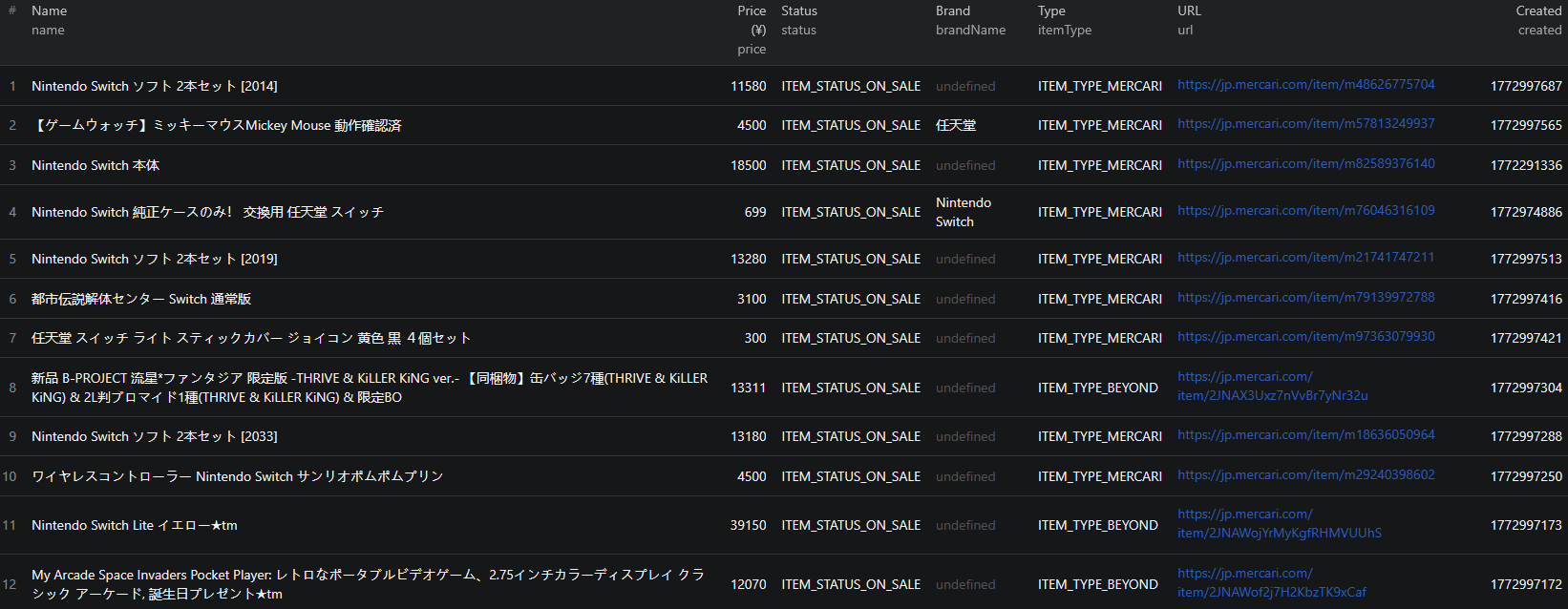
Here is what the actual output looks like from the Mercari Listings Scraper.

Search mode output:
{
"id": "m17108645847",
"name": "Nintendo Switch2 ソフト 2本セット",
"price": "15080",
"status": "ITEM_STATUS_ON_SALE",
"thumbnails": [
"https://static.mercdn.net/thumb/item/webp/m17108645847_1.jpg"
],
"categoryId": 0,
"itemConditionId": "1",
"shippingPayerId": "2",
"sellerId": "614470169",
"itemType": "ITEM_TYPE_MERCARI",
"created": "1772995134",
"updated": "1772995134",
"url": "https://jp.mercari.com/item/m17108645847"
}
Detail mode output (fetchItemDetails: true):
{
"id": "m64547526481",
"name": "iPhone15 超強化 ガラスフィルム",
"price": 598,
"status": "on_sale",
"description": "商品をご覧いただき誠にありがとうございます...",
"photos": [
"https://static.mercdn.net/item/detail/orig/photos/m64547526481_1.jpg"
],
"sellerId": 614470169,
"sellerName": "ぴっぴ",
"sellerRatingScore": 0,
"sellerRatings": {
"good": 10660,
"normal": 1,
"bad": 10
},
"sellerIsVerified": false,
"brandName": null,
"itemType": "ITEM_TYPE_MERCARI",
"created": 1772995134,
"updated": 1772995134,
"url": "https://jp.mercari.com/item/m64547526481"
}
Key things to notice:
- Price in JPY — all prices are returned in Japanese Yen, making it straightforward to apply currency conversion for cross-border analysis
- Item condition — numeric condition ratings (1=New through 6=Bad) let you filter and compare data by quality tier
- Seller ratings breakdown — good, normal, and bad rating counts give a clear picture of seller trustworthiness without needing to visit individual profiles
- Full descriptions — available in detail mode, including Japanese-language item descriptions that reveal product details not visible in the title
- High-res photos — original-quality image URLs for detailed visual review of listings
Try the Mercari Listings Scraper now — no coding required.
Pricing: Pay Only for What You Scrape
The Mercari Listings Scraper uses a pay-per-event pricing model — you are only charged for the data you actually collect:
| Event | Price per result | Price per 1,000 |
|---|---|---|
| Listing result (search mode) | $0.002 | $2.00 |
| Item detail enrichment | $0.004 | $4.00 |
Examples:
- 1,000 listings (search only): $2.00
- 1,000 listings with full details: $6.00 ($2.00 for listings + $4.00 for detail enrichment)
There is no subscription or minimum commitment. You pay for what you use on each run.
Automating Mercari Market Monitoring
For ongoing price monitoring or trend research, you do not want to run the scraper manually every time. The Apify platform supports full automation:
Scheduled Runs
Set up recurring scrapes on any schedule — daily, weekly, or monthly. The scraper runs automatically and stores results in a dataset you can access anytime. Daily runs work well for price tracking and inventory monitoring. Weekly runs are sufficient for broader market research.
API Integration
Use the Apify API to trigger scraper runs programmatically and retrieve results. This lets you integrate Mercari data into your existing workflows:
- Feed listing data into pricing dashboards or analytics tools
- Trigger alerts when specific products fall below a target price in JPY
- Build trend reports that update automatically with fresh marketplace data
- Connect to tools like Zapier, Make, or custom data pipelines
Price Tracking Pipelines
Combine scheduled scraping with historical data storage to build price tracking systems. Monitor how resale prices change over time for specific brands, product types, or categories. Identify seasonal pricing patterns and optimal buy/sell windows in the Japanese market.
Node.js Example
For a complete working example showing how to call this scraper from Node.js, see the GitHub repository.
Webhooks
Configure webhooks to get notified when a scraper run completes. This is useful for event-driven workflows where you want to process new listing data as soon as it is available.
Using Mercari Data for E-commerce Intelligence
Mercari data is valuable for building smarter sourcing, pricing, and market analysis tools.
Cross-Border Arbitrage
Japanese resale prices differ significantly from Western markets for many product categories — particularly electronics, collectibles, gaming, and fashion. Scraped Mercari data lets you systematically identify items priced below their value in target markets, enabling data-driven sourcing decisions.
Demand Forecasting
Track listing volumes, pricing trends, and how quickly items sell across categories to predict demand patterns. Correlate seasonal patterns with pricing changes to identify optimal times for buying and selling specific product types.
Seller Performance Analysis
Detail mode returns seller rating breakdowns — total good, normal, and bad ratings. Aggregate this data across a product category to understand what separates high-performing sellers from lower-rated ones. This is useful for marketplace analytics, fraud detection, and trust-signal research.
Product Classification and Tagging
Use Mercari listing titles, descriptions, and category IDs to train classification models. The mix of Japanese-language content and structured metadata provides rich features for building multilingual product classification systems.
Does Mercari Provide an API?
No. Mercari does not offer a public API for accessing marketplace data. There is no official way to programmatically query product listings, pricing, or seller information.
Your options for bulk data extraction are:
- Manual browsing — feasible for a handful of listings, but completely unscalable
- Custom scraper — requires significant development time, ongoing maintenance, and infrastructure to handle dynamic content, Japanese encoding, and pagination
- Pre-built scraper — a maintained solution like the Mercari Listings Scraper that handles all the technical complexity
For most teams, the pre-built scraper is the most practical choice. It eliminates development and maintenance burden while delivering reliable, structured output.
Why Use a Mercari Scraper Instead of Building One
Building a custom Mercari scraper sounds achievable until you encounter the real challenges:
- Language complexity — handling Japanese text, encodings, and search queries requires careful engineering that goes beyond standard scraping setups
- Infrastructure complexity — Mercari requires browser-level rendering and sophisticated request handling, not simple HTTP requests
- Maintenance cost — Mercari updates its frontend regularly, breaking custom scrapers and requiring immediate fixes to keep data pipelines running
- Anti-bot handling — reliable scraping at scale requires proxy rotation, request throttling, and detection avoidance — all of which require ongoing operational investment
- Scaling challenges — scraping thousands of item pages in detail mode requires distributed infrastructure, queue management, and monitoring
- Opportunity cost — every hour spent building and maintaining a scraper is an hour not spent analyzing data and acting on it
Unless you have very specific requirements no existing tool can meet, a maintained scraper lets you focus on what to do with the data instead of how to collect it.
Try the Mercari Listings Scraper
The Mercari Listings Scraper extracts structured data from Mercari Japan — product listings, pricing, item conditions, seller data, and full item details, all without requiring a browser or proxy setup.
What you get:
- Structured JSON or CSV output ready for analysis
- Rich filter support: keyword, category, brand, price range, condition, and more
- Optional detail enrichment with descriptions, high-res photos, and seller ratings
- Up to 15,000 items per run with automatic pagination
- Scheduled runs for ongoing price monitoring and market tracking
- API access for integration into your workflows
- Pay-per-event pricing — no wasted compute
- No coding or scraper maintenance required
Start scraping Mercari now — your first run takes less than 5 minutes to set up.
If you are building a broader marketplace data pipeline, combine Mercari data with other e-commerce sources like AliExpress or Alibaba for cross-marketplace sourcing intelligence, or Poshmark for Western resale market comparison.
Legal and Ethical Considerations
Web scraping occupies a well-established legal space, but responsible practice matters:
- Public data only — the Mercari scraper extracts publicly visible listing information that anyone can see by visiting jp.mercari.com. No login or authentication is required
- Respect rate limits — the scraper is designed to make requests at a reasonable pace to avoid overloading Mercari's servers
- Privacy compliance — if you operate in or serve users in Japan, be aware of the Act on the Protection of Personal Information (APPI). This applies to how you store and process data containing personal information, not to the collection of publicly visible listing data
- GDPR/CCPA — if you operate in the EU or California, ensure your data handling practices comply with applicable regulations
- Responsible use — use collected data for legitimate business purposes like market research and pricing analysis
Frequently Asked Questions
Is scraping Mercari legal?
Scraping publicly available data from Mercari is generally legal. Product listings are visible to anyone who visits the site without logging in. You should always use the data responsibly, comply with local privacy regulations including Japan's APPI, and avoid overloading Mercari's servers with excessive requests.
Does Mercari have an API?
Mercari does not offer a public API for accessing its marketplace data. There is no official way to programmatically query product listings, pricing, or seller information. A web scraper is the practical alternative for extracting structured marketplace data at scale.
What data can be extracted from Mercari?
In search mode, you can extract item IDs, product names, prices, sale status, thumbnail images, category IDs, item condition, shipping payer, seller IDs, and direct listing URLs. Enabling detail mode adds full item descriptions, high-resolution photos, seller names, seller ratings, and seller verification status.
Does the Mercari scraper support English and Japanese keywords?
Yes. The scraper supports both English and Japanese search keywords, making it easy to find items whether you are searching in romaji or native Japanese script.
How many Mercari listings can I scrape at once?
The scraper supports up to 15,000 items per run. You can control the exact number with the maxItems parameter. Pagination is handled automatically, so you do not need to manage page navigation yourself.
Can I filter Mercari results by condition, price, or category?
Yes. The scraper supports rich filtering including item condition (New, Like New, Good, Fair, Poor, Bad), price range in JPY, category ID, brand ID, shipping payer, item status, and sort order. You can combine any of these filters in a single run.
About the Author
This guide was written by Piotr, a software engineer with hands-on experience building and maintaining web scrapers at scale. He develops and maintains a suite of data extraction tools on the Apify platform, helping businesses automate their data collection workflows.
Need help with your scraping project?
Book a free discovery call and let's scope your project together.
Book a Call