Piotr VassevPiotr Vassev

How to Scrape Walmart Product Listings (Step-by-Step Guide)

How to Scrape Walmart Product Listings

If you want to scrape Walmart product listings for price monitoring, competitor analysis, or market research, this guide walks you through the entire process. You will learn what data you can extract from Walmart search and category pages, how to automate the collection, and how to turn raw product listings into actionable e-commerce intelligence.

Why Scrape Walmart Data?

Walmart is one of the largest retailers in the world, and Walmart.com is one of the fastest-growing e-commerce marketplaces in North America. Its search and category pages expose millions of actively priced products across virtually every consumer category — groceries, electronics, home and garden, apparel, toys, automotive, and more.

What makes Walmart particularly valuable is the breadth and freshness of its catalog. Prices change continuously, new sellers enter the marketplace, promotional flags appear and disappear throughout the day, and product rankings shift based on demand. For anyone who needs a live pulse on retail pricing and product activity at scale, Walmart is one of the best public data sources available.

Businesses and researchers scrape Walmart data for a range of purposes:

  • Price monitoring — track pricing changes across a competitor's catalog or across an entire product category
  • Competitor analysis — understand exactly which products competing sellers carry and how they position them
  • Market research — analyze which brands, product types, and price points are most active in a given category
  • Assortment benchmarking — identify gaps in your own catalog by comparing it to what is selling on Walmart
  • MAP (minimum advertised price) enforcement — monitor whether third-party sellers are violating your pricing policies
  • Trend tracking — spot emerging products and rising brands based on review counts, ratings, and promotional badges

Manually copying product details from Walmart category pages is completely impractical. A single search can return thousands of products across dozens of pages, and listings change continuously. Automation is the only realistic approach.

What Data You Can Extract from Walmart

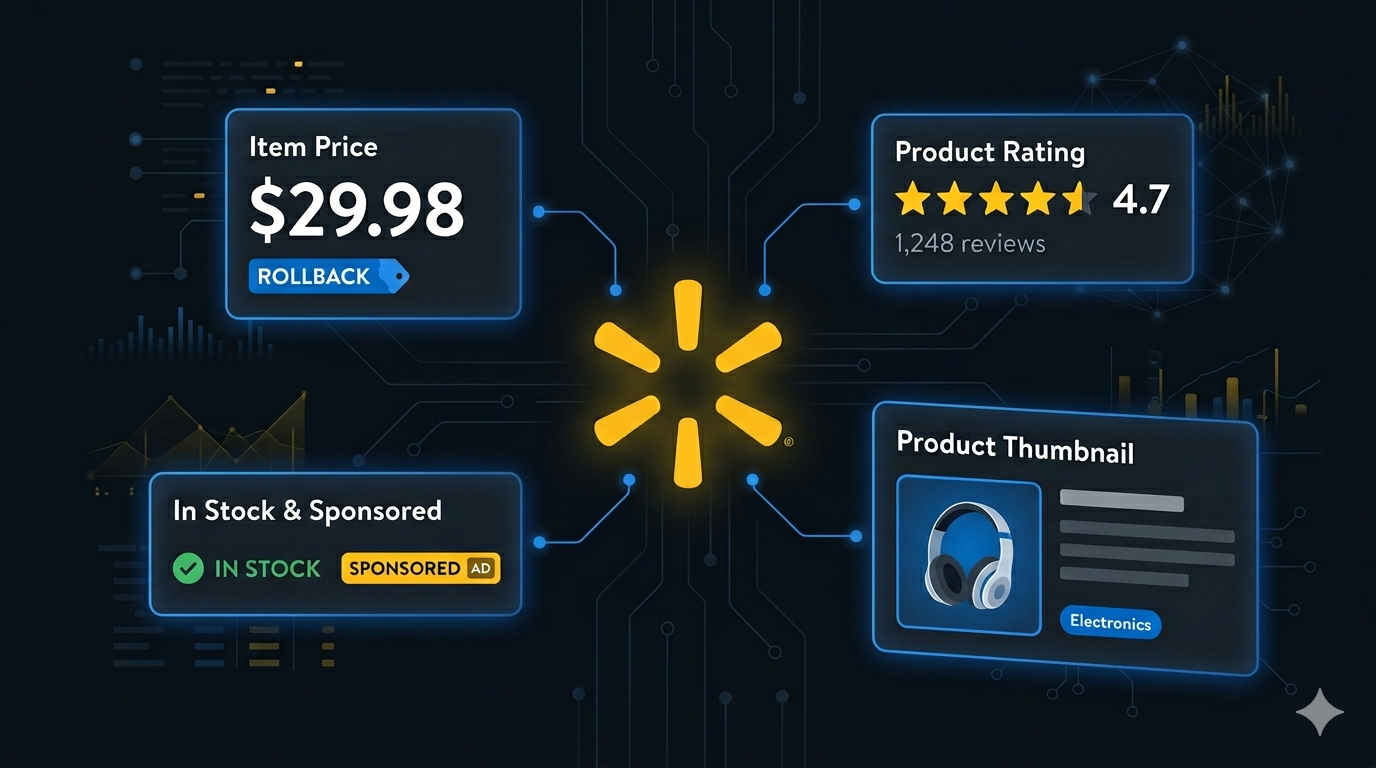
The Walmart Listings Scraper extracts structured product data from any Walmart search or category page. Here are the key fields available:

FieldDescriptionExample
NameFull product titleBack to the Roots Natural and Organic 3-in-1 Seed Starting Mix
PriceCurrent listed price7.97
BrandProduct brand if availableMiracle-Gro
ImageProduct image URLi5.walmartimages.com/seo/...
URLDirect link to the product pagewalmart.com/ip/...
Average RatingAverage customer rating (0–5)4.2
Number of ReviewsTotal count of customer reviews397
Seller NameName of the seller fulfilling the productWalmart.com
Availability StatusWhether the product is in stockIn stock
FlagPromotional or social-proof badge shown on the listing500+ bought since yesterday
Is SponsoredWhether the listing is a sponsored resulttrue

This data gives you everything you need to analyze pricing, assortment, seller behavior, and demand signals across Walmart's catalog.

Common Use Cases for Walmart Data

Competitive Price Monitoring

Pricing on Walmart moves constantly. Competitors adjust prices daily or even hourly in response to demand, inventory, and marketplace dynamics. Scraping product listings on a schedule lets you track these changes across an entire category or competitor catalog, and feed pricing data directly into your own repricing engine or analytics dashboard.

Scheduled scrapes — hourly, daily, or weekly — give you a continuous price history that manual tracking cannot come close to matching.

Catalog and Assortment Research

Before launching a new product or entering a new category, you need to understand the competitive landscape. Walmart's category pages give you a comprehensive view of what is currently being sold, at what price points, and by which sellers and brands. Scraping that data lets you answer questions like: which brands dominate this category, where are the price gaps, and which niches are underserved.

For larger teams, regular scrapes across target categories power catalog planning, assortment expansion decisions, and new product launches.

Seller and Marketplace Intelligence

Walmart's marketplace has grown rapidly, with thousands of third-party sellers competing alongside Walmart.com itself. The sellerName field tells you who is fulfilling each listing — whether it is Walmart directly or a third-party seller. Aggregating this data reveals which sellers are most active in a given category, which products they lead on, and how their pricing compares to Walmart's first-party listings.

MAP and Brand Protection

If you are a brand or manufacturer with a MAP policy, monitoring Walmart listings is essential. Scraping product names, prices, and sellers on a regular basis lets you flag violations quickly and engage with sellers or Walmart's brand protection team before price erosion spreads across the marketplace.

Demand and Trend Signals

The flag field captures promotional badges like "500+ bought since yesterday" — a direct social-proof signal Walmart shows shoppers. Combined with review counts and ratings, this data gives you a rough but useful indicator of which products are gaining traction in the moment. Tracking these signals across time helps identify rising products and emerging brands before they become obvious.

Sponsored vs. Organic Analysis

The isSponsored field lets you distinguish paid placements from organic listings. For advertisers, this means you can benchmark your own sponsored positions against competitors. For researchers, it lets you filter out ads and focus on true organic rankings for category analysis.

Challenges of Extracting Walmart Data Manually

Before jumping into the tutorial, it is worth understanding why scraping Walmart at scale is harder than it looks:

  • JavaScript-rendered listings — Walmart search and category pages rely on dynamic rendering, so simple HTTP requests will not return usable product data
  • Paginated results — category and search pages span many pages that all need to be navigated and parsed to collect a complete dataset
  • Bot detection — Walmart actively deploys anti-bot measures, which means naive scraping attempts get blocked quickly
  • Frequent frontend changes — Walmart updates its UI and HTML structure regularly, and every update can break custom scrapers
  • Large result sets — a single category search can return tens of thousands of products, making manual collection completely impractical

Building and maintaining your own Walmart scraper is a significant engineering commitment. For most use cases, a pre-built, maintained solution is the more practical choice.

Step-by-Step: How to Scrape Walmart Product Listings

Here is how to scrape Walmart product data using the Walmart Listings Scraper on Apify.

Step 1 — Find Your Walmart URL

Navigate to walmart.com and browse or search for the products you want to extract. You can use any of the following URL types:

  • Search URLs — results for a keyword search, for example https://www.walmart.com/search?q=seed+starting+mix
  • Category URLs — department or category listing pages such as https://www.walmart.com/cp/gardening/1081856
  • Filtered URLs — search or category pages with filters applied for brand, price range, rating, or availability

Once the page shows the products you want, copy the full URL from your browser. That URL is your scraper input.

Step 2 — Configure the Scraper Input

Head to the Walmart Listings Scraper on Apify and configure your run:

  1. Paste your Walmart search or category URL into the input field
  2. You can add multiple URLs to collect products from multiple searches or categories in a single run
  3. Set the maximum number of products per URL if you want to limit the dataset size
  4. Click Start to begin the extraction

The scraper handles browser rendering, pagination, and data parsing automatically — no additional configuration required.

Step 3 — Run the Scraper

Once started, the scraper will:

  • Load each search or category page and extract product data
  • Navigate through all available pages automatically
  • Parse structured product data including names, prices, ratings, sellers, and sponsorship flags
  • Store results in a clean, structured dataset

Processing time depends on the number of products and pages. Most runs complete within a few minutes.

Step 4 — Export Your Results

Once the scraper finishes, you can export the results in multiple formats:

  • JSON — ideal for developers building data pipelines or integrations
  • CSV — perfect for spreadsheet analysis in Excel or Google Sheets
  • API — access results programmatically via the Apify API for automated workflows

Each record includes the full set of structured fields: product name, price, brand, image, URL, average rating, review count, seller name, availability, promotional flag, and sponsorship status.

Ready to try it? Run the Walmart Listings Scraper on Apify and get your first dataset in minutes.

Example Output (Real Data Preview)

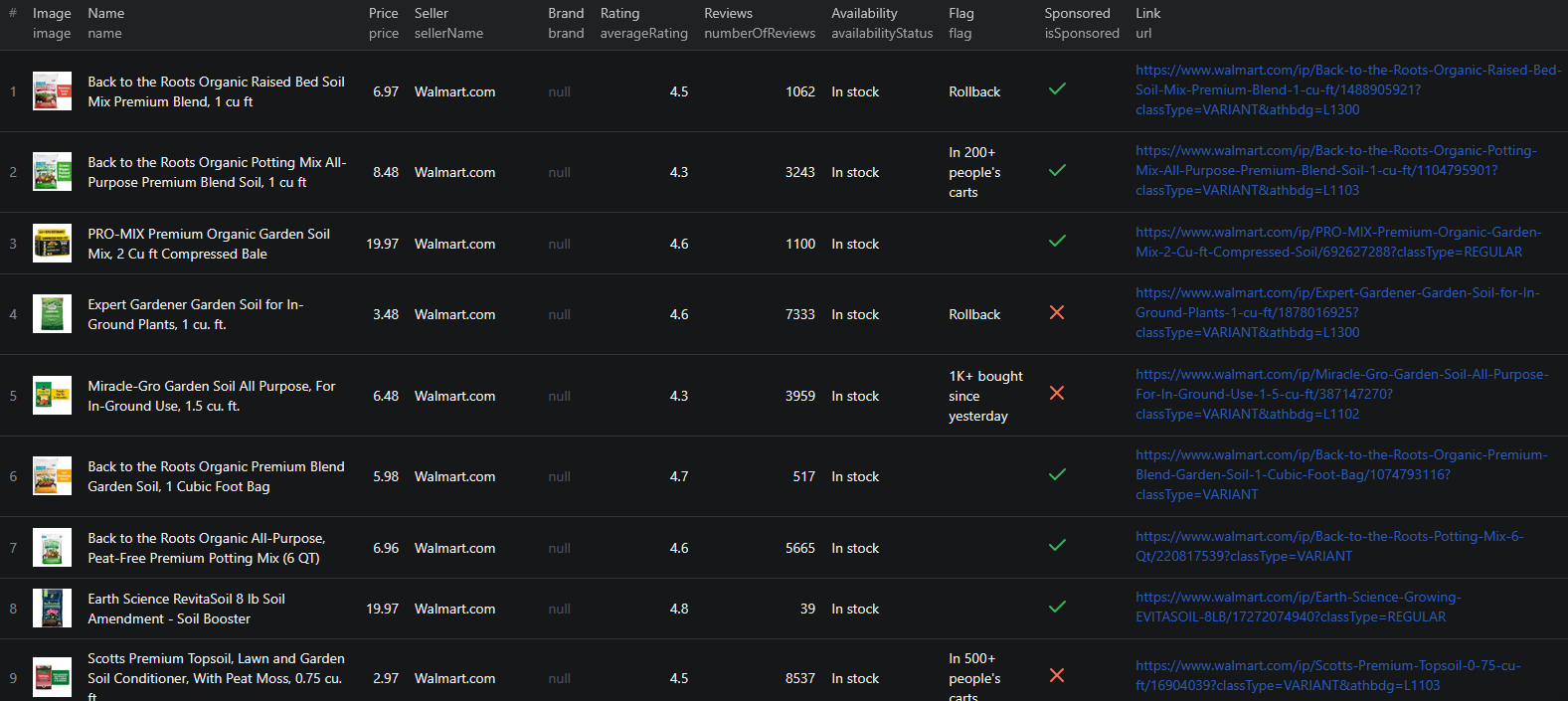
Walmart scraper results

Here is what the actual output looks like from the Walmart Listings Scraper. Each product returns a structured JSON object:

{
  "name": "Miracle-Gro Cactus, Palm & Citrus Potting Mix, 8 qt., Use with Succulents",
  "price": 5.78,
  "brand": null,
  "image": "https://i5.walmartimages.com/seo/Miracle-Gro-Cactus-Palm-and-Citrus-Potting-Mix-8-qt-bag_0d310203-8513-452b-a5b2-96b2cf312bac.780740f1a879d4848fb5213085e46ce4.jpeg?odnHeight=180&odnWidth=180&odnBg=FFFFFF",
  "url": "https://www.walmart.com/ip/Miracle-Gro-Cactus-Palm-and-Citrus-Potting-Mix-8-qt-bag/34621226?classType=VARIANT&athbdg=L1102",
  "averageRating": 4.2,
  "numberOfReviews": 397,
  "sellerName": "Walmart.com",
  "availabilityStatus": "In stock",
  "flag": "500+ bought since yesterday",
  "isSponsored": false
}

Key things to notice:

  • Clean numeric pricing — the price field is a clean number, so calculations, comparisons, and time-series tracking work out of the box with no parsing required
  • Ratings and review countsaverageRating and numberOfReviews give you both dimensions of product popularity, which is essential for trend and demand analysis
  • Seller attributionsellerName tells you whether Walmart.com or a third-party marketplace seller fulfills the listing, which matters for competitive and MAP analysis
  • Social-proof flags — the flag field captures Walmart's "X bought since yesterday" style badges, a direct signal of real-time product momentum
  • Sponsored vs. organicisSponsored lets you cleanly separate ads from organic results when analyzing category rankings

This structured format imports cleanly into any spreadsheet, database, or analytics platform.

Try the Walmart Listings Scraper now — no coding required.

Automating Walmart Data Collection

For ongoing price monitoring, competitor tracking, or catalog research, you do not want to run the scraper manually every time. The Apify platform supports full automation:

Scheduled Runs

Set up recurring scrapes on any schedule — hourly, daily, or weekly. The scraper runs automatically and stores results in a dataset you can access anytime. Hourly runs work well for active price monitoring in fast-moving categories. Daily runs are usually sufficient for broader competitor tracking and assortment research.

API Integration

Use the Apify API to trigger scraper runs programmatically and retrieve results. This lets you integrate Walmart data into your existing workflows:

  • Feed price and availability data into repricing engines or pricing dashboards
  • Trigger alerts when a tracked product drops below a threshold or goes out of stock
  • Build competitive intelligence dashboards that refresh on a schedule
  • Connect to tools like Zapier, Make, or custom data pipelines

Price and Inventory Pipelines

Combine scheduled scraping with downstream processing to build fully automated pricing and inventory pipelines. Store historical prices to compute trend lines, alerting thresholds, and elasticity estimates. Join Walmart data with data from other marketplaces to build cross-channel competitive dashboards.

Node.js Example

For a complete working example showing how to call this scraper from Node.js, see the GitHub repository.

Webhooks

Configure webhooks to get notified when a scraper run completes. This is useful for event-driven workflows where you want to process new data as soon as the scraper finishes — for example, to immediately update a database or push alerts to a Slack channel.

Using Walmart Data for E-commerce Intelligence

Walmart data powers a range of e-commerce analytics and pricing applications.

Dynamic Repricing

Feed scraped Walmart prices into your repricing engine to keep your own listings competitive in real time. Combined with ratings, review counts, and sponsorship data, you can build sophisticated repricing rules that factor in more than just price.

Assortment Gap Analysis

Compare your catalog against competing sellers on Walmart to identify products you do not carry but should — or products where you have a pricing or review advantage. Aggregating listings by brand and category surfaces these gaps systematically.

MAP Violation Monitoring

Brands with MAP policies can scrape all Walmart listings for their products on a schedule and flag any listing priced below the MAP threshold. Adding seller name to the alert gives brand protection teams everything they need to follow up directly.

Category Trend Analysis

Aggregate Walmart data over time by category, brand, or price band to reveal longer-term trends. Which brands are gaining share? Which categories are seeing the most new listings? Where are prices drifting up or down? Scraped data, stored systematically, answers these questions precisely.

Marketplace Seller Research

For brands considering selling on Walmart's marketplace, scraping existing listings in your category reveals who the active sellers are, how aggressively they price, and which listings dominate the top rankings. That is invaluable intelligence before committing to a marketplace expansion.

Does Walmart Provide an API?

Walmart does offer APIs, but none of them are practical for bulk extraction of search and category page data:

  • Walmart Marketplace API — available only to approved Walmart marketplace sellers, and scoped to managing your own listings, orders, and inventory rather than querying the public catalog
  • Walmart Affiliate API — designed for affiliate marketers and requires approval, with rate limits and data scope that are not suitable for large-scale competitor or pricing research
  • No public catalog API — there is no general-purpose API for pulling all products from a category or search page as a non-seller

Your practical options for comprehensive product data extraction are:

  • Walmart's official APIs — suitable for approved sellers and affiliates but not for broad catalog or competitor research
  • Custom scraper — requires development time, ongoing maintenance, and infrastructure for dynamic content, pagination, and anti-bot handling
  • Pre-built scraper — a maintained solution like the Walmart Listings Scraper that handles all technical complexity out of the box

For most teams running at any meaningful scale, the pre-built scraper delivers more data with less overhead than building around the official APIs.

Why Use a Walmart Scraper Instead of Building One

Building a custom Walmart scraper sounds straightforward until you encounter the real challenges:

  • Dynamic content — Walmart renders listings using JavaScript. Simple HTTP requests will not return product data, so you need full browser automation
  • Anti-bot protection — Walmart actively blocks scraping traffic, so reliable extraction requires proxy rotation, request throttling, and fingerprint management — each of which requires ongoing engineering investment
  • Pagination handling — search and category results span many pages that require automated navigation. Pagination patterns change with frontend updates
  • Maintenance burden — Walmart updates its frontend regularly. Every update is a potential breakage that requires immediate intervention to keep your pipeline running
  • Scaling infrastructure — scraping tens of thousands of products requires distributed infrastructure, queue management, and monitoring that adds operational complexity fast
  • Opportunity cost — every hour spent building and maintaining a scraper is an hour not spent analyzing data, pricing products, or growing your business

Unless you have highly specific requirements that no existing tool can meet, a pre-built, maintained scraper lets you focus on using the data rather than collecting it.

Try the Walmart Listings Scraper

The Walmart Listings Scraper extracts structured product data from Walmart search and category pages — names, prices, brands, ratings, review counts, seller names, availability, promotional flags, sponsorship status, images, and direct product URLs.

What you get:

  • Structured JSON or CSV output ready for analysis
  • Any Walmart search or category URL as input — filter by keyword, department, brand, or price range
  • Clean numeric pricing ready for direct use in repricing and analytics pipelines
  • Ratings, review counts, and promotional flags for demand and trend analysis
  • Seller attribution and sponsorship flags for competitive and marketplace intelligence
  • Automatic pagination to collect all products in your search
  • Scheduled runs for ongoing price monitoring and competitor tracking
  • API access for integration into your data workflows
  • No coding or scraper maintenance required

Start scraping Walmart now — your first run takes less than 5 minutes to set up.

If you are building a broader e-commerce intelligence pipeline, combine Walmart data with listings from other marketplaces like the Amazon Storefront Scraper or the AliExpress Product Listings Scraper for a cross-marketplace view of pricing and assortment.

Legal and Ethical Considerations

Web scraping occupies a well-established legal space, but responsible practice matters:

  • Public data only — the Walmart scraper extracts publicly visible product information that anyone can see by visiting Walmart without logging in
  • Respect rate limits — the scraper is designed to make requests at a reasonable pace to avoid overloading Walmart's servers
  • Responsible use — use collected data for legitimate business purposes like price monitoring, market research, and competitive analysis
  • Privacy compliance — if you operate in the EU or California, ensure your data handling complies with GDPR or CCPA. This applies to how you store and process data, not to the collection of publicly visible product information

Frequently Asked Questions

Is scraping Walmart legal?

Scraping publicly available data from Walmart is generally legal. Product listings are visible to anyone who visits the site without logging in. You should always use the data responsibly, comply with applicable privacy regulations, and avoid overloading Walmart's servers with excessive requests.

Does Walmart have an API?

Walmart offers the Walmart Marketplace API and the Walmart Affiliate API, but both come with significant restrictions. The Marketplace API is limited to approved Walmart sellers, and the Affiliate API is designed for affiliate marketers rather than bulk catalog extraction. Neither is practical for large-scale product data collection across search and category pages.

What data can be extracted from Walmart?

You can extract product names, prices, brands, image URLs, direct product URLs, average ratings, review counts, seller names, availability status, promotional flags (such as "bought since yesterday" badges), and sponsorship status. Each product is returned as a structured JSON object.

How do I use the Walmart Scraper?

Copy any Walmart search or category page URL and paste it as input. The scraper handles pagination, rendering, and data parsing automatically, and returns all matching products as structured JSON.

Can I scrape Walmart by category or search keyword?

Yes. Any Walmart search or category page URL works as input, including URLs filtered by department, brand, price range, or keyword. The scraper processes the result pages and returns the matching product listings.

Can I export Walmart product data to CSV or JSON?

Yes. The Walmart Listings Scraper exports data in both JSON and CSV formats. You can also access results via the Apify API for automated workflows and data pipeline integrations.

About the Author

This guide was written by Piotr, a software engineer with hands-on experience building and maintaining web scrapers at scale. He develops and maintains a suite of data extraction tools on the Apify platform, helping businesses automate their data collection workflows.

Need help with your scraping project?

Book a free discovery call and let's scope your project together.

Book a Call
Piotr Vassev

Piotr Vassev

Founder of FalconScrape. Building production-grade web scraping systems and data automation pipelines for businesses worldwide.

Connect on LinkedIn