Piotr VassevPiotr Vassev

How to Scrape Amazon Storefront Products (Step-by-Step Guide)

How to Scrape Amazon Storefront Products

If you want to scrape Amazon storefront products for competitive analysis, price monitoring, or market research, this guide walks you through the entire process. You will learn what data you can extract from any Amazon seller's storefront, how to automate the collection across 12 global marketplaces, and how to turn raw product listings into actionable business intelligence.

Why Scrape Amazon Storefront Data?

Amazon is the world's largest e-commerce marketplace, and individual seller storefronts represent one of the richest sources of competitive product intelligence available. A single storefront can hold thousands of active listings across multiple categories — each one a data point about pricing strategy, product selection, and market positioning.

For brands, resellers, and analysts, that data has real business value. But Amazon does not make it easy to access in bulk. There is no simple export button, no open API for bulk storefront queries, and manually copying product details from a seller's storefront at any meaningful scale is completely impractical.

That is where automated extraction comes in. Businesses and researchers scrape Amazon storefront data for a range of reasons:

  • Competitive intelligence — understand exactly which products a competing seller carries, how they price them, and which items earn Best Seller badges
  • Price monitoring — track pricing changes across a competitor's entire catalog over time
  • Catalog research — identify gaps in a seller's lineup or benchmark your own catalog against theirs
  • Supplier and reseller analysis — evaluate potential business partners by reviewing their full product range and pricing
  • Market entry research — survey what established players in a niche are selling before launching your own products
  • Buy box and Prime analysis — understand which products qualify for Prime and which sellers are winning the buy box

Doing this manually is not realistic at any scale. Automating it with a purpose-built scraper gives you complete, structured storefront data in minutes.

What Data You Can Extract from Amazon Storefronts

The Amazon Storefront Scraper returns rich, structured product data for every listing in a seller's storefront:

FieldDescriptionExample
ASINAmazon Standard Identification NumberB0DFY6F2N1
TitleFull product listing titleEcho Show 8 (3rd Gen, 2024 release)
PriceListed price as a number99.99
CurrencyCurrency code for the priceUSD
RatingAverage star rating (out of 5)4.6
Rating textHuman-readable rating string4.6 out of 5 stars
Review countTotal number of customer reviews12,345
Image URLPrimary product image URLhttps://m.media-amazon.com/images/I/example.jpg
Product URLDirect link to the Amazon product pagehttps://www.amazon.com/dp/B0DFY6F2N1
Prime eligibilityWhether the listing ships with Primetrue
Best Seller badgeWhether the item holds a Best Seller badgetrue
Best Seller categoryThe category where the badge appliesSmart Speakers
SponsoredWhether the listing is a sponsored adfalse
Seller IDThe seller's Amazon IDATVPDKIKX0DER
MarketplaceWhich Amazon marketplace was scrapedUS
Scraped atTimestamp of when the data was collected2026-02-21T12:00:00.000Z

This combination of pricing, social proof (ratings and review counts), fulfillment status (Prime), and badge data gives you a complete snapshot of any seller's product catalog and competitive standing.

Common Use Cases for Amazon Storefront Data

Competitive Catalog Analysis

Understanding a competitor's full product range is the starting point for any competitive strategy. Scraping their storefront gives you a complete inventory — every ASIN they sell, how it is priced, and which items are performing well enough to earn Best Seller badges. This data reveals their product selection strategy in ways that are impossible to discover through manual browsing.

Ongoing Price Monitoring

Prices on Amazon change frequently — sometimes multiple times per day. Scheduled scraping of a competitor's storefront lets you track those changes over time. Build a historical price database and you can see not just current prices but patterns: when prices drop, which products are discounted together, and how quickly competitors respond to market changes.

Prime Eligibility Benchmarking

Prime eligibility is a significant competitive advantage. Knowing which of a competitor's products ship with Prime — and which do not — helps you understand their fulfillment strategy and identify gaps your own catalog might fill.

Best Seller Badge Tracking

Amazon's Best Seller badges are competitive signals. When a competitor's product earns a badge in a specific subcategory, that tells you something about demand in that niche. Tracking badge changes across a storefront over time reveals which products are gaining or losing market momentum.

Reseller and Supplier Evaluation

Before entering a business relationship with a supplier or reseller, reviewing their complete Amazon storefront gives you an objective picture of their catalog depth, pricing discipline, and product quality (through ratings and review counts). This due diligence is far more reliable than evaluating a curated pitch deck.

Review and Rating Intelligence

Aggregate rating and review count data across an entire storefront to identify which categories of products resonate with buyers and which do not. Low review counts on certain product lines can signal weak market fit or recent launches worth monitoring.

Challenges of Extracting Amazon Storefront Data Manually

Before walking through the tutorial, it is worth understanding why automated extraction is necessary:

  • Volume — a single seller may have thousands of products spread across dozens of pages. Manual extraction is not viable beyond a handful of items
  • Dynamic rendering — Amazon uses heavily JavaScript-driven pages that require browser-level rendering to access complete product data
  • Pagination — storefront results paginate across hundreds of pages for large sellers, requiring automated navigation
  • Anti-bot defenses — Amazon actively detects and blocks scraping attempts. Handling this reliably requires sophisticated request patterns and proxy infrastructure
  • Marketplace complexity — supporting 12 international marketplaces adds localization, currency, and routing complexity
  • Maintenance burden — Amazon updates its frontend frequently, breaking any custom scraper that relies on specific HTML structure or CSS selectors
  • Rate limits — aggressive scraping without proper throttling triggers CAPTCHAs and IP bans

Building your own Amazon scraper that handles all of this is a significant engineering project. For most use cases, a purpose-built, maintained tool is the right call.

Step-by-Step: How to Scrape an Amazon Seller Storefront

Here is how to scrape Amazon storefront products using the Amazon Storefront Scraper on Apify.

Step 1 — Find the Seller You Want to Scrape

You need the seller's storefront URL, profile URL, or seller ID. There are three ways to provide this input:

  • Storefront URL — go to an Amazon seller's storefront page. The URL will look like: https://www.amazon.com/s?me=ATVPDKIKX0DER
  • Profile URL — visit a seller's profile page: https://www.amazon.com/sp?seller=A294P4X85L
  • Raw seller ID — just the ID itself: A294P4X85L

You can find a seller's storefront by clicking on the seller name from any product listing and navigating to their storefront page.

Step 2 — Configure the Scraper Input

Head to the Amazon Storefront Scraper on Apify and configure your run:

  1. Enter one or more seller storefront URLs, seller profile URLs, or raw seller IDs in the sellerUrls field
  2. Set the marketplace — the scraper auto-detects from the URL when possible, or you can specify: US, UK, DE, FR, IT, ES, CA, JP, IN, AU, MX, or BR
  3. Set maxProducts to control how many products to extract per seller (set to 0 for all products, up to ~19,200)
  4. Click Start to begin the extraction

Step 3 — Run the Scraper

Once started, the scraper will:

  • Navigate to the seller's storefront on the appropriate Amazon marketplace
  • Paginate automatically through all result pages
  • Extract structured product data for each listing including ASIN, price, rating, Prime status, and badge information
  • Timestamp each record with when it was scraped
  • Store all results in a clean, structured dataset

Run time depends on the number of products and sellers provided. Most runs for a single seller with a few hundred products complete within a few minutes.

Step 4 — Export Your Results

When the run finishes, export your data in the format that works best for your workflow:

  • JSON — ideal for developers building data pipelines, feeding downstream systems, or storing in a database
  • CSV — perfect for spreadsheet analysis, filtering, and sharing with non-technical stakeholders
  • API — access results programmatically via the Apify API for automated or event-driven workflows

Ready to try it? Run the Amazon Storefront Scraper on Apify and get your first storefront dataset in minutes.

Example Output (Real Data Preview)

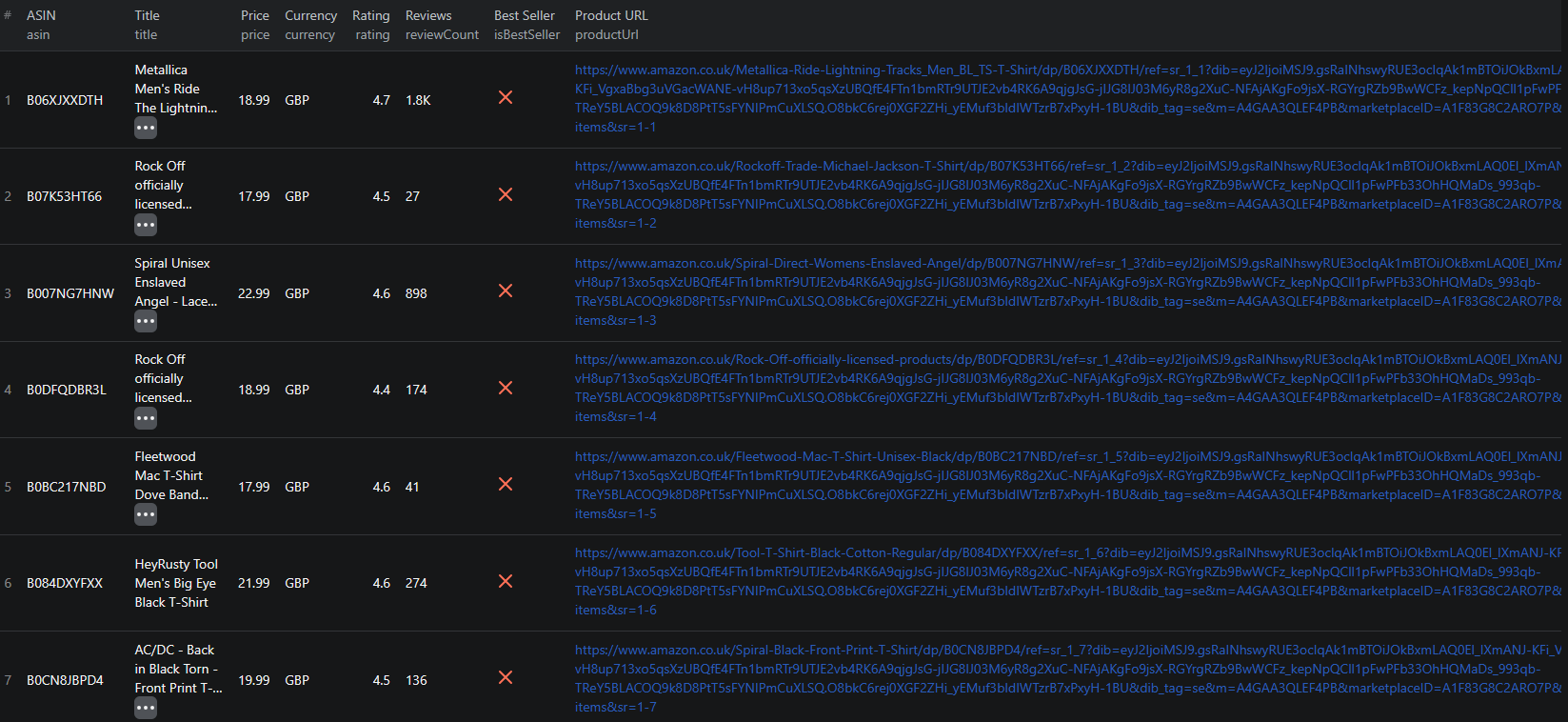
Here is what the actual output looks like from the Amazon Storefront Scraper.

Amazon Storefront Scraper results

[
  {
    "asin": "B0DFY6F2N1",
    "title": "Echo Show 8 (3rd Gen, 2024 release)",
    "price": 99.99,
    "currency": "USD",
    "rating": 4.6,
    "ratingText": "4.6 out of 5 stars",
    "reviewCount": "12,345",
    "imageUrl": "https://m.media-amazon.com/images/I/example.jpg",
    "productUrl": "https://www.amazon.com/dp/B0DFY6F2N1",
    "isPrime": true,
    "isBestSeller": true,
    "bestSellerCategory": "Smart Speakers",
    "isSponsored": false,
    "sellerId": "ATVPDKIKX0DER",
    "marketplace": "US",
    "scrapedAt": "2026-02-21T12:00:00.000Z"
  }
]

Key things to notice about this output:

  • ASIN — the unique Amazon product identifier is returned for every item, making it straightforward to cross-reference with other Amazon data sources or the Product Advertising API
  • Structured price — prices are returned as numbers with a separate currency field, making it easy to work with in spreadsheets or code without parsing
  • Prime and Best Seller flags — boolean fields that make filtering immediate — find all Prime-eligible listings or all Best Seller products in a single query
  • Timestamps — every record includes when it was scraped, which is essential for building historical price tracking databases
  • Complete URLs — direct product page links let you navigate straight to any listing without reconstructing URLs from ASINs

Try the Amazon Storefront Scraper now — no coding required.

Automating Amazon Storefront Monitoring

For competitive intelligence and price monitoring, running the scraper once is rarely enough. The real value comes from ongoing, automated collection that builds a historical dataset over time.

Scheduled Runs

Set up recurring scrapes on any schedule — daily, weekly, or monthly. The scraper runs automatically and appends results to a growing dataset. Daily runs work well for price tracking on high-velocity categories. Weekly runs are sufficient for catalog-level competitive analysis.

API Integration

Use the Apify API to trigger scraper runs programmatically and retrieve results. This enables integration into your existing workflows:

  • Feed competitor pricing data into dashboards or BI tools
  • Trigger alerts when a competitor drops prices or adds new Best Seller products
  • Build catalog comparison pipelines that run on a schedule and generate automated reports
  • Connect to Zapier, Make, or custom webhook handlers for event-driven workflows

Price Tracking Pipelines

Combine scheduled scraping with a database to build full price tracking systems. Store each run's results with timestamps and run queries like:

  • Which products changed price in the last 7 days?
  • Which items earned or lost a Best Seller badge this month?
  • What is the price distribution across this seller's catalog?

Node.js Example

For a complete working example showing how to call this scraper from Node.js, see the GitHub repository.

Webhooks

Configure webhooks to receive a notification the moment a scraper run finishes. This is useful when you want to process new storefront data immediately without polling for completion.

Using Amazon Storefront Data for Business Intelligence

Storefront data from Amazon is a building block for a wide range of business intelligence applications.

Catalog Gap Analysis

Compare your own product catalog against a competitor's storefront to identify categories or price points they cover that you do not. A systematic catalog gap analysis can surface expansion opportunities that are invisible from manual browsing.

Pricing Strategy Optimization

Aggregate price distributions across a competitor's storefront to understand their pricing architecture. Do they cluster products in specific price ranges? Do they use psychological pricing ($X.99) consistently? How does their pricing change across different product categories? Answering these questions at scale requires data.

Market Share Proxies

Review count growth is a proxy for sales volume on Amazon. Tracking review count changes across a seller's storefront over time gives you a rough measure of which products are gaining traction, even without access to actual sales data.

Brand Monitoring

If you represent a brand and want to ensure authorized resellers are pricing products correctly, scraping their storefronts gives you an automated compliance check. Flag listings that are outside allowed pricing windows without manually visiting each seller's page.

Private Label Research

Identify which products in a niche are performing well (high review counts, Best Seller badges, strong ratings) before investing in a private label product. Competitor storefront data gives you a demand signal grounded in real marketplace performance.

Does Amazon Provide an API for Storefront Data?

Amazon offers two developer APIs, but neither is a practical solution for bulk storefront extraction:

  • Selling Partner API (SP-API) — designed for sellers managing their own inventory. Requires being a registered Amazon seller with specific permissions. Does not provide access to competitor storefront data.
  • Product Advertising API (PA-API) — designed for affiliate marketers. Provides some product data but has strict rate limits and is not built for bulk catalog extraction.

Your practical options for extracting full storefront data are:

  • Manual browsing — feasible for a handful of products, completely unscalable beyond that
  • Custom scraper — requires significant development investment to handle dynamic rendering, anti-bot defenses, pagination, and multi-marketplace support
  • Pre-built scraper — a maintained solution like the Amazon Storefront Scraper that handles the technical complexity and stays up-to-date as Amazon changes

For most teams, the pre-built scraper delivers the most value with the least overhead.

Why Use a Pre-Built Scraper Instead of Building One

Custom Amazon scrapers sound straightforward until you encounter what Amazon actually puts in front of automated requests:

  • Anti-bot infrastructure — Amazon has sophisticated detection systems that identify and block scraping patterns. Building something that reliably works at scale requires significant proxy and request management infrastructure
  • Dynamic content — product pages use JavaScript rendering that simple HTTP clients cannot access. Browser automation adds latency, complexity, and resource requirements
  • Frequent layout changes — Amazon changes its page structure regularly. Custom scrapers tied to specific HTML structure need constant maintenance to keep working
  • Multi-marketplace complexity — handling 12 different Amazon marketplaces, each with different domains, currencies, and regional variations, multiplies the maintenance surface
  • Scaling overhead — extracting 19,200 products from a single storefront requires efficient pagination, rate throttling, and error handling that takes time to engineer correctly

Unless you have highly specific requirements no existing tool can meet, a pre-built, actively maintained scraper is the faster path to reliable storefront data.

Try the Amazon Storefront Scraper

The Amazon Storefront Scraper extracts complete product listings from any Amazon seller's storefront — ASINs, pricing, ratings, Prime status, Best Seller badges, and more, across 12 global Amazon marketplaces.

What you get:

  • Structured JSON or CSV output ready for analysis
  • All key product fields: ASIN, title, price, currency, rating, review count, Prime, Best Seller badge, and more
  • Support for 12 Amazon marketplaces including US, UK, DE, FR, and JP
  • Flexible input: storefront URLs, profile URLs, or raw seller IDs
  • Up to ~19,200 products per seller with automatic pagination
  • Scheduled runs for ongoing competitive monitoring
  • API access for integration into your data pipelines
  • No coding or scraper maintenance required

Start scraping Amazon storefronts now — your first run takes less than 5 minutes to set up.

If you are building a broader e-commerce data pipeline, combine Amazon storefront data with other marketplace sources. Explore how to scrape AliExpress product listings or Alibaba for cross-marketplace sourcing intelligence, or Poshmark and Mercari for secondhand market comparison.

Legal and Ethical Considerations

Web scraping is well-established as a legal practice for public data, but responsible use matters:

  • Public data only — the Amazon Storefront Scraper extracts product listing information that is publicly visible to anyone visiting Amazon.com without logging in. No account credentials or authentication are required
  • Respect rate limits — the scraper is designed to make requests at a responsible pace to avoid placing excessive load on Amazon's servers
  • GDPR and CCPA compliance — if you operate in the EU or California, ensure your data storage and processing practices comply with applicable privacy regulations. Public product listings generally do not contain personal data, but be mindful of how you handle any seller-identifying information
  • Terms of service — review Amazon's terms of service for any specific restrictions relevant to your use case
  • Responsible use — use collected data for legitimate business purposes such as competitive research, price monitoring, and market analysis

Frequently Asked Questions

Is scraping Amazon storefronts legal?

Scraping publicly available product data from Amazon seller storefronts is generally considered legal. The listings are visible to anyone without logging in. You should always use the data responsibly, avoid overloading Amazon's servers with excessive requests, and ensure your use complies with applicable data regulations such as GDPR or CCPA.

Does Amazon have an API for seller storefront data?

Amazon offers the Selling Partner API (SP-API) and the Product Advertising API, but both have significant limitations. SP-API is available only to registered Amazon sellers with specific permissions, and the Product Advertising API is designed for affiliates rather than bulk data extraction. Neither provides a simple way to pull all products from a given seller's storefront at scale.

What data can be extracted from an Amazon seller storefront?

You can extract ASINs, product titles, prices and currency, star ratings, review counts, Prime eligibility, Best Seller badges and categories, sponsorship status, product image URLs, direct product page URLs, seller IDs, and the marketplace country.

How many products can I scrape from an Amazon storefront?

The scraper supports up to approximately 19,200 products per seller storefront. Set maxProducts to 0 to extract everything, or specify a limit to control the size of each run.

Which Amazon marketplaces are supported?

The scraper supports 12 Amazon marketplaces: US, UK, DE, FR, IT, ES, CA, JP, IN, AU, MX, and BR. The marketplace is auto-detected from the URL when possible, or you can specify it manually.

What input formats does the Amazon Storefront Scraper accept?

You can provide seller storefront URLs (e.g. https://www.amazon.com/s?me=ATVPDKIKX0DER), seller profile URLs (e.g. https://www.amazon.com/sp?seller=A294P4X85L), or raw seller IDs (e.g. A294P4X85L). All three formats are supported.

About the Author

This guide was written by Piotr, a software engineer with hands-on experience building and maintaining web scrapers at scale. He develops and maintains a suite of data extraction tools on the Apify platform, helping businesses automate their data collection workflows.

Need help with your scraping project?

Book a free discovery call and let's scope your project together.

Book a Call
Piotr Vassev

Piotr Vassev

Founder of FalconScrape. Building production-grade web scraping systems and data automation pipelines for businesses worldwide.

Connect on LinkedIn