Piotr VassevPiotr Vassev

How to Enrich Leads and Generate Outreach with AI (Step-by-Step Guide)

How to Use an AI Lead Enrichment & Outreach Generator

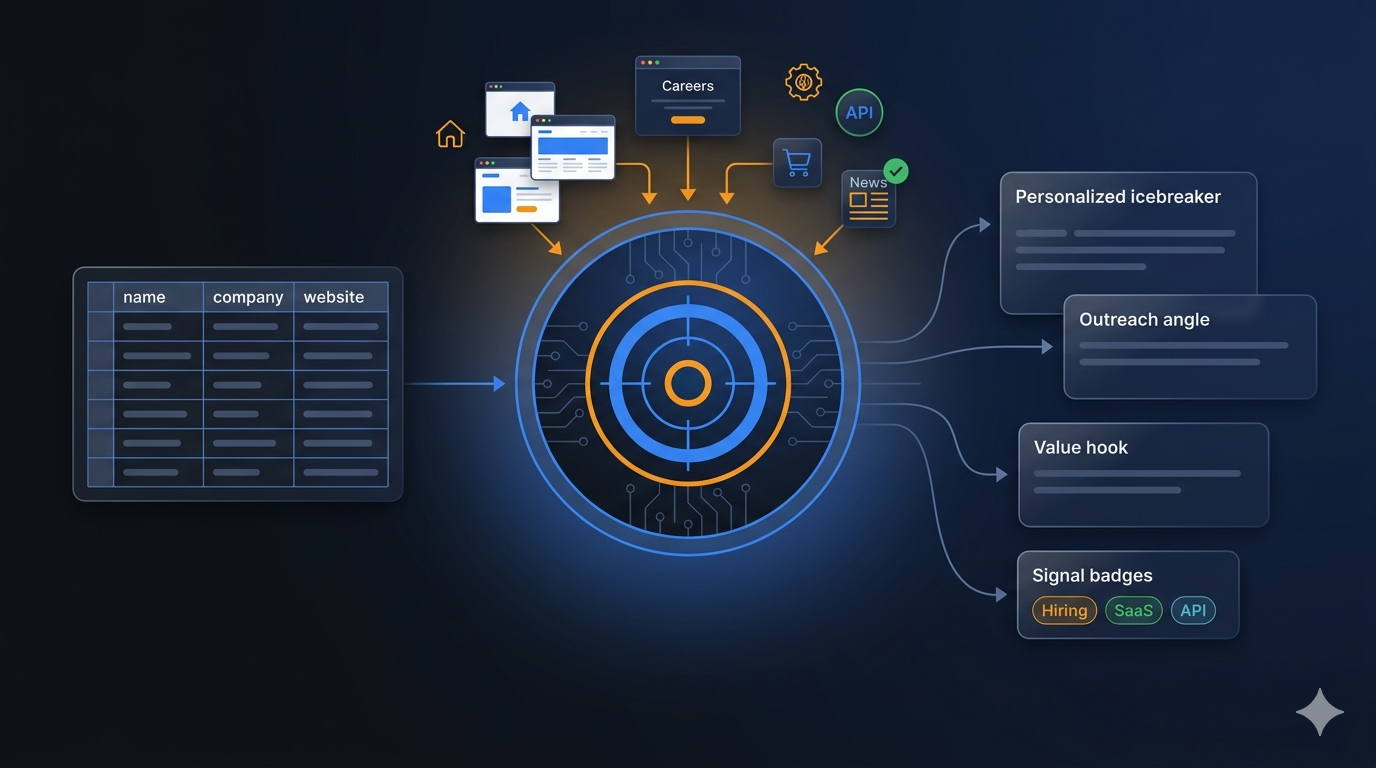
If you want to enrich a flat list of leads with live company data and generate personalized outreach copy at scale, this guide walks you through the entire process. You will learn how to take a raw CSV of prospects, automatically scrape their company websites, detect relevant business signals, and produce grounded, ready-to-send cold emails and LinkedIn messages — without writing a single line of code.

Why Automate Lead Enrichment and Outreach Generation?

The gap between a lead list and a sent outreach campaign is where most sales pipelines leak. The raw list you get from a data provider, event registration, or LinkedIn export typically contains a name, a job title, and a company website — not much to write a compelling first message about.

The traditional path is manual research: read the company website, find something relevant to mention, write a personalized opener, then do it again for the next lead. For a list of 50 companies, this takes a full day. For a list of 500, it takes a week.

AI-powered enrichment flips this model. Instead of manually researching each company, you feed the list to an automated pipeline that:

  • Scrapes each company's website in real time — homepage, about page, product page, blog — and extracts a compact company summary
  • Detects business signals — whether the company is hiring, developer-focused, B2B SaaS, ecommerce, agency-positioned, or publishing active content
  • Generates grounded outreach copy using OpenAI, strictly tied to the scraped evidence and your value proposition — no generic flattery, no hallucinated company references
  • Scores each lead for fit between your offer and the company, so you can automatically skip poor matches and only pay for real opportunities

The result is a CSV ready to drop into your outreach sequencer — with personalized copy for every lead — in the time it would have taken to manually research and write for five.

What Data the Actor Enriches and Generates

The AI Lead Enrichment & Outreach Generator adds the following fields to every row in your input:

Enrichment Fields

FieldDescriptionExample
company_summaryCompact AI-generated description of the company based on scraped pagesLinear – The system for product development. AI workflows at its core, built for modern teams.
detected_signalsList of rule-based business signals detected from the websiteb2b_saas, developer_or_api_focus
signal_evidenceThe specific words or phrases that triggered each signalb2b_saas: platform | developer_or_api_focus: API
scraped_urlsThe pages fetched during enrichmentlinear.app, linear.app/about, linear.app/customers
confidence_scoreFit score (0–1) measuring alignment between the company and your offer0.8
processing_statusWhether the row was successfully processed, skipped, or failedsuccess

AI-Generated Outreach Fields

FieldDescriptionExample
icebreakerA grounded opening sentence referencing something specific about the companyI noticed Linear is purpose-built for modern teams with AI workflows at its core...
outreach_angleThe strategic connection between the company's focus and your offerLinear's focus on self-driving product operations aligns with Flowprint's AI-guided onboarding tours...
value_hookA specific, evidence-backed value claim relevant to this companyFlowprint can cut your new-user onboarding time by up to 40%...
email_subjectA personalized email subject lineFaster onboarding for Linear's product users
linkedin_openerA short, personalized LinkedIn connection request or openerHi Sarah, I'm impressed by how Linear is redefining product development with AI workflows...
personalization_reasonAn internal explanation of why this copy was generated for this leadLinear's AI-centric product development system aligns well with Flowprint's AI-guided onboarding solution.

Every original column from your CSV is preserved in the output, so you can drop the enriched file directly into your sequencer without any reformatting.

Common Use Cases

Outbound Sales at Scale

Outbound campaigns live or die on personalization. Generic cold emails get deleted; emails that open with something specific about the recipient's company get replies. The AI Lead Enrichment & Outreach Generator gives you personalized openers, angles, and subject lines for every lead in your list — without hiring a researcher or spending hours on manual company research.

Pair the generated copy with your sequencer of choice (Instantly, Smartlead, Apollo, Lemlist) and you have a fully personalized outbound campaign ready to launch in minutes.

ICP Filtering and Lead Scoring

Not every lead in a purchased list actually fits your ICP. The actor's fit scoring tells you which companies genuinely align with your offer before you spend time on outreach. Set a minFitScoreToCharge threshold to automatically skip low-fit leads — you save both money on generation costs and time on outreach that was never going to convert.

Pre-Meeting Research Automation

Beyond outbound campaigns, lead enrichment is valuable for pre-meeting prep. Before a discovery call, enrich the prospect's domain through the actor to get a structured company summary and signal breakdown. Your sales rep walks into the call already knowing the company's focus, signals of growth or hiring, and the best angle to lead with.

Account-Based Marketing Enrichment

ABM requires deep account context before outreach. The actor automates the first layer of that research — scraping public website signals so your team can focus on higher-order strategy rather than manual data gathering.

Agency and Consultant Prospecting

Agencies prospecting for new clients need to demonstrate that they understand the prospect's business before the first touchpoint. Using this actor, you can generate company-specific angles and value hooks for every prospect in a target vertical — giving every outreach message the appearance of bespoke research.

Automated Lead List Processing

If you regularly receive lead lists from partners, conference organizers, or content downloads, you can build an automated enrichment pipeline. Connect the Apify API to your CRM or lead routing workflow to automatically enrich and score new leads as they arrive — with outreach copy ready by the time a sales rep picks up the lead.

Challenges of Manual Lead Enrichment

Before jumping into the tutorial, it is worth understanding why manual lead enrichment does not scale:

  • Volume — even 100 leads require reading 100 company websites, extracting relevant context, and writing 100 personalized first messages. This takes days of work that brings zero direct revenue
  • Consistency — quality varies across a manually researched list. Some messages are strong; others are weak because the researcher ran out of energy or found nothing interesting on the company's site
  • Stale data — by the time a manually enriched list is ready, some of the company data is already out of date
  • Coverage gaps — manual researchers often fall back on generic openers when they cannot find anything specific on a company website, which defeats the purpose of personalization
  • No scoring — without automated fit scoring, sales teams waste outreach cycles on leads that were never a good match for their offer
  • Opportunity cost — every hour a sales rep or researcher spends on enrichment is an hour not spent on calls, demos, or closing

Automating lead enrichment eliminates all of these problems. The pipeline runs in minutes, produces consistent output quality, and scores every lead before a human ever touches it.

Step-by-Step: How to Enrich Leads and Generate Outreach Copy

Here is how to use the AI Lead Enrichment & Outreach Generator on Apify.

Step 1 — Prepare Your Lead List

Prepare a CSV with at least a website column for each lead. The following standard headers are detected automatically:

  • first_name — the lead's first name
  • company_name — the company name
  • website — the company website URL
  • title — the lead's job title

You can include any additional columns (LinkedIn URL, company size, industry). Extra columns are passed through to the output and can also be surfaced to the AI as additional context.

Or use Google Sheets — paste a publicly accessible Google Sheets URL instead. The actor converts it to CSV automatically.

Try the demo — leave the actor's prefilled inputs as-is and click Start. It enriches three real B2B SaaS companies (Linear, Notion, PostHog) against a sample value proposition so you can see exactly what the output looks like before processing your own list.

Step 2 — Configure the Actor Input

Head to the AI Lead Enrichment & Outreach Generator on Apify and configure your run:

{
  "inputSourceType": "csv_upload",
  "csvFile": "SAMPLE",
  "maxRows": 100,
  "sellerValueProposition": "Flowprint helps B2B SaaS companies cut new-user onboarding time by 40% with AI-guided interactive walkthroughs built automatically from existing product docs.",
  "sellerCompanyName": "Flowprint",
  "sellerProofPoints": ["Reduced onboarding time by 40% at Acme Corp", "Used by 50+ SaaS teams"],
  "openAiModel": "gpt-4.1-mini",
  "outputTypes": ["icebreaker", "outreach_angle", "value_hook", "email_subject", "linkedin_opener"],
  "scrapeMode": "homepage_plus_about",
  "minFitScoreToCharge": 0.5,
  "tone": "professional",
  "lengthPreference": "short"
}

Key parameters:

  • sellerValueProposition — 1–3 sentences describing what you sell, for whom, and the specific outcome. This is the most important input. The more specific your value proposition, the more specific and useful the generated copy will be
  • sellerProofPoints — facts the AI is allowed to cite: customer names, measurable results, case studies. These ground the value hook in real evidence
  • openAiModelgpt-4.1-mini is the default and the best quality/price tradeoff for outbound copy
  • scrapeModehomepage_plus_about (default) scrapes the homepage and about page. smart_multi_page also fetches product, customers, and blog pages for richer context. Use homepage_only for very large lists to reduce cost
  • minFitScoreToCharge — rows scoring below this threshold are marked skipped and not billed. Set to 0.5 once you have validated your value proposition setup
  • outputTypes — choose which copy fields to generate. Generate only what your sequencer actually uses to reduce token cost

Step 3 — Run the Actor

Once started, the actor runs a five-step pipeline for each unique company domain:

  1. Fetch pages — scrapes the company website (homepage, about, product, customers, blog) based on your scrapeMode setting
  2. Generate company summary — extracts a compact description of the company from the scraped content
  3. Detect business signals — runs rule-based detection for signals including hiring, developer/API focus, B2B SaaS positioning, ecommerce, recent blog content, and agency positioning
  4. Score fit — computes a confidence_score between 0 and 1 measuring alignment between the company's signals and your value proposition
  5. Generate outreach copy — calls OpenAI with the scraped context, detected signals, and your seller inputs to produce grounded, personalized copy for each lead at that company

Domain deduplication runs automatically: if 10 leads share the same company domain, steps 1–4 run once and step 5 runs 10 times (once per lead) using the shared company context.

Step 4 — Export Your Results

Once the run finishes, export your enriched dataset:

  • OUTPUT.csv — available directly in the run's Storage tab under the key-value store. This is the file to upload to your email sequencer
  • JSON dataset — the full structured dataset accessible via the Apify UI or API, with every field including intermediate enrichment data
  • CSV / Excel — standard export formats available from the dataset view

The OUTPUT.csv preserves all original columns and appends the enrichment and AI-generated fields — ready to import into Instantly, Smartlead, Lemlist, Apollo, or any sequencer that accepts CSV.

Ready to try it? Run the AI Lead Enrichment & Outreach Generator on Apify and get your first enriched outreach dataset in minutes.

Example Output (Real Data Preview)

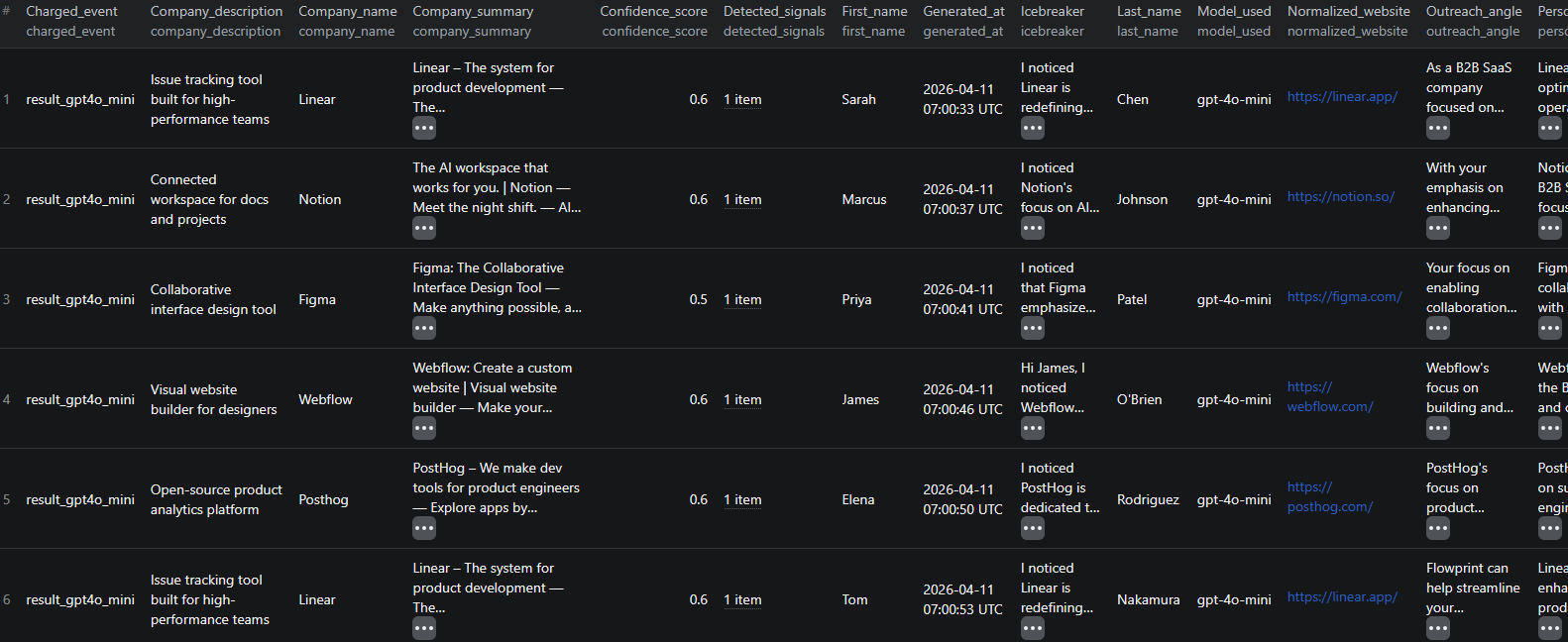
AI Lead Enrichment & Outreach Generator results

Here is what the actual output looks like. Each record preserves the original CSV fields and adds enrichment and AI copy:

{
  "first_name": "Sarah",
  "company_name": "Linear",
  "title": "Head of Growth",
  "website": "https://linear.app",
  "processing_status": "success",
  "normalized_website": "https://linear.app",
  "scraped_urls": [
    "https://linear.app",
    "https://linear.app/about",
    "https://linear.app/customers"
  ],
  "company_summary": "Linear – The system for product development. AI workflows at its core, built for modern teams.",
  "detected_signals": ["b2b_saas", "developer_or_api_focus"],
  "signal_evidence": "b2b_saas: platform | developer_or_api_focus: API",
  "icebreaker": "I noticed Linear is purpose-built for modern teams with AI workflows at its core, setting a new standard for product development.",
  "outreach_angle": "Linear's focus on self-driving product operations aligns with Flowprint's AI-guided onboarding tours to accelerate user activation.",
  "value_hook": "Flowprint can cut your new-user onboarding time by up to 40% by auto-generating interactive walkthroughs from your existing product docs.",
  "email_subject": "Faster onboarding for Linear's product users",
  "linkedin_opener": "Hi Sarah, I'm impressed by how Linear is redefining product development with AI workflows — would love to discuss growth strategies.",
  "personalization_reason": "Linear's AI-centric product development system aligns well with Flowprint's AI-guided onboarding solution.",
  "confidence_score": 0.8,
  "model_used": "gpt-4.1-mini",
  "charged_event": "result_gpt41_mini",
  "generated_at": "2026-04-11T12:14:22.108Z"
}

Key things to notice:

  • Grounded icebreaker — the opening sentence references something real scraped from Linear's website, not a generic compliment. This is what makes recipients read past the first line
  • Separated copy fields — icebreaker, outreach angle, value hook, subject line, and LinkedIn opener are returned as separate fields, giving you flexibility to mix and match in your sequencer templates
  • Confidence score — the 0.8 score on Linear tells you this is a strong fit for a product onboarding offer. A score of 0.3 would tell you to skip this lead or deprioritize it
  • Signal detectionb2b_saas and developer_or_api_focus are the specific signals that drove the fit score and outreach angle — useful for segment-level reporting and ICP validation
  • Model trackingmodel_used and charged_event are included so you can audit exactly what was charged and which model produced each result

Try the AI Lead Enrichment & Outreach Generator now — no coding required.

Automating Lead Enrichment Pipelines

For teams processing lead lists regularly, manual runs are not efficient. The Apify platform supports full automation:

Scheduled Runs

Set up a scheduled actor run to automatically enrich new leads on a weekly or daily cadence. Point the actor at a Google Sheet that your team continuously appends leads to — each scheduled run processes the new rows and adds enriched copy to the output dataset.

API Integration

Use the Apify API to trigger the actor programmatically from your CRM, lead routing system, or data pipeline. This enables:

  • Automatic enrichment when new leads enter your CRM from a web form, content download, or event registration
  • Triggering outreach sequence enrollment as soon as enriched copy is ready
  • Building a lead scoring dashboard that updates as new leads arrive

Node.js Example

For a complete working example showing how to call this actor from Node.js, see the GitHub repository.

Webhooks

Configure a webhook to notify your system when an enrichment run completes. This is useful for event-driven pipelines where you want to immediately process the OUTPUT.csv — for example, automatically uploading it to your sequencer or updating your CRM with the fit scores.

Pricing

The AI Lead Enrichment & Outreach Generator uses Pay Per Event pricing — you are charged per successfully enriched lead, and the price depends on the OpenAI model you choose. Failed rows, skipped rows, and rows below your minFitScoreToCharge threshold are never billed.

| OpenAI Model | Tier | Price per 1,000 results | |---|---|---| | gpt-4o-mini | Cheapest | $3.99 | | gpt-4.1-mini | Lower-mid (default) | $6.99 | | gpt-4.1 | Premium | $16.99 | | gpt-4o | Premium+ | $19.99 |

Example costs:

  • 100 leads with gpt-4.1-mini (default): ~$0.70
  • 500 leads with gpt-4.1-mini (default): ~$3.50
  • 1,000 leads with gpt-4.1-mini (default): ~$6.99
  • 1,000 leads with gpt-4o: ~$19.99

Tips to control cost:

  • Start with gpt-4.1-mini — it delivers strong copy quality at the lowest effective cost per lead
  • Set minFitScoreToCharge to 0.5 — once you have validated your value proposition, automatically skip leads that don't fit your ICP
  • Use homepage_only scrape mode for very large lists if deep company context is not critical
  • Domain deduplication is automatic — 500 leads across 50 companies trigger 50 website scrapes, not 500

Why Use This Actor Instead of Building a Custom Pipeline

Building a custom lead enrichment and outreach generation pipeline sounds straightforward — but it involves solving a stack of non-trivial problems:

  • Website scraping reliability — many company websites use JavaScript rendering, anti-bot protection, or redirect chains that break naive HTTP scrapers. Getting consistent, clean content out of arbitrary company URLs requires a robust scraping layer
  • Content extraction quality — raw HTML is not useful. Turning scraped pages into a compact, informative company summary requires careful parsing and summarization logic
  • Signal detection — defining, calibrating, and maintaining a rule-based signal detection system for business context takes significant time to get right
  • Prompt engineering — generating outreach copy that is grounded in evidence rather than generic or hallucinated requires carefully designed prompts with explicit grounding constraints
  • OpenAI cost management — integrating fit scoring, model selection, and selective generation (skipping low-fit leads) to keep token costs under control adds significant product complexity
  • Output formatting — producing a clean, sequencer-ready CSV that maps correctly to your outreach tool's import format is a detail that takes time to get right
  • Infrastructure and scaling — processing hundreds or thousands of leads in parallel, with rate limiting, error handling, and retry logic, requires distributed infrastructure that takes time to build and maintain

The AI Lead Enrichment & Outreach Generator handles all of this out of the box.

Try the AI Lead Enrichment & Outreach Generator

The AI Lead Enrichment & Outreach Generator turns a flat CSV of leads into grounded, personalized outreach copy in a single automated run — no coding, no manual research, no hallucinated filler.

What you get:

  • Live website enrichment for every company domain in your list
  • Business signal detection with supporting evidence
  • Fit scoring to automatically skip low-quality leads
  • AI-generated icebreaker, outreach angle, value hook, email subject, and LinkedIn opener — grounded in scraped facts and your value proposition
  • Domain deduplication to reduce cost on lists with multiple contacts per company
  • OUTPUT.csv ready to upload to Instantly, Smartlead, Lemlist, Apollo, or any sequencer
  • Scheduled runs and API access for automated enrichment pipelines
  • No coding or infrastructure required

Start enriching your leads now — your first run takes less than 5 minutes to set up.

If you are building a broader B2B prospecting workflow, combine this with the LinkedIn Decision Maker Finder to first identify the right contacts at target companies, then feed those leads directly into this enrichment pipeline for ready-to-send outreach copy.

Legal and Ethical Considerations

  • Public data only — the actor scrapes only publicly accessible company website pages that anyone can read in a browser. It does not access login-protected content, internal systems, or private data
  • GDPR and CCPA — the actor processes lead data you provide. Ensure that your original lead list was collected in compliance with applicable privacy regulations. Use the enriched data for legitimate business outreach and not for spam or unsolicited mass messaging
  • AI-generated content — review AI-generated copy before sending, particularly value hook claims. The sellerProofPoints input exists precisely to keep claims grounded in real evidence — use it
  • Responsible outreach — personalized copy is a tool for relevance, not manipulation. Use it to start genuine conversations rather than to bypass recipients' considered judgment about your offer

Frequently Asked Questions

What inputs does the AI Lead Enrichment & Outreach Generator accept?

The actor accepts a CSV file upload or a publicly accessible Google Sheets URL. Standard column headers (first_name, company_name, website, title) are detected automatically. You can customize which column maps to which field if your headers differ.

Which OpenAI models are supported?

The actor supports gpt-4.1-mini (default), gpt-4.1, gpt-4o-mini, and gpt-4o. The default gpt-4.1-mini offers the best quality-to-price ratio for outbound copy. You can switch to a more powerful model for higher-stakes outreach.

What outreach copy does the actor generate?

For each lead, the actor can generate an icebreaker, outreach angle, value hook, email subject line, and LinkedIn opener. All copy is grounded in the scraped company evidence and your seller value proposition — no generic flattery or hallucinated company references.

What is the fit score and how does it work?

Each lead receives a confidence_score between 0 and 1 measuring how well the company fits your offer based on scraped signals and your value proposition. You can set minFitScoreToCharge to automatically skip leads below a threshold — those rows are not billed, so you only pay for real fits.

How does domain deduplication work?

If multiple leads share the same company domain, the actor scrapes that domain only once and generates per-lead copy from the shared company context. This significantly reduces both processing time and cost for lead lists with multiple contacts at the same company.

Can I export the results to CSV for use in my email sequencer?

Yes. Every run produces an OUTPUT.csv file in the Apify key-value store in addition to the standard dataset. This CSV is formatted to drop directly into tools like Instantly, Smartlead, Lemlist, or Apollo.

About the Author

This guide was written by Piotr, a software engineer with hands-on experience building and maintaining web scrapers at scale. He develops and maintains a suite of data extraction tools on the Apify platform, helping businesses automate their data collection workflows.

Need help with your scraping project?

Book a free discovery call and let's scope your project together.

Book a Call
Piotr Vassev

Piotr Vassev

Founder of FalconScrape. Building production-grade web scraping systems and data automation pipelines for businesses worldwide.

Connect on LinkedIn