
How to Compare Chrono24 Watch Prices by Reference
Two watches with the same model name can have very different asking prices because they are different references, years, or conditions. A useful comparison starts by matching those details before looking at the price.
Our Chrono24 Listings Scraper exports watch listings from brand, model, or individual-watch URLs. In full-detail mode it adds the reference number, condition, year, box and papers, seller, specifications, and images. It runs as an Apify Actor; you can use the Input form and download JSON or CSV without writing a scraper. These are live listing prices, not completed sales.
Export three GMT-Master listings
- Open the Chrono24 Actor on Apify.
- Under Start URLs, enter
https://www.chrono24.com/rolex/gmt-master--mod3.htm. - Turn on Scrape full watch details, set Max items to
3, and leave Country (pricing locale) on United States (USD). - Start the run, open its Dataset, and export the records.
The JSON editor input is:
{
  "startUrls": [
    { "url": "https://www.chrono24.com/rolex/gmt-master--mod3.htm" }
  ],
  "scrapeDetails": true,
  "maxItems": 3,
  "country": "us"
}
Our three-result run shows why a model-level average would be misleading:
| Reference | Asking price | Condition | Box and papers |
|---|---|---|---|
| 126710BLNR | $18,900 | Like new / unworn | Both included |
| 116710BLNR | $14,495 | Used (Good) | Neither included |
| 126710BLRO | $34,500 | Like new / unworn | Both included |
This separate 12-row listings-only preview shows asking prices and source URLs. The reference, condition, and box-and-papers fields used above come from the full-detail run, not these shallow rows.
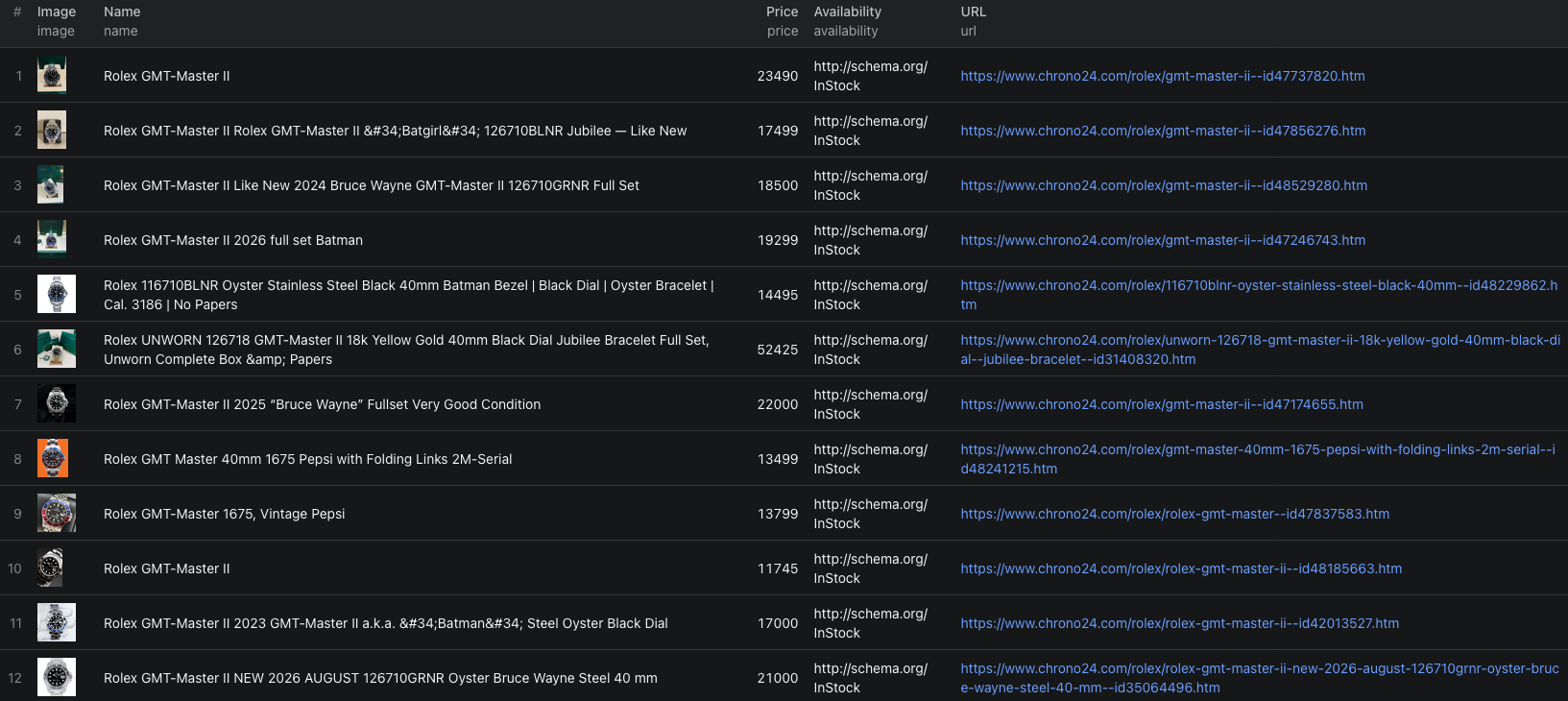
Those are three different reference numbers. The price spread does not tell you what any one reference is worth. Each row also retains a source URL and listingId so you can reopen the listing before making a decision.
The Chrono24 Node.js example runs this three-watch sample and reads its dataset.
Build a closer comparison set
Start with one exact referenceNumber. Then compare condition, yearOfProduction, scopeOfDelivery, seller location, and priceCurrency. Keep the original listing URL, because details can change or the watch can disappear. Exclude records with missing reference numbers from an exact-reference calculation until reviewed.
Use the listings-only mode when you just need a broad scan of names, prices, and URLs. Switch on full details for a smaller shortlist; that is where the reference and condition fields become available. Do not describe the resulting median as a sale price. It is a summary of asking prices in the listings you captured at that time.
Pricing
Pricing as of September 24, 2026 is $0.001 per listing-only watch or $0.012 per watch with full details. These are alternative per-watch events. The Actor start event is $0.00005 per GB of allocated memory, with a minimum of one event. Three full-detail watches have an Actor event estimate of $0.03605 at the minimum start charge. Apify platform usage may be billed separately according to your plan. Check live pricing before a larger run.
Frequently asked questions
Are Chrono24 prices completed sale prices?
No. The Actor returns listing asking prices. Do not present them as sold prices or appraised values.
Why do I need full watch details?
Listing-only mode is useful for a broad price scan. Full details add the reference number, condition, year, box and papers, seller, and specifications needed for a closer comparison.
Can I compare prices from different countries directly?
Not safely. Set a pricing locale and keep priceCurrency and seller location with each record. Also account for differences in condition, delivery, and applicable fees.
