
How to Compare ezCater Menus and Delivery Costs
A caterer can look affordable until its order minimum and delivery fee are added to the picture. For a useful shortlist, compare firms serving the same location and inspect the actual menu, not just the star rating.
Our ezCater Listings Scraper searches US cities or ZIP codes for caterers. Listings include ratings, delivery fees, and minimums. Turn on full details when you also need menu items, prices, cuisines, and dietary tags. It runs from Apify's Input form and exports the results as a dataset.
Compare three Boston caterers
- Open the ezCater Actor on Apify.
- Enter
Boston, MAunder Locations and leave Order type on Delivery. - Turn on Scrape full details and menus and set Max caterers to
3. - Start the run, open the Dataset, and export JSON. CSV is convenient for the top-level comparison, but JSON preserves the nested menu.
The JSON editor input is:
{
  "locations": ["Boston, MA"],
  "orderType": "DELIVERY",
  "scrapeMenus": true,
  "maxItems": 3,
  "proxyConfiguration": { "useApifyProxy": false }
}
maxItems is a total run limit if you supply several locations. Our three-result Boston run returned these figures:
| Caterer | Rating | Delivery fee | Order minimum | Menu items |
|---|---|---|---|---|
| Flour Bakery | 4.9 | $30 | $150 | 21 |
| Tatte Bakery & Cafe | 4.9 | $30 | $100 | 96 |
| Pressed Cafe | 4.8 | $35 | $100 | 319 |
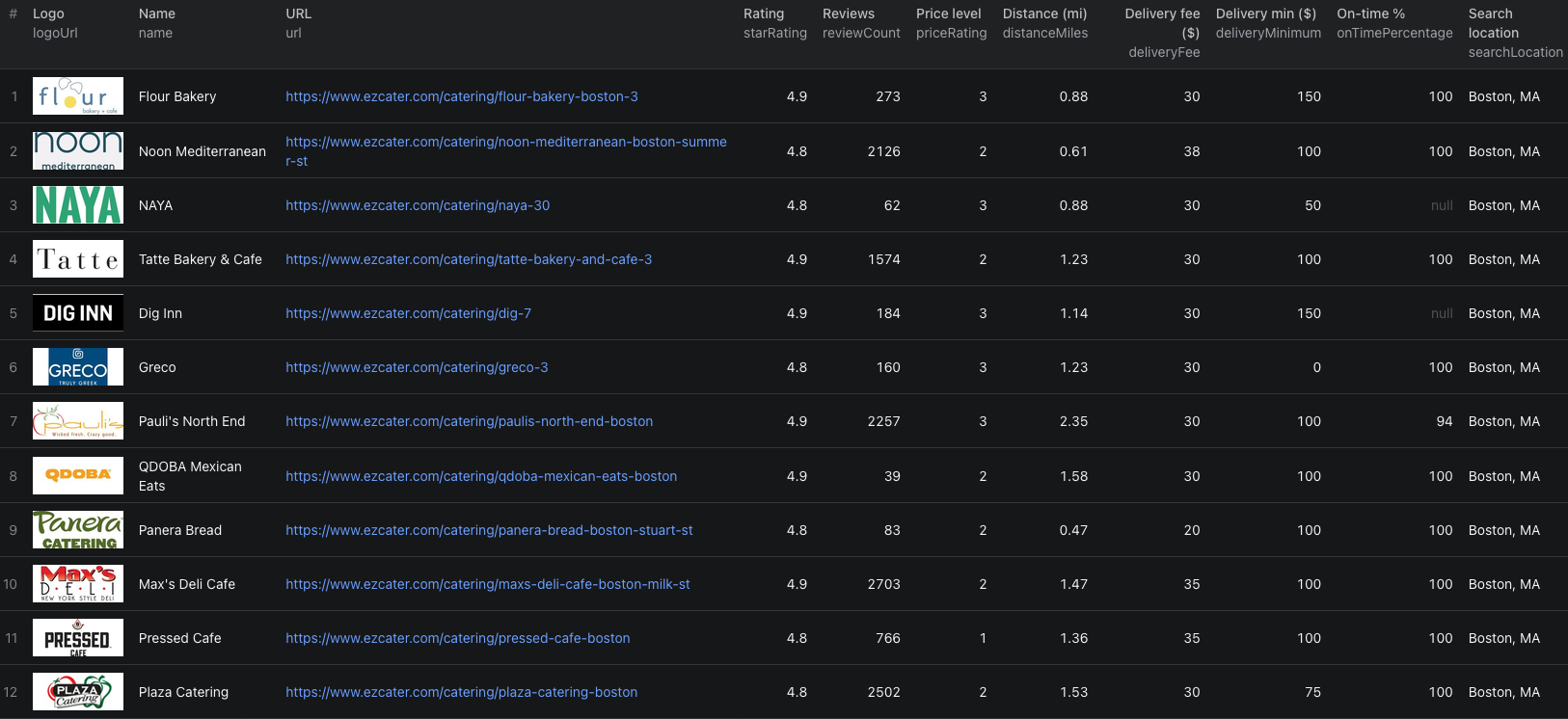
This larger Boston run shows 12 caterers at the top level. Menus are nested inside each full-detail result rather than displayed in these visible columns.
For example, Flour Bakery's menu record included a Fruit Bowl priced at $80, with vegetarian and gluten-free tags. That price is for the menu option shown in the source, not a per-person quote. Review serving size and the current listing before comparing it with another caterer's platter.
The ezCater Node.js example runs this three-caterer sample and fetches the dataset.
Make a shortlist you can actually use
First filter out any caterer whose deliveryMinimum exceeds your planned food budget. Then compare deliveryFee, menu categories, item prices, and dietary tags. Keep url beside each row so someone ordering can confirm the live menu and availability.
Do not add the minimum and fee and call that a final quote. The minimum is a threshold, not a menu item. Taxes, service charges, serving sizes, and checkout terms may change the order total. Ratings and on-time percentages are useful context, but compare them alongside review counts rather than treating every 4.9 as equally supported.
If you only need a broad list of caterers, turn Scrape full details and menus off. That avoids paying for menu enrichment you will not use.
Pricing
Pricing as of September 24, 2026 is $0.002 per listing-only caterer or $0.008 per caterer with full details and menu. They are alternative events for each result. The Actor start event is $0.00005 per GB of allocated memory, with a minimum of one event. Three enriched caterers have an Actor event estimate of $0.02405 at the minimum start charge. Apify platform or proxy usage may be billed separately according to your plan. See live pricing before scaling up.
Frequently asked questions
Can I get menus without opening each caterer manually?
Yes. Turn on Scrape full details and menus. The Actor then visits each caterer and returns menu categories, items, prices, and available dietary tags.
Is the delivery minimum the total order cost?
No. Treat deliveryMinimum, deliveryFee, and menu prices as separate fields. Taxes, service charges, availability, and checkout details may change the final amount.
Does maxItems apply separately to each location?
No. It caps the total number of caterers across all locations in the run.
