
How to Compare Kaspi Prices and Seller Offers
On Kaspi.kz, a product can have many sellers, and the advertised product price may differ from an individual seller's offer. Prices, stock, and delivery also depend on the selected city. A useful comparison keeps those facts together instead of ranking a mixed list of prices.
Our Kaspi.kz Scraper finds products by keyword or URL and can add each product's marketplace seller offers. The output includes product identity, price in KZT, city, stock, seller names and IDs, offer prices, ratings where available, and delivery options. Product specifications and reviews are separate optional modes.
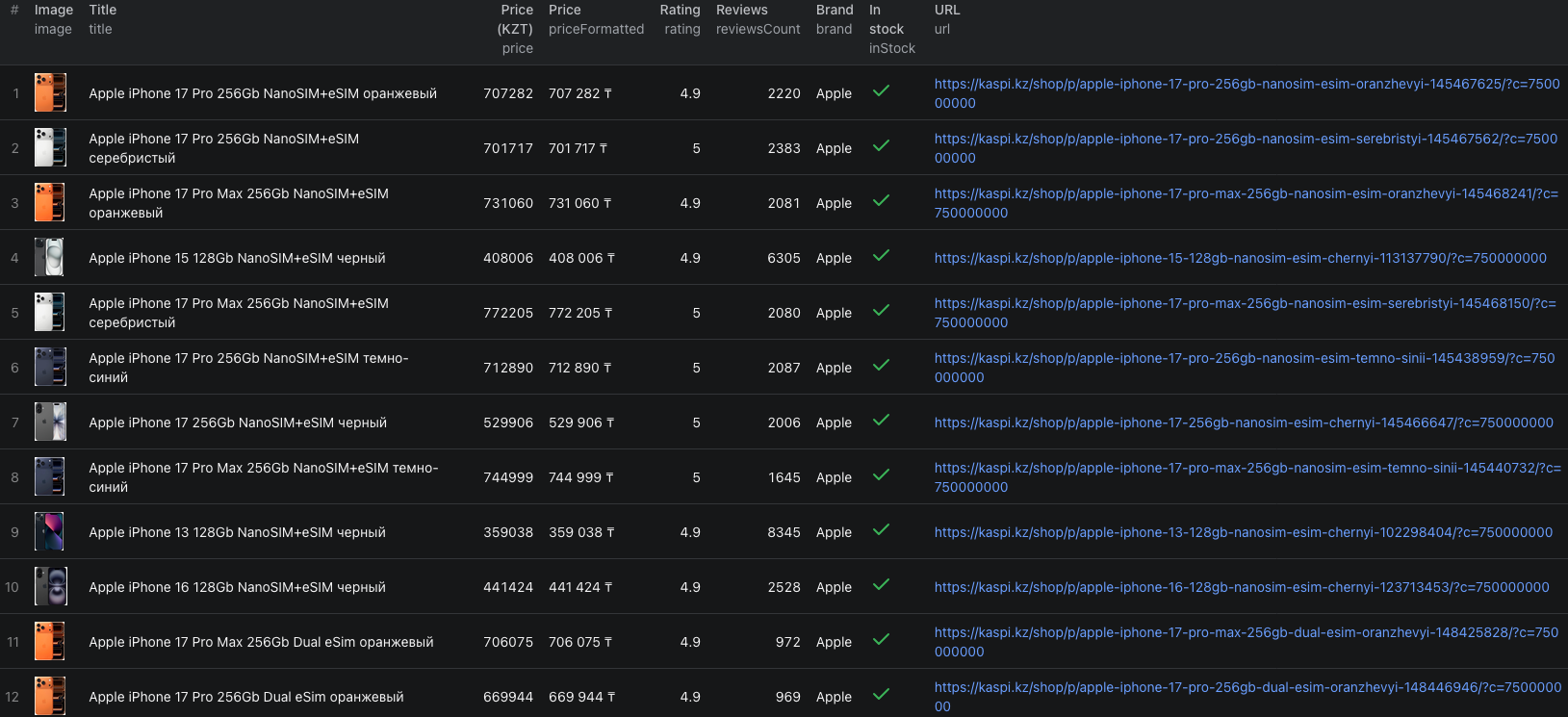
This guide collects five phone results in Almaty, then narrows the comparison to the exact product configuration.

Collect five products with offers
- Open the Actor on Apify.
- Enter
iphone 17 prounder Search queries. - Set Max items to
5and City to Almaty. - Turn on Scrape seller offers. Leave product details and reviews off for this first pass.
- Keep the residential proxy enabled, click Start, then open the completed run's Dataset.
You can paste the same input into the JSON editor:
{
  "searchQueries": ["iphone 17 pro"],
  "maxItems": 5,
  "scrapeProductDetails": false,
  "scrapeOffers": true,
  "scrapeReviews": false,
  "city": "750000000",
  "proxyConfiguration": {
    "useApifyProxy": true,
    "apifyProxyGroups": ["RESIDENTIAL"]
  }
}
750000000 selects Almaty. The input also accepts category, search, and direct product URLs under startUrls. maxItems is a product limit across every query and URL, not a separate allowance for each one.
Our live run returned five product records with offer arrays. One abbreviated row was:
{
  "id": "145467625",
  "title": "Apple iPhone 17 Pro 256Gb NanoSIM+eSIM оранжевый",
  "price": 707255,
  "priceWithBonus": 686038,
  "currency": "KZT",
  "city": "750000000",
  "inStock": true,
  "offersCount": 65,
  "offers": [
    {
      "merchantId": "18679883",
      "merchantName": "NOVAMART",
      "price": 707180,
      "merchantRating": 4.9,
      "kaspiDelivery": true,
      "deliveryOptions": {
        "EXPRESS": { "deliveryCost": 995 },
        "TO_DOOR": { "deliveryCost": 0 }
      }
    }
  ]
}
The offers array shown here contains one excerpted seller. The product row reported 65 offers at collection time. Notice that the product's price was 707,255 KZT while this seller's price was 707,180 KZT. Keep the two fields separate.
The Kaspi Node.js example runs this five-product check and retrieves the dataset.
Compare the same product before comparing sellers
The five results included different colors and SIM configurations. Even when the model name looks identical, those are distinct product IDs. Choose one ID and compare offers within its array before drawing a conclusion about seller pricing.
For a spreadsheet or database, keep a product table keyed by id and an offers table keyed by id plus merchantId. Retain city and collection time with both. Then:
- Filter to the exact product configuration you want.
- Sort its seller offers by
price, keeping delivery cost and method visible. - Review seller rating and fulfilment details when the source supplies them.
- Open the current Kaspi page before acting on an older offer.
priceWithBonus reflects Kaspi's bonus-adjusted display. It is not the same as an unconditional seller price, so do not mix it into a seller-price ranking. Likewise, an offer with a lower price and paid delivery may not be the cheapest delivered option.
| Field | What to keep straight |
|---|---|
id, title, url | Match the exact product, color, storage, and SIM configuration. |
price, priceWithBonus | Keep the displayed product price and bonus-adjusted value distinct. |
city, inStock | Interpret the observation in the selected market and availability context. |
offersCount, offers | Inspect the seller price ladder for that product, not for all search results combined. |
merchantId, merchantRating, deliveryOptions | Compare the seller identity, source rating, and delivery terms beside the price. |
Compare cities with separate runs
Run the same product URL or search in Almaty and another supported city, such as Astana, using the corresponding City option. Save each export with its city and time. Match the product id across the two datasets; a search can surface different products or sort orders in each city.
When an ID appears in both, compare its displayed price, stock status, and seller offers. Do not interpret a product missing from a five-row sample as unavailable in the city. Raise the limit or use its direct product URL to check it.
Turn on scrapeProductDetails only when specifications or full gallery data are needed to identify a product. Turn on scrapeReviews when customer feedback is part of the question. Each mode adds work and its own event charge.
Pricing
Pricing as of September 23, 2026 uses a $0.001 listing event per basic product and an additional $0.004 seller-offers event per enriched product. Full details use a $0.004 detail event instead of the listing event. Reviews add $0.004 per enriched product. The Actor start event is $0.00005 per GB of allocated memory, with a minimum of one event.
Our example returned five basic products and five offer arrays. Its Actor event charges were $0.00005 + (5 × $0.001) + (5 × $0.004) = $0.02505. Apify platform or proxy usage may be billed separately according to your plan. Check live pricing before adding several optional modes or a large category.
If the comparison looks wrong
- Search results contain near-identical phones. Compare product IDs, color, storage, and SIM format before joining prices.
- The product price does not match the first seller offer. Preserve both source fields; they are different values in the returned row.
- A seller looks cheapest but delivery is extra. Compare the relevant delivery option and its cost for the selected city.
- A seller rating is null. Leave it missing rather than assigning a zero rating.
- The same search changes between runs. Keep each run's city and collection time. Use direct product URLs for a stable comparison set.
Frequently asked questions
Does maxItems apply to each search query?
No. maxItems limits products across all queries and URLs in a single run.
Why should I select a city?
Kaspi prices, stock, and delivery options can differ by city. Keep the selected city with every export and run each city separately when comparing regions.
Are seller offers charged per seller?
No. The current seller-offers event is charged once per enriched product, in addition to that product's listing or detail event.
