
How to Compare ManoMano Product Prices Across European Markets
For a price comparison to mean anything, you need to know which product, seller, and market each price came from. A category page is a useful starting point, but similar-looking tools can differ in model or included accessories.
Our ManoMano Listings Scraper turns ManoMano category URLs from France, Germany, Spain, Italy, or the UK into product rows. Listings include title, brand, seller, current and retail prices, discount, rating, delivery type, category, and URL. Optional product-page details add attributes and identifiers such as EAN and manufacturer SKU where ManoMano provides them.
Export a small category sample
Open the Actor on Apify. Add a ManoMano category URL under Start URLs, set Max items to 10, and leave Scrape product details off for the first pass. Start the run and open its Dataset.
In the JSON editor, use:
{
  "startUrls": [
    { "url": "https://www.manomano.fr/perceuse-visseuse-perforateur-burineur-marteau-piqueur-465" }
  ],
  "maxItems": 10,
  "scrapeProductDetails": false
}
The cap is global across all category URLs. Each row has dataType: "listing", so you can export the ten rows to CSV and compare brand, sellerName, priceCurrent, priceRetail, ratingAverage, and deliveryType side by side. The Actor's documentation shows these fields for a French power-tool category; prices are snapshots and can change.
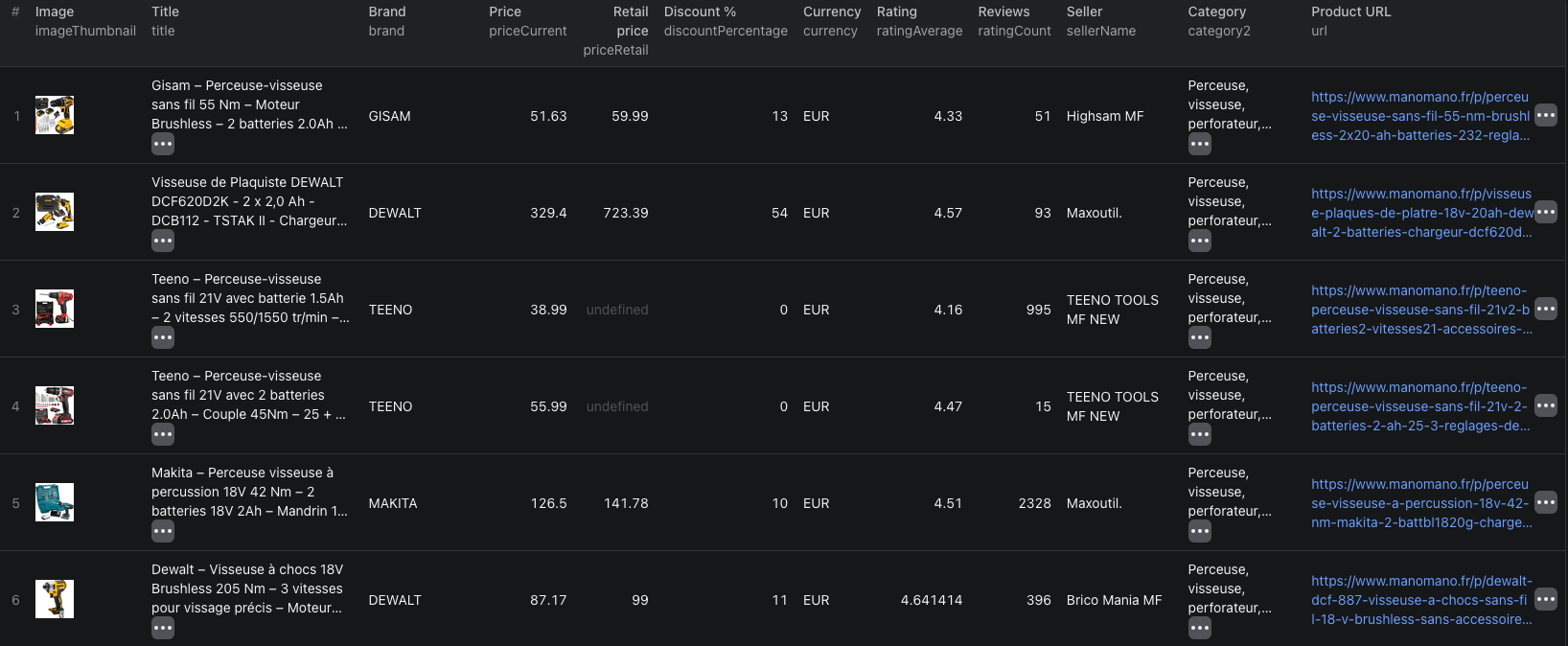
This screenshot shows six visible products from a category run; the remaining rows, if any, are outside the crop.
The Node.js example runs this listing-only input and reads the results through Apify's API.
Compare the same item, not just similar titles
Start with one locale and one category. Group candidate rows by brand and model, and keep product URLs so you can inspect mismatches. Compare the current price only after checking bundle contents, voltage, size, or other relevant specifications. A promotion flag or crossed-out retail price is context, not proof that one offer is the best deal.
If titles are ambiguous, rerun a small category sample with scrapeProductDetails: true. The Actor then saves both a listing row and an additional detail row per enriched product. The detail row may include EAN, manufacturer SKU, attributes, description, and delivery information. Join rows by articleId or product URL; do not count both row types as separate products. When comparing across countries, keep the source domain and currency, and account for delivery and tax before drawing a purchasing conclusion.
Pricing
Pricing as of September 28, 2026 is $0.002 per listing row. When full product details are enabled, an additional $0.015 per detail row applies. Ten listing-only rows would be $0.02 in Actor events; ten listings with ten successful detail rows would be $0.17. Apify platform usage may be billed separately under your plan. See live pricing before enriching a large category.
Frequently asked questions
Does maxItems apply to each category URL?
No. maxItems is a global cap on listing products across all category URLs in the run.
Do detailed product rows replace listing rows?
No. With scrapeProductDetails enabled, the Actor saves a listing row and an additional detail row for each product it enriches. Filter by dataType when exporting.
