
How to Compare Vestiaire Collective Prices and Buyer Fees
A luxury resale search can show prices that look comparable until you inspect condition, buyer fees, and whether each item is still available. Even a query naming a bag size may return broader model matches.
Our Vestiaire Collective Listings Scraper exports listing prices, brands, models, seller fields, and URLs. Turn on Fetch product details to add condition, material, measurements, and a price breakdown. This is an Apify Actor: you can run it from the Input form and export the dataset without writing scraper code. The values are listing prices, not completed sale prices.
Inspect three Neverfull listings
Open the Vestiaire Actor, enter Louis Vuitton Neverfull MM under Search queries, set Max items to 3, and turn on Fetch product details. Keep Country as US and Currency as USD. For our September 25 example, we disabled Apify Proxy in Proxy configuration after a residential-proxy attempt failed; site access can vary by session and network.
The input we used in the JSON editor was:
{
  "searchQueries": ["Louis Vuitton Neverfull MM"],
  "maxItems": 3,
  "fetchProductDetails": true,
  "country": "US",
  "currency": "USD",
  "language": "en",
  "proxyConfiguration": { "useApifyProxy": false }
}
Start the run, then open its Dataset. Export JSON to keep the nested pricingBreakdown, buyerFees, and condition fields. maxItems caps unique listings across all search queries in the run. A query may also hit Vestiaire's own results ceiling, so raising the Actor limit does not guarantee complete coverage.
Our three-row sample shows why the fee breakdown matters:
| Listing ID | Seller / full price | Buyer service |
|---|---|---|
| 71491898 | $2,295 / $2,594 | $299 |
| 71145649 | $756 / $855 | $99 |
| 70187111 | $700 / $805 | $105 |
The first item was marked never worn; the other two were marked very good. In these records, priceAmount equals pricingBreakdown.fullPrice, which already includes the buyer-service amount shown in the breakdown. Adding that amount again would double-count it. A separate buyerFees array and dutyAndTax field also appear in the detail output; do not call the stored full price a final checkout total without checking how those charges apply to the specific listing.
None of these rows confirms the requested MM size, and all three returned inStock: false even though sold was false. Treat them as examples of the data structure, not an available-item shortlist. Reopen each url to verify current size, condition, availability, and checkout terms.
The Vestiaire Node.js example runs this same three-item input and reads the dataset.
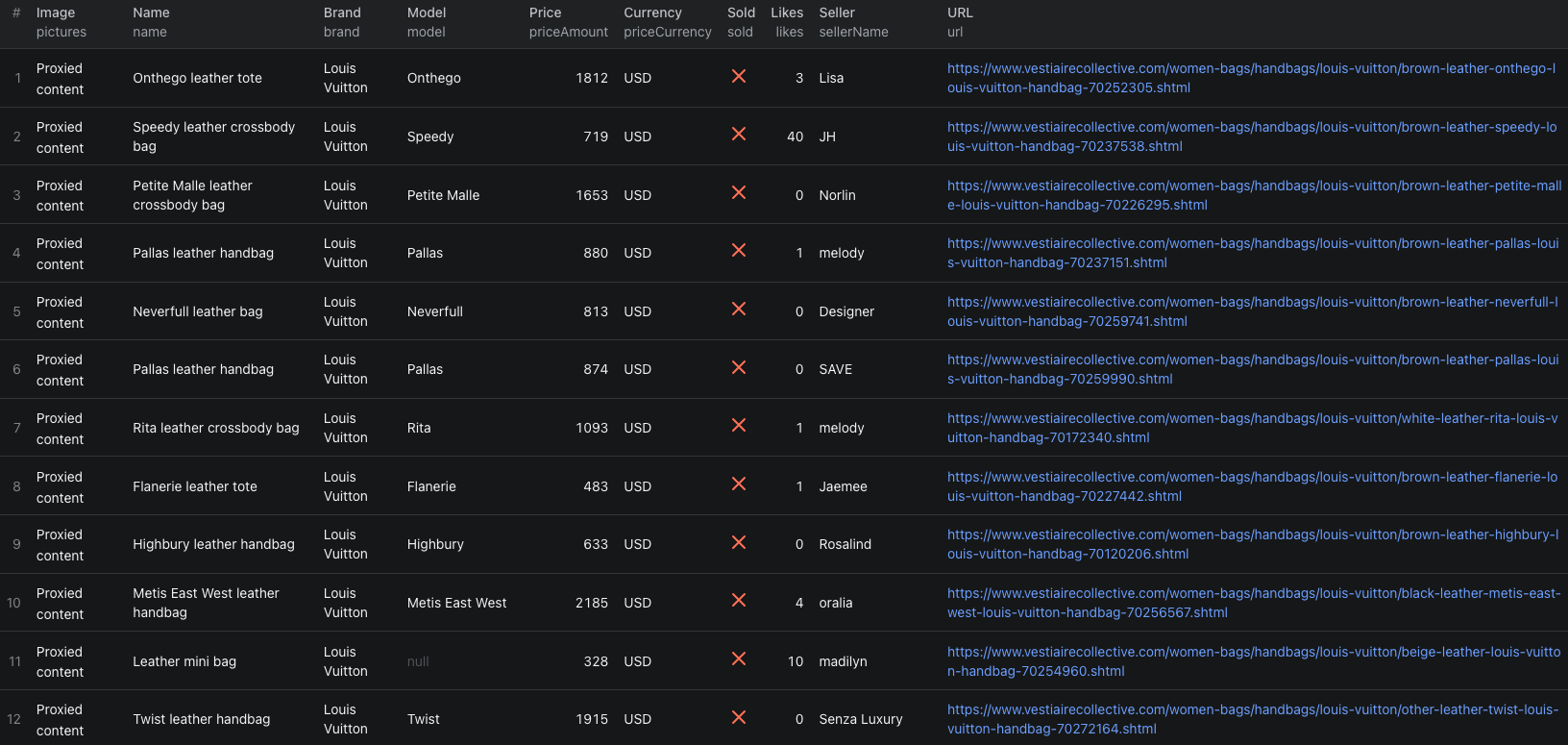
This separate, larger search shows listing-level results in the Apify dataset. The screenshot does not show fee breakdowns; fetch product details and open a row to inspect those nested fields.
Make a comparison you can trust
Keep id, url, brand, model, priceAmount, priceCurrency, condition, measurements, inStock, and the price breakdown. First filter out unavailable or uncertain listings. Then verify the exact model and size from the detail fields or linked page, and compare items in the same currency and similar condition.
If you only need a broad scan of asking prices and URLs, leave Fetch product details off. For a shortlist, enable it and inspect fees and condition. If a run succeeds with an empty dataset, check its log before interpreting that as zero matching listings. Our first proxy attempt and a later request both ended without rows because access failed; one no-proxy run returned the sample above. Switching proxy settings is a diagnostic step, not a guaranteed fix.
Pricing
Pricing as of September 25, 2026 is $0.005 per listing plus $0.015 for each successfully enriched detail. Unlike Booksy or Momo, these events are additive: three fully enriched listings have an Actor event estimate of $0.06005 at the minimum start charge. The Actor-start event is $0.00005 per GB of allocated memory, minimum one event. Apify platform and proxy usage may be billed separately under your plan. Check live pricing before a larger run.
Frequently asked questions
Should I add the buyer-service fee to priceAmount?
No. In our sample, priceAmount matched pricingBreakdown.fullPrice, which already included the buyer-service amount. Inspect the breakdown before adding any other charges.
Does a search for a specific bag size return only that size?
No. Our Neverfull MM query also returned records identified only as Neverfull. Confirm size and other specifications on the linked listing before treating items as comparable.
