
How to Find Property Management Companies and Business Emails
A list of property managers is most useful when you can narrow it to the firms that serve your market and manage the property types you care about. An email address alone does not tell you either of those things.
Our All Property Management Scraper turns location searches on AllPropertyManagement.com into company records with public business emails, postal addresses, profile text, and property-type specialties. It is an Apify Actor, so you can run it from a form and export the results without writing code. It does not supply phone numbers or company website URLs.
This guide starts with five results for Austin, Texas, then shows how to turn them into a cleaner prospect list.

Collect a small Austin sample
- Open the Actor on Apify.
- Enter
Austin, TXunder Locations. - Set Maximum companies to
5. - Leave the proxy off, click Start, and open the completed run's Dataset.
- Export CSV for a spreadsheet or JSON if you want to retain the full email and property-type arrays.
The JSON editor accepts this complete input:
{
  "searchTerms": ["Austin, TX"],
  "maxItems": 5,
  "proxyConfiguration": { "useApifyProxy": false }
}
maxItems limits the run's returned companies, not five companies per location. Leave searchTerms empty only if you want to explore the nationwide directory, and keep a sensible result limit for that first run.
Here is a larger eight-company preview. The email cells are masked in this public screenshot; the dataset export keeps the actual values.
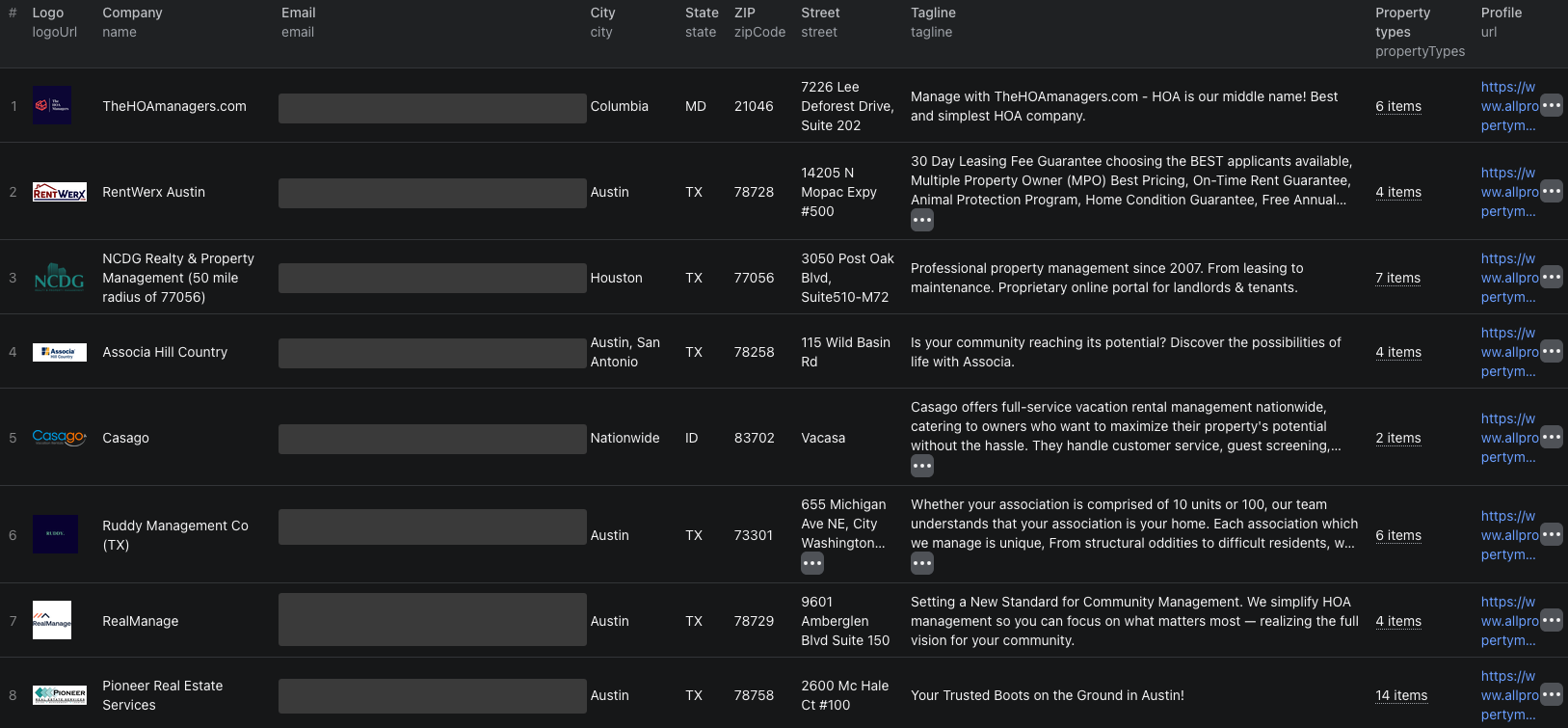
Our example returned five company records. The table below summarizes two of them without republishing individual email addresses:
| Company | Returned city | Business emails | Specialties shown |
|---|---|---|---|
| RentWerx Austin | Austin, TX | 3 | Single-family homes and condos by value range |
| Associa Hill Country | Austin, San Antonio, TX | 3 | HOA and condominium associations |
Each dataset row includes id, name, url, email, emails, address fields, propertyTypes, and a description. The emails array can hold several addresses. Preserve the source profile URL so a person reviewing the list can check the current company record.
The property-management Node.js example runs this five-company sample and retrieves its dataset.
Turn the export into a relevant company list
Do not treat the location search as an office-address filter. One of our five Austin, TX search results had city: "Houston" in its returned record. It may serve Austin, but it is not an Austin office based on that field.
For an Austin-office list, keep state = TX and review city before outreach. If your target is firms serving Austin from anywhere, keep the broader search result and label the distinction. Then filter propertyTypes for the portfolio you serve, such as HOA associations or small multifamily buildings.
Use id or the directory url to deduplicate companies across several searches. Keep the source email array intact, but choose an appropriate contact rather than emailing every address on the row. Check the current profile and your own contact requirements before adding anyone to a campaign. The Actor extracts directory-published addresses; it does not verify inbox deliverability or employment.
Pricing
Pricing as of September 23, 2026 is $0.003 per returned company plus an Actor start event of $0.00005 per GB of allocated memory, with a minimum of one event. Our five-company run charged one start event and five company events: $0.00005 + (5 × $0.003) = $0.01505 in Actor event charges. Apify platform usage may be billed separately according to your plan. Check live pricing before a larger export.
If the list needs cleaning
- A company is outside your chosen city. The search can reflect service area. Filter the returned address fields when office location matters.
- An email belongs to a person or another domain. Reopen the directory profile and confirm the intended contact before using it. Do not infer that the address is validated.
- Several searches return one company. Deduplicate by
idor sourceurl, not by name alone. - A category is broader than your target. Use the returned
propertyTypesvalues and review the profile description. Do not infer unit counts the source did not provide. - You need phone numbers or company websites. Those are not in this Actor's public directory output; plan a separate, appropriate source.
Frequently asked questions
Does an Austin search return only Austin companies?
No. A location search can include companies serving that area from another city. Filter the returned city and state fields if you need offices physically in Austin.
Are the email addresses verified inboxes?
The Actor returns business emails displayed by the source directory. It does not test deliverability or confirm that each person still works at the company.
Can I collect phone numbers or company websites?
Not from this Actor's public directory records. It returns profile URLs, postal addresses, emails, and property specialties, but not phone numbers or company website URLs.
