Piotr VassevPiotr Vassev

How to Scrape All Jobs at a Company on LinkedIn (Step-by-Step Guide)

How to Scrape All Jobs at a Company on LinkedIn

If you need every open role at a specific company on LinkedIn — for recruitment research, competitor tracking, or hiring-signal lead generation — this guide walks you through the entire process. You will learn how to go from a list of company names to a complete, deduplicated dataset of their open positions worldwide.

Why Track a Company's Open Roles?

Searching LinkedIn by keyword tells you what the market wants. Searching by company tells you what a specific organisation is doing — and that is a far sharper signal.

  • Sales prospecting on hiring signals — a company opening fifteen roles is a company with budget and momentum. Hiring activity is one of the strongest buying signals in B2B, and the shape of that hiring tells you which department to call
  • Competitor intelligence — watch which functions a competitor is expanding, in which markets, and at what seniority. A cluster of enterprise AE roles in Germany is a go-to-market move you can see months before the press release
  • Recruitment research — understand a target employer's full hiring footprint before you pitch candidates into it, or before you accept an offer from it
  • Account research — enrich key accounts in your CRM with live hiring counts, so reps can lead with something current and specific
  • Investment due diligence — headcount growth is a lagging indicator; open-role velocity is a leading one

The Two Traps in Company Job Data

Most tools that claim to give you "all jobs at a company" quietly give you a subset. Two things cause it.

Trap 1: Results are silently scoped to one country

LinkedIn's public search scopes results to whatever country the request comes from, unless it is explicitly told to search worldwide. For a cloud scraper, that means a US data centre — so "every open role at IBM" quietly becomes "every open role at IBM in the United States."

The gap is not small. Measured live:

CompanyDefault (country-scoped)Explicit worldwide
IBM5521,000+
Stripe567901
Vercel99113

This scraper always searches worldwide.

Trap 2: The 1,000-result ceiling

LinkedIn serves at most 1,000 results for any single search — including a company-filtered one. A large employer with 3,000 open roles returns 1,000 of them, and the tool reports success.

When a company saturates that ceiling, this scraper automatically re-runs the search across narrower posting-date windows and merges everything, deduplicated on job ID. Measured on Deloitte, which reports "1,000+" open roles: the plain search returned exactly 1,000, and window-splitting took it to 1,400 unique roles with zero duplicates.

When even that is exhausted, the run says so explicitly and tells you to narrow with a keyword or location — rather than handing back a short list and calling it complete.

What Data You Can Extract

Job fields (every run)

FieldDescription
jobIdLinkedIn job posting ID — the deduplication key
jobUrlCanonical LinkedIn job URL
titleJob title
locationJob location as posted
postedDatePosting date (YYYY-MM-DD)
postedTimeAgoRelative posting age, e.g. "1 week ago"
sourceQueryWhich search produced this row
scrapedAtISO 8601 scrape timestamp

Company fields (every run, no extra charge)

FieldDescription
companyIdNumeric LinkedIn organization ID
companySlugCompany slug — stable join key across runs
companyUrlCompany LinkedIn profile URL
companyNameCompany name
companyLogoCompany logo image URL
companyTaglineOne-line tagline under the company name
companyDescriptionFull About text
companyIndustryIndustry, e.g. "Software Development"
companyWebsiteThe company's own website
companyHeadquartersHeadquarters location
companySizeEmployee band, e.g. "5,001-10,000 employees"
companyEmployeeCountUpper bound of that band, as a number
companyFollowersLinkedIn follower count
companyFoundedYear founded
companySpecialtiesSpecialties the company lists
companyTypePublic Company, Privately Held, Nonprofit, ...

The company block is included on every job row at no additional cost, because resolving the company requires fetching that page regardless.

Full detail fields (optional depth)

Description, posted salary parsed into min / max / currency / period, seniority level, employment type, job function, industries, applicant count, apply type, plus LinkedIn's similar-jobs and people-also-viewed recommendations.

Common Use Cases

Hiring-Signal Prospecting

Feed your target account list in, get back live open-role counts and titles per company, and prioritise outreach by hiring velocity rather than by firmographics alone.

Competitor Expansion Tracking

Run the same competitor list weekly and diff the results. New locations, new functions, and seniority shifts all show up before anything is announced.

Talent Mapping for Recruiters

Understand exactly what an employer is building — how many roles, at what level, in which offices — before you place candidates into it.

CRM Enrichment

Join on companySlug to attach current hiring activity to accounts you already track.

Market Entry Research

Watch which international markets a set of companies are opening roles in to infer expansion plans.

Supplier and Partner Monitoring

Track whether key suppliers are growing or contracting, using open roles as the leading indicator.

Challenges of Doing This Manually

  • Country scoping — the single biggest source of undercounting, and completely invisible from the browser
  • The 1,000-result ceiling — large employers silently truncate
  • Resolving a company to its internal ID — the obvious source on the page is wrong for some large companies. Microsoft's "See jobs" button carries seven different IDs and every one of them returns zero jobs, while the correct identifier returns 999. A small test sample would never catch this
  • Invalid IDs fail silently — a bad company ID returns HTTP 200 with zero results, indistinguishable from "no open roles"
  • Deduplication — posting-date windows overlap by design, so merging without an ID-keyed dedup double-counts
  • Budget fairness across companies — ask for five companies and 200 roles, and a naive scraper gives Stripe all 200 and the other four nothing

Step-by-Step: How to Scrape a Company's LinkedIn Jobs

Step 1 — Open the Scraper

Go to the LinkedIn Company Jobs Scraper on Apify.

Step 2 — Add Your Companies

Enter one or more companies under companies. Both formats work, and you can mix them freely:

  • Slug: stripe
  • Full URL: https://www.linkedin.com/company/stripe
  • Any locale or path variant: https://fr.linkedin.com/company/stripe/about/

The slug is the part of the profile URL after /company/.

Step 3 — Optionally Narrow the Search

  • keywords — only roles matching this text, e.g. engineer or marketing
  • location — only roles in this location, as LinkedIn writes it
  • postedWithin — only roles posted in the past 24 hours, week, or month

Leave all three empty for every open role worldwide.

Step 4 — Choose Your Depth

Leave scrapeJobDetails off for a fast, cheap sweep of titles and locations. Turn it on when you need descriptions, salaries, and seniority.

Step 5 — Configure and Run

{
  "companies": ["stripe", "vercel", "https://www.linkedin.com/company/notionhq"],
  "keywords": "engineer",
  "postedWithin": "r604800",
  "scrapeJobDetails": false,
  "maxItems": 200,
  "autoFanOut": true
}

maxItems is shared fairly across the companies you asked for, and recomputed as the run progresses — so whatever a small company leaves unspent flows to the rest. Three companies and 90 items returns 30 / 30 / 30, not 90 / 0 / 0.

Step 6 — Export Your Results

JSON, CSV, Excel, HTML, or the Apify API. Every run also writes a summary recording the open-role count LinkedIn reports per company, how many were returned, and whether anything was truncated and why.

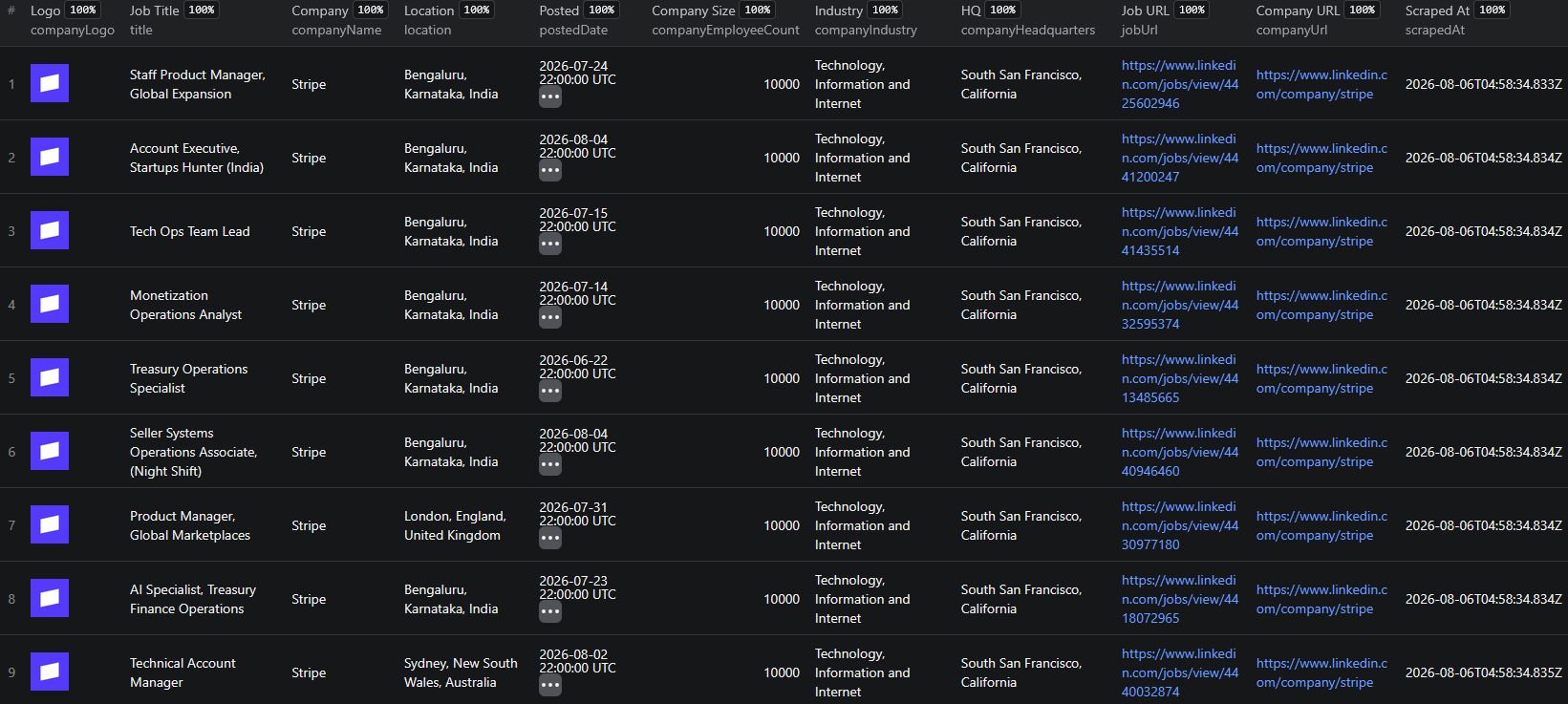
Example Output (Real Data Preview)

LinkedIn Company Jobs Scraper results

{
  "jobId": "4425602946",
  "jobUrl": "https://www.linkedin.com/jobs/view/4425602946",
  "title": "Staff Product Manager, Global Expansion",
  "location": "Bengaluru, Karnataka, India",
  "postedDate": "2026-07-25",
  "postedTimeAgo": "1 week ago",
  "companyName": "Stripe",
  "companyId": "2135371",
  "companySlug": "stripe",
  "companyUrl": "https://www.linkedin.com/company/stripe",
  "companyTagline": "Help increase the GDP of the internet.",
  "companyIndustry": "Technology, Information and Internet",
  "companyWebsite": "https://stripe.com",
  "companyHeadquarters": "South San Francisco, California",
  "companySize": "5,001-10,000 employees",
  "companyEmployeeCount": 10000,
  "companyFollowers": 1612797,
  "companyFounded": "2010",
  "companyType": "Privately Held",
  "sourceQuery": "geoId=92000000&f_C=2135371",
  "scrapedAt": "2026-08-06T04:47:15.660Z"
}

Key things to notice:

  • A job in India — proof the search really is worldwide, not scoped to the server's country
  • Full company block on a listing-tier row — included free, not held back for a paid tier
  • companySlug and companyId — stable join keys for merging with your CRM or with company-level data
  • sourceQuery — records exactly which search produced the row, so coverage is auditable

Try the LinkedIn Company Jobs Scraper now — no coding required.

Automating Company Job Tracking

Scheduled Runs

Run your account list weekly and store each snapshot. Diffing consecutive runs turns a static list into a hiring-velocity time series.

API Integration

Trigger runs and pull results through the Apify API to push live hiring counts into your CRM or data warehouse.

Node.js Example

For a complete working example showing how to call this scraper from Node.js, see the GitHub repository.

Webhooks

Fire a webhook on run completion to alert a sales channel when a watched account opens roles.

Only want the new ones?

For continuous monitoring, the LinkedIn Jobs Monitor returns only postings it has not reported before, so you are not re-processing the same roles every run.

Why Use a Scraper Instead of Building One

The hard parts here are not the HTTP requests. They are the country-scoping default, the 1,000-result ceiling, the company-ID resolution trap that only shows up on large employers, distinguishing "no open roles" from "wrong ID," and dividing a budget fairly across companies. Each of those was found by measurement, not by reading documentation — and each one silently produces a plausible-looking but wrong dataset if you get it wrong.

Pricing — Pay Only for Results

EventWhen it's chargedFree planGold plan
job-listingOnce per role, including the full company profile$0.0008$0.0004
job-detailOnce per role when full details are on$0.003$0.0012

Example run costs (200 roles):

  • Listings + company profiles → $0.16 on Free, $0.08 on Gold
  • Listings + full job details → $0.60 on Free, $0.24 on Gold

For comparison, the closest competing actor on the store charges $1.00 per run plus $0.007 per item — the same 200-role run costs $2.40 there.

Try the LinkedIn Company Jobs Scraper

The LinkedIn Company Jobs Scraper turns a list of company names into their complete open-role footprint.

What you get:

  • Company slugs or profile URLs, mixed freely, several per run
  • Worldwide by default — not silently scoped to one country
  • Automatic decomposition past LinkedIn's 1,000-result ceiling: measured 1,000 → 1,400 unique roles on Deloitte
  • Deduplicated on job ID, always
  • Full company profile on every row at no extra charge
  • Optional full job detail: description, parsed salary, seniority, employment type, applicant count
  • Misspelled companies named explicitly, never silently dropped
  • Budget shared fairly across the companies you asked for
  • Honest truncation reporting in every run summary
  • No proxy setup, no LinkedIn account, no cookies

Start scraping company jobs now — your first run takes under 5 minutes to set up.

The Rest of the LinkedIn Suite

Legal and Ethical Considerations

  • Public data only — publicly visible job postings and company pages, no login or cookies required
  • No personal profiles — this scraper collects job and company data, not personal LinkedIn profiles
  • Respect rate limits — requests are paced to avoid loading LinkedIn's infrastructure
  • Compliance — ensure your storage and processing comply with applicable regulations such as GDPR
  • Legitimate use — recruitment research, competitive analysis, and prospecting are well-established uses of public job data

Frequently Asked Questions

How do I see all the jobs a company has posted on LinkedIn?

LinkedIn shows a company's open roles on its profile under the Jobs tab, but the public view is paginated, capped, and scoped to the country you are browsing from. The LinkedIn Company Jobs Scraper takes a list of company names or profile URLs and returns every open role worldwide as a structured dataset, deduplicated on job ID, with the company profile attached to every row.

Where do I find a company's LinkedIn slug?

The slug is the part of the profile URL after /company/. For https://www.linkedin.com/company/stripe the slug is stripe. You can paste the full URL instead — it is accepted as-is, including locale subdomains like fr.linkedin.com and trailing paths like /about/.

Why do I get more jobs than LinkedIn's own company page shows?

Two reasons. First, LinkedIn's public search silently scopes results to the country you are browsing from unless told otherwise — IBM shows 552 roles from a US connection and over 1,000 worldwide. This scraper always searches worldwide. Second, LinkedIn serves at most 1,000 results per search; when a company exceeds that, the scraper automatically re-runs the search across narrower posting-date windows and merges the results. Measured on Deloitte, that took 1,000 roles up to 1,400.

Is the company profile charged separately?

No. Resolving a company requires fetching its profile page anyway, so the full company block — industry, size, followers, website, headquarters, founding year, type, and description — is included free on every job row. Charging for data already in hand would not be honest.

What happens if I misspell a company name?

The company is named explicitly in the run log and in the run summary, with the reason it failed. It is never silently dropped. If every company you supplied fails to resolve, the run fails loudly rather than reporting an empty success.

How much does the LinkedIn Company Jobs Scraper cost?

It uses Apify's Pay-Per-Event pricing with volume tiers. A job listing, including the full company profile, costs $0.0008 on the Free plan and $0.0004 on Gold. Opening each posting for full details costs $0.003 on Free and $0.0012 on Gold. A 200-role run costs about $0.16 on Free for listings, or $0.60 with full details.

About the Author

This guide was written by Piotr, a software engineer with hands-on experience building and maintaining web scrapers at scale. He develops and maintains a suite of data extraction tools on the Apify platform, helping businesses automate their data collection workflows.

Need help with your scraping project?

Book a free discovery call and let's scope your project together.

Book a Call
Piotr Vassev

Piotr Vassev

Founder of FalconScrape. Building production-grade web scraping systems and data automation pipelines for businesses worldwide.

Connect on LinkedIn