How to Scrape Allegro Product Listings (Step-by-Step Guide)

If you want to scrape Allegro product listings for price monitoring, competitor tracking, or market research, this guide walks you through the entire process. You will learn what data you can extract from Allegro category and seller pages, how to set up the scraper, and how to turn raw listing data into actionable e-commerce intelligence for the Polish and CEE market.
Why Scrape Allegro Data?
Allegro is the largest e-commerce marketplace in Poland and one of the dominant online platforms across Central and Eastern Europe. Founded in 1999, it predates most modern marketplaces and has remained the default shopping destination for tens of millions of Polish consumers — covering electronics, fashion, home goods, automotive parts, books, baby products, and dozens of other verticals. For any business operating in or selling into Poland, Allegro is the marketplace that matters.
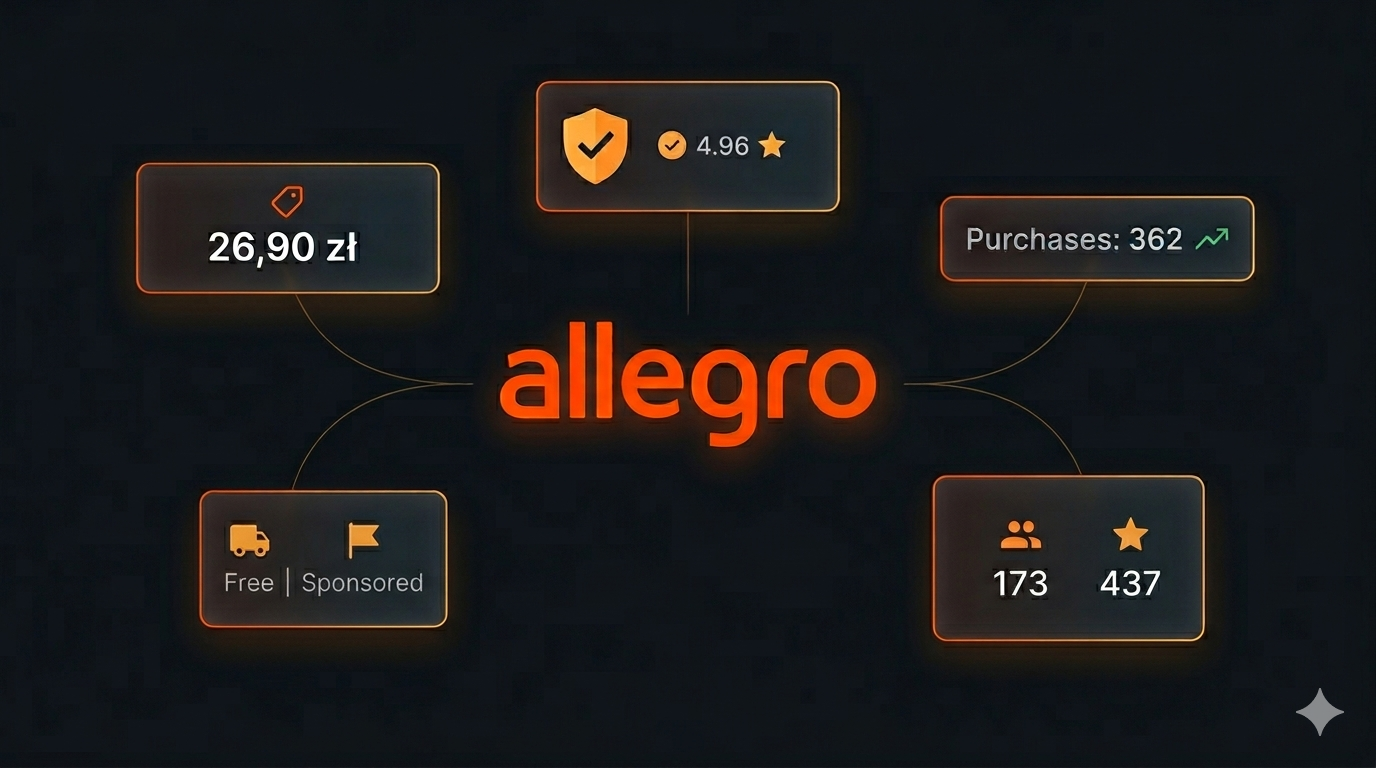
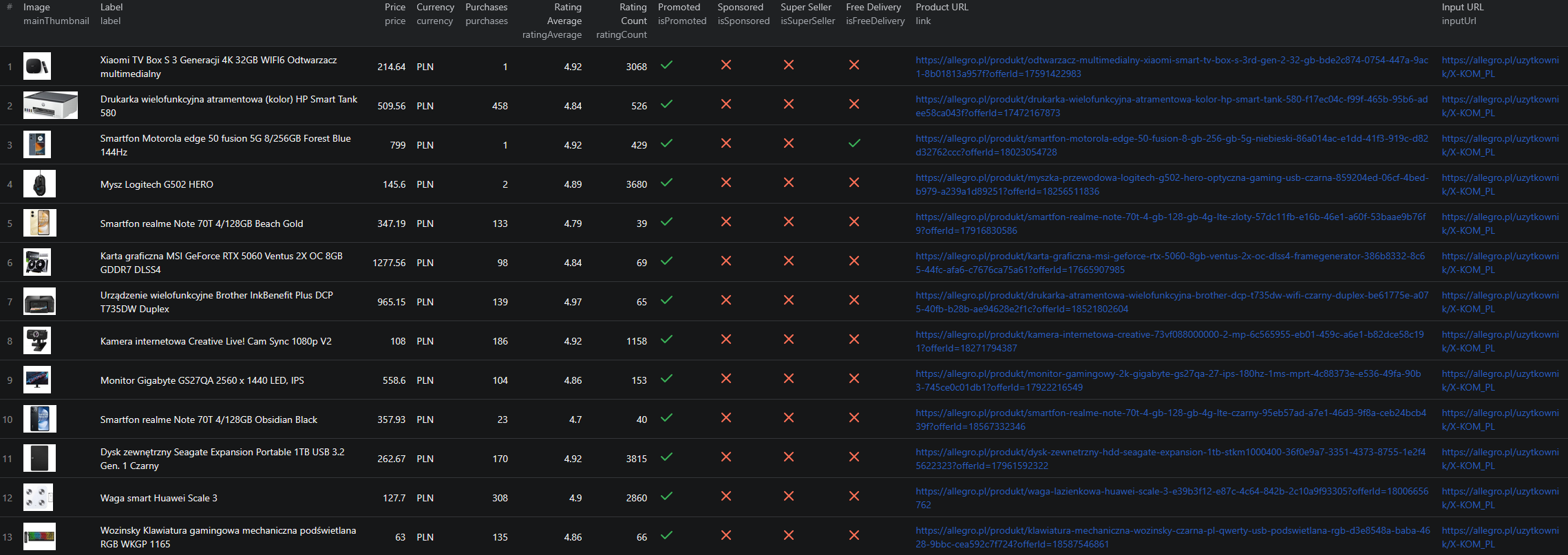
What makes Allegro valuable as a data source is the breadth of structured information surfaced on every listing card: product title, current price, currency, purchase count, average rating, review count, primary thumbnail, plus boolean flags for Super Seller status, free delivery, promoted listings, and sponsored placements. Combined with the source page URL (category or seller), these fields tell you not just what a product costs — but how it ranks, how much it has sold, and which sellers are dominating each vertical.
Businesses and researchers scrape Allegro data for a range of purposes:
- Polish & CEE price monitoring — track PLN pricing across categories in real time, the only reliable way to monitor the Polish marketplace at scale
- Seller catalog mapping — point the scraper at any
allegro.pl/uzytkownik/{seller}page to get the full assortment of a competitor or supplier - Super Seller benchmarking — isolate listings flagged
isSuperSeller: trueand benchmark pricing, ratings, and review counts against your own listings - Sponsored placement analysis — quantify how aggressively competitors are buying promoted and sponsored slots in your target categories
- Demand proxy via purchase counts — Allegro surfaces a
purchasescount on most listings, a strong leading indicator of demand - Category-level market mapping — sweep an entire category to build a full snapshot of brands, price bands, and review velocities
- Cross-marketplace comparison — pair Allegro data with OLX, Kleinanzeigen, or other CEE marketplaces to build a full picture of the regional e-commerce stack
Manually browsing Allegro and copy-pasting product details is impractical at any meaningful scale — Allegro serves tens of millions of listings across hundreds of categories, with pricing, promotions, and rankings shifting daily. Automation is the only realistic approach.
What Data You Can Extract from Allegro
The Allegro Listings Scraper extracts structured product data from any Allegro category or seller page URL. Here are the key fields available:
| Field | Description | Example |
|---|---|---|
| Label | Full product title as displayed on the listing card | Folia stretch XL czarna 2,45 KG Brutto kryjąca strecz mocna |
| Price | Current selling price in PLN | 26.9 |
| Currency | ISO currency code of the listing | PLN |
| Is promoted | Boolean — listing carries Allegro's promoted badge | true |
| Is sponsored | Boolean — listing is a paid sponsored placement | false |
| Link | Canonical URL of the source product page | allegro.pl/oferta/folia-stretch-xl-... |
| Purchases | Number of times the listing has been bought | 130 |
| Main thumbnail | Primary product image (Allegro CDN URL) | a.allegroimg.com/s180/... |
| Is Super Seller | Boolean — seller carries Allegro's Super Seller badge | true |
| Is free delivery | Boolean — listing ships free | false |
| Rating average | Average star rating (0–5) | 4.96 |
| Rating count | Total number of reviews | 147 |
| Input URL | The original category or seller page the record came from | allegro.pl/uzytkownik/SmartLED |
Every record preserves the source inputUrl, so you can trace exactly which category sweep or seller page each row came from — useful for downstream attribution and reproducibility.
Common Use Cases for Allegro Data
Polish Marketplace Price Monitoring
Allegro is the default Polish marketplace, so its PLN prices are the benchmark for any retailer or brand operating in Poland. Scraping prices on a schedule lets you build a live view of where competitors are pricing equivalent SKUs and how often promotional pricing kicks in.
Seller Catalog Mapping
Allegro exposes a clean seller page at allegro.pl/uzytkownik/{seller} listing every active offer from that account. Pointing the scraper at this URL is the fastest way to map a competitor's full assortment — every product they sell, at what price, with what rating, and how many units sold.
Super Seller Benchmarking
Allegro's Super Seller program (isSuperSeller: true) is the platform's quality signal. Filtering to Super Seller listings only gives you the high-trust slice of the market — useful for benchmarking your own catalog against the listings buyers actually trust.
Sponsored & Promoted Placement Analysis
The isPromoted and isSponsored flags let you quantify ad spend on Allegro. Sweep a category, count what fraction of top-rank listings are sponsored vs. organic, and you have a direct view of how competitive paid placement has become in that vertical.
Demand Proxy via Purchase Counts
Unlike many marketplaces that bucket sold counts into vague ranges, Allegro publishes a precise integer purchases value on most listings. Aggregating purchases by brand, price band, or seller produces a high-fidelity demand signal — particularly useful for sourcing decisions and identifying breakout SKUs.
Cross-Marketplace Comparison
Pair Allegro data with OLX for secondhand and classifieds context, Kleinanzeigen for the German-speaking neighbor market, or global marketplaces like Amazon and AliExpress to understand how Polish pricing compares to cross-border alternatives.
Challenges of Scraping Allegro Manually
Before jumping into the tutorial, it is worth understanding why building your own Allegro scraper is harder than it looks:
- Anti-bot defenses — Allegro deploys standard bot detection on category and seller pages. Plain HTTP clients get blocked quickly, and naïve scrapers fail within a few dozen requests
- Heavy pagination — popular categories run to dozens of pages with thousands of listings, and pagination parameters change subtly across category types
- Promoted vs. organic mixing — sponsored placements are interleaved with organic results, so accurate ranking analysis requires correctly distinguishing the two
- Polish-language parsing — product titles, category names, and seller pages are entirely in Polish, and some character handling (e.g. ą, ę, ł, ś, ż) trips up brittle scrapers
- Frontend churn — Allegro updates its layout and DOM structure regularly, breaking custom scrapers that are not actively maintained
- CDN URL handling — Allegro images live on
a.allegroimg.comwith size-prefixed paths (e.g./s180/), which needs careful URL handling for downstream pipelines
For most use cases, a pre-built and maintained scraper is dramatically more practical than building one in-house.
Step-by-Step: How to Scrape Allegro Product Listings
Here is how to scrape Allegro product data using the Allegro Listings Scraper on Apify.
Step 1 — Gather Your Target URLs
The scraper is URL-driven and accepts two URL types:
- Category pages — any Allegro category URL, e.g.
https://allegro.pl/kategoria/elektronika - Seller pages — any seller profile URL, e.g.
https://allegro.pl/uzytkownik/SmartLED
You can pull URLs from:
- Browsing Allegro and copying the category or seller URL directly
- Your existing competitive-intelligence trackers
- A previous Allegro run's output (every record carries the
inputUrl)
Step 2 — Configure the Scraper Input
Head to the Allegro Listings Scraper on Apify and configure your run by providing your array of URLs.
Example input:
{
"startUrls": [
"https://allegro.pl/uzytkownik/SmartLED",
"https://allegro.pl/kategoria/elektronika"
]
}
Step 3 — Run the Scraper
Once started, the scraper will:
- Iterate through every URL in
startUrls - Paginate through category and seller pages to collect every visible listing
- Extract structured label, price, currency, purchases, rating, review count, and thumbnail from each card
- Flag promoted, sponsored, Super Seller, and free-delivery listings for downstream filtering
- Stream results to the dataset as they are scraped
Most runs of a few categories or sellers complete in a couple of minutes.
Step 4 — Export Your Results
When the scraper finishes, export your data in the format you need:
- JSON / JSONL — ideal for developers building integrations or price-monitoring pipelines
- CSV — perfect for spreadsheet analysis or importing into BI tools
- Excel / HTML / XML — for sharing with non-technical stakeholders
- API — access results programmatically via the Apify API for automated workflows
Ready to try it? Run the Allegro Listings Scraper on Apify and get your first dataset in minutes.
Example Output (Real Data Preview)

Here is what the actual output looks like. Each product is returned as a structured JSON object:
{
"label": "Folia stretch XL czarna 2,45 KG Brutto kryjąca strecz mocna dużo folii",
"price": 26.9,
"currency": "PLN",
"isPromoted": true,
"isSponsored": false,
"link": "https://allegro.pl/oferta/folia-stretch-xl-czarna-2-45-kg-brutto-kryjaca-strecz-mocna-duzo-folii-14885094374",
"purchases": 130,
"mainThumbnail": "https://a.allegroimg.com/s180/114264/b1b98d5a4e43abe8144a446a5efe/Folia-stretch-XL-czarna-2-45-KG-Brutto-kryjaca-strecz-mocna-duzo-folii",
"isSuperSeller": true,
"isFreeDelivery": false,
"ratingAverage": 4.96,
"ratingCount": 147,
"inputUrl": "https://allegro.pl/uzytkownik/SmartLED"
}
And a second record from the same seller:
{
"label": "Żarówka LED GU10 10W = 80W Biała Zimna Wydajna Mocna 120° Nie Mruga",
"price": 49.9,
"currency": "PLN",
"isPromoted": true,
"isSponsored": false,
"link": "https://allegro.pl/oferta/zarowka-led-gu10-10w-80w-biala-zimna-wydajna-mocna-120-nie-mruga-16684691035",
"purchases": 362,
"mainThumbnail": "https://a.allegroimg.com/s180/1176fd/23f5414748b78ab8c3e5b7c73ca6/Zarowka-LED-GU10-10W-80W-Biala-Zimna-Wydajna-Mocna-120-Nie-Mruga",
"isSuperSeller": true,
"isFreeDelivery": false,
"ratingAverage": 4.92,
"ratingCount": 1353,
"inputUrl": "https://allegro.pl/uzytkownik/SmartLED"
}
Key things to notice:
- Price in PLN on every record — currency is surfaced explicitly so PLN values normalize cleanly to EUR or USD downstream
- Precise
purchasesinteger — unlike marketplaces that bucket sold counts into vague ranges, Allegro publishes a clean integer purchase count, giving you a high-fidelity demand signal - Four boolean flags per listing —
isPromoted,isSponsored,isSuperSeller, andisFreeDeliverymake it trivial to filter to the slice of the market you care about ratingAverageandratingCounttogether — both are required for meaningful rating analysis (a 5.0 average with 2 reviews is not the same as a 4.7 with 1,353)- Canonical product
link— every record carries a stable PDP URL you can enrich downstream or hand to a buyer inputUrlfor attribution — every row remembers which category or seller URL it came from, so multi-input runs stay traceable
Try the Allegro Listings Scraper now — no coding required.
Automating Allegro Data Collection
For ongoing Allegro intelligence, you do not want to run the scraper manually every time you need fresh data. The Apify platform supports full automation:
Scheduled Runs
Set up recurring scrapes on any schedule — hourly, daily, or weekly. The scraper runs automatically and stores results in a dataset you can access anytime. Daily runs are typically enough for catalog tracking; hourly runs work well during peak promotional windows like Black Friday or Polish-specific events (e.g. Allegro Smart! Week).
API Integration
Use the Apify API to trigger scraper runs programmatically and retrieve results. This lets you integrate Allegro data into your existing analytics workflows:
- Feed new listings into your price-monitoring pipeline
- Trigger alerts when a tracked SKU drops below a target PLN price
- Sync Allegro catalog data into your BI warehouse
- Connect to tools like Zapier, Make, or custom data pipelines
Node.js Example
For a complete working example showing how to call this scraper from Node.js, see the GitHub repository.
Webhooks
Configure webhooks to get notified when a scraper run completes. This is useful for event-driven architectures where you want to process new product data as soon as it is available — for example, kicking off a normalization or alerting job the moment a fresh Allegro run finishes.
Using Allegro Data for Market Intelligence
The structured data from Allegro unlocks a range of analytical use cases.
PLN Price Index
Maintain a fixed basket of SKUs you sell on Allegro (or compete against) and scrape the equivalent listings on a schedule. Compute the per-SKU price gap (yourPrice - competitorPrice) and aggregate to a category-level "Allegro pressure" index. The result is a quantitative view of where competitors are pricing aggressively in PLN.
Sponsored vs. Organic Ranking Analysis
By isolating isSponsored: true and isPromoted: true records, you can measure exactly how much of the top-ranked inventory in any category is paid placement vs. organic. This is a direct read on how saturated Allegro Ads has become in your vertical.
Super Seller Concentration
Filter to isSuperSeller: true only and aggregate by seller. The top-N sellers by purchase count tell you which Super Seller accounts are driving the category — a quick way to identify both competitors and potential reseller partners.
Demand-Weighted Rating Aggregation
Pair ratingAverage with purchases and ratingCount to compute volume-weighted ratings. A 4.9-star product with 5,000 purchases is a much stronger demand signal than a 5.0-star product with 12, and weighting your analysis appropriately surfaces the actual breakout SKUs.
Visual Catalog Enrichment
The mainThumbnail field on every record enables downstream visual workflows — embedding-based similarity search, automatic style classification, or pulling product imagery for internal catalog enrichment.
Does Allegro Provide an API?
Allegro provides a REST API, but it is designed primarily for sellers managing their own inventory — not for browsing competitor catalogs at scale.
What's Available
- The official API supports listing management, order processing, shipping, and account operations for authenticated sellers
- It is OAuth-gated and tightly scoped to the seller's own account
- Public catalog browsing, ranked search results, and cross-seller competitor data are not exposed
What the API Misses
The official API omits exactly the fields that make Allegro data useful for market research: ranked search/category results, sponsored placement context, competitor seller pages, and cross-seller comparisons. For pricing intelligence and competitor tracking, a public-page scraper is the practical alternative.
The Allegro Listings Scraper gives you structured product data from any Allegro category or seller URL — without API approval or seller-account gating.
Why Use an Allegro Scraper Instead of Building One
Building a custom Allegro scraper sounds straightforward until you actually start:
- Anti-bot defenses — Allegro blocks plain HTTP clients quickly, and naïve scrapers fail within a few dozen requests without proxy and request-pattern management
- Heavy pagination logic — every category and seller page paginates differently, and the cumulative complexity of getting pagination right across the marketplace is significant
- Promoted vs. organic disambiguation — accurate ranking analysis requires correctly separating sponsored placements from organic results, which requires careful DOM parsing
- Polish-language and character handling — special characters in titles and seller names cause subtle parser bugs that only surface on edge cases
- Frontend churn — Allegro updates its layout regularly, and every update breaks unmaintained scrapers
- Opportunity cost — every hour spent fixing your scraper is an hour not spent on the analysis the scraper exists to support
Unless you have very specific requirements that no existing tool can meet, a maintained scraper lets you focus on insights instead of plumbing.
Try the Allegro Listings Scraper
The Allegro Listings Scraper extracts structured data from Allegro category and seller pages — labels, prices in PLN, purchase counts, ratings, review counts, thumbnails, plus boolean flags for Super Seller, free delivery, promoted, and sponsored placements.
What you get:
- Structured JSON, JSONL, CSV, Excel, HTML, or XML output ready for any downstream tool
- URL-driven input — point it at any list of Allegro category or seller URLs and get clean structured records back
- Automatic pagination across every input URL
- PLN price preservation with explicit currency code on every record
- Boolean flags for promoted, sponsored, Super Seller, and free delivery
- Precise integer purchase counts for a clean demand signal
- Scheduled runs and API access for ongoing market intelligence
- No coding, no proxy management, no scraper maintenance
Start scraping Allegro now — your first run takes less than 5 minutes to set up.
If you are building a CEE e-commerce data pipeline, combine Allegro data with other regional sources like OLX for classifieds, Kleinanzeigen for the German market, or global marketplaces like Amazon and AliExpress for cross-border price benchmarks.
Legal and Ethical Considerations
Web scraping occupies a well-established legal space, but responsible practice matters:
- Public data only — the Allegro scraper extracts publicly visible product information that anyone can see by visiting the site. No login or authentication is required
- Respect rate limits — the scraper is designed to make requests at a reasonable pace without aggressive hammering of Allegro's infrastructure
- No misuse — use collected data for legitimate business purposes like price monitoring, catalog research, and competitive analysis. Do not use the data to create counterfeit listings or mislead buyers
- GDPR compliance — Allegro operates primarily in the EU, so GDPR applies. The scraper extracts product and listing data, not personal data, but downstream use is your responsibility
Allegro product listings are public marketplace data — they are designed to be found by buyers. Scraping this data for catalog research and price intelligence is aligned with the platform's intended purpose.
Frequently Asked Questions
What is Allegro?
Allegro is the largest e-commerce marketplace in Poland and one of the biggest online platforms in Central and Eastern Europe. Founded in 1999, it operates similarly to Amazon or eBay, hosting millions of products from third-party sellers across categories like electronics, fashion, home goods, automotive parts, and more. Allegro is the default shopping destination for tens of millions of Polish consumers.
Is scraping Allegro legal?
Scraping publicly available product data from Allegro is generally legal. Listings on category and seller pages are visible to anyone visiting allegro.pl without logging in. You should always use the data responsibly, comply with local data-protection regulations (Allegro operates primarily in the EU/GDPR jurisdiction), and avoid overloading Allegro's servers with excessive requests.
Does Allegro provide a public API?
Allegro provides a REST API mainly for sellers managing their own listings, orders, and shipments. It is not designed for browsing competitor catalogs or extracting structured listing data at scale across the marketplace. For market research and competitor tracking, a public-page scraper is the practical alternative.
Can I scrape both category pages and seller pages?
Yes. The Allegro Listings Scraper accepts both URL types. Category pages give you a horizontal slice of the market — what's trending across an entire vertical — while seller pages (allegro.pl/uzytkownik/{seller}) let you map a single seller's full assortment, useful for competitor catalog mapping or supplier discovery.
Does the scraper handle Super Seller and free delivery flags?
Yes. Each record includes boolean flags for isSuperSeller, isFreeDelivery, isPromoted, and isSponsored. These are useful for filtering — for example, ranking only Super Seller listings, isolating sponsored placements for ad-spend analysis, or comparing free-delivery offers against paid-shipping listings.
What currency does Allegro use?
Allegro lists prices in Polish złoty (PLN). The scraper preserves the original currency code on every record, so PLN values can be normalized to EUR, USD, or any other reporting currency downstream without ambiguity.
About the Author
This guide was written by Piotr, a software engineer with hands-on experience building and maintaining web scrapers at scale. He develops and maintains a suite of data extraction tools on the Apify platform, helping businesses automate their data collection workflows.
Need help with your scraping project?
Book a free discovery call and let's scope your project together.
Book a Call