How to Scrape Bloomberg News Articles (Step-by-Step Guide)

If you want to scrape Bloomberg news articles for market intelligence, sentiment analysis, or automated news monitoring, this guide walks you through the entire process.
You will learn what data you can extract, how to automate the collection, and how to turn Bloomberg news into structured datasets for financial research and AI applications.
Why Scrape Bloomberg News Data?
Bloomberg is one of the most influential financial news sources in the world. It covers global markets, economic policy, technology, business, and politics — the kind of information that drives investment decisions, shapes market sentiment, and informs corporate strategy.
Businesses and researchers scrape Bloomberg news data for several reasons:
- Market intelligence — monitor financial news and economic developments that affect your industry or portfolio
- Sentiment analysis — build datasets for AI models that analyze market sentiment from news headlines and articles
- Investment research — track news related to specific companies, sectors, or markets to inform trading and investment decisions
- News aggregation — build dashboards, alerts, or data feeds that consolidate financial news from multiple categories
- AI training datasets — create large-scale news datasets for training LLMs, NLP models, and financial text classifiers
Manually checking Bloomberg categories and copying article details is impractical. New articles are published continuously across dozens of categories, and the volume of content makes manual tracking impossible. Automation is the only realistic approach.
What Data You Can Extract from Bloomberg Articles
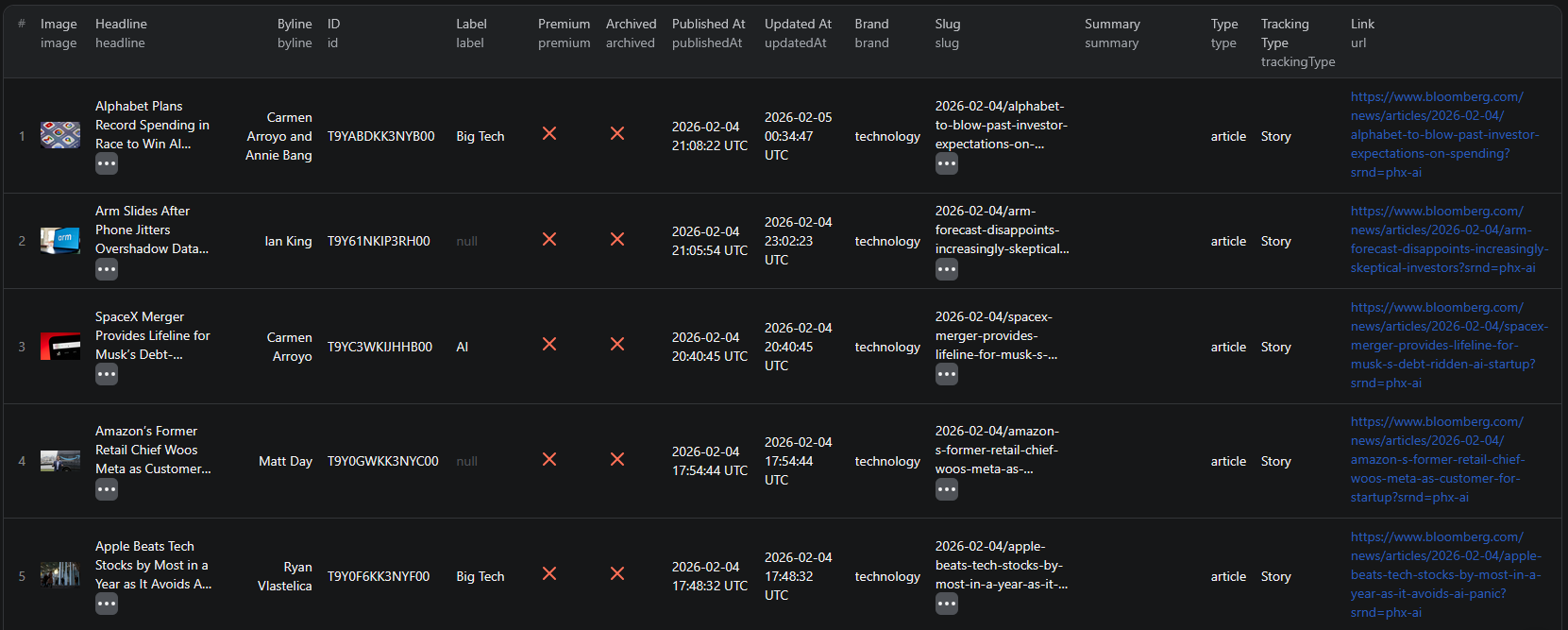
The Bloomberg Category News Scraper extracts structured data from category pages. Here are the key fields you can collect:
| Field | Description | Example |
|---|---|---|
| Headline | The article title | OpenAI Co-Founder Sutskever's Startup Is Fundraising at $30 Billion-Plus Valuation |
| Author | The journalist who wrote the article | Kate Clark |
| Category | The Bloomberg section the article belongs to | technology |
| Topic label | Specific topic tag within the category | AI |
| Published date | When the article was first published | 2025-02-17T20:30:31.679Z |
| Updated date | When the article was last modified | 2025-02-17T20:30:31.678Z |
| Article URL | Direct link to the full article | bloomberg.com/news/articles/2025-02-17/... |
| Image | Thumbnail image URL for the article | assets.bwbx.io/images/... |
| Article type | Content format classification | article |
| Premium status | Whether the article requires a subscription | false |
This is the kind of structured data that would take hours to compile manually even for a single news category. With a scraper, you can extract hundreds of articles across multiple categories in minutes.
Common Use Cases for Bloomberg News Data
Market Intelligence
Financial professionals use Bloomberg news data to monitor developments that affect their portfolios, industries, or business operations. By scraping news across categories like markets, economics, and technology, you can build a comprehensive feed of market-moving events without manually checking Bloomberg throughout the day.
Track company announcements, policy changes, economic indicators, and global market shifts — all structured and ready for analysis.
Sentiment Analysis
Bloomberg headlines and article metadata are valuable inputs for sentiment analysis models. Financial sentiment — whether news coverage is positive, negative, or neutral about a company, sector, or market — is a widely used signal in quantitative trading and investment research.
Build datasets of headlines with timestamps and categories to train models that detect market sentiment shifts in real time.
Investment Research
Track news related to specific companies, industries, or economic themes. By monitoring Bloomberg categories like technology, markets, or economics over time, you can build a historical news dataset that reveals patterns in coverage frequency, topic shifts, and market attention.
This data complements traditional financial data sources like price feeds and earnings reports with qualitative context about what is driving market movements.
News Aggregation and Dashboards
Build custom news dashboards or alert systems that pull structured data from Bloomberg categories. Feed scraped articles into internal tools, Slack channels, or analytics platforms to keep your team informed about relevant developments without manual monitoring.
AI Training Datasets
Large-scale news datasets are essential for training and fine-tuning NLP models. Bloomberg articles cover a wide range of financial topics with consistent quality and structure, making them valuable training data for:
- Financial text classification
- Named entity recognition for companies and market instruments
- Topic modeling across economic sectors
- Summarization models for financial news
Challenges of Scraping Bloomberg Manually
Before jumping into the tutorial, it is worth understanding why scraping Bloomberg is harder than it looks:
- Dynamic article pages — Bloomberg uses JavaScript-heavy rendering, so simple HTTP requests will not capture the data
- Category pagination — news articles are loaded dynamically as you scroll, making traditional pagination scraping ineffective
- Structured extraction — article metadata like authors, dates, categories, and labels are embedded in complex page structures that require careful parsing
- Frequent updates — Bloomberg publishes new content continuously, so any manual process goes stale almost immediately
- Maintaining crawlers — Bloomberg updates its frontend periodically, which means custom scrapers break and need constant fixing
Building and maintaining your own Bloomberg scraper is a significant engineering investment. For most use cases, using a pre-built, maintained solution is far more practical.
Step-by-Step: How to Scrape Bloomberg News
Here is how to scrape Bloomberg news articles using the Bloomberg Category News Scraper on Apify.
Step 1 — Choose a News Category
Start by deciding what kind of news you want to extract. Bloomberg organizes content into categories you can target directly. For example:
- Technology —
https://www.bloomberg.com/technology - Markets —
https://www.bloomberg.com/markets - Economics —
https://www.bloomberg.com/economics - Politics —
https://www.bloomberg.com/politics - Business —
https://www.bloomberg.com/business
You can scrape one category at a time or provide multiple category URLs to cover different topics in a single run.
Step 2 — Configure the Scraper Input
Head to the Bloomberg Category News Scraper on Apify and configure your run:
- Paste your Bloomberg category URL(s) into the input field
- You can add multiple category URLs to scrape different sections in a single run
- Review the settings and click Start to begin the extraction
The scraper handles all the technical complexity — browser rendering, dynamic content loading, and structured data parsing.
Step 3 — Run the Scraper
Once started, the scraper will:
- Load each category page and extract article data
- Parse structured metadata including headlines, authors, dates, and categories
- Handle dynamic content loading to capture all available articles
- Store results in a clean, structured dataset
Processing time depends on the number of categories and articles. Most runs complete within a few minutes.
Step 4 — Export Structured Results
Once the scraper finishes, you can export the results in multiple formats:
- JSON — ideal for developers building data pipelines or integrations
- CSV — perfect for spreadsheet analysis in Excel or Google Sheets
- API — access results programmatically via the Apify API for automated workflows
Each record includes the full set of structured fields: headline, author, category, label, dates, article URL, image, and metadata.
Ready to try it? Run the Bloomberg Category News Scraper on Apify and get your first dataset in minutes.
Example Output (Real Data Preview)

Here is what the actual output looks like from the Bloomberg Category News Scraper. Each article returns a structured JSON object:
{
"image": "https://assets.bwbx.io/images/users/iqjWHBFdfxIU/iJV4749z5gE4/v1/-1x-1.webp",
"headline": "OpenAI Co-Founder Sutskever's Startup Is Fundraising at $30 Billion-Plus Valuation",
"byline": "Kate Clark",
"brand": "technology",
"id": "SRUC0QDWLU6800",
"url": "https://www.bloomberg.com/news/articles/2025-02-17/openai-co-founder-s-startup-is-fundraising-at-a-30-billion-plus-valuation",
"label": "AI",
"premium": false,
"archived": false,
"publishedAt": "2025-02-17T20:30:31.679Z",
"updatedAt": "2025-02-17T20:30:31.678Z",
"type": "article"
}
Key things to notice:
- Headline and author — article title and journalist name for quick scanning and attribution
- Category and label — the Bloomberg section and specific topic tag for filtering and classification
- Timestamps — both publication and update dates for tracking article freshness and news timing
- Premium status — indicates whether the full article requires a Bloomberg subscription
- Direct URL — link to the full article on Bloomberg for reference and follow-up
- Article ID — unique identifier for deduplication across scraper runs
This structured format makes it straightforward to import into any database, analytics tool, or AI pipeline.
Try the Bloomberg Category News Scraper now — no coding required.
Automating Financial News Monitoring
For ongoing market intelligence, you do not want to manually run the scraper every time you need fresh data. The Apify platform supports full automation:
Scheduled Runs
Set up recurring scrapes on any schedule — hourly, daily, or weekly. The scraper runs automatically and stores results in a dataset you can access anytime. For financial news monitoring, daily runs capture the latest developments. For research and historical analysis, weekly runs may be sufficient.
API Integration
Use the Apify API to trigger scraper runs programmatically and retrieve results. This lets you integrate Bloomberg news data into your existing workflows:
- Feed new articles into analytics dashboards automatically
- Trigger alerts when articles match specific keywords or categories
- Build news monitoring systems that update in real time
- Connect to tools like Zapier, Make, or custom data pipelines
Alert Systems
Combine scheduled scraping with keyword filtering to build custom alert systems. Monitor specific topics — like AI regulation, interest rate decisions, or earnings announcements — and get notified when relevant articles appear. This turns Bloomberg's news flow into an automated intelligence feed tailored to your needs.
Node.js Example
For a complete working example showing how to call this scraper from Node.js, see the GitHub repository.
Webhooks
Configure webhooks to get notified when a scraper run completes. This is useful for event-driven architectures where you want to process new articles as soon as data is available.
Using Bloomberg Data for AI and NLP
Bloomberg news data is particularly valuable for AI and natural language processing applications. The consistent quality, broad coverage, and structured metadata make it an excellent source for building financial AI models.
Sentiment Analysis Models
Train models to classify article headlines as positive, negative, or neutral for specific companies or market sectors. Bloomberg's category and label system provides built-in topic segmentation that simplifies training data preparation.
Topic Modeling
Use article metadata and headlines to identify emerging themes across financial markets. Track how topic distribution shifts over time — for example, detecting when AI coverage in the technology category spikes relative to other topics.
Financial News Classification
Build classifiers that categorize news articles by their potential market impact. Use headline text, category labels, and publication timing as features to predict which news events are most likely to move markets.
LLM Training Datasets
Large language models benefit from high-quality, domain-specific training data. Bloomberg articles provide well-written financial text with consistent structure and terminology — ideal for fine-tuning models on financial language understanding.
Does Bloomberg Offer a News API?
Bloomberg offers data services, but they come with significant barriers:
Bloomberg Terminal APIs
Bloomberg's most comprehensive data access is through the Bloomberg Terminal, which costs approximately $20,000+ per year. Terminal users can access APIs for market data, news, and analytics, but the pricing puts it out of reach for most individuals and small teams.
Bloomberg Enterprise Data
Bloomberg offers enterprise data feeds and APIs for large organizations. These require custom contracts, are expensive, and are typically designed for institutional use cases like trading desks and research departments.
Data Licensing Limitations
Even with paid access, Bloomberg's data licensing terms restrict how you can use and redistribute the data. Building products or datasets from Bloomberg API data requires careful compliance with their terms.
The Practical Alternative
For most teams that need structured Bloomberg news data without the cost and complexity of official data services, a web scraper is the practical solution. The Bloomberg Category News Scraper extracts publicly available article metadata from category pages — the same information anyone can see by visiting Bloomberg's website.
Why Use a Bloomberg Scraper Instead of Building One
Building a custom Bloomberg scraper sounds straightforward until you start dealing with the reality:
- Infrastructure complexity — Bloomberg's site requires browser-level rendering and sophisticated request handling. Setting this up from scratch is a significant engineering project.
- Maintenance cost — Bloomberg updates its frontend regularly. Every update can break your scraper, requiring immediate fixes to keep your data pipeline running.
- Proxy management — reliable scraping at scale requires proxy rotation and request throttling to avoid blocks. Managing this infrastructure takes time and money.
- Scaling challenges — scraping multiple categories with high frequency requires distributed infrastructure, queue management, and monitoring. The operational overhead adds up fast.
- Opportunity cost — every hour spent building and maintaining a scraper is an hour not spent analyzing the data and acting on insights
Unless you have very specific requirements that no existing tool can meet, using a maintained scraper lets you focus on what to do with the data instead of how to collect it.
Try the Bloomberg Category News Scraper
The Bloomberg Category News Scraper extracts structured data from Bloomberg news category pages — headlines, authors, publication dates, categories, topic labels, article URLs, and metadata.
What you get:
- Structured JSON or CSV output ready for analysis
- All key article data fields in a single export
- Multiple category support in a single run
- Scheduled runs for ongoing news monitoring
- API access for integration into your workflows
- No coding or scraper maintenance required
Start scraping Bloomberg news now — your first run takes less than 5 minutes to set up.
If you are building a data intelligence pipeline, combine Bloomberg news data with other data sources like LinkedIn job listings for hiring signals or Clutch company data for B2B lead generation.
Legal and Ethical Considerations
Web scraping occupies a well-established legal space, but responsible practice matters:
- Public data only — the Bloomberg scraper extracts publicly visible article metadata from category pages that anyone can access without logging in. No Bloomberg Terminal or subscription is required.
- Respect rate limits — the scraper is designed to make requests at a reasonable pace to avoid overloading Bloomberg's servers
- No content republishing — extracting metadata like headlines and dates for analysis is different from republishing full article text. Always respect copyright when working with news content.
- Compliance — if you operate in the EU or California, ensure your data handling complies with GDPR or CCPA. This primarily applies to how you store and process the data, not the collection itself.
Frequently Asked Questions
Can you scrape Bloomberg news articles?
Yes. You can scrape publicly available Bloomberg news articles by category using an automated scraper. The scraper extracts headlines, authors, publication dates, article URLs, categories, and other structured data from Bloomberg's category pages without requiring a Bloomberg Terminal subscription.
Does Bloomberg have a public API?
Bloomberg offers APIs through its Terminal and Enterprise products, but these require expensive subscriptions and are not openly available. There is no free public API for accessing Bloomberg news articles. A web scraper is the practical alternative for extracting structured news data at scale.
What data can I extract from Bloomberg?
You can extract article headlines, author names, publication dates, update timestamps, article URLs, category labels, topic tags, article types, thumbnail images, and premium status indicators. Each article is returned as a structured JSON object.
How often can news data be updated?
You can schedule scraper runs as often as you need — hourly, daily, or weekly. For real-time news monitoring, daily or even hourly runs ensure you capture new articles as they are published. For research and analysis use cases, weekly runs may be sufficient.
Is scraping financial news legal?
Scraping publicly available news data is generally legal. The Bloomberg Category News Scraper extracts data from publicly accessible category pages that anyone can visit without logging in. However, you should always use the data responsibly, respect copyright when republishing content, and comply with local regulations.
Can I export Bloomberg news data to CSV?
Yes. The Bloomberg Category News Scraper supports exporting results as JSON, CSV, or via API. CSV exports can be opened directly in Excel or Google Sheets for analysis.
About the Author
This guide was written by Piotr, a software engineer with hands-on experience building and maintaining web scrapers at scale. He develops and maintains a suite of data extraction tools on the Apify platform, helping businesses automate their data collection workflows.
Need help with your scraping project?
Book a free discovery call and let's scope your project together.
Book a Call