How to Scrape Carousell Listings and Product Data (Step-by-Step Guide)

If you want to scrape Carousell listings and product data for market research, price monitoring, or competitive analysis, this guide walks you through the entire process. You will learn what data you can extract from Singapore's leading peer-to-peer marketplace, how to automate the collection, and how to turn raw Carousell listings into actionable market intelligence.
Why Scrape Carousell Data?
Carousell is Southeast Asia's largest C2C marketplace, originally launched in Singapore and now operating across multiple countries in the region. It spans every conceivable category — electronics, fashion, furniture, property, cars, and more — making it a rich data source for tracking secondhand market trends, pricing patterns, and product availability in the region.
What makes Carousell particularly valuable for data collection is its dual nature: it hosts both verified Carousell Certified pre-owned products and a high volume of everyday user-to-user listings. This combination gives researchers a unique view into both organized resale and organic secondhand trading patterns across Southeast Asian markets.
Businesses and analysts scrape Carousell data for several reasons:
- Price monitoring — track how specific product categories and brands are priced in Singapore's secondhand market
- Competitive analysis — understand how competing sellers price and position similar products
- Product trend analysis — identify which categories and items are gaining traction among secondhand shoppers in the region
- Inventory research — understand what products are widely available and at what price points across different conditions
- Market intelligence — build datasets for resale market reports and regional e-commerce analytics
- Certified product tracking — monitor Carousell Certified listings separately from user listings for quality-controlled data
Manually browsing Carousell and copying listing details is completely impractical at scale. A single keyword or category page surfaces hundreds of listings, and inventory changes constantly. Automation is the only viable approach for meaningful data collection.
What Data You Can Extract from Carousell
The Carousell Listings Scraper supports two extraction modes. Card-level mode gives you fast summary data, while detail mode retrieves the full listing page including descriptions, seller profiles, and engagement metrics.
Card-Level Data
| Field | Description | Example |
|---|---|---|
| Listing ID | Unique identifier for the listing | 1428890606 |
| URL | Direct link to the product listing | carousell.sg/p/vintage-blue-desk-lamp-ikea-1428890606/ |
| Title | Product title as listed by the seller | Vintage Blue Desk Lamp IKEA |
| Price | Current listing price | 10.50 |
| Currency | Currency code for the listed price | SGD |
| Condition | Item condition as specified by the seller | Lightly used |
| Images | Array of product image URLs | media.karousell.com/media/photos/... |
| Scraped At | Timestamp of when the data was extracted | 2026-03-28T09:52:17.527Z |
Detail-Level Data (additional fields)
| Field | Description | Example |
|---|---|---|
| Description | Full listing description written by the seller | Selling to clear due to house move |
| Seller username | The seller's Carousell username | sol.handembroidery |
| Seller profile URL | Direct link to the seller's profile | carousell.sg/u/sol.handembroidery/ |
| All images | Complete array of product images from the listing page | media.karousell.com/media/photos/... |
| Views | Number of times the listing has been viewed | 134 |
| Likes | Number of likes or saves on the listing | 7 |
| Time posted | When the listing was originally posted | 2 days ago |
This data gives you everything you need to analyze pricing patterns, track seller behavior, monitor product availability, and understand engagement across different listing categories.
Supported URL Formats
The Carousell Listings Scraper accepts several URL formats, each suited to a different data collection goal:
| Format | Example | Best For |
|---|---|---|
| Keyword browse | carousell.sg/desk-lamp/q/ | User-to-user listings for a specific keyword |
| Search with params | carousell.sg/search/?query=iphone&sort_by=3 | Search results, often skewed toward Certified products |
| Category browse | carousell.sg/categories/mobile-phones-17040/ | All listings within a specific category |
| Direct listing | carousell.sg/p/listing-title-123456/ | Single listing detail extraction |
Tip: Use the
/keyword/q/URL format to target regular user-to-user listings. The/search/?query=format tends to return mostly Carousell Certified products.
Common Use Cases for Carousell Data
Secondhand Price Monitoring
Understanding current resale prices is fundamental to any buy-and-sell operation in the Singapore market. Scrape Carousell regularly to build a pricing database for specific product types, brands, and conditions. Compare prices across listings to understand what the market is actually paying for a given item — and identify pricing opportunities before your competitors do.
This is especially valuable for resellers sourcing goods to flip, or for businesses benchmarking their own secondhand pricing against the wider market.
Competitive Seller Analysis
If you sell on Carousell, understanding how competing sellers price and present similar products is critical. Scrape listings by keyword or category to see what others are doing — how they title listings, what price points they use, how they describe condition, and what their engagement metrics look like.
Recurring scrapes reveal patterns: which sellers consistently generate more likes and views, which price points attract engagement, and how quickly certain product types sell through.
Regional Market Intelligence
Carousell operates across Southeast Asia, making it a useful data source for understanding secondhand market dynamics in Singapore and the surrounding region. Which product categories are most active? What price ranges dominate? How does the certified product market compare to organic user listings?
Aggregating Carousell data at scale gives you a ground-level view of secondhand commerce in one of Asia's most active consumer markets.
Electronics and Gadget Tracking
Electronics are one of Carousell's most active categories. Scrape iPhone listings, laptop categories, gaming console searches, and consumer electronics keywords to build a real-time price index for secondhand tech in Singapore.
This data is useful for resellers, buyers timing their purchases, or analysts tracking how new product releases affect secondhand prices for older models.
Furniture and Home Goods Research
Singapore's highly mobile population means a constant churn of furniture and home goods listings on Carousell. Scraping furniture categories gives interior designers, property managers, and resellers a live view of what is available, at what prices, and in what condition — without manually browsing hundreds of listings.
Challenges of Extracting Carousell Data Manually
Before jumping into the tutorial, it is worth understanding why scraping Carousell requires automation:
- Large listing volume — popular keywords and categories return hundreds of pages of results, making manual collection completely impractical
- Dynamic content loading — Carousell renders listings using JavaScript, so simple HTTP requests will not return usable data
- Anti-bot protection — Carousell uses bot detection to limit programmatic access, requiring reliable proxy handling to collect data consistently
- Proxy geolocation — because Carousell serves regionally localized content, proxies must be located in Singapore to return accurate SGD pricing and local listings
- Two scraping layers — getting full listing data requires visiting both the search results page and each individual listing page, which doubles the complexity of a custom implementation
- Maintenance overhead — Carousell updates its frontend regularly, which means custom scrapers break and require constant attention
Building and maintaining your own Carousell scraper is a significant engineering commitment. For most use cases, a pre-built, maintained solution is the more practical choice.
Step-by-Step: How to Scrape Carousell Listings
Here is how to scrape Carousell data using the Carousell Listings Scraper on Apify.
Step 1 — Choose Your Input URLs
The Carousell Listings Scraper accepts multiple URL types as input. Navigate to Carousell and copy the URL from any of the following page types:
Keyword browse pages — use the /keyword/q/ format for user-to-user listings:
- Desk lamps —
https://www.carousell.sg/desk-lamp/q/ - Vintage watches —
https://www.carousell.sg/vintage-watch/q/ - Gaming chairs —
https://www.carousell.sg/gaming-chair/q/
Category pages — browse by Carousell's category structure:
- Mobile phones —
https://www.carousell.sg/categories/mobile-phones-17040/ - Laptops —
https://www.carousell.sg/categories/laptops-17062/
Search pages with filters — use the search URL with parameters for more targeted results:
-
https://www.carousell.sg/search/?query=iphone+15&sort_by=3
You can provide multiple URLs in a single run — the scraper will process all of them and merge the results into a single dataset.
Step 2 — Configure the Scraper Input
Head to the Carousell Listings Scraper on Apify and configure your run:
- Add your Carousell URLs to the
startUrlsfield - Set
scrapeDetails— enable it (true) for full listing data including descriptions, seller profiles, views, and likes; disable it (false) for faster card-level extraction only - Set
maxRequestsPerCrawlto control the total number of requests the scraper makes (search pages plus detail pages). Set to 0 for unlimited - Configure the proxy — the scraper defaults to Apify Proxy with a Singapore location, which is recommended for reliable, locally accurate results
- Click Start to begin the extraction
The scraper handles browser rendering, anti-bot protection, and data parsing automatically.
Step 3 — Run the Scraper
Once started, the scraper will:
- Load each search or category page and extract listing cards
- If
scrapeDetailsis enabled, visit each listing's detail page to retrieve full data - Parse structured product data including prices, condition, seller information, and images
- Store results in a clean, structured dataset on the Apify platform
Processing time depends on the number of listings and whether detail mode is enabled. Card-only runs complete significantly faster than full detail runs.
Step 4 — Export Your Results
Once the scraper finishes, you can export results in multiple formats:
- JSON — ideal for developers building data pipelines or integrations
- CSV — perfect for spreadsheet analysis in Excel or Google Sheets
- API — access results programmatically via the Apify API for automated workflows
Each record includes the full set of structured fields appropriate for the mode you selected.
Ready to try it? Run the Carousell Listings Scraper on Apify and get your first dataset in minutes.
Example Output (Real Data Preview)

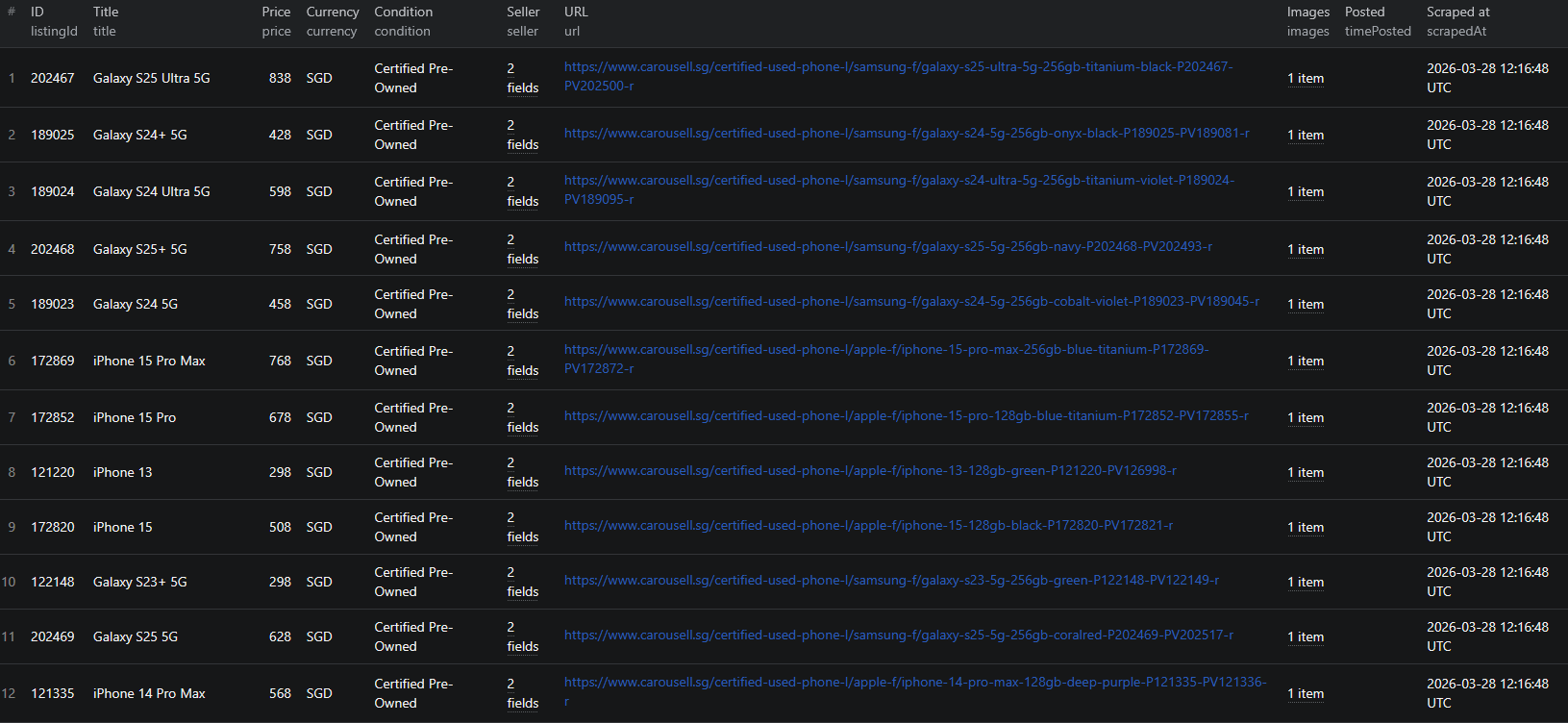
Here is what the actual output looks like from the Carousell Listings Scraper. Each listing returns a structured JSON object.
Card-level output (scrapeDetails: false):
{
"listingId": "1428890606",
"url": "https://www.carousell.sg/p/vintage-blue-desk-lamp-ikea-1428890606/",
"title": "Vintage Blue Desk Lamp IKEA",
"price": 10.5,
"currency": "SGD",
"condition": "Lightly used",
"seller": {
"username": "",
"profileUrl": ""
},
"images": [
"https://media.karousell.com/media/photos/products/2026/3/28/vintage_blue_desk_lamp_ikea_1774690568.jpg"
],
"timePosted": "",
"category": "",
"scrapedAt": "2026-03-28T09:52:17.527Z"
}
Detail-level output (scrapeDetails: true):
{
"listingId": "1428851262",
"url": "https://www.carousell.sg/p/ikea-black-adjustable-desk-lamp-1428851262/",
"title": "IKEA Black Adjustable Desk Lamp",
"price": 9,
"currency": "SGD",
"condition": "Well used",
"description": "S$9 | Selling to clear due to house move",
"seller": {
"username": "sol.handembroidery",
"profileUrl": "https://www.carousell.sg/u/sol.handembroidery/"
},
"images": [
"https://media.karousell.com/media/photos/products/2026/3/28/ikea_black_adjustable_desk_lam_1774679188.jpg"
],
"category": "",
"timePosted": "",
"views": null,
"likes": null,
"scrapedAt": "2026-03-28T09:55:58.496Z"
}
Key things to notice:
- Two scraping modes — card-level mode trades data depth for speed. Detail mode adds descriptions, full seller profiles, views, and likes at the cost of additional requests per listing
- SGD pricing — prices are returned as numbers with the currency code, making it easy to filter, sort, and compare across listings
- Condition field — Carousell's condition labels (Lightly used, Well used, Like new, etc.) are captured directly, allowing you to segment data by item condition without additional parsing
- Seller profile data — in detail mode, seller usernames and profile URLs give you a starting point for seller-level analysis and repeat seller tracking
- Listing ID — serves as a stable unique identifier for deduplication across multiple scraping runs
This structured format imports cleanly into any spreadsheet, database, or analytics platform.
Try the Carousell Listings Scraper now — no coding required.
Automating Carousell Market Monitoring
For ongoing price tracking or trend research, you do not want to run the scraper manually every time. The Apify platform supports full automation:
Scheduled Runs
Set up recurring scrapes on any schedule — daily, weekly, or monthly. The scraper runs automatically and stores results in a dataset you can access anytime. Daily runs work well for price monitoring and seller tracking. Weekly runs are sufficient for broader category trend research and market analysis.
API Integration
Use the Apify API to trigger scraper runs programmatically and retrieve results. This lets you integrate Carousell data into your existing workflows:
- Feed listing data into pricing dashboards or analytics tools automatically
- Trigger alerts when specific products drop below a target price threshold
- Build trend reports that update on a schedule with fresh Carousell data
- Connect to tools like Zapier, Make, or custom data pipelines
Price Tracking Pipelines
Combine scheduled scraping with historical data storage to build price tracking systems. Monitor how secondhand prices shift over time for specific product types and conditions. Identify seasonal pricing patterns and optimal times to buy or sell in different categories.
Node.js Example
For a complete working example showing how to call this scraper from Node.js, see the GitHub repository.
Webhooks
Configure webhooks to get notified when a scraper run completes. This is useful for event-driven workflows where you want to process new listing data as soon as it becomes available.
Using Carousell Data for Market Intelligence
Carousell data powers a range of market research and resale intelligence applications.
Secondhand Price Index
Scrape Carousell regularly across multiple categories to build a live secondhand price index for the Singapore market. Track how prices shift in response to new product launches, seasonal demand, and economic changes. This kind of index is valuable for analysts, resellers, and e-commerce businesses operating in Southeast Asia.
Seller Performance Analysis
In detail mode, the scraper captures views and likes per listing — engagement signals that indicate how well a listing is performing. Combine this with seller profile data to identify high-performing sellers in your target categories. Understanding what top sellers do differently (pricing, listing quality, condition descriptions) gives you a concrete edge.
Certified vs. User Listing Comparison
Carousell Certified products are verified pre-owned items sold at fixed prices, while user listings are unverified and negotiable. Scraping both types separately — using the appropriate URL formats — lets you compare pricing, condition distribution, and category coverage between the two market segments. This is useful for understanding how the certified market affects pricing in the broader secondhand category.
Cross-Platform Market Analysis
Combine Carousell data with other secondhand marketplace sources for a more complete view of the regional resale market. Compare pricing, product availability, and demand signals across platforms to identify arbitrage opportunities and understand where different product types command the strongest prices.
Does Carousell Provide an API?
No. Carousell does not offer a public API for accessing its marketplace data. There is no official endpoint to query product listings, pricing, or seller information programmatically.
Your practical options for bulk data extraction are:
- Manual browsing — works for a handful of listings but completely unscalable
- Custom scraper — requires development time, ongoing maintenance, proxy infrastructure with Singapore geolocation, and handling of dynamic rendering and anti-bot protection
- Pre-built scraper — a maintained solution like the Carousell Listings Scraper that handles all technical complexity out of the box
For most teams, the pre-built scraper is the most practical choice. It eliminates the engineering and maintenance burden while delivering reliable, structured output in the correct regional context.
Why Use a Carousell Scraper Instead of Building One
Building a custom Carousell scraper sounds straightforward until you encounter the real challenges:
- Anti-bot protection — Carousell actively detects and blocks automated requests, requiring sophisticated proxy handling and request management to collect data reliably
- Singapore proxy requirement — Carousell serves localized content based on the visitor's location. Without Singapore-based proxies, you will get inaccurate pricing and missing regional listings
- Dynamic content rendering — Carousell requires browser-level rendering. Simple HTTP requests will not return listing data, so you need a full browser automation setup
- Two-layer scraping — collecting full listing data requires navigating both the search or category page and each individual listing page, which doubles the infrastructure complexity
- Pagination handling — navigating through all result pages requires automated page management that breaks whenever Carousell changes its frontend
- Maintenance burden — Carousell updates its structure regularly. Every update is a potential breakage that requires immediate intervention to keep your data pipeline running
- Opportunity cost — every hour spent building and maintaining a scraper is an hour not spent analyzing data, refining pricing, or growing your operation
Unless you have highly specific requirements that no existing tool can meet, a pre-built, maintained scraper lets you focus on using the data rather than collecting it.
Try the Carousell Listings Scraper
The Carousell Listings Scraper extracts structured listing data from Carousell search pages, category pages, and individual listing URLs — with support for both fast card-level extraction and full detail scraping.
What you get:
- Structured JSON or CSV output ready for analysis
- Two scraping modes: fast card-level extraction or full detail mode with descriptions, seller profiles, and engagement metrics
- Support for keyword browse, search, category, and direct listing URLs in a single run
- Automatic anti-bot handling with Singapore-based proxies for accurate regional data
- Scheduled runs for ongoing price monitoring and trend tracking
- API access for integration into your data workflows
- No coding or scraper maintenance required
Pay Per Event pricing: $2 per 1,000 listings in card mode, $4 per 1,000 listings in detail mode. No platform compute costs — proxy usage is included.
Start scraping Carousell now — your first run takes less than 5 minutes to set up.
If you are building a broader secondhand marketplace intelligence pipeline, combine Carousell data with other C2C sources like Depop for Western resale markets or Mercari for Japanese market insights.
Legal and Ethical Considerations
Web scraping occupies a well-established legal space, but responsible practice matters:
- Public data only — the Carousell scraper extracts publicly visible listing information that anyone can see by visiting Carousell without logging in
- Respect rate limits — the scraper is designed to make requests at a reasonable pace to avoid overloading Carousell's servers
- Responsible use — use collected data for legitimate business purposes like market research, price monitoring, and competitive analysis
- Privacy compliance — if you operate in the EU or Singapore, ensure your data handling complies with GDPR or Singapore's PDPA. This applies to how you store and process data, not to the collection of publicly visible listing information
Frequently Asked Questions
Is scraping Carousell legal?
Scraping publicly available data from Carousell is generally legal. Product listings are visible to anyone who visits the site without logging in. You should always use the data responsibly, comply with applicable privacy regulations, and avoid overloading Carousell's servers with excessive requests.
Does Carousell have an API?
Carousell does not offer a public API for accessing its marketplace data. There is no official way to programmatically query product listings, pricing, or seller information. A web scraper is the practical alternative for extracting structured C2C marketplace data at scale.
What data can be extracted from Carousell?
You can extract listing IDs, URLs, titles, prices, currency, condition, seller usernames and profile URLs, product images, descriptions, and post timestamps. Full detail mode also provides views, likes, and complete seller profile data.
Can I scrape Carousell by keyword search or category?
Yes. The Carousell Listings Scraper supports keyword browse URLs (e.g. carousell.sg/desk-lamp/q/), search result URLs with parameters, category browse pages, and direct listing URLs. You can combine multiple URL types in a single run.
What is the difference between card-level and detail-level scraping?
Card-level scraping (scrapeDetails: false) extracts quick summary data visible on search and category pages — title, price, condition, and the first image. Detail-level scraping (scrapeDetails: true) visits each listing page to collect full descriptions, all images, seller profile information, views, and likes.
Can I export Carousell data to CSV or JSON?
Yes. The Carousell Listings Scraper exports data in both JSON and CSV formats. You can also access results via the Apify API for automated workflows and data pipeline integrations.
About the Author
This guide was written by Piotr, a software engineer with hands-on experience building and maintaining web scrapers at scale. He develops and maintains a suite of data extraction tools on the Apify platform, helping businesses automate their data collection workflows.
Need help with your scraping project?
Book a free discovery call and let's scope your project together.
Book a Call