How to Scrape Carsales Used-Car Listings
A useful used-car price comparison needs more than a list of dollar amounts. Model year, badge, transmission, odometer, seller type, location, and the price basis all affect whether two Australian listings are genuinely comparable.
Our Carsales Scraper exports public Carsales search results and individual vehicle pages. Basic rows include the asking price, price label, year, trim, odometer, body, engine, transmission, state, seller type, photos, and source URL. Optional details add the description, features, specifications, fuel, drive type, colour, suburb, and postcode.
The prices are advertised asking prices, not completed sale prices. Keep the price basis beside every amount.
Export ten Toyota Yaris listings
- Build the desired filters on Carsales and copy the search-results URL.
- Open the Actor on Apify.
- Add the search URL under Start URLs.
- Set Maximum vehicles to
10. - Leave Scrape full details off for the first comparison and click Start.
We used this input:
{
  "startUrls": [
    { "url": "https://www.carsales.com.au/cars/toyota/yaris/" }
  ],
  "maxItems": 10,
  "scrapeDetails": false,
  "proxyConfiguration": {
    "useApifyProxy": true
  }
}
maxItems is global across all input URLs. Our example returned ten records. One abbreviated row was:
{
  "id": "SSE-AD-20818423",
  "url": "https://www.carsales.com.au/cars/details/2007-toyota-yaris-yrs-manual/SSE-AD-20818423/",
  "title": "2007 Toyota Yaris YRS Manual F",
  "make": "Toyota",
  "model": "Yaris",
  "badge": "YRS Manual F",
  "year": 2007,
  "condition": "Used",
  "price": 2990,
  "currency": "AUD",
  "priceLabel": "Excl. Govt. Charges",
  "odometerKm": 205690,
  "bodyType": "Hatch",
  "engine": "4cyl 1.5L Petrol",
  "transmission": "Manual",
  "state": "NSW",
  "sellerType": "Private",
  "photoCount": 6
}
| Field group | How to use it |
|---|---|
id, url, scrapedAt | Deduplicate listings, reopen the source, and keep the observation time. |
make, model, badge, year | Build comparable groups instead of mixing different trims and generations. |
price, priceLabel, priceExcludingGovtCharges | Keep the displayed amount and its basis together before comparing prices. |
odometerKm, engine, transmission, bodyType | Control for the vehicle characteristics that materially affect an asking price. |
state, sellerType, sellerId | Segment the market by location and seller type, and group stock from the same seller ID. |
photoCount, images | See how much visual material the ad contains. Basic results include the first few source-hosted photos. |
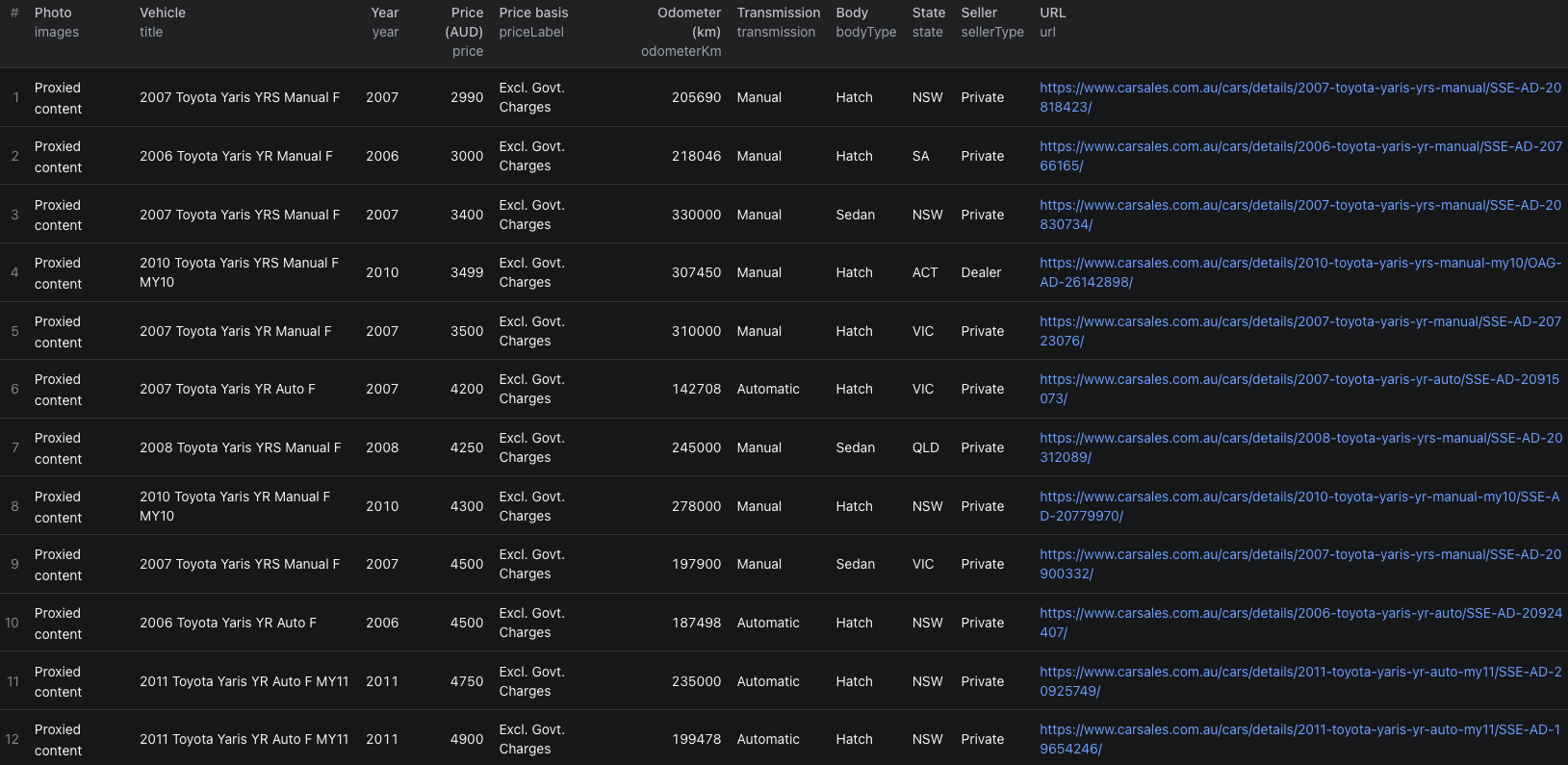
The Carsales listings Node.js example runs the same ten-vehicle search with apify-client and retrieves the resulting dataset.
Build an asking-price comparison that holds up
Start with a narrow search, then make the records comparable before calculating a median or range:
- Group by make, model, badge, year, transmission, and body type.
- Separate dealer and private listings when seller type matters to the question.
- Keep location visible because supply and asking prices can differ by state.
- Exclude null prices and keep
priceLabelbeside every remaining amount. - Compare odometer bands within each vehicle group.
- Open unusually cheap or expensive listings and inspect their descriptions, photos, and current availability.
price is the displayed amount. priceLabel explains whether it is drive-away or excludes government charges. Some dealer records also contain priceExcludingGovtCharges. Do not mix unlike price bases into one average.
The dataset can support asking-price monitoring, inventory comparisons, and dealer-stock analysis. It cannot tell you the final negotiated or completed sale price.
Turn on full details only when the task needs them
Leave scrapeDetails off when you need a broad comparison using price, year, badge, odometer, transmission, state, seller type, and photos.
Turn it on when description, colour, fuel type, drive type, engine capacity, doors, seats, suburb, postcode, features, or specifications affect the shortlist. A single vehicle-detail URL always returns the full detail record, regardless of this setting.
Carsales keeps dealer names, addresses, and phone numbers behind sign-in, so they are not included. The stable sellerId can still group a seller's public stock without claiming a business identity.
Basic search results include the first few images and photoCount reports the advertised total. Full details can return the complete photo list. The files remain hosted by the source.
Understand ordering and coverage
The Actor works past the site's visible paging and reports collected X of Y matching vehicles in the run log. Inventory can change while the run is active, so a small difference from the site's counter is normal.
Results are collected cheapest first, with unpriced vehicles later. Very large searches are processed across several price ranges, so order is cheapest first within a range rather than a guaranteed final global sort. Sort the finished export by price after separating null values and incompatible price bases.
When many new cars share the same price, year, and state, the public filters may not distinguish every result. Narrow the search when the run log reports that tied inventory cannot be fully separated.
Pricing
Pricing as of September 22, 2026 uses alternative result events plus a small start event:
| Event | Price |
|---|---|
| Actor start | $0.00005 per GB of allocated memory, minimum one event |
| Vehicle listing | $0.001 per returned basic search result |
| Vehicle details | $0.0025 per returned full detail record, charged instead of the listing event |
Our example used one start event and returned ten basic listings. Its Actor event charges were $0.00005 + (10 × $0.001) = $0.01005. Apify platform or proxy usage may be billed separately according to your plan.
Check live pricing before increasing the number of vehicles or enabling full details.
Check these cases before scaling up
- Prices use different labels. Separate drive-away and excluding-government-charges records before comparing them.
- A record has no price. Keep it outside price calculations instead of treating null as zero.
- The output order looks mixed. Sort the completed dataset yourself. Large searches can be collected in parallel price ranges.
- The count differs from the website. Read the final run log and remember that live inventory changes while collection is running.
- Suggested vehicles appear on a narrow search page. The Actor excludes recommendations that fall outside the requested filters.
- A listing is no longer available. Keep its ID and collection time for historical analysis, but verify the current page before acting on it.
Frequently asked questions
Can the Actor scrape a single Carsales vehicle page?
Yes. Add a public vehicle-detail URL and the Actor returns the full detail record regardless of the scrapeDetails setting.
Does maxItems apply to each search URL?
No. maxItems is the maximum number of vehicles across the whole run.
Are Carsales prices completed sale prices?
No. The output contains displayed asking prices. Keep priceLabel and priceExcludingGovtCharges with the amount so drive-away and excluding-government-charges prices are not mixed.