
How to Scrape Cycle Trader Motorcycle Listings and Compare Asking Prices
If you are comparing motorcycle prices, a broad list of dollar amounts is not enough. A new bike and a used one, or two different trims, are not useful peers. You need the source listing and enough vehicle detail to build a fair comparison.
Our Cycle Trader Listings Scraper collects public Cycle Trader search results with the year, make, model, condition, asking price, and listing URL. An optional detail pass adds fields such as mileage, location, dealer contact, photos, and specifications when the listing provides them. It works from search or category URLs, not a list of individual motorcycle pages.
Start with ten listings
Open the Actor on Apify. An Actor is a tool you run on Apify; you can use its Input form without writing code. Leave the default Search / category URLs entry in place, set Max items to 10, and keep Scrape full listing details off. Click Start, then open the run's Dataset.
Or switch the Input form to JSON and paste:
{
  "startUrls": [
    { "url": "https://www.cycletrader.com/motorcycles-for-sale" }
  ],
  "maxItems": 10,
  "scrapeDetails": false
}
This broad search is a quick check of the output, not a ready-made price comparison. For a useful comparison, apply make, model, condition, and location filters on Cycle Trader, then replace the URL with that search page. maxItems is one cap across the entire run, even if you supply several URLs. The Actor uses US residential proxies by default; leave that setting alone for the first test.
Our Actor documentation shows this abbreviated listing record as an example of the basic output:
{
  "id": "5040896982",
  "url": "https://www.cycletrader.com/listing/2025-Triumph-THRUXTON+FINAL+EDITION-5040896982",
  "year": 2025,
  "make": "Triumph",
  "model": "THRUXTON FINAL EDITION",
  "condition": "Used",
  "price": 19500
}
This is a documentation example, not a claim about what the ten-listing input returns today. Inventory and asking prices change. The basic export is intentionally lean; do not assume mileage or dealer phone is present just because the dataset view has a column for it.
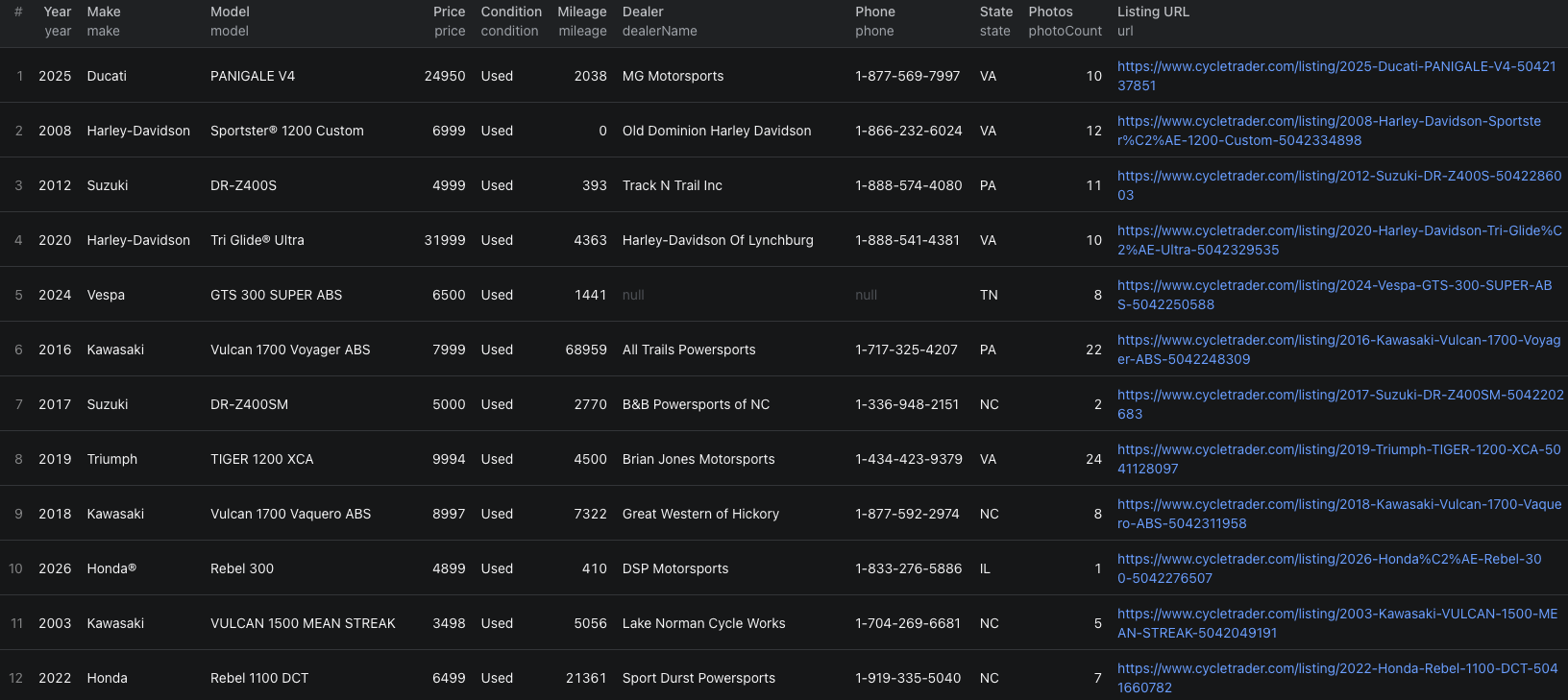
This screenshot shows twelve visible rows from a separate detail-mode run, with mileage and dealer fields. The ten-item JSON above is a smaller listing-only starting input.
The Cycle Trader Node.js example runs that ten-item input with apify-client and reads the resulting dataset.
Make the prices comparable
Export the Dataset as CSV or JSON. Keep id and url with each row so you can remove duplicates and reopen unusual listings. Then:
- Separate new and used motorcycles.
- Group by make, model, trim, and a narrow year range. If the basic row does not have a trim, open the source before treating two models as identical.
- Keep location visible and exclude missing or nonnumeric prices from a median.
- Check the original ads for unusually low or high asking prices before drawing a conclusion.
These are advertised prices, not completed sale prices. A comparison can show what sellers are asking now; it cannot establish what buyers paid.
Add full details when they change the decision
Set scrapeDetails to true when mileage, dealer phone, full photos, colour, engine size, description, or specifications matter. The Actor visits each listing page and saves a detail record instead of a basic listing record. A field can still be empty if it is absent from the source page.
Start with a small maxItems in detail mode. It makes additional page requests and costs more per returned record. If a broad search yields irrelevant bikes or too few comparable rows, refine the search URL on Cycle Trader before increasing the cap. The Actor paginates search results, but one broad search is not a guarantee of complete marketplace coverage.
Pricing
Pricing as of October 4, 2026 is $0.004 per basic listing or $0.010 per full detail record, plus an Actor-start event of $0.00005 per GB of allocated memory, minimum one event. The listing and detail result fees are alternatives, not two charges for the same record. At the default 1 GB, ten returned basic listings would cost $0.04005 in Actor events; ten returned detail records would cost $0.10005. Fewer returned records cost less, although the start event still applies. See live pricing before a larger run.
Frequently asked questions
Does maxItems apply to each Cycle Trader search URL?
No. maxItems caps the number of listings collected across the whole run. Set a small value for your first export.
Does the basic listing export include mileage and dealer phone numbers?
No. Turn on Scrape full listing details to visit each listing page for fields such as mileage, dealer phone, photos, and specifications when available.
Are the exported prices completed sale prices?
No. They are advertised asking prices. Listings can change or disappear, and the final transaction price is not provided.
