Piotr VassevPiotr Vassev

How to Scrape eBay Listings and Sold Prices (Step-by-Step Guide)

How to Scrape eBay Listings and Sold Prices

If you want to scrape eBay listings for price research, resale arbitrage, or competitor monitoring, this guide walks you through the entire process. You will learn what data you can extract from eBay search, category, and sold-items pages, how to capture the realized sale prices that eBay's public API does not expose, and how to turn raw listings into a usable market-intelligence dataset.

Why Scrape eBay Data?

eBay is the world's oldest large-scale online marketplace and still one of the most valuable public datasets in e-commerce. With roughly 130 million active buyers and over a billion live listings across phones, electronics, collectibles, fashion, auto parts, and industrial equipment, it is the reference market for anything that is bought and sold second-hand.

What makes eBay uniquely valuable is not the active listings — it is the completed sales. Most marketplaces only tell you what sellers are asking. eBay publishes what buyers actually paid, with a date attached, for every sold item over the past ~90 days. That single fact turns eBay from a catalog into a price oracle: it is the closest thing the internet has to a public transaction log for used goods.

Businesses and researchers scrape eBay data for a range of purposes:

  • Price research — establish the true market value of an item from realized sale prices, not aspirational asking prices
  • Resale and arbitrage — spot underpriced active listings by comparing them against the sold-price distribution for the same model and condition
  • Sell-through analysis — compare active listing counts against sold counts to measure how quickly a category actually moves
  • Competitor and seller monitoring — track what specific sellers list, at what price, in what condition, and how fast their inventory turns
  • Condition-based price banding — quantify what "New", "Open Box", "Refurbished", and "Pre-Owned" are each worth for the same SKU
  • Catalog and inventory building — collect item specifics and image galleries across a whole category to seed your own product database

Manually collecting this is impossible at any useful scale. A single search can return 10,000 results across hundreds of pages, auction prices change by the minute, and the sold-items window rolls forward every day. Automation is the only realistic approach.

What Data You Can Extract from eBay

The eBay Listings Scraper extracts structured data from any eBay search, category, or sold/completed listings URL. Here are the key fields available:

FieldDescriptionExample
Item IDeBay's unique listing identifier335622367053
TitleFull listing title as written by the sellerApple iPhone 15 (Excellent Condition) for AT&T or Cricket Only
PriceNumeric price — the realized sale price for sold listings384.99
Price textRaw price string exactly as eBay displays it$384.99
CurrencyISO currency codeUSD
ConditionItem condition as declared by the sellerPre-Owned
Buying formatHow the item is soldBuy It Now / auction / Best Offer
ShippingShipping cost and delivery estimate text+$9.99 delivery by Tue, Jun 23
Sold countUnits sold, when eBay shows it on the card15+ sold
WatchersWatcher count, when displayed42 watching
Sold dateDate of sale — populated for sold/completed listingsSold Jun 16, 2026
Image URLMain listing image at full resolutioni.ebayimg.com/images/g/...s-l1600.jpg
URLCanonical link to the item pageebay.com/itm/335622367053

With scrapeDetails: true, each record additionally includes sellerName, sellerFeedbackScore, sellerPositiveFeedback, sellerNotes (the seller's own condition write-up), itemSpecifics (the full key/value attribute table — processor, chipset, network, lock status, and so on), and images (the complete gallery rather than just the hero shot).

Common Use Cases for eBay Data

Sold-Price Research and Valuation

This is the flagship use case. Apply eBay's Sold items filter to any search, paste the URL into the scraper, and every record comes back with price set to the actual transaction value and soldDate set to the day it closed. Aggregate a few hundred of those and you have a real price distribution — median, spread, and trend — for a specific model in a specific condition. No survey, no estimate, no asking-price bias.

Resale and Arbitrage

Run two scrapes on the same query: one on active listings, one on sold listings. Any active Buy It Now priced meaningfully below the sold median for its condition is an arbitrage candidate. Because condition, buyingFormat, and price are all returned as separate structured fields, this comparison is a simple join rather than a text-parsing exercise.

Sell-Through Rate by Category

Sell-through rate — sold listings divided by total listings — is the single best indicator of demand on eBay, and it is not published anywhere. Scrape the active results and the sold results for the same query and divide. A 60% sell-through category is liquid; a 5% category will leave you holding inventory.

Seller and Competitor Monitoring

An eBay seller's storefront is just another URL the scraper accepts. Track a competitor's full inventory on a schedule to see what they add, what they reprice, what disappears (sold), and how their feedback score moves. Detail mode returns sellerFeedbackScore and sellerPositiveFeedback, so seller reputation becomes a time series rather than a snapshot.

Condition Price Bands

For refurbishers and recommerce operators, the spread between conditions is the business model. Scraping sold listings and grouping by condition tells you exactly what the market pays for New vs. Open Box vs. Refurbished vs. Pre-Owned on the same SKU — which is what determines whether a repair is worth doing.

Catalog Building with Item Specifics

Detail mode returns eBay's itemSpecifics table as a clean key/value object. Scraped across a category, this is a fast way to bootstrap a structured product catalog — attributes, variants, and image galleries included — without writing a parser per product type.

Challenges of Scraping eBay Manually

Before jumping into the tutorial, it is worth understanding why building your own eBay scraper is harder than it looks:

  • Aggressive anti-bot protection — eBay actively fingerprints requests and rate-limits datacenter IPs. US residential proxies are effectively mandatory for consistent results
  • The 10,000-result ceiling — every search and category is hard-capped at roughly 10,000 listings regardless of how many results actually exist, so broad queries silently truncate
  • Inconsistent card layouts — search result cards vary by category and by whether the listing is an auction, Buy It Now, Best Offer, or multi-variant listing. Each variant needs its own parsing branch
  • Price text is not a number — eBay displays ranges ($299.00 to $449.00), currency conversions, and "or Best Offer" suffixes. Turning that into a reliable numeric field takes real work
  • Sold-listings URLs are fragile — the &LH_Sold=1&LH_Complete=1 parameters have to be preserved through pagination or you silently fall back to active listings and corrupt your dataset
  • Pagination drift — eBay reshuffles results between page loads, so naïve page-by-page crawling produces duplicates and gaps without ID-level deduplication
  • Maintenance burden — eBay ships frontend changes continuously, and each one breaks unmaintained scrapers

For most use cases, a pre-built and maintained scraper is dramatically more practical than building one in-house.

Step-by-Step: How to Scrape eBay Listings

Here is how to scrape eBay product data using the eBay Listings Scraper on Apify.

Step 1 — Build Your Start URL on eBay

The scraper is URL-driven, which means you build your query in the eBay UI you already know and then paste the result. Three URL types work:

  • Search URLs — run any search on eBay and copy the address bar, e.g. https://www.ebay.com/sch/i.html?_nkw=iphone+15
  • Category URLs — browse into any category or sub-category and copy the URL
  • Sold-items URLs — this is the important one. Run your search, open the filter sidebar, tick Sold items, and copy the resulting URL. eBay appends &LH_Sold=1&LH_Complete=1, and the scraper will return realized sale prices and sold dates for every result

Any filter you apply in the eBay UI — condition, price band, buying format, location, seller — is carried in the URL and respected by the scraper. Use that to keep each run under the 10,000-result ceiling.

Step 2 — Configure the Scraper Input

Head to the eBay Listings Scraper on Apify and configure your run:

  1. Paste your URLs into startUrls — you can mix search, category, and sold-items URLs in a single run
  2. Set maxItems to cap the number of listings across all start URLs (default 50; set 0 for no limit)
  3. Toggle scrapeDetails:
    • Off (listing mode) — fast and cheap, returns 13 fields per listing straight from the results pages
    • On (detail mode) — visits every item page for seller profile, feedback, seller notes, the full item-specifics table, and the complete image gallery
  4. Leave proxyConfiguration on its default — US residential proxies are required for this target and are pre-selected

Example input for active listings:

{
  "startUrls": [{ "url": "https://www.ebay.com/sch/i.html?_nkw=iphone+15" }],
  "maxItems": 500,
  "scrapeDetails": false,
  "proxyConfiguration": {
    "useApifyProxy": true,
    "apifyProxyGroups": ["RESIDENTIAL"],
    "apifyProxyCountry": "US"
  }
}

And the same query against sold/completed listings:

{
  "startUrls": [
    { "url": "https://www.ebay.com/sch/i.html?_nkw=iphone+15&LH_Sold=1&LH_Complete=1" }
  ],
  "maxItems": 500,
  "scrapeDetails": false
}

Step 3 — Run the Scraper

Once started, the scraper will:

  • Resolve each start URL and detect whether it is an active or sold/completed results page
  • Paginate through results automatically until maxItems is reached or the URL is exhausted
  • Normalize eBay's price strings into a numeric price plus a raw priceText, with the currency split out
  • Parse condition, buying format, shipping text, sold counts, and watchers from each result card
  • Populate soldDate and treat price as the realized sale price on sold-items runs
  • Optionally visit each item page when scrapeDetails: true and merge seller data, item specifics, and the image gallery into the record
  • Handle eBay's anti-bot protection and retries transparently — you are not charged for blocked requests

Step 4 — Export Your Results

When the run finishes, export your data in the format you need:

  • JSON — ideal for developers building price-monitoring or arbitrage pipelines
  • CSV / Excel — perfect for pivot-table analysis of sold prices by condition
  • XML / HTML / RSS — useful for feeds and reporting workflows
  • API — pull results programmatically via the Apify API for scheduled runs

Ready to try it? Run the eBay Listings Scraper on Apify and get your first dataset in minutes.

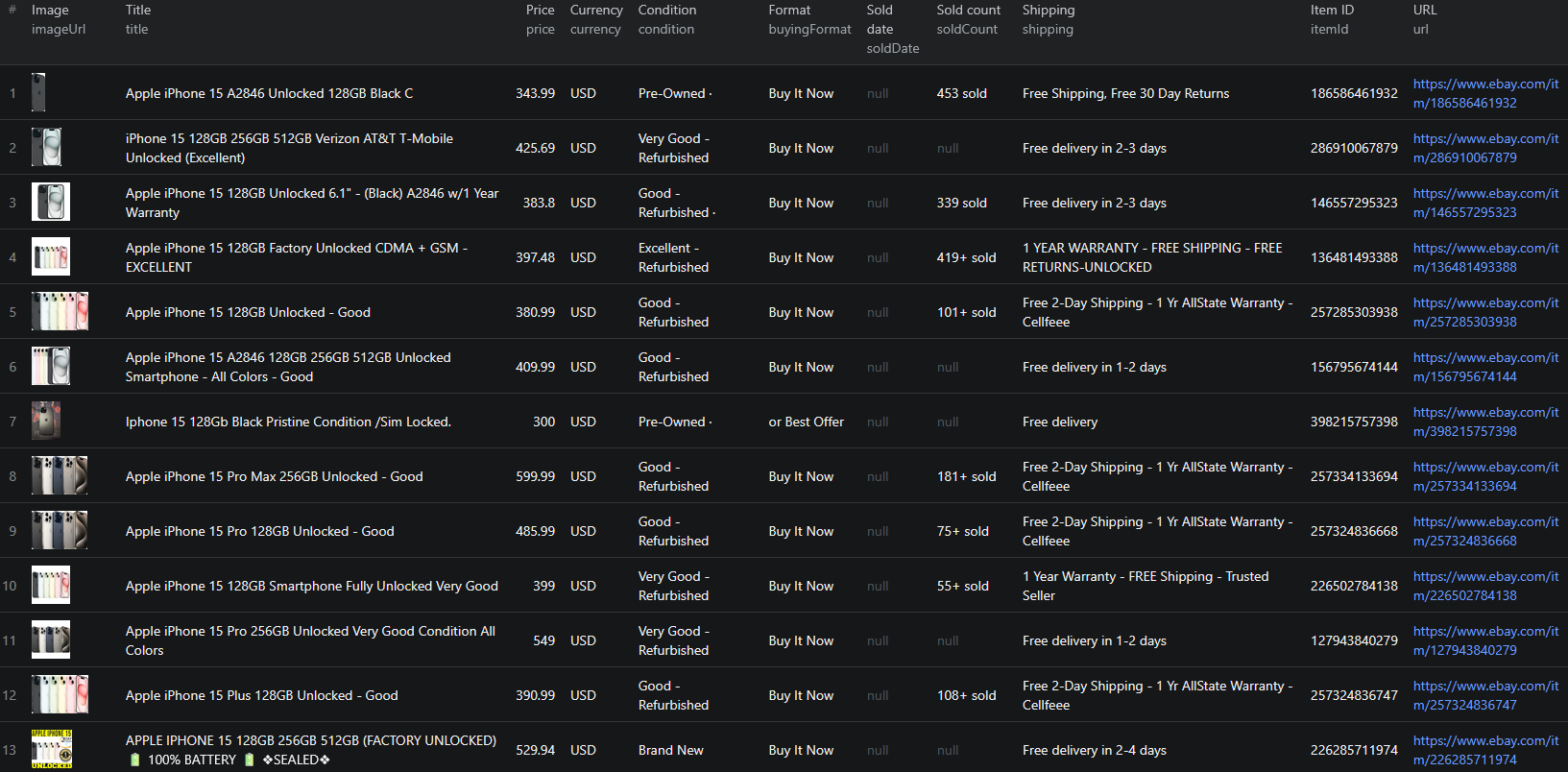
Example Output (Real Data Preview)

eBay scraper results

Here is what an active listing looks like in listing mode (scrapeDetails: false):

{
  "itemId": "335622367053",
  "url": "https://www.ebay.com/itm/335622367053",
  "title": "Apple iPhone 15 (Excellent Condition) for AT&T or Cricket Only",
  "price": 384.99,
  "priceText": "$384.99",
  "currency": "USD",
  "imageUrl": "https://i.ebayimg.com/images/g/8mYAAeSwtMZpjO8W/s-l1600.jpg",
  "condition": "Pre-Owned",
  "buyingFormat": "Buy It Now",
  "shipping": "+$9.99 delivery by Tue, Jun 23",
  "soldCount": "15+ sold",
  "watchers": null,
  "soldDate": null
}

And here is the same shape from a sold-items run, where price is the realized sale price and soldDate is populated:

{
  "itemId": "236873524013",
  "title": "iphone 15 pro 128g Att Cricket Clean Esn",
  "price": 298.0,
  "priceText": "$298.00",
  "currency": "USD",
  "condition": "Pre-Owned",
  "buyingFormat": "Buy It Now",
  "soldDate": "Sold Jun 16, 2026"
}

With scrapeDetails: true, each record is enriched with the seller and item-specifics payload:

{
  "sellerName": "Nikaforos",
  "sellerFeedbackScore": 65642,
  "sellerPositiveFeedback": "99.6% positive",
  "sellerNotes": "The phone is in Open Box condition. The phone will show very light signs of handling.",
  "itemSpecifics": {
    "Processor": "Hexa Core",
    "Chipset Model": "A17 Pro (3 NM)",
    "Lock Status": "Network Locked",
    "SIM Card Slot": "eSIM",
    "Network": "AT&T"
  },
  "images": [
    "https://i.ebayimg.com/images/g/ZAMAAeSwNDppJcRF/s-l1600.webp",
    "https://i.ebayimg.com/images/g/f0kAAeSwQAlpJcRG/s-l1600.webp"
  ]
}

Key things to notice:

  • price is a number, priceText is the original string — you get a clean numeric field for analysis without losing eBay's exact display value for auditing
  • soldDate is the switch between two datasets — its presence tells you unambiguously whether a record came from a sold-items run or an active-listings run
  • Condition and buying format are first-class fields — grouping sold prices by condition or filtering out auctions is a one-liner, not a regex
  • itemSpecifics is a real key/value object — not a scraped HTML blob, so you can query attributes directly
  • itemId enables deduplication — eBay reshuffles results between pages, and the item ID is what lets you merge runs cleanly

Try the eBay Listings Scraper now — no coding required.

Automating eBay Data Collection

For ongoing price intelligence, you do not want to run the scraper by hand. The Apify platform supports full automation:

Scheduled Runs

Set up recurring scrapes on any schedule. For sold-price research, a daily run against your sold-items URLs is the natural cadence — eBay's completed-listings window only covers about 90 days, so a daily scrape lets you accumulate transaction history far beyond what the site itself will show you. That accumulated archive is worth more than any single scrape, because it is data nobody else kept.

For active listings and arbitrage scanning, hourly runs make sense in fast-moving categories like phones, GPUs, and sneakers.

API Integration

Use the Apify API to trigger runs programmatically and retrieve results. This lets you wire eBay data into your existing systems:

  • Feed sold prices into a valuation model or pricing dashboard
  • Trigger an alert when an active listing appears below your arbitrage threshold
  • Sync category snapshots into a BI warehouse for sell-through reporting
  • Connect to Zapier, Make, Google Sheets, or Slack for no-code workflows

Node.js Example

For a complete working example showing how to call this scraper from Node.js — including the sold-items input that returns realized sale prices — see the GitHub repository.

Webhooks

Configure webhooks to fire when a run completes, so downstream processing starts the moment new listings land instead of on a polling timer.

Using eBay Data for Business Intelligence

The structured output unlocks a range of analysis that is simply not possible from the eBay UI.

True Market Value from Sold Prices

Take 200 sold records for a model, filter to a single condition, and take the median of price. That number is the market value — defensible, current, and derived from actual transactions. Track the median week over week and you have a depreciation curve for any product on earth that trades second-hand.

Ask-vs-Sold Spread

Scrape active and sold results for the same query and compare the two distributions. A large gap between the active median and the sold median means sellers are overpricing and inventory is sitting; a narrow gap means the category is efficient. For a reseller, that spread is the margin forecast.

Sell-Through and Liquidity Scoring

Combine sold counts with active listing counts per query to score categories by liquidity before you commit capital to inventory. This is the single most useful metric for anyone sourcing goods to resell, and it takes two scraper runs to compute.

Seller Reputation as a Time Series

sellerFeedbackScore and sellerPositiveFeedback scraped on a schedule turn a static badge into a trend. A competitor whose feedback score is climbing fast is moving volume; one whose positive percentage is slipping is having fulfillment problems. Both are actionable.

Cross-Marketplace Comparison

eBay sold prices are the best available benchmark for the rest of the resale internet. Pair them with Mercari, Poshmark, Depop, or Vinted to find categories where one platform systematically underprices another — that gap is a cross-listing arbitrage opportunity.

Does eBay Provide an API?

eBay does have official APIs, but they are a poor fit for market research — and for sold prices specifically, they are close to unusable.

What's Available

  • Browse API — the modern public API for searching listings. It requires an application key, returns active listings only, and applies daily call limits that make broad category sweeps impractical
  • Marketplace Insights API — the only official source of completed-sale data. It is a Limited Release product: access requires a business case, an approved application, and an eBay partnership. Most developers never get it
  • Finding API — the legacy endpoint that many older tutorials still reference. It has been retired and should not be used for new work

What the APIs Miss

The gap is stark. The Browse API gives you asking prices; it will not tell you what anything actually sold for, which is the entire reason to look at eBay in the first place. Marketplace Insights would answer that, but the approval gate means it is effectively unavailable unless you are already an eBay partner.

Meanwhile, that same completed-sale data is sitting on the public site behind a checkbox — visible to any shopper, no login required. The eBay Listings Scraper reads it the way a buyer would: paste the sold-items URL, get the realized price and sold date as structured fields, no partner approval and no key management.

Why Use an eBay Scraper Instead of Building One

Building a custom eBay scraper sounds straightforward until you actually start:

  • Residential proxy requirement — eBay blocks datacenter IPs quickly. Sourcing, rotating, and paying for US residential proxies is a project in itself
  • Price normalization — ranges, currency conversions, "or Best Offer" suffixes, and shipping-inclusive totals all have to be parsed into one trustworthy numeric field
  • Sold-parameter preservation — losing LH_Sold=1 during pagination silently swaps your sold dataset for active listings, and the output looks fine until you analyze it
  • Layout variance — auctions, Buy It Now, Best Offer, multi-variant, and sponsored cards each render differently and need their own parsing branch
  • Deduplication — result reshuffling between page loads means you need ID-level dedup or your medians are wrong
  • Frontend churn — eBay ships changes continuously, and every one of them is a maintenance ticket for a homegrown scraper
  • Opportunity cost — every hour spent on proxy rotation is an hour not spent on the pricing analysis the scraper exists to support

Unless you have requirements no existing tool can meet, a maintained scraper lets you focus on the analysis instead of the plumbing.

Pricing — Pay Only for Results

The eBay Listings Scraper uses Apify's Pay-Per-Event pricing model. There is no fixed per-run fee — you pay only for listings that actually land in your dataset, and blocked or retried requests are free.

EventWhen it's chargedPrice per eventPer 1,000 listings
product-listingEach listing extracted from a search, category, or sold-items results page$0.002$2.00
item-detailEach listing enriched with seller profile, feedback, seller notes, item specifics, and the full gallery (scrapeDetails: true)$0.007$7.00

Quick cost estimates:

  • 1,000 sold listings for a price-research dataset → $2.00
  • 1,000 fully enriched listings with seller and item-specifics data → $7.00
  • A daily 500-listing sold-price tracker → $1.00/day, about $30/month

For price research, sell-through analysis, and arbitrage scanning, listing mode already returns everything you need — including the realized sale price and sold date — and is by far the better value. Reserve detail mode for catalog building and seller due diligence, where item specifics and feedback history are the point.

New Apify accounts include free monthly usage credits, so you can validate the output before spending anything.

Try the eBay Listings Scraper

The eBay Listings Scraper extracts structured data from any eBay search, category, or sold-items URL — item IDs, titles, numeric prices, currency, condition, buying format, shipping, sold counts, watchers, sold dates, and images. Toggle detail mode for seller profiles, feedback scores, seller notes, item specifics, and the full image gallery.

What you get:

  • Realized sold prices and sold dates — the data eBay's public API does not expose
  • Structured JSON, CSV, Excel, HTML, or XML output ready for any downstream tool
  • URL-driven input — build the query in eBay's own UI and paste it, filters and all
  • Up to ~10,000 listings per URL, with multiple URLs combined in a single run
  • US residential proxies and anti-bot handling configured out of the box
  • Pay-Per-Event pricing: $2.00 / 1,000 listings, $7.00 / 1,000 enriched records — you only pay for results
  • Scheduled runs, webhooks, and API access for ongoing intelligence
  • No coding, no proxy management, no scraper maintenance

Start scraping eBay now — your first run takes less than 5 minutes to set up.

If you are building a resale or price-intelligence pipeline, combine eBay data with other marketplace sources like Mercari and Poshmark for peer-to-peer resale, Walmart for the retail price floor, or AliExpress for the upstream sourcing view.

Legal and Ethical Considerations

Web scraping occupies a well-established legal space, but responsible practice matters:

  • Public data only — the eBay scraper extracts publicly visible listing information that anyone can see by visiting eBay.com. No login or authentication is required, including for sold/completed results
  • Respect rate limits — the scraper paces its requests and rotates sessions rather than hammering eBay's servers
  • Seller data is business data — seller names, feedback scores, and store details are public business identifiers, but if you store them, handle them under the same data-protection rules you would apply to any commercial contact data
  • No misuse — use the data for legitimate purposes like price research, valuation, and competitive analysis. Do not use it to clone listings, copy seller photography, or mislead buyers
  • Compliance — if you operate in the EU, California, or another regulated jurisdiction, ensure your storage and processing comply with GDPR, CCPA, or the local equivalent. This applies mainly to how you retain the data, not to the collection itself

eBay listings are public marketplace data — they exist to be found by buyers and indexed by search engines. Using them for price research and market intelligence is consistent with how the platform is designed to work.

Frequently Asked Questions

Is scraping eBay legal?

Scraping publicly available data from eBay is generally legal. Listings, prices, conditions, and completed-sale results are visible to anyone who visits eBay without logging in. You should use the data responsibly, comply with applicable privacy regulations, and avoid overloading eBay's servers with excessive requests.

Can I get eBay sold prices without the API?

Yes. eBay's Marketplace Insights API — the only official source of completed-sale data — is a Limited Release product restricted to approved partners. Scraping the public sold-items results page is the practical alternative: apply the Sold items filter on eBay, paste the resulting URL into the scraper, and each record comes back with the realized sale price and the sold date.

What data can be extracted from eBay?

You can extract item IDs, titles, numeric prices, currency, condition, buying format (Buy It Now, auction, Best Offer), shipping text, sold count, watchers, sold date, and image URLs. With detail mode enabled, you also get the seller name, feedback score, positive-feedback percentage, seller condition notes, the full item-specifics key/value table, and the complete image gallery.

How do I use the eBay Listings Scraper?

Paste one or more eBay search, category, or sold-items URLs into the startUrls field, set a maxItems cap, and optionally toggle scrapeDetails for the enriched payload. The scraper resolves each URL, paginates automatically, and returns all matching listings as structured JSON, CSV, Excel, HTML, or XML.

How many eBay listings can I scrape in one run?

eBay caps any single search or category to roughly 10,000 results. You can combine multiple start URLs in one run to go beyond that — split a broad category by sub-category, price band, or condition filter and paste each resulting URL as its own start URL.

Why are some fields empty?

Listings vary by category and format, so not every field appears on every item. Watcher counts, sold counts, and shipping estimates are only present when eBay renders them on the result card, and soldDate is populated only for sold/completed listings.

How much does the eBay Listings Scraper cost?

The actor uses Apify's Pay-Per-Event pricing. Listing-only records cost $0.002 each ($2.00 per 1,000), and detail-enriched records cost $0.007 each ($7.00 per 1,000). There is no fixed per-run fee — you only pay for listings that actually land in your dataset.

About the Author

This guide was written by Piotr, a software engineer with hands-on experience building and maintaining web scrapers at scale. He develops and maintains a suite of data extraction tools on the Apify platform, helping businesses automate their data collection workflows.

Need help with your scraping project?

Book a free discovery call and let's scope your project together.

Book a Call
Piotr Vassev

Piotr Vassev

Founder of FalconScrape. Building production-grade web scraping systems and data automation pipelines for businesses worldwide.

Connect on LinkedIn