How to Scrape Encar Used-Car Listings
Finding Korean used cars for export requires more than a model name. A usable shortlist needs the exact trim, registration month, mileage, asking price, seller region, listing photos, and a link back to the current vehicle page.
Our Encar Listings Scraper exports public Encar inventory as structured records. You can choose Korean domestic cars, imported cars, or both; set a price range; and optionally add VIN-level vehicle details such as English model names, original MSRP, color, displacement, seller contact, and option count.
Prices are asking prices in Korean won, not completed sale prices or export quotes. Shipping, taxes, inspection, registration, and customs costs are outside the dataset.
Compare imported cars from ₩20 million to ₩50 million
- Open the Actor on Apify and click Try for free.
- Choose Imported under Car type.
- Set the minimum price to
2000and maximum price to5000. - Turn on Scrape full vehicle details.
- Set Maximum number of cars to
5, keep the default proxy enabled, and click Start.
The price filters use units of 10,000 KRW, called 만원. A value of 2000 means ₩20,000,000, not ₩2,000.
We used this input:
{
  "carType": "imported",
  "priceMin": 2000,
  "priceMax": 5000,
  "scrapeDetails": true,
  "maxItems": 5,
  "proxyConfiguration": {
    "useApifyProxy": true
  }
}
Our example run requested five cars and returned three complete detail records. Two detail requests remained blocked after their retries, so they did not produce partial rows. This is why maxItems should be treated as a ceiling rather than a guaranteed result count.
One abbreviated record was:
{
  "id": "42530101",
  "url": "https://fem.encar.com/cars/detail/42530101",
  "manufacturer": "테슬라",
  "model": "모델 3",
  "badge": "롱 레인지 AWD",
  "fuelType": "전기",
  "year": 202103,
  "formYear": "2021",
  "mileage": 100994,
  "price": 32200000,
  "priceManwon": 3220,
  "region": "부산",
  "manufacturerEnglish": "Tesla",
  "modelGroupEnglish": "Model 3",
  "gradeEnglish": "Long Range AWD",
  "originPrice": 59990000,
  "color": "청색",
  "bodyType": "준중형차",
  "optionCount": 37
}
| Field group | How to use it |
|---|---|
id, url, modifiedDate | Identify the listing, reopen the current source page, and track snapshots without assuming an update means the price changed. |
manufacturer, model, badge, year | Match the exact trim and registration month before comparing vehicles. |
mileage, price, priceManwon | Compare odometer readings and asking prices while keeping the two price representations distinct. |
region, officeName, dealerName | Group inventory by seller location and dealer. Confirm current availability directly on the listing. |
manufacturerEnglish, modelGroupEnglish, gradeEnglish | Normalize a shortlist for non-Korean workflows when full details are enabled. |
vin, plateNumber, condition | Use identifiers and source flags for further due diligence. A flag is not the underlying inspection or accident report. |
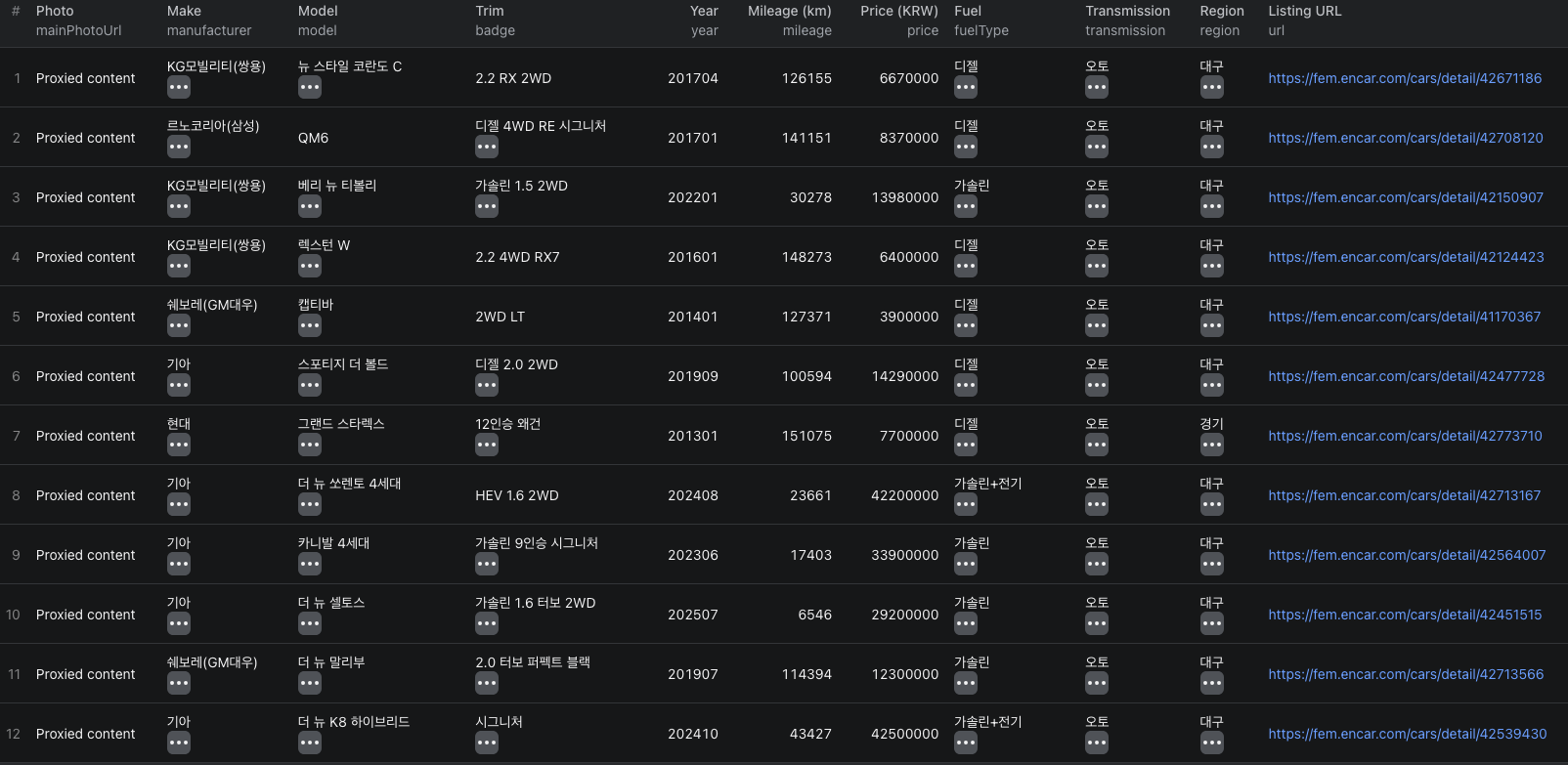
The Encar listings Node.js example runs the same imported-car comparison with apify-client and retrieves the resulting dataset.
Build a comparable vehicle shortlist
Start with fields that describe the actual vehicle rather than the seller's prose:
- Group by
manufacturer,model,badge, andformYear. - Compare
mileageandpriceonly within those matched groups. - Keep
yearas a year-month value. For example,202103means March 2021. - Open the source listing and review its photos, condition flags, options, and current availability.
- Add shipping, inspection, tax, customs, and currency conversion outside the listing-price column.
price is the full KRW value, while priceManwon is Encar's 10,000-KRW representation. Keep one canonical price in calculations to avoid multiplying or dividing twice.
Seller descriptions and displayed condition claims are source-provided. Do not convert them into independent guarantees. For a purchasing decision, obtain the relevant vehicle-history and inspection documents and use a qualified local review process.
Decide whether full details are necessary
Leave scrapeDetails off when the shortlist only needs make, model, trim, year, mileage, price, dealer, region, and photos. This mode uses fewer requests and costs less per returned row.
Turn it on when VIN, plate number, English names, original MSRP, color, displacement, option count, seller contact, or view count affects the workflow. Detail requests can be blocked independently after the listing page succeeds, so verify the dataset count before assuming every requested car was enriched.
Full-detail output can include contact information and vehicle identifiers. Collect only what your task needs, restrict access to exports, and follow the rules that apply to your use of the data.
Pricing
Pricing as of September 22, 2026 uses alternative result events plus a small start event:
| Event | Price |
|---|---|
| Actor start | $0.00005 per GB of allocated memory, minimum one event |
| Basic car listing | $0.005 per returned listing when full details are off |
| Full car detail | $0.02 per returned enriched record when full details are on |
The deployed build charges a returned row as either a basic listing or a full detail record, not both. Our 1 GB example returned three full detail records, so its Actor event charges were $0.00005 + (3 × $0.02) = $0.06005. The two failed detail requests did not produce records and were not charged as detail events.
Apify platform or proxy usage may be billed separately according to your plan. Check the dataset count, run cost, and live pricing before increasing maxItems.
Check these cases before scaling up
- The dataset has fewer rows than
maxItems. The limit is a ceiling. Check the run log for blocked list or detail requests and confirm that enough vehicles match the selected segment. - The dataset is empty after a successful run status. Inspect the request statistics and logs. A list request can exhaust its retries without producing rows.
- A Korean field is unclear. Enable full details for English make, model-group, and grade fields where available, but preserve the Korean source values too.
- The year looks like six digits. Treat it as
YYYYMM, whileformYearis the model year string. - A price comparison looks unusually cheap. Confirm the trim, mileage, condition, seller terms, exchange rate, and all export-related costs.
- A listing disappears later. Encar inventory changes. Keep the listing ID and collection time, but do not present an older asking price as current availability.
Frequently asked questions
What units do the Encar price filters use?
priceMin and priceMax use units of 10,000 Korean won. For example, 2000 means 20,000,000 KRW. Output includes both the full KRW price and the 만원 value.
Can the Actor return English vehicle names?
Yes. Enable full vehicle details to add English manufacturer, model-group, and grade fields where Encar supplies them. Basic listing fields remain in Korean.
Does maxItems guarantee that many cars?
No. maxItems is a ceiling. Fewer rows can be returned when the selected segment has fewer cars or a list or detail request remains blocked after retries.