Piotr VassevPiotr Vassev

How to Scrape Kleinanzeigen Listings (Germany's Largest Classifieds)

How to Scrape Kleinanzeigen Listings

If you want to scrape Kleinanzeigen listings for price research, competitor analysis, lead generation, or market intelligence, this guide walks you through the complete process. You will learn what data you can extract from Germany's largest classifieds marketplace, how to automate collection at scale, and how to turn raw Kleinanzeigen ads into structured, actionable datasets.

Why Scrape Kleinanzeigen Data?

Kleinanzeigen.de (formerly eBay Kleinanzeigen) is Germany's dominant classifieds platform, hosting hundreds of millions of listings across electronics, vehicles, real estate, fashion, home goods, jobs, and services. With a massive and diverse seller base spanning private individuals and professional dealers, it is one of the richest sources of real-world market pricing data in the German-speaking world.

Unlike retail platforms where sellers set fixed prices, Kleinanzeigen reflects genuine supply-and-demand dynamics — VB (Verhandelbar / negotiable) pricing, private vs. PRO seller distinctions, and hyper-local listing activity. That makes it uniquely valuable for anyone who needs to understand what goods are actually worth in the German market.

Businesses and researchers scrape Kleinanzeigen listing data for several reasons:

  • Price research — understand what specific products sell for in the German second-hand market across regions and seller types
  • Market analysis — track supply and demand for product categories, identify regional pricing differences, and spot emerging trends
  • Lead generation — find sellers in specific categories who may be prospects for your services, platform, or marketplace
  • Competitive intelligence — monitor how PRO dealers price goods compared to private sellers, and track competitor inventory on the platform
  • Inventory sourcing — identify bulk sellers and consistent listers for procurement, arbitrage, or wholesale outreach
  • Real estate research — analyze rental and sale listing volumes, price levels, and availability across German cities
  • Academic research — study the German informal economy, second-hand market dynamics, and regional price disparities

Manually browsing Kleinanzeigen and copying ad details is completely impractical at any meaningful scale. A single search query can return thousands of results across dozens of pages, and listings appear and expire daily. Automation is the only realistic approach for comprehensive data collection.

What Data You Can Extract from Kleinanzeigen

The Kleinanzeigen Listings Scraper operates in two modes — listing mode for quick summaries and detail mode for complete ad data. Here are the key fields available:

Listing Mode Fields (scrapeDetails: false)

FieldDescriptionExample
Ad IDUnique Kleinanzeigen listing identifier3361291367
URLDirect link to the ad pagekleinanzeigen.de/s-anzeige/iphone17.../3361291367-...
TitleAd headline as written by the selleriPhone17 neu verschweißt aus meinem neuen Vertrag
PriceListed price including negotiability indicator900 € VB
LocationCity and postal code of the listing73240 Wendlingen am Neckar
Date postedWhen the ad was published or refreshedHeute, 16:51
DescriptionShort ad description (preview text)Hallo, verkaufe hier das Iphone17 in schwarz...
ShippingAvailable shipping methods[]
Is PROWhether the seller is a professional dealerfalse
Image countNumber of images attached to the listing2
Scraped atTimestamp of when the data was collected2026-03-23T15:53:59.785Z

Additional Fields in Detail Mode (scrapeDetails: true)

FieldDescriptionExample
Seller nameDisplay name of the sellerLeon Welker
CategoryFull category breadcrumb path["Kleinanzeigen", "Elektronik", "Handy & Telefon"]
AttributesStructured category-specific attributesArt: Apple, Farbe: Schwarz, Zustand: Gut
ImagesArray of full-resolution image URLsimg.kleinanzeigen.de/api/v1/prod-ads/images/...

The two-mode design lets you choose between breadth and depth: listing mode is fast and cost-efficient for bulk price surveys, while detail mode gives you everything needed for comprehensive ad analysis.

Common Use Cases for Kleinanzeigen Data

Price Research and Market Valuation

Kleinanzeigen is one of the most reliable proxies for what goods are actually worth in the German second-hand market. Prices on the platform reflect real buyer-seller negotiation dynamics — not catalog prices or inflated retail markups. Scraping Kleinanzeigen data gives you a ground-truth view of market values for electronics, vehicles, appliances, and virtually any consumer category.

Compare prices across regions, track how quickly listings at different price points get removed (a signal of demand), and segment by private vs. PRO sellers to understand the pricing gap between professional and casual sellers in your category.

Competitive Intelligence for PRO Dealers

If you operate a professional dealership or resale business in Germany, Kleinanzeigen is where your competitors are active. Scrape PRO seller listings in your category to track their inventory levels, pricing strategies, and how they position products relative to private sellers. Monitor when competitors reduce prices or list bulk inventory, and use that intelligence to adjust your own pricing in real time.

Lead Generation

Sellers actively listing high-value items in specific categories can be valuable leads for related services. A seller listing a used car may need vehicle history checks, financing, or insurance. A seller listing electronics may need repairs or accessories. A landlord listing apartments may need property management or photography services.

Kleinanzeigen data gives you a direct, high-intent list of prospects at the exact moment they are most relevant — actively transacting in your target category.

Inventory Sourcing and Arbitrage

Businesses and arbitrage operators use Kleinanzeigen to identify bulk sellers, liquidators, and consistent listers in their target categories. By filtering by seller type and tracking listing volume over time, you can identify PRO sellers who may be open to wholesale arrangements, and private sellers who have large single-lot inventory available at below-market prices.

Real Estate Market Analysis

Kleinanzeigen hosts a significant volume of real estate listings in Germany. Researchers and property investors use the platform's listing data to track rental prices, monitor property availability, and identify geographic trends across German cities and postal codes. The location data included with every listing enables fine-grained geographic segmentation without any additional parsing.

Academic and Policy Research

Kleinanzeigen's scale and diversity make it a compelling dataset for researchers studying the German informal economy, second-hand market dynamics, regional price differences, and consumer goods availability. The platform provides transaction-level market data that complements traditional economic surveys and retail indices.

Challenges of Extracting Kleinanzeigen Data Manually

Before jumping into the tutorial, it is worth understanding why scraping Kleinanzeigen requires automation:

  • Volume — major categories like electronics or vehicles contain tens of thousands of listings across hundreds of pages. Manual browsing captures a negligible fraction of available data
  • Pagination — Kleinanzeigen paginates results across multiple pages per search or category, requiring automated navigation to collect comprehensively
  • Two-level data structure — complete ad data requires visiting each listing's detail page individually. Manual collection of both summary and detail data multiplies effort dramatically
  • Structured attributes — each category has its own set of attributes (phone specs, vehicle details, property features). Parsing these consistently from raw HTML is error-prone and time-consuming
  • Listing volatility — popular listings disappear within hours. Manual collection is stale almost immediately for fast-moving categories
  • Language — the platform is entirely in German, including category structures and attribute labels, adding friction for non-German-speaking teams

Building and maintaining a custom Kleinanzeigen scraper that handles all of this reliably is a significant engineering investment. A pre-built, maintained solution is far more practical for most use cases.

Step-by-Step: How to Scrape Kleinanzeigen Listings

Here is how to scrape Kleinanzeigen data using the Kleinanzeigen Listings Scraper on Apify.

Step 1 — Choose Your Input: Search Terms or Category URLs

The scraper supports two input methods, which you can combine in a single run:

Search terms — provide free-text keywords and the scraper automatically builds the correct Kleinanzeigen search URLs. For example:

  • iphone 13
  • macbook pro
  • fahrrad (bicycle)
  • sofa

Start URLs — browse Kleinanzeigen and navigate to any category or search results page. Copy the URL and paste it directly as input. This gives you precise control over the category, filters, and geographic scope of your scrape.

You can combine multiple search terms and multiple start URLs in the same run — the scraper processes all inputs and merges the results.

Step 2 — Choose Your Scrape Depth

Decide whether you need summary data or full ad details:

Listing mode (scrapeDetails: false) — collects summary data from search and category pages only. Fast, lightweight, and cost-efficient. Best for:

  • Bulk price surveys across large categories
  • Monitoring listing volumes and availability
  • Building price distribution datasets

Detail mode (scrapeDetails: true) — follows each listing to its detail page to extract the full description, seller name, category breadcrumbs, structured attributes, and image URLs. Slower and higher cost per listing, but delivers complete ad data. Best for:

  • Comprehensive competitor research
  • Building structured product databases
  • Lead generation requiring seller contact details
  • Image collection for visual analysis

Step 3 — Configure the Scraper Input

Head to the Kleinanzeigen Listings Scraper on Apify and configure your run:

  1. Add your search terms to the searchTerms field and/or paste Kleinanzeigen URLs into the startUrls field
  2. Set maxPages to control how many result pages to paginate per input (default: 5)
  3. Set maxRequestsPerCrawl as a total request safety cap (default: 500)
  4. Toggle scrapeDetails to true if you need full ad data including seller name, attributes, and images
  5. Configure proxy settings — using Apify Residential Proxies is recommended for reliable scraping at scale
  6. Click Start to begin the extraction

The scraper handles pagination, page rendering, and data parsing automatically.

Step 4 — Run the Scraper

Once started, the scraper will:

  • Build search URLs from your keywords or process the start URLs you provided
  • Navigate through listing pages up to your configured maxPages limit
  • Extract structured ad data from each listing card on the page
  • Optionally follow each ad to its detail page if scrapeDetails is enabled
  • Store all results in a clean, structured dataset

Processing time depends on the number of listings and pages configured. Most runs complete within a few minutes.

Step 5 — Export Your Results

Once the scraper finishes, export your results in your preferred format:

  • JSON — ideal for developers building data pipelines or downstream integrations
  • CSV — perfect for spreadsheet analysis in Excel or Google Sheets
  • API — access results programmatically via the Apify API for automated workflows

Each record includes the full set of structured fields you configured for your run.

Ready to try it? Run the Kleinanzeigen Listings Scraper on Apify and get your first dataset in minutes.

Example Output (Real Data Preview)

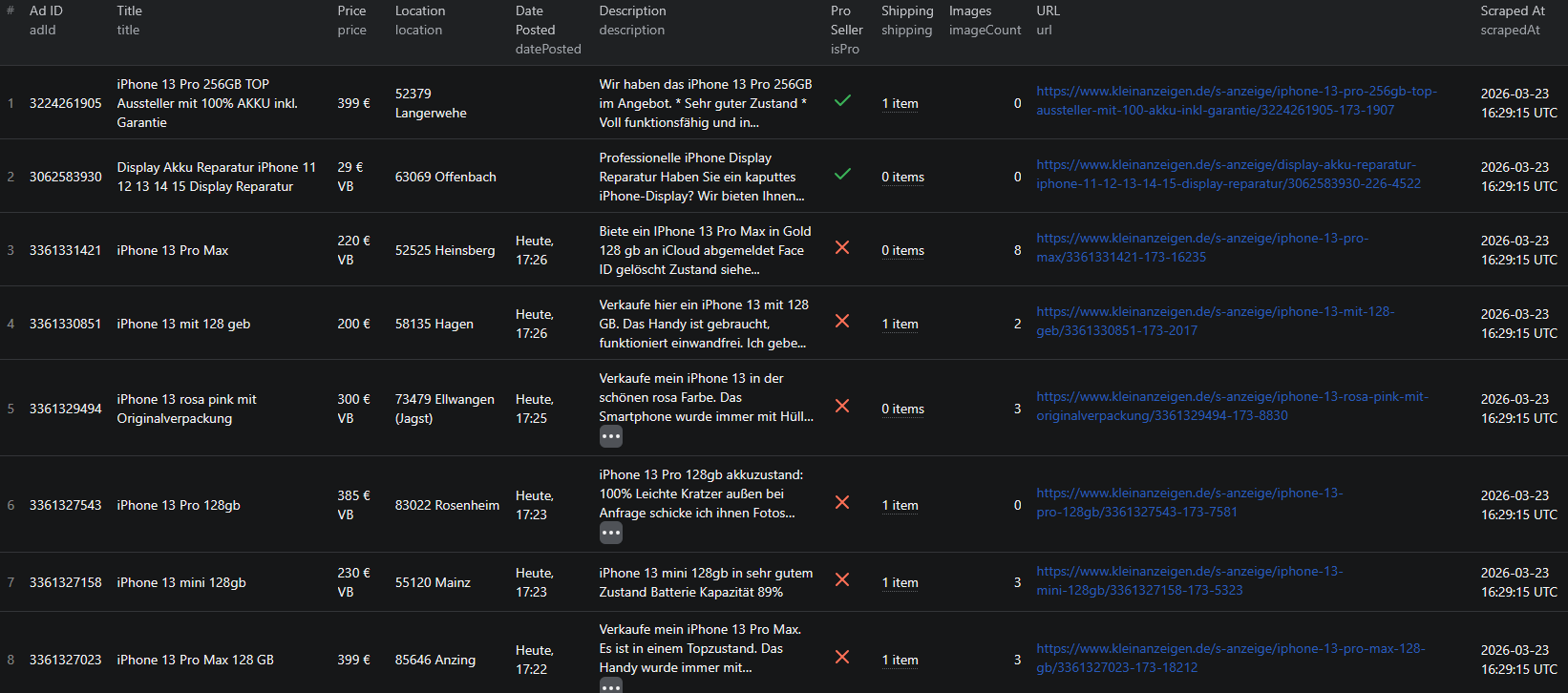
Kleinanzeigen scraper results

Here is what the actual output looks like from the Kleinanzeigen Listings Scraper.

Listing mode output (scrapeDetails: false):

{
  "adId": "3361291367",
  "url": "https://www.kleinanzeigen.de/s-anzeige/iphone17-neu-verschweisst-aus-meinem-neuen-vertrag/3361291367-173-8390",
  "title": "iPhone17 neu verschweißt aus meinem neuen Vertrag",
  "price": "900 € VB",
  "location": "73240 Wendlingen am Neckar",
  "datePosted": "Heute, 16:51",
  "description": "Hallo, verkaufe hier das Iphone17 in schwarz. Es hat 256gb und ist noch verschweißt...",
  "shipping": [],
  "isPro": false,
  "imageCount": 2,
  "scrapedAt": "2026-03-23T15:53:59.785Z"
}

Detail mode output (scrapeDetails: true):

{
  "adId": "3361291803",
  "url": "https://www.kleinanzeigen.de/s-anzeige/iphone-11-mit-64gb/3361291803-173-7988",
  "title": "iPhone 11 mit 64GB",
  "price": "100 € VB",
  "location": "72124 Baden-Württemberg - Pliezhausen",
  "datePosted": "23.03.2026",
  "description": "iPhone 11 mit 64GB, Gebrauchsspuren auf dem Bildschirm und auf der Rückseite",
  "sellerName": "Leon Welker",
  "category": ["Kleinanzeigen", "Elektronik", "Handy & Telefon"],
  "attributes": {
    "Art": "Apple",
    "Farbe": "Schwarz",
    "Gerät & Zubehör": "Gerät",
    "Zustand": "Gut"
  },
  "images": [
    "https://img.kleinanzeigen.de/api/v1/prod-ads/images/8f/8f4b68b8-0f3c-4471-a199-148cff01de32?rule=$_59.AUTO"
  ],
  "scrapedAt": "2026-03-23T15:54:25.785Z"
}

Key things to notice:

  • Price with negotiability — the price field preserves the "VB" (Verhandelbar / negotiable) suffix as it appears on the listing, so you can identify which sellers are open to offers versus fixed-price
  • PRO seller flagisPro distinguishes professional dealers from private sellers at a glance, letting you segment your analysis by seller type without any additional parsing
  • Structured attributes — in detail mode, category-specific attributes like brand, color, and condition are returned as a clean key-value object rather than embedded in raw text, making filtering and analysis straightforward
  • Category breadcrumbs — the full path from the root category down to the specific sub-category is included, enabling precise category-level segmentation without needing to reverse-engineer URL structures
  • Image URLs — full-resolution image URLs are returned in an array, giving you complete visual data without a second visit to each listing
  • Location precision — location includes both the postal code and the city or district name, enabling geographic segmentation down to the neighborhood level

This structured format imports cleanly into any spreadsheet, database, or analytics platform without additional transformation.

Try the Kleinanzeigen Listings Scraper now — no coding required.

Automating Kleinanzeigen Market Monitoring

For ongoing price tracking, competitive research, or lead generation, you do not want to run the scraper manually every time. The Apify platform supports full automation:

Scheduled Runs

Set up recurring scrapes on any schedule — daily, weekly, or monthly. The scraper runs automatically and stores results in a persistent dataset you can access at any time. Daily runs are ideal for price monitoring and lead generation in fast-moving categories. Weekly runs work well for broader market research and trend tracking.

API Integration

Use the Apify API to trigger scraper runs programmatically and retrieve results. This lets you integrate Kleinanzeigen data into your existing workflows:

  • Feed new listings into your pricing database automatically
  • Trigger alerts when listings matching your criteria appear on Kleinanzeigen
  • Build dashboards that update with fresh ad data on a schedule
  • Connect to tools like Zapier, Make, or custom data pipelines

Price Tracking Pipelines

Combine scheduled scraping with historical data storage to build price tracking systems. Monitor how prices shift over time for specific product categories, identify seasonal patterns, and track how quickly listings disappear at different price points — a reliable signal of market demand.

Node.js Example

For a complete working example showing how to call this scraper from Node.js, see the GitHub repository.

Webhooks

Configure webhooks to get notified when a scraper run completes. This is useful for event-driven workflows where you want to process new listing data immediately rather than polling on a schedule.

Tips for Getting the Most Out of Kleinanzeigen Data

Using Search Terms vs. Start URLs

Search terms are the easiest way to get started — just type a keyword and the scraper builds the correct search URL automatically. Start URLs give you more control: you can pre-filter by category, region, price range, or other platform filters before the scraper begins, and it will respect those parameters throughout the run.

For targeted collection, combine both: use search terms for broad discovery and start URLs for specific category or geographic segments.

Choosing the Right Scrape Depth

Use listing mode when you need to survey a large category quickly or when price and location data is sufficient for your analysis. Use detail mode when you need structured attributes (e.g. phone model, color, condition), seller names, or image URLs. The additional cost per listing in detail mode is justified when the extra fields are central to your use case.

Pagination and Volume Control

The maxPages parameter controls how many result pages are scraped per input URL or search term. Each page typically contains 25–50 listings. For a full category survey you may want to set this higher; for a targeted price check a lower value is sufficient. The maxRequestsPerCrawl cap provides a hard safety limit on total requests across the entire run — useful for cost control when running multiple inputs simultaneously.

Working with German-Language Attributes

Kleinanzeigen's structured attributes are in German. Common attribute keys you will encounter include:

  • Zustand — condition (e.g. Neu / Gut / In Ordnung)
  • Marke or Art — brand
  • Farbe — color
  • Größe — size
  • Kilometerstand — mileage (vehicles)
  • Baujahr — year of manufacture

Planning your data pipeline to handle these keys upfront will save post-processing effort.

Does Kleinanzeigen Offer an API?

No. Kleinanzeigen does not provide a public API for extracting listing data at scale. There is no official way to programmatically query ads, prices, or seller information.

Your practical options for bulk data extraction are:

  • Manual browsing — works for a handful of listings but is completely unscalable for any meaningful analysis
  • Custom scraper — requires development time, ongoing maintenance, and handling of dynamic content, pagination, and two-level ad structure
  • Pre-built scraper — a maintained solution like the Kleinanzeigen Listings Scraper that handles all technical complexity out of the box

For most teams, the pre-built scraper is the most practical path. It eliminates the engineering and maintenance burden while delivering reliable, structured output.

Why Use a Pre-Built Kleinanzeigen Scraper Instead of Building One

Building a custom Kleinanzeigen scraper sounds straightforward until you encounter the real challenges:

  • Two-level scraping — collecting complete ad data requires both a search/category pass and a detail page pass for every listing. Coordinating this reliably requires queue management and careful state handling
  • Dynamic rendering — Kleinanzeigen relies on JavaScript for listing display, so simple HTTP requests will not return usable data. A full browser automation setup is required
  • Pagination handling — navigating through all result pages requires automated page management that breaks whenever Kleinanzeigen changes its frontend structure
  • Structured attribute parsing — each category has its own attribute schema. A generic scraper misses this data; a category-aware parser requires ongoing updates as Kleinanzeigen adds or modifies categories
  • Anti-bot protection — reliable scraping at scale requires proxy rotation, request throttling, and detection avoidance, each of which requires engineering and operational investment
  • Maintenance burden — Kleinanzeigen updates its frontend regularly. Every update is a potential breakage that requires immediate intervention to keep your data pipeline running
  • Opportunity cost — every hour spent building and maintaining a scraper is an hour not spent analyzing prices, finding leads, or growing your business

Unless you have highly specific requirements that no existing tool can meet, a pre-built, maintained scraper lets you focus on using the data rather than collecting it.

Try the Kleinanzeigen Listings Scraper

The Kleinanzeigen Listings Scraper extracts structured listing data from Germany's largest classifieds marketplace — ad titles, prices, locations, seller types, descriptions, structured attributes, category breadcrumbs, and image URLs.

What you get:

  • Structured JSON or CSV output ready for analysis
  • Keyword search and direct URL input support in a single run
  • Two scrape depths: fast listing summaries or complete detail page data
  • PRO vs. private seller distinction on every listing
  • Structured category attributes (brand, color, condition, and more)
  • Full category breadcrumb paths for precise segmentation
  • Automatic pagination up to your configured page limit
  • Scheduled runs for ongoing price monitoring and market tracking
  • API access for integration into your data workflows
  • No coding or scraper maintenance required

Start scraping Kleinanzeigen now — your first run takes less than 5 minutes to set up.

If you are building a broader European classifieds intelligence pipeline, combine Kleinanzeigen data with OLX listings for Central and Eastern European market coverage, or Depop for secondhand fashion data from a younger demographic.

Legal and Ethical Considerations

Web scraping occupies a well-established legal space, but responsible practice matters:

  • Public data only — the Kleinanzeigen Listings Scraper extracts publicly visible ad information that anyone can see by visiting Kleinanzeigen.de without logging in
  • GDPR compliance — Kleinanzeigen operates in the EU, so be mindful of GDPR when storing and processing data. Listing data may include seller names and locations — handle these fields with appropriate care
  • Respect rate limits — the scraper is designed to make requests at a reasonable pace to avoid overloading Kleinanzeigen's servers
  • Responsible use — use collected data for legitimate business purposes such as price research, market analysis, and lead generation

Frequently Asked Questions

Is scraping Kleinanzeigen legal?

Scraping publicly available listings from Kleinanzeigen.de is generally legal. All ad data is visible to any visitor without logging in. You should use the data responsibly, comply with applicable privacy regulations including GDPR, and avoid overloading Kleinanzeigen's servers with excessive requests.

Does Kleinanzeigen offer an official API?

Kleinanzeigen does not provide a public API for extracting listing data at scale. There is no official way to programmatically query ads, prices, or seller information. A web scraper is the practical alternative for accessing structured Kleinanzeigen data in bulk.

What data can be extracted from Kleinanzeigen listings?

In listing mode you can extract ad IDs, URLs, titles, prices, locations, posting dates, short descriptions, shipping options, seller type (private vs. PRO), and image counts. In detail mode you additionally get the full seller name, category breadcrumbs, structured attributes (e.g. brand, color, condition), and full-resolution image URLs.

What is the difference between listing mode and detail mode?

Listing mode (scrapeDetails: false) collects summary data from search or category pages quickly and at lower cost. Detail mode (scrapeDetails: true) follows each ad to its individual page to extract the full description, seller name, category path, structured attributes, and image URLs. Use listing mode for bulk price surveys and detail mode when you need complete ad data.

Can I scrape Kleinanzeigen by keyword or category?

Yes. The Kleinanzeigen Listings Scraper accepts both free-text search terms (e.g. iphone 13) and direct Kleinanzeigen category or search page URLs. You can combine both input types in a single run.

Can I export Kleinanzeigen data to CSV or JSON?

Yes. The Kleinanzeigen Listings Scraper exports data in both JSON and CSV formats. Results are also accessible via the Apify API for automated workflows and downstream data pipeline integrations.

About the Author

This guide was written by Piotr, a software engineer with hands-on experience building and maintaining web scrapers at scale. He develops and maintains a suite of data extraction tools on the Apify platform, helping businesses automate their data collection workflows.

Need help with your scraping project?

Book a free discovery call and let's scope your project together.

Book a Call
Piotr Vassev

Piotr Vassev

Founder of FalconScrape. Building production-grade web scraping systems and data automation pipelines for businesses worldwide.

Connect on LinkedIn