How to Scrape Ozon Product Listings and Prices
You can export Ozon search and category results with prices, discounts, ratings, review counts and stock using our Ozon Scraper, an Actor (a tool you run on Apify) that reads the public product cards on ozon.ru. Give it a search phrase or an Ozon URL and you get one row per product, in Ozon's ranking order, as JSON, CSV or Excel.
The main limitation is worth knowing first: prices are what Ozon shows a shopper right now, for one delivery city. They aren't sales figures, and the struck-through "original" price isn't a price history.
This guide follows one task: you sell, or plan to sell, an electric kettle on Ozon and want to know where your price would sit. We run one search, read the price range, and look at what the top results have in common.
Ozon's API or a scraper?
Ozon has an official Seller API, but it's built for managing your own store. You connect it with the Client-Id and Api-Key from your seller account, and it returns your own products, prices and stock. It won't list another seller's products or prices.
| You want | Use |
|---|---|
| Your own products, orders, prices and stock | Ozon's Seller API, with your seller account keys |
| Other sellers' products and prices in a search or category | The Ozon Scraper, no Ozon account needed |
| Seller, characteristics and variants of specific products | The Ozon Scraper with Scrape product details on |
You need an Apify account to run the Actor. Nothing else is required: no Ozon login, no code, and no Russian payment card.
What one row looks like
Here are the first eight products from our example search for электрический чайник (electric kettle), sorted by popularity. Titles are shortened and translated, and prices are in roubles.
| # | Product | price | originalPrice | rating | reviewsCount | stockLeft |
|---|---|---|---|---|---|---|
| 1 | Weissgauff WK 1760 EcoGlass, 1.7 l, glass | 1,674 | 4,185 | 4.8 | 52,329 | 1,540 |
| 2 | Glass electric kettle (unbranded) | 1,739 | 18,000 | 5.0 | 106 | 10 |
| 3 | REDMOND KG224, 1.5 l, double-walled | 1,748 | 2,806 | 4.8 | 12,029 | 2,509 |
| 4 | Weissgauff WK 1500 Dt Touch BodyCool, 1.5 l | 2,814 | 7,035 | 4.9 | 67,924 | 434 |
| 5 | Weissgauff WK 1720 EcoGlass Inox, 1.7 l | 1,734 | 4,335 | 4.8 | 52,329 | 417 |
| 6 | Comfee CF-KT7001, 1.7 l, LED | 1,578 | 2,190 | 4.9 | 4,110 | 352 |
| 7 | Hi EK-17S20 | 876 | 1,047 | 4.8 | 7,622 | 1 |
| 8 | Scarlett SC-EK27G103, 1.8 l | 1,281 | 4.7 | 22,880 |
Each row also has the sku, product url, discountPercent, currency, badge (Ozon's sale badge), deliveryDate in Ozon's own wording, a "verified brand" flag, labels, images and position, the product's place in Ozon's ranking. A field is empty when Ozon doesn't show it: row 8 has no struck price and no stock count.
Run the search
- Open the Ozon Scraper and click Try for free.
- Type your product in Russian in Search query. We used
электрический чайник. You can paste category, brand or seller URLs from ozon.ru into Start URLs instead, and filters already in the URL are kept. - Set Sort by to Popular so the rows follow Ozon's default ranking.
- Set Max products per start URL to
50. The limit applies to each search query and each URL separately, so three searches at 50 can return 150 products. - Leave Scrape product details off for now and click Start.
If you prefer JSON input, open the JSON tab of the input and paste:
{
  "search": "электрический чайник",
  "sort": "score",
  "maxItems": 50
}
Our example run took under a minute and saved 50 products. When the status says Succeeded, open the Output tab, then use Export to download CSV or Excel.
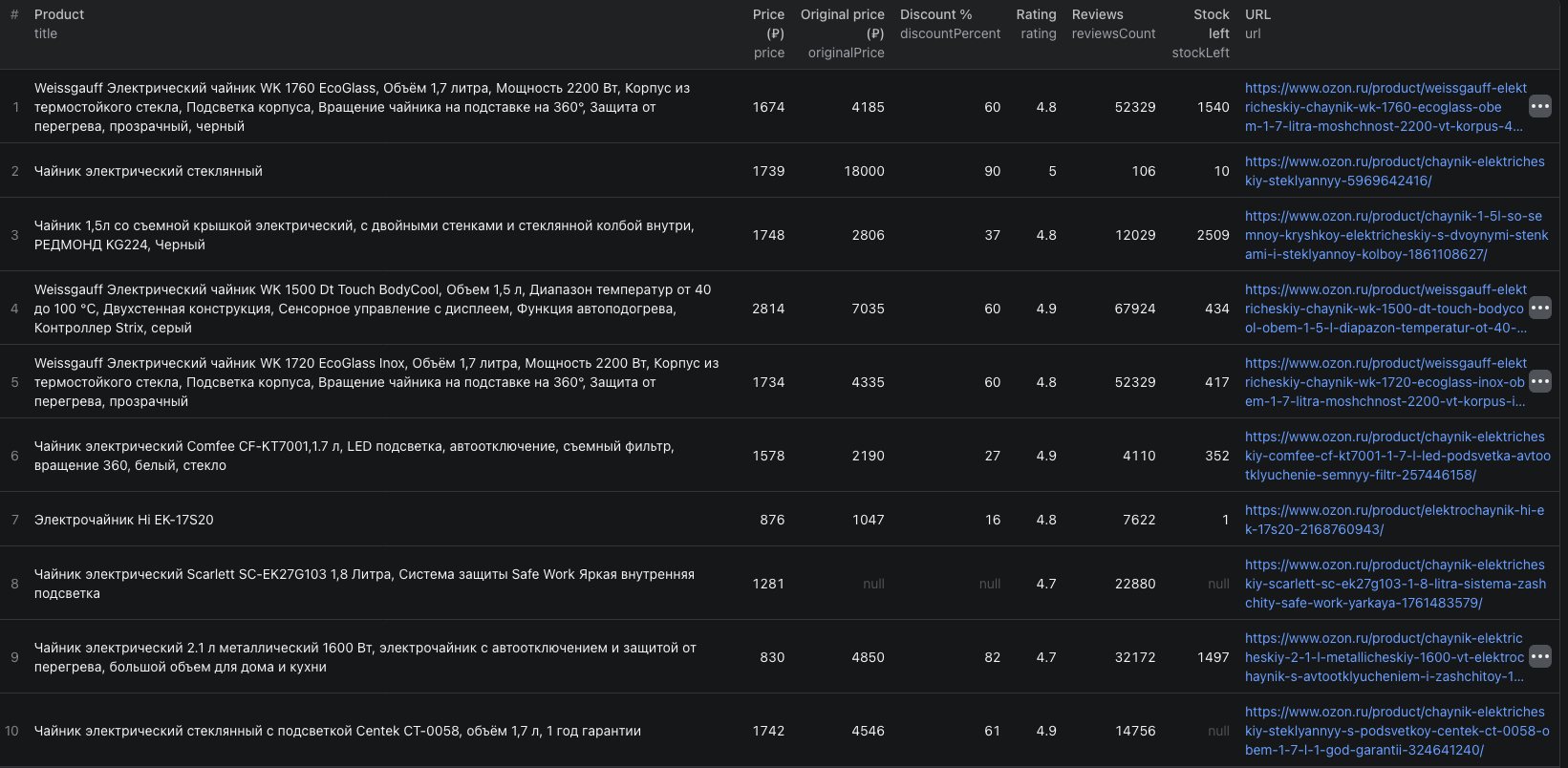
The Output tab shows the main columns side by side: price, original price, discount, rating, review count and stock left. An empty cell shows as null.
Read the price range
Sort the export by price and you have the range you're pricing into. For our 50 kettles:
| Price band (₽) | Products | Median rating | Median reviews |
|---|---|---|---|
| Under 1,000 | 2 | 4.75 | 19,897 |
| 1,000 to 1,999 | 18 | 4.8 | 12,687 |
| 2,000 to 2,999 | 19 | 4.9 | 12,441 |
| 3,000 and up | 11 | 4.9 | 883 |
The median price was 2,194 ₽, and the middle half of the results sat between 1,734 and 2,858 ₽. Ratings barely move across the bands, but review counts drop sharply above 3,000 ₽. On this search, most of the buying evidence sits under 3,000 ₽. A kettle priced above that competes with products that have far fewer reviews, and ratings won't set it apart.
Three things in the data will skew that reading if you don't account for them.
Struck prices are display values. The median discountPercent was 60%, and the second product showed 18,000 ₽ struck through above a price of 1,739 ₽. Compare current prices across products. Don't compute savings from originalPrice.
Variants share one review count. Ozon shows the same reviews on every colour or size of a product, so the 50 rows had only 35 distinct review counts. One count, 52,329, appeared on 6 rows. Before you add up reviews to size demand, keep one row per review count and rating.
Promotions move prices. Our run was on November 15, and 25 of the 50 products carried the Black Friday badge (Чёрная пятница). Run the same search again after the promotion and compare the two exports before you settle on a price.
Add sellers and the price without the Ozon Card
The listing price is the Ozon Card price, the extra discount Ozon gives shoppers who pay with its own card (Ozon's explanation). To see the price without the card, plus who sells each product, switch on Scrape product details. Keep the limit small, because each product page costs more.
We ran the same search with Max products per start URL set to 10 and details on. Each row then adds:
price(without the card) next tocardPrice. Nine of our 10 kettles had both prices. On six of them the price without the card was 11% higher, on two it was 6 to 9% higher, and one had the same price either way.sellerwith its name, ID, store URL and seller rating. In our details run, 5 of the 10 top products came from one seller, ГАУФ РУС, and all five were Weissgauff kettles.characteristicssuch as volume, power, body material and control type, which lets you compare like with like.variants, each with its own SKU, price and stock, andcheaperOfferFrom, the lowest price from another seller when Ozon shows one.categories, the category path, andcity, the delivery city Ozon priced the product for.
Prices and delivery dates depend on the delivery city. In our run, city wasn't the same on every row, so compare prices inside one run rather than across separate runs, and treat differences of a few percent as noise.
Repeat it
To track a price range over time, save the input as a task in Apify Console and give it a schedule, for example every Monday. Each run creates a new dataset that you can export, or pass to a spreadsheet or another tool with one of Apify's integrations. If you track several products, use More search queries so each phrase gets its own limit in one run.
What our example run cost
Pricing as of November 15, 2026 (live pricing):
| Run | Products | Price per product | Cost |
|---|---|---|---|
| Search, listing rows | 50 | $0.002 | $0.10 |
| Search with product details | 10 | $0.006 | $0.06 |
Each run also has a start fee of $0.00005 per GB of memory. A product with details replaces its listing charge, so the details run cost $0.06, not $0.08. If a product page can't be opened, you get that product's listing row at the listing price.
Likely problems
- Few or odd results: search in Russian, the language of Ozon's product titles, or paste the category URL from ozon.ru.
- Prices outside your range: Min price and Max price are applied by Ozon to the Ozon Card price, so
pricecan sit slightly outside the range. - Empty
priceanddeliveryDate: the product is out of stock. - Fewer products than the limit: Ozon ran out of results for that search. Add related phrases or subcategory URLs.
Collect only what you need, at a sensible pace, and check that your use of the data fits the rules that apply to you.
Frequently asked questions
Does Ozon have an API for product prices? Ozon's official Seller API works with your own store. You connect it with the Client-Id and Api-Key from your seller account, and it returns your own products, prices and stock. To read other sellers' listings and prices, you need the public pages, which is what the Ozon Scraper reads.
Which price does the Ozon Scraper return? On listing rows, price is the price the product card shows, which is the Ozon Card price. With Scrape product details on, price becomes the price without the card and cardPrice keeps the card price. In our example the price without the card was up to 11% higher.
Can I trust the original price and discount? Treat them as Ozon's display values, not a price history. In our kettle run the median discount was 60%, and one kettle showed 18,000 roubles struck through above a 1,739 rouble price. Compare current prices across products instead of computing savings.
Do I need to search in Russian? Yes. Ozon is a Russian-language marketplace and its product titles are in Russian, so search the way a Russian shopper would, for example электрический чайник (electric kettle). You can also paste a category URL from ozon.ru instead of a search phrase.
How much did the example cost? As of November 15, 2026: 50 products at $0.002 is $0.10, plus $0.00005 for the start event. The 10 products with Scrape product details on cost $0.006 each, or $0.06.
How many products can I get from one search? Up to the Max products per start URL value from each category, search URL or search query. For large categories, add several narrower URLs, such as subcategories, brands or price ranges, rather than one very large limit.