
How to Scrape TikTok Shop Products and Compare Regional Prices
A TikTok Shop product can have a different price, currency, or availability depending on the market you request. To build a useful comparison, you need to keep that market attached to every row.
The TikTok Shop Product Scraper collects product details from URLs, product IDs, and seller storefronts. I maintain the Actor. This guide starts with one known product in one country, then shows how to expand the run without confusing regional records with duplicate products.
Choose the right starting point
Use a product URL or ID when you already know what you want to monitor. Use a seller storefront when you need a starting selection from one shop. The documented storefront mode collects products from the first storefront page. It does not establish that you have the seller's entire catalog.
Keyword search and category browsing are not supported. Related-product discovery is available, but it follows recommendations from your seed products. Those recommendations are not a representative sample of the market.
The country selector supports us, gb, id, my, th, sg, vn, and ph. These are accepted input values, not a guarantee that every product is available in every market.
Fetch one product before adding a seller
In Apify, open the Actor's Input editor and choose JSON. This historical product ID gives you the shape of a small run; replace it with a currently accessible product if necessary:
{
  "productIds": ["1729587769570529799"],
  "countries": ["us"],
  "expandRelated": false,
  "maxProducts": 1
}
expandRelated: false keeps the run focused on the seed. maxProducts caps saved products across the run, rather than setting an allowance for each input. A value of zero removes that cap. Leave it positive while testing.
Click Start. When results appear, compare the title, countryCode, currency, and product URL against the item you requested. Check the run log if no record appears; a valid numeric ID does not ensure an available product in the chosen market.
Here is an abbreviated historical record from the earlier guide. The numbers are not current stock or price claims:
{
  "productId": "1729587769570529799",
  "countryCode": "us",
  "title": "3 Bottles of Goli Ashwagandha & Vitamin D Gummy - Mixed Berry, KSM-66, Vegan, Plant Based, Non-GMO, Gluten & Gelatin Free",
  "price": 14.98,
  "originalPrice": 24.99,
  "currency": "USD",
  "ratingScore": 4.7,
  "ratingCount": 71077,
  "scrapedAt": "2026-05-16T09:34:00.000Z"
}
The record illustrates a three-bottle product. Comparing its price with a one-bottle offer without adjusting for pack size would produce a misleading result. Keep the title and variant information close to the price when reviewing the export.
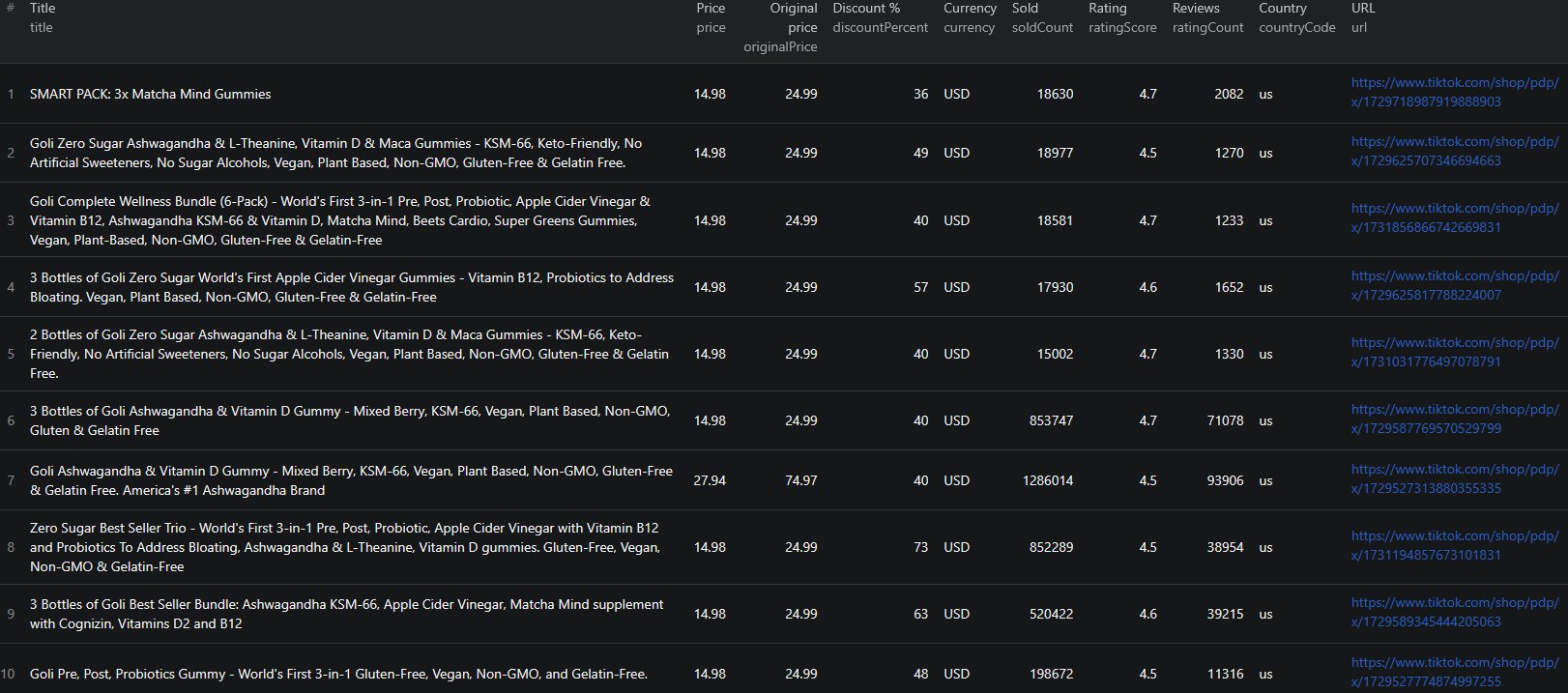
The output also documents variants, images, category paths, rating distributions, and shop metadata. Rating totals and star distributions are not the text of individual reviews. Product stock and sold counts are source-reported snapshots; they do not establish your own sales forecast.
What a small run costs
Pricing as of September 6, 2026: the product event is $0.015 per saved result, plus an Actor-start event of $0.005 per GB of allocated memory, with at least one event. Ten saved results represent $0.15 in product event fees before the start charge.
A country is another fetch context. Requesting the same product in two countries can produce two billable records, and related products can add more. Review current pricing and set the run charge limit as well as maxProducts.
Build a comparison that keeps countries separate
After the first run works, try the same product in two markets:
{
  "productIds": ["1729587769570529799"],
  "countries": ["us", "gb"],
  "expandRelated": false,
  "maxProducts": 2
}
Export CSV for the basic comparison. Keep productId, countryCode, title, price, currency, and scrapedAt. Export JSON when you need to inspect nested variants and shop objects.
Use the pair productId and countryCode as the product-market identifier. Add the collection time when storing history. Deduplicating on product ID alone would throw away one of the markets you deliberately requested.
Before comparing the two prices, check that both rows describe the same pack and variant. Keep original currencies in the table. If you convert prices, record the exchange rate and its date in separate columns rather than overwriting the source values. Shipping, taxes, and buyer-specific offers need a separate check before this becomes a landed-price comparison.
An absent UK record means the requested run did not return that product-market combination. It does not prove the product is unavailable everywhere in the UK.
Expand from a storefront deliberately
To inspect a seller, replace the product input with a seller ID:
{
  "sellerIds": [
    {"sellerId": "7495794203056835079", "slug": "goli-nutrition"}
  ],
  "countries": ["us"],
  "expandRelated": false,
  "maxProducts": 20
}
This is a first-page sample capped at 20 saved results. Compare the dataset with the visible storefront before calling it coverage of the shop. The shop's reported total product count can exceed the number collected.
Only turn on expandRelated if you want products beyond your seed selection. Keep a finite cap, and use the output's source field to distinguish discovered records where it is populated. Related recommendations can lead away from the original seller or product type, so review relevance before combining them into a competitor list.
Check these before scheduling
Fewer rows than the cap: a cap is a maximum, not a target. The source may expose fewer items, some requests may fail, or a product may not resolve in a selected country.
Unexpected alternatives: inspect expandRelated and your input sources. Use a saved task with fixed product IDs for repeatable monitoring.
Large price changes: compare variants and promotions before treating the change as a stable market movement. Retain the previous snapshot so you can inspect both values.
For integration work, see the TikTok Shop Node.js example. Begin with the validated input above, then automate the workflow you have already checked in Apify.
Questions before you run
Does storefront mode collect a complete seller catalog?
The current documentation describes collecting products from the first storefront page. Treat it as a sample unless you independently verify complete coverage.
Does maxProducts apply separately to each country?
No. The input schema describes a cap on products saved across the run. Keep room for each product-country record you want to collect.
Can I scrape TikTok videos with this Actor?
This Actor is for TikTok Shop product and storefront data. It is not a video or transcript scraper.
