How to Scrape Vinted Listings and Compare Asking Prices
Comparing Vinted prices only helps if the items are comparable. A new jacket in one size and a worn jacket in another should not end up in the same pricing average just because their titles mention the same brand.
The Vinted Listings Scraper collects listings from keywords, filtered search URLs, or seller IDs. I maintain the Actor. This walkthrough uses a small search to build a spreadsheet of comparable asking prices, with optional seller information when you need it.

Define the comparison before collecting data
Choose a country domain, product type, brand, size, and condition. Open that search in Vinted first. If the visible results are mostly irrelevant, scraping more of them will not improve the comparison.
For the first run, a keyword search is enough to inspect the data shape. Later, copy a filtered catalog URL from Vinted or use the Actor's category, brand, size, condition, and price filters. Copy real filter IDs from a search you have checked; do not guess them from the label shown in the browser.
The current input lists 17 country domains, including Italy. Use the domain dropdown in the Actor and keep the chosen market consistent throughout your comparison. Accepted domains describe the Actor's configuration; they do not guarantee identical catalog access or available fields in every country.
Run a small search with seller enrichment off
In the Actor's Input editor on Apify, switch to JSON and use:
{
  "searchQueries": ["nike air max 90"],
  "domain": "vinted.co.uk",
  "order": "newest_first",
  "maxItems": 20,
  "includeSellerDetails": false,
  "proxyConfiguration": {
    "useApifyProxy": true,
    "apifyProxyGroups": ["RESIDENTIAL"]
  }
}
maxItems is the total listing cap across queries. Zero means unlimited. Keep the cap small until you know that your search and filters return the items you want.
The current schema calls for residential proxies for reliable results and uses them by default. Leave that configuration in place for the first run. Seller enrichment is off here because basic listing prices, condition, and size are enough to begin the comparison.
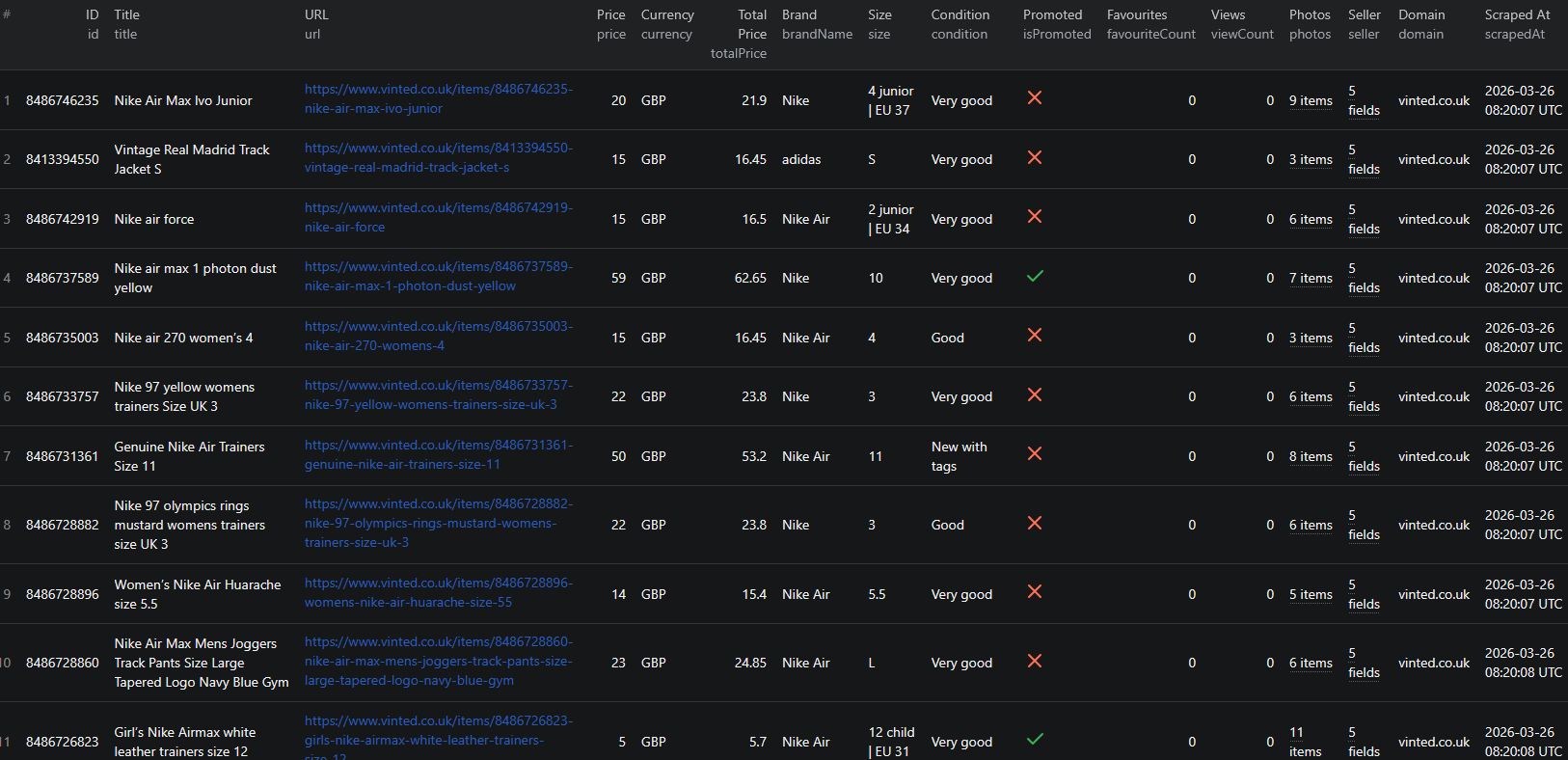
Click Start, then inspect the dataset and run log. Check the actual titles, sizes, conditions, and currencies rather than judging the run only by its row count.
An abbreviated historical record shows why these fields belong together:
{
  "id": 8483516504,
  "title": "Nike Air Max 90 Essential white UK 9",
  "price": 55.0,
  "currency": "GBP",
  "serviceFee": 3.45,
  "totalPrice": 58.45,
  "brandName": "Nike",
  "size": "UK 9",
  "condition": "Very good",
  "scrapedAt": "2026-03-26T08:00:00.000Z"
}
Here, 55 plus the reported 3.45 service fee equals 58.45. Do not treat totalPrice as a delivered checkout total without checking shipping and other applicable charges. These historical values are an example of the fields, not a current offer.
Narrow the search without keeping the default keyword
If the initial sample contains too many unrelated models or sizes, use a filtered catalog URL. The input shape is:
{
  "searchQueries": [],
  "startUrls": [
    {"url": "https://www.vinted.co.uk/catalog?search_text=nike+air+max+90&order=newest_first"}
  ],
  "domain": "vinted.co.uk",
  "maxItems": 20,
  "includeSellerDetails": false,
  "proxyConfiguration": {
    "useApifyProxy": true,
    "apifyProxyGroups": ["RESIDENTIAL"]
  }
}
Replace the URL with your own search after applying the filters in Vinted. Set searchQueries to an empty array when you want the URL to be the only search source. Otherwise, a prefilled keyword can make the run broader than you intended. Keep the URL's domain and the domain setting aligned.
The same principle applies to seller-only runs: clear keyword and URL inputs you do not want before supplying seller IDs.
Build a comparable-price sheet
Export CSV and keep id, title, url, price, currency, serviceFee, totalPrice, brandName, size, and condition. Use JSON when you need the complete photo arrays or nested seller objects.
First, remove duplicate listing IDs within the same market. Then filter out accessories, damaged items, bundles, and unrelated models unless those are specifically what you are studying. Separate sizes and conditions that buyers would price differently.
Calculate a median asking price only after that cleanup. Keep the number of comparable listings next to the median: a figure based on three items deserves different confidence from one based on fifty. For a hypothetical set of comparable asking prices of 40, 45, and 80, the median is 45. That describes the active offers you collected, not what buyers actually paid.
Keep fees in a separate comparison column. Comparing one item's base price with another item's fee-inclusive price will distort the result. Do not replace missing fees with zero unless you have verified that no fee applies.
Favourites and views can help describe attention, but they are not completed transactions. A listing disappearing from a later run also does not prove a sale; it may have been removed, hidden, or missed by the new search snapshot.
Add seller details only when they affect the decision
Enable includeSellerDetails if you need profile-level feedback, item counts, or other seller context. Basic seller identification and the optional enriched profile are different levels of data. Keep those fields out of the first run if all you need is a price sample.
Pricing as of September 6, 2026: $0.001 per listing, plus $0.004 per unique seller profile fetched when enrichment is enabled. The configured start event is $0.00005 per GB of allocated memory, with at least one event. Twenty listings without enrichment represent $0.02 in listing event fees. If enrichment fetches ten unique sellers, it adds $0.04 in profile event fees.
Check current pricing and the actual run charge breakdown. Seller enrichment is additional work, so a listing cap alone does not express every charge in an enriched run.
If a run is empty, check the country, filters, and proxy configuration before broadening it. If seller fields are absent, confirm enrichment was enabled and inspect whether the source exposes the values. Preserve missing values instead of inventing a reputation score.
For automation, retain collection dates and the same search settings between runs. The Vinted Node.js example is available when you are ready to move the checked workflow into code.
Questions before you run
Are these completed sale prices?
No. The workflow compares asking prices from listings. Favourites, views, and a listing disappearing from a later snapshot do not establish a completed sale.
Is the limit per search query?
No. maxItems is the total listing cap across queries. A value of zero removes the cap.
Does seller enrichment cost extra?
Yes. The configured profile event is charged for each unique seller fetched when includeSellerDetails is enabled, in addition to listing events and the Actor-start charge.