Piotr VassevPiotr Vassev

How to Scrape Wayfair Product Listings (Step-by-Step Guide)

How to Scrape Wayfair Product Listings

If you want to scrape Wayfair product listings — for price monitoring, MAP enforcement, or home-goods catalog research — this guide walks you through the entire process. You will learn what data you can extract from Wayfair category and search pages, how to automate the collection without spinning up a browser, and how to turn raw listings into actionable e-commerce intelligence for the US home goods market.

Why Scrape Wayfair Data?

Wayfair is one of the largest online-only retailers in North America and the dominant pure-play marketplace for furniture and home goods. With tens of millions of SKUs spanning sofas, beds, lighting, kitchenware, rugs, outdoor furniture, and seasonal décor, Wayfair effectively sets the reference price for the US home furnishings category across every price tier.

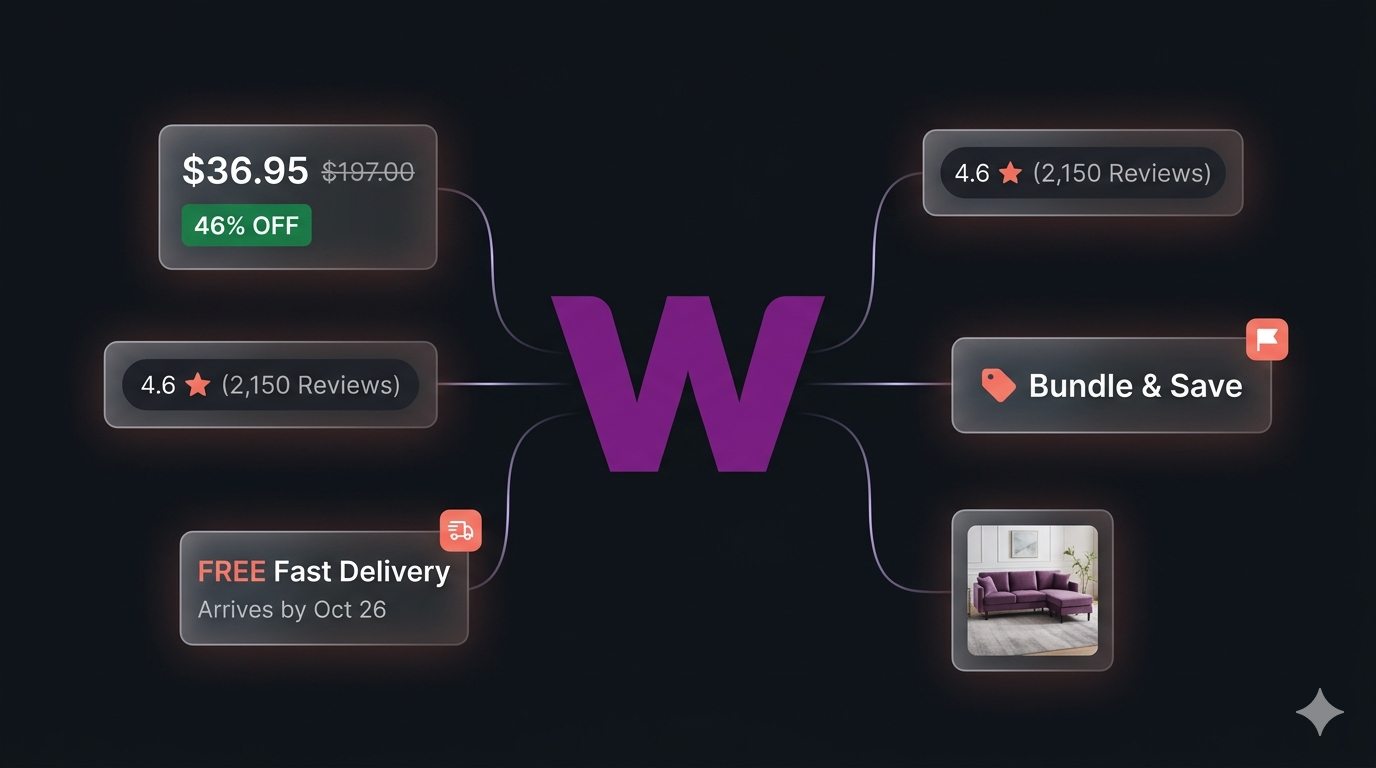
What makes Wayfair uniquely valuable as a data source is the depth of structured information on every category page: list price and current price, a clean discount percentage, ratings and review counts, variant counts, promotional flags ("Sale", "Bundle & Save"), shipping speed badges, and estimated arrival dates. For anyone tracking the US home goods market — sellers, brands, market researchers, and price-comparison products — Wayfair is one of the highest-signal public datasets in the category.

Businesses and researchers scrape Wayfair data for a range of purposes:

  • Price monitoring — track pricing changes across a competitor's catalog or an entire category in USD
  • Discount intensity tracking — Wayfair runs near-constant promotions; quantifying discount depth across categories is one of the most useful retail KPIs in the home goods space
  • MAP (minimum advertised price) enforcement — monitor whether marketplace sellers are violating brand pricing policies
  • Cross-marketplace comparison — pair Wayfair with Amazon or Walmart on the same SKUs to spot pricing gaps and arbitrage opportunities
  • Catalog analysis — explore which brands, price points, and styles dominate a given category on Wayfair
  • Demand & sentiment signals — use review counts and ratings to identify trending products and emerging home-goods brands

Manually copying product details from Wayfair category pages is impractical. A single category like "Sofas" or "Standing Desks" can return tens of thousands of products across hundreds of pages, prices and promotional flags change continuously, and Wayfair's PerimeterX anti-bot layer aggressively blocks naïve scraping attempts. Automation is the only realistic approach.

What Data You Can Extract from Wayfair

The Wayfair Listings Scraper extracts structured product data from any Wayfair category URL, sub-category URL, or keyword search URL. Here are the key fields available:

FieldDescriptionExample
SKUWayfair's unique product identifierW011378024
NameFull product titleShavera Velvet Upholstered Modular Sectional Sofa
URLDirect link to the product detail pagewayfair.com/furniture/pdp/...-w011378024.html
PriceCurrent selling price in USD1080
Previous pricePre-discount list price2014.72
Discount %Computed discount off the previous price46
CurrencyISO currency codeUSD
RatingAverage rating4.6
Review countTotal review count118
Lead imagePrimary product image URLassets.wfcdn.com/im/...
Variant count textRaw variant string ('4 Colors', '2 Sizes')4 Colors
FlagPromotional badge ('Sale', 'Bundle & Save', etc.)Bundle & Save
Speed badgeWayfair's delivery-speed badgeFREE Fast Delivery
Estimated arrivalEstimated delivery date textGet it by Thu, May 14
Best ValueWayfair's algorithmic 'Best Value' flagfalse
Category breadcrumbsFull breadcrumb trail of the source category["Furniture", "Living Room Furniture", "Sofas"]
Source URLThe start URL the product was collected fromwayfair.com/furniture/sb0/sofas-c413892.html
Scraped atUTC timestamp of the extraction2026-05-10T13:25:42.117Z

This is exactly the kind of structured retail data category managers, pricing analysts, and brand teams need — list price, current price, a computed discount, rating signals, delivery badges, and provenance fields — all in a single export.

Common Use Cases for Wayfair Data

Price Monitoring & Discount Tracking

Wayfair's pricing is unusually transparent — every listing carries both the original price and the current selling price. Scraping these fields on a schedule lets you build a real-time view of how aggressively Wayfair discounts each category, when category-wide promotions kick in, and how prices move during events like Way Day, Memorial Day, and Black Friday.

MAP Enforcement for Home Goods Brands

If you are a brand selling on or off Wayfair, the scraper makes MAP enforcement straightforward: pull every listing for your products, check the current price against your floor, and flag the violating SKUs. The previousPrice and discountPercent fields make it easy to distinguish a legitimate manufacturer-approved promotion from an unapproved retailer markdown.

Cross-Marketplace Comparison

Pair Wayfair with Amazon and Walmart on the same SKUs to spot pricing gaps. Furniture and home goods carry some of the largest cross-marketplace price spreads on the US internet — Wayfair's aggressive discounting often undercuts the same SKU on Amazon by 20–40%, and surfacing that gap is straightforward when the data is structured.

Catalog & Style Analysis

Scrape every result for a category (e.g. /furniture/sb0/sofas-c413892.html) and analyze the distribution of brands, price points, styles, and ratings. Wayfair's breadcrumbs and variant counts make it easy to slice the data along the dimensions a category manager actually cares about.

Speed-Badge & Logistics Intelligence

Wayfair surfaces its delivery promise on the listing page itself — "FREE Fast Delivery", "Free Shipping", and the estimated-arrival date next to each product. Aggregating these flags at category scale gives you a structured view of which products Wayfair is willing to ship fast, which categories rely on slower freight, and how the estimated-arrival promise moves over time.

Trend Spotting in Home Goods

Wayfair is one of the earliest indicators for what is happening in US home goods retail. Tracking new listings, review velocity, and rating distributions on Wayfair is an early signal of what will trend on Amazon, Target, and the rest of the US home category.

Challenges of Scraping Wayfair Manually

Before jumping into the tutorial, it is worth understanding why building your own Wayfair scraper is harder than it looks:

  • PerimeterX anti-bot — Wayfair is gated by PerimeterX, which issues multi-minute IP bans after roughly 50–70 sustained requests from datacenter IPs. Naïve scrapers get blocked within the first few pages
  • Block-page detection — when PerimeterX trips, Wayfair returns a 200-status block page that looks like a real product listing if you only check HTTP codes. You have to detect the block payload explicitly to avoid silently corrupting your dataset
  • Pagination via ?curpage=N — every category, sub-category, and keyword search uses the same curpage parameter, but pagination behaviour differs subtly across category types. Building a robust walker takes some care
  • Discount math — Wayfair renders the previous price and the discount percentage independently, but they don't always agree numerically. You need to compute the discount from raw numbers to get a trustworthy field
  • Mixed listing shapes — sponsored placements, "Best Value" call-outs, "Bundle & Save" cards, and standard product cards all coexist on the same page with slightly different HTML
  • Session rotation on 429 — Wayfair rate-limits aggressively per IP. Building a scraper that rotates sessions cleanly on 429 instead of just retrying is the difference between a 60-second run and a multi-hour ban
  • Frontend churn — Wayfair updates its category page frontend periodically, breaking custom scrapers that are not actively maintained

For most use cases, a pre-built and maintained scraper that already handles PerimeterX, pagination, and session rotation is dramatically more practical than building one in-house.

Step-by-Step: How to Scrape Wayfair Product Listings

Here is how to scrape Wayfair product data using the Wayfair Listings Scraper on Apify.

Step 1 — Pick Your Start URLs

The scraper accepts any combination of three Wayfair URL types:

  • Category URLs — e.g. https://www.wayfair.com/furniture/sb0/sofas-c413892.html
  • Sub-category URLs — narrower, refined category pages
  • Keyword search URLs — e.g. https://www.wayfair.com/keyword.php?keyword=standing+desk

You can mix and match all three in a single run. Most users start with broad category URLs to map an entire vertical, then re-scrape keyword search URLs later to pick up products that span multiple categories (e.g. "standing desk", "outdoor heater", "kitchen island").

Step 2 — Set a Result Cap

Wayfair categories can run into the tens of thousands of products. Cap each start URL with maxResults to control scope and cost:

  • maxResults: 500 — typical sample for a category overview
  • maxResults: 5000 — deeper sweep for a focused price-monitoring run
  • maxResults: 0 — unlimited; walks every page of the listing

The scraper paginates via ?curpage=N automatically and stops as soon as the cap is reached for a given start URL.

Step 3 — Configure the Scraper Input

Head to the Wayfair Listings Scraper on Apify and configure your run:

  1. Add one or more startUrls — each entry is an object { "url": "..." }
  2. Set maxResults per start URL (default 500, use 0 for unlimited)
  3. Configure proxyConfigurationresidential proxies are strongly recommended. Datacenter IPs get blocked by PerimeterX within ~50–70 sustained requests

Example input:

{
  "startUrls": [
    { "url": "https://www.wayfair.com/furniture/sb0/sofas-c413892.html" },
    { "url": "https://www.wayfair.com/keyword.php?keyword=standing+desk" }
  ],
  "maxResults": 500,
  "proxyConfiguration": {
    "useApifyProxy": true,
    "apifyProxyGroups": ["RESIDENTIAL"]
  }
}

Step 4 — Run the Scraper

Once started, the scraper will:

  • Walk each start URL through ?curpage=N pagination until maxResults is reached
  • Rotate residential sessions on 429 responses and PerimeterX block-page detection
  • Add jittered delays to keep traffic patterns natural and avoid sustained bans
  • Parse promotional flags, speed badges, variant counts, and estimated-arrival text into clean fields
  • Compute the discount percentage from price and previousPrice directly so the number is internally consistent
  • Stream every product into a typed dataset

Because the scraper is pure HTTP + Cheerio — no headless browser, no JavaScript execution — runs are fast and cheap. A 5,000-product sweep typically finishes in a few minutes.

Step 5 — Export Your Results

When the scraper finishes, export your data in the format you need:

  • JSON — ideal for developers building integrations or price-monitoring pipelines
  • CSV / Excel — perfect for spreadsheet analysis or importing into BI tools
  • XML / HTML / RSS — useful for feeds and reporting workflows
  • API — access results programmatically via the Apify API for automated runs

Ready to try it? Run the Wayfair Listings Scraper on Apify and get your first dataset in minutes.

Example Output (Real Data Preview)

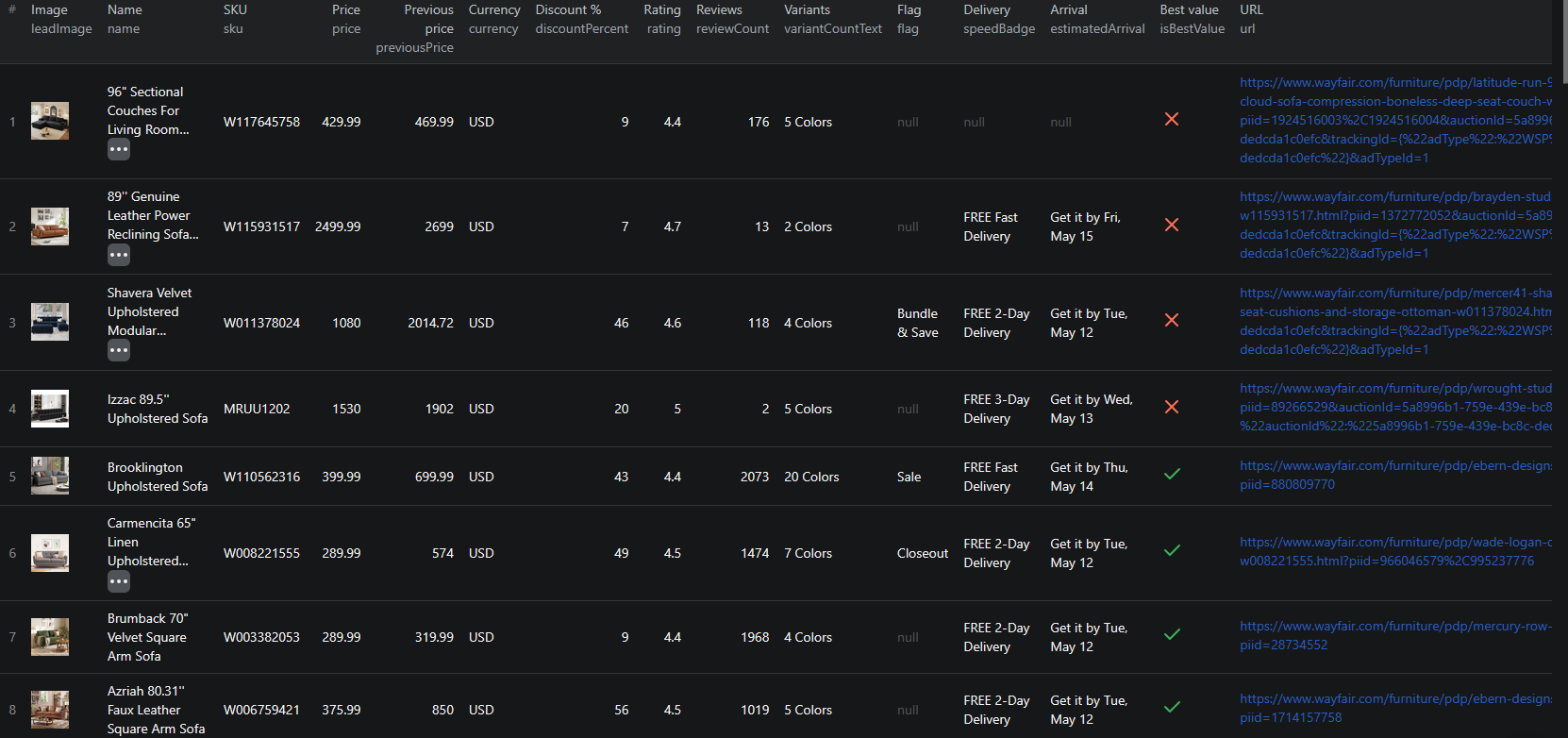
Wayfair scraper results

Here is what the actual output looks like. Each product is returned as a structured JSON object:

{
  "sku": "W011378024",
  "name": "Shavera Velvet Upholstered Modular Sectional Sofa",
  "url": "https://www.wayfair.com/furniture/pdp/...-w011378024.html",
  "price": 1080,
  "previousPrice": 2014.72,
  "currency": "USD",
  "discountPercent": 46,
  "rating": 4.6,
  "reviewCount": 118,
  "leadImage": "https://assets.wfcdn.com/im/.../Shavera+Velvet+...jpg",
  "variantCountText": "4 Colors",
  "flag": "Bundle & Save",
  "speedBadge": "FREE Fast Delivery",
  "estimatedArrival": "Get it by Thu, May 14",
  "isBestValue": false,
  "categoryBreadcrumbs": ["Furniture", "Living Room Furniture", "Sofas"],
  "sourceUrl": "https://www.wayfair.com/furniture/sb0/sofas-c413892.html",
  "scrapedAt": "2026-05-10T13:25:42.117Z"
}

Key things to notice:

  • Previous price, current price, and discount as first-class dataprice, previousPrice, and discountPercent are extracted as separate numeric fields, ready for analysis
  • Discount computed, not parseddiscountPercent is computed from the two numeric prices so it is always internally consistent, even when the page renders a slightly different value
  • Promotional flags ready for filtersflag and speedBadge are clean string fields, perfect for segmenting "Sale", "Bundle & Save", and "FREE Fast Delivery" listings
  • Variant counts surfaced as textvariantCountText ("4 Colors", "2 Sizes") gives you a quick read on assortment depth without expanding every product
  • Provenance fieldssku, sourceUrl, and scrapedAt make it easy to deduplicate across start URLs, audit your dataset, and join records over time
  • Breadcrumb trailcategoryBreadcrumbs returns the full path through Wayfair's taxonomy so you can slice the dataset by department, category, and sub-category without re-scraping the site map

Try the Wayfair Listings Scraper now — no coding required.

Automating Wayfair Data Collection

For ongoing price intelligence, you do not want to run the scraper manually every time. The Apify platform supports full automation:

Scheduled Runs

Set up recurring scrapes on any schedule — hourly, daily, or weekly. Hourly runs work well during Way Day, Memorial Day, or Black Friday when prices move quickly; daily runs are sufficient for general catalog tracking; weekly runs make sense for slower-moving categories like lighting or rugs.

API Integration

Use the Apify API to trigger scraper runs programmatically and retrieve results. This lets you integrate Wayfair data into your existing systems:

  • Feed listings into your home-goods price-monitoring dashboard
  • Trigger alerts when a tracked SKU drops below a target price
  • Sync Wayfair catalog data into your BI warehouse, partitioned by category breadcrumb
  • Connect to tools like Zapier, Make, or custom data pipelines

Node.js Example

For a complete working example showing how to call this scraper from Node.js, see the GitHub repository.

Webhooks

Configure webhooks to get notified when a scraper run completes. This is useful for event-driven workflows where you want to process new product data as soon as it lands — for example, recomputing discount intensity by category right after a fresh sweep finishes.

Using Wayfair Data for Business Intelligence

The structured data from Wayfair unlocks a range of analytical use cases that are specific to the US home goods market.

Discount Intensity by Category

Wayfair discounts are not uniform — sofas, mattresses, and outdoor furniture see far deeper and more frequent discounts than lighting or small décor. With price and previousPrice returned as numeric fields, building a time-series view of average and median discount per category is straightforward, and a strong leading indicator for category-level promotional intensity across US home goods retail.

Brand Share by Category

Scrape every result in a category and group by the brand portion of the product title or by the breadcrumb trail. The result is a clean map of which brands dominate which categories on Wayfair, useful for distribution decisions, brand-share tracking, and identifying categories where direct-to-consumer entry would be most effective.

"Best Value" & Speed Badge Analysis

The isBestValue flag and speedBadge field surface two pieces of Wayfair's internal merchandising logic. Tracking which products earn these badges over time gives you a structured view of how Wayfair is steering the customer — useful for sellers competing on the platform and for brands negotiating placement.

Estimated Arrival Trends

Wayfair surfaces an estimated arrival date directly on the listing card. Aggregating those dates by category and tracking how they shift over time is a surprisingly strong indicator of inventory health — when delivery promises slip from "Thu, May 14" to "Mon, May 25" across a category, the underlying logistics situation is changing in real time.

Does Wayfair Provide an API?

Wayfair does not offer a general-purpose public product API:

What's Available

  • Wayfair runs an affiliate program (typically through Impact Radius) that exposes a limited subset of catalog data to approved affiliate partners
  • Some seller-facing APIs exist for the Wayfair Partner Home (CastleGate) integration, but these are scoped to your own listings, not the broader catalog
  • The on-site search and category endpoints are private internal APIs that are not documented or supported for third-party use

What an Official API Would Miss

Even if Wayfair did publish a full public catalog API, the most useful fields for retail intelligence — the precise current price, the rendered discount percentage, the live promotional flag ("Sale", "Bundle & Save"), the speed badge, the estimated-arrival date, and the "Best Value" flag — are merchandising-layer artifacts that change continuously and rarely make it into stable affiliate feeds. The public site exposes them to every visitor; an official API almost certainly would not.

The Wayfair Listings Scraper gives you a practical alternative — structured catalog data from any category, sub-category, or keyword search URL, without affiliate approval or rate-limit gating.

Why Use a Wayfair Scraper Instead of Building One

Building a custom Wayfair scraper sounds straightforward until you actually start:

  • PerimeterX anti-bot — datacenter IPs are banned within ~50–70 sustained requests. You need real residential proxies, jittered request timing, and a working block-page detector
  • Silent 200-status blocks — PerimeterX returns block pages with HTTP 200 codes that look like real listing pages. Without explicit block detection, your dataset gets silently polluted with empty rows
  • Session rotation on 429 — when Wayfair throttles your session, you need to rotate to a fresh residential identity, not just retry the same request
  • Pagination edge cases — the ?curpage=N walker behaves slightly differently for keyword searches, top-level categories, and refined sub-categories. Building a single walker that handles all three takes care
  • Mixed card shapes on the page — sponsored placements, bundle promotions, and standard products coexist on the same page with slightly different HTML
  • Frontend churn — Wayfair updates its category page frontend periodically, propagating changes across categories at different rates
  • Opportunity cost — every hour spent fixing your scraper is an hour not spent on the pricing analysis the scraper exists to support

Unless you have very specific requirements that no existing tool can meet, a maintained scraper that already handles PerimeterX, pagination, and session rotation lets you focus on insights instead of plumbing.

Pricing — Pay Only for Results

The Wayfair Listings Scraper uses Apify's Pay-Per-Event pricing model. You only pay for products that actually land in your dataset — failed pages and retries are free. Compute units and residential proxy bandwidth are included in the per-event price.

EventWhen it's chargedPrice per eventPer 1,000 products
product-listingEach product card scraped from a Wayfair listing page$0.001$1.00

Quick cost estimates:

  • 1,000 products → $1.00
  • 10,000 products → $10.00
  • A full 50,000-product category sweep → $50.00

Set maxResults per start URL to cap your spend before kicking off a large run.

Try the Wayfair Listings Scraper

The Wayfair Listings Scraper extracts structured data from Wayfair product listings across categories, sub-categories, and keyword searches — SKUs, names, current prices, previous prices, computed discount percentages, ratings, review counts, lead images, variant counts, promotional flags, speed badges, estimated arrival dates, and category breadcrumbs.

What you get:

  • Any Wayfair category, sub-category, or keyword search URL — mix and match in a single run
  • Structured JSON, CSV, Excel, HTML, XML, or RSS output ready for any downstream tool
  • Pure HTTP + Cheerio crawler — no headless browser, no JavaScript execution, fast and cheap
  • Residential proxy support, jittered delays, session rotation on 429, and explicit PerimeterX block-page detection
  • Discount percentage computed from raw numeric prices so the field is always internally consistent
  • Promotional flags, speed badges, variant counts, and estimated-arrival text parsed into clean fields
  • Pay-Per-Event pricing: $1.00 / 1,000 products — compute and residential proxy bandwidth included
  • Scheduled runs and API access for ongoing price intelligence
  • No coding, no proxy management, no scraper maintenance

Start scraping Wayfair now — your first run takes less than 5 minutes to set up.

If you are building a US home goods data pipeline, combine Wayfair data with other marketplace sources like Amazon for the broadest US catalog, Walmart for omnichannel retail, or AliExpress for cross-border price benchmarking.

Legal and Ethical Considerations

Web scraping occupies a well-established legal space, but responsible practice matters:

  • Public data only — the Wayfair scraper extracts publicly visible product information that anyone can see by visiting Wayfair.com. No login or authentication is required
  • Respect rate limits — the scraper makes requests at a reasonable pace with jittered delays and rotates residential sessions on 429 to avoid overloading Wayfair's infrastructure
  • No misuse — use collected data for legitimate business purposes like price monitoring, catalog research, MAP enforcement, and competitive analysis. Do not use the data to create counterfeit listings or mislead buyers
  • Compliance — if you operate in jurisdictions covered by GDPR, CCPA, or similar data-protection regimes, ensure your data handling complies with the relevant regulations. This primarily applies to how you store and process the data, not the collection itself

Wayfair product listings are public marketplace data — they are designed to be found by buyers. Scraping this data for catalog research and price intelligence is aligned with the platform's intended purpose.

Frequently Asked Questions

Is scraping Wayfair legal?

Scraping publicly available data from Wayfair is generally legal. Product listings, prices, ratings, and delivery badges are visible to anyone who visits the site without logging in. You should always use the data responsibly, comply with applicable privacy regulations, and avoid overloading Wayfair's servers with excessive requests.

Does Wayfair provide a public API?

Wayfair runs an affiliate program through partners like Impact Radius, but does not offer a general-purpose public API for product listings. Affiliate feeds are limited, gated, and lag the live site. A web scraper is the practical alternative for live price monitoring, MAP enforcement, and catalog research.

What data can be extracted from Wayfair?

You can extract SKUs, product titles, current price, previous price, a computed discount percentage, rating, review count, the lead product image, variant count text (e.g. "4 Colors"), promotional flags ("Sale", "Bundle & Save"), Wayfair speed badges, estimated arrival dates, the "Best Value" flag, and the full category breadcrumb trail.

How do I use the Wayfair Listings Scraper?

Provide one or more Wayfair category, sub-category, or keyword search URLs as startUrls, set a maxResults cap per URL, and pick a residential proxy. The scraper handles pagination, PerimeterX block-page detection, session rotation, and dataset assembly automatically. Results are exported as JSON, CSV, Excel, HTML, XML, or RSS.

Why are residential proxies recommended for Wayfair?

Wayfair is protected by PerimeterX, which issues multi-minute IP bans after roughly 50–70 sustained requests from datacenter IPs. Residential proxies blend in with real consumer traffic and are by far the most reliable way to scrape Wayfair at any meaningful scale. The scraper rotates sessions automatically on 429 responses.

How much does the Wayfair Listings Scraper cost?

The actor uses Apify's Pay-Per-Event pricing. Products cost $0.001 each ($1.00 per 1,000). Compute units and residential proxy bandwidth are included in the per-event price. You only pay for products that actually land in your dataset — failed pages and retries are free.

About the Author

This guide was written by Piotr, a software engineer with hands-on experience building and maintaining web scrapers at scale. He develops and maintains a suite of data extraction tools on the Apify platform, helping businesses automate their data collection workflows.

Need help with your scraping project?

Book a free discovery call and let's scope your project together.

Book a Call
Piotr Vassev

Piotr Vassev

Founder of FalconScrape. Building production-grade web scraping systems and data automation pipelines for businesses worldwide.

Connect on LinkedIn