How to Scrape Weibo Posts and Profiles (Step-by-Step Guide)

If you want to scrape Weibo posts and profiles for sentiment analysis, trend monitoring, or social media research, this guide walks you through the entire process. You will learn what data you can extract, how to automate the collection, and how to turn Weibo's social feed into structured datasets for research and AI applications.
Why Scrape Weibo Data?
Weibo is one of the largest social media platforms in China, with over 580 million monthly active users. Often described as China's equivalent of Twitter/X, it is a primary channel for public discourse, celebrity engagement, brand communication, and viral content in the Chinese-speaking world.
That makes Weibo an invaluable data source for anyone studying Chinese social media, tracking public opinion, or building AI models on multilingual text data.
Businesses and researchers scrape Weibo data for several reasons:
- Social media research — analyze public discussions, viral content patterns, and user engagement across one of the world's largest social platforms
- Sentiment analysis — study public opinion on brands, products, events, and policies through post text and engagement metrics
- Brand monitoring — track mentions of your company, products, or competitors on Weibo to understand your presence in the Chinese market
- Trend detection — identify viral topics, emerging discussions, and cultural trends before they peak
- AI training datasets — build Chinese-language social media datasets for NLP models, sentiment classifiers, and language understanding systems
Manually browsing Weibo and copying post data is impractical. The platform generates millions of posts daily, and engagement metrics change constantly. Automation is the only realistic approach for any serious research or monitoring effort.
What Data You Can Extract from Weibo
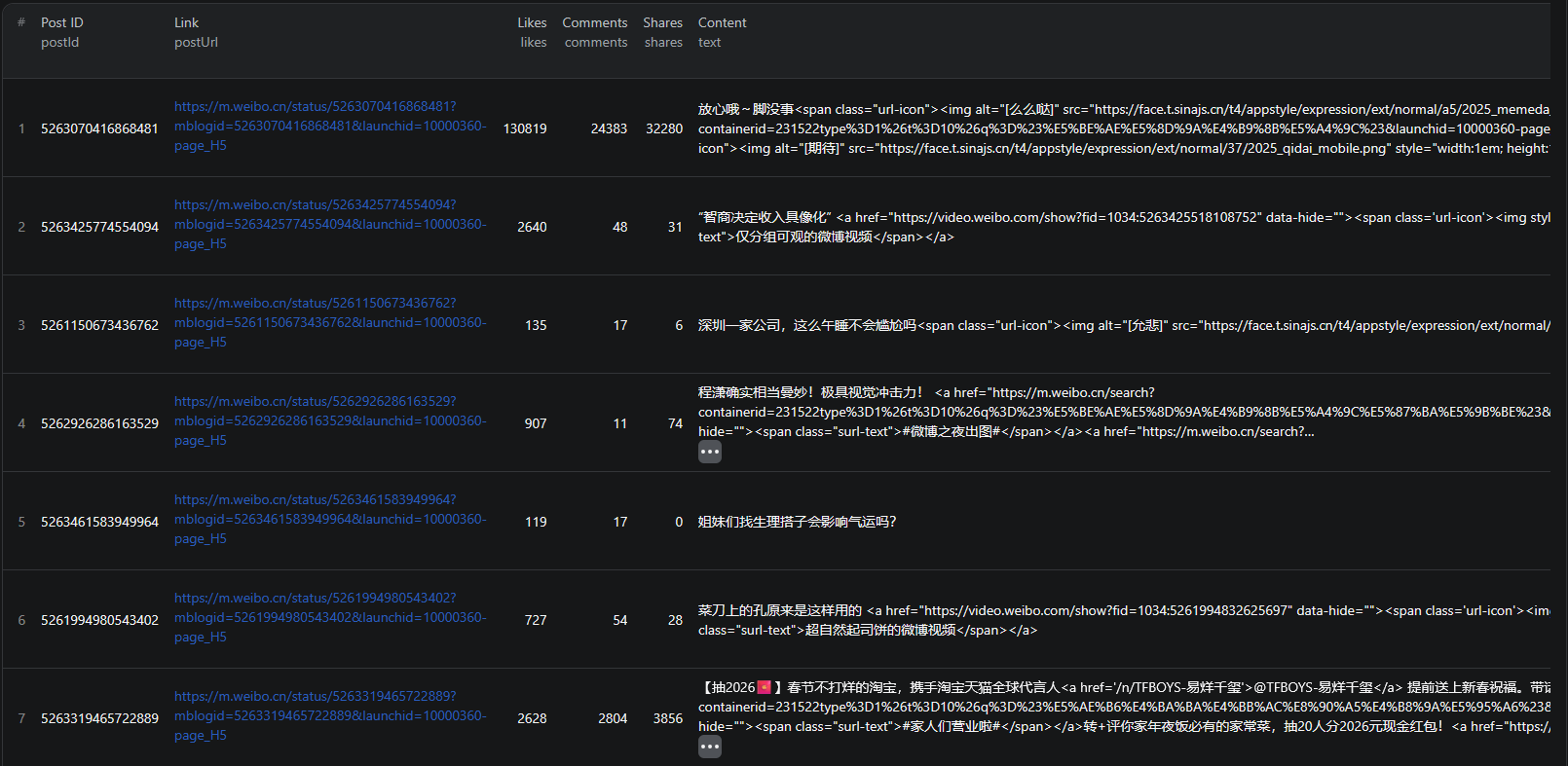
The Weibo Scraper extracts structured data from Weibo's main feed. Here are the key fields you can collect:
| Field | Description | Example |
|---|---|---|
| Post text | The full content of the Weibo post | 我吃好汤圆啦!愿大家阖家团圆,幸福安康 |
| Author name | The user's display name | angelababy |
| Profile URL | Direct link to the author's profile | m.weibo.cn/u/1642351362 |
| Verified status | Whether the account is verified | true |
| Followers count | Number of followers the author has | 1.05亿 (105 million) |
| Post date | When the post was published | Wed Feb 12 21:01:43 +0800 2025 |
| Likes | Number of likes on the post | 460,463 |
| Comments | Number of comments on the post | 89,118 |
| Shares | Number of times the post was shared | 425,895 |
| Images | URLs of images attached to the post | Multiple image URLs |
| Videos | URLs of videos attached to the post | Video URLs if present |
| Location | Where the post was published from | 发布于 云南 (Yunnan) |
| Post URL | Direct link to the post | m.weibo.cn/status/5133332497307244 |
This is the kind of data that would take hours to compile manually for even a small sample of posts. With a scraper, you can extract thousands of structured records in minutes.
Common Use Cases for Weibo Data
Social Media Research
Weibo is a window into Chinese public discourse. Researchers use Weibo data to study communication patterns, information spread, and public engagement with current events. The platform's scale and openness make it one of the richest data sources for social media research focused on the Chinese-speaking world.
Analyze post frequency, engagement distributions, content types, and user behavior patterns across large datasets that would be impossible to study manually.
Sentiment Analysis
Weibo posts express opinions on everything from consumer products to government policy. By extracting post text alongside engagement metrics, you can build sentiment analysis pipelines that quantify public opinion on specific topics, brands, or events.
Combine text content with likes, comments, and shares to weight sentiment by reach and engagement — a post with 460,000 likes carries more signal than one with 5.
Brand Monitoring
Companies operating in or selling to the Chinese market use Weibo data to track how their brand is perceived. Monitor mentions of your company, products, or competitors to understand your reputation, catch emerging PR issues early, and measure the impact of marketing campaigns.
Trend Detection
Weibo is often where viral trends in China originate. By monitoring post volume and engagement spikes, you can identify trending topics, viral content, and emerging discussions before they peak. This is valuable for media companies, marketers, and researchers studying information diffusion.
AI Training Datasets
Chinese-language social media text is essential for training NLP models that understand Mandarin. Weibo provides a massive corpus of informal, user-generated text with rich metadata — ideal for training sentiment classifiers, topic models, and language understanding systems.
Challenges of Scraping Weibo Manually
Before jumping into the tutorial, it is worth understanding why scraping Weibo is harder than it looks:
- Dynamic content loading — Weibo uses JavaScript-heavy rendering, so simple HTTP requests will not capture post data
- Pagination and infinite scroll — posts are loaded dynamically as you scroll, making traditional scraping approaches ineffective
- Anti-bot protections — Weibo employs various detection measures to block automated access, including rate limiting and CAPTCHAs
- Login barriers — some content is gated behind authentication, and logged-in scraping risks account restrictions
- Maintaining crawlers — Weibo updates its frontend and APIs regularly, which means custom scrapers break and need constant fixing
Building and maintaining your own Weibo scraper is a significant engineering investment. For most use cases, using a pre-built, maintained solution is far more practical.
Step-by-Step: How to Scrape Weibo Posts
Here is how to scrape Weibo data using the Weibo Scraper on Apify.
Step 1 — Define What You Want to Extract
Start by deciding the scope of your data collection. The Weibo Scraper extracts posts from Weibo's main feed. You can configure how many posts to collect based on your research needs:
- Small research sample — 100-500 posts for initial analysis or proof of concept
- Medium dataset — 1,000-5,000 posts for sentiment analysis or trend studies
- Large corpus — 10,000+ posts for AI training datasets or comprehensive research
Step 2 — Configure the Scraper Input
Head to the Weibo Scraper on Apify and configure your run:
- Set the maximum number of posts you want to extract
- Review the input configuration
- Click Start to begin the extraction
The scraper handles all the technical complexity — browser rendering, dynamic content loading, and structured data parsing.
Step 3 — Run the Scraper
Once started, the scraper will:
- Access Weibo's main feed and extract post data
- Parse structured metadata including text, engagement metrics, author details, and media
- Handle dynamic content loading to capture the requested number of posts
- Store results in a clean, structured dataset
Processing time depends on the number of posts requested. Most runs complete within a few minutes.
Step 4 — Export Structured Results
Once the scraper finishes, you can export the results in multiple formats:
- JSON — ideal for developers building data pipelines or NLP applications
- CSV — perfect for spreadsheet analysis in Excel or Google Sheets
- API — access results programmatically via the Apify API for automated workflows
Each record includes the full set of structured fields: post text, author details, engagement metrics, media URLs, location, and direct post links.
Ready to try it? Run the Weibo Scraper on Apify and get your first dataset in minutes.
Example Output (Real Data Preview)

Here is what the actual output looks like from the Weibo Scraper. Each post returns a structured JSON object:
{
"postId": "5133332497307244",
"postUrl": "https://m.weibo.cn/status/5133332497307244",
"author": {
"id": 1642351362,
"name": "angelababy",
"profileUrl": "https://m.weibo.cn/u/1642351362",
"verified": true,
"followersCount": "1.05亿"
},
"createdAt": "Wed Feb 12 21:01:43 +0800 2025",
"text": "我吃好汤圆啦!愿大家阖家团圆,幸福安康",
"likes": 460463,
"comments": 89118,
"shares": 425895,
"images": [
"https://wx3.sinaimg.cn/large/001N98C6gy1hyi40gn6ehj625c3807wl02.jpg"
],
"videos": [],
"location": "发布于 云南"
}
Key things to notice:
- Engagement metrics — likes, comments, and shares give you quantitative signals for measuring post reach and audience response
- Author details — name, verification status, and follower count let you weight posts by author influence and credibility
- Post content — full text including emojis and mentions for text analysis and sentiment classification
- Media attachments — image and video URLs for content analysis or archival
- Location data — geographic information about where the post was published from
- Direct URLs — links to both the post and the author's profile for reference and follow-up
This structured format makes it straightforward to import into any database, analytics tool, or NLP pipeline.
Try the Weibo Scraper now — no coding required.
Automating Social Media Monitoring
For ongoing trend monitoring or brand tracking, you do not want to run the scraper manually every time. The Apify platform supports full automation:
Scheduled Runs
Set up recurring scrapes on any schedule — hourly, daily, or weekly. The scraper runs automatically and stores results in a dataset you can access anytime. Daily runs work well for brand monitoring and trend detection, while weekly runs are sufficient for research and dataset building.
API Integration
Use the Apify API to trigger scraper runs programmatically and retrieve results. This lets you integrate Weibo data into your existing workflows:
- Feed new posts into analytics dashboards automatically
- Trigger alerts when engagement spikes on specific topics
- Build social listening systems that update in real time
- Connect to tools like Zapier, Make, or custom data pipelines
Social Listening Pipelines
Combine scheduled scraping with keyword filtering and sentiment analysis to build comprehensive social listening systems. Monitor brand mentions, track competitor activity, and measure campaign impact across Weibo — all automated and feeding directly into your analytics tools.
Node.js Example
For a complete working example showing how to call this scraper from Node.js, see the GitHub repository.
Webhooks
Configure webhooks to get notified when a scraper run completes. This is useful for event-driven architectures where you want to process new social data as soon as it is available.
Using Weibo Data for AI and NLP
Weibo data is particularly valuable for AI and natural language processing applications targeting the Chinese language.
Sentiment Analysis Models
Train models to classify Weibo posts as positive, negative, or neutral for specific brands, products, or topics. The combination of post text and engagement metrics provides both the input features and implicit quality signals needed for building effective sentiment classifiers.
Topic Modeling
Use post text to identify emerging themes and discussion topics across Weibo. Track how topic distribution shifts over time — for example, detecting when discussions about a particular technology or brand spike relative to baseline activity.
Social Media Trend Prediction
Build models that predict which posts or topics will go viral based on early engagement patterns. Use features like initial like velocity, comment-to-share ratio, and author follower count to forecast content spread before it peaks.
Training Datasets for Language Models
Chinese-language social media text is essential for fine-tuning LLMs on informal, conversational Mandarin. Weibo provides a massive corpus of user-generated content with natural language patterns, slang, and cultural references that formal text sources lack.
Does Weibo Offer an API?
Weibo offers a developer API, but it has significant limitations:
Weibo Open Platform
Weibo's API is available through its Open Platform, but access requires registration and approval. Even approved developers face strict rate limits that make large-scale data collection impractical through the API alone.
API Data Restrictions
The API does not expose the same breadth of data available on public Weibo pages. Access to historical posts, engagement metrics over time, and comprehensive feed data is limited compared to what you can extract through scraping.
Developer Barriers
The API documentation is primarily in Chinese, and the registration process requires Chinese phone verification in many cases. For international researchers and businesses, these barriers make the API impractical as a primary data source.
The Weibo Scraper gives you a practical alternative — structured social media data on demand, without API approval or access restrictions.
Why Use a Weibo Scraper Instead of Building One
Building a custom Weibo scraper sounds straightforward until you start dealing with the reality:
- Infrastructure complexity — Weibo requires browser-level rendering, proxy management, and sophisticated request handling. Setting this up from scratch is a significant engineering project.
- Anti-bot protections — Weibo actively detects and blocks scraping attempts. A production-quality scraper needs CAPTCHA handling and anti-detection measures that take months to fine-tune.
- Maintenance cost — Weibo updates its frontend and internal APIs regularly. Every update can break your scraper, requiring immediate fixes to keep your data pipeline running.
- Scaling challenges — scraping thousands of posts requires distributed infrastructure, queue management, and monitoring. The operational overhead adds up fast.
- Language and platform complexity — Weibo's interface and API documentation are in Chinese, adding an additional barrier for teams without Chinese language expertise
Unless you have very specific requirements that no existing tool can meet, using a maintained scraper lets you focus on what to do with the data instead of how to collect it.
Try the Weibo Scraper
The Weibo Scraper extracts structured data from Weibo's main feed — post text, author details, engagement metrics, media URLs, location data, and direct post links.
What you get:
- Structured JSON or CSV output ready for analysis
- All key post and author data fields in a single export
- Configurable post limits for any dataset size
- Scheduled runs for ongoing social media monitoring
- API access for integration into your workflows
- No coding or scraper maintenance required
Start scraping Weibo now — your first run takes less than 5 minutes to set up.
If you are building a data intelligence pipeline, combine Weibo social data with other sources like Bloomberg news for financial context, AliExpress product data for e-commerce insights, or Fiverr for freelancer market intelligence.
Legal and Ethical Considerations
Web scraping occupies a well-established legal space, but responsible practice matters — especially when dealing with social media data:
- Public data only — the Weibo Scraper extracts publicly visible posts that anyone can see by visiting Weibo. No login or authentication is required.
- Respect rate limits — the scraper is designed to make requests at a reasonable pace to avoid overloading Weibo's servers
- Privacy considerations — while posts are public, be mindful when handling personal data. Anonymize user information when possible and avoid using data in ways that could harm individuals.
- Compliance — if you operate in the EU, ensure your data handling complies with GDPR. If your research involves Chinese user data, be aware of China's Personal Information Protection Law (PIPL) and its requirements for cross-border data transfers.
Frequently Asked Questions
Is scraping Weibo legal?
Scraping publicly available data from Weibo is generally legal. The posts are visible to anyone who visits the site without logging in. However, you should always use the data responsibly, comply with local privacy regulations, and be mindful of China's data protection laws when handling personal information from Chinese users.
Does Weibo provide an API?
Weibo offers a developer API, but it requires approval, has strict rate limits, and restricts access to many data points. Most researchers and businesses cannot get the breadth of data available on public Weibo pages through the API alone. A scraper is the practical alternative for extracting structured social media data at scale.
What data can be extracted from Weibo?
You can extract post text, author names, profile images, profile URLs, verification status, follower counts, post timestamps, likes, comments, shares, images, videos, location data, and direct post URLs. Each post is returned as a structured JSON object.
How often can Weibo data be updated?
You can schedule scraper runs as often as you need — hourly, daily, or weekly. For real-time trend monitoring and brand tracking, daily runs ensure you capture new posts and engagement changes quickly. For research and dataset building, weekly runs may be sufficient.
Can I scrape Weibo hashtags?
The Weibo Scraper extracts posts from Weibo's main feed, which includes posts containing hashtags. You can filter the extracted data by hashtag keywords in post-processing to build hashtag-specific datasets.
Can I export Weibo data to CSV?
Yes. The Weibo Scraper supports exporting results as JSON, CSV, or via API. CSV exports can be opened directly in Excel or Google Sheets for analysis.
About the Author
This guide was written by Piotr, a software engineer with hands-on experience building and maintaining web scrapers at scale. He develops and maintains a suite of data extraction tools on the Apify platform, helping businesses automate their data collection workflows.
Need help with your scraping project?
Book a free discovery call and let's scope your project together.
Book a Call