
How to Scrape ZipRecruiter Jobs with a Predictable Scope
A salary comparison becomes misleading when it combines employer-stated pay with estimates or hourly contracts with annual roles. ZipRecruiter's listing data gives you a useful starting point, provided you preserve those distinctions.
The Job Listings Scraper for ZipRecruiter collects jobs by keyword and location, with optional full descriptions and structured details. I maintain it. This guide uses nursing jobs near Denver to build a small, reviewable salary sample.

Collect listing cards before buying details
An Actor is a tool hosted on Apify. Open this Actor's Input, select JSON, and enter:
{
  "search": "nurse",
  "location": "Denver, CO",
  "maxPages": 1,
  "maxItems": 20,
  "scrapeDetails": false
}
search and location are required. A search page holds up to twenty jobs. maxPages accepts 1 to 100, while maxItems provides a separate hard cap on output. A one-page run will not return a thousand jobs just because the default item cap is 1,000.
Leave scrapeDetails off for the first pass. Click Start, open the dataset, and check titles, employer names, and actual job locations. A search near Denver can include nearby cities; retain searchLocation separately from the returned location.
Separate stated pay from estimates
The historical README sample includes:
{
  "jobId": "7667284bd630a71c",
  "title": "Behavioral Health Nurse - RN",
  "company": "HCA HealthONE Mental Health and Wellness Center",
  "location": "Aurora, CO",
  "salary": "$36.68 - $53.52/hr",
  "isEstimatedSalary": false,
  "searchQuery": "nurse",
  "searchLocation": "Denver, CO"
}
The job is in Aurora even though the search location is Denver. The salary text explicitly gives an hourly range, and isEstimatedSalary: false distinguishes it from a ZipRecruiter estimate. Preserve the flag and original text; neither the range nor the flag promises what a particular applicant will be offered.
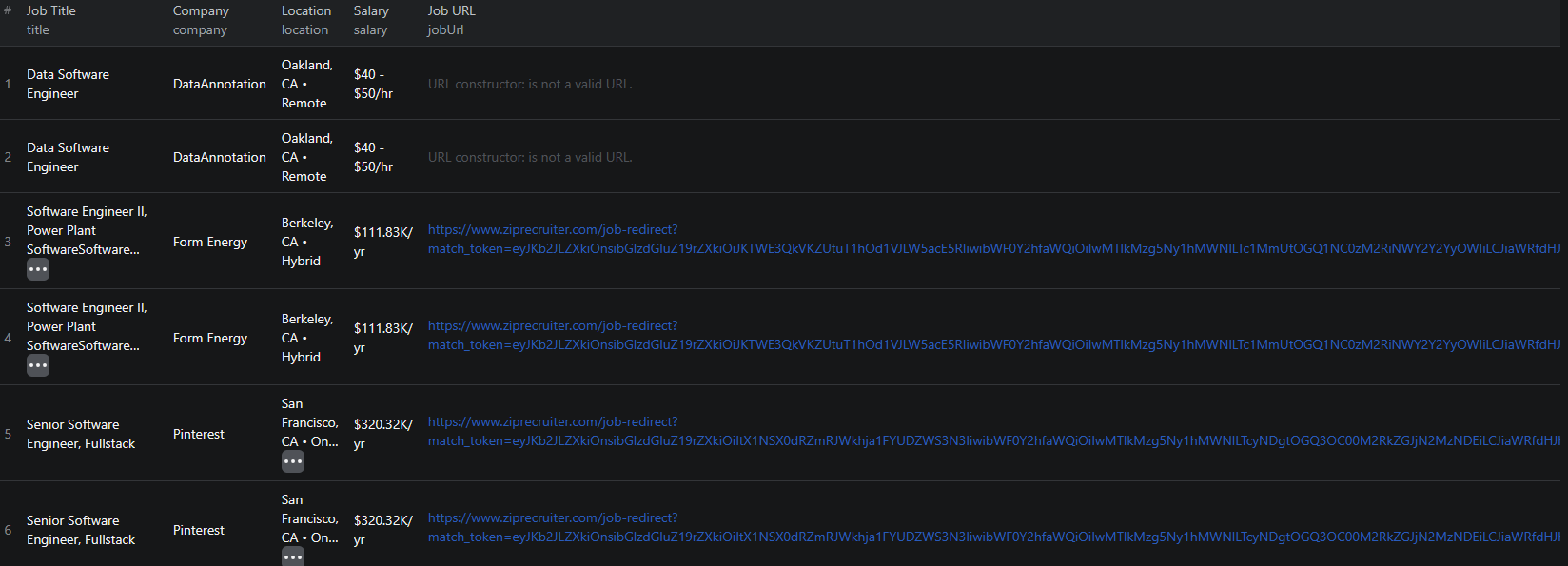
Earlier ZipRecruiter results illustrate the salary and location context used in the sample.
Export CSV with jobId, listingKey, title, company, location, salary, isEstimatedSalary, jobUrl, searchQuery, and searchLocation. Add a collection timestamp for the research log, since the documented output does not include a universal scrape-time field.
Deduplicate by jobId, retaining listingKey for source tracing. Filter to the nursing specialization and geography you actually want before parsing salary bounds. Put estimated salaries in a separate group and exclude missing salaries from arithmetic without dropping those jobs from the overall posting count.
For the example range, the midpoint is $45.10 per hour. Label that as the midpoint of the advertised range, not an average nurse's wage. Do not annualize it without an explicit hours-and-weeks assumption, and keep benefits, bonuses, and shift differentials outside the figure unless verified.
Add descriptions when the card cannot answer the question
Repeat the small search with scrapeDetails: true when you need full responsibilities, requirements, or employment classification. This opens each returned job page and can add description, employmentType, industry, datePosted, validThrough, occupationalCategory, city, region, country, and baseSalary.
The input has no direct-job-ID list, so a second search may not return exactly the same jobs. Join the outputs on jobId; do not assume row one in the second run enriches row one in the first.
Read the description to separate staff roles, travel assignments, and other arrangements. A bare baseSalary is not a replacement for the full range and period in salary. If the structured employment type is vague, preserve it and record what the description actually establishes.
An expiry date is useful context, but it should not silently delete a row from your archive. Open jobUrl to check whether the posting is still available before making an application or classifying the role as closed.
Budget enrichment separately
Pricing as of September 6, 2026: each returned job costs $0.004, and successful detail enrichment adds $0.016 per job. Actor start costs $0.00005 per GB of allocated memory, minimum one event.
Twenty basic jobs cost $0.08 in job fees. A run returning and successfully enriching twenty jobs costs $0.40 before its start charge. If you first run the basic search and then repeat it with details, both runs incur their own result fees; the second run is not a free upgrade of the first. Check live pricing.
For missing details, confirm the option was enabled and inspect failed requests in the log. If the search is empty, verify the keyword and location before increasing pages. Once useful, save the search as a task and compare IDs across dated exports, with manual review for likely reposts.
For a tech-specific comparison, the Dice guide shows how recruiter and remote-work fields affect the sample.
The Node.js example shows how to run this Actor from code and retrieve its dataset.
Frequently asked questions
Are full descriptions included in the basic job fee?
No. Enable scrapeDetails to request them. Successful enrichment adds a $0.016 detail event to the $0.004 job event at the rates as of September 6, 2026.
How should I compare ZipRecruiter salary values?
Keep salary text and isEstimatedSalary together. Compare matching currencies, pay periods, locations, and employment arrangements, separating estimates from employer-stated ranges.
