How to Scrape Dice Job Listings and Tech Hiring Data (Step-by-Step Guide)

If you want to scrape Dice job listings for recruitment intelligence, sales prospecting, or tech job market research, this guide walks you through the entire process. You will learn what data you can extract, how to automate the collection, and how to turn Dice's job postings into actionable hiring intelligence.
Why Scrape Dice Job Data?
Dice.com is one of the largest technology-focused job boards in the United States. Unlike general-purpose job sites, Dice specializes in tech roles — software engineering, DevOps, data science, cybersecurity, cloud computing, and IT. That focus makes it one of the most valuable data sources for anyone tracking the tech labor market.
Businesses and recruiters scrape Dice job data for several reasons:
- Tech hiring signals — companies posting on Dice are actively investing in engineering talent, which is a strong indicator of growth and budget
- Recruitment analytics — track which skills, frameworks, and technologies are in highest demand across the tech industry
- Sales prospecting — identify companies expanding their engineering teams as targets for developer tools, SaaS products, and B2B services
- Job market research — analyze salary trends, remote work adoption, and hiring patterns across tech sectors
- Lead enrichment — add hiring activity signals to your CRM to prioritize outreach to fast-growing tech companies
Manually browsing Dice and copying job details is impractical. A single keyword search can return thousands of results, and new postings appear daily. Automation is the only realistic approach at scale.
What Data You Can Extract from Dice
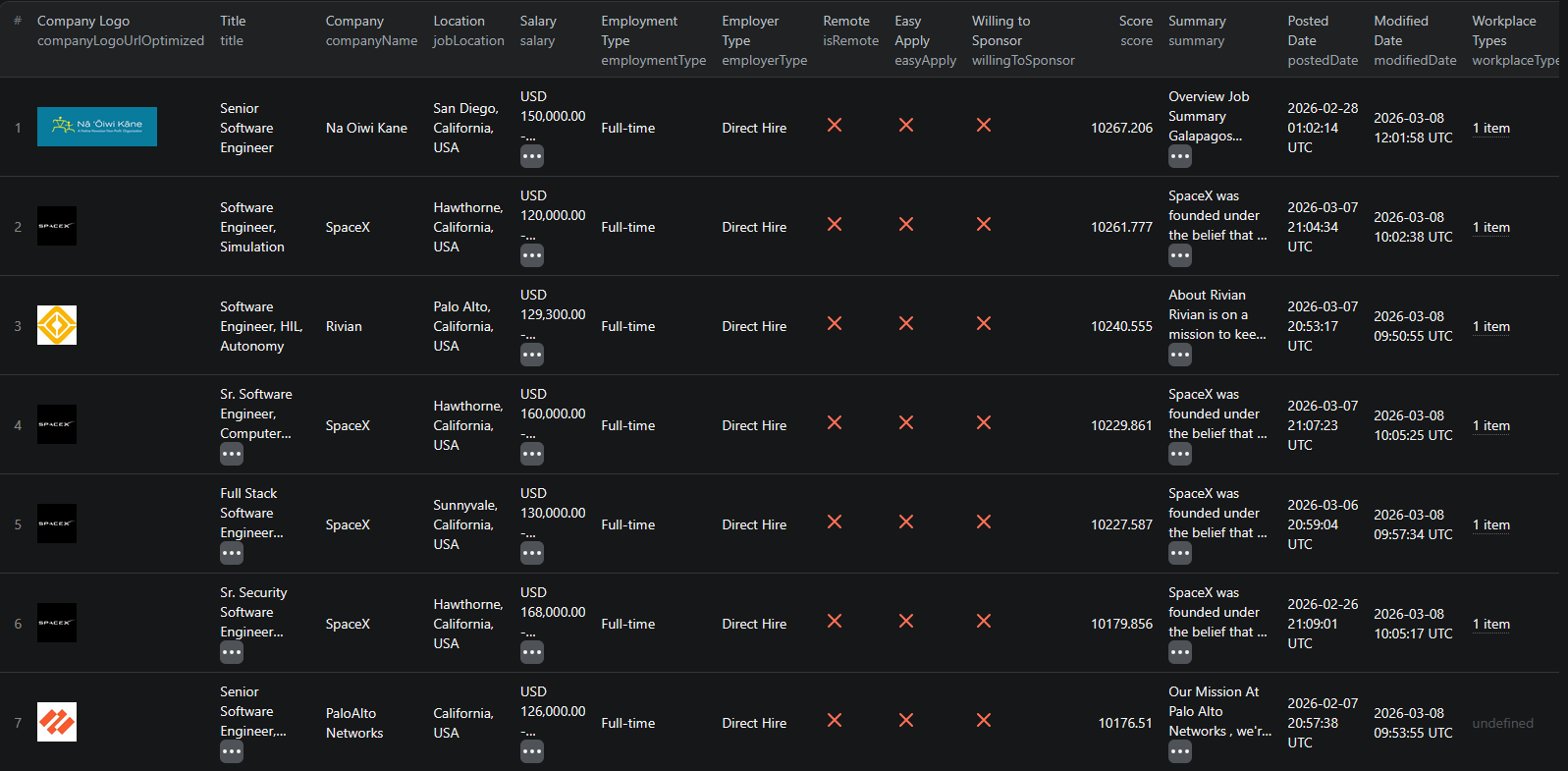
The Dice.com Jobs Scraper extracts structured data from job search results. Here are the key fields you can collect:
| Field | Description | Example |
|---|---|---|
| Job title | The title of the position | Principal .NET Engineer / Hybrid / Waxahachie, TX |
| Company name | The hiring organization | Motion Recruitment Partners, LLC |
| Salary | Compensation range if listed | 150k - 180k |
| Job location | Where the role is based | Waxahachie, Texas, USA |
| Employment type | Full-time, contract, etc. | Full-time |
| Remote status | Whether the role is remote | false |
| Workplace type | On-site, remote, or hybrid | On-Site |
| Posting date | When the job was published | 2025-02-12T01:53:07Z |
| Job description | Summary of the role and requirements | Full description text... |
| Employer type | Direct hire or recruiter | Recruiter |
| Easy apply | Whether quick apply is available | true |
| Sponsorship | Whether visa sponsorship is offered | false |
| Company logo | URL of the company's logo | d3qscgr6xsioh.cloudfront.net/... |
| Job URL | Direct link to the job posting | dice.com/job-detail/31e8bca3-... |
This is the kind of structured data that would take hours to compile manually. With a scraper, you can extract thousands of tech job listings in minutes.
Common Use Cases for Dice Job Data
Tech Hiring Signals
Dice job data is a goldmine for B2B sales teams. A company posting multiple engineering roles on Dice is actively investing in technology — which means they are likely evaluating new tools, platforms, and services. Hiring activity is one of the most reliable indicators of budget and buying intent.
Use Dice data to build prospect lists of companies that are growing their engineering teams right now.
Recruitment Analytics
Recruiting firms and in-house talent teams use Dice data to stay ahead of the tech hiring market. Track which skills are in highest demand, what salary ranges companies are offering, and how job requirements are evolving over time.
Monitor how demand for specific technologies — React, Kubernetes, Python, AWS — shifts across quarters and regions. This intelligence helps recruiters position candidates and advise clients on competitive compensation.
Sales Prospecting
If you sell developer tools, cloud infrastructure, SaaS platforms, or IT services, Dice data tells you exactly which companies are hiring the people who use your products. A company posting for a "Senior DevOps Engineer" is probably about to invest in CI/CD tooling. A company hiring "Data Scientists" likely needs analytics or ML infrastructure.
The job titles themselves reveal what a company is about to buy.
Job Market Research
Analysts and researchers use Dice data to study the tech labor market. Track hiring volumes across industries, analyze salary distributions, monitor remote work trends, and identify which metro areas are gaining or losing tech jobs.
This data provides a real-time view of the tech economy that complements traditional labor market reports.
Lead Enrichment
Add tech hiring signals to your existing CRM data. When you know a prospect company is actively hiring engineers, your outreach becomes far more relevant and timely. Combine Dice data with company data from LinkedIn jobs or Clutch to build comprehensive prospect profiles.
Challenges of Extracting Dice Data Manually
Before jumping into the tutorial, it is worth understanding why scraping Dice is harder than it looks:
- Large volume — Dice lists thousands of tech jobs at any given time. Even a specific search like "React developer" returns hundreds of results
- Pagination and filtering — results are spread across many pages with multiple filter options for location, salary, and employment type
- Structured data extraction — each job listing contains nested data like salary ranges, workplace types, and employer details that are tedious to copy accurately
- Frequent updates — new jobs are posted daily and existing listings are modified. Manual snapshots go stale quickly
- Maintenance overhead — Dice updates its frontend regularly, which means custom scrapers break and need constant fixing
Building and maintaining your own Dice scraper is a significant time investment. For most use cases, using a pre-built, maintained solution is far more practical.
Step-by-Step: How to Scrape Dice Job Listings
Here is how to scrape Dice job data using the Dice.com Jobs Scraper on Apify.
Step 1 — Define Your Search Query
Start by deciding what kind of tech jobs you want to extract. The Dice.com Jobs Scraper supports keyword-based search with state-level location filtering. For example:
- Software engineer — search keyword "software engineer" in any state
- DevOps engineer in Texas — search keyword "devops engineer", state "TX"
- Data scientist in California — search keyword "data scientist", state "CA"
You can target any technology role and US state combination.
Step 2 — Configure the Scraper Input
Head to the Dice.com Jobs Scraper on Apify and configure your run:
- Enter your search keywords to target specific tech roles or skills
- Set the state filter to narrow results by location
- Review the settings and click Start to begin the extraction
The scraper handles pagination automatically and returns all matching results.
Step 3 — Run the Scraper
Once started, the scraper will:
- Search Dice with your keywords and location filters
- Extract job data from all matching listings
- Parse structured data including salaries, companies, locations, and job descriptions
- Store results in a clean, structured dataset
Processing time depends on the number of matching jobs. Most runs complete within a few minutes.
Step 4 — Export Structured Results
Once the scraper finishes, you can export the results in multiple formats:
- JSON — ideal for developers building data pipelines or integrations
- CSV — perfect for spreadsheet analysis in Excel or Google Sheets, or importing into a CRM
- API — access results programmatically via the Apify API for automated workflows
Each record includes the full set of structured fields: job title, company, salary, location, employment type, remote status, description, and direct URLs.
Ready to try it? Run the Dice.com Jobs Scraper on Apify and get your first dataset in minutes.
Example Output (Real Data Preview)

Here is what the actual output looks like from the Dice.com Jobs Scraper. Each job listing returns a structured JSON object:
{
"id": "d5237c682f343d5cde17816df0ceeeea",
"title": "Principal .NET Engineer / Hybrid / Waxahachie, TX",
"postedDate": "2025-02-12T01:53:07Z",
"detailsPageUrl": "https://www.dice.com/job-detail/31e8bca3-2c97-40aa-bfa6-c6f7f770383d",
"companyName": "Motion Recruitment Partners, LLC",
"companyPageUrl": "https://www.dice.com/company/10105282",
"salary": "150k - 180k",
"employmentType": "Full-time",
"summary": "Established in 1868, this community-focused bank is dedicated to providing personalized financial services...",
"easyApply": true,
"willingToSponsor": false,
"employerType": "Recruiter",
"isRemote": false,
"workplaceTypes": ["On-Site"],
"jobLocation": "Waxahachie, Texas, USA"
}
Key things to notice:
- Salary data — compensation ranges let you analyze market rates and identify high-budget companies
- Company details — company name, logo, and profile URL for researching the hiring organization
- Employment signals — employment type, employer type (direct hire vs recruiter), and easy apply status
- Remote and location data — remote status and workplace types for filtering by work arrangement
- Sponsorship info — visa sponsorship availability for international recruitment use cases
- Job description — full summary text for keyword analysis, skill extraction, and market research
- Direct URLs — links to both the job posting and company profile for quick reference
This structured format makes it straightforward to import into any CRM, database, or analytics tool.
Try the Dice.com Jobs Scraper now — no coding required.
Automating Tech Hiring Intelligence
For ongoing recruitment monitoring or sales prospecting, you do not want to run the scraper manually every time. The Apify platform supports full automation:
Scheduled Runs
Set up recurring scrapes on any schedule — daily, weekly, or monthly. The scraper runs automatically and stores results in a dataset you can access anytime. Daily runs are ideal for time-sensitive recruitment and sales use cases, while weekly runs work well for market research.
API Integration
Use the Apify API to trigger scraper runs programmatically and retrieve results. This lets you integrate Dice job data into your existing workflows:
- Feed new job listings into your CRM or ATS automatically
- Trigger alerts when target companies post new tech roles
- Build dashboards that update with fresh hiring data
- Connect to tools like Zapier, Make, or custom data pipelines
Hiring Signal Pipelines
Combine scheduled scraping with company-level aggregation to build hiring signal systems. Track which companies are posting the most roles, which are hiring for new skill sets, and which are expanding into new locations. These signals are powerful for both sales teams and investors.
Node.js Example
For a complete working example showing how to call this scraper from Node.js, see the GitHub repository.
Webhooks
Configure webhooks to get notified when a scraper run completes. This is useful for event-driven architectures where you want to process new job data as soon as it is available.
Using Dice Data for Job Market Analysis
Dice data is particularly valuable for understanding the technology job market.
Skill Demand Analysis
Track which technologies, frameworks, and programming languages appear most frequently in Dice job listings. Monitor how demand for skills like Python, Kubernetes, or generative AI shifts over time. This data helps training companies, bootcamps, and career advisors identify the most marketable skills.
Salary Trend Monitoring
Analyze salary ranges across roles, locations, and company types. Identify which tech positions command the highest compensation, how salaries differ between remote and on-site roles, and how compensation trends are shifting across the industry.
Hiring Demand Forecasting
Use historical Dice data to build models that predict hiring trends. Correlate job posting volumes with company growth signals, industry events, and economic indicators to forecast where tech hiring is headed.
Tech Labor Market Insights
Compare hiring patterns across industries that employ tech talent — finance, healthcare, SaaS, e-commerce, and defense. Identify which sectors are ramping up engineering hiring and which are contracting, providing early signals for job seekers and investors alike.
Does Dice Provide an API?
Dice does not offer a broadly available public API for accessing job listing data:
Limited API Access
While Dice has some enterprise integrations for job board aggregators and ATS platforms, there is no open API available to most businesses or developers. Accessing comprehensive job data programmatically requires alternative approaches.
Manual Export Limitations
You can manually browse Dice and copy job details, but this works for only a handful of listings. Beyond 10-20 jobs, manual collection becomes impractical and error-prone.
The Practical Alternative
For most teams that need structured Dice job data, a web scraper is the practical solution. The Dice.com Jobs Scraper extracts publicly available job listings with all their structured details — the same information anyone can see by visiting Dice's website.
Why Use a Dice Scraper Instead of Building One
Building a custom Dice scraper sounds straightforward until you start dealing with the reality:
- Infrastructure complexity — Dice requires proper request handling, proxy management, and structured data parsing. Setting this up from scratch is a significant engineering project.
- Maintenance cost — Dice updates its frontend and search system regularly. Every update can break your scraper, requiring immediate fixes to keep your data pipeline running.
- Proxy management — reliable scraping at scale requires proxy rotation and request throttling to avoid blocks. Managing this infrastructure takes time and money.
- Scaling challenges — scraping thousands of job listings across multiple searches requires distributed infrastructure, queue management, and monitoring. The operational overhead adds up fast.
- Opportunity cost — every hour spent building and maintaining a scraper is an hour not spent on closing deals, recruiting talent, or analyzing market data
Unless you have very specific requirements that no existing tool can meet, using a maintained scraper lets you focus on what to do with the data instead of how to collect it.
Try the Dice.com Jobs Scraper
The Dice.com Jobs Scraper extracts structured data from Dice job listings — job titles, companies, salaries, locations, employment types, remote status, descriptions, and direct URLs.
What you get:
- Structured JSON or CSV output ready for analysis
- All key job and company data fields in a single export
- Keyword and state-level location filtering
- Scheduled runs for ongoing hiring signal monitoring
- API access for integration into your workflows
- No coding or scraper maintenance required
Start scraping Dice jobs now — your first run takes less than 5 minutes to set up.
If you are building a hiring intelligence pipeline, combine Dice data with LinkedIn job listings for broader job market coverage, Clutch for company data, or Fiverr for freelancer market intelligence.
Legal and Ethical Considerations
Web scraping occupies a well-established legal space, but responsible practice matters:
- Public data only — the Dice scraper extracts publicly visible job listings that anyone can see by visiting Dice.com. No login or authentication is required.
- Respect rate limits — the scraper is designed to make requests at a reasonable pace to avoid overloading Dice's servers
- No candidate data — the scraper extracts job listing and company data, not personal information about job seekers or applicants
- Compliance — if you operate in the EU or California, ensure your data handling complies with GDPR or CCPA. This primarily applies to how you store and process the data, not the collection itself.
Frequently Asked Questions
Is scraping Dice legal?
Scraping publicly available job listings from Dice.com is generally legal. The postings are visible to anyone who visits the site without logging in. However, you should always use the data responsibly, comply with local privacy regulations, and avoid overloading Dice's servers with excessive requests.
Does Dice offer an API?
Dice does not offer a broadly available public API for accessing job listing data. While some enterprise integrations exist, most businesses cannot get the level of detail available on public job pages through official channels. A scraper is the practical alternative for extracting structured tech job data at scale.
What data can be extracted from Dice job listings?
You can extract job titles, company names, salary ranges, job locations, employment types, remote work status, posting dates, job descriptions, company logos, company profile URLs, workplace types, sponsorship availability, and direct job URLs. Each listing is returned as a structured JSON object.
How often can job data be updated?
You can schedule scraper runs as often as you need — daily, weekly, or on a custom schedule. For recruitment and sales use cases, daily or weekly runs ensure you catch new postings as they appear. For general market research, weekly runs provide a good balance.
Can I export Dice job listings?
Yes. The Dice.com Jobs Scraper supports exporting results as JSON, CSV, or via API. CSV exports can be opened directly in Excel or Google Sheets for analysis and CRM import.
Can I filter Dice jobs by location?
Yes. The scraper supports keyword and US state-based filtering. You can target job listings in specific states or search for remote-only positions to narrow your results.
About the Author
This guide was written by Piotr, a software engineer with hands-on experience building and maintaining web scrapers at scale. He develops and maintains a suite of data extraction tools on the Apify platform, helping businesses automate their data collection workflows.
Need help with your scraping project?
Book a free discovery call and let's scope your project together.
Book a Call