
How to Track Momo Prices and Stock in Taiwan
Momo listings can show both a sale price and a stock count. That makes them useful for spotting changes, but only if you compare the same product over time. A search for a model family can include refurbished units, bundles, and different models.
Our Momo Listings Scraper exports product names, prices in TWD, stock, promotions, ratings, and source URLs from Momo search results. It runs on Apify and accepts English or Traditional Chinese keywords. Product details are optional; you do not need them for a first price-and-stock scan.
Start with four products
Open the Momo Actor, enter Dyson V12 under Search keywords, set Max items to 4, and leave Scrape product details off. Start the run and export the Dataset as CSV for a price sheet or JSON to retain the full records.
For the JSON editor, use:
{
  "keywords": ["Dyson V12"],
  "maxItems": 4,
  "scrapeProductDetails": false
}
maxItems is the total product limit across all keywords and start URLs, not four per keyword. Our September 25 run returned four rows. Here are three, shortened to the fields needed for a first pass:
| Listing | Price | Stock |
|---|---|---|
| V12 Detect Slim Fluffy Total Clean | NT$17,900 | 303 |
| V12 Detect Slim Fluffy | NT$12,999 | 22 |
| V12s Detect Slim Submarine | NT$22,900 | 106 |
The first is an upgrade bundle with two main heads. The second price is lower, but that listing is marked refurbished, not a like-for-like new-unit offer. The third is a different wet-and-dry model. Keep the full title and goodsCode before drawing a price conclusion. stock is the count exposed at collection time; it is not a reservation or a promise of availability later. Promotion text may carry conditions that need checking on the product page.
The Momo Node.js example runs this four-row sample and fetches the dataset.
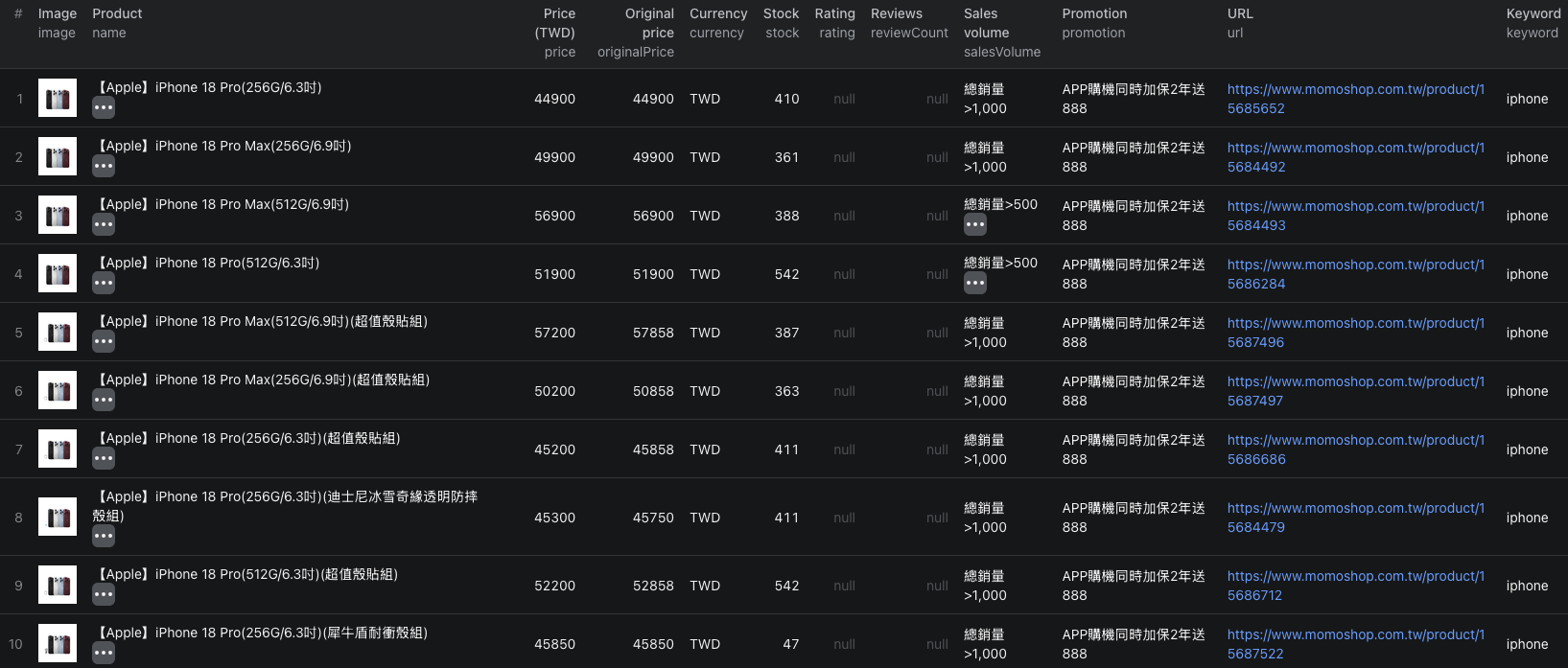
This separate iPhone search shows a larger listing-mode dataset. Each row keeps the product URL and price beside the stock count captured at run time.
Check what actually changed
Save goodsCode, url, name, price, originalPrice, currency, stock, and the time of each run. On the next export, join by goodsCode and calculate price and stock deltas. Do not treat salesVolume bands such as “over 500” as exact sales counts or infer sales solely from a stock decrease; inventory can be replenished or adjusted.
If you need brand, category breadcrumbs, purchase limits, or fuller promotions, turn on Scrape product details for a small sample first. The Actor visits each product page and saves an enriched row. Direct product URLs are also supported. A detail run is slower and uses the detail price, so avoid it when listing fields already answer your question.
Pricing
Pricing as of September 25, 2026 is $0.0015 per listing-mode product or $0.005 per product saved with detail. The events are alternatives for a saved row, not a listing fee plus a detail fee. The Actor-start event is $0.00005 per GB of allocated memory, minimum one event. Four listing-mode products have an Actor event estimate of $0.00605 at the minimum start charge. Apify platform or proxy usage may be billed separately under your plan. Check live pricing before scaling up.
Frequently asked questions
Is Momo stock a live inventory feed?
No. The scraper captures the stock count shown when the run collects a product. Run it again to measure changes, and keep the collection time with your export.
Does Scrape product details add a second charge to each product?
No. Search results saved in listing mode use the $0.0015 listing event. A product saved after a detail fetch uses the $0.005 detail event instead.
