
How to Analyze Booking.com Hotel Reviews by Stay Date
A guest can stay in one month and post a review in the next. If you are assessing a renovation or a change in service, the stay date matters more than the date the review appeared.
Our Booking Reviews Scraper exports hotel reviews with scores, liked and disliked text, publication time, check-in and checkout dates, room type, traveller type, reviewer country, and hotel replies where available. The Actor does not export reviewer names or profile photos. This guide uses one hotel to build a small, stay-dated review sheet.

Collect a small set of written reviews
Open the Actor on Apify and add The Savoy's Booking.com page under Hotel URLs. Set Maximum reviews per hotel to 10, choose Newest first, turn on Only reviews with text, and set Stayed from to 2026-01-01. Click Start, then open the run's Dataset.
The JSON editor accepts the same input:
{
  "startUrls": [
    { "url": "https://www.booking.com/hotel/gb/the-savoy.html" }
  ],
  "maxReviewsPerHotel": 10,
  "sortBy": "newest",
  "stayedFrom": "2026-01-01",
  "onlyWithText": true
}
The limit is per hotel. stayedFrom checks the guest's check-in date, not the publication date. Written-review filtering avoids rows that have a score but no comment. If you want to monitor newly posted reviews instead, use Reviewed since (reviewedSince) with Newest first. The two dates answer different questions.
An abbreviated record from our Actor documentation shows the fields to keep together:
{
  "hotelName": "The Savoy",
  "score": 9,
  "reviewedAt": "2026-09-23T20:10:18.000Z",
  "stayCheckin": "2026-09-22",
  "stayCheckout": "2026-09-23",
  "roomType": "One-Bedroom River View Suite",
  "travellerType": "SOLO_TRAVELLERS",
  "liked": "the water debit",
  "disliked": "not too much space"
}
This is a historical example, not a prediction of what the ten-review run will return. The Booking reviews Node.js example runs the same input and retrieves the dataset.
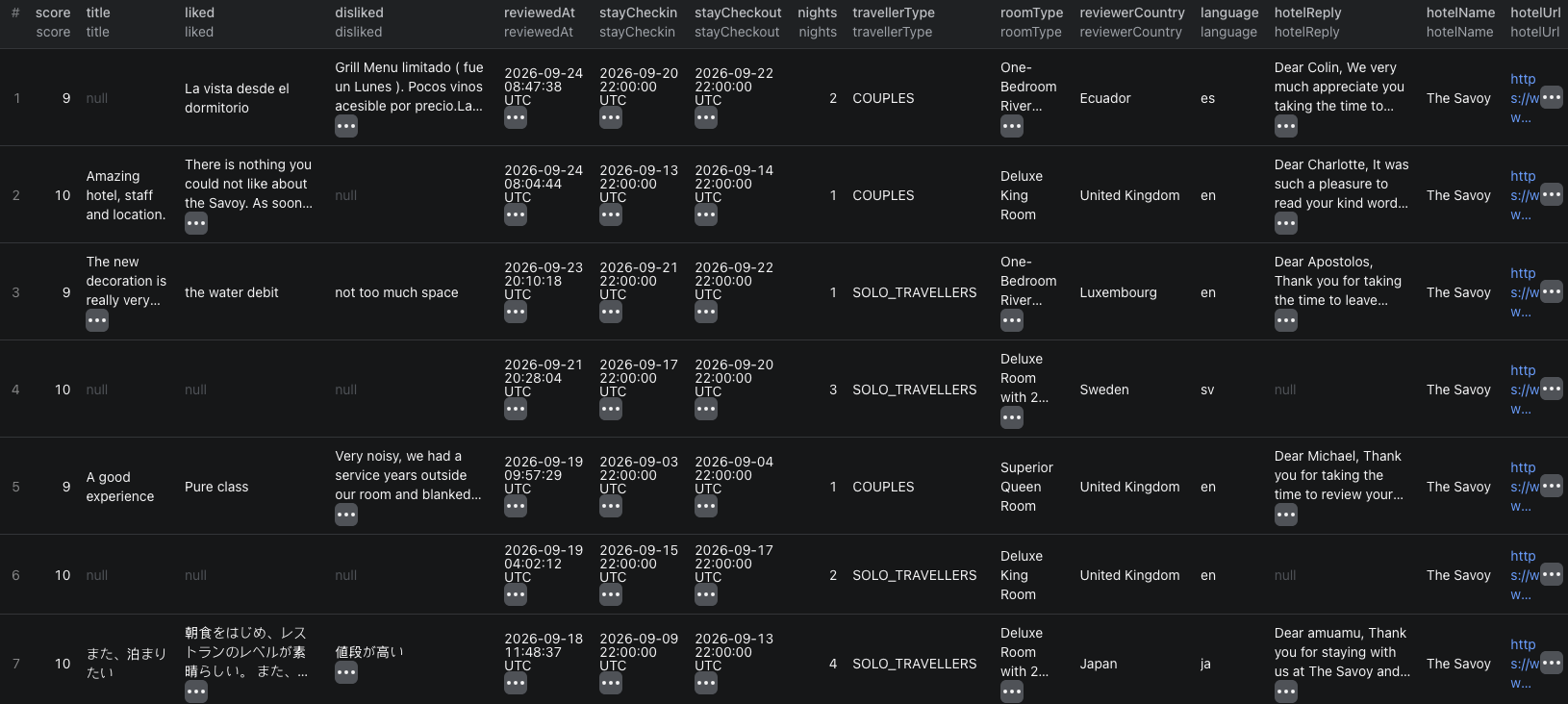
This screenshot is from a separate hotel review run. It includes score-only rows, so it does not represent the Only reviews with text input above. The separate reviewedAt and stayCheckin columns are the important distinction.
Read the stay, not just the score
Export CSV for a spreadsheet or JSON if you need to keep every field. Group reviews by stayCheckin month to study stays in a particular period. Keep reviewedAt as a separate column so a late-posted review is not assigned to the wrong month. Compare like with like: room type and traveller type can explain why two guests describe the same property differently.
Read liked and disliked alongside score. A high overall score can still contain a specific complaint worth investigating. hotelReply shows whether the property responded, not whether the issue was resolved. The run's Coverage summary contains per-hotel totals and category scores; it helps you see how narrow your ten-row sample is.
Booking.com exposes reviews from roughly the last 36 months. Raising the limit will not retrieve older feedback. Text stays in the guest's original language; the Actor does not translate it. For a stay-specific subset, you can add Stayed to, traveller type, language, keyword, or score filters. Selective stay-date and score filters may take longer because the Actor checks reviews one by one.
If you need current room prices rather than guest feedback, use our Booking.com hotel rates guide.
Pricing
Pricing as of September 27, 2026 is $0.001 per saved review, plus the $0.00005 Actor start event per GB of allocated memory, minimum one event. Ten returned reviews cost $0.01005 in Actor events at 1 GB. Filtered-out reviews are not charged. Apify platform or proxy usage may be billed separately under your plan. Check live pricing before a larger run.
Frequently asked questions
Is reviewedSince the same as stayedFrom?
No. reviewedSince filters by publication date. stayedFrom filters by the guest's check-in date. Use the one that matches your question.
Can I export reviews older than three years?
Booking.com exposes roughly the last 36 months of reviews to the Actor. Older reviews cannot be recovered by increasing the run limit.
