
How to Compare Allegro Seller Offers by Delivered Price

The lowest listed price is not necessarily the lowest delivered price. On Allegro, the same catalog product can have many seller offers with different delivery charges, conditions, and buy-now prices.
Our Allegro Price Comparison Scraper takes a product URL or EAN and exports one row per matching seller offer. It collects prices, ordinary delivery costs where available, seller details, condition, and Smart! status. This guide uses one printer URL to make a small, like-for-like shortlist. The Actor covers consumer Allegro Poland, not Allegro's Czech or Slovak marketplaces.
Compare one product first
Open the Actor on Apify and add the printer offer URL under Product or offer URLs. Set Maximum saved offers to 3, Product condition to New only, and Sort offers by to Buy-now price plus delivery. Start the run, then open its Dataset.
Or switch the Input form to JSON and paste:
{
  "productUrls": ["https://allegro.pl/oferta/17338232832"],
  "eans": [],
  "maxItems": 3,
  "maxOffersPerProduct": 3,
  "condition": "new",
  "sortBy": "priceWithDelivery",
  "smartOnly": false
}
maxItems limits saved offers across all inputs, not products. maxOffersPerProduct limits one product's saved offers. The Actor collects the available offer pages before selecting the cheapest matching rows, so the cap is not just the first three placements it sees.
In our September 18 printer validation, the product page advertised 43 offers. The Actor collected 43 unique offers and found 36 eligible new buy-now offers. A three-offer export contained these rows; the values are historical snapshots and may differ when you run it:
| Seller | Buy now | Ordinary delivery | Delivered total |
|---|---|---|---|
| komtek | 339.00 PLN | 10.49 PLN | 349.49 PLN |
| REMEDIAL | 349.90 PLN | 10.49 PLN | 360.39 PLN |
| REMEDIAL_RTV_AGD | 349.90 PLN | 10.49 PLN | 360.39 PLN |
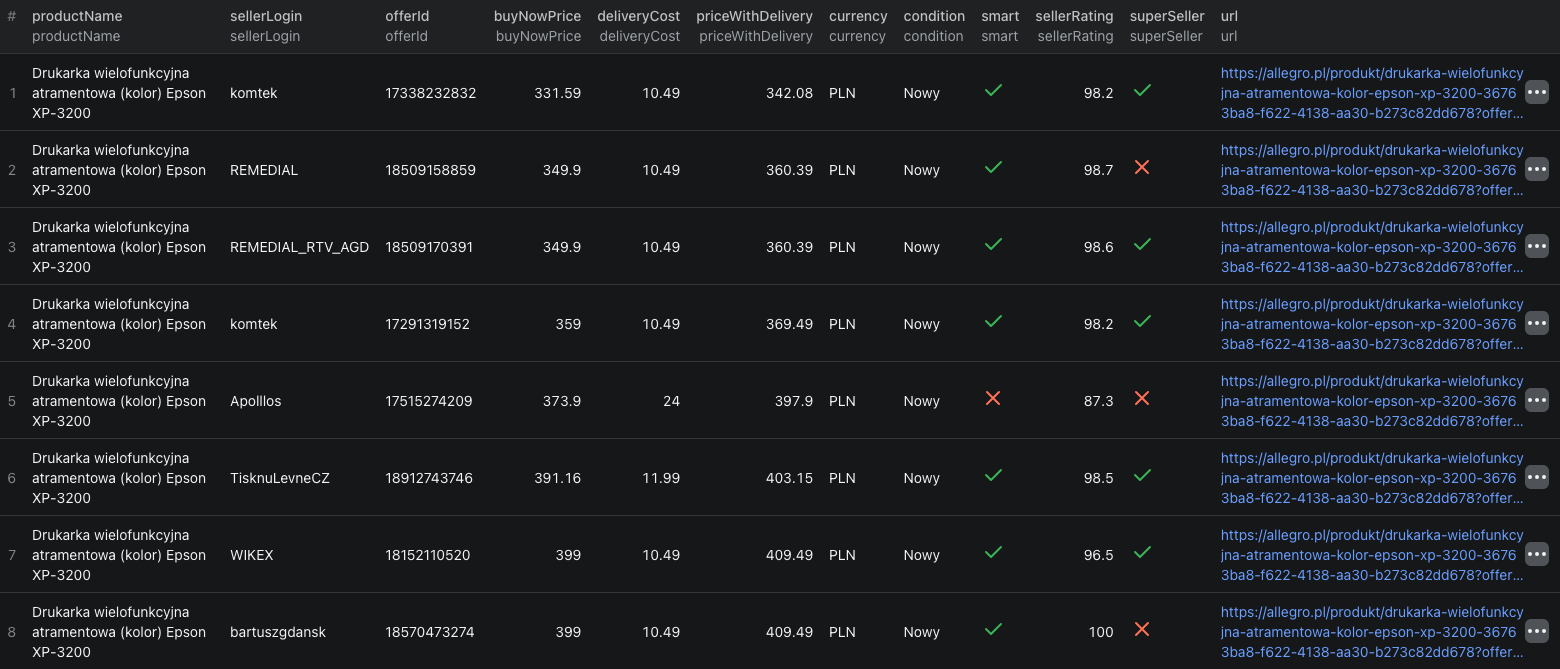
This dataset screenshot shows eight visible rows from a larger printer comparison. It is a snapshot, not a live price quote; check the current offers before making a decision.
The Node.js example runs the same three-offer check and reads the dataset through Apify's API.
Check the comparison before acting on it
Export the dataset as CSV for a price sheet, or JSON if you want to keep every field. Use productId to keep offers for the same catalog product together, and offerId to track a specific seller offer. A seller may have more than one offer for one product, so seller name alone is not an offer key.
Sort on priceWithDelivery when ordinary delivery matters. Keep buyNowPrice and deliveryCost beside it so the total can be explained. The Actor excludes pure auctions from the buy-now comparison; a current auction bid is not an immediate-purchase price. Check the title and condition of each shortlisted offer for differences in bundle, warranty, or included accessories. A shared catalog product ID does not make every offer commercially identical.
Smart! is another separate signal. A Smart! badge does not mean ordinary delivery is free, and the exported delivery amount is not a postcode-specific checkout quote. Open the current offer before buying or changing your own price.
The run's Run summary shows how many offers the source advertised, how many were collected, how many matched your filters, and how many were saved. A max_items_reached status means your cap shortened the export; it does not mean the product has only three sellers. If the Actor cannot verify complete source coverage, do not treat a partial result as an all-seller comparison.
When to use an EAN instead
If you have a catalog code rather than an Allegro URL, put it in eans as a string, preserving any leading zero. The Actor checks candidate products against their product-page GTIN. Some codes still point to more than one candidate or produce only fuzzy matches. An ambiguous lookup reports the candidates instead of silently choosing one. Use a direct product URL once you know which catalog item you mean.
The Allegro Listings Scraper guide covers discovery from category and seller pages. Use this comparison Actor after you have a specific product or EAN and need its seller-offer price ladder.
Pricing
Pricing as of September 26, 2026 is $0.03 per successfully resolved product URL or $0.05 per successfully resolved EAN, plus $0.002 per unique saved offer. URL and EAN resolution events are alternatives, while the offer events are additional. The Actor-start event is $0.00005 per GB of allocated memory, minimum one event. At the default 1 GB memory, the three-offer URL example has an Actor event estimate of $0.03605. Apify platform or proxy usage may be billed separately under your plan. See live pricing before a larger run.
Frequently asked questions
Does maxItems limit products or seller offers?
Seller offers. maxItems caps saved offers across the whole run; maxOffersPerProduct caps how many are saved for one product.
Is a Smart! offer always free to deliver?
No. Smart! eligibility and ordinary delivery cost are separate fields. The delivered total reflects the anonymous source context, not a quote for your address or account.
Does an EAN always identify one Allegro product?
No. An EAN lookup can be ambiguous. The Actor reports candidates rather than choosing one; use a product URL to select the intended item.
