Piotr VassevPiotr Vassev

How to Scrape Amazon Best Sellers (Step-by-Step Guide)

How to Scrape Amazon Best Sellers

If you want to scrape Amazon Best Sellers for rank tracking, product research, or category sizing, this guide walks you through the process. You will learn how to extract the full Top 100 from any Best Sellers, New Releases, Most Wished For or Most Gifted chart, how to cover a whole department in one run, and how to turn a chart into a time series.

Why Scrape Amazon Best Sellers Data?

Amazon Best Sellers is the most-watched leaderboard in retail. Every category on every Amazon marketplace has a Top 100, refreshed hourly, ranked by actual sales. It is the closest thing to a public sales report that Amazon publishes, and it is free to look at.

Looking is not the problem. The problem is that a chart is a snapshot, and the value is in the movement. A product at rank 40 today means little. A product that went from unranked to rank 40 in a week is a signal — a launch working, an ad campaign landing, a competitor about to take your shelf. Amazon shows you the current chart and nothing else. Yesterday's is gone.

The other problem is breadth. Amazon has tens of thousands of Best Sellers categories across more than twenty marketplaces. Nobody can watch more than a handful by hand.

Scraping fixes both. A structured Top 100 per category, captured on a schedule, turns Amazon's leaderboard into a dataset you can diff, chart and alert on.

Teams scrape Amazon Best Sellers for a range of purposes:

  • Rank tracking — where your products and your competitors' sit in every category that matters, every day
  • Product research and sourcing — what is selling in a niche, at what price, with what rating, before you invest in inventory
  • Category sizing — how deep the Top 100 goes on price and review count tells you how competitive a category is
  • Launch and trend detection — New Releases and Most Wished For surface demand before it shows up in sales rank
  • Cross-marketplace comparison — the same category on amazon.com, amazon.de and amazon.co.jp, side by side
  • Pricing intelligence — the price points that win in a category, and how they shift over time

Doing this by hand means opening a category page, scrolling to load all 100 products, copying each one into a sheet and coming back tomorrow. That is the definition of an automation target.

What Data You Can Extract from Amazon Best Sellers

Each ranked product comes back as one structured row.

FieldDescriptionExample
rankPosition in the chart, 1 to 1002
asinAmazon's product identifierB0DCH8VDXF
titleProduct title as shown on the chartApple EarPods Headphones with USB-C Plug...
urlDirect link to the product pagehttps://www.amazon.com/.../dp/B0DCH8VDXF
imageUrlProduct imagehttps://images-na.ssl-images-amazon.com/...
price / priceText / currencyNumeric price, the displayed text and the currency code19 / $19.00 / USD
rating / ratingCountAverage star rating and number of ratings4.5 / 17,453
listTypeWhich chart the row came frombestsellers
category / categoryUrlThe category name and chart URLElectronics
marketplaceWhich Amazon storefrontamazon.com
scrapedAtWhen this row was collected2026-09-03T14:48:22Z

Twelve fields is deliberately lean. This is a breadth tool: it captures the whole chart, for hundreds of categories, in minutes, at a price that makes daily snapshots sensible. When you need depth on a specific ASIN — bullet points, variants, Buy Box seller — that is a job for a product-detail scraper on the ASINs this one surfaces.

Four charts from one URL pattern

Amazon publishes four ranked lists per category, and the scraper reads all of them:

  • Best Sellers (/gp/bestsellers/...) — ranked by sales
  • New Releases (/gp/new-releases/...) — the best-selling products launched recently
  • Most Wished For (/gp/most-wished-for/...) — ranked by wishlist adds
  • Most Gifted (/gp/most-gifted/...) — ranked by gift purchases

listType tells you which chart each row came from, so you can scrape all four for a category in one run and compare them.

Every marketplace, local currency

Paste a URL from any Amazon storefront and the row comes back with the local price, currency code and a marketplace field. The one thing to know is that category slugs differ between storefronts — electronics on amazon.com is ce-de on amazon.de — so copy the URL from the marketplace you want rather than editing the domain.

Common Use Cases for Amazon Best Sellers Data

Daily Rank Tracking

Scrape the categories you sell in every day. Join today's rows to yesterday's on asin and you have rank deltas for every product in the Top 100, including yours and your competitors'. A product climbing ten places a day is a product someone is spending on; a product falling is a product with a problem.

Product Research and Sourcing

Before committing to inventory, pull the Top 100 for a niche and look at the shape of it. Median price, median ratingCount, how many products have under 100 ratings — those three numbers tell you whether a category is open or locked up. A Top 100 where rank 50 has 40,000 ratings is not a category a new entrant wins on quality alone.

Launch Detection

New Releases is Amazon telling you what is selling among products that did not exist a few weeks ago. Scrape it daily, keep the ASINs that appear for the first time, and you have a launch feed for any category — competitors' launches included.

Category Sizing and Selection

Scrape a whole department with subcategoryDepth set to 1 and compare the subcategories against each other. Price distribution, rating density and how many distinct brands hold the Top 100 vary enormously between neighbouring categories, and that variation is where opportunity is.

Cross-Marketplace Arbitrage

The same product often ranks very differently on amazon.com, amazon.co.uk and amazon.de, at very different prices. Scrape the same category across marketplaces and diff on asin to find products that are proven in one market and absent from another. Pair this with Amazon storefront data to see which sellers are already there.

Pricing Intelligence

The Top 100 is a price survey of what actually sells. Track the price of each ranked product over time and you can see promotions, price wars and the price bands where rank is won.

Challenges of Doing This Manually

Before the tutorial, it is worth being clear about why this is awkward to build in-house:

  • The chart loads in pieces — Amazon renders 30 products, loads 20 more as you scroll, then continues on a second page. Getting all 100 means four requests with the right parameters, not one
  • Bot detection — Amazon fingerprints aggressively and serves CAPTCHAs to anything that looks automated. Reliable volume needs proxy rotation and session handling
  • Every marketplace is slightly different — currencies, number formats, category slugs and page structure vary by storefront
  • Prices come in many shapes — ranges, "from" prices, missing prices and localized formatting all need normalizing to a number
  • Subcategory trees are deep — walking a department tree by hand means discovering and visiting hundreds of URLs
  • Rankings are perishable — the chart changes hourly. A snapshot pipeline that fails silently for a day leaves a hole you cannot fill later
  • Maintenance — Amazon changes its markup regularly, and each change breaks an unmaintained scraper

For most teams, a maintained actor is more practical than owning that stack.

Step-by-Step: How to Scrape Amazon Best Sellers

Here is how to do it using the Amazon Best Sellers Scraper on Apify.

Step 1 — Choose Your Category URLs

Go to the marketplace you want and open any Best Sellers, New Releases, Most Wished For or Most Gifted page. Copy the URL, for example:

  • https://www.amazon.com/gp/bestsellers/electronics
  • https://www.amazon.co.uk/gp/new-releases/books
  • https://www.amazon.de/gp/most-wished-for/ce-de

Deeper category pages work the same way — copy the URL from Amazon's category sidebar. Because slugs differ between marketplaces, always copy from the storefront you are targeting.

Step 2 — Configure the Run

Head to the Amazon Best Sellers Scraper and set your options:

  1. Paste your URLs into categoryUrls
  2. Set maxItems to cap the total number of ranked products saved (default 100) — this is your cost control
  3. Set subcategoryDepth to 1 or 2 if you want the scraper to walk into the subcategories below each URL; leave it at 0 to scrape only the pages you gave it
  4. Leave the default proxy; switch to residential if you see blocked-request warnings

Example input for a single Top 100:

{
  "categoryUrls": ["https://www.amazon.com/gp/bestsellers/electronics"],
  "maxItems": 100,
  "subcategoryDepth": 0
}

And for a whole department across two marketplaces:

{
  "categoryUrls": [
    "https://www.amazon.com/gp/bestsellers/electronics",
    "https://www.amazon.de/gp/bestsellers/ce-de"
  ],
  "maxItems": 5000,
  "subcategoryDepth": 1
}

Step 3 — Run the Scraper

Once started, the actor will:

  • Open each category URL and detect the marketplace and chart type
  • Fetch all four segments of the chart so ranks 1 to 100 are all captured
  • Discover and queue subcategories to the depth you set
  • Extract rank, ASIN, title, URL, image, price, rating and rating count for every product
  • Normalize the price to a number and tag it with the local currency
  • Stamp every row with its chart type, category, marketplace and timestamp
  • Stop cleanly at your maxItems cap

A Top 100 takes four requests, so hundreds of categories finish in minutes.

Step 4 — Export Your Results

  • CSV / Excel — the natural fit here, since every row is flat
  • JSON — for feeding a database or a pipeline
  • API — pull results programmatically via the Apify API
  • Integrations — push straight to Google Sheets, Make, Zapier, or Slack

Ready to try it? Run the Amazon Best Sellers Scraper on Apify and get your first Top 100 in minutes.

Example Output (Real Data Preview)

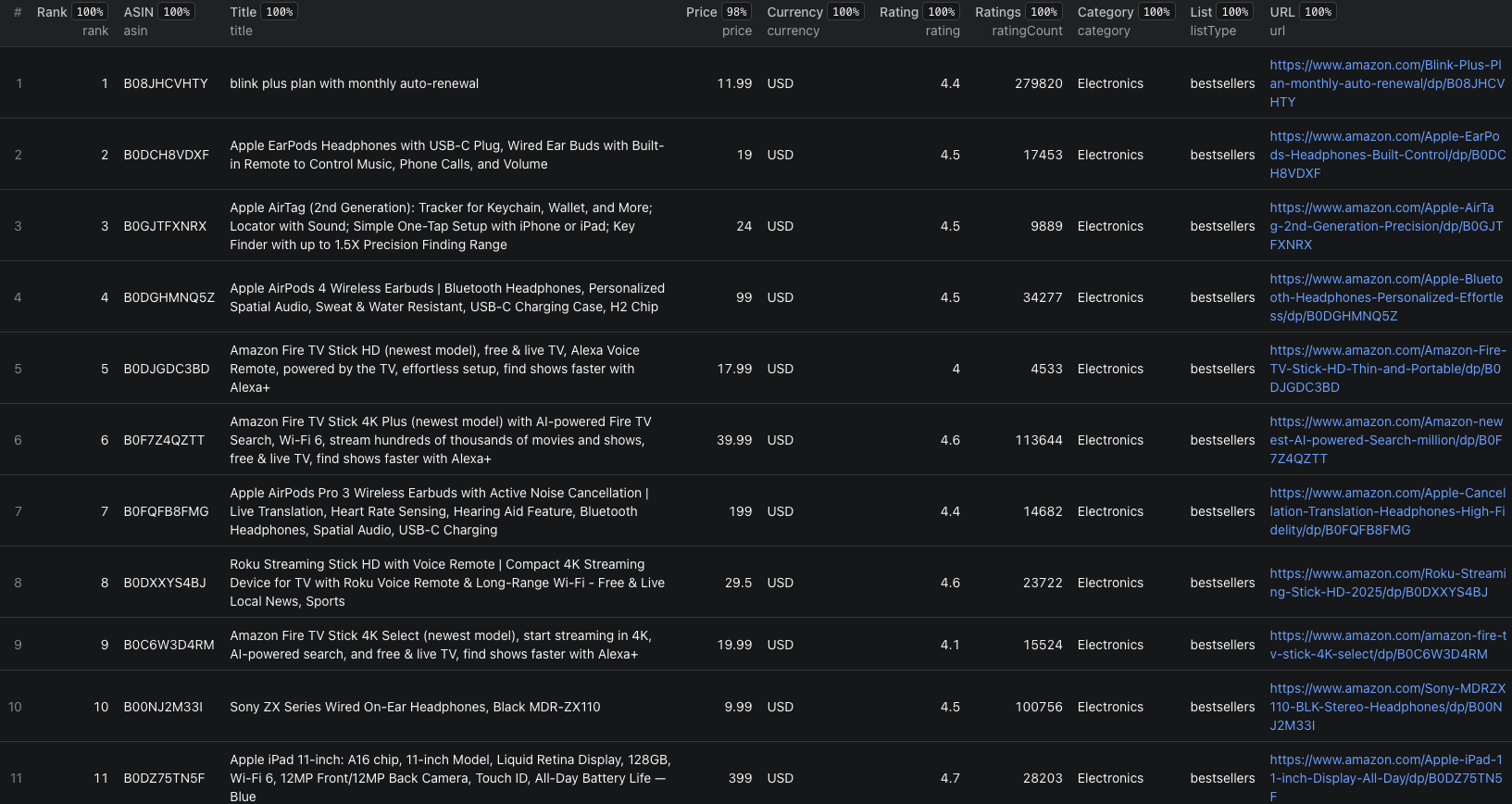
Amazon Best Sellers scraper results

Here are real rows from the Electronics Top 100 on amazon.com:

[
  {
    "rank": 1,
    "asin": "B08JHCVHTY",
    "title": "blink plus plan with monthly auto-renewal",
    "url": "https://www.amazon.com/Blink-Plus-Plan-monthly-auto-renewal/dp/B08JHCVHTY",
    "imageUrl": "https://images-na.ssl-images-amazon.com/images/I/31YHGbJsldL._AC_UL300_SR300,200_.png",
    "price": 11.99,
    "priceText": "$11.99",
    "currency": "USD",
    "rating": 4.4,
    "ratingCount": 279820,
    "listType": "bestsellers",
    "category": "Electronics",
    "categoryUrl": "https://www.amazon.com/gp/bestsellers/electronics",
    "marketplace": "amazon.com",
    "scrapedAt": "2026-09-03T14:48:22.095Z"
  },
  {
    "rank": 2,
    "asin": "B0DCH8VDXF",
    "title": "Apple EarPods Headphones with USB-C Plug, Wired Ear Buds with Built-in Remote to Control Music, Phone Calls, and Volume",
    "url": "https://www.amazon.com/Apple-EarPods-Headphones-Built-Control/dp/B0DCH8VDXF",
    "imageUrl": "https://images-na.ssl-images-amazon.com/images/I/513OSdW4elL._AC_UL300_SR300,200_.jpg",
    "price": 19,
    "priceText": "$19.00",
    "currency": "USD",
    "rating": 4.5,
    "ratingCount": 17453,
    "listType": "bestsellers",
    "category": "Electronics",
    "categoryUrl": "https://www.amazon.com/gp/bestsellers/electronics",
    "marketplace": "amazon.com",
    "scrapedAt": "2026-09-03T14:48:22.095Z"
  },
  {
    "rank": 31,
    "asin": "B00SFSU53G",
    "title": "Mounting Dream Full Motion TV Wall Mount for 32-70 Inch TVs",
    "url": "https://www.amazon.com/Mounting-Dream-Bracket-Articulating-400x400mm/dp/B00SFSU53G",
    "imageUrl": "https://images-na.ssl-images-amazon.com/images/I/61da4dQI-hL._AC_UL300_SR300,200_.jpg",
    "price": 34.99,
    "priceText": "$34.99",
    "currency": "USD",
    "rating": 4.8,
    "ratingCount": 75716,
    "listType": "bestsellers",
    "category": "Electronics",
    "categoryUrl": "https://www.amazon.com/gp/bestsellers/electronics",
    "marketplace": "amazon.com",
    "scrapedAt": "2026-09-03T14:48:22.095Z"
  }
]

Key things to notice:

  • Rank 1 is a subscription, not a gadget — the top of Electronics is a $11.99 monthly plan. Best Sellers ranks by units, so cheap consumables and subscriptions dominate the top slots in many categories. Filter by price if you are looking for physical products
  • ratingCount is the moat indicator — 279,820 ratings at rank 1 and 75,716 at rank 31. In a category like this, review count is the barrier to entry, and the chart shows you exactly how high it is
  • price is numeric, priceText is what Amazon showed — use price for math and priceText for display. The currency code lets you mix marketplaces in one table safely
  • Rank 31 is a row you would not see without scrolling — Amazon loads it lazily. The scraper returns the full 100, not the first 30
  • scrapedAt is your time-series key — join snapshots on asin and categoryUrl, order by scrapedAt, and every product has a rank history
  • asin is the join key to everything else — product details, reviews, Buy Box data and your own catalog all key on it

Try the Amazon Best Sellers Scraper now — no coding required.

Automating Amazon Best Sellers Collection

Scheduled Runs

This is a snapshot dataset, and its value compounds with every snapshot. Schedule the actor daily against a fixed list of category URLs and append every run to one table. Within a month you have rank histories that Amazon itself does not offer; within a quarter you can see seasonality, launch curves and the slow decline of products that stopped being restocked.

Key each row on asin + categoryUrl + scrapedAt and nothing is lost or duplicated.

API Integration

Use the Apify API to trigger runs and collect results programmatically:

  • Load each snapshot into a warehouse and compute rank deltas
  • Alert Slack when a competitor's ASIN enters the Top 10, or yours leaves it
  • Feed new ASINs from New Releases into a product-detail scraper automatically
  • Refresh a category dashboard every morning

Node.js Example

For a complete working example showing how to call this actor from Node.js — including category competitiveness metrics and a New Releases launch feed — see the GitHub repository.

Webhooks

Fire a webhook on run completion so diffing, alerting and dashboard refreshes kick off the moment a new snapshot lands.

Using Amazon Best Sellers Data for Business Intelligence

Rank Velocity

Rank delta per day, per ASIN, is the single most useful derived metric. Rising fast means demand or promotion; falling fast means stockout, a price change or a competitor. Compute it across a whole category and the products worth investigating rank themselves.

Category Competitiveness Index

For each category, take the median ratingCount of the Top 100 and the share of the Top 100 held by the top five brands. High median ratings and high brand concentration mean a locked category; low on both means an open one. Run this across hundreds of subcategories in one job and you have a sourcing map.

Price Band Analysis

Bucket the Top 100 by price and count ranks per bucket. Most categories have one or two bands where ranking is won; products priced outside them rarely climb. Knowing the band before you price a product is worth more than any competitor's listing.

New Release Survival

Track the ASINs that appear on New Releases and record how many days each survives on Best Sellers afterwards. Categories where new products stick around are categories where launches work; categories where they vanish in a week are not.

Cross-Marketplace Gaps

Diff the Top 100 for the same category across marketplaces on asin. Products in the Top 20 on one storefront and absent from another are candidates for expansion — proven demand, no local competition.

Does Amazon Provide an API for This?

Not usefully. Amazon's Product Advertising API is built for affiliates, not for market research.

What's Available

  • Product lookup, search and browse-node data through the Product Advertising API
  • Access requires an approved Associates account that keeps making qualifying sales
  • Request quotas scale with your affiliate revenue, and start very low
  • No endpoint returns the ranked Best Sellers chart as a chart, and no historical data is offered
  • Seller-side APIs cover only your own listings and orders

What That Means

For rank tracking across categories and marketplaces, the API is not an option for most teams. Everything the actor reads is rendered publicly for any visitor: the chart, the ranks, the titles, prices and ratings.

The Amazon Best Sellers Scraper reads that public surface and returns it as one clean row per ranked product, tagged with chart type, category and marketplace.

Pricing — Pay Only for Results

The actor uses Apify's Pay-Per-Event pricing model, so you pay for what you actually get back.

EventWhen it's chargedPrice
Actor startOnce per run$0.00005
product-listingPer ranked product row — rank, ASIN, title, URL, image, price, rating and rating count$0.005

Quick cost estimates:

  • One full Top 100 → $0.50
  • A department plus its ~30 direct subcategories → about $15.50
  • A daily snapshot of 10 categories → roughly $150 per month
  • A weekly snapshot of 200 categories → roughly $400 per month

maxItems caps every run, and you are charged only for rows that actually land in your dataset. New Apify accounts include free monthly usage credits, so you can validate the output before spending anything.

Try the Amazon Best Sellers Scraper

The Amazon Best Sellers Scraper turns Amazon's leaderboards into structured data — the full Top 100 from Best Sellers, New Releases, Most Wished For and Most Gifted, on any marketplace, with rank, ASIN, title, price, rating and review count per product. Paste a category URL, set a depth, and a first run finishes in minutes.

Building a broader Amazon dataset? See how to scrape Amazon storefront products for seller-level data, or work through the e-commerce scraping guide for the wider picture.

Legal and Ethical Considerations

  • Public data only — the actor reads chart pages visible to any visitor. No login, no account data
  • Respect the platform — keep request volumes reasonable and use the data in compliance with Amazon's Conditions of Use and applicable law
  • No personal data — rows contain products, not people, which keeps this dataset well clear of GDPR-style obligations
  • Do not republish wholesale — rank data is fine to analyze and act on; mirroring Amazon's charts as a product is a different matter
  • Respect trademarks and images — product titles and images belong to their brands. Use them for analysis, not as marketing assets

Frequently Asked Questions

Is scraping Amazon Best Sellers legal?

Scraping publicly available data from Amazon is generally legal. Best Sellers rankings, product titles, prices and ratings are visible to anyone browsing Amazon without an account. You should use the data responsibly, comply with applicable regulations, and avoid overloading Amazon's servers with excessive requests.

Does the scraper return the full Top 100?

Yes. Amazon shows the first 30 products on a Best Sellers page and loads the rest as you scroll, then continues on a second page. The scraper fetches all four segments, so every ranked product from 1 to 100 is returned for each category.

Which Amazon marketplaces are supported?

All of them. Paste a category URL from amazon.com, .co.uk, .de, .fr, .it, .es, .ca, .co.jp, .in, .com.au or any other Amazon storefront and the scraper returns prices in the local currency with a marketplace field on every row. Category slugs differ between marketplaces, so copy the URL from the storefront you want.

Can I scrape subcategories automatically?

Yes. Set Subcategory depth to 1 and the scraper walks into every direct subcategory of each URL you provide — typically 10 to 35 per department. Depth 2 goes one level further. One department URL can cover hundreds of categories in a single run.

Does Amazon have an API for Best Sellers?

Amazon's Product Advertising API exposes browse-node and search data, but it requires an approved Associates account with qualifying sales, enforces strict request quotas, and does not return the ranked Best Sellers chart as such. For rank tracking across categories and marketplaces, scraping the public charts is the practical route.

How much does the Amazon Best Sellers Scraper cost?

The actor uses Apify's Pay-Per-Event pricing at $0.005 per ranked product — $5.00 per 1,000 rows. A full Top 100 list costs $0.50, a department with 30 subcategories costs about $15.50, and a weekly snapshot of 200 categories runs roughly $400 per month.

About the Author

This guide was written by Piotr, a software engineer with hands-on experience building and maintaining web scrapers at scale. He develops and maintains a suite of data extraction tools on the Apify platform, helping businesses automate their data collection workflows.

Want this data without writing code?

Every scraper on this site runs on Apify with free starter credits — or get it straight into a spreadsheet with the Google Sheets add-on.

Piotr Vassev

Piotr Vassev

Founder of FalconScrape. Building production-grade web scraping systems and data automation pipelines for businesses worldwide.

Connect on LinkedIn