How to Scrape BBB Business Listings (Step-by-Step Guide)

If you want to scrape BBB business listings for local lead generation, sales prospecting, or market research, this guide covers everything you need. You will learn what data you can extract from the Better Business Bureau, how to automate the process, and how to turn raw business listings into actionable leads.
Why Scrape BBB Business Data?
The Better Business Bureau (BBB) is one of the most trusted business directories in the United States and Canada. It lists hundreds of thousands of businesses across every industry and location, each with detailed profiles including BBB ratings, accreditation status, complaint history, and contact information.
That makes BBB a high-value data source for anyone doing local lead generation or B2B outreach. Unlike generic directories, BBB profiles include trust signals like accreditation, letter-grade ratings, and complaint records — the kind of data that lets you qualify leads before you reach out.
Businesses scrape BBB data for several reasons:
- Local lead generation — build targeted outreach lists of businesses in specific industries and locations
- Sales prospecting — identify SMB companies that match your ideal customer profile based on industry, location, and reputation
- Market research — analyze local business ecosystems, industry density, and competitive landscapes across regions
- CRM enrichment — add BBB ratings, contact details, and accreditation data to your existing business database
- Agency prospecting — find potential clients by targeting businesses in specific categories and geographies
Manually browsing BBB and copying business data into a spreadsheet is impractical at scale. A single search for plumbers in a major city can return hundreds of results across many pages. Automation is the only realistic approach.
What Data You Can Extract from BBB
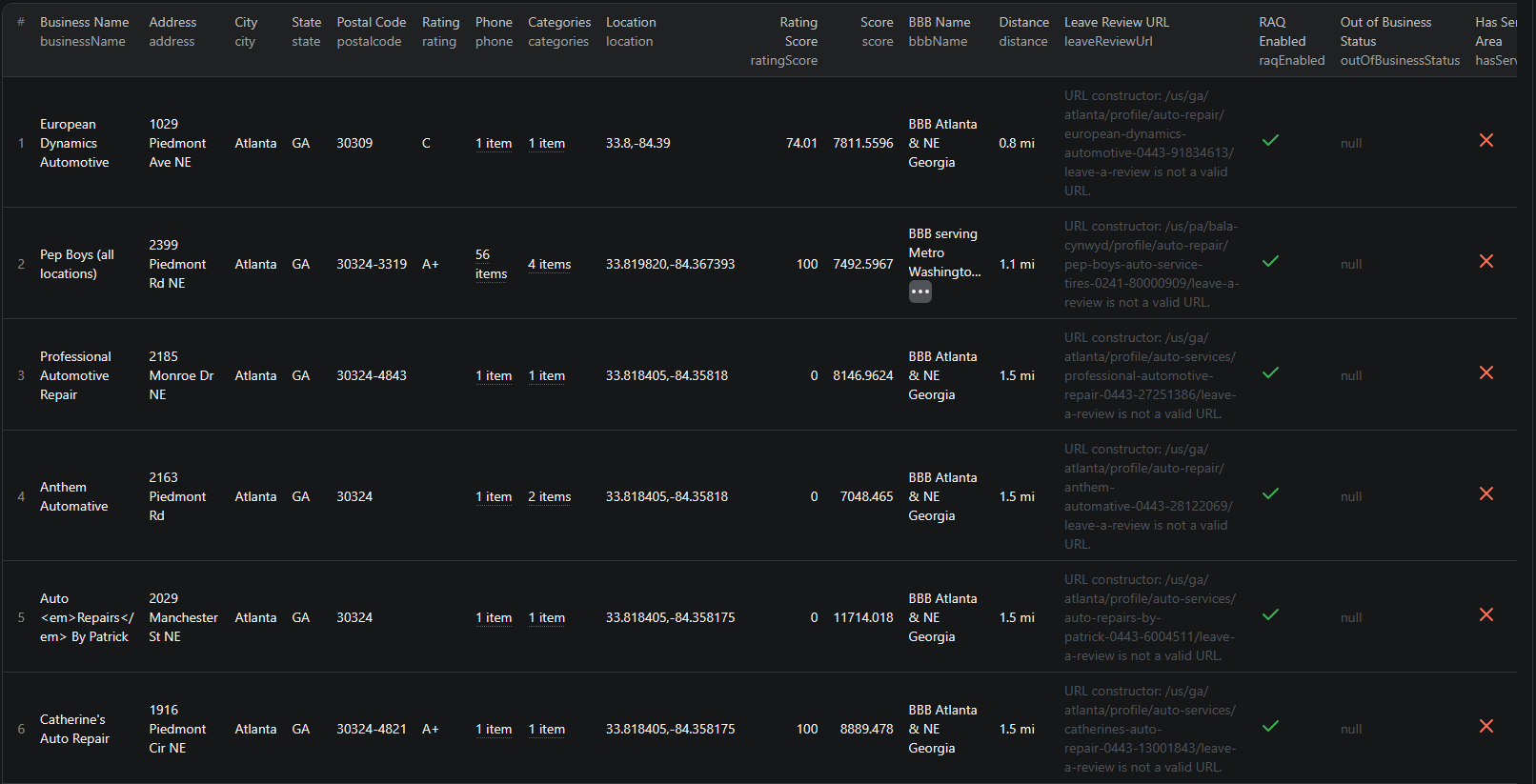
The BBB Advanced Scraper extracts structured data from business search results. Here are the key fields you can collect:
| Field | Description | Example |
|---|---|---|
| Business name | The company's official name | Dale Inc. |
| Address | Street address of the business | 915 6th Avenue South |
| City / State | Location of the business | Nashville, TN |
| Phone number | Business contact phone | (615) 896-8886 |
| BBB rating | Letter grade rating from BBB | A+ |
| Accreditation | Whether the business is BBB-accredited | true |
| Industry | Primary business category | Home Improvement |
| Categories | Full list of service categories | Home Improvement, Windows, Window Installation, Doors |
| GPS coordinates | Latitude and longitude | 36.149925, -86.78923 |
| Distance | Distance from your search location | 0.5 mi |
| Profile URL | Direct link to the BBB profile | bbb.org/us/tn/nashville/profile/home-improvement/dale-inc-0573-10435 |
| Review URL | Link to customer reviews | bbb.org/.../customer-reviews |
This is exactly the kind of data sales teams need for local prospecting — business name, phone number, industry, location, and trust signals — all in one structured export.
Common Use Cases for BBB Data
Local Lead Generation
BBB data is a goldmine for sales teams targeting local businesses. If you sell services or tools to SMBs — marketing agencies, SaaS platforms, insurance, financial services, or home service contractors — BBB gives you a pre-qualified list of businesses complete with contact details and reputation indicators.
Filter by industry and location to build outreach lists for specific markets. A list of A+-rated plumbing companies in Chicago tells you these are established, reputable businesses worth reaching out to.
Sales Prospecting
B2B sales teams use BBB data to identify and prioritize prospects. Accredited businesses with strong ratings are more likely to be established, profitable companies that invest in their reputation — making them better prospects for premium products and services.
Combine BBB data with distance filters to build hyper-local prospect lists for field sales teams and territory-based outreach.
Market Research
Want to know how many roofing companies operate in Texas? Or which industries are most represented in a specific city? BBB data lets you map local business ecosystems with real numbers instead of guesswork.
Analyze industry density, geographic distribution, and accreditation rates across regions to identify underserved markets or competitive hotspots.
CRM Enrichment
Add BBB ratings, accreditation status, and contact details to your existing customer and prospect databases. This enrichment layer helps sales teams prioritize outreach and personalize messaging based on a company's reputation and industry focus.
Competitor Analysis
If you operate a local business, BBB data shows you exactly who your competitors are in your area. Compare ratings, complaint histories, and service categories to understand the competitive landscape and identify opportunities to differentiate.
Challenges of Extracting BBB Data Manually
Before diving into the tutorial, here is why manual collection is impractical:
- Scale — BBB lists thousands of businesses per city and industry. Even a narrow search can return hundreds of results across many pages
- Pagination — results are spread across multiple pages, each requiring a separate page load
- Structured data complexity — each business profile contains nested data like categories, complaint details, and service areas that are tedious to copy accurately
- Time cost — manually extracting 100 businesses with all their data points would take hours. At 1,000+ businesses, it is not feasible
- Freshness — BBB profiles change as businesses get new reviews, complaints, or rating updates. Manual snapshots go stale quickly
- Location-based filtering — BBB results are tied to geographic searches, making it cumbersome to compile data across multiple locations manually
A pre-built, maintained scraper eliminates all of these problems.
Step-by-Step: How to Scrape BBB Business Listings
Here is how to scrape BBB data using the BBB Advanced Scraper on Apify.
Step 1 — Choose an Industry and Location
Start by deciding what kind of businesses you want to extract. The BBB Advanced Scraper supports keyword-based search with location and distance filters. For example:
- Plumbers in Chicago — search keyword "plumbers", location "Chicago, IL"
- Marketing agencies in New York — search keyword "marketing agency", location "New York, NY"
- Roofing companies in Texas — search keyword "roofing", location "Dallas, TX" with a wide distance radius
You can target any industry and location combination that BBB covers.
Step 2 — Configure the Scraper Input
Head to the BBB Advanced Scraper on Apify and configure your run:
- Enter your search keywords to target specific industries or business types
- Set the location and distance filters to define your geographic scope
- Review the settings and click Start to begin the extraction
The scraper handles pagination automatically and applies your filters to return only relevant results.
Step 3 — Run the Scraper
Once started, the scraper will:
- Search BBB with your keywords and location filters
- Extract business data from all matching results
- Parse structured data including ratings, categories, contact details, and accreditation status
- Store results in a clean, structured dataset
Processing time depends on the number of matching businesses. Most runs complete within a few minutes.
Step 4 — Export Your Results
When the scraper finishes, export your data in the format you need:
- JSON — ideal for developers building integrations or data pipelines
- CSV — perfect for spreadsheet analysis in Excel or Google Sheets, or importing into a CRM
- API — access results programmatically via the Apify API for automated workflows
Each record includes the full set of structured fields — business name, address, phone, rating, accreditation, categories, and direct URLs.
Ready to try it? Run the BBB Advanced Scraper on Apify and get your first dataset in minutes.
Example Output (Real Data Preview)

Here is what the actual output looks like from the BBB Advanced Scraper. Each business listing returns a structured JSON object:
{
"businessName": "Dale Inc.",
"address": "915 6th Avenue South",
"city": "Nashville",
"state": "TN",
"postalcode": "37203",
"tobText": "Home Improvement",
"rating": "A+",
"bbbMember": true,
"phone": ["(615) 896-8886"],
"location": "36.149925,-86.78923",
"ratingScore": 100,
"distance": "0.5 mi",
"categories": [
"Home Improvement",
"Windows",
"Window Installation",
"Doors"
],
"reportUrl": "/us/tn/nashville/profile/home-improvement/dale-inc-0573-10435",
"leaveReviewUrl": "/us/tn/nashville/profile/home-improvement/dale-inc-0573-10435/customer-reviews"
}
Key things to notice:
- Contact details — business name, address, phone number, and postal code for direct outreach
- Trust signals — BBB letter rating, numeric rating score, and accreditation status for lead qualification
- Industry data — primary category and full category list for filtering by business type
- Location intelligence — GPS coordinates and distance from your search point for geographic targeting
- Direct URLs — profile and review page links for quick follow-up and deeper research
This structured format makes it straightforward to import into any CRM, database, or analytics tool for sales outreach and market analysis.
Try the BBB Advanced Scraper now — no coding required.
Automating Local Lead Generation
For ongoing prospecting, you do not want to run the scraper manually every time you need fresh leads. The Apify platform supports full automation:
Scheduled Runs
Set up recurring scrapes on any schedule — daily, weekly, or monthly. The scraper runs automatically and stores results in a dataset you can access anytime. Weekly or bi-weekly runs work well for most lead generation use cases, since BBB profiles do not change as rapidly as marketplace listings.
API Integration
Use the Apify API to trigger scraper runs programmatically and retrieve results. This lets you integrate BBB data into your existing sales workflows:
- Feed new business listings directly into your CRM
- Trigger alerts when businesses matching your criteria appear
- Build dashboards that update with fresh local business data
- Connect to tools like Zapier, Make, or custom data pipelines
CRM Enrichment Pipelines
Combine BBB data with data from other directories like Clutch for agency data or LinkedIn job listings for hiring signals. Cross-referencing multiple sources gives you richer company profiles and reduces the chance of outdated information.
Node.js Example
For a complete working example showing how to call this scraper from Node.js, see the GitHub repository.
Webhooks
Configure webhooks to get notified when a scraper run completes. This is useful for event-driven architectures where you want to process new leads as soon as data is available.
Using BBB Data for Market Intelligence
BBB data goes beyond simple lead generation. It is a powerful tool for understanding local business markets.
Industry Analysis
Map industry concentration across cities and regions. Identify which business types are overrepresented or underserved in specific locations. This data informs market entry decisions, franchise planning, and competitive strategy.
Regional Market Trends
Track how BBB listings change over time by running regular scrapes. Monitor new business registrations, rating changes, and accreditation trends to spot growth markets and declining sectors.
Local Business Ecosystems
Analyze the full business landscape in a specific area — how many businesses operate in each category, their average ratings, and accreditation rates. This comprehensive view is valuable for commercial real estate, local marketing agencies, and business development teams.
Does BBB Provide an API?
No. BBB does not offer a public API for accessing its business directory data. There is no official way to programmatically query company listings, ratings, or reviews through an API endpoint.
This means your options for bulk data extraction are:
- Manual browsing — works for a handful of businesses but is not scalable
- Custom scraper — requires development time, ongoing maintenance, and infrastructure to handle search filters and pagination
- Pre-built scraper — a maintained solution like the BBB Advanced Scraper that handles all the technical complexity
For most teams, the pre-built scraper is the most practical choice. It eliminates the development and maintenance burden while giving you reliable, structured data output.
Why Use a BBB Scraper Instead of Building One
Building a custom BBB scraper sounds straightforward until you start dealing with the details:
- Infrastructure complexity — BBB requires proper request handling, proxy management, and structured data parsing. Setting this up from scratch is a significant engineering project.
- Maintenance cost — BBB updates its frontend periodically. Every layout change can break your scraper, requiring immediate fixes to keep your data pipeline running.
- Search and filtering — BBB's search system uses location-based queries with distance calculations. Replicating this filtering logic reliably takes additional development effort.
- Scaling challenges — scraping across multiple industries and locations requires distributed infrastructure, queue management, and monitoring. The operational overhead adds up fast.
- Opportunity cost — every hour spent building and maintaining a scraper is an hour not spent on closing deals or analyzing your lead data
Unless you have very specific requirements that no existing tool can meet, using a maintained scraper lets you focus on what to do with the data instead of how to collect it.
Try the BBB Advanced Scraper
The BBB Advanced Scraper extracts structured data from BBB business listings — company names, addresses, phone numbers, BBB ratings, accreditation status, industry categories, GPS coordinates, and direct profile URLs.
What you get:
- Structured JSON or CSV output ready for CRM import or analysis
- All key business data fields in a single export
- Advanced filtering by keyword, location, and distance
- Scheduled runs for ongoing lead generation
- API access for integration into your sales workflows
- No coding or scraper maintenance required
Start scraping BBB now — your first run takes less than 5 minutes to set up.
If you are building a B2B lead generation pipeline, combine BBB data with other directory scrapers like Clutch for agency data, LinkedIn jobs for hiring signals, or Fiverr for freelancer market intelligence.
Legal and Ethical Considerations
Web scraping occupies a well-established legal space, but responsible practice matters:
- Public data only — the BBB scraper extracts publicly visible business information that anyone can see by visiting BBB.org. No login or authentication is required.
- Respect rate limits — the scraper is designed to make requests at a reasonable pace to avoid overloading BBB's servers
- No spam — use collected data for legitimate business purposes like market research and B2B outreach. Do not use contact information to spam or harass businesses.
- Compliance — if you operate in the EU or California, ensure your data handling complies with GDPR or CCPA. This primarily applies to how you store and process the data, not the collection itself.
BBB profiles are public business listings — they are designed to be found and contacted. Scraping this data for business development is aligned with the directory's intended purpose.
Frequently Asked Questions
Is scraping BBB legal?
Scraping publicly available data from BBB.org is generally legal. The business listings are visible to anyone who visits the site without logging in. However, you should always use the data responsibly, comply with local privacy regulations like GDPR and CCPA, and avoid overloading BBB's servers with excessive requests.
Does BBB provide an API?
BBB does not offer a public API for accessing its business directory data. There is no official way to programmatically query company listings, ratings, or reviews. A web scraper is the practical alternative for extracting structured business data at scale.
What data can be extracted from BBB?
You can extract business names, addresses, cities, states, phone numbers, BBB ratings, accreditation status, industry categories, complaint history, review URLs, GPS coordinates, service areas, and BBB profile URLs. Each listing is returned as a structured JSON object.
How often can business data be updated?
You can schedule scraper runs as often as you need — daily, weekly, or on a custom schedule. For most lead generation use cases, weekly or bi-weekly runs provide a good balance of freshness and efficiency. BBB profiles do not change as rapidly as marketplace listings.
Can I export BBB company lists?
Yes. The BBB Advanced Scraper supports exporting results as JSON, CSV, or via API. CSV exports can be opened directly in Excel or Google Sheets for analysis and CRM import.
How many BBB listings can I scrape at once?
The scraper can process searches across multiple keywords, locations, and distance filters in a single run. There is no hard limit on the number of listings — the run time scales with the volume of data you request.
About the Author
This guide was written by Piotr, a software engineer with hands-on experience building and maintaining web scrapers at scale. He develops and maintains a suite of data extraction tools on the Apify platform, helping businesses automate their data collection workflows.
Need help with your scraping project?
Book a free discovery call and let's scope your project together.
Book a Call