Piotr VassevPiotr Vassev

How to Scrape Bol.com Product Listings (Step-by-Step Guide)

How to Scrape Bol.com Product Listings

If you want to scrape Bol.com product listings — for price monitoring, MAP enforcement, or catalog research across the Benelux — this guide walks you through the entire process. You will learn what data you can extract from Bol.com search, category, and product detail pages, how to automate the collection across both the Dutch and Belgian shops, and how to turn raw listings into actionable e-commerce intelligence for the Netherlands and Belgium.

Why Scrape Bol.com Data?

Bol.com is the largest e-commerce marketplace in the Netherlands and Belgium — the Benelux equivalent of Amazon. With tens of millions of products spanning electronics, books, toys, home goods, beauty, and groceries, and a third-party seller platform ("Verkopen via bol") layered on top of its own retail catalog, Bol.com effectively sets the reference price for consumer goods across the Dutch and Belgian markets.

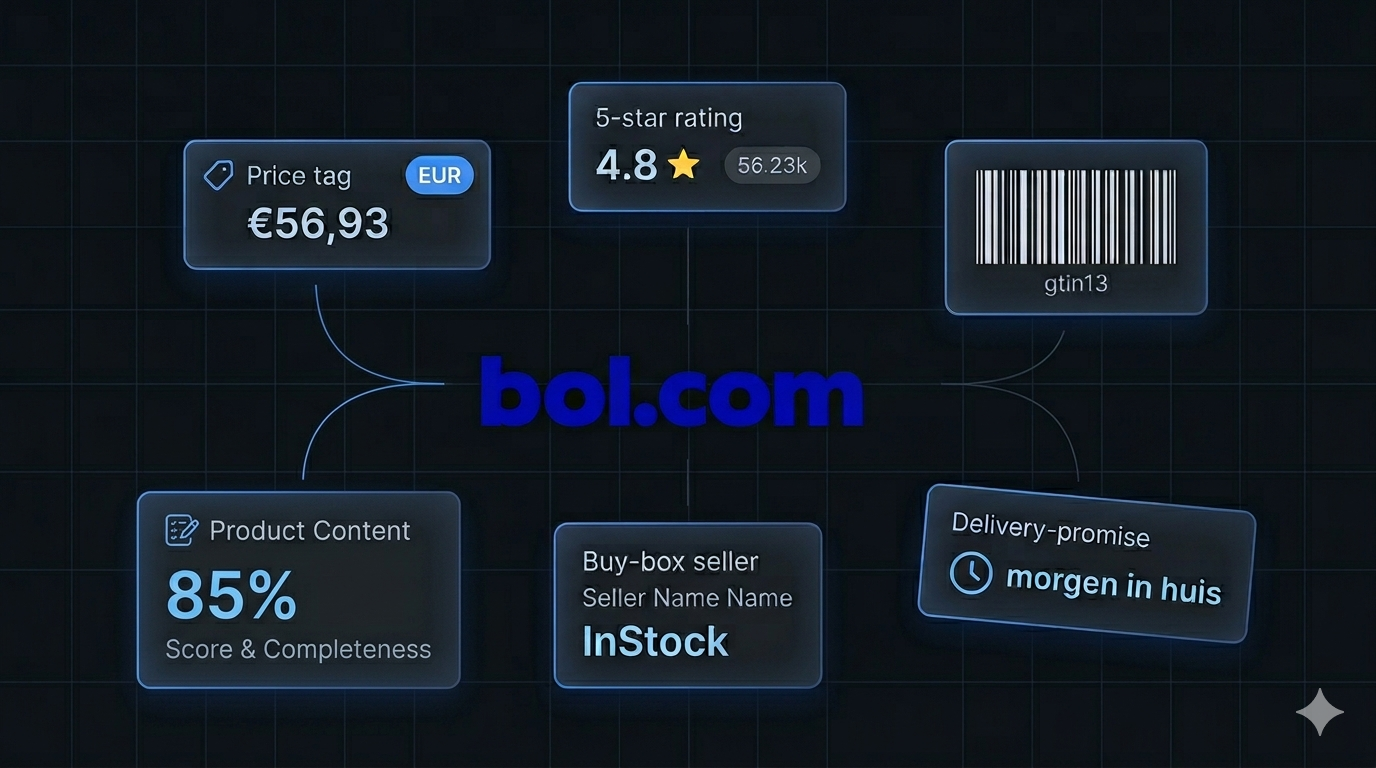
What makes Bol.com uniquely valuable as a data source is the depth of structured information behind every page. Listing cards carry prices, ratings, review counts, brand, seller hints, delivery promises, and sponsored flags. And because Bol.com embeds rich JSON-LD on product detail pages, per-variant enrichment surfaces clean, machine-readable fields — EAN-13 barcodes, color, weight, condition, availability, and the buy-box seller for each variant. For anyone tracking the Benelux retail market — sellers, brands, market researchers, and price-comparison products — Bol.com is one of the highest-signal public datasets in the region.

Businesses and researchers scrape Bol.com data for a range of purposes:

  • Price monitoring — track pricing changes across a competitor's catalog or an entire category in EUR
  • MAP (minimum advertised price) enforcement — monitor whether marketplace sellers are violating brand pricing policies
  • Buy-box & seller tracking — Bol.com's third-party marketplace means multiple sellers compete on the same product; tracking who wins the buy box and at what price is a core KPI
  • Cross-marketplace comparison — pair Bol.com with Amazon or Allegro on the same EAN to spot pricing gaps and arbitrage opportunities across European markets
  • Catalog analysis — explore which brands, price points, and sellers dominate a given category on Bol.com
  • Demand & sentiment signals — use review counts and ratings to identify trending products and emerging Benelux brands
  • Product matching by barcode — the EAN-13 / ISBN-13 (gtin13) field makes it trivial to join Bol.com data to other catalogs and price feeds

Manually copying product details from Bol.com is impractical. A single keyword search can return thousands of cards across hundreds of pages, prices and buy-box sellers change continuously, and Bol.com's Akamai Bot Manager aggressively blocks naïve scraping attempts. Automation is the only realistic approach.

What Data You Can Extract from Bol.com

The Bol.com Listings Scraper has two modes. With includeProductDetails=false (the default), it returns one listing card per product straight from search, category, brand, and series pages. With includeProductDetails=true, it uses those pages only to discover product URLs and returns one rich product detail record per product — including full JSON-LD variants.

Listing card fields (default mode)

FieldDescriptionExample
productIdBol.com's unique product identifier9200000023479731
titleFull product titleHarry Potter - Full Boxset
urlDirect link to the product detail pagebol.com/nl/nl/p/harry-potter-boxset/9200000023479731/
priceCurrent selling price56.93
priceCurrencyISO currency codeEUR
brandNameBrand or author nameJ.K. Rowling
ratingAverage rating4.8
reviewCountTotal review count612
imageUrlPrimary product image URLmedia.s-bol.com/qwD5RRPRo10/550x450.jpg
specsSpec snippets shown on the card["Engels", "Boxset paperback", "3872 pagina's"]
sponsoredWhether the card is a sponsored placementfalse
sustainableBol.com's sustainability flagfalse
sellerHintSeller hint from the card ('bol' or third party)bol
deliveryTextDelivery-promise textVoor 23:59 uur besteld, maandag in huis
domainCountry shop the card came fromnl
sourceUrl / sourcePageThe start URL and page number the card was collected from.../s/?searchtext=harry+potter+boek — page 1
scrapedAtUTC timestamp of the extraction2026-05-16T10:00:00.000Z

Product detail fields (enrichment mode)

When you enable includeProductDetails, each record adds the full JSON-LD ProductGroup: productGroupId, name, rating, reviewCount, lowPrice, highPrice, offerCount, the full category breadcrumb trail, and a variants array. Each variant carries productId, url, name, color, gtin13 (EAN-13 for products, ISBN-13 for books), weightGrams, brandName, price, priceCurrency, condition, availability, and the per-variant sellerName.

This is exactly the kind of structured retail data category managers, pricing analysts, and brand teams need — price ranges, ratings, the full taxonomy path, and barcode-level variant detail — all in a single export.

Common Use Cases for Bol.com Data

Price Monitoring & Buy-Box Tracking

Bol.com is a marketplace — the same product often has several sellers competing on price. Scraping listing cards on a schedule lets you build a real-time view of how prices move across a category, while enrichment mode surfaces the sellerName and price for each variant so you can track who wins the buy box and at what margin.

MAP Enforcement for Benelux Brands

If you are a brand selling on or off Bol.com, the scraper makes MAP enforcement straightforward: pull every listing for your products, match by gtin13, and flag the variants priced below your floor. The per-variant sellerName field tells you exactly which marketplace seller is breaking policy.

Cross-Marketplace Comparison

Pair Bol.com with Amazon and Allegro on the same EAN-13 to spot pricing gaps across European markets. Because Bol.com exposes the barcode in the gtin13 field, joining records across marketplaces is exact rather than fuzzy title-matching.

Catalog & Brand Analysis

Scrape every result for a category, brand, or series URL and analyze the distribution of brands, price points, sellers, and ratings. Bol.com's category breadcrumbs and specs make it easy to slice the data along the dimensions a category manager actually cares about.

Books & Media Intelligence

Bol.com is the dominant book retailer in the Benelux. The scraper handles Bol's Book JSON-LD shape — variants live under workExample, and the ISBN-13 lands in the same gtin13 field as product EANs — so you can track pricing and availability across editions of a title without special-casing media.

NL vs BE Market Comparison

Run the same keyword on both the nl and be shops to compare assortment, pricing, and delivery promises between the Dutch and Belgian markets. The scraper pins the residential proxy to the matching country, so each dataset reflects what a real local shopper sees.

Challenges of Scraping Bol.com Manually

Before jumping into the tutorial, it is worth understanding why building your own Bol.com scraper is harder than it looks:

  • Akamai Bot Manager — Bol.com is gated by Akamai, which blocks datacenter IPs quickly with 403 and 429 responses. Naïve scrapers get blocked within the first few pages
  • Country/proxy coupling — the /nl/ and /be/ shops must be requested from IPs in the matching country. Mixing a /nl/ path with a Belgian IP (or vice versa) trips anti-bot heuristics and skews delivery and pricing data
  • Two different page shapes — listing cards and product detail pages need completely different parsers, and the PDP JSON-LD comes in both a standard ProductGroup shape and a Book/workExample shape
  • Pagination — search and category pages paginate up to Bol's 256-page cap, and a robust walker has to stop cleanly at the end of results
  • Sponsored vs organic — sponsored placements and organic cards coexist on the same page with slightly different markup, and you need to flag them rather than silently mix them in
  • Session rotation on 403/429 — when Akamai throttles a session, you need to rotate to a fresh residential identity, not just retry the same request
  • Frontend churn — Bol.com updates its frontend periodically, breaking custom scrapers that are not actively maintained

For most use cases, a pre-built and maintained scraper that already handles Akamai, country-matched proxies, both page shapes, and session rotation is dramatically more practical than building one in-house.

Step-by-Step: How to Scrape Bol.com Product Listings

Here is how to scrape Bol.com product data using the Bol.com Listings Scraper on Apify.

Step 1 — Choose Your Input Mode

The scraper figures out what to do from what you give it:

  • Search — add keywords under searchQueries (e.g. harry potter boek) or paste search URLs into startUrls
  • Category / Brand / Series — paste /l/, /pb/, or /serie/ URLs into startUrls
  • Product detail — paste /p/.../{id}/ URLs into startUrls

You can mix and match URL types in a single run. At least one of startUrls or searchQueries must be provided.

Step 2 — Pick the Country Shop

Set country to nl (default) or be. This drives both the search URL path and the residential proxy country — they are always forced to match, so you never mix a /nl/ request with a Belgian IP.

Step 3 — (Optional) Turn On Per-Variant Enrichment

Set includeProductDetails: true to switch into PDP-enrichment mode. Listing pages then become URL sources only, and the dataset gets one rich record per product detail page — full JSON-LD with EAN-13 / ISBN-13, color, weight, condition, availability, and per-variant seller. Leave it false for fast, cheap listing cards.

Step 4 — Configure the Scraper Input

Head to the Bol.com Listings Scraper on Apify and configure your run:

  1. Add searchQueries, startUrls, or both
  2. Pick the country shop (nl or be)
  3. Set maxItems to cap the run (default 0 = unlimited)
  4. Optionally enable includeProductDetails
  5. Configure proxyConfigurationresidential proxies are required. Bol.com blocks datacenter IPs, and the country code is pinned to match country automatically

Example input:

{
  "searchQueries": ["harry potter boek"],
  "startUrls": [
    { "url": "https://www.bol.com/nl/nl/l/elektronica/3136/" }
  ],
  "country": "nl",
  "maxItems": 500,
  "includeProductDetails": false,
  "proxyConfiguration": {
    "useApifyProxy": true,
    "apifyProxyGroups": ["RESIDENTIAL"]
  }
}

Step 5 — Run the Scraper

Once started, the scraper will:

  • Convert each searchQuery into a search URL on the selected country shop
  • Walk each listing source through pagination up to Bol's 256-page cap or until maxItems is reached
  • Pin the residential proxy to the matching country and rotate sessions on 403/429
  • Flag sponsored placements and sustainability badges instead of silently mixing them in
  • In enrichment mode, fetch each product detail page and parse both ProductGroup and Book JSON-LD into a clean variants array
  • Stream every item into a typed dataset

Step 6 — Export Your Results

When the scraper finishes, export your data in the format you need:

  • JSON — ideal for developers building integrations or price-monitoring pipelines
  • CSV / Excel — perfect for spreadsheet analysis or importing into BI tools
  • XML / HTML / RSS — useful for feeds and reporting workflows
  • API — access results programmatically via the Apify API for automated runs

Ready to try it? Run the Bol.com Listings Scraper on Apify and get your first dataset in minutes.

Example Output (Real Data Preview)

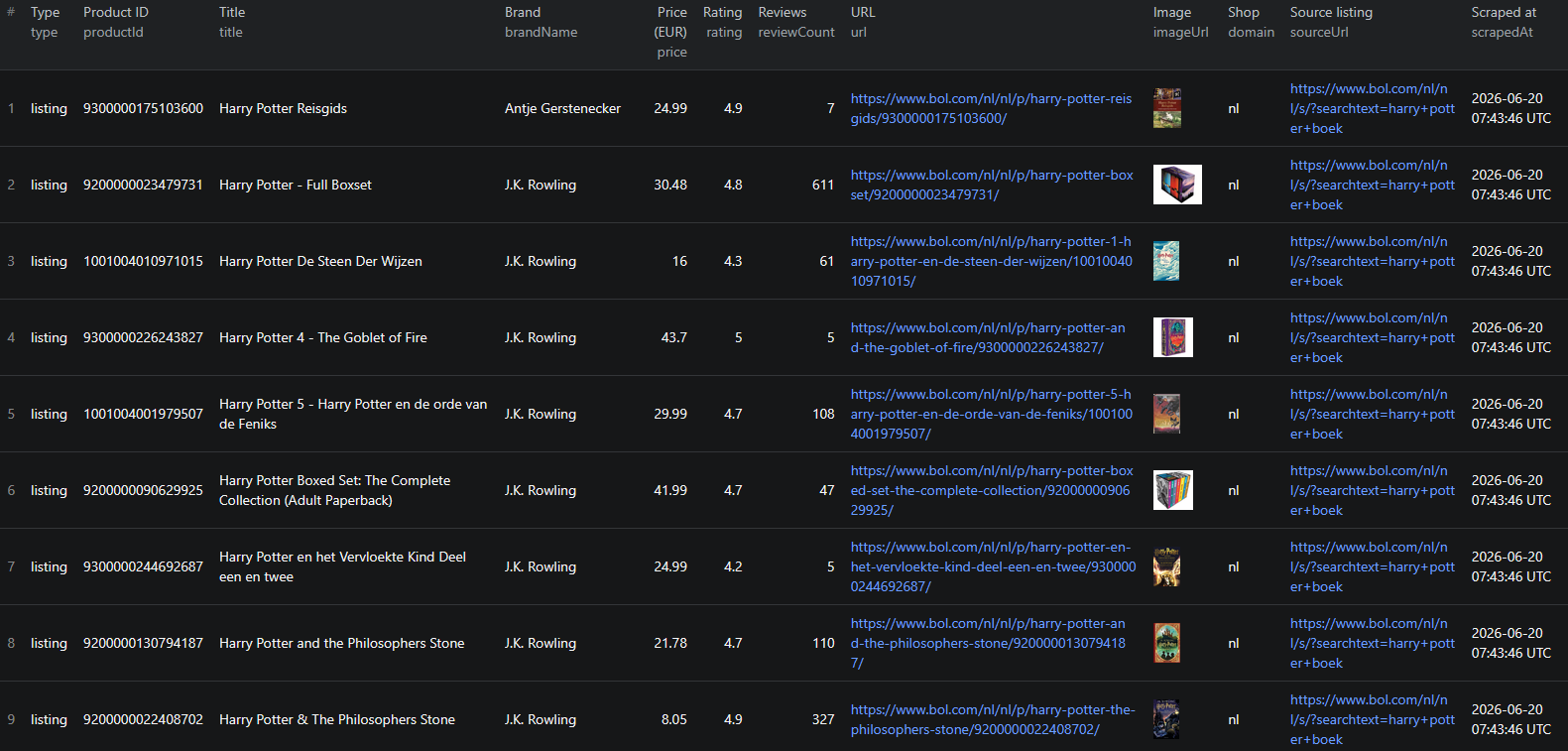
Bol.com scraper results

Here is what the actual output looks like. In default mode, each product is returned as a structured listing card:

{
  "type": "listing",
  "productId": "9200000023479731",
  "url": "https://www.bol.com/nl/nl/p/harry-potter-boxset/9200000023479731/",
  "title": "Harry Potter - Full Boxset",
  "imageUrl": "https://media.s-bol.com/qwD5RRPRo10/550x450.jpg",
  "brandName": "J.K. Rowling",
  "price": 56.93,
  "priceCurrency": "EUR",
  "rating": 4.8,
  "reviewCount": 612,
  "specs": ["Engels", "Boxset paperback", "9781408856772", "3872 pagina's"],
  "sponsored": false,
  "sustainable": false,
  "sellerHint": "bol",
  "deliveryText": "Voor 23:59 uur besteld, maandag in huis",
  "domain": "nl",
  "sourceUrl": "https://www.bol.com/nl/nl/s/?searchtext=harry+potter+boek",
  "sourcePage": 1,
  "scrapedAt": "2026-05-16T10:00:00.000Z"
}

With includeProductDetails=true, each record is a full product with variants:

{
  "type": "product",
  "productGroupId": "9300000219087542",
  "name": "iPhone 17 - verwacht model",
  "rating": 4.8,
  "reviewCount": 32,
  "lowPrice": 815,
  "highPrice": 1218,
  "offerCount": 10,
  "category": [
    { "name": "Elektronica", "position": 1, "url": "https://www.bol.com/nl/nl/l/elektronica/3136/" },
    { "name": "Smartphones", "position": 3, "url": "https://www.bol.com/nl/nl/l/smartphones/4010/" }
  ],
  "variants": [
    {
      "productId": "9300000240171669",
      "url": "https://www.bol.com/nl/nl/p/apple-iphone-17-256gb-sage/9300000240171669/",
      "name": "Apple iPhone 17 - 256GB - Sage",
      "color": "Groen",
      "gtin13": "0195950644388",
      "weightGrams": 337,
      "brandName": "Apple",
      "price": 889,
      "priceCurrency": "EUR",
      "condition": "NewCondition",
      "availability": "InStock",
      "sellerName": "Smartech NL"
    }
  ],
  "domain": "nl",
  "url": "https://www.bol.com/nl/nl/p/apple-iphone-17-256gb-sage/9300000240171669/",
  "scrapedAt": "2026-05-16T10:00:00.000Z"
}

Key things to notice:

  • Barcode-level matchinggtin13 carries the EAN-13 for products and the ISBN-13 for books, so joining Bol.com data to other catalogs is exact, not fuzzy
  • Per-variant seller and price — every variant exposes its own sellerName, price, condition, and availability, which is exactly what buy-box and MAP analysis needs
  • Price ranges out of the boxlowPrice, highPrice, and offerCount summarize the competitive spread on a product without parsing each offer yourself
  • Full taxonomy pathcategory returns the complete breadcrumb trail so you can slice the dataset by department and sub-category without re-scraping the site map
  • Sponsored flag for clean analysissponsored lets you separate paid placements from organic results
  • Provenance fieldsproductId, sourceUrl, sourcePage, and scrapedAt make it easy to deduplicate, audit, and join records over time

Try the Bol.com Listings Scraper now — no coding required.

Automating Bol.com Data Collection

For ongoing price intelligence, you do not want to run the scraper manually every time. The Apify platform supports full automation:

Scheduled Runs

Set up recurring scrapes on any schedule — hourly, daily, or weekly. Hourly runs work well during peak retail events like Black Friday and Sinterklaas; daily runs are sufficient for general catalog tracking; weekly runs make sense for slower-moving categories.

API Integration

Use the Apify API to trigger scraper runs programmatically and retrieve results. This lets you integrate Bol.com data into your existing systems:

  • Feed listings into your Benelux price-monitoring dashboard
  • Trigger alerts when a tracked EAN drops below a target price or loses the buy box
  • Sync Bol.com catalog data into your BI warehouse, partitioned by category breadcrumb
  • Connect to tools like Zapier, Make, or custom data pipelines

Node.js Example

For a complete working example showing how to call this scraper from Node.js, see the GitHub repository.

Webhooks

Configure webhooks to get notified when a scraper run completes. This is useful for event-driven workflows where you want to process new product data as soon as it lands — for example, recomputing buy-box ownership by seller right after a fresh sweep finishes.

Using Bol.com Data for Business Intelligence

The structured data from Bol.com unlocks a range of analytical use cases specific to the Dutch and Belgian markets.

Seller & Buy-Box Share

Group enrichment-mode variants by sellerName to see which third-party sellers win the buy box across a category, and at what price. This is the single most actionable view on a marketplace like Bol.com, where the same product is sold by many competing sellers.

Brand Share by Category

Scrape every result in a category and group by brandName or the category breadcrumb. The result is a clean map of which brands dominate which categories on Bol.com — useful for distribution decisions and identifying categories where direct-to-consumer entry would be most effective.

NL vs BE Price & Assortment Gaps

Run the same keyword on both shops and compare price, offerCount, and deliveryText between the Dutch and Belgian markets. Cross-border price and assortment gaps within the Benelux are a recurring source of arbitrage and merchandising insight.

Review-Velocity Trend Spotting

Track rating and reviewCount over time on the same products to spot which items are gaining momentum. Review velocity on Bol.com is an early indicator for what will trend across the broader Benelux retail market.

Does Bol.com Provide an API?

Bol.com does not offer a general-purpose public catalog API:

What's Available

  • The Bol.com Retailer API lets approved sellers manage their own offers, orders, shipments, and inventory — scoped to your account, not the broader catalog
  • The Marketing / Advertising API exposes campaign and ad data for your own listings
  • The on-site search and product endpoints are private internal APIs that are not documented or supported for third-party use

What an Official API Would Miss

Even where seller APIs exist, they only show your data. The most useful fields for retail intelligence — competitors' live prices, the winning buy-box seller, ratings and review counts across the catalog, sponsored placements, and delivery promises — are visible to every shopper on the public site but are not exposed through any official API. A scraper is the only practical way to capture them at scale.

The Bol.com Listings Scraper gives you a practical alternative — structured catalog data from any search, category, brand, series, or product URL, without seller approval or rate-limit gating.

Why Use a Bol.com Scraper Instead of Building One

Building a custom Bol.com scraper sounds straightforward until you actually start:

  • Akamai Bot Manager — datacenter IPs are banned quickly. You need real residential proxies, session rotation on 403/429, and browser-realistic headers
  • Country/proxy coupling — you have to pin IPs to the country of the shop you're scraping, or anti-bot heuristics trip and your delivery and pricing data is wrong
  • Two page shapes plus a Book special-case — listing cards, ProductGroup PDPs, and Book/workExample PDPs each need their own parser
  • Pagination to the 256-page cap — a robust walker has to stop cleanly at the end of results
  • Sponsored vs organic — paid placements and organic cards coexist with slightly different markup and need to be flagged, not silently mixed
  • Frontend churn — Bol.com updates its frontend periodically, breaking unmaintained scrapers
  • Opportunity cost — every hour spent fixing your scraper is an hour not spent on the pricing analysis the scraper exists to support

Unless you have very specific requirements that no existing tool can meet, a maintained scraper that already handles Akamai, country-matched proxies, both page shapes, and session rotation lets you focus on insights instead of plumbing.

Pricing — Pay Only for Results

The Bol.com Listings Scraper uses Apify's Pay-Per-Event pricing model. You only pay for items that actually land in your dataset — failed pages and retries are free. Which event you're charged for depends on the includeProductDetails flag (the two modes are mutually exclusive within a run).

EventWhen it's chargedPrice per event
product-listingEach listing card pushed when includeProductDetails=false$0.003
item-detailEach PDP record with full JSON-LD variants when includeProductDetails=true$0.010

Quick cost estimates:

  • Keyword search, first 10 pages (~250 cards) → $0.75
  • Full keyword search to Bol's 256-page cap (~6,400 cards) → $19.20
  • 1,000 product-detail records with variants → $10.00
  • 10,000 product-detail records with variants → $100.00

Set maxItems to put a hard cap on the run and your bill before kicking off a large sweep.

Try the Bol.com Listings Scraper

The Bol.com Listings Scraper extracts structured data from Bol.com across search, category, brand, series, and product detail URLs — product IDs, titles, prices, ratings, review counts, brand, sellers, delivery promises, sponsored flags, images, and — with enrichment enabled — full JSON-LD variants with EAN-13 / ISBN-13, color, weight, condition, availability, and per-variant seller.

What you get:

  • Search keywords or any Bol.com search, category, brand, series, or product URL — mix and match in a single run
  • Both the Dutch (nl) and Belgian (be) shops, with the residential proxy pinned to match
  • Two modes: fast listing cards, or rich per-variant product detail records from embedded JSON-LD
  • Structured JSON, CSV, Excel, HTML, XML, or RSS output ready for any downstream tool
  • Akamai Bot Manager bypass via residential proxy, browser-realistic headers, and session rotation on 403/429
  • Barcode-level gtin13 for exact cross-marketplace matching, plus per-variant seller and price for buy-box analysis
  • Pay-Per-Event pricing — $0.003 per listing card, $0.010 per detail record — compute and residential proxy bandwidth included
  • Scheduled runs and API access for ongoing price intelligence
  • No coding, no proxy management, no scraper maintenance

Start scraping Bol.com now — your first run takes less than 5 minutes to set up.

If you are building a European e-commerce data pipeline, combine Bol.com data with other marketplace sources like Amazon for the broadest catalog, Allegro for the Polish market, or Kleinanzeigen for German classifieds.

Legal and Ethical Considerations

Web scraping occupies a well-established legal space, but responsible practice matters:

  • Public data only — the Bol.com scraper extracts publicly visible product information that anyone can see by visiting Bol.com. No login or authentication is required
  • Respect rate limits — the scraper makes requests at a reasonable pace and rotates residential sessions on 403/429 to avoid overloading Bol.com's infrastructure
  • No misuse — use collected data for legitimate business purposes like price monitoring, catalog research, MAP enforcement, and competitive analysis. Do not use the data to create counterfeit listings or mislead buyers
  • Compliance — Bol.com serves the Netherlands and Belgium, both covered by GDPR. Ensure your data handling complies with the relevant regulations. This primarily applies to how you store and process the data, not the collection of public product listings

Bol.com product listings are public marketplace data — they are designed to be found by buyers. Scraping this data for catalog research and price intelligence is aligned with the platform's intended purpose.

Frequently Asked Questions

Is scraping Bol.com legal?

Scraping publicly available data from Bol.com is generally legal. Product listings, prices, ratings, sellers, and delivery promises are visible to anyone who visits the site without logging in. You should always use the data responsibly, comply with applicable privacy regulations like GDPR, and avoid overloading Bol.com's servers with excessive requests.

Does Bol.com provide a public API?

Bol.com offers a Retailer API and a Marketing/Advertising API, but both are scoped to your own seller account — your own offers, orders, and ads — not the broader public catalog. There is no general-purpose public API for browsing prices, ratings, and competitor listings across the marketplace. A web scraper is the practical alternative for live price monitoring, MAP enforcement, and catalog research.

What data can be extracted from Bol.com?

From listing pages you can extract product IDs, titles, prices, currency, ratings, review counts, brand, seller hints, delivery text, sponsored and sustainability flags, image URLs, and spec snippets. With per-variant enrichment enabled you also get full JSON-LD ProductGroup records — EAN-13 / ISBN-13 (gtin13), color, weight in grams, condition, availability, per-variant buy-box seller, category breadcrumbs, and price ranges.

How do I use the Bol.com Listings Scraper?

Provide search keywords under searchQueries, or paste search, category, brand, series, or product detail URLs into startUrls. Pick the country shop (nl or be), optionally turn on includeProductDetails for per-variant enrichment, set maxItems to cap your spend, and run. The scraper handles pagination, Akamai anti-bot bypass, country-matched residential proxies, and dataset assembly automatically. Results export as JSON, CSV, Excel, HTML, XML, or RSS.

Why are residential proxies recommended for Bol.com?

Bol.com is protected by Akamai Bot Manager, which blocks datacenter IPs quickly with 403 and 429 responses. Residential proxies blend in with real consumer traffic and are by far the most reliable way to scrape Bol.com at scale. The scraper pins the residential proxy to the country you select — never mixing /nl/ paths with Belgian IPs — and rotates sessions automatically on 403/429.

How much does the Bol.com Listings Scraper cost?

The actor uses Apify's Pay-Per-Event pricing. Listing cards cost $0.003 each when includeProductDetails is off, and full product-detail records with variants cost $0.010 each when it is on. You only pay for items that actually land in your dataset — failed pages and retries are free. Set maxItems to put a hard cap on the run and your bill.

About the Author

This guide was written by Piotr, a software engineer with hands-on experience building and maintaining web scrapers at scale. He develops and maintains a suite of data extraction tools on the Apify platform, helping businesses automate their data collection workflows.

Need help with your scraping project?

Book a free discovery call and let's scope your project together.

Book a Call
Piotr Vassev

Piotr Vassev

Founder of FalconScrape. Building production-grade web scraping systems and data automation pipelines for businesses worldwide.

Connect on LinkedIn