How to Scrape Flipkart Product Listings (Step-by-Step Guide)

If you want to scrape Flipkart product listings for price monitoring, catalog analysis, or competitor research, this guide walks you through the entire process. You will learn what data you can extract from Flipkart search and category pages, how to automate the collection, and how to turn raw product listings into actionable e-commerce intelligence for the Indian market.
Why Scrape Flipkart Data?
Flipkart is India's largest e-commerce marketplace and the country's most important consumer retail platform after the rise of online shopping in India. Owned by Walmart, it competes head-to-head with Amazon India across virtually every category — smartphones, laptops, fashion, home appliances, groceries, and more — and sets the reference price for millions of SKUs across the Indian internet.
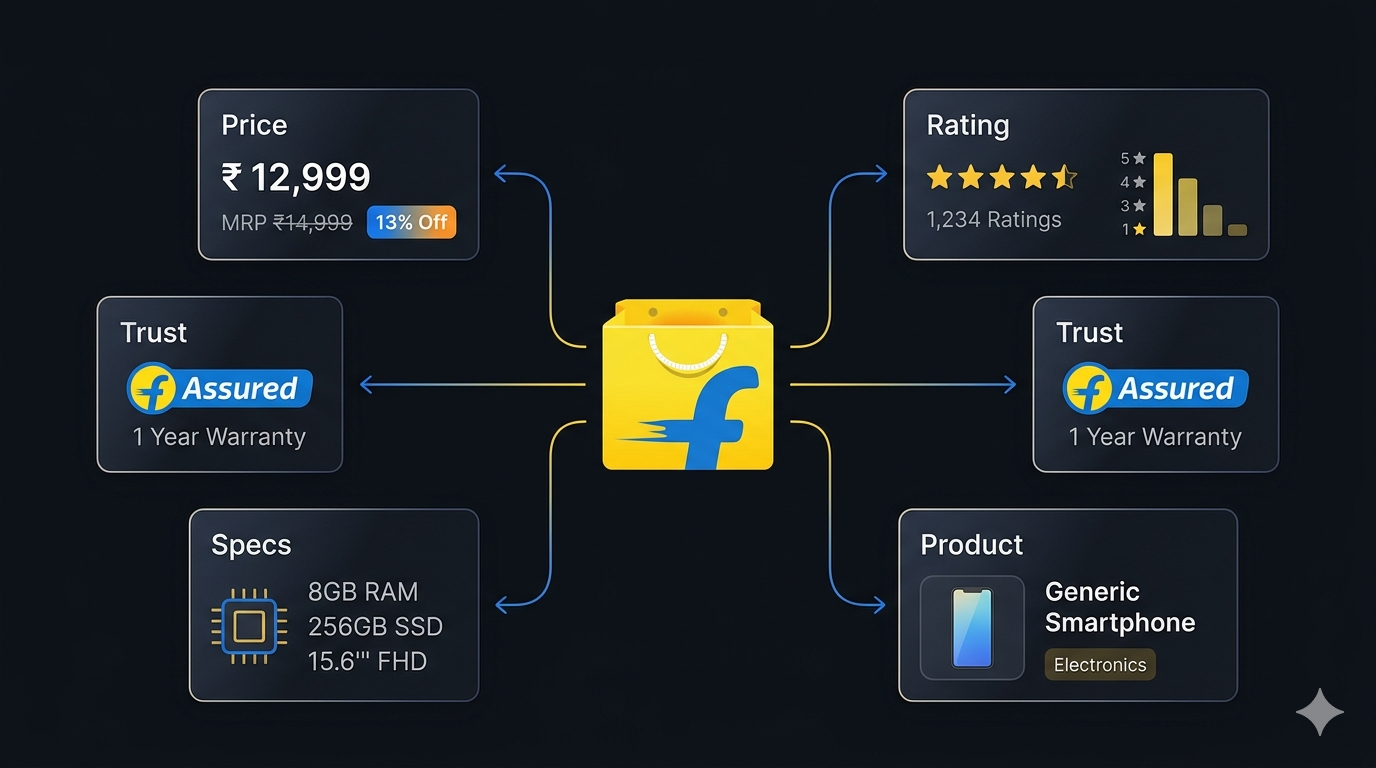
What makes Flipkart particularly valuable as a data source is the depth of structured information on every product page: list price (MRP) and current price, a clean discount percentage, full 1★–5★ rating histograms, key specs, warranty, and Flipkart's own "Assured" trust badge. For anyone tracking the Indian e-commerce market — sellers, brands, researchers, and price-comparison products — Flipkart is one of the highest-signal public datasets available.
Businesses and researchers scrape Flipkart data for a range of purposes:
- Price monitoring — track pricing changes across a competitor's catalog or across an entire category in INR
- Competitor analysis — understand which products competing sellers carry, their MRP, and their effective discount
- Catalog analysis — explore which brands, price points, and key specs dominate a given category on Flipkart
- MAP (minimum advertised price) enforcement — monitor whether marketplace sellers are violating brand pricing policies
- Demand & sentiment signals — use rating histograms and rating counts to identify trending products and emerging brands
- Cross-marketplace comparison — pair Flipkart data with Amazon India to spot pricing gaps and arbitrage opportunities
Manually copying product details from Flipkart category pages is impractical. A single search can return thousands of products across dozens of pages, and prices change continuously throughout the day during Flipkart's frequent sale events. Automation is the only realistic approach.
What Data You Can Extract from Flipkart
The Flipkart Listings Scraper extracts structured product data from any Flipkart search query, category page, or direct product URL. Here are the key fields available:
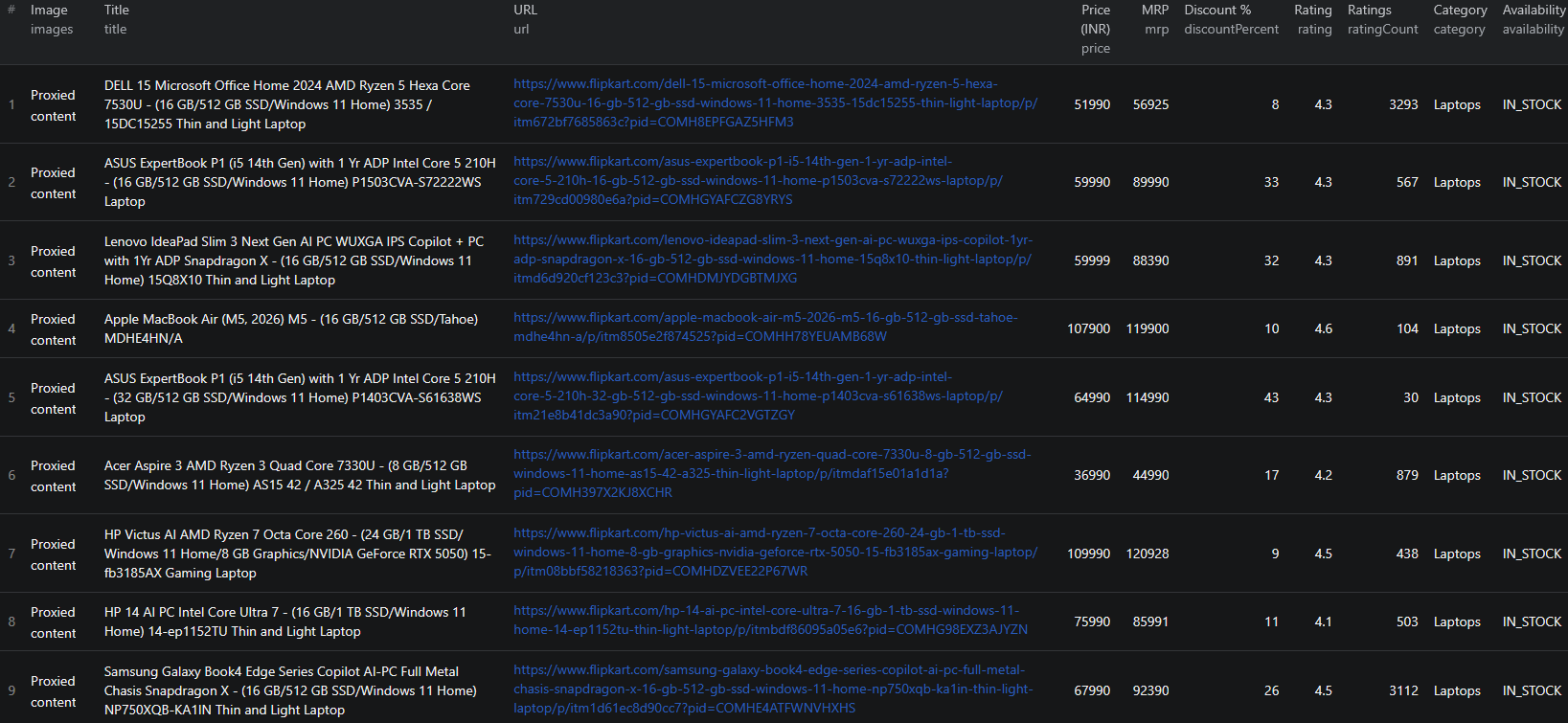
| Field | Description | Example |
|---|---|---|
| Product ID | Flipkart's unique product identifier | COMHDMJYDGBTMJXG |
| Title | Full product title | Lenovo IdeaPad Slim 3 Next Gen AI PC Snapdragon X |
| Subtitle | Secondary product descriptor | 15.3 Inch, Luna Grey, 1.55 Kg, With MS Office |
| Price | Current selling price in INR | 59999 |
| MRP | Maximum retail price (list price) | 88390 |
| Discount % | Discount off MRP | 32 |
| Rating | Average customer rating (0–5) | 4.3 |
| Rating count | Total number of ratings | 891 |
| Rating histogram | Full 1★–5★ distribution | 1★: 51, 2★: 27, 3★: 44, 4★: 233, 5★: 536 |
| Key specs | Top product bullets from the listing | 16 GB LPDDR5X RAM, 512 GB SSD |
| Images | Resolved 832×832 product image URLs | rukmini1.flixcart.com/... |
| Category & subcategory | Flipkart's taxonomy for the product | Laptops > Laptop |
| Availability | Stock state | IN_STOCK |
| Flipkart Assured | Whether the product carries the Assured badge | true |
| Warranty | Manufacturer or seller warranty text | 1 Year Onsite Warranty |
| URL | Direct link to the product page | flipkart.com/.../p/itm... |
With includeDetails: true, each record additionally includes sku, brand, color, full description, fullImages (high-resolution gallery), sampleReviews (top 3), specifications (grouped by section like "General" and "Display Features"), and product highlights.
Common Use Cases for Flipkart Data
Price Monitoring & Discount Tracking
Flipkart's pricing is unusually transparent — every listing carries both the MRP and the current selling price, plus a clean discount percentage. Scraping these fields on a schedule lets you build a real-time view of how aggressively competitors are discounting, when flash sales kick in, and how prices respond to events like Big Billion Days.
Catalog & Assortment Analysis
A single Flipkart category URL (e.g. /mobiles/pr?sid=tyy,4io) covers thousands of SKUs spanning every major brand. Scraping the category lets you map the full assortment by brand, price band, and key spec — and identify gaps in your own catalog relative to what sells on India's largest marketplace.
MAP Enforcement for Indian Brands
If you are a brand selling on or off Flipkart, the scraper makes MAP enforcement straightforward: pull every listing for your products, check the current price against your floor, and flag the violating sellers. The seller-aware enrichment in detail mode makes it easy to tie violations back to specific marketplace sellers.
Demand Signals via Ratings & Histograms
Unlike a single "average rating" number, Flipkart's full 1★–5★ rating histogram reveals the shape of buyer sentiment — bimodal ratings (lots of 1s and 5s) usually signal quality control issues, while monotonically rising distributions signal a healthy product. Combined with rating counts, the histogram is one of the strongest demand signals on the Indian internet.
Cross-Marketplace Comparison
Pair Flipkart data with Amazon India or other Indian marketplaces on the same SKUs to spot pricing gaps. Many sellers list slightly different bundles or warranty terms on each platform — surfacing those differences is straightforward when the data is structured.
Challenges of Scraping Flipkart Manually
Before jumping into the tutorial, it is worth understanding why building your own Flipkart scraper is harder than it looks:
- Sponsored vs. organic results — Flipkart injects sponsored placements into search results that duplicate organic listings. Naïve scrapers double-count products
- Templated CDN URLs — Flipkart's image URLs contain placeholders like
{@width}/{@height}/{@quality}that have to be resolved before they are usable - Pagination quirks — search and category pages use
<link rel="next">tags rather than simple page numbers, and the structure differs across categories - Dual page types — Flipkart serves both standalone product detail pages (PDPs) and bundled listing layouts (multi-variant pages, "more buying choices" pages) that require different parsers
- Rich but irregular spec data — specifications are grouped into sections that vary by category, and the key specs shown on the listing card differ from the full spec table on the PDP
- Anti-bot protection — Flipkart applies rate limits and bot detection that can return empty pages or block aggressive scrapers
- Maintenance burden — Flipkart's frontend updates regularly, breaking custom scrapers that are not actively maintained
For most use cases, a pre-built and maintained scraper is dramatically more practical than building one in-house.
Step-by-Step: How to Scrape Flipkart Product Listings
Here is how to scrape Flipkart product data using the Flipkart Listings Scraper on Apify.
Step 1 — Choose Your Input Mode
The scraper supports three input modes, and you can mix and match them in a single run:
- Search queries — plain-text terms like
laptoporiphone 15. Each becomes a Flipkart search URL behind the scenes - Category/browse URLs — any Flipkart category or browse URL (e.g.
https://www.flipkart.com/mobiles/pr?sid=tyy,4io) - Direct product URLs — point at specific products (
https://www.flipkart.com/.../p/itm...) to extract single SKUs without crawling any listings. Direct product URLs always return full detail-mode data
Most users start with broad search queries or a category URL to discover products, then re-scrape specific URLs later when they need full PDP detail.
Step 2 — Configure the Scraper Input
Head to the Flipkart Listings Scraper on Apify and configure your run:
- Add your
searchQueries,categoryUrls, orproductUrls(at least one is required) - Set
maxItemsPerInputto cap the number of products per query/URL (default50; set0for unlimited) - Toggle
includeDetails:- Off (listing mode) — fast and cheap, returns 16+ fields per product from the listing pages
- On (detail mode) — visits each product page for brand, full description, sample reviews, full image gallery, and the complete spec table
- Leave the
proxyConfigurationon its default — Apify Proxy works well for moderate volume; switch to residential above ~5,000 products per run
Example input:
{
"searchQueries": ["laptop", "iphone 15"],
"categoryUrls": ["https://www.flipkart.com/mobiles/pr?sid=tyy,4io"],
"productUrls": [],
"maxItemsPerInput": 100,
"includeDetails": false,
"proxyConfiguration": { "useApifyProxy": true }
}
Step 3 — Run the Scraper
Once started, the scraper will:
- Build search URLs from your queries and fetch each listing page
- Follow
<link rel="next">automatically to walk pagination untilmaxItemsPerInputis reached - Resolve Flipkart's templated CDN image URLs to ready-to-use 832×832 JPEGs
- Deduplicate sponsored placements that mirror organic listings by
productId - Optionally fetch each PDP when
includeDetails: trueand merge the extra fields into the record - Store everything in a clean, typed dataset
The actor uses pure HTTP scraping — no headless browser — and handles roughly 24 products per request. A 2,000-product run typically completes in around 3 minutes.
Step 4 — Export Your Results
When the scraper finishes, export your data in the format you need:
- JSON — ideal for developers building integrations or price-monitoring pipelines
- CSV / Excel — perfect for spreadsheet analysis or importing into BI tools
- XML / HTML / RSS — useful for feeds and reporting workflows
- API — access results programmatically via the Apify API for automated runs
Ready to try it? Run the Flipkart Listings Scraper on Apify and get your first dataset in minutes.
Example Output (Real Data Preview)

Here is what the actual output looks like in listing mode (includeDetails: false). Each product is returned as a structured JSON object:
{
"productId": "COMHDMJYDGBTMJXG",
"listingId": "LSTCOMHDMJYDGBTMJXG112MJM",
"title": "Lenovo IdeaPad Slim 3 Next Gen AI PC Snapdragon X",
"subtitle": "15.3 Inch, Luna Grey, 1.55 Kg, With MS Office",
"url": "https://www.flipkart.com/lenovo-ideapad-slim-3/p/itmd6d920cf123c3?pid=COMHDMJYDGBTMJXG",
"price": 59999,
"mrp": 88390,
"discountPercent": 32,
"currency": "INR",
"rating": 4.3,
"ratingCount": 891,
"reviewCount": 85,
"ratingHistogram": { "1": 51, "2": 27, "3": 44, "4": 233, "5": 536 },
"keySpecs": [
"Snapdragon X Processor",
"16 GB LPDDR5X RAM",
"Windows 11 Home Operating System",
"512 GB SSD",
"38.86 cm (15.3 Inch) Display",
"Office Home 2024"
],
"images": [
"https://rukmini1.flixcart.com/image/832/832/xif0q/computer/d/z/z/-original-imahgfdfx3hhguyc.jpeg?q=70"
],
"category": "Laptops",
"subCategory": "Laptop",
"availability": "IN_STOCK",
"isFlipkartAssured": true,
"isSponsored": false,
"warranty": "1 Year Onsite Warranty",
"sourceQuery": "laptop",
"scrapedAt": "2026-05-10T12:00:00.000Z"
}
Key things to notice:
- MRP and discount as first-class data —
mrp,price, anddiscountPercentare extracted as separate numeric fields, ready for analysis - Full rating histogram — the 1★–5★ distribution is structured as a key-value object, not a single average, so you can analyze the shape of buyer sentiment
- Key specs as a list — the top spec bullets from the listing card are returned as an array, ready for filtering or categorization
- Resolved image URLs — Flipkart's templated
{@width}/{@height}/{@quality}placeholders are pre-resolved, so the URLs work in any downstream tool - Provenance fields —
sourceQuery,isSponsored,productId, andscrapedAtmake it easy to deduplicate and audit your dataset
With includeDetails: true, you additionally get sku, brand, color, full description, fullImages (high-resolution gallery), sampleReviews (top 3), specifications (grouped by section, e.g., "General", "Display Features"), and highlights — the same payload you would see by manually opening the product page.
Try the Flipkart Listings Scraper now — no coding required.
Automating Flipkart Data Collection
For ongoing competitive intelligence, you do not want to run the scraper manually every time. The Apify platform supports full automation:
Scheduled Runs
Set up recurring scrapes on any schedule — hourly, daily, or weekly. The scraper runs automatically and stores results in a dataset you can access anytime. Hourly runs work well during Flipkart's frequent sale events when prices move quickly; daily runs are sufficient for general catalog tracking.
API Integration
Use the Apify API to trigger scraper runs programmatically and retrieve results. This lets you integrate Flipkart data into your existing systems:
- Feed listings into your price-monitoring dashboard
- Trigger alerts when a tracked SKU drops below a target price
- Sync Flipkart catalog data into your BI warehouse
- Connect to tools like Zapier, Make, or custom data pipelines
Node.js Example
For a complete working example showing how to call this scraper from Node.js, see the GitHub repository.
Webhooks
Configure webhooks to get notified when a scraper run completes. This is useful for event-driven workflows where you want to process new product data as soon as it lands.
Using Flipkart Data for Business Intelligence
The structured data from Flipkart unlocks a range of analytical use cases.
Price Intelligence
Track price movements across competitors, identify the cadence of discounts, and quantify how often specific SKUs hit their MRP vs. their floor. With both price and mrp returned as numeric fields, building a time-series view of discount intensity is trivial.
Rating-Histogram Driven Quality Signals
A 4.3-star product with 891 ratings looks great as an average — but if the histogram is {"1": 200, "2": 80, "5": 600}, the product likely has a real defect rate. Scraping the full histogram gives you an honest read on product quality that the headline average hides.
Brand & Category Mapping
Scrape every result in a Flipkart category and group by brand, price band, and rating. The result is a clean map of which brands own which price points in the Indian market — useful for competitive positioning, distribution decisions, and brand-equity tracking.
Flipkart Assured & Warranty Analysis
The isFlipkartAssured flag and the structured warranty text are surprisingly useful for assortment analysis. Assured products typically convert better and are trusted more by buyers, so understanding the Assured share within a category is a strong proxy for the maturity of the marketplace in that segment.
Does Flipkart Provide an API?
Flipkart does not offer a public catalog API. The closest official channel is the Flipkart Affiliate API, which has serious limitations for data collection:
What's Available
- The Affiliate API is restricted to approved partners in Flipkart's affiliate program
- It is designed for affiliate marketing rather than catalog research
- Coverage is limited — only featured categories and a subset of products are exposed
- The rating histograms, key specs, and Assured tags central to catalog analysis are not available
What the API Misses
The official affiliate channel omits exactly the fields that make Flipkart data useful: the discount-percent decomposition, the full 1★–5★ rating distribution, the structured spec table, and direct product-detail enrichment for arbitrary SKUs. Flipkart Marketplace data — what competing sellers list and at what price — is also out of scope.
The Flipkart Listings Scraper gives you a practical alternative — structured catalog data from any search query, category URL, or direct product URL, without partner approval or rate-limit gating.
Why Use a Flipkart Scraper Instead of Building One
Building a custom Flipkart scraper sounds straightforward until you actually start:
- Sponsored-vs-organic deduplication — Flipkart injects sponsored cards that duplicate organic listings. Naïve scrapers double-count
- Templated CDN URL resolution — image URLs contain
{@width}/{@height}/{@quality}placeholders that have to be expanded before they are usable - Pagination via
<link rel="next">— not simple page-number pagination; the link relation tag has to be parsed correctly - Inconsistent PDP layouts — Flipkart serves multiple product-page templates depending on category, and each needs its own parser
- Anti-bot defenses — request fingerprinting, rate limits, and occasional CAPTCHAs require active session management
- Frontend churn — Flipkart redesigns parts of its site multiple times per year, and every update breaks unmaintained scrapers
- Opportunity cost — every hour spent fixing your scraper is an hour not spent on the analysis the scraper exists to support
Unless you have very specific requirements that no existing tool can meet, a maintained scraper lets you focus on insights instead of plumbing.
Pricing — Pay Only for Results
The Flipkart Listings Scraper uses Apify's Pay-Per-Event pricing model. You only pay for products that actually land in your dataset — failed pages and retries are free.
| Event | When it's charged | Price per event | Per 1,000 products |
|---|---|---|---|
product-listing | Each product extracted from a listing page (includeDetails: false) | $0.001 | $1.00 |
item-detail | Each product enriched with full PDP details (includeDetails: true or any direct productUrls input) | $0.004 | $4.00 |
Quick cost estimates:
- 1,000 listing-only products → $1.00
- 1,000 enriched products → $4.00
- 500 listings + 500 enriched (mixed run) → $0.50 + $2.00 = $2.50
For most price-monitoring and catalog use cases, the listing-only mode already returns 16+ fields per product and is the better value. Detail mode is best reserved for products where you need the full description, sample reviews, image gallery, or grouped specifications.
Try the Flipkart Listings Scraper
The Flipkart Listings Scraper extracts structured data from Flipkart product listings — product IDs, titles, prices, MRP, discount %, ratings, full rating histograms, key specs, images, availability, warranty, and the Flipkart Assured flag. Toggle detail mode for the full PDP payload.
What you get:
- Structured JSON, CSV, Excel, HTML, XML, or RSS output ready for any downstream tool
- Three input modes — search queries, category URLs, and direct product URLs — mix and match in a single run
- Resolved CDN image URLs and automatic sponsored/organic deduplication
- Pay-Per-Event pricing:
$1.00 / 1,000listing rows,$4.00 / 1,000enriched rows — you only pay for results - Built-in pagination, retries, and Apify Proxy support
- Scheduled runs and API access for ongoing intelligence
- No coding, no proxy management, no scraper maintenance
Start scraping Flipkart now — your first run takes less than 5 minutes to set up.
If you are building an e-commerce data pipeline, combine Flipkart data with other marketplace sources like Walmart for North American retail, DHgate for cross-border wholesale, or 1688.com for the upstream factory-direct view.
Legal and Ethical Considerations
Web scraping occupies a well-established legal space, but responsible practice matters:
- Public data only — the Flipkart scraper extracts publicly visible product information that anyone can see by visiting Flipkart.com. No login or authentication is required
- Respect rate limits — the scraper makes requests at a reasonable pace and rotates sessions to avoid overloading Flipkart's servers
- No misuse — use collected data for legitimate business purposes like price monitoring, catalog research, and competitive analysis. Do not use the data to create counterfeit listings or mislead buyers
- Compliance — if you operate in the EU, California, or under India's DPDP Act, ensure your data handling complies with the relevant regulations. This primarily applies to how you store and process the data, not the collection itself
Flipkart product listings are public marketplace data — they are designed to be found by buyers. Scraping this data for catalog research and price intelligence is aligned with the platform's intended purpose.
Frequently Asked Questions
Is scraping Flipkart legal?
Scraping publicly available data from Flipkart is generally legal. Product listings are visible to anyone who visits the site without logging in. You should always use the data responsibly, comply with applicable privacy regulations, and avoid overloading Flipkart's servers with excessive requests.
Does Flipkart provide a public API?
Flipkart offers the Flipkart Affiliate API, but it is limited to approved affiliate partners and does not provide the full catalog depth or freshness available on the public site. There is no general-purpose product listing API. A web scraper is the practical alternative for catalog research, price monitoring, and competitor analysis.
What data can be extracted from Flipkart?
You can extract product titles, current price, MRP, discount percentage, ratings, rating count, full 1★–5★ rating histogram, key specs, category, availability, warranty, Flipkart Assured tag, and product images. With detail enrichment turned on, you also get brand, full description, sample reviews, the complete image gallery, and the full specification table.
How do I use the Flipkart Scraper?
Provide search queries, Flipkart category or browse URLs, direct product URLs — or any combination. The scraper handles pagination, deduplication, and image-URL resolution automatically, and returns all matching products as structured JSON, CSV, Excel, HTML, XML, or RSS.
Can I scrape Flipkart by category or by direct product URL?
Yes. The scraper supports three input modes — plain-text search queries, Flipkart category/browse URLs (e.g. /mobiles/pr?sid=tyy,4io), and direct product URLs. You can mix and match all three in a single run. Direct product URLs always return full detail-mode data.
How much does the Flipkart Listings Scraper cost?
The actor uses Apify's Pay-Per-Event pricing. Listing-only products cost $0.001 each ($1.00 per 1,000), and detail-enriched products cost $0.004 each ($4.00 per 1,000). You only pay for products that actually land in your dataset — failed pages and retries are free.
About the Author
This guide was written by Piotr, a software engineer with hands-on experience building and maintaining web scrapers at scale. He develops and maintains a suite of data extraction tools on the Apify platform, helping businesses automate their data collection workflows.
Need help with your scraping project?
Book a free discovery call and let's scope your project together.
Book a Call