Piotr VassevPiotr Vassev

How to Scrape Instacart Grocery Prices Across 70+ Retailers

How to Scrape Instacart Grocery Prices

If you want to scrape Instacart for grocery price monitoring, cross-retailer comparison, or CPG market research, this guide walks you through the entire process. You will learn what data you can extract from Instacart product pages, retailer storefronts, and cross-retailer search, and how to turn it into a grocery price feed spanning dozens of US chains at once.

Why Scrape Instacart Data?

Instacart is not a grocery store — it is the aggregation layer sitting on top of the US grocery industry. More than 70 retailers list their catalogs there: Costco, Safeway, Walmart, Target, Kroger, Publix, Sprouts, Wegmans, Whole Foods, and dozens of regional chains. Each one exposes product names, brands, sizes, images, prices, sale prices, and availability behind a single consistent URL structure.

That aggregation is the whole point. Scraping Kroger, Publix, and Costco individually means writing and maintaining three separate scrapers against three unrelated frontends, each with its own anti-bot posture. Scraping Instacart means writing one — and getting all three, plus 70 more, in the same schema. For anyone doing grocery price intelligence, that is a step change in how much of the market you can cover per unit of engineering effort.

Businesses and researchers scrape Instacart data for a range of purposes:

  • Cross-retailer price comparison — see what the same SKU costs at Costco vs. Safeway vs. Target in one dataset, without normalizing three different schemas
  • CPG brand monitoring — track how your products are priced, sized, and merchandised across every retailer that carries them
  • Promotion and discount tracking — the fullPriceString field exposes the pre-discount price, so you can measure real promo depth rather than inferring it
  • Availability and out-of-stock monitoring — catch stockouts across a retailer network before they show up in sales data
  • Private-label analysis — compare Kirkland Signature, Great Value, and Good & Gather against national brands on price per size
  • Dietary and attribute research — Instacart tags products with dietary attributes, making it straightforward to size categories like gluten-free, organic, or keto

Manual collection is hopeless here. A single retailer storefront carries thousands of SKUs, prices move weekly with promo cycles, and there are 70+ retailers. Automation is the only realistic approach.

What Data You Can Extract from Instacart

The Grocery Product Scraper for Instacart returns one record per product, with an identical shape regardless of whether the product came from a product page, a storefront, or a search result. Here are the key fields:

FieldDescriptionExample
Product IDInstacart's product identifier20630136
Retailer slugWhich retailer this price belongs to (null on unscoped search results)walmart
NameProduct name as listedGreat Value 2% Reduced Fat Milk
BrandBrand nameGreat Value
SizePack size or unit128 oz
CategoryInstacart's category for the productPlain Milk
PriceCurrent numeric price3.48
Price stringPrice exactly as displayed$3.48
Full price stringPre-discount price when the item is on sale$11.94
CurrencyISO currency codeUSD
AvailabilityStock stateInStock
Dietary attributesTags such as organic, gluten-free, vegan["Organic"]
ImageProduct image URLd2lnr5mha7bycj.cloudfront.net/...
SourceWhere the record came frompdp / storefront / search
Postal codeLocation context for the price94105
Scraped atISO timestamp of extraction2026-05-23T06:26:03.293Z

The source field is more useful than it looks. Because storefront and search records are cheaper to collect but shallower than product pages, knowing the provenance of each row lets you decide which records to trust for which analysis — and which ones to re-scrape at full depth.

Common Use Cases for Instacart Data

Cross-Retailer Price Comparison

This is the flagship use case, and it is one Instacart is uniquely suited to. Run a cross-retailer search for a product term and you get the same item priced across several chains in one pass, already normalized into a single schema. Doing that from the retailers' own sites would mean maintaining a parser per chain and reconciling incompatible product identifiers.

CPG Brand and Distribution Monitoring

If you are a brand, Instacart tells you where you are actually on shelf. Sweep the storefronts of every retailer that should carry your SKUs and check which ones return your products, at what price, in what size, and with what availability. Gaps in the results are distribution gaps.

Promotion Depth Tracking

price and fullPriceString together give you real promo depth rather than a guess. Scraping on a schedule turns that into a promo calendar — which retailers discount which categories, how deep, and how often. For a category manager, that is the single most actionable grocery dataset there is.

Private-Label vs. National Brand Analysis

Retailer private labels — Kirkland Signature, Great Value, Good & Gather, 365 — are the fastest-moving segment in US grocery. Because brand and size come back as separate fields, computing price-per-unit and comparing private label against national brands within a category is straightforward.

Stockout and Availability Monitoring

The availability field, scraped daily across a retailer network, surfaces stockouts as they happen. For suppliers this is early warning that something has gone wrong in the supply chain, weeks before it shows up in sell-through reporting.

Dietary and Category Sizing

Instacart tags products with dietary attributes. Sweep a category, group by attribute, and you have a defensible estimate of how much shelf space organic, gluten-free, or plant-based products actually occupy in a given chain.

Challenges of Scraping Instacart Manually

Before jumping into the tutorial, it is worth understanding why building your own Instacart scraper is harder than it looks:

  • The data lives in Apollo state, not HTML — Instacart is a React application that embeds its product data in a serialized Apollo client cache plus JSON-LD blocks. Naïve CSS-selector scraping returns almost nothing useful
  • Three different page shapes — product detail pages, retailer storefronts, and cross-retailer search each serialize their payload differently and need separate parsers that emit a common schema
  • Location-dependent pricing — Instacart prices and availability vary by ZIP, so a price without its location context is meaningless. Any serious pipeline has to record the market alongside every row
  • Retailer-scoped product identity — the same physical product has different Instacart records per retailer. Deduplicating across chains requires matching on brand plus size, not on ID
  • Inconsistent field values — Instacart's own payloads mix conventions in the availability field (InStock, inStock, highlyInStock), and retailer association is absent on some search results, so both have to be normalized downstream
  • Page-size limits — storefronts surface roughly 32 featured items and cross-retailer search returns about 14 per query on the first server-rendered page. Building broad coverage means orchestrating many small requests rather than paginating one big one
  • Maintenance burden — Instacart ships frontend changes continuously, and each one can move the shape of the embedded state

For most use cases, a pre-built and maintained scraper is dramatically more practical than building one in-house.

Step-by-Step: How to Scrape Instacart

Here is how to scrape Instacart grocery data using the Grocery Product Scraper for Instacart on Apify.

Step 1 — Choose Your Input Mode

Every input field is optional and they can be combined freely in a single run. There are five ways to point the scraper at products:

  • retailerSlugs — the simplest broad sweep. Pass ["costco", "safeway", "target"] and the scraper walks each storefront and enqueues its featured products as full product pages
  • searchQueries — free-text terms run against Instacart's cross-retailer search, returning the same product across multiple chains. This is the input to use for price comparison
  • startUrls — any mix of Instacart URLs: product pages (/products/...), storefronts (/store/{retailer}), or search (/store/s?k=...)
  • productIds — fetch specific products directly by ID, optionally scoped to a retailer with defaultRetailerSlug. This is the input for tracking a known SKU list over time
  • seedFromHome — set to true to pull every retailer storefront linked from Instacart's homepage. Use this for exploratory sweeps when you do not yet know which retailers you care about

Step 2 — Configure the Scraper Input

Head to the Grocery Product Scraper for Instacart on Apify and configure your run:

  1. Pick your input mode — retailer slugs, search queries, start URLs, or product IDs
  2. Set maxItems to cap the number of products (default 50; set 0 for unlimited)
  3. Set postalCode to the market you are studying — this is recorded on every record so your dataset always carries its location context
  4. Optionally enable a US proxy under proxyConfiguration for more accurate location defaults

Example input for a cross-retailer price comparison:

{
  "retailerSlugs": ["costco", "safeway", "target"],
  "searchQueries": ["milk", "eggs", "olive oil"],
  "maxItems": 500,
  "postalCode": "10001",
  "proxyConfiguration": { "useApifyProxy": false }
}

And for tracking a known SKU list at one retailer:

{
  "productIds": ["7079", "20630136"],
  "defaultRetailerSlug": "safeway",
  "maxItems": 0
}

One important caveat on ZIP codes. The postalCode field is recorded against every item so your data is always self-describing, but the scraper does not currently inject it into requests — Instacart serves its default market (94105, San Francisco) unless your traffic originates elsewhere. If you need prices for a specific metro, route the run through a proxy in that region and set postalCode to match. Treat the field as a label on your data, not as a location switch.

Step 3 — Run the Scraper

Once started, the scraper will:

  • Resolve each input into concrete Instacart requests and classify them as product page, storefront, or search
  • Fetch every page over plain HTTP with a Cheerio-based crawler — no headless browser, so runs are fast and cheap
  • Parse the embedded Apollo client state and JSON-LD blocks to recover the full product payload
  • Enqueue featured products from each storefront as full product pages for deeper data
  • Emit one record per product in a single consistent schema, tagged with its source and postalCode
  • Stop cleanly at your maxItems cap

Step 4 — Export Your Results

When the run finishes, export your data in the format you need:

  • JSON — ideal for developers building price-comparison or monitoring pipelines
  • CSV / Excel — perfect for pivot-table analysis of price by retailer and category
  • XML / HTML / RSS — useful for feeds and reporting workflows
  • API — pull results programmatically via the Apify API for scheduled runs

Ready to try it? Run the Instacart scraper on Apify and get your first dataset in minutes.

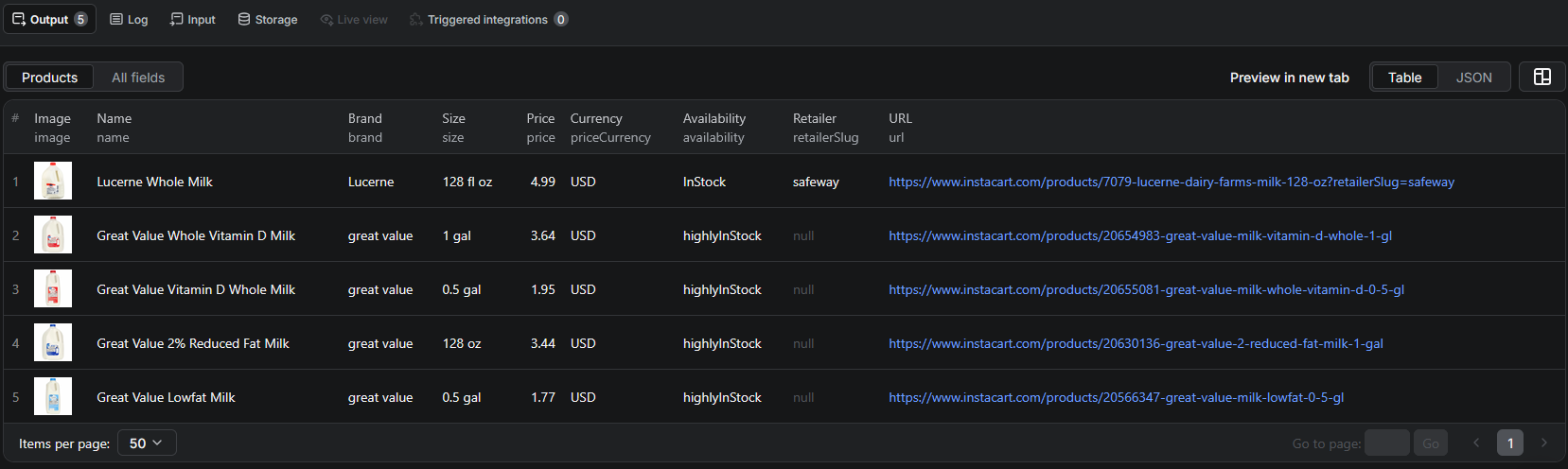
Example Output (Real Data Preview)

Instacart scraper results

Here is a product-page record, with source set to pdp:

{
  "id": "items_88059-20630136",
  "productId": "20630136",
  "retailerSlug": "walmart",
  "url": "https://www.instacart.com/products/20630136-great-value-2-reduced-fat-milk-1-gal?retailerSlug=walmart",
  "name": "Great Value 2% Reduced Fat Milk",
  "brand": "Great Value",
  "size": "128 oz",
  "image": "https://d2lnr5mha7bycj.cloudfront.net/product-image/file/large_5c855497.jpeg",
  "category": "Plain Milk",
  "description": null,
  "price": 3.48,
  "priceString": "$3.48",
  "fullPriceString": null,
  "priceCurrency": "USD",
  "availability": "InStock",
  "dietaryAttributes": [],
  "source": "pdp",
  "postalCode": "94105",
  "scrapedAt": "2026-05-23T06:26:03.293Z"
}

And a storefront record for a discounted Costco item, where fullPriceString exposes the pre-discount price:

{
  "id": "items_74-20110703",
  "productId": "20110703",
  "retailerSlug": "costco",
  "name": "Kirkland Signature Mini Chocolate Chip Cookies, 60-count",
  "brand": "kirkland signature",
  "size": "each",
  "price": 9.94,
  "priceString": "$9.94",
  "fullPriceString": "$11.94",
  "priceCurrency": "USD",
  "availability": "inStock",
  "dietaryAttributes": [],
  "source": "storefront",
  "postalCode": "94105",
  "scrapedAt": "2026-05-23T06:26:04.891Z"
}

Key things to notice:

  • price is numeric, priceString preserves the display value — you get a clean field for math without losing the original for auditing
  • fullPriceString is the promo signal — when it is populated, the item is discounted, and the gap between it and price is the real promo depth
  • retailerSlug is what makes comparison a group-by — it is populated whenever the record is scoped to a retailer (product pages opened with ?retailerSlug=, and everything from a storefront sweep). Cross-retailer search results can come back with it null, because those items are not tied to one chain — so scope your comparison runs through retailerSlugs or retailer-scoped URLs rather than bare search
  • source tells you the provenance — product-page records are the deepest; storefront and search records are shallower but far cheaper to collect
  • availability is not a clean enum — Instacart returns several spellings and gradations, including InStock, inStock, and highlyInStock. Lowercase and bucket these before filtering rather than matching exact strings
  • postalCode and scrapedAt make rows self-describing — a grocery price without a market and a timestamp is not worth storing

Try the Instacart scraper now — no coding required.

Automating Instacart Data Collection

Grocery pricing is a moving target, so this is a scraper that earns its keep on a schedule.

Scheduled Runs

Grocery promo cycles are weekly, and most chains reset on the same weekday. A daily run captures every price change with a day's resolution, which is enough to reconstruct the promo calendar for any category you track. For fast-moving fresh categories, or during major holiday promo periods, twice-daily runs are worth the marginal cost.

The compounding value here is the archive. Instacart shows you today's price; a scheduled scrape gives you the last two years of them.

API Integration

Use the Apify API to trigger runs programmatically and retrieve results:

  • Feed prices into a category-management or revenue-growth-management dashboard
  • Alert when a competitor discounts below your floor in a tracked category
  • Sync cross-retailer price data into a BI warehouse for elasticity modelling
  • Connect to Zapier, Make, Google Sheets, or Slack for no-code workflows

Node.js Example

For a complete working example showing how to call this scraper from Node.js — including a combined retailer-storefront sweep and cross-retailer search — see the GitHub repository.

Webhooks

Configure webhooks to fire when a run completes, so downstream processing starts as soon as new pricing lands rather than on a polling timer.

Using Instacart Data for Business Intelligence

Price Index by Retailer

Scrape a fixed basket of SKUs across every retailer weekly and compute a price index per chain. This is the grocery industry's own core metric, and building it yourself takes one scheduled run and a group-by.

Promo Depth and Cadence

Group discounted rows — those with a populated fullPriceString — by retailer, category, and week. The result is a map of who promotes what, how deeply, and how often. Brands use this to plan trade spend; retailers use it to benchmark against competitors.

Price Per Unit Normalization

size and price together let you compute price per ounce or per count, which is the only fair way to compare a Costco bulk pack against a Safeway single. Private-label price gaps only become visible after this normalization.

Assortment Overlap Between Chains

Compare the product sets returned for the same category across retailers to see how much assortment overlap exists. Low overlap means each chain is differentiating on selection; high overlap means the category competes purely on price.

Availability as a Supply-Chain Signal

Track availability over time per SKU per retailer. A product going out of stock at several chains at once is a supply signal, not a merchandising one — and it usually leads reported sales data by weeks.

Does Instacart Provide an API?

Instacart does run developer programs, but none of them is a general-purpose data source.

What's Available

  • Instacart Connect — the enterprise platform retailers use to power their own e-commerce and fulfillment on Instacart's infrastructure. It requires a commercial agreement and is scoped to your own business's data
  • Instacart Developer Platform — the partner-facing API for shoppable recipes and product links, aimed at publishers and app developers rather than analysts
  • Neither program exposes an open, self-serve product-catalog endpoint you can query across retailers

What the APIs Miss

The gap is structural. Instacart's programs are built for participants in its commerce ecosystem — retailers running storefronts, brands buying ads, publishers linking to carts. They are not built for someone who wants to observe the market from outside, and access is gated behind partnership approval either way.

The cross-retailer price comparison that makes Instacart interesting as a dataset is precisely what no partner API will hand you, because it means seeing other retailers' prices. That data is nonetheless public on the site, visible to any shopper without logging in. The Grocery Product Scraper for Instacart reads it the way a shopper would and returns it as structured records.

Why Use an Instacart Scraper Instead of Building One

Building a custom Instacart scraper sounds straightforward until you actually start:

  • Apollo state parsing — the product data is in a serialized GraphQL client cache, and recovering a clean record from it requires understanding Instacart's internal data model, not just its HTML
  • Three parsers, one schema — product pages, storefronts, and search all serialize differently and must be normalized into a single output shape or the dataset is unusable
  • Cross-retailer identity — matching the same product across chains needs brand-plus-size logic, because product IDs are retailer-scoped
  • Location handling — prices are ZIP-dependent, so every row needs a market recorded against it or the dataset silently mixes incomparable numbers
  • Request orchestration — with ~32 items per storefront and ~14 per search page, breadth comes from many small requests, which means queue management rather than simple pagination
  • Frontend churn — Instacart ships changes continuously, and each one is a maintenance ticket for a homegrown scraper
  • Opportunity cost — every hour spent reverse-engineering Apollo state is an hour not spent on the pricing analysis the scraper exists to support

Unless you have requirements no existing tool can meet, a maintained scraper lets you focus on the analysis instead of the plumbing.

Pricing — Pay Only for Results

The Grocery Product Scraper for Instacart uses Apify's Pay-Per-Event pricing model. You pay per product that lands in your dataset — failed pages and retries are free.

EventWhen it's chargedPrice per eventPer 1,000 products
productEach product written to the dataset, whether from a product page, storefront, or search$0.005$5.00
Actor startOnce per run, per GB of memory$0.00005negligible

Quick cost estimates:

  • A 500-product cross-retailer comparison run → $2.50
  • 1,000 products swept across three retailer storefronts → $5.00
  • A daily 200-SKU price tracker → $1.00/day, about $30/month

Because pricing is flat per product regardless of source, the cheapest way to build breadth is storefront and search sweeps, and the cheapest way to build depth is a targeted productIds list you re-scrape on a schedule. Most production setups do both: a wide monthly sweep to discover SKUs, and a narrow daily run to track the ones that matter.

New Apify accounts include free monthly usage credits, so you can validate the output before spending anything.

Try the Instacart Scraper

The Grocery Product Scraper for Instacart extracts structured grocery data across 70+ US retailers — product IDs, retailer, name, brand, size, category, image, price, pre-discount price, currency, availability, dietary attributes, source type, and postal-code context.

What you get:

  • 70+ US grocery retailers in one schema — Costco, Safeway, Walmart, Target, Kroger, Publix, Sprouts, Wegmans, Whole Foods, and more
  • Five input modes — retailer slugs, search queries, start URLs, product IDs, or a homepage sweep — combinable in a single run
  • Cross-retailer search that returns the same product priced across multiple chains in one pass
  • Promo depth via the pre-discount fullPriceString field
  • Fast plain-HTTP extraction with no browser overhead
  • Pay-Per-Event pricing: $5.00 / 1,000 products — you only pay for results
  • Scheduled runs, webhooks, and API access for ongoing intelligence
  • No coding, no proxy management, no scraper maintenance

Start scraping Instacart now — your first run takes less than 5 minutes to set up.

If you are building a retail price-intelligence pipeline, combine Instacart data with Walmart for direct retail pricing, Just Eat for the food-delivery side of the same basket, or work through the e-commerce scraping guide for the broader pipeline picture.

Legal and Ethical Considerations

Web scraping occupies a well-established legal space, but responsible practice matters:

  • Public data only — the scraper extracts publicly visible product information that anyone can see by visiting instacart.com. No login or authentication is required
  • No personal data — grocery product listings contain no personal information. This is catalog and pricing data, not consumer data
  • Respect rate limits — the scraper paces its requests rather than hammering Instacart's servers, and uses lightweight HTTP requests instead of rendering full browsers
  • No misuse — use the data for legitimate purposes like price research, category analysis, and availability monitoring. Do not use it to misrepresent retailer pricing to consumers
  • Compliance — if you operate in a regulated jurisdiction, ensure your storage and processing practices comply with local requirements

Instacart product listings are public commerce data — they exist to be found by shoppers and indexed by search engines. Using them for price research and market intelligence is consistent with how the platform is designed to work.

Disclaimer: This scraper is an independent tool and is not affiliated with, endorsed by, or sponsored by Instacart or any of its subsidiaries. All trademarks mentioned are the property of their respective owners.

Frequently Asked Questions

Is scraping Instacart legal?

Scraping publicly available data from Instacart is generally legal. Product pages, retailer storefronts, and search results are visible to anyone who visits instacart.com without logging in. You should use the data responsibly, comply with applicable privacy regulations, and avoid overloading Instacart's servers with excessive requests.

Does Instacart have a public API?

No. Instacart's developer programs — Instacart Connect and the Instacart Developer Platform — are partner offerings that require a commercial agreement, and they are built for retailers, brands, and integration partners rather than for market research. There is no open product-catalog API, which makes scraping the public site the practical alternative.

Which retailers can I scrape through Instacart?

Instacart aggregates 70+ US grocery retailers including Costco, Safeway, Walmart, Target, Kroger, Publix, Sprouts, Wegmans, and Whole Foods. The scraper accepts retailer slugs directly, so you can sweep several storefronts in a single run, or use cross-retailer search to pull the same product from multiple chains at once.

What data can be extracted from Instacart?

You can extract product IDs, retailer slug, product name, brand, size, category, image, description, current price, the pre-discount full price, currency, availability, dietary attributes, the source type (product page, storefront, or search), the postal-code context, and a scrape timestamp.

Do Instacart prices vary by ZIP code?

Yes. Instacart pricing and availability are location-dependent, and the same product can differ between markets. Every record carries a postalCode field so you always know which location context produced the price. Note that the scraper records this value rather than injecting it into requests, so results reflect Instacart's default market (94105, San Francisco) unless you route through a proxy in your target region.

How many products can I get per storefront or search?

A retailer storefront surfaces roughly 32 featured items, and a cross-retailer search returns about 14 items on the first server-rendered page. Breadth comes from combining many retailer slugs and search queries in one run rather than from deep pagination on a single page.

How much does the Instacart scraper cost?

The actor uses Apify's Pay-Per-Event pricing at $0.005 per product ($5.00 per 1,000 products), plus a negligible per-run start event. You only pay for products that actually land in your dataset.

About the Author

This guide was written by Piotr, a software engineer with hands-on experience building and maintaining web scrapers at scale. He develops and maintains a suite of data extraction tools on the Apify platform, helping businesses automate their data collection workflows.

Need help with your scraping project?

Book a free discovery call and let's scope your project together.

Book a Call
Piotr Vassev

Piotr Vassev

Founder of FalconScrape. Building production-grade web scraping systems and data automation pipelines for businesses worldwide.

Connect on LinkedIn