Piotr VassevPiotr Vassev

How to Scrape Lazada Product Listings (Step-by-Step Guide)

How to Scrape Lazada Product Listings

If you want to scrape Lazada product listings for price monitoring, market research, or competitor analysis across Southeast Asia, this guide walks you through the entire process. You will learn what data you can extract from Lazada search, category, and product pages, how to handle Alibaba's TMD anti-bot stack and country-level geo-gating, and how to turn raw listings into actionable SEA e-commerce intelligence across all six Lazada storefronts.

Why Scrape Lazada Data?

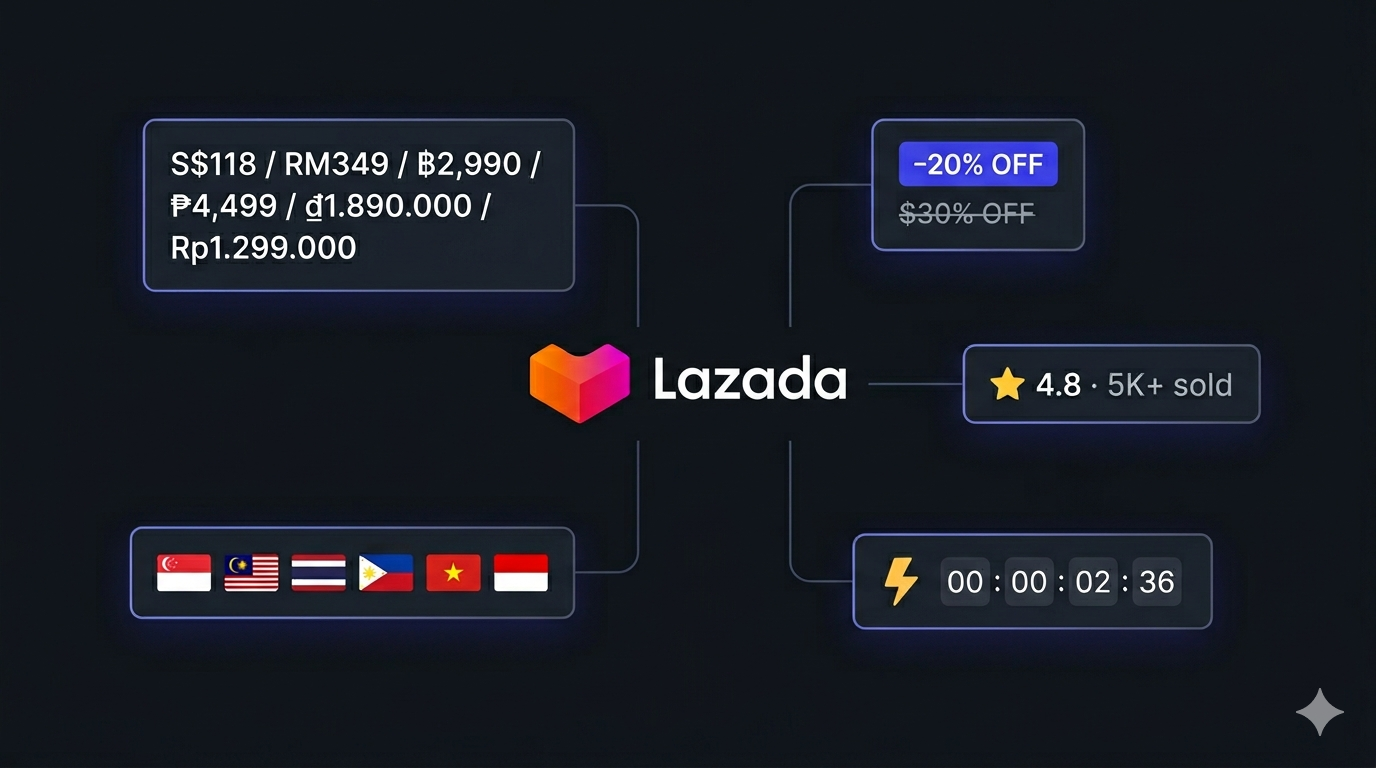
Lazada is the largest e-commerce marketplace in Southeast Asia, operating six country storefronts under one platform — Singapore, Malaysia, Thailand, the Philippines, Vietnam, and Indonesia. Owned by Alibaba Group, Lazada is the dominant general-purpose marketplace in most of the region and the natural counterpart to Shopee. For anyone selling into SEA, sourcing from SEA, or studying the SEA consumer market, Lazada is one of the highest-signal public datasets available.

What makes Lazada particularly valuable as a data source is that the same structured schema is exposed across six different country markets — title, price in local currency, original price, discount percentage, sold count, rating, review count, images, variants, sellers, brands, and category breadcrumbs. The result is a clean, cross-comparable dataset that lets you analyze how the same product or brand performs in Singapore vs. Indonesia vs. Vietnam without rewriting a parser per country.

Businesses and researchers scrape Lazada data for a range of purposes:

  • SEA price intelligence — track local-currency prices and discount percentages across all six storefronts in real time
  • Cross-country pricing comparison — see how the same SKU is priced in SGD vs. THB vs. IDR vs. PHP, and identify regional pricing gaps
  • Catalog & assortment research — map every brand and SKU in a category across multiple SEA markets
  • Competitor seller analysis — identify which sellers dominate a category in each country
  • Promotion & flash-sale monitoring — track the daily homepage flash-sale lineup across all six markets
  • Cross-marketplace comparison — pair Lazada data with Carousell or TikTok Shop to build a full SEA marketplace view

Manually browsing six country storefronts and copy-pasting product details is impractical at any meaningful scale — a single category like mobiles spans thousands of SKUs across dozens of pages, and prices change continuously during Lazada's near-constant promotional cycles. Automation is the only realistic approach.

What Data You Can Extract from Lazada

The Lazada Listings Scraper extracts structured product data from any Lazada search query, category slug, direct product URL, or the daily homepage flash sale. Here are the key fields available:

FieldDescriptionExample
Item IDLazada's unique product identifier3179771414
SKU IDSKU-level identifier within the product21628177316
URLDirect link to the product detail pagelazada.sg/products/pdp-i3179771414.html
Country codeWhich Lazada storefront the record came fromsg
TitleFull product titleGoogle Pixel XL Original Unlocked 4GB RAM 32GB ROM
PriceVoucher-applied current price in local currency118.84
CurrencyISO currency code of the storefrontSGD
Discount percentDiscount off original price (%)20
Sold countHow many units the listing has sold5
Rating averageAverage star rating (0–5)5
Review countTotal number of reviews1
ImagesArray of CDN image URLs["img.lazcdn.com/..."]
BrandBrand name (PDP only)SuperFarm
BreadcrumbsCategory path (PDP only)["Groceries", "Food Staples", "Dried Goods"]
VariantsArray of SKU variants with option paths[ ... ]
SellerSeller ID and details (PDP only){ "id": "1677" }
SourceWhere the record came from (search, category, pdp, homepage)category
Scraped atISO timestamp of the extraction2026-05-17T11:30:32.480Z

Every record also carries provenance fields so you can deduplicate, audit, and slice your dataset cleanly across country, source, and run.

Common Use Cases for Lazada Data

SEA Price Monitoring

Lazada exposes both the original price and the voucher-applied current price plus a clean discount percentage on every listing. Scraping these fields on a schedule lets you build a real-time view of how aggressively competitors are discounting and how prices move during Lazada's frequent campaign events like 11.11, 12.12, and monthly mega sales.

Cross-Country Pricing Comparison

Because the schema is identical across all six storefronts, you can run the scraper once per country on the same target SKU or query and produce a clean cross-country dataset. This is one of the only realistic ways to compare SEA pricing across SGD, MYR, THB, PHP, VND, and IDR for the same brands at scale.

Catalog & Assortment Mapping

A single Lazada category slug like mobiles or laptops covers thousands of SKUs across every major brand. Scraping a category lets you map the full SEA assortment by brand, price band, and rating — and identify gaps in your own catalog relative to what sells across the region.

Seller & Brand Share Analysis

The seller and brand fields (returned for PDP requests) let you aggregate share-of-category by seller or brand. This is particularly useful for understanding how a category is structured in each Lazada country: many SEA categories are dominated by a handful of local power sellers that do not appear in the same shape on Shopee.

Flash-Sale Tracking

The homepageOnly mode fetches the daily flash-sale lineup from each country homepage at near-zero cost. Running it every morning across all six countries gives you a rolling dataset of what Lazada is heavily promoting in each market — a strong leading indicator for category momentum and price elasticity.

Cross-Marketplace Comparison

Pair Lazada data with Carousell for SEA secondhand pricing, TikTok Shop for SEA live-commerce, or 1688.com for upstream factory-direct sourcing. Together they give you a full picture of the SEA e-commerce stack from factory to marketplace to resale.

Challenges of Scraping Lazada Manually

Before jumping into the tutorial, it is worth understanding why building your own Lazada scraper is harder than it looks:

  • TMD anti-bot stack — Lazada inherits Alibaba's TMD anti-bot platform (the same one used by Taobao, Tmall, and AliExpress) which combines TLS fingerprinting, JavaScript challenges, and behavioral analysis. Most scrapers, including many headless-browser setups, get captcha-gated within a few requests
  • Country-level geo-gating — each Lazada storefront serves different content depending on the IP country. A request to lazada.co.th from outside Thailand will routinely return reduced or empty results
  • Six different domainslazada.sg, lazada.com.my, lazada.co.th, lazada.com.ph, lazada.vn, lazada.co.id. Each has its own currency, language, and category tree
  • First-page promo modules — Lazada serves a promotional landing module on page 1 of most search and category URLs instead of a clean product grid, so naïve scrapers that start at page 1 miss most of the catalog
  • Voucher-applied vs. sticker pricing — the price visible on the card is typically voucher-applied, not the raw sticker. Naïve scrapers that pull the sticker price misrepresent what shoppers actually pay
  • Variant & SKU explosion — PDPs surface dozens of SKUs and option combinations. Extracting them cleanly requires careful handling of Lazada's propPath schema
  • Frontend churn — Lazada updates its layout regularly, breaking custom scrapers that are not actively maintained

For most use cases, a pre-built and maintained scraper is dramatically more practical than building one in-house.

Step-by-Step: How to Scrape Lazada Product Listings

Here is how to scrape Lazada product data using the Lazada Listings Scraper on Apify.

Step 1 — Pick Your Country Storefront

Pick a country from the dropdown — sg, my, th, ph, vn, or id. The country setting controls:

  • Which Lazada domain the scraper targets
  • Which currency the price field is denominated in
  • Which proxy country requests are routed through

Every run targets a single country. To cover multiple storefronts, run the scraper once per country — the output schema is identical so the datasets aggregate cleanly.

Step 2 — Pick Your Discovery Mode

The scraper supports four input modes that you can mix and match in a single run:

  • Search queries — free-text keywords like iphone or เสื้อยืด. Each query is paginated from searchStartPage to searchEndPage
  • Categories — Lazada category slugs like mobiles, laptops, or cameras. The scraper hits /shop-{slug}/ and walks pagination
  • Start URLs — explicit Lazada URLs. Accepts product pages (/products/...-iXXXXX.html), search pages (/catalog/?q=...), and category pages
  • Homepage flash sale — set homepageOnly: true to fetch only the daily flash-sale items from the country homepage. Free of TMD-bypass cost

Step 3 — Configure the Scraper Input

Head to the Lazada Listings Scraper on Apify and configure your run:

  1. Set country to the storefront you want (default sg)
  2. Add your searchQueries, categories, or startUrls (at least one is required, unless you use homepageOnly)
  3. Tune searchStartPage (default 2 — skips the page-1 promo module) and searchEndPage (default 5)
  4. Set maxItems to cap the total number of items returned (default 50, 0 means unlimited)

Example input:

{
    "country": "sg",
    "searchQueries": ["iphone", "macbook"],
    "categories": ["mobiles"],
    "startUrls": [
        "https://www.lazada.sg/products/pdp-i3179771414.html"
    ],
    "searchStartPage": 2,
    "searchEndPage": 5,
    "maxItems": 200
}

Step 4 — Run the Scraper

Once started, the scraper will:

  • Build search URLs from your queries and category slugs for the chosen country
  • Walk pagination from searchStartPage to searchEndPage until maxItems is reached
  • Auto-detect PDP URLs inside startUrls and route them to the product handler
  • Survive Lazada's TMD anti-bot stack via managed residential proxies in the target country
  • Extract structured price, discount, sold count, rating, review count, and image fields from search/category cards
  • Enrich PDPs with brand, breadcrumbs, variants, and seller details when requested
  • Stream results to the dataset as they are scraped

Most runs of a few hundred products complete in a couple of minutes.

Step 5 — Export Your Results

When the scraper finishes, export your data in the format you need:

  • JSON / JSONL — ideal for developers building integrations or price-monitoring pipelines
  • CSV — perfect for spreadsheet analysis or importing into BI tools
  • Excel / HTML / XML — for sharing with non-technical stakeholders
  • API — access results programmatically via the Apify API for automated workflows

Ready to try it? Run the Lazada Listings Scraper on Apify and get your first dataset in minutes.

Pricing (Pay-Per-Event)

This actor uses Pay-Per-Event billing — you only pay for the data classes you actually consume. Choose the input mode that matches your need; the cost per row is fixed by what is emitted.

EventWhen it firesPrice / 1k rowsPer row
homepage-itemRun with homepageOnly: true — daily flash-sale snapshot from the country homepage$0.50$0.0005
product-listingEach card parsed from a search or category result page — title, voucher price, discount %, sold count, rating, review count, image$3.00$0.003
item-detailEach full PDP from a startUrls product page — adds description, brand, breadcrumbs, variants, seller, full image gallery$10.00$0.01

Practical cost examples:

  • Watching today's flash-sale across all six countries (~180 items total): $0.09
  • 200 products from a single-country category sweep (5 pages × 40 items): $0.60
  • 1,000 full PDPs for a price-monitoring pipeline: $10.00

Tip: Search and category mode already returns the voucher-applied price plus rating, reviews, and sold count. For most price-tracking use cases that's all you need — item-detail is only required if you want the full description, variants, or seller details.

Example Output (Real Data Preview)

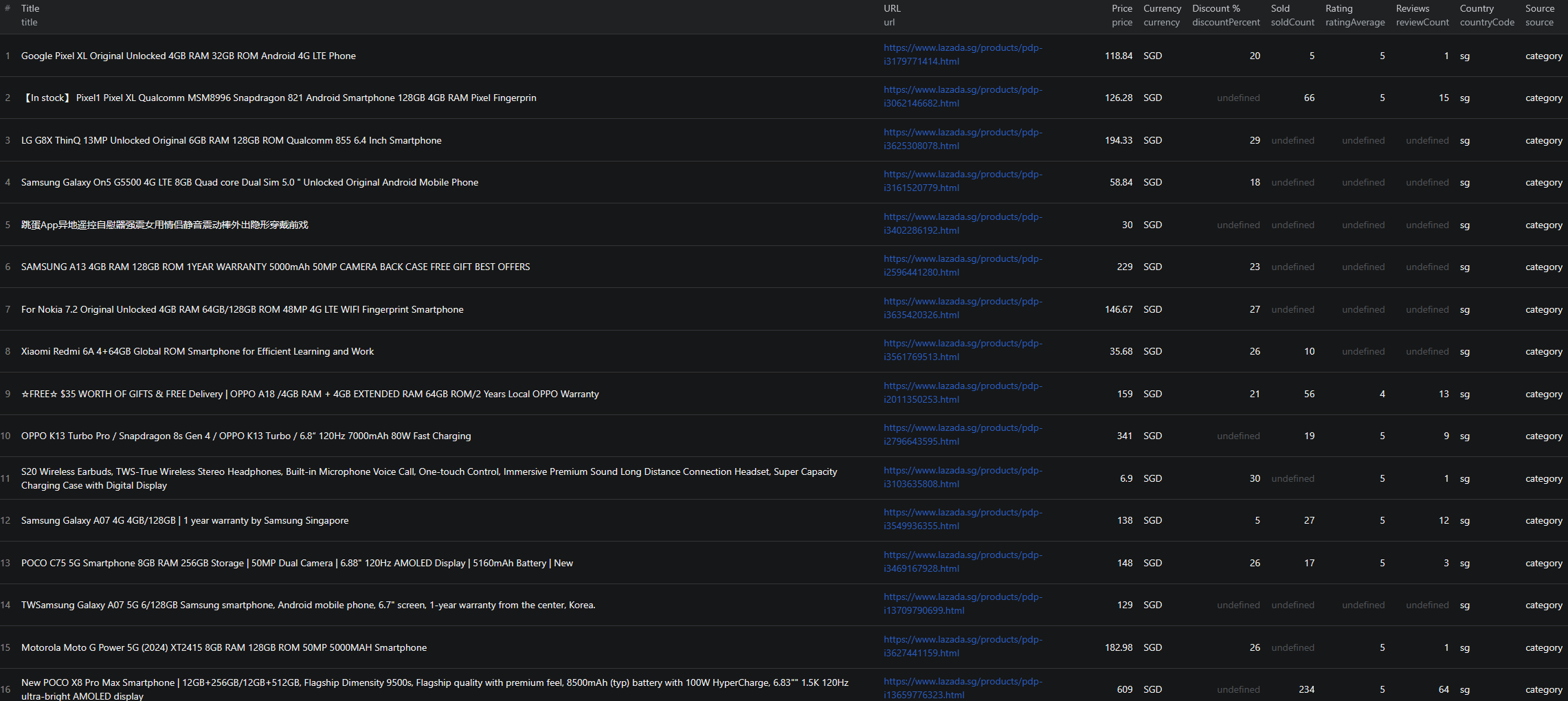
Lazada scraper results

Here is what the actual output looks like. Each product is returned as a structured JSON object:

{
    "itemId": "3179771414",
    "skuId": "21628177316",
    "url": "https://www.lazada.sg/products/pdp-i3179771414.html",
    "countryCode": "sg",
    "title": "Google Pixel XL Original Unlocked 4GB RAM 32GB ROM Android 4G LTE Phone",
    "price": 118.84,
    "currency": "SGD",
    "discountPercent": 20,
    "soldCount": 5,
    "reviewCount": 1,
    "ratingAverage": 5,
    "images": [
        "https://img.lazcdn.com/g/p/0091046bf97944f4218cd858f1c6c6a7.jpg_200x200q75.jpg"
    ],
    "source": "category",
    "scrapedAt": "2026-05-17T11:30:32.480Z"
}

And a richer PDP record:

{
    "itemId": "100362025",
    "skuId": "16307225598",
    "url": "https://www.lazada.sg/products/pdp-i100362025-s16307225598.html",
    "countryCode": "sg",
    "title": "Superchia Organic Chia Seeds 500g USDA-certified",
    "brand": "SuperFarm",
    "breadcrumbs": ["Groceries", "Food Staples & Cooking Essentials", "Dried Goods"],
    "category": "Dried Goods",
    "categoryId": "10003344",
    "price": 18,
    "currency": "SGD",
    "images": [
        "https://laz-img-sg.alicdn.com/p/ae6ce73aec2f3bd8ddda4bacd0577003.jpg"
    ],
    "variants": [
        { "skuId": "100367035", "options": { "propPath": "120132602:2 packs (500gx2)" } }
    ],
    "seller": { "id": "1677" },
    "source": "pdp",
    "scrapedAt": "2026-05-17T11:16:52.696Z"
}

Key things to notice:

  • Voucher-applied price as the headline price — what the shopper actually pays after Lazada coupons, separated from any pre-discount sticker
  • Country code on every recordsg, my, th, ph, vn, or id — making cross-country aggregation trivial
  • Currency alongside price — no implicit assumptions; SGD, MYR, THB, PHP, VND, and IDR are all surfaced as ISO codes
  • Discount and sold count as numeric fields — ready for ranking, filtering, and time-series analysis without parsing
  • Variants as structured arrays — PDP records expose every SKU variant with its propPath so you can reconstruct the full option matrix
  • Provenance fieldssource and scrapedAt make it easy to deduplicate, audit, and track drift over time

The same record shape is returned whether the product came from a search query, a category slug, a direct PDP, or the homepage flash sale — so downstream consumers can treat the dataset uniformly across all six SEA markets.

Try the Lazada Listings Scraper now — no coding required.

Automating Lazada Data Collection

For ongoing SEA e-commerce intelligence, you do not want to run the scraper manually every time you need fresh data. The Apify platform supports full automation:

Scheduled Runs

Set up recurring scrapes on any schedule — hourly, daily, or weekly. The scraper runs automatically and stores results in a dataset you can access anytime. Hourly runs work well during Lazada's mega-sale events (9.9, 11.11, 12.12) when prices and flash-sale lineups move quickly; daily runs are sufficient for general catalog tracking. Schedule one run per country for full SEA coverage.

API Integration

Use the Apify API to trigger scraper runs programmatically and retrieve results. This lets you integrate Lazada data into your existing analytics workflows:

  • Feed new listings into your SEA price-monitoring pipeline
  • Trigger alerts when a tracked SKU drops below a target price in any of the six currencies
  • Sync Lazada catalog data into your BI warehouse
  • Connect to tools like Zapier, Make, or custom data pipelines

Cross-Country Aggregation Pipelines

Run the scraper once per country on the same target SKUs and aggregate the output into a single cross-SEA pricing dataset. Because the schema is identical across countries, the join is trivial — group by itemId (or by a normalized product key) and compare price/currency/discountPercent across the six storefronts in one query.

Node.js Example

For a complete working example showing how to call this scraper from Node.js, see the GitHub repository.

Webhooks

Configure webhooks to get notified when a scraper run completes. This is useful for event-driven architectures where you want to process new product data as soon as it is available — for example, kicking off a cross-country normalization job the moment all six per-country runs finish.

Using Lazada Data for SEA Market Intelligence

The structured data from Lazada unlocks a range of analytical use cases.

Cross-Country Price Index

Run the scraper across all six countries on the same set of target SKUs and build a SEA price index. Normalize each price to a common currency (USD or SGD), and you have a clean view of which SEA market is cheapest or most expensive for any given category.

Discount Cadence Tracking

Lazada runs near-continuous promotions. By scraping discountPercent daily across a fixed basket of SKUs, you can quantify how often each product hits its peak discount, how long that discount lasts, and which sellers lead vs. lag the category in promotional intensity in each country.

Demand Proxy via Sold Counts

The soldCount field acts as a rough proxy for demand. Aggregating sold counts by brand, price band, or seller surfaces which products and price points are actually moving in each country — a much stronger signal than rating alone.

Variant & Assortment Analysis

PDP records expose every SKU variant with its propPath. This is invaluable for assortment planning — you can see exactly which sizes, colors, and bundle options are offered for a product in each country, and identify gaps in your own variant mix.

Brand & Price Band Mapping

Scrape every result in a Lazada category and group by brand and price band. The result is a clean map of which brands own which price points in each SEA country — useful for competitive positioning, channel strategy, and brand-equity tracking.

Does Lazada Provide an API?

Lazada does not offer a public catalog API. The closest official channel is the Lazada Open Platform, which has serious limitations for data collection:

What's Available

  • The Open Platform is restricted to approved sellers and integration partners
  • It is designed for managing your own listings, orders, and logistics — not for browsing competitor catalogs
  • Cross-seller search results, category browsing, and competitor SKUs are not exposed
  • The structured price, discount, sold count, and rating data central to competitive analysis are not available via the API

What the API Misses

The official channel omits exactly the fields that make Lazada data useful for market research: cross-seller search results, organic category browsing, voucher-applied pricing, sold counts, and the cross-country normalization that public-page scraping makes trivial. For real SEA e-commerce intelligence, a public-page scraper is the practical alternative.

The Lazada Listings Scraper gives you structured catalog data from any search query, category slug, or direct product URL across all six SEA storefronts — without seller approval or rate-limit gating.

Why Use a Lazada Scraper Instead of Building One

Building a custom Lazada scraper sounds straightforward until you actually start:

  • TMD anti-bot stack — Alibaba's TMD platform captcha-gates plain HTTP requests within a few calls and routinely defeats headless browsers without serious investment in stealth tooling
  • Country-level geo-gating — each Lazada storefront partially or fully filters requests from outside its country. Without proper proxy management, requests from outside the target country silently return reduced or empty results
  • Six domains, six currencies — every parser, every URL builder, and every test has to account for six different country storefronts
  • Page-1 promo modules — naïve scrapers that start at page 1 of search or category URLs miss most of the catalog because page 1 is a promo landing module
  • Voucher-applied price extraction — pulling the wrong price field — sticker vs. voucher-applied — silently misrepresents your entire dataset
  • Variant & SKU parsing — PDPs expose dozens of SKUs and option combinations via Alibaba's propPath schema, which takes real work to map cleanly
  • Frontend churn — Lazada redesigns parts of its site frequently, and every update breaks unmaintained scrapers
  • Opportunity cost — every hour spent fixing your scraper is an hour not spent on the analysis the scraper exists to support

Unless you have very specific requirements that no existing tool can meet, a maintained scraper lets you focus on insights instead of plumbing.

Try the Lazada Listings Scraper

The Lazada Listings Scraper extracts structured data from Lazada product listings across all six SEA storefronts — item IDs, titles, voucher-applied prices in local currency, discount percentages, sold counts, ratings, review counts, images, variants, sellers, brands, and category breadcrumbs.

What you get:

  • Structured JSON, JSONL, CSV, Excel, HTML, or XML output ready for any downstream tool
  • One actor covering all six SEA storefronts — sg, my, th, ph, vn, id — via a single country dropdown
  • Four discovery modes — free-text search, category slugs, direct product URLs, and homepage flash sale — mix and match in a single run
  • Automatic TMD anti-bot bypass via managed residential proxies routed to the target country
  • Identical record shape across countries and sources, so cross-SEA aggregation is trivial
  • Pay-Per-Event billing — pay only for the rows you consume, no idle compute fees
  • Configurable pagination, maxItems cap, and free homepageOnly mode for flash-sale tracking
  • Scheduled runs and API access for ongoing SEA market intelligence
  • No coding, no proxy management, no scraper maintenance

Start scraping Lazada now — your first run takes less than 5 minutes to set up.

If you are building a SEA data pipeline, combine Lazada data with other regional sources like Carousell for SEA secondhand pricing, TikTok Shop for live-commerce, or 1688.com for upstream factory-direct sourcing.

Legal and Ethical Considerations

Web scraping occupies a well-established legal space, but responsible practice matters:

  • Public data only — the Lazada scraper extracts publicly visible product information that anyone can see by visiting the country storefront. No login or authentication is required
  • Respect rate limits — the scraper is designed to make requests at a reasonable pace and handle Lazada's TMD protection cleanly without aggressive hammering
  • No misuse — use collected data for legitimate business purposes like price monitoring, catalog research, and competitive analysis. Do not use the data to create counterfeit listings or mislead SEA buyers
  • Compliance — each SEA country has its own data-protection regime (PDPA in Singapore, Malaysia, and Thailand; the Personal Data Protection Law in Indonesia; the Data Privacy Act in the Philippines; the Cybersecurity Law in Vietnam). The scraper extracts product and listing data, not personal data, but downstream use is your responsibility

Lazada product listings are public marketplace data — they are designed to be found by buyers. Scraping this data for catalog research and price intelligence is aligned with the platform's intended purpose.

Frequently Asked Questions

What is Lazada?

Lazada is the largest e-commerce marketplace in Southeast Asia, owned by Alibaba Group. It operates six country storefronts — Singapore (lazada.sg), Malaysia (lazada.com.my), Thailand (lazada.co.th), Philippines (lazada.com.ph), Vietnam (lazada.vn), and Indonesia (lazada.co.id). For anyone selling into or studying the SEA consumer market, Lazada is one of the highest-signal public datasets available alongside Shopee.

Is scraping Lazada legal?

Scraping publicly available product data from Lazada is generally legal. Product listings are visible to anyone who visits the site without logging in. You should always use the data responsibly, comply with local data-protection regulations in each SEA country you operate in (PDPA in Singapore/Malaysia/Thailand, the Personal Data Protection Law in Indonesia, etc.), and avoid overloading Lazada's servers with excessive requests.

Does Lazada provide a public API?

No. Lazada does not offer a public catalog API. The Lazada Open Platform is a seller-and-partner API designed for managing your own listings — it does not expose competitor catalog data, search results, or category browsing. A web scraper is the practical alternative for cross-seller catalog research and price monitoring.

Do I need a country-specific proxy to scrape Lazada?

Each Lazada storefront is geo-gated to its country and protected by Alibaba's TMD anti-bot stack. The Lazada Listings Scraper handles proxy routing per country automatically — you just pick the storefront from a dropdown and the scraper takes care of the rest. You do not need to configure your own SEA proxies.

What is TMD and why does it block most Lazada scrapers?

TMD is Alibaba's in-house anti-bot platform — the same one that protects Taobao, Tmall, and AliExpress. It combines TLS fingerprinting, JavaScript challenges, and behavioral analysis to detect non-browser traffic, and routinely serves captchas to scrapers built with plain HTTP clients or even headless browsers. The Lazada Listings Scraper survives TMD via managed residential proxies and proven request patterns, with no Playwright or fragile stealth scripts.

Can I scrape all six Lazada storefronts in one run?

Each run targets a single country storefront (the country field accepts one of sg, my, th, ph, vn, id). To cover multiple countries, trigger the scraper once per country — either manually, via the Apify API, or via a scheduled task. The output schema is identical across countries, which makes downstream aggregation straightforward.

About the Author

This guide was written by Piotr, a software engineer with hands-on experience building and maintaining web scrapers at scale. He develops and maintains a suite of data extraction tools on the Apify platform, helping businesses automate their data collection workflows.

Need help with your scraping project?

Book a free discovery call and let's scope your project together.

Book a Call
Piotr Vassev

Piotr Vassev

Founder of FalconScrape. Building production-grade web scraping systems and data automation pipelines for businesses worldwide.

Connect on LinkedIn