Piotr VassevPiotr Vassev

How to Scrape StockX Prices, Bids, and Sales Data (Step-by-Step Guide)

How to Scrape StockX Prices and Sales Data

If you want to scrape StockX for resale analysis, arbitrage, or sneaker market research, this guide walks you through the entire process. You will learn how to extract live ask and bid prices, last sale values, and StockX's own 90-day and annual statistics — volatility and price premium included — and how to turn them into a quantitative view of the resale market.

Why Scrape StockX Data?

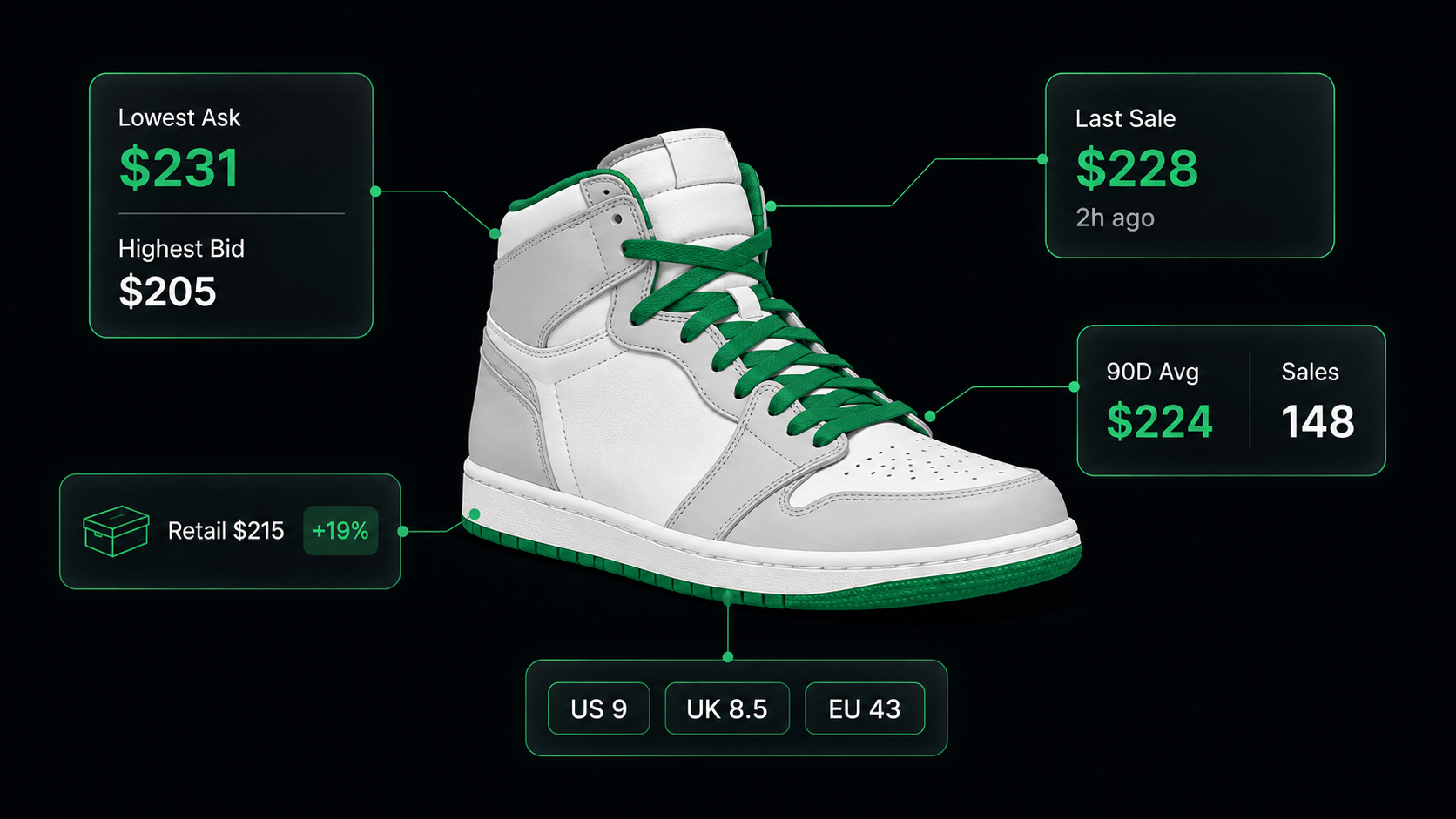
StockX is not really a marketplace. It is an exchange, and it was designed that way deliberately — the founders modelled it on a securities market and kept the vocabulary: every product has a lowest ask, a highest bid, and a last sale. Buyers and sellers meet at a clearing price, and StockX publishes what that price was.

That is what makes it uniquely valuable as a data source. Most resale platforms show you asking prices, and you have to guess what things actually trade for. StockX shows you the last trade, the 90-day average, the annual sales volume, the price volatility, and the premium over retail — the same fields you would expect from a financial data terminal, for sneakers, streetwear, watches, trading cards, and electronics.

Businesses and researchers scrape StockX data for a range of purposes:

  • Resale ROI modelling — compare lastSale against retailPrice to compute realized margin on any release
  • Arbitrage — find products where the StockX clearing price diverges from prices on eBay, Grailed, or Poshmark
  • Liquidity screening — use salesCount90d and salesCount72h to separate products that actually move from products that merely have a price
  • Volatility and risk analysisvolatilityAnnual tells you how stable a product's price is, which is what determines whether holding inventory is a bet or a business
  • Release performance tracking — monitor how a drop's ask, bid, and sale price evolve in the days after release
  • Brand and category benchmarking — aggregate premium and volume across a whole brand slug to see which lines hold value

Doing this by hand is impossible. StockX carries hundreds of thousands of products, market data updates continuously, and the statistics that matter are spread across product pages.

What Data You Can Extract from StockX

The StockX Listings Scraper flattens StockX's server-rendered data into one record per product. Here are the key fields available on every listing:

FieldDescriptionExample
Title / modelProduct name and model lineNike ZoomX Vaporfly 3 Multi-Color
BrandBrand nameNike
Lowest askCheapest price a seller will accept right now109
Highest bidMost any buyer is currently offering90
Last salePrice of the most recent completed trade104
Avg price 90dAverage sale price over 90 days131
Sales count 90dNumber of trades in 90 days132
Avg price annualAverage sale price over 12 months129
Sales count annualNumber of trades in 12 months996
Sales count 72hVery recent trade velocity3
Volatility annualPrice volatility over 12 months0.127194
Price premium annualPremium (or discount) versus retail-0.6
Release dateOfficial release date2024-10-03
Condition / gender / categoryProduct classificationNew / men / sneakers
Source / source valueWhich input produced this recordsearch / "vaporfly"

With includePdpDetails: true — or for any product fetched via productUrls — each record additionally includes styleId, colorway, retailPrice, variants (the full size matrix across US M, UK, CM, KR, EU, and US W), gallery, and fullDescription.

lowestAsk and highestBid also come with lowestAskAt and highestBidAt timestamps, so you know how fresh each side of the book is.

Common Use Cases for StockX Data

Resale ROI and Premium Analysis

retailPrice and lastSale together give you realized margin per product, and pricePremiumAnnual gives you StockX's own calculation of the same thing over a year. Scrape a brand slug and sort by premium and you have an immediate map of which releases hold value and which trade below retail — the single most important question in resale.

Liquidity Screening Before Buying Inventory

A high premium on a product that trades three times a year is not a business. salesCount90d, salesCountAnnual, and salesCount72h are what separate a real market from a thin one. Screening on volume before price is the difference between resellers who turn stock and resellers who hold it.

Reading Ask and Bid Correctly

lowestAsk and highestBid are product-level aggregates across every size, not two sides of a single order book. The cheapest ask might be a US 15 nobody wants; the highest bid might be a US 9 everybody does. That has a consequence worth internalizing before you build anything: highestBid is frequently higher than lowestAsk, which would be impossible within one size but is completely normal across a size run.

So treat the pair as the price envelope for the product — where demand is concentrated versus where supply is cheapest — rather than as a tradeable spread. A product whose bid sits well above its ask is telling you the popular sizes are bid up while the tails are being dumped, which is genuinely useful information. It is just not a spread, and anything you compute as ask - bid will produce negative numbers you cannot interpret.

Volatility-Adjusted Position Sizing

volatilityAnnual is a genuinely unusual field for a commerce dataset. Pair it with premium and you can rank products by risk-adjusted return rather than raw margin — the same logic a portfolio manager applies, on sneakers.

Cross-Platform Arbitrage

StockX gives you an authenticated clearing price. Compare it against realized prices elsewhere — eBay sold listings are the natural benchmark — and the gap is your arbitrage, minus fees. This is the highest-value cross-source analysis in resale, and it needs exactly two scrapers.

Release-Day Price Discovery

Scrape a product hourly through its release window and you capture the entire price-discovery process: where asks start, how fast bids rise, and where the market settles. Very few public datasets let you watch a market form in real time.

Challenges of Scraping StockX Manually

Before jumping into the tutorial, it is worth understanding why building your own StockX scraper is harder than it looks:

  • Serious anti-bot protection — StockX is one of the more aggressively defended commerce targets on the web. Naïve requests get blocked quickly, and browse pages and detail pages need different levels of protection
  • Data lives in server-rendered state, not markup — the market fields are embedded in StockX's inline SSR payload and have to be located and flattened, not selected out of HTML
  • The 1,000-result cap — every browse query stops at 25 pages of 40 regardless of how large the underlying catalog is, so wide coverage means orchestrating many queries and deduplicating across them
  • Per-variant pricing is not in the page — size-level ask and bid are hydrated client-side through a separate request, so anyone expecting size-level prices from the HTML will come away empty
  • Nested statistics — the 90-day and annual figures sit in nested objects that need flattening before they are usable in a spreadsheet or warehouse
  • Cost control on enrichment — PDP enrichment triples the per-record cost, so it has to be applied deliberately rather than left on
  • Maintenance burden — StockX ships changes continuously, and its protection posture changes with them

For most use cases, a pre-built and maintained scraper is dramatically more practical than building one in-house.

Step-by-Step: How to Scrape StockX

Here is how to scrape StockX data using the StockX Listings Scraper on Apify.

Step 1 — Choose Your Input Mode

There are four input modes, and they can be combined in a single run. At least one is required:

  • searches — keyword queries such as vaporfly or dunk low, crawled through StockX search. Each query paginates to the 1,000-result cap
  • brands — brand slugs such as jordan, nike, or adidas, crawled through the brand pages. This is the input for whole-catalog sweeps
  • categories — category slugs such as sneakers, apparel, accessories, electronics, collectibles, or trading-cards. StockX is not sneakers-only, and the non-sneaker categories are far less picked over
  • productUrls — specific products, either as a full URL or just the url-key (air-jordan-4-retro-toro-bravo-2026). These are always fetched as full detail pages

Use searches and brands for discovery, then feed the interesting url-keys back in as productUrls for a cheap, precise tracking run.

Step 2 — Configure the Scraper Input

Head to the StockX Listings Scraper on Apify and configure your run:

  1. Provide at least one of searches, brands, categories, or productUrls
  2. Set maxItems to cap the run — leave it empty to crawl everything up to StockX's own limits
  3. Toggle includePdpDetails:
    • Off (browse mode) — already returns the complete market picture: ask, bid, last sale, and all 90-day and annual statistics
    • On (detail mode) — adds styleId, colorway, retailPrice, the size matrix, and the gallery, at one extra request and three times the cost per record

Example input for a brand-wide market sweep:

{
  "brands": ["jordan"],
  "includePdpDetails": false,
  "maxItems": 1000
}

And a precise tracking run over known products, with full detail:

{
  "productUrls": [
    "air-jordan-4-retro-toro-bravo-2026",
    "nike-zoomx-vaporfly-3-multi-color"
  ],
  "includePdpDetails": true
}

Important: turn on PDP enrichment only when you need it. The browse-page record already contains every market and statistics field — ask, bid, last sale, averages, volumes, volatility, premium. Enrichment adds catalog metadata (style code, colorway, retail price, sizes), not better pricing. If you are doing price analysis, you almost certainly want it off; if you are matching StockX products against another catalog by style code, you want it on.

Step 3 — Run the Scraper

Once started, the scraper will:

  • Build the search, brand, and category URLs from your inputs and paginate each one at 40 products per page
  • Route requests through tiered protection — a cheaper proxy for search pages, stronger anti-scraping protection for brand, category, and detail pages
  • Locate and flatten StockX's inline server-rendered payload into a typed record per product
  • Deduplicate across all your queries by product urlKey
  • Optionally fetch each product's detail page when includePdpDetails is on, merging catalog fields into the record
  • Tag every record with source and sourceValue so you always know which input produced it

Step 4 — Export Your Results

When the run finishes, export your data in the format you need:

  • JSON — ideal for developers building pricing models or arbitrage pipelines
  • CSV / Excel — the flattened statistics drop straight into a spreadsheet
  • XML / HTML / RSS — useful for feeds and reporting workflows
  • API — pull results programmatically via the Apify API for scheduled runs

Ready to try it? Run the StockX Listings Scraper on Apify and get your first dataset in minutes.

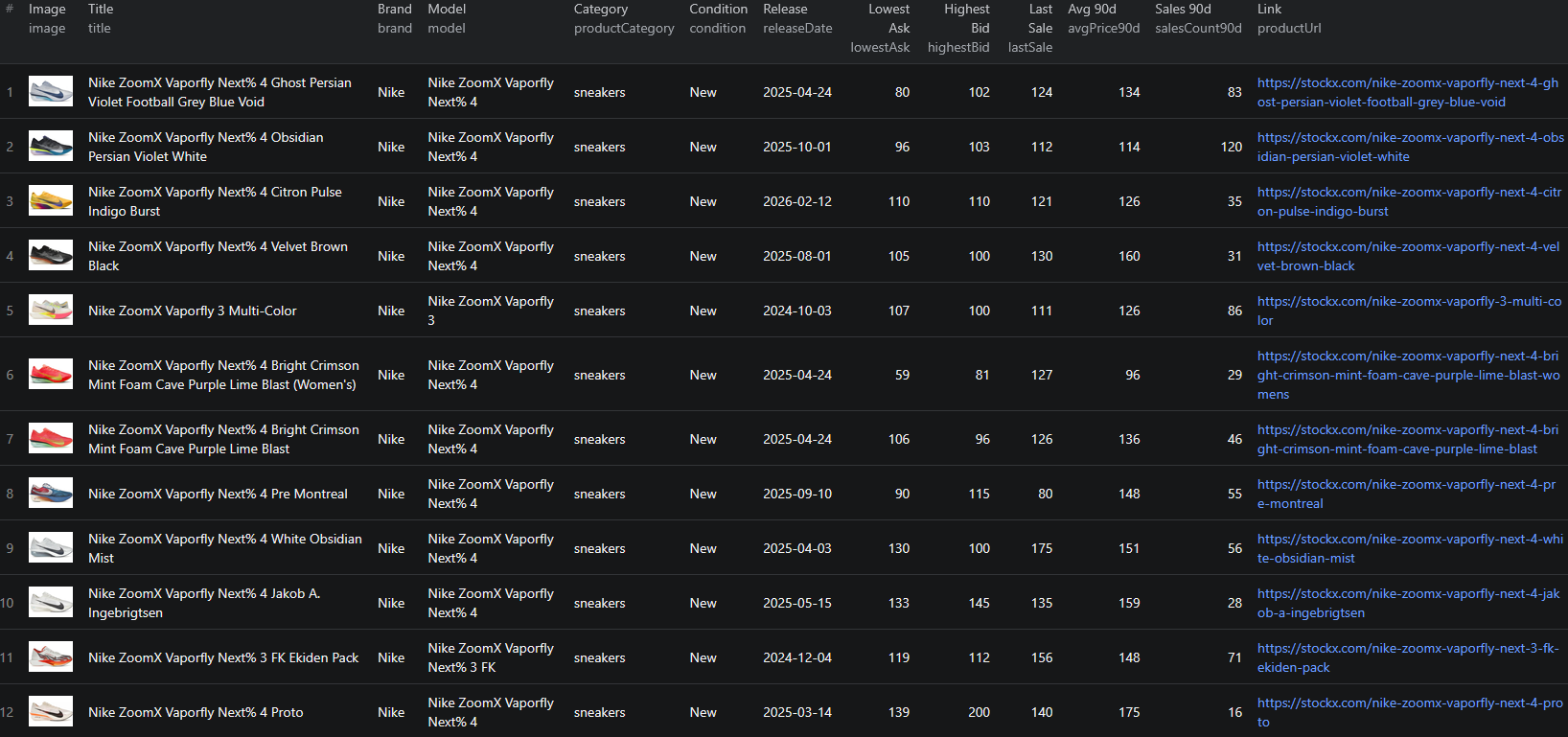
Example Output (Real Data Preview)

StockX scraper results

Here is a browse-mode record, which already carries the full market picture:

{
  "source": "search",
  "sourceValue": "vaporfly",
  "id": "74ddd080-1608-4bc8-b158-45f9af54e03c",
  "title": "Nike ZoomX Vaporfly 3 Multi-Color",
  "urlKey": "nike-zoomx-vaporfly-3-multi-color",
  "productUrl": "https://stockx.com/nike-zoomx-vaporfly-3-multi-color",
  "brand": "Nike",
  "model": "Nike ZoomX Vaporfly 3",
  "gender": "men",
  "productCategory": "sneakers",
  "condition": "New",
  "releaseDate": "2024-10-03",
  "lowestAsk": 109,
  "lowestAskAt": "2026-05-13T02:44:23Z",
  "highestBid": 90,
  "highestBidAt": "2026-05-04T21:26:23Z",
  "lastSale": 104,
  "avgPrice90d": 131,
  "salesCount90d": 132,
  "avgPriceAnnual": 129,
  "salesCountAnnual": 996,
  "volatilityAnnual": 0.127194,
  "pricePremiumAnnual": -0.6,
  "salesCount72h": 3
}

With includePdpDetails: true, the record gains catalog fields and the size matrix:

{
  "styleId": "HQ3219-902",
  "colorway": "Multi-Color/Volt/Hyper Pink/Black",
  "retailPrice": 260,
  "variants": [
    {
      "id": "7a4c2a58-9723-427a-8615-1fea62856835",
      "size": "4",
      "sizeChart": {
        "us m": "US M 4",
        "uk": "UK 3.5",
        "cm": "CM 23",
        "kr": "KR 230",
        "eu": "EU 36",
        "us w": "US W 5.5"
      }
    }
  ],
  "gallery": [],
  "fullDescription": "The Nike ZoomX Vaporfly 3 Multi-Color is a vibrantly colored trainer..."
}

Key things to notice:

  • Ask, bid, and last sale come on every recordlowestAsk 109, highestBid 90, lastSale 104. Note that ask and bid are aggregates across the whole size run, so on many products the bid lands above the ask. That is not a data error; see the section above on reading them correctly
  • The statistics are pre-computed and flattenedvolatilityAnnual and pricePremiumAnnual come straight from StockX's own model, already at the top level of the record
  • A negative premium is a signal, not an errorpricePremiumAnnual: -0.6 against a retailPrice of 260 and a lastSale of 104 means this shoe trades far below retail. Plenty of products do, and knowing which is the point
  • salesCountAnnual vs salesCount72h — 996 trades a year but 3 in the last 72 hours tells you the market is real but currently quiet
  • source and sourceValue track provenance — essential when a single run mixes several searches, brands, and categories
  • Size-level pricing is not here. variants gives you the size matrix, but per-variant ask and bid are not in StockX's server-rendered page — the site loads them client-side. Use the product-level ask and bid for any pricing work

Try the StockX Listings Scraper now — no coding required.

Automating StockX Data Collection

Market data is only useful as a time series, so this is a scraper built for schedules.

Scheduled Runs

lastSale is a snapshot; a scheduled scrape turns it into a price history. A daily run over your tracked products reconstructs the trade curve StockX shows on its own charts, in your own warehouse, for products you choose.

During release windows, drop to hourly. The first 48 hours after a drop are when the entire price discovery happens, and that window is where the interesting data is.

API Integration

Use the Apify API to trigger runs programmatically and retrieve results:

  • Feed ask/bid/last-sale into a pricing or inventory model
  • Alert when a tracked product's lowestAsk falls below your buy threshold
  • Sync brand-wide sweeps into a BI warehouse for premium and volatility reporting
  • Connect to Zapier, Make, Google Sheets, or Slack for no-code workflows

Node.js Example

For a complete working example showing how to call this scraper from Node.js — including a brand sweep and a targeted product-tracking run — see the GitHub repository.

Webhooks

Configure webhooks to fire when a run completes, so downstream processing starts as soon as fresh market data lands rather than on a polling timer.

Using StockX Data for Business Intelligence

Risk-Adjusted Return Ranking

Compute expected margin from lastSale against your acquisition cost, then divide by volatilityAnnual. Ranking inventory candidates by that ratio rather than by raw margin is the single highest-leverage thing you can do with this dataset, and it takes one scrape and one formula.

Liquidity Scoring

Score every product on salesCount90d for depth and salesCount72h for current activity, then sanity-check the price level against avgPrice90d rather than against a computed spread. Volume is the reliable signal here — a product with 4,000 trades in 90 days is a market you can enter and exit, and one with 12 is not, whatever its headline premium says.

Resist the temptation to build a spread metric from lowestAsk and highestBid: because those are aggregates across sizes, the arithmetic produces negative values on plenty of products and means something different on every one.

Premium Decay Curves

Track pricePremiumAnnual over time by release date and you can model how quickly premium decays after a drop. That curve is what tells you whether to flip immediately or hold — and it differs sharply by brand and model line.

Catalog Matching by Style Code

styleId is the manufacturer's style code, which means PDP-enriched StockX data joins cleanly against retailer catalogs, wholesale feeds, and other resale platforms. This is the reason to turn enrichment on: not better prices, but a reliable join key.

Category Expansion Beyond Sneakers

StockX's electronics, collectibles, and trading-cards categories carry the same market fields as sneakers and attract far less analytical attention. If you are looking for an underexploited dataset, that is where it is.

Does StockX Provide an API?

StockX runs an API program, but it does not solve the market-research problem.

What's Available

  • The StockX API is aimed at approved sellers and integration partners — it exists so businesses can manage their own listings, inventory, and orders programmatically
  • Access requires approval, and the program is scoped to operating a business on the platform rather than observing the market from outside
  • There is no open, self-serve endpoint for querying ask, bid, last-sale, and statistics across the catalog

What the API Misses

The gap is the same one that shows up on every marketplace: partner APIs are built for participants, not analysts. A seller API tells you about your own listings. It does not hand you the volatility and premium figures for a competitor's entire brand catalog, because that is not what it is for.

That data is nonetheless rendered on the public site for every visitor, no login required. The StockX Listings Scraper reads it the way a shopper would and returns it flattened and typed.

Why Use a StockX Scraper Instead of Building One

Building a custom StockX scraper sounds straightforward until you actually start:

  • Anti-bot protection is the main event — StockX defends itself seriously, and different page types need different levels of protection. Getting this right and keeping it right is most of the work
  • SSR payload extraction — the market data is in an inline server-rendered state blob, not in the DOM, and it has to be located and flattened
  • 1,000-result orchestration — meaningful coverage means running many queries and deduplicating by product key across all of them
  • Nested statistics flattening — the 90-day and annual figures need unpacking before they are usable
  • Enrichment cost management — PDP fetching triples cost per record, so it needs to be a deliberate toggle rather than a default
  • Frontend and protection churn — StockX changes both, and each change is a maintenance ticket
  • Opportunity cost — every hour spent fighting bot detection is an hour not spent on the pricing model the data exists to feed

Unless you have requirements no existing tool can meet, a maintained scraper lets you focus on the analysis instead of the plumbing.

Pricing — Pay Only for Results

The StockX Listings Scraper uses Apify's Pay-Per-Event pricing model. You only pay for products that land in your dataset — blocked requests and retries are free.

EventWhen it's chargedPrice per eventPer 1,000 products
product-listingEach product from a search, brand, or category page — including all market data and statistics$0.002$2.00
item-detailEach product enriched with PDP data — style ID, colorway, retail price, size matrix, gallery (productUrls input or includePdpDetails: true)$0.006$6.00

Quick cost estimates:

  • A 1,000-product brand sweep with full market data → $2.00
  • 500 keyword-search results → $1.00
  • 50 tracked products fetched as detail pages → $0.30
  • 100 search results with PDP enrichment → $0.60

The economics point clearly in one direction: browse mode is where the value is. It already includes ask, bid, last sale, and every statistic, at a third of the enriched price. Reserve enrichment for the products where you specifically need a style code to join against another catalog, or the size matrix.

The efficient pattern is a wide cheap sweep to find what matters, then a small enriched run over just those url-keys.

Try the StockX Listings Scraper

The StockX Listings Scraper extracts flattened market data from StockX — lowest ask, highest bid, last sale with timestamps, 90-day and annual averages and volumes, annual volatility, price premium over retail, and 72-hour sales velocity, plus full product metadata.

What you get:

  • Exchange-grade market data — lowest ask, highest bid, and the last completed trade, not just asking prices
  • Pre-computed statistics — volatility, price premium, and sales volume straight from StockX's own model, flattened to the top level
  • Four input modes — keyword search, brand slug, category slug, and direct product URLs — combinable in one run
  • Coverage beyond sneakers: apparel, accessories, electronics, collectibles, and trading cards
  • Optional PDP enrichment for style code, colorway, retail price, and the full size matrix
  • Pay-Per-Event pricing: $2.00 / 1,000 listings, $6.00 / 1,000 enriched — you only pay for results
  • Scheduled runs, webhooks, and API access for ongoing intelligence
  • No coding, no proxy management, no fighting bot detection

Start scraping StockX now — your first run takes less than 5 minutes to set up.

If you are building a resale intelligence pipeline, pair StockX with eBay sold listings for the broadest realized-price benchmark, or with Poshmark and Depop for the peer-to-peer side of the same inventory.

Legal and Ethical Considerations

Web scraping occupies a well-established legal space, but responsible practice matters:

  • Public data only — the scraper extracts publicly visible product and market information that anyone can see by visiting stockx.com. No login or authentication is required
  • No personal data — StockX market data is product and price information. Individual buyers and sellers are not identified in the output
  • Respect rate limits — the scraper paces its requests and uses tiered protection rather than hammering StockX's infrastructure
  • No misuse — use the data for legitimate purposes like price research, inventory planning, and market analysis. Do not use it to manipulate prices or to misrepresent authentication status
  • Compliance — if you operate in a regulated jurisdiction, ensure your storage and processing practices comply with local requirements

StockX publishes its market data openly because price transparency is the product. Using it for research and analysis is consistent with how the platform positions itself.

Frequently Asked Questions

Is scraping StockX legal?

Scraping publicly available data from StockX is generally legal. Product pages, ask and bid prices, last sale values, and 90-day statistics are visible to anyone who visits stockx.com without logging in. You should use the data responsibly, comply with applicable regulations, and avoid overloading StockX's servers with excessive requests.

Does StockX have a public API?

StockX runs an API program, but it is built for approved sellers and integration partners to manage their own listings, inventory, and orders — not for market research. There is no open, self-serve endpoint for querying ask/bid/last-sale data across the catalog, which makes scraping the public site the practical alternative for price analysis.

What market data can I get from StockX?

Every listing returns lowestAsk, highestBid, and lastSale with timestamps, plus aggregated statistics: 90-day average price and sales count, annual average price and sales count, annual volatility, annual price premium over retail, and a 72-hour sales count. With PDP enrichment you also get styleId, colorway, retail price, the full size matrix, and the media gallery.

Can I get size-level prices from StockX?

Not directly. The scraper returns the full size matrix (US M, UK, EU, CM, KR, US W) for each product with PDP enrichment enabled, but per-variant ask and bid are not present in StockX's server-rendered page — the site loads them client-side through a separate request. Use the product-level lowestAsk and highestBid for pricing analysis.

How many StockX products can I scrape per query?

StockX caps each browse query at 1,000 results (25 pages of 40). To go beyond that, split your crawl across multiple keyword searches, brand slugs, and category slugs — each query gets its own 1,000-result budget, and results are deduplicated by product key.

Does StockX cover more than sneakers?

Yes. Alongside sneakers, the scraper accepts the apparel, accessories, electronics, collectibles, and trading-cards category slugs, all carrying the same market and statistics fields. The non-sneaker categories receive considerably less analytical attention.

How much does the StockX Listings Scraper cost?

The actor uses Apify's Pay-Per-Event pricing. Shallow listings with full market data cost $0.002 each ($2.00 per 1,000), and PDP-enriched records cost $0.006 each ($6.00 per 1,000). You only pay for products that actually land in your dataset.

About the Author

This guide was written by Piotr, a software engineer with hands-on experience building and maintaining web scrapers at scale. He develops and maintains a suite of data extraction tools on the Apify platform, helping businesses automate their data collection workflows.

Need help with your scraping project?

Book a free discovery call and let's scope your project together.

Book a Call
Piotr Vassev

Piotr Vassev

Founder of FalconScrape. Building production-grade web scraping systems and data automation pipelines for businesses worldwide.

Connect on LinkedIn