Piotr VassevPiotr Vassev

How to Scrape X (Twitter) Video Transcripts and Post Data

How to Scrape X Twitter Video Transcripts

If you want to scrape X (Twitter) video transcripts for social listening, competitor research, or an AI pipeline, this guide covers the whole process. You will learn how to turn any public post's video into clean, timestamped, searchable text — with the author and engagement attached — and what that unlocks.

Why Scrape X Video Transcripts?

X is a text platform that quietly became a video platform. Product announcements ship as clips. Executives make their real arguments on camera rather than in a thread. Breaking news arrives as footage with a five-word caption. Long-form video runs to conference-talk length.

The captions above those clips are almost useless as data. "This." "Watch this whole thing." A link and an emoji. The substance — the claim, the number, the announcement — is spoken, and every text-based social listening tool on the market treats it as an empty row.

X offers no transcript view, no caption download, and nothing in the public API that returns spoken content. So the fastest-growing part of the platform is also the least analyzable part.

Transcription fixes that asymmetry. Once a video is text, an X post becomes a normal document: searchable, embeddable, comparable against the thousands of text posts you already track.

Teams scrape X video transcripts for:

  • Social listening that covers video — keyword and brand monitoring that does not silently skip clips
  • Competitor and product intelligence — what rivals announce and claim on camera, verbatim
  • Breaking news and market signal — spoken content in footage, minutes after it posts
  • Creator and content research — which hooks, formats and lengths actually perform
  • AI and RAG pipelines — a dated, attributable corpus of what a niche is saying
  • Repurposing — turn your own video posts into threads, blog drafts and subtitle tracks

What Data You Can Extract from X Videos

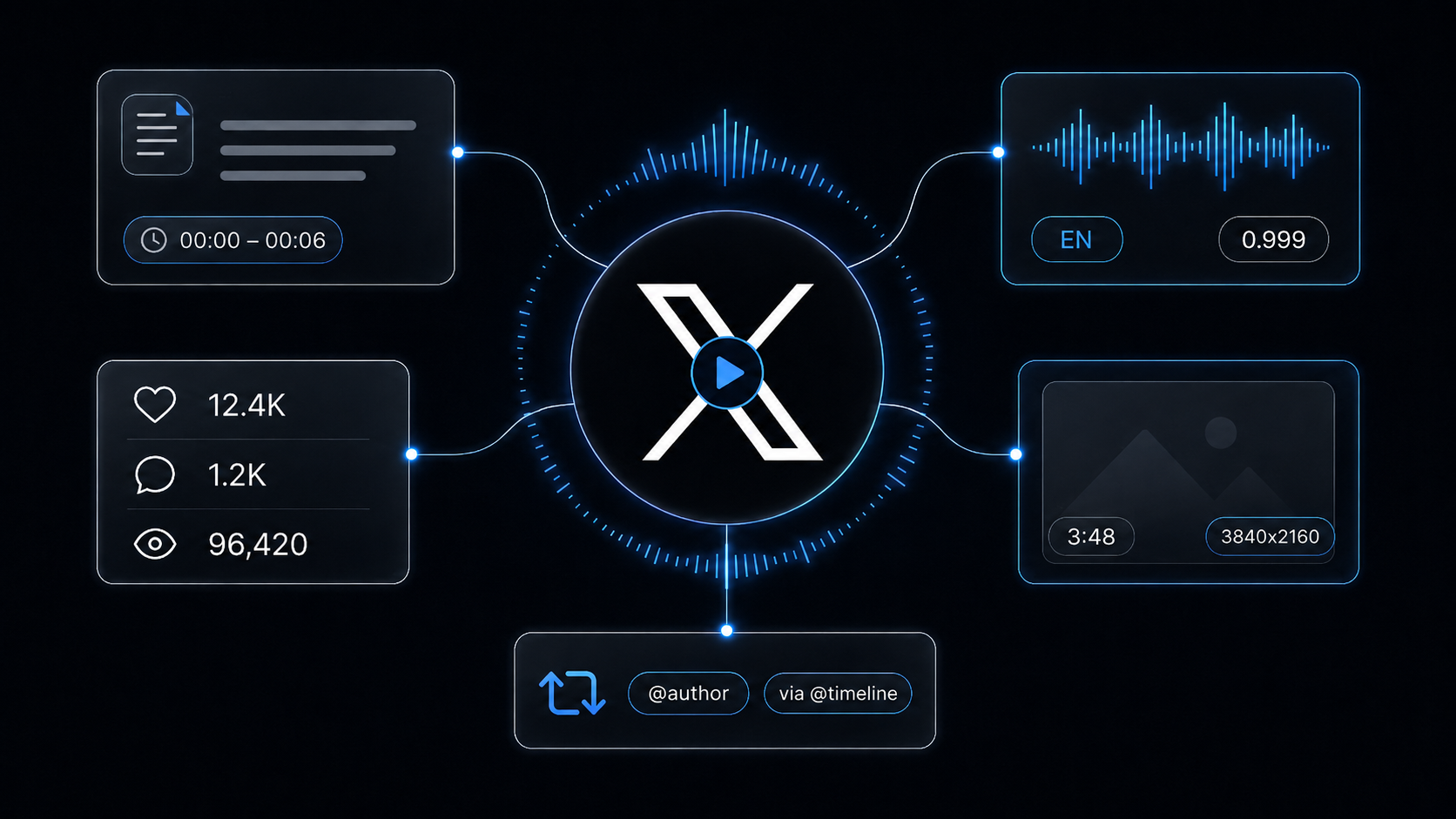
Every post comes back as one record: the transcript plus the context that makes it interpretable.

FieldDescriptionExample
tweetId / postUrlPost identifier and direct link2087601629486813499
postedAtPublish timestamp2026-08-12T18:06:28Z
discoveredViaWhich account's timeline surfaced the post@nasa
authorName / authorHandle / authorUrlWho actually posted it — not necessarily the timeline it was onNASA / NASA
authorVerifiedWhether the author's account is verifiedtrue
text / langPost body copy and its languageThe Nationwide Eclipse Ballooning Project...
likeCount / replyCountEngagement on the post116 / 4
hasVideo / videoUrl / videoQualityWhether the post carries video and its direct media linktrue / 3840x2160
thumbnailUrl / durationSecondsCover image and clip length227.6
transcriptFull spoken text, punctuated and formattedTalking to us live from Iceland...
transcriptLanguage / transcriptConfidenceDetected language and model confidenceen / 0.999
transcriptParagraphsTimestamped segments with text, start, end, speakerstart 0.08 → end 6.32, speaker 0
transcriptNotePresent when a transcript was skipped, and whyVideo exceeds max length

Attribution is a first-class problem on X

More than any other platform, X timelines are full of other people's content. An account you track may be 80% reposts. A naive scraper credits all of it to the timeline owner and quietly poisons your dataset.

Here, authorName / authorHandle always reflect who actually posted the video, while discoveredVia records which timeline you found it on. Those are different questions and you get both answers. Turn on onlyOwnPosts when you want strictly original content, and leave it off — the default — when amplification is itself the signal you care about.

The same logic applies to billing: a video that appears across several accounts is transcribed once and charged once.

Common Use Cases for X Transcript Data

Social Listening That Actually Covers Video

Add transcripts to your brand-monitoring corpus and mentions that happen out loud stop being invisible. A competitor naming you in a 90-second clip is exactly the mention you most want to catch, and it is precisely the one a text-only pipeline misses.

Product and Announcement Tracking

Companies increasingly announce on camera before they update the docs. Run the scraper against a competitor's account daily and you get their claims verbatim, dated, with like and reply counts attached.

Breaking News and Market Signal

Footage posts before articles do. Transcribing it turns raw video into a searchable feed within minutes — useful alongside structured news sources like Bloomberg articles or CryptoPanic for a fuller picture.

Creator and Format Research

Correlate transcript features — length, opening line, question density — against likeCount and replyCount. The reply-to-like ratio is the useful shape here: clips that provoke discussion behave very differently from clips that simply get approved of, and the transcript tells you which rhetorical moves produce which.

AI Pipelines and RAG

Transcripts plus postUrl, authorHandle and postedAt make near-perfect RAG documents — conversational, attributable, timestamped. Chunk on transcriptParagraphs and you get semantic boundaries for free.

Repurposing Your Own Video

Point it at your own handle and every clip you have posted becomes a thread draft, a blog section, a set of quotes and a subtitle file.

Challenges of Doing This Manually

  • No transcript exists to fetch — there is no caption track to download, so real speech-to-text is unavoidable
  • Video URLs are nested and multi-rendition — X serves several qualities per clip under video.twimg.com, and picking the right variant is the difference between a clean transcript and a wasted download
  • Reposts and quotes wreck attribution — getting this wrong is easy and the resulting dataset looks fine while being wrong
  • Length variance is extreme — the same account can post a 12-second clip and a 50-minute stream recording. Without a guard, one long video dominates a run's cost
  • Duplicate videos across accounts — a viral clip transcribed once per appearance is money burned for identical text
  • Rate limits and bot defenses — sustained collection needs proxy rotation and careful pacing
  • Personal data obligations — spoken words tied to a named account are personal data, with everything that implies
  • Maintenance — X's frontend and payload shapes change frequently, and each change breaks an unmaintained scraper

Step-by-Step: How to Scrape X Video Transcripts

Here is how to do it using the X (Twitter) Video Transcript Scraper on Apify.

Step 1 — Choose Your Input

Two input modes, mixable in one run:

  • Accounts — a bare handle like nasa, or a full profile URL. Recent posts are collected and every video among them is transcribed
  • Post URLsx.com or twitter.com status links, or a bare post ID, when you know exactly what you want

Step 2 — Configure the Run

Go to the X (Twitter) Video Transcript Scraper and set:

  1. Add handles to profiles and/or links to postUrls
  2. Set maxResults to cap posts returned (default 20) — your primary cost control
  3. Set maxVideoMinutes (default 20) — your protection against a single hour-long clip
  4. Leave onlyVideoPosts on so you never pay for posts with nothing to transcribe
  5. Turn on onlyOwnPosts if reposts and quotes are noise for your use case
  6. Turn on includeOlderPosts to reach past the account's most recent posts
  7. Leave language on automatic unless detection is misreading an accent

Example input for monitoring an account:

{
  "profiles": ["nasa"],
  "onlyVideoPosts": true,
  "onlyOwnPosts": false,
  "maxVideoMinutes": 20,
  "language": "auto",
  "maxResults": 20
}

And for a specific set of posts:

{
  "postUrls": ["https://x.com/NASA/status/2087601629486813499"],
  "maxVideoMinutes": 10,
  "maxResults": 10
}

Step 3 — Run the Scraper

The actor will:

  • Resolve each handle into its recent posts, newest first
  • Skip posts with no video (unless you turned that off)
  • Attribute reposts and quotes to whoever actually posted them
  • Skip transcription on anything over maxVideoMinutes, noting why in transcriptNote
  • Transcribe the rest with automatic language detection, punctuation and smart formatting
  • Segment output into timestamped paragraphs with speaker labels
  • Attach full post context — author, verification, copy, likes, replies, thumbnail, duration
  • Deduplicate repeated videos so each is transcribed and charged once
  • Stop cleanly at your maxResults cap

Step 4 — Export Your Results

  • JSON — the right choice, since transcriptParagraphs is a nested array
  • CSV / Excel — fine for flat transcript text plus post metadata
  • API — pull results programmatically via the Apify API
  • Integrations — Google Sheets, Make, Zapier, Slack

Ready to try it? Run the X (Twitter) Video Transcript Scraper on Apify and get your first transcripts in minutes.

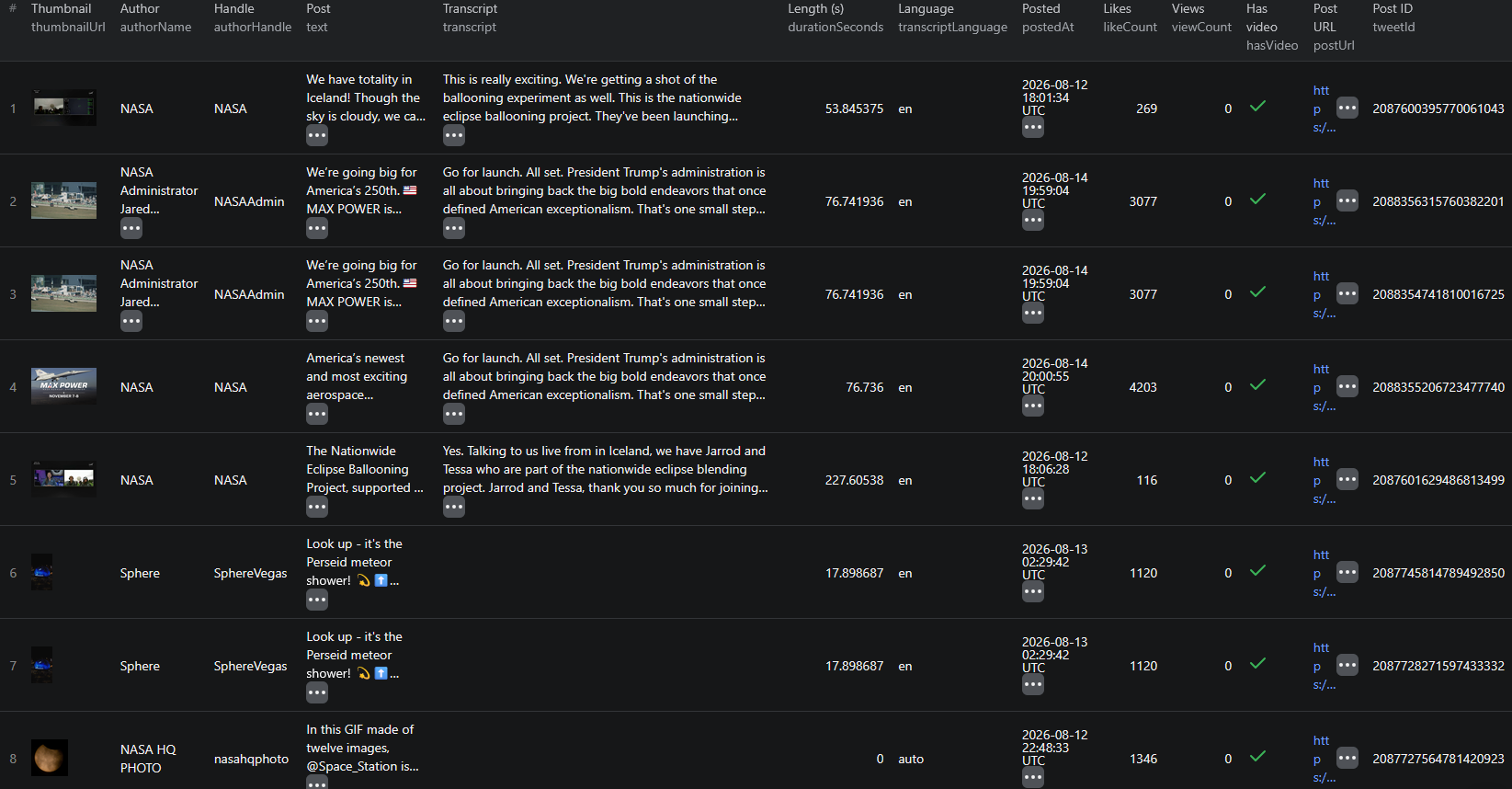
Example Output (Real Data Preview)

X Twitter video transcript scraper results

A real record, trimmed for length:

{
  "tweetId": "2087601629486813499",
  "postUrl": "https://x.com/NASA/status/2087601629486813499",
  "postedAt": "2026-08-12T18:06:28.000Z",
  "discoveredVia": "@nasa",
  "authorName": "NASA",
  "authorHandle": "NASA",
  "authorUrl": "https://x.com/NASA",
  "authorVerified": true,
  "text": "The Nationwide Eclipse Ballooning Project, supported by NASA, gathers student teams from around the world to study solar eclipses with stratospheric balloons. https://t.co/Q72P1XhHcS",
  "lang": "en",
  "likeCount": 116,
  "replyCount": 4,
  "hasVideo": true,
  "videoUrl": "https://video.twimg.com/amplify_video/2087601144964984832/vid/avc1/3840x2160/GvChTaURBEoBmtkv.mp4",
  "videoQuality": "3840x2160",
  "thumbnailUrl": "https://pbs.twimg.com/amplify_video_thumb/2087601144964984832/img/mHI43mco3aFwojo2.jpg",
  "durationSeconds": 227.61,
  "transcript": "Talking to us live from Iceland, we have Jarrod and Tessa who are part of the nationwide eclipse ballooning project... So we have some balloons that are measuring a lot of different things, like temperature, pressure, humidity, wind direction, and speed.",
  "transcriptLanguage": "en",
  "transcriptConfidence": 0.999,
  "transcriptParagraphs": [
    {
      "text": "Talking to us live from Iceland, we have Jarrod and Tessa who are part of the nationwide eclipse ballooning project.",
      "start": 0.08,
      "end": 6.32,
      "speaker": 0
    }
  ]
}

Key things to notice:

  • The caption describes, the transcript explains — the post text is one sentence of framing; the transcript carries the interview itself, including every instrument the balloons measure. That gap is the dataset
  • speaker separates voices — this clip is an interview, and speaker indices let you split question from answer. Monologue clips come back as a single speaker
  • View counts are not here, by design — X does not render them on the logged-out surface this reads, so rather than ship a column of zeros the field was dropped. Rank on likeCount and replyCount
  • transcriptConfidence at 0.999 — studio-quality audio scores near-perfect; noisy field footage scores lower, so gate on this before feeding an LLM
  • durationSeconds is fractional and billing rounds up — a 227.61-second clip costs four started minutes
  • transcriptNote explains absences — when a transcript is missing, the record tells you whether it was skipped for length, had no speech, or the post had no video at all
  • authorHandle vs discoveredVia — identical here because NASA posted its own video. On repost-heavy accounts they diverge constantly, and that divergence is data

Try the X (Twitter) Video Transcript Scraper now — no coding required.

Automating X Transcript Collection

Scheduled Runs

Roughly 17 of an account's own recent posts are reachable, plus reposts on the timeline. The way to build depth is cadence, not one big run: schedule daily for fast-moving accounts and weekly for everyone else, deduplicate on tweetId, and the archive accumulates on its own.

For breaking-news accounts, an hourly schedule with a small maxResults is cheap and keeps latency low.

API Integration

Use the Apify API to trigger runs and collect results:

  • Push transcripts into a vector store for semantic search across everything an industry says
  • Alert in Slack when a keyword appears in spoken content
  • Summarize each new video with an LLM and append to a competitive-intelligence sheet
  • Join with your existing text-post listening pipeline so video stops being a blind spot

Node.js Example

For a complete working example showing how to call this actor from Node.js — including repost attribution handling and turning transcriptParagraphs into ready-to-embed chunks — see the GitHub repository.

Webhooks

Fire a webhook on run completion so embedding, summarization and alerting start the moment new transcripts land.

Using X Transcript Data for Business Intelligence

Keyword Coverage Across Modalities

Run the same keyword list against text posts and video transcripts, then compare hit rates. Most teams discover a meaningful share of their brand mentions were only ever spoken — and had never appeared in any report.

Announcement Timelines

Extract dated claims from transcripts with an LLM and you can reconstruct exactly when a competitor first said something publicly. Spoken announcements frequently predate the blog post by weeks.

Engagement Shape, Not Just Volume

With view counts unavailable anywhere on the public surface, the informative signal is the ratio between replies and likes. A clip at 4,203 likes and 185 replies is provoking discussion; one at 316 likes and 11 replies is being nodded at and scrolled past. Join that ratio against transcript features and you learn which spoken arguments actually start conversations.

Original vs Amplified Content Mix

Group by authorHandle against discoveredVia to measure how much of an account's timeline is its own work. That ratio characterizes an account's role in a niche — creator, curator, or amplifier — and it is invisible without correct attribution.

Multilingual Monitoring

With automatic detection across 20+ languages, one run over a regional handle list produces comparable text for markets you do not staff.

Does X Provide an API for This?

X has a public API, but it will not give you this.

What's Available

  • API access is paid, tiered, and rate-limited, with meaningful volume priced for enterprises
  • Endpoints return post text and media URLs — never spoken content
  • There is no transcript, caption or speech-to-text surface anywhere in the API
  • Media downloads and any transcription would still be entirely your problem

What That Means

Even a paid API subscription leaves you exactly where you started: you would have to resolve the video, download it and transcribe it yourself. The actor does all of that in one step, and reads only what any logged-out visitor can see.

The X (Twitter) Video Transcript Scraper returns the post and the spoken content together, as structured records.

Pricing — Pay Only for Results

Pay-Per-Event pricing, so you pay for what you actually get back.

EventWhen it's chargedPrice
Actor startOnce per run$0.00005
postPer post returned, with all its metadata$0.005
transcriptOnce per video turned into text$0.008
transcript-minutePer started minute of audio$0.008

Quick cost estimates:

  • A typical sub-minute video → $0.021 per post, about $2.10 per 100 videos
  • The 228-second NASA clip above → $0.045 (post + transcript + 4 started minutes)
  • A daily monitor over 5 accounts, ~3 videos each → roughly $0.32 per day

Four things keep the bill predictable: posts without video are skipped by default and never charged, videos over maxVideoMinutes are returned without a transcript and not charged for one, videos containing no speech are not charged, and a video appearing in several posts is charged once. New Apify accounts include free monthly usage credits, so you can validate the output before spending anything.

Try the X (Twitter) Video Transcript Scraper

The X (Twitter) Video Transcript Scraper turns posted videos into structured text — full AI transcripts with timestamps and detected language, plus author, handle, verification, post copy, publish date, likes and replies.

What you get:

  • Full transcripts of every public X video, punctuated and formatted
  • Timestamped paragraphs with speaker labels — ready for clipping, subtitling or embedding
  • Correct attribution on reposts and quotes, with discoveredVia preserved
  • A length guard so one long video cannot blow up a run's cost
  • Never billed twice for the same video across accounts
  • Automatic language detection across 20+ languages
  • No login, no cookies, no X API subscription
  • Pay-Per-Event pricing — about $2.10 per 100 short videos
  • Scheduled runs, webhooks, and API access

Start transcribing X videos now — your first run takes less than 5 minutes to set up.

Doing the same on other platforms? See how to scrape LinkedIn video transcripts, or work through the news and social media scraping guide for the wider picture.

Legal and Ethical Considerations

Transcripts are people's words, so this dataset warrants more care than a product feed.

  • Public data only — the actor reads posts visible to any logged-out visitor. No login, no cookies, no protected accounts
  • Transcripts are personal data — a named account holder's spoken words, tied to their handle and profile URL, are personal data under GDPR, UK GDPR, CCPA and similar regimes. You need a lawful basis to collect and process them, and if you are processing data about EU residents you are the controller
  • Purpose matters — tracking a company's public messaging is ordinary competitive research; building profiles of individuals is a different activity with obligations you probably do not want
  • Collect only what you need — if you are tracking themes, you may not need author identity at all. Aggregate analysis carries far less risk than a personal-data archive
  • Build deletion in from day one — retrofitting removal handling is painful
  • Transcripts are not verbatim-perfect — speech-to-text errs, particularly on field audio and crosstalk. Never quote a transcript publicly as an exact statement without checking the source video; use transcriptConfidence as a first filter
  • Respect the platform's terms — you are responsible for using the data in compliance with X's Terms of Service and applicable law
  • Do not republish wholesale — analysis, search and summarization are legitimate uses of your own copy; reposting full transcripts as content is not

Public statements are fair to study. The person who made them still has rights over how you process their identity.

Frequently Asked Questions

Can you get a transcript of a video on X (Twitter)?

Not from X itself. The platform offers no transcript view, no caption download and no public API endpoint that returns spoken text. The only route is to resolve the post's video file and run it through speech-to-text, which is what the X (Twitter) Video Transcript Scraper does — returning punctuated text with timestamped paragraphs alongside the full post data.

Does the scraper handle reposts and quote posts correctly?

Yes, and this matters more on X than anywhere else. Every record is attributed to whoever actually posted the video, not to the timeline it was found on. The discoveredVia field records which account surfaced it, so you can always tell the difference between original content and amplification. Set onlyOwnPosts to true if you want strictly the account's own material.

How do I stop one long video from blowing up my run cost?

Use the maxVideoMinutes option, which defaults to 20. Videos longer than the limit are still returned with their full post data, but no transcript is attempted and no transcription event is charged. Posts on X can run close to an hour, so this guard is the difference between a predictable bill and a surprise.

How much does it cost to transcribe X videos?

Pay-Per-Event pricing: $0.005 per post scraped, $0.008 per video transcribed, and $0.008 per started minute of audio. Most posted videos run under a minute, so a typical transcribed post costs about $0.021 — roughly $2.10 per 100 videos. Posts without video are skipped and never charged, and a video appearing in several posts is transcribed and billed once.

How many posts can I get per X account?

Roughly 17 of an account's own recent posts are reachable, plus the reposts on its timeline, with more available when Include older posts is enabled. The actor is built to monitor accounts over time rather than backfill a full posting history — a weekly schedule builds the archive for you.

Do I need an X account, an API key or cookies?

No. The actor reads only publicly visible posts, so there is no login, no cookie and no X API subscription involved. That also means it sees what a logged-out visitor sees: public accounts and public posts.

About the Author

This guide was written by Piotr, a software engineer with hands-on experience building and maintaining web scrapers at scale. He develops and maintains a suite of data extraction tools on the Apify platform, helping businesses automate their data collection workflows.

Need help with your scraping project?

Book a free discovery call and let's scope your project together.

Book a Call
Piotr Vassev

Piotr Vassev

Founder of FalconScrape. Building production-grade web scraping systems and data automation pipelines for businesses worldwide.

Connect on LinkedIn